
Most advice about a business process automation case study gets the proof wrong. It treats the dramatic percentage, the named testimonial, or the polished before-and-after graph as the evidence. For most Australian service businesses, the more useful proof is operational and much easier to verify. Every enquiry or task should have an owner, a stage, a next action, and a visible outcome inside the systems your team already uses.
That matters because adoption headlines can distract from implementation reality. A recent business process automation 2026 overview says Australian business services reached 53% automation adoption, while broader Australian business AI adoption reached 72%, up from 34.8% in 2024 and 41.5% in the prior year. The same source says intelligent automation adoption in Australia was 17% in 2025, above the global average of 10% (Australian automation and AI factsheet). Those numbers show momentum, not maturity.
The seven examples below are more useful than inflated ROI claims because they focus on workflow patterns you can inspect in your own CRM. Some include verified figures from Australian case studies. Those figures belong to those specific situations and shouldn't be treated as universal outcomes. Truespeak's approach fits that reality: managed automation around existing tools, with human review where judgement, relationships, or exceptions still matter.
Table of Contents
- 1. Service Business Unified Enquiry Capture Across Multiple Channels
- 2. Trade Business First Response Automation with Qualification and Booking
- 3. Professional Services Proposal Follow-up and Deal Momentum Automation
- 4. B2B Intake and Brief Automation Reducing Rework Before Handoff
- 5. CRM Hygiene and Pipeline Visibility Converting Data Into Action Queues
- 6. Invoice Reminder Automation Accelerating Cash Collection Without Friction
- 7. Dormant Lead Re-engagement Surfacing and Reconnecting Forgotten Opportunities
- 7-Point Business Process Automation Case Study Comparison
- Turn These Patterns Into a Verifiable Automation Plan
1. Service Business Unified Enquiry Capture Across Multiple Channels
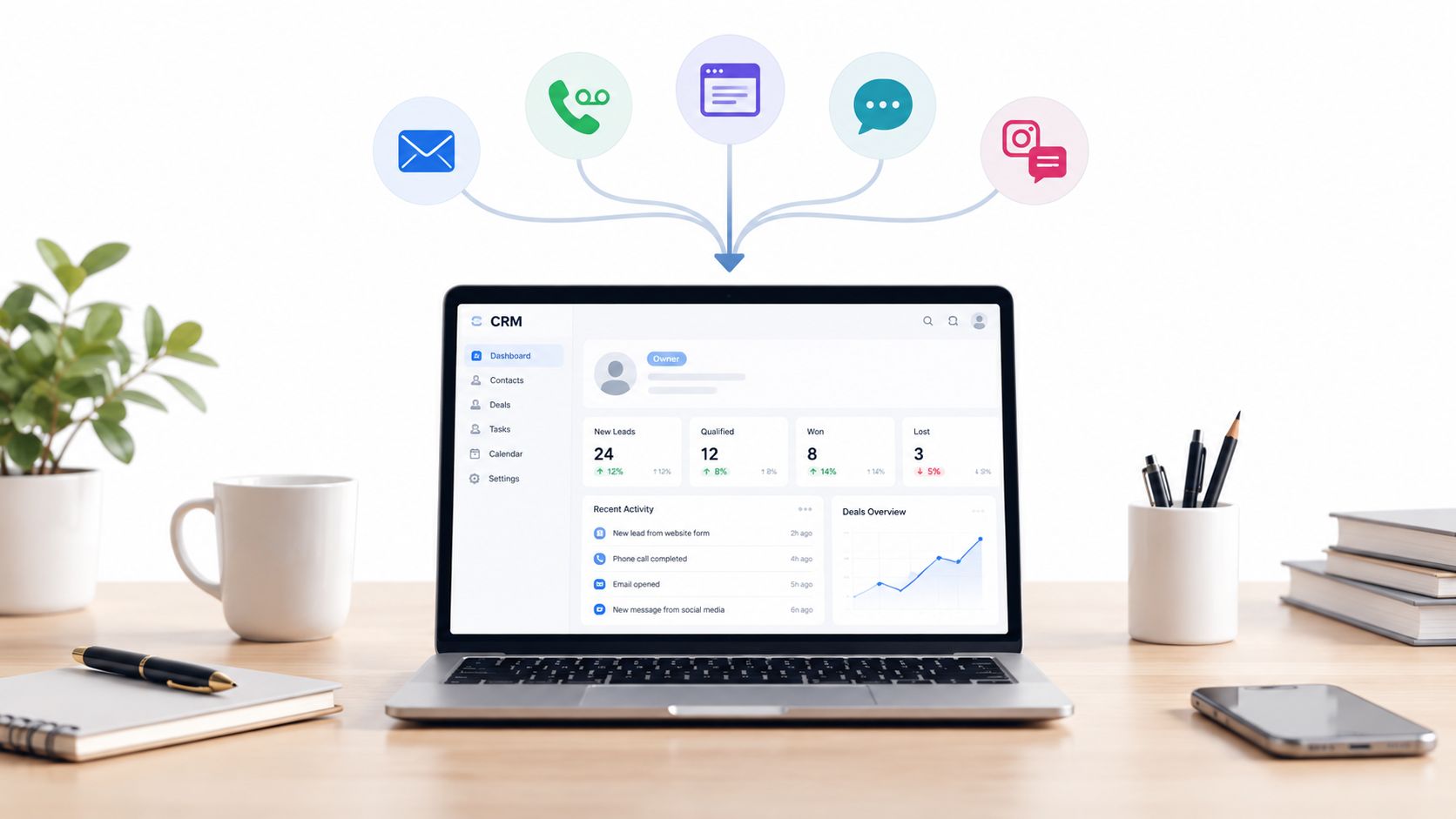
More enquiries do not fix a broken intake process. For many service businesses, the bigger problem is that demand arrives through too many channels with no shared ownership model. Web forms, missed calls, email replies, social messages, and referral texts all create work, but they do not create one visible queue unless the business sets one up.
What the Workflow Fixes
The repeatable pattern is straightforward. Every inbound enquiry, regardless of source, should create or update a single CRM record with five visible fields: owner, stage, next action, follow-up date, and exception status. That sounds administrative, but it changes how work moves. A message sitting in one staff member's inbox is private memory. A record in a shared system is operational work with accountability.
That distinction matters most in businesses where office staff, technicians, and owners all touch the same lead at different points. Without unified capture, the handoff risk is not just slow response. It also shows up as duplicate callbacks, unquoted jobs, missing photos, or silent drop-off after an initial conversation.
Good intake forms reduce that rework if they collect the information the next person needs. For a service enquiry, that usually means job type, location, timing, contact preference, and supporting photos or documents. Longer forms can improve qualification, but they also reduce completion rates. The practical trade-off is to capture enough detail to route correctly, then request deeper information only when the job is worth the extra effort.
Practical rule: Start with the highest-volume channel and prove that records are created, assigned, and advanced consistently before adding other sources.
Earlier Australian case examples in this article showed that automation can reduce response delay and improve follow-up outcomes in specific settings. The transferable lesson is narrower and more useful. Once every enquiry enters the same system, businesses can inspect where work stalls. Usually the failure point is not lead volume. It is missing ownership, unclear next action, or no visible exception queue for records that do not fit the standard path.
What to Measure Instead of a Vanity Uplift
A credible review of this workflow looks at process signals inside the CRM, not just top-line conversion.
- Owner assigned: Each new enquiry has one accountable person within a defined time window.
- Stage visible: Records move through a consistent set of statuses such as new, qualified, booked, quoted, won, lost, or archived.
- Next action set: Every active record has a specific follow-up task, not a vague note.
- Follow-up visibility: Managers can see overdue callbacks, unbooked site visits, and quotes with no subsequent activity.
- Exceptions flagged: Duplicates, incomplete briefs, out-of-area jobs, and unclear requests are separated for manual review.
Many automation projects fail. They capture the lead but do not design the exception path, so messy enquiries still disappear into inboxes or personal notes.
For similar businesses, the replicable outcome is not a promised uplift percentage. It is a cleaner operating model: one queue, clear ownership, visible follow-up, and fewer enquiries lost between channels.
2. Trade Business First Response Automation with Qualification and Booking
Speed matters, but speed alone is a weak diagnosis. Many trade businesses reply late because the enquiry never becomes a managed record in the first place. The call is missed while someone is on-site. A web form arrives after hours. A message sits in SMS or Facebook until the day is full. By the time someone responds, the prospect has often chosen the business that made the next step clear first.
External benchmarks still help frame the risk. An Australian benchmark article reports long delays to web enquiry response and a meaningful share of enquiries receiving no response at all (Australian lead follow-up benchmarks). The practical takeaway is narrower than "reply faster." Trade businesses need a first-response workflow that turns inbound interest into an assigned job record, a qualification path, and a visible booking outcome.
The Workflow Pattern Worth Copying
A useful first response confirms receipt, gathers the minimum detail needed to triage the job, and gives the customer one clear next action. That next action might be a booking link for a site visit, a request for photos, or a promise of a callback within a defined window.
The qualification step matters because trade demand is uneven. A switchboard replacement, a leaking hot water system, and a price-shopping request should not sit in the same queue with the same SLA. High-value or technically unclear jobs usually need owner or estimator review. Simpler work can move to an office coordinator or a booking queue with a standard checklist.
As noted earlier, missed calls and unlogged enquiries are often an operations problem before they are a marketing problem. The businesses that improve this workflow usually do five things inside the CRM:
- Owner assigned: every new enquiry is allocated to one person or one monitored queue
- Stage set: new, qualified, booked, quoted, out-of-area, duplicate, or no-fit
- Next action defined: callback, request photos, confirm address, schedule inspection
- Follow-up visible: overdue callbacks and unbooked qualified jobs appear in one review view
- Exceptions separated: spam, unclear requests, and emergency work outside service scope do not clog the main queue
This structure also protects against a common failure mode. Automated acknowledgement goes out, but nobody owns the record after that. Response time looks good on paper while booking rates stay flat because the bottleneck is qualification or callback follow-through.
Where Automation Helps, and Where People Still Decide
Trade businesses benefit from automating the first minute, not the full sales process. The system can log the enquiry, send confirmation, collect job basics, and route by job type or suburb. A person should still review edge cases, urgency, scope uncertainty, and jobs that could expand into larger work.
Three trade-offs are easy to miss.
- More speed can reduce context. If the intake form is too short, staff spend the first callback reconstructing the job.
- More qualification can reduce response rates. If the form is too long, prospects drop out before booking.
- More routing logic increases exception work. Every rule creates cases that do not fit cleanly.
Same-day acknowledgement keeps intent alive. Accurate qualification determines whether that intent turns into a booked job.
For similar businesses, the replicable result is not a promised uplift percentage. It is a cleaner handoff from enquiry to booking, with fewer missed callbacks, clearer triage, and a visible queue for jobs that need human judgement before anyone commits a time slot.
3. Professional Services Proposal Follow-Up and Deal Momentum Automation
Professional services firms often produce strong proposals, then let them drift into silence. The proposal was sent. The prospect opened it. Internal discussion may even be happening. But unless someone records a next action, the opportunity starts ageing without anyone deciding what to do next.
That makes proposal follow-up less about persuasion technology and more about momentum control. A short reminder sequence can keep a deal visible without making communication feel robotic.
A Better Way to Treat Quiet Proposals
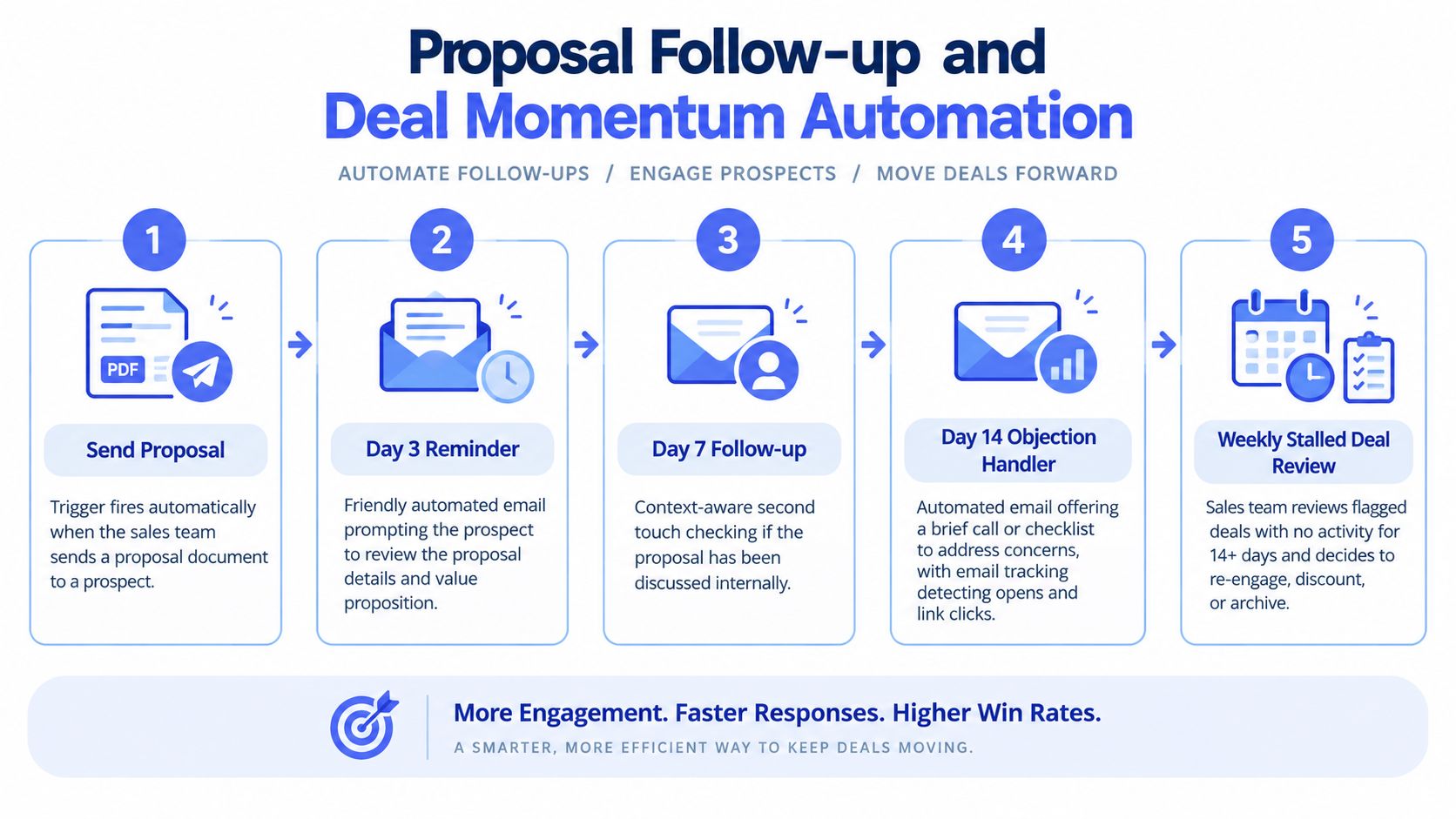
A practical follow-up rhythm usually includes an early reminder, a later check-in, and a final prompt that offers a simple next step such as a brief call or a short checklist to resolve objections. The message should refer to the proposal context, not read like a generic sequence.
Truespeak's own framing is useful here. In a typical engagement, value isn't judged by a published ROI percentage. It's judged by whether every opportunity has an owner, stage, next action, and clear outcome, with follow-up visible inside the CRM. That makes lead follow-up automation a workflow discipline first and a messaging tool second.
Field note: If a proposal has no recorded next action, the problem usually isn't copywriting. It's pipeline design.
What to Review Every Week
A good automation sequence still needs human review. Weekly deal reviews should separate active proposals from stalled ones, then decide whether to re-engage, revise scope, hold position, or archive. That review matters more than the sequence itself because it forces a sales team to make decisions instead of waiting passively.
Keep the cadence short and varied. Too many touches can make a firm sound anxious. Too few leaves the prospect doing all the work of restarting the conversation.
4. B2B Intake and Brief Automation Reducing Rework Before Handoff
Rework rarely starts in delivery. It starts when scope, files, approvals, and constraints arrive through different channels and no one converts them into a usable brief. Sales thinks the job is ready. Delivery opens the record and finds missing assets, unclear success criteria, and no confirmed owner for the next step.
That failure pattern is easy to spot in a CRM.
If new work reaches handoff without a complete brief, assigned owner, stage, next action, and visible exceptions, the business is not dealing with a documentation problem. It has an intake control problem. The practical question is not whether to automate intake. It is which parts should be standardized, which require human review, and which missing details should block handoff.
A well-designed client intake software setup helps by forcing structure early. Conditional fields can separate a web build from a branding project. File uploads can attach directly to the record. Mandatory fields can stop work from progressing until decision-makers, deadlines, dependencies, and source materials are recorded in one place.
Here is the process visually:
The useful pattern is narrower than many teams expect. Good intake automation does not mean asking every possible question upfront. It means collecting the minimum information needed for a credible handoff, then flagging exceptions for review.
Three design choices usually matter most:
First, separate required fields from helpful context. If a project cannot start without brand files, approver names, or delivery dates, those items should be mandatory. Nice-to-have background can wait.
Second, map ownership at each stage. Someone needs to own incomplete submissions, brief validation, and handoff approval. Without that, automation only moves ambiguity faster.
Third, make exception handling visible. If a client skips a required upload or gives conflicting timeline information, the record should move into a review queue instead of passing to production.
The capacity benefit can be real, but businesses should be careful with the story they tell themselves. More automation does not automatically mean faster delivery. In some firms, better intake initially slows the front end because incomplete jobs stop earlier. That is usually a healthy trade-off. It shifts effort from downstream rework to upstream clarification, where mistakes are cheaper to fix.
A simple test is whether handoff meetings get shorter and less repetitive over time. If the same questions keep surfacing after automation goes live, the form is collecting data the team cannot use, or missing data the team needs. As noted earlier, structured workflow design can materially increase team capacity. In intake, the mechanism is straightforward. Cleaner inputs reduce clarification loops, revision risk, and internal guesswork before work begins.
5. CRM Hygiene and Pipeline Visibility Converting Data into Action Queues
Dirty CRM data is usually framed as an admin problem. In practice, it is a queue design problem. If an opportunity can sit in an active stage without an owner, next action, or review date, the CRM is storing history instead of directing work.
That distinction matters because pipeline visibility is often overstated. Many teams say they have visibility because they can see stage totals and forecast values. What they need is a reliable list of records that require action now, records that require a manager decision, and records that should be closed out. Without that separation, dashboards look organised while follow-up quality declines.
A useful hygiene routine checks a small set of verifiable signals inside the CRM:
- owner assigned
- stage updated recently enough to reflect reality
- next action logged
- follow-up date set
- exception status clear, active, paused, or archive candidate
Those checks are simple. The discipline is harder. If stage names do not map to real commercial conditions, automation will escalate the wrong records. If reps can leave a deal in proposal sent or follow-up without a dated next step, pipeline reports inflate while deal momentum slows.
The better pattern is to route exceptions into named queues with clear ownership. One queue might hold active opportunities with no next action. Another might hold stale deals above a value threshold for manager review. A third might hold records with missing contact data that block outreach. That structure turns CRM hygiene from periodic cleanup into operating rhythm.
Canon Australia offers an example of what mature process design can look like at scale. A separate Australian case study reports that 98% of processes now run without manual intervention (Canon Australia automation case study). That result is not a template for smaller firms to copy directly. The more useful lesson is narrower. High automation rates depend on precise stage rules, ownership, and exception handling, not just on adding software.
One caution is easy to miss. Better visibility often makes the pipeline look worse before it improves. Stale opportunities become visible. Missing ownership becomes countable. Forecast categories shrink once neglected deals are forced into review or closure. That is not a reporting failure. It is the first sign that the CRM is becoming credible enough to manage from.
For a more detailed operating model, this guide to pipeline management in CRM operations explains how stage discipline, ownership, and next-step visibility fit together.
The practical test is straightforward. At the start of the week, can each owner open one queue and know which records need action, which need escalation, and which should leave the pipeline? If not, the business does not have a visibility problem alone. It has a workflow definition problem.
6. Invoice Reminder Automation Accelerating Cash Collection Without Friction
Late payment is often framed as a collections problem. In many small and mid-sized firms, it is a workflow definition problem first.
The recurring failure is rarely the wording of the reminder. It is weaker than that. No one can see, inside the CRM or finance system, which invoice sits at which follow-up stage, who owns the next action, whether the customer opened a dispute, or when the account should leave automation and move to human contact. Once those signals are missing, chasing becomes irregular, relationship-sensitive accounts get inconsistent treatment, and finance staff spend time reconstructing context instead of collecting cash.
Xero Small Business Insights reports that Australian small businesses were paid an average of 6.0 days late in the June 2026 quarter, and clients took an average of 22.9 days to pay an invoice. Xero also recommends a polite reminder within one to three days of the due date, followed by stronger follow-up such as a phone call or formal written reminder if no response arrives within 14 days (Australian invoice payment timing benchmarks).
That benchmark is useful, but only up to a point. Similar businesses should not copy timing rules without checking their own buying cycle, contract terms, and customer mix. A trade contractor collecting from project-based commercial clients may need a different path from a professional services firm invoicing monthly retainers. The transferable lesson is narrower and more reliable. Define the reminder stages in advance, assign ownership at each stage, and make exception states visible.
A practical receivables flow often has five distinct states:
- Pre-due courtesy reminder for invoices likely to be missed because approval or processing takes time.
- Due-date notice with clear payment method details.
- Early overdue follow-up for standard late payment.
- Escalation queue for invoices that pass the normal reminder window.
- Exception handling for disputes, promised payment dates, strategic accounts, or credit hold decisions.
That structure changes the job. Staff no longer scan the whole ledger asking who might need a nudge. They work a smaller queue based on stage, owner, and exception type.
Approval still matters. High-value customers, active disputes, and accounts with a named relationship owner should not receive the same automated cadence as routine invoices. Automation helps most when it removes predictable follow-up, then stops cleanly when judgement, negotiation, or commercial sensitivity takes over.
The useful test is operational, not rhetorical. Open the receivables queue and check whether the team can answer four questions quickly: what reminder has already been sent, what the next action is, who owns it, and why any invoice has paused. If those answers are not visible, the business has not automated collections in a meaningful sense. It has only scheduled emails.
The result to look for is modest but measurable. Fewer invoices drift with no follow-up. Fewer customers receive the wrong message at the wrong time. More exceptions reach a person early enough to resolve them before they become aged debt.
7. Dormant Lead Re-Engagement Surfacing and Reconnecting Forgotten Opportunities
Old leads do not disappear because demand vanished. They disappear because no one owns the point between "not ready" and "ready again."
That makes dormant lead automation less about marketing volume and more about CRM discipline. The useful signals are simple and verifiable: who owns the record, which stage it last reached, what the next action should be, whether prior follow-up is visible, and what exception should stop automation. Businesses can audit those fields directly. They do not need inflated ROI claims to see whether the workflow is working.
This pattern fits firms with long buying cycles, repeat quoting, seasonal demand, or approvals that stall for reasons outside the seller's control. It only works well when the CRM contains enough history to distinguish a paused opportunity from a dead one.
Re-Engagement Works Best When It Sounds Like a Real Review
The first message should acknowledge the gap, refer to the last known context, and ask a narrow question. Has timing changed? Is there a new stakeholder? Should the opportunity be closed and revisited later? A second follow-up can offer a low-friction next step such as a short call, an updated quote, or a revised scope. After that, the record should move to nurture, archive, or a future review date with a named owner.
The operational benefit is easy to miss. Automation does not "win back" every dormant lead. It surfaces records that already had some buying intent but lost momentum because the next action was unclear or no review date existed. Human time then goes to the smaller set that merits judgment, not to broad list blasting.
As noted earlier, operational automation often creates value by returning staff time to conversations that require context and timing. Dormant lead recovery follows the same principle. The sequence should do the surfacing and logging. A person should handle ambiguity, changed requirements, and commercial nuance.
Set the Dormancy Rules Before Building the Sequence
"Dormant" is not a universal age threshold. In some businesses, no activity for 21 days may justify review. In others, especially capital purchases or annual contract cycles, several months may still be normal. The trigger should come from observed deal velocity by stage, not from guesswork.
A practical rule set usually includes four checks: no completed activity within the agreed period, no future task already scheduled, no open exception such as active tender or procurement hold, and enough prior context in the CRM for a sensible re-contact. Without those controls, teams risk sending generic messages to records that were never qualified properly in the first place.
Australian government reporting also suggests caution about overestimating operational maturity. An Australian government update said only about 12% of Australian businesses used AI in the workplace in 2024–25, while 35% of large firms did so, and SME adoption sat around 43% to 44% in recent quarters (Australian Government AI adoption insights). The implication is practical. Start with a basic review queue and a short re-engagement cadence. If ownership, stage history, and exception handling are still inconsistent, extra automation will only scale confusion.
The test is straightforward. Open the dormant queue and check whether the team can explain why each lead is there, what happened last, what message has already gone out, who should act next, and which records should stay paused. If those answers are visible, the workflow is doing useful work. If not, the business has scheduled follow-up without creating real pipeline visibility.
7-Point Business Process Automation Case Study Comparison
| Solution | Implementation Complexity 🔄 | Resource Requirements ⚡ | Expected Outcomes 📊 | Ideal Use Cases 💡 | Key Advantages ⭐ |
|---|---|---|---|---|---|
| Service Business: Unified Enquiry Capture Across Multiple Channels | Medium 🔄, multi‑channel integrations + routing rules | Medium ⚡, CRM license, intake form design, staff training | High 📊, clear ownership, fewer lost/duplicate enquiries, faster responses | Service businesses handling email, phone, web forms, social messages | ⭐ Centralized intake, accountability, measurable pipeline visibility |
| Trade Business: First Response Automation with Qualification and Booking | Low–Medium 🔄, autoresponders, qualification flows, booking links | Low ⚡, calendar integration, templated workflows, minimal setup time | High 📊, near‑100% same‑day acknowledgement, faster bookings | Trades/contractors with many time‑sensitive enquiries | ⭐ Captures buyer intent fast; reduces lost leads; automates scheduling |
| Professional Services: Proposal Follow‑up and Deal Momentum Automation | Low 🔄, automated email sequences + tracking | Low ⚡, CRM/email automation, templates, tracking setup | Medium–High 📊, higher proposal responses, consistent deal momentum | Consulting, accounting, legal, design firms sending proposals | ⭐ Consistent, context‑aware follow‑up; clearer deal status |
| B2B Intake and Brief Automation: Reducing Rework Before Handoff | Medium–High 🔄, smart branching forms, file handling, CRM linkage | Medium ⚡, form tooling, storage, UX design, delivery team onboarding | High 📊, fewer clarifying calls, reduced rework, faster project starts | Software, design, or agency teams needing detailed briefs | ⭐ Complete, consistent briefs; organized assets; smoother handoffs |
| CRM Hygiene and Pipeline Visibility: Converting Data Into Action Queues | Medium 🔄, nightly checks, exception routing, escalation queues | Medium ⚡, automation rules, initial data cleanup, team discipline | High 📊, trustworthy pipeline, improved forecasting, prioritized actions | Growing sales teams with inconsistent CRM data | ⭐ Reliable reports, faster intervention on stalled/high‑risk deals |
| Invoice Reminder Automation: Accelerating Cash Collection Without Friction | Low–Medium 🔄, timed reminder sequence + human review gate | Medium ⚡, accounting integration, message templates, approver role | High 📊, reduced DSO, reclaimed finance hours, improved cash flow | Mid‑size service businesses with regular invoicing | ⭐ Faster payments, consistent tone, finance focus on exceptions |
| Dormant Lead Re‑engagement: Surfacing and Reconnecting Forgotten Opportunities | Low 🔄, detection rules + re‑engagement workflow | Low ⚡, CRM rules, email sequences, quarterly nurture content | Medium 📊, recovered pipeline, periodic reactivations | B2B firms with long sales cycles and accumulated leads | ⭐ Systematic re‑evaluation; recaptures cold revenue; reduces reliance on memory |
Turn These Patterns into a Verifiable Automation Plan
The strongest automation case studies don't prove that software is magical. They prove that a business diagnosed dropped work clearly enough to redesign it. Across these seven patterns, the recurring principles are consistent. Find where enquiries, tasks, approvals, or payments go missing before you choose tools. Establish one source of truth. Define the trigger, the next action, and the exception path. Keep human approval where money, reputation, or client relationships are at stake.
That's also the cleanest way to judge whether a business process automation case study applies to your own business. Don't ask whether someone else claimed a dramatic return. Ask whether your team can verify the same operating signals in your CRM: owner, stage, source, last activity, and next action. If those fields are missing, any ROI story is built on weak evidence.
A practical rollout sequence is usually smaller than businesses expect. Pick one workflow with obvious leakage. First response for inbound leads is often a good candidate. Invoice reminders are another. Map the current steps, including who handles exceptions and where hand-offs fail. Then run a narrow pilot through the tools you already have, review the CRM evidence weekly, and tune the rules before adding more complexity.
That measured approach matters because Australian adoption headlines can create false confidence. Plenty of firms are experimenting. Far fewer have stable, managed workflows that stay useful after launch. The operational gap is where most value sits.
For businesses that don't want to design, monitor, and refine these systems internally, Truespeak is one option to consider. Its role is practical rather than theatrical: diagnose dropped work, build around existing systems, add approval gates where needed, and keep the workflow running through monitoring, tuning, and exception handling. That's a better fit for most SMEs than a one-off automation build with an unverified ROI promise.
Truespeak helps Australian businesses build managed automation for first response, follow-up, intake, CRM hygiene, and invoice reminders around the systems they already use. If you want to turn one of these workflow patterns into a small, verifiable pilot, visit Truespeak and see how its AI operations approach is designed to keep automations monitored, usable, and accountable after launch.