
At 5:47 pm, the office is meant to be winding down. Instead, three web enquiries land at once, a quote from Tuesday still hasn't had a follow-up, and someone notices the CRM says “call back next week” with no owner attached. Nothing is broken in a dramatic way. It's just loose. That looseness is where small businesses lose time, context, and often good work.
That's why small business automation feels harder than the sales pages make it sound. Most owners don't need another app. They need a way for work to keep moving through automated workflows when the inbox gets messy, when staff are flat out, and when no one has time to remember every next step.
Table of Contents
- Introduction Why Small Business Automation Feels Harder Than It Should
- Understanding Where Australian Small Businesses Stand on Automation
- How to Prioritise What to Automate First
- Managed Service Versus DIY Automation and How to Choose
- Running a Low Risk Pilot from Smallest Useful System to Steady Operation
- Five Automation Workflows That Create Capacity Without New Hires
- Conclusion What Good Automation Should Deliver and Your Next Move
Introduction Why Small Business Automation Feels Harder Than It Should
In growing service businesses, the strain usually shows up in handoffs. An enquiry comes in after hours. A team member plans to reply in the morning. Morning gets busy. The lead cools off. A quote goes out, but no reminder is scheduled. A customer means to pay, but the invoice sits under six other priorities. None of this looks like a technology problem at first. It looks like a busy team.
But busy teams still need an operating rhythm.
Small business automation works best when you treat it as an operating layer around the tools you already use. That layer handles first response, routing, reminders, simple updates, and basic hygiene so people can spend their time on judgment, conversations, and exceptions.
A lot of readers come into this topic thinking they need to pick software first. Usually that's the wrong starting point. The better starting point is to ask where data entry work gets dropped, delayed, or duplicated. If the answer is “between the inbox, the phone, the spreadsheet, and the CRM”, you're not alone.
What Usually Confuses People
Three things tend to trip owners up early:
- Tool confusion: They think automation means replacing everything.
- Scope confusion: They try to automate a whole business process in one hit.
- Control confusion: They assume automation means losing human oversight.
In practice, good automation is narrower and calmer than that.
A More Practical Definition
For a small business, automation should do four things first:
- Respond quickly: Acknowledge new enquiries and capture the basics.
- Route clearly: Put the right task in front of the right person.
- Clean as it goes: Keep notes, statuses, and records organised enough to use.
- Remind consistently: Follow up on quotes, tasks, and invoices without relying on memory.
If you get those four right, operations usually feel less brittle very quickly. If you skip them and buy more software anyway, you often end up with a faster version of the same mess.
Understanding Where Australian Small Businesses Stand on Automation
Australia's numbers tell a useful story. The headline isn't that adoption is rising. It's that tool use and operational maturity are not the same thing.
Small businesses have different starting points. Some already use connected tools; others rely on shared inboxes and spreadsheets. Your AI readiness depends on the process, available data and person responsible for exceptions.
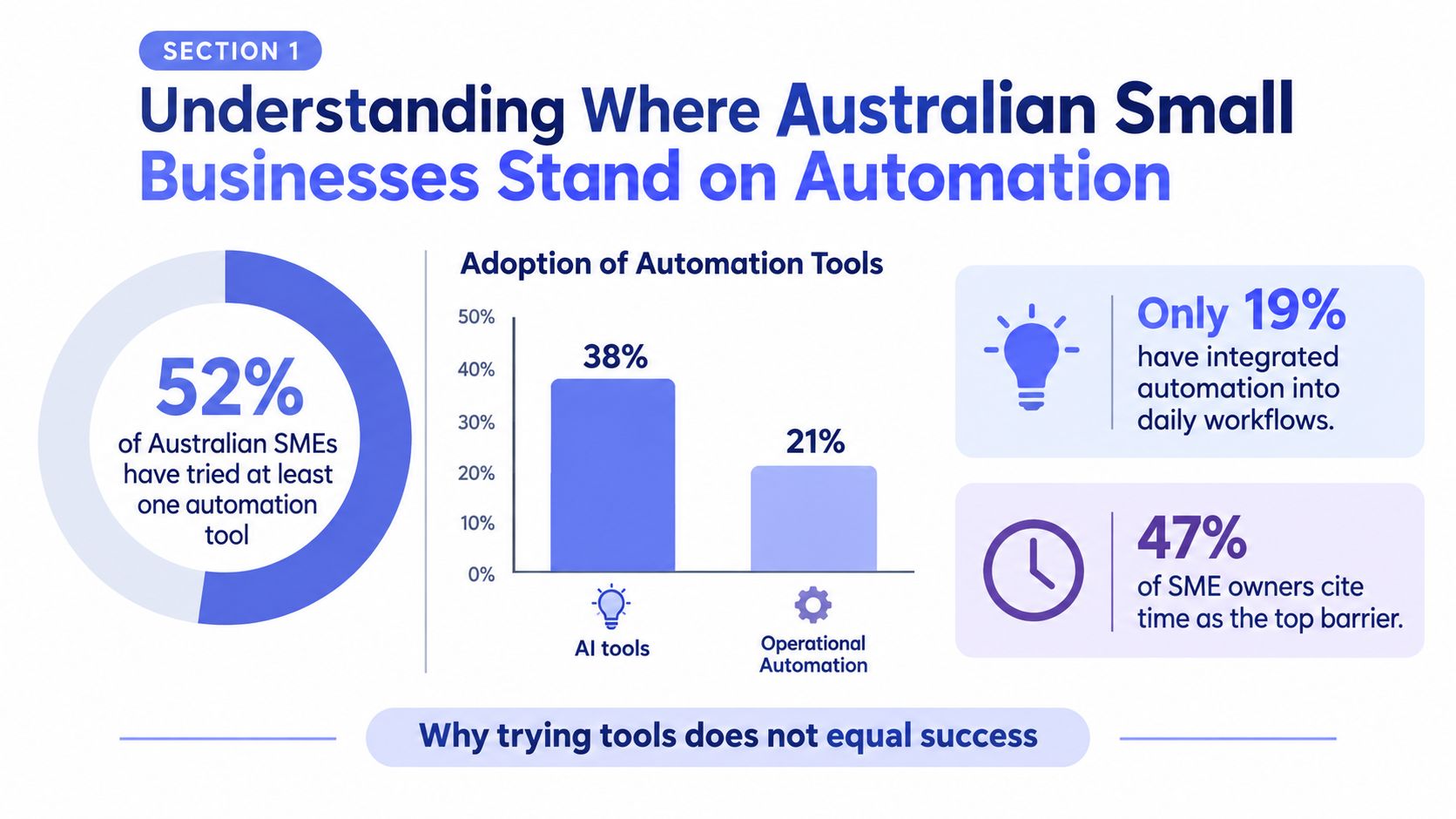
That gap becomes clearer when you think of apps as tools and workflow design as the operating system. A business can own a drill, a saw, and a nail gun, and still build badly. In the same way, a business can have ChatGPT, HubSpot, Xero, Zapier, and a booking tool, and still miss enquiries because nobody decided who reviews edge cases or what happens when a form comes in half-complete.
Adoption Is Moving Fast, but Maturity Is Uneven
Distinguish access to AI from a dependable operating process. A useful automation has an agreed trigger, authorised actions, a visible result and a recovery path when something fails.
That sounds encouraging, and it is. But “some level of adoption” covers a wide range. One business may have a single drafting tool. Another may have first response, follow-up, CRM updates, and reminders running in a coordinated way.
The Real Bottleneck Isn't Model Access
Many businesses get stuck. The issue usually isn't that the tools are weak. It's that the workflow around them is unfinished.
Workflow design is part of the investment. A faster AI draft will not help much if information is missing, ownership is unclear or the approval queue never moves.
A related point sits inside the broader conversation about business process automation benefits. The gain doesn't come from adding software for its own sake. It comes from deciding what should happen automatically, what needs approval, and what should get kicked back to a person.
The businesses that make progress usually stop shopping for features and start defining handoffs.
How to Prioritise What to Automate First
When owners say, “We want automation,” my first question is usually, “Which dropped ball annoys you most each week?” That answer is more useful than a software shortlist.
You don't need a big audit to choose a starting point. You need a ranking method that separates attractive ideas from useful ones. Three useful filters are frequency and leakage, time sensitivity, and exception risk.
Filter One Looks for Repeat Pain
Some tasks are irritating but rare. Others leak value every day. Start with the ones that repeat often enough to justify setup and review.
Look for signs like these:
- Frequent manual touchpoints: The team keeps copying the same details between email, forms, spreadsheets, and CRM.
- Visible drift: Records go stale, reminders aren't sent, or statuses stop meaning anything.
- Regular chasing: Someone has to remember who to call back, who to nudge, or what to update.
If a workflow creates low-level friction every day, it's often a stronger candidate than a dramatic problem that appears once a month.
Filter Two Asks Whether Timing Matters
Time-sensitive work is where automation often earns trust first. If speed changes the outcome, the workflow deserves attention.
A first response to a new enquiry is time-sensitive. A quote follow-up usually is too. So are invoice reminders, because they depend on dates rather than inspiration.
By contrast, automating a nice-looking internal report might save effort, but it won't necessarily stop work from going cold.
Filter Three Checks Exception Risk
Many DIY projects go wrong. People choose a process that looks repetitive, then discover it's full of edge cases.
A good first automation candidate has a clear trigger, a narrow action, and a safe fallback. If the workflow involves heavy judgment, sensitive emotion, or legal nuance, keep a person close to it.
Map the Workflow Before You Score It
For each candidate, write down four things:
Trigger
What starts the workflow. A form submission, a quote sent, an invoice nearing due date.Context
What information the system needs. Contact details, job type, due date, stage, assigned staff member.Decision
What rule decides the next action. Route to sales, request missing details, send reminder, flag for review.Verification
How you confirm it worked. CRM updated, task assigned, message approved, status changed.
That quick map exposes weak spots early. If no one agrees on the trigger or the verification, don't automate it yet.
Prioritisation Matrix for Small Business Automation Candidates
| Workflow | Leakage Signal | Automation Fit |
|---|---|---|
| First response to new enquiries | Leads sit overnight or wait until someone is free | Strong fit when reply, routing, and booking rules are clear |
| Quote and proposal follow-up | Quotes go quiet with no consistent next step | Strong fit if timing and message boundaries are agreed |
| Intake and document collection | Jobs start with missing details, photos, or briefs | Strong fit when required fields can be standardised |
| CRM hygiene | Pipeline is cluttered and owners can't trust statuses | Good fit if update rules are simple and reviewable |
| Invoice reminders | Payments depend on manual chasing | Strong fit because reminders are rule-based and date-driven |
A lot of businesses will find two items rise to the top quickly. Usually one customer-facing workflow and one admin workflow. That's a healthy place to begin because it spreads risk and makes the benefit easier to see.
Managed Service Versus DIY Automation and How to Choose
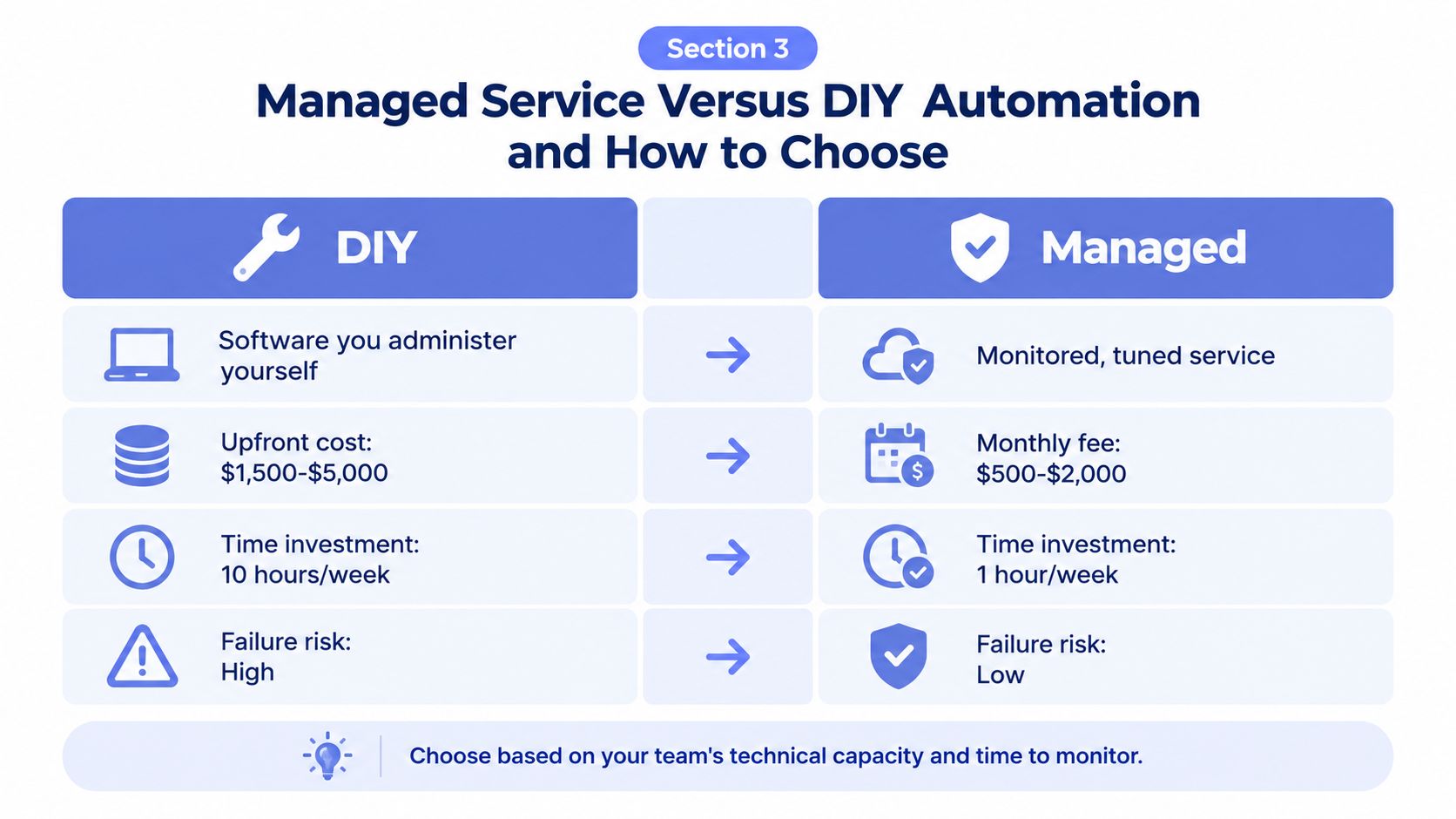
There are two broad ways to implement small business automation. You can build and manage it yourself with tools like Zapier, Make, HubSpot, Xero, Google Workspace, Slack, or Airtable. Or you can use a managed service that designs, runs, monitors, and tunes the workflow for you.
Neither path is universally right. The right choice depends on how much internal capacity you have, how tidy your processes are, and how comfortable your team is with maintenance.
What DIY Really Means
DIY sounds cheaper and more flexible, and sometimes it is. But DIY doesn't just mean “we own the software”. It means your team owns the logic, testing, error handling, monitoring, staff handover, and ongoing cleanup.
That's manageable if you have a steady operator inside the business who enjoys systems work and has time to keep it healthy. It's much less manageable when the person who built the flow was also the only one who understood it.
What Managed Service Means in Practice
A managed approach treats automation more like an operational function than a one-off setup. The provider handles the build, then keeps an eye on logs, failures, approval gates, prompts, exceptions, and reporting after launch.
One example is Truespeak's managed AI automation model, which focuses on first response, follow-up, intake, CRM hygiene, invoice reminders, and reporting around existing tools rather than forcing a wholesale system replacement. That style suits businesses that want an operating layer but don't want an internal team member becoming the unofficial automation mechanic. Truespeak offers AI automation services in Sydney.
A Practical Comparison
| Decision area | DIY automation | Managed service |
|---|---|---|
| Control | High direct control over every rule and change | Control through agreed rules, approvals, and review cadences |
| Internal admin load | Your team handles upkeep and troubleshooting | Provider handles monitoring and tuning |
| Continuity | Can be fragile if one staff member owns it | Usually more resilient if runbooks and reviews are maintained |
| Speed to value | Fast for simple flows, slower when exceptions appear | Often steadier for multi-step workflows with edge cases |
| Security and access | Depends on your setup discipline | Depends on provider process, environment separation, and access controls |
| Best fit | Teams with strong internal systems ownership | Teams that want outcomes without extra operational overhead |
Questions Worth Asking Before You Choose
- Who owns failures: If a workflow stops, who notices first and who fixes it?
- How are approvals handled: Can sensitive messages wait for human review?
- What happens when the CRM is messy: Will the system work around it or break on contact?
- How visible is the logic: Can your team understand the rules without reading code?
- What gets reviewed after launch: Are there logs, alerts, and regular tuning?
If you've got a capable internal operator and a narrow use case, DIY can work well. If your business is already stretched and you need continuity more than experimentation, managed usually makes more sense.
Running a Low Risk Pilot from Smallest Useful System to Steady Operation
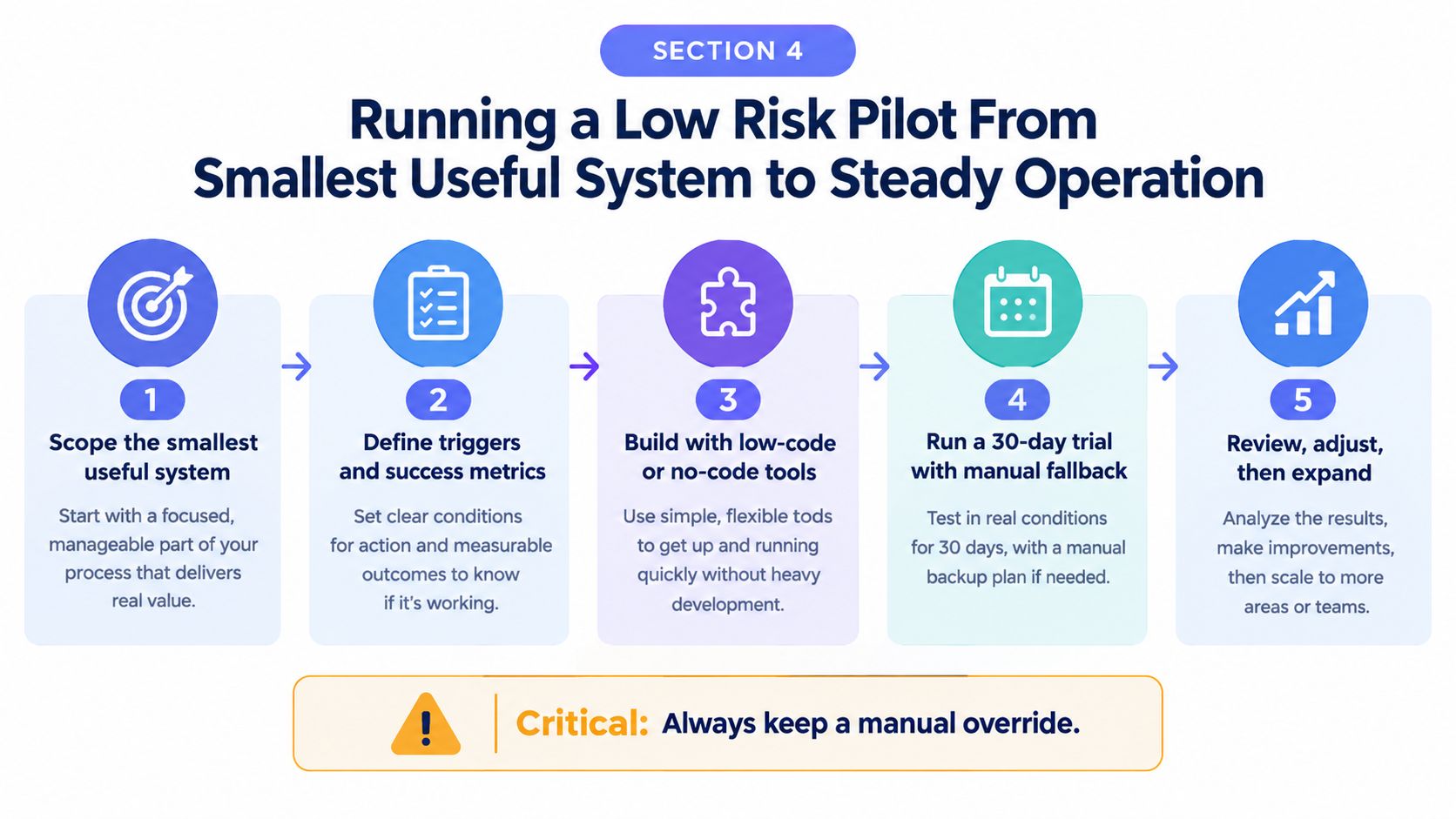
The safest pilot is rarely the most impressive one. It's the one that survives ordinary mistakes, odd customer behaviour, and half-complete records without causing chaos.
That's why I prefer a smallest useful system. Not a grand rollout. One contained workflow with clear triggers, clear ownership, and a manual fallback.
Scope the Pilot Tightly
A good pilot has boundaries. For example, you might automate first response for web enquiries from one service line only. Or invoice reminders for one customer segment. Or intake collection for jobs above a certain value.
Keep the scope narrow enough that staff can still see what the automation is doing and step in when needed.
Build in Human Gates Early
This matters most when messages go to customers or payment reminders could create friction. A pilot should include clear moments where a person can review, approve, or stop a step.
Useful safeguards include:
- Approval before send: Especially for invoice reminders or unusual follow-up cases.
- Fallback assignment: If required data is missing, create a task for a staff member instead of guessing.
- Restricted access: Keep sensitive data in isolated environments with tightly limited permissions.
For teams that operate across the field and office, it also helps if alerts and approvals can be handled through channels they already watch, such as Slack, Telegram, or WhatsApp.
Review What Failed, Not Just What Ran
This is the part people skip. A workflow can look fine in a demo and still fail in production. Maybe phone numbers arrive in the wrong format. Maybe staff rename pipeline stages. Maybe a customer replies with a question the system shouldn't touch.
Set a short review cadence. Weekly is usually enough for an early pilot. Look at what triggered correctly, what needed manual intervention, and where exceptions repeated. Those repeated exceptions are often the design brief for version two.
Signs a Pilot Is Ready to Expand
Don't scale because the flow exists. Scale because the business can trust it.
Good signs include:
- Stable handoffs: Staff know when the system acts and when they do.
- Clean exception paths: Unusual cases land somewhere sensible.
- Useful reporting: The team can see what happened without detective work.
When those are in place, you can widen the pilot by channel, job type, or workflow step. That's how automation becomes operational maturity rather than another abandoned setup.
Five Automation Workflows That Create Capacity Without New Hires
The most useful automation layer usually isn't one workflow. It's a set of small connected ones. Each handles a narrow job, and together they stop routine work from stalling.
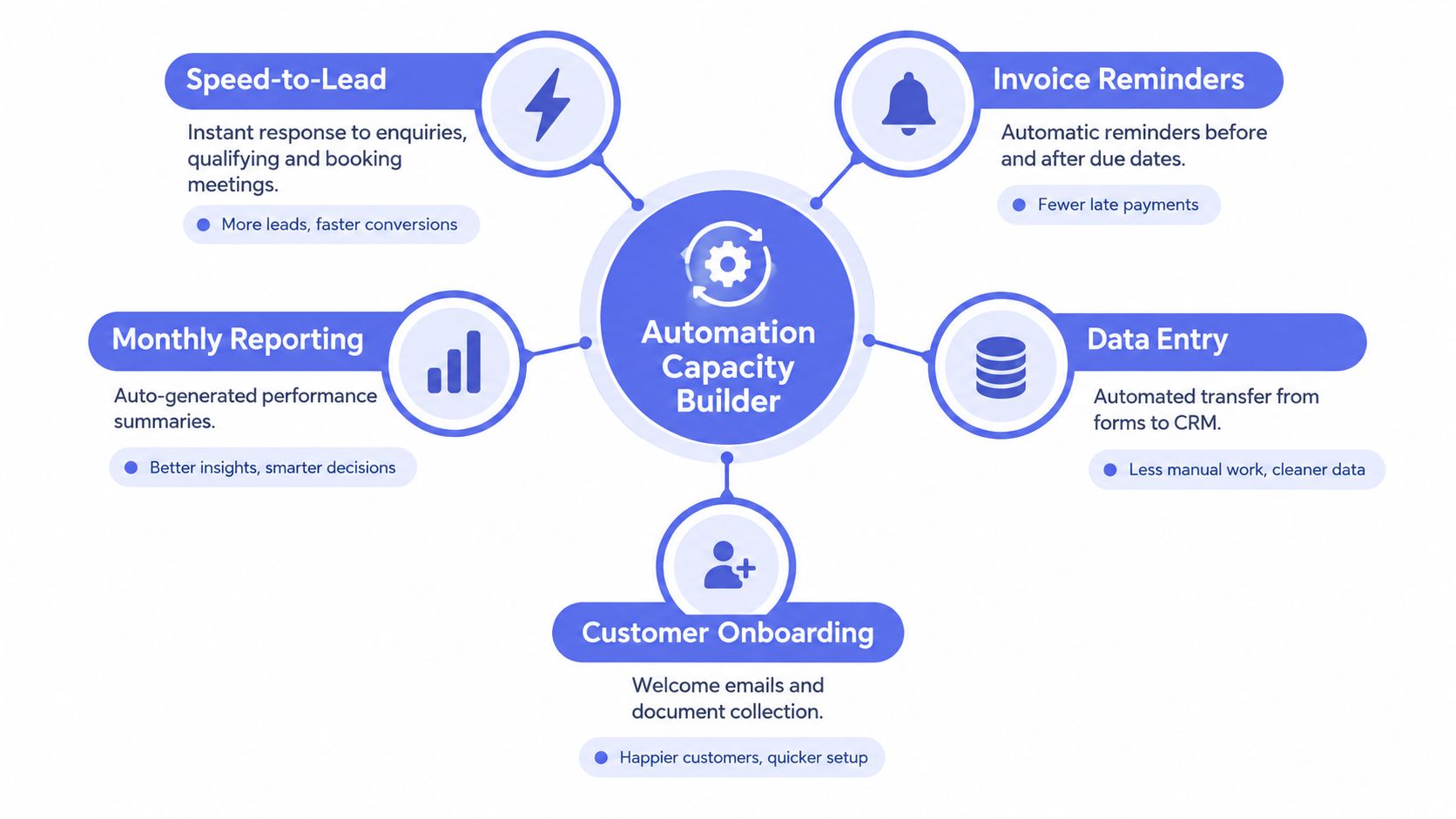
First Response That Buys Time Without Sounding Robotic
A web enquiry comes in after hours. The system replies quickly with a useful acknowledgement, asks one or two clarifying questions, logs the contact, and routes the lead based on service type or location.
The verification is simple. Did the contact land in the right queue, with enough context for a human to pick it up? The exception path is also simple. If the enquiry is vague or unusual, flag it for manual review rather than trying to be clever.
Follow-Up That Doesn't Rely on Memory
Quotes and proposals often don't die. They drift. A good follow-up workflow watches for inactivity, nudges at the right moment, and stops when the customer replies or the status changes.
The key is context. Don't send the same message to every contact. Use stage, last activity, and owner so the follow-up feels connected to the conversation.
Intake That Reduces Rework Before the Handoff
This one is underrated. Many teams lose time because jobs begin with scattered details, missing photos, unclear addresses, or half-formed briefs.
A structured intake flow can request the right fields, collect documents, ask for images, and package the brief before it reaches the estimator, installer, or coordinator. The system doesn't need to “understand everything”. It just needs to stop bad handoffs becoming normal.
CRM Hygiene That Turns Records into Action
Messy CRMs don't usually fail because the software is bad. They fail because no one maintains movement. Automation can help by updating statuses, prompting owners, creating action queues, and surfacing records that need attention.
If you're comparing platforms and connectors before building these routines, this overview of automation tools for small business is useful because it frames tools around workflow jobs rather than feature lists.
Invoice Reminders That Protect Time and Cash Flow
Invoice reminders should follow the payment terms and current account status. Agree the timing with the business, stop reminders when payment is confirmed and route disputes to a person.
That timing works because it's predictable, reviewable, and easy to gate. Finance teams can approve sensitive reminders before they go. If you want a deeper look at how firms scale finance workflows with AI, it's worth reading alongside your own receivables process so you can separate reminder logic from accounting logic.
The Workflows Work Better Together
These five aren't isolated wins. They feed each other.
- First response creates clean records
- Follow-up uses those records
- Intake improves handoff quality
- CRM hygiene keeps the queue usable
- Invoice reminders finish the job after delivery
That's the operating layer many small businesses are missing. Not magic. Just organised continuity.
Conclusion What Good Automation Should Deliver and Your Next Move
Good automation should be visible in the day-to-day rhythm of the business. New enquiries get a prompt first response. Quotes don't sit in silence. Staff receive cleaner handoffs. The CRM becomes a usable action list instead of a graveyard of stale notes. Invoice reminders go out consistently, with the right level of human oversight.
That's a much better test than asking whether the business is “using AI”.
Readiness is demonstrated by a small system working on representative cases. Test normal work, missing information, duplicates and failures before expanding its scope.
A Simple Readiness Check
Before choosing software, check these points:
- Known leakage: Can you name where work gets dropped or delayed?
- Clear owner: Does one person own the pilot decision and review rhythm?
- Defined trigger: Do you know exactly what starts the workflow?
- Human fallback: Can a staff member step in easily when the system hits an edge case?
- Review habit: Will the team inspect failures and adjust?
If most of those are missing, start with process mapping before platform shopping.
The Next Move That Lowers Risk
Choose one contained workflow. Make it narrow, observable, and reversible. Review it closely in the first month or two. Expand only after the exception path is trustworthy.
That's how small business automation becomes something stable enough to rely on. Not a bundle of disconnected tools, but a modest operating layer that keeps routine work moving when the business gets busy.
If you want help identifying where work is leaking before you buy more software, Truespeak offers diagnostic assessment, managed AI operations, and practical workflow builds around the tools you already use. If that smallest-useful-system approach fits how your business runs, visit Truespeak and have a look at how they handle first response, follow-up, intake, CRM hygiene, and invoice reminders.