
Sales automation supports a visible sales process: capturing enquiries, assigning owners, preparing follow-up and maintaining records. People retain responsibility for judgement, relationships and commercial decisions.
A lot of owners recognise the pattern straight away. Enquiries come in through web forms, email, phone, and referrals, then someone says they'll “get back to it”, and the lead sits in a inbox, a spreadsheet, or someone's memory until the buyer has moved on. Sales automation exists to stop that drift, not to replace your team.
Table of Contents
- Introduction to What Sales Automation Really Means
- Understanding the Core Concept Behind Sales Automation
- Key Workflows That Make Up Sales Automation
- Benefits of Sales Automation for Growing Businesses
- Common Misconceptions About Sales Automation
- Quick Implementation Checklist for Your Sales Process
- Conclusion and Next Steps for Getting Started
Introduction to What Sales Automation Really Means
A business can look busy and still lose deals without noticing. A builder gets a form enquiry, the office replies later that afternoon, the estimator is on site, and by the time anyone checks the thread again the customer has already booked someone else. The problem is usually ownership, timing, and visibility.
Sales automation is the operating layer that keeps those moving parts connected. It captures the enquiry, routes it to the right owner, sets the next action, and keeps follow-up standards visible inside the CRM. Truespeak's own framing is straightforward, the system supports a visible sales process, and people stay responsible for relationships and decisions.
Record where the team spends time on administration, updates and repeated follow-up. Automate a narrow part of that work and measure whether the saved time improves useful customer conversations.
A useful companion piece on connected systems is what workflow automation looks like in practice, because sales automation works best when it sits inside a wider operating model rather than as a loose tool.
This guide keeps the language plain. You'll see what sales automation is, how the core workflows fit together, where the benefits show up first, which misconceptions trip people up, and how to start without turning your business into a science project. If you're running a growing Australian business and your team is already juggling calls, inboxes, CRM updates, and invoice chasing, the goal is simple. Make the process easier to see and easier to run.
Understanding the Core Concept Behind Sales Automation
A sales enquiry is a lot easier to manage when everyone can see the same live picture. Without that, leads drift between inboxes, spreadsheets, and memory, and follow-up turns into guesswork.
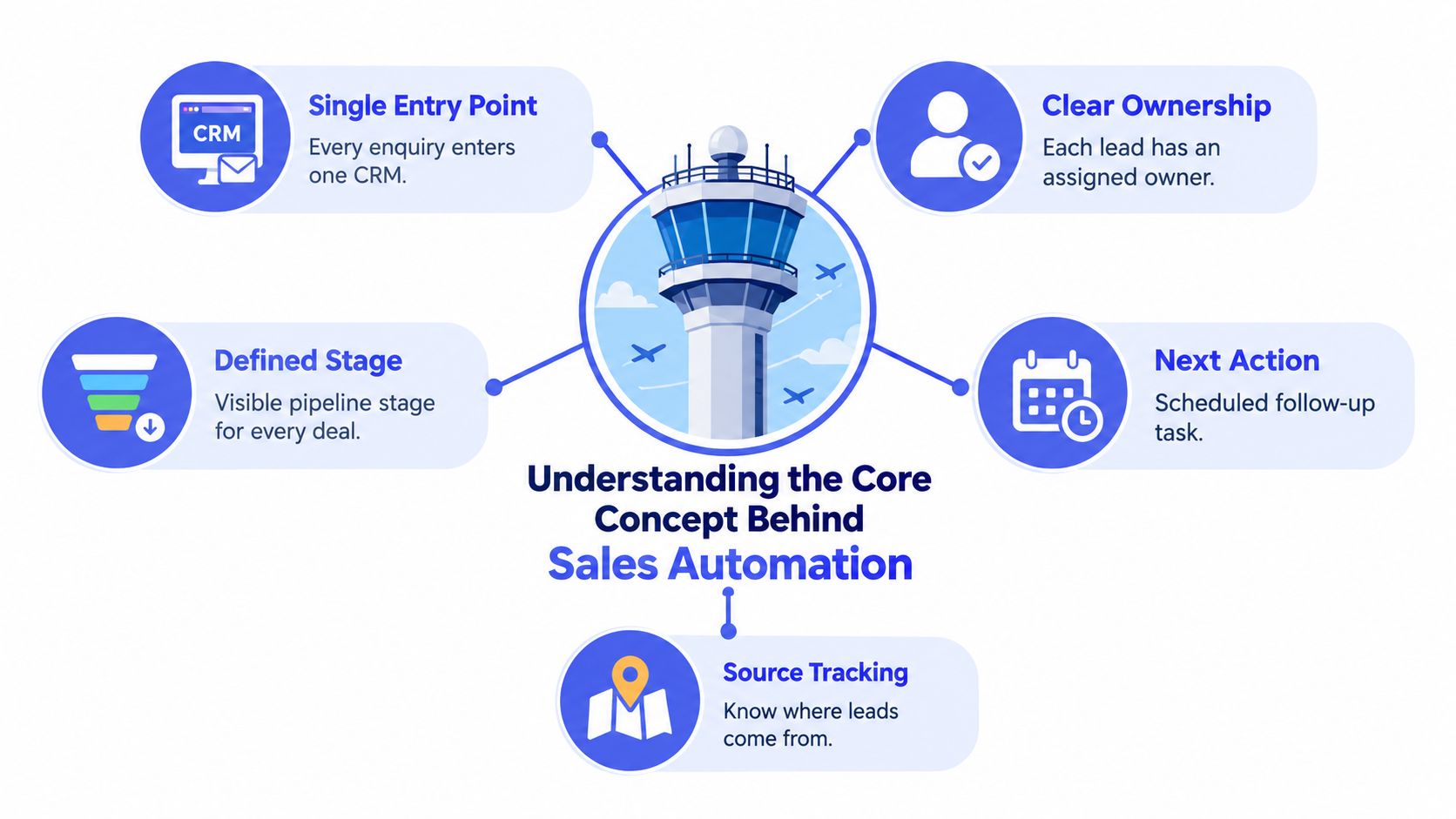
The CRM Is the Control Tower
An Australian small-business CRM guide explains that a CRM stores contacts, tracks each deal through the sales pipeline, and automates follow-up that would otherwise slip through the cracks (Clientflow CRM guide). That is the core idea. Every enquiry should land in one CRM, so the team is working from the same record instead of scattered notes.
Each record needs a few basic fields. Who owns it, what stage it is in, what the next action is, what response is expected, and what outcome you are working towards. Without that structure, automation has nothing reliable to act on.
Automation Is the Support Layer, Not the Decision-Maker
An Australian CRM implementation guide sets out the usual order: map the pipeline and the follow-up gaps, configure stages, fields, permissions, and integrations, then build automated follow-up, booking, reminder, and handover workflows (GetUp Solutions CRM automation guide). That sequence matters. Process comes before tooling.
Automation should take the repetitive, rules-based work off the team's plate, capture, enrichment, routing, reminders, routine admin, and consistent follow-up. People keep judgement, relationships, exceptions, and decisions that carry weight. If a quote needs a careful reply, or a client needs a difficult conversation, the system can set it up, but the person still owns the moment.
A good rule of thumb is simple. If the process is hard to describe clearly, it is too early to automate it.
That is why one CRM, one owner, one next action keeps showing up in good sales systems. It makes the pipeline visible enough to manage and stops tools from being added before ownership is sorted out. When ownership is fuzzy, automation just helps confusion move faster.
What Good Structure Looks Like
- Single entry point: every enquiry enters one CRM.
- Clear ownership: each lead has a named owner.
- Defined stage: the deal is visible at a glance.
- Next action: the follow-up is already scheduled.
- Source tracking: the origin of the lead is recorded.
Used this way, what is sales automation becomes easier to grasp. It is a visible operating layer around the pipeline, like a control tower around a busy airfield. The CRM keeps the flight paths in view, and automation handles the routine hand-offs while people stay responsible for the calls that need judgement.
Key Workflows That Make Up Sales Automation
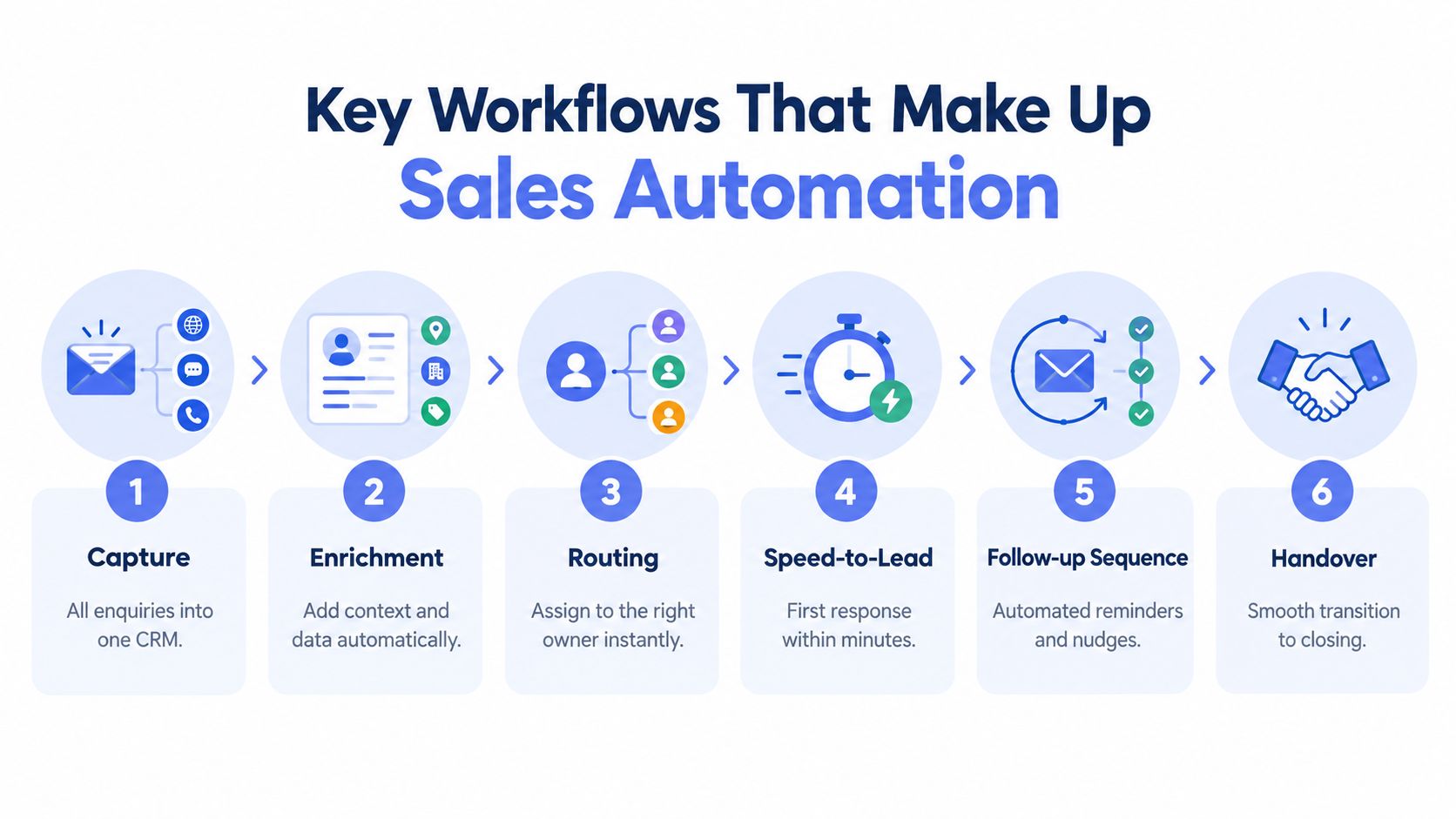
The practical side of sales automation is a chain of small hand-offs. A new lead arrives, the system enriches the record, assigns it, prompts the first response, nudges the next step, and keeps the pipeline visible. That's why the best systems feel less like software and more like a disciplined operations desk.
Start with Capture and First Response
A specific Australian sales-system example says a new lead can trigger a personalised SMS and email so the business is first to respond (LinkAi Digital CRM system). That matters because the first message isn't just polite, it's the beginning of qualification. The system should acknowledge the enquiry, ask the right intake questions, and route the right kind of lead to the right owner.
The operational benchmark here is simple. Australian lead-response guidance targets a first human contact within 5 minutes, with high-performing teams aiming under 60 seconds (Raffine Studio sales funnel strategy). The same source recommends tracking median minutes to first human contact, 90th-percentile response time, contact rate, qualified rate, booking rate, and show rate.
Then Build the Pipeline Logic Around the Lead
Once the enquiry is in the CRM, the next jobs are predictable. Enrichment fills in the context you need. Routing sends the lead to the right person. Follow-up sequences keep quotes, proposals, and dormant opportunities from going stale. CRM hygiene keeps records current so the team can trust what they see.
A good way to compare this is to a checkout flow. A staged sequence can reduce friction because each step has a clear purpose. For a useful example of how multi-step orchestration works in another part of revenue operations, the guide to ecommerce checkout orchestration shows how linked steps keep people moving without losing the thread.
The technical point is not to blast every contact with the same sequence. It's to design rules, triggers, and exception paths. Some leads need booking links, some need document collection, and some need a human review before anything goes out. The best systems are built for that branching logic.
To see the broader shape of pipeline design, Truespeak's sales process automation overview is useful context, because it frames automation as a managed process rather than a stack of disconnected tools.
Visibility Is Part of the Workflow
A live pipeline should show stage, owner, source, last activity, and next action so stalled opportunities stay visible instead of disappearing into inboxes or spreadsheets. That's not glamorous, but it's where a lot of revenue leakage sits. If nobody can see the deal, nobody can move it.
Benefits of Sales Automation for Growing Businesses
A growing business often feels sales work slipping through cracks, one enquiry at a time. A form submission sits in a shared inbox. A quote waits for follow-up. An invoice reminder gets postponed because someone is busy on the phone. Sales automation helps put a visible operating layer around the CRM so those steps keep moving with human oversight, instead of relying on memory.
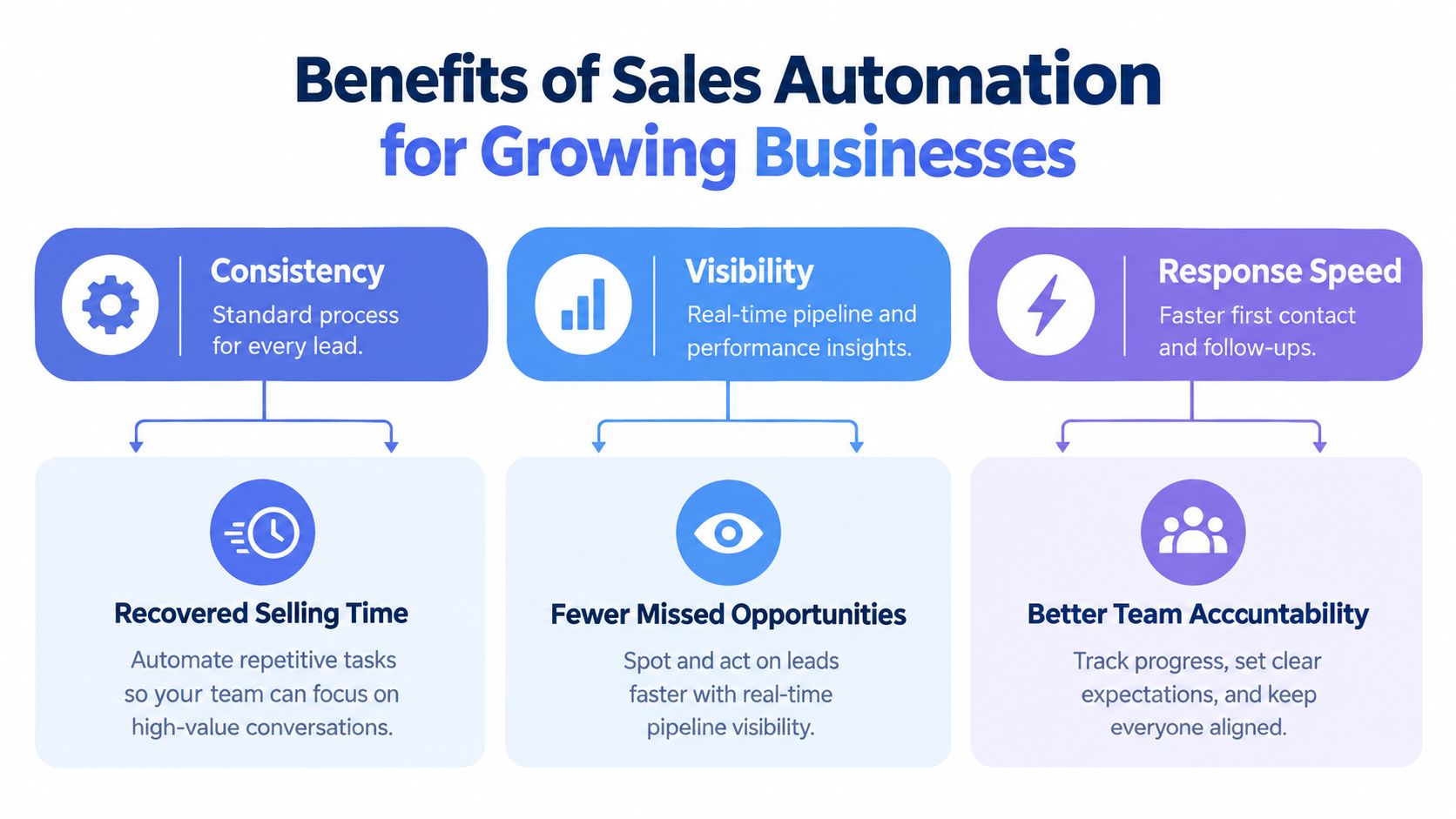
Consistency Changes the Day-to-Day
Sales automation gives every enquiry a standard path. The same questions get asked, ownership is assigned the same way, and follow-up expectations stay visible. That matters because each lead stops depending on who happened to be free that day.
It also reduces the amount of routine work sitting on a rep's desk. The value is not mysterious, it is capacity. Repeated admin can be handled by rules and prompts, while people spend more time on calls, pricing decisions, and tricky conversations.
Visibility Stops Opportunities from Disappearing
A live CRM shows the pipeline in plain sight. You can see what is stuck, what needs a quote, what is waiting on a reply, and what has gone cold. That is a lot better than hoping someone remembers to update a spreadsheet or mention a deal in a meeting.
The same visibility helps with revenue after the sale, not just lead capture. Chase work, reminders, and overdue invoices can sit in the same operating flow as sales follow-up, so cash collection does not become an afterthought. For a growing business, that keeps more of the work already won from drifting out of view.
Speed-to-Lead Improves the Odds of Real Contact
Lead response timing matters because interest cools fast. Australian lead automation guidance shows that fast contact can make a major difference, with leads reached within 5 minutes converting at much higher rates than those contacted later, and a 1-hour follow-up outperforming a 2-hour delay (LeadTrack AI Australian SMB lead automation guide). The message is simple. The first useful response should happen quickly.
That does not mean handing every enquiry to software with no review. A good setup sends an instant acknowledgement, gathers basic qualification details, and routes the lead to the right person or booking option. Like a front desk that greets visitors before passing them to the right room, automation handles the first step so a human can take over at the right moment.
The Right First Priorities Are Usually Practical
- Capture: get every enquiry into one CRM.
- Routing: assign the right owner immediately.
- Follow-up: keep quotes, proposals, and reminders on track.
- Visibility: keep stalled work in front of the team.
- Revenue operations: include invoice reminders where cash flow needs it.
These are the areas where automation pays off first. They reduce missed hand-offs, make follow-up more disciplined, and give owners a clearer picture of what is moving. In a growing business, that kind of order matters more than flashy software features.
Common Misconceptions About Sales Automation
The word automation still makes some owners cautious. That reaction is understandable. A lot of systems have been sold as if they replace judgment, when their job is really to support people who are already working under pressure.
It's Not a Black Box
One common misconception is that sales automation means cold, impersonal messages with no human oversight. A better model is human-in-the-loop. Automation handles repeatable steps, then hands sensitive or high-value moments to a person who can judge tone, timing, and context.
That means reminders, prompts, and draft messages can be prepared automatically, while an owner or manager still decides how to handle exceptions, complaints, or complex deals. Like a reception desk that sorts visitors before sending them to the right person, automation should clear the routine work without removing the human decision at the point that matters.
Tools Don't Fix Unclear Ownership
The other mistake is assuming software will solve an undefined process. If no one knows who owns the lead, what stage it sits in, or what happens next, automation only speeds up confusion. A CRM works when the team agrees on the rules that feed it.
A good setup starts by mapping the gaps, then shaping the structure, then building the workflows. That order is easy to skip and hard to fix later. The same logic applies to GetUp Solutions CRM automation guide, which points back to the basics before adding more moving parts.
Visibility Is the Most Effective Antidote to Lost Deals
A simple pipeline view gives each live opportunity a stage, an owner, a source, a last activity, and a next action. When a deal stalls, it stays visible instead of disappearing into an inbox or spreadsheet. People can then follow up with intent, instead of finding out too late that the buyer has gone cold.
That is also why “too much automation” gets blamed too easily. The problem is badly designed automation that removes judgement from the wrong places and leaves the team without a clear view of what is happening.

Quick Implementation Checklist for Your Sales Process
A good rollout starts where the work is already leaking. Many businesses do not need a full rebuild. They need a clearer first pass at the points where leads stall, reminders slip, or invoices sit untouched.
Diagnose Where the Leakage Is Happening
Start with the steps that depend on memory. That might be web form enquiries, quote follow-up, proposal reminders, CRM updates, or invoice chasing. The aim is to find where people are carrying the process in their heads instead of inside the system.
A useful test is simple. If one person is away for a day, where does the work stop? If the answer is “everywhere”, the problem is not volume, it is structure.
Map the Triggers and Exception Paths
Write down what should happen when a lead arrives, when a quote goes out, when a proposal stalls, and when an invoice becomes overdue. Then mark the exceptions, because customer paths are not all the same. Some messages need approval, some need a human call, and some need a pause before the next step.
This is the point where a visible operating layer helps. Truespeak's sales automation software overview fits this approach because it treats automation as something you monitor and tune around the CRM, not a black box that replaces judgment.
Configure the CRM Before You Layer on More Tools
Set the stages, fields, permissions, and ownership rules first. If the CRM is messy, automation only moves the mess faster. Keep the setup simple enough that the team can use it every day.
That approach suits service businesses that want more capacity without loading the team with admin. It also makes review easier, because you can see whether each rule helps or just adds noise.
Add Human Approval to the Right Messages
Invoice reminders, payment nudges, and some client follow-ups should be polite and checked by a person. The payment report referenced earlier shows why this matters in practice, late payment still creates follow-up work that lands on someone's desk whether the reminder is automated or not. Automation should keep that work consistent, not strip out judgment.
Review the Leading Indicators Regularly
Track minutes to first human contact, not just total leads. Watch response time, qualification rate, booking rate, and show rate. Those measures tell you whether the system is working before revenue appears in the P&L.
Start small, read the signals, then tighten the parts that are slowing the team down.
Conclusion and Next Steps for Getting Started
Sales automation works when it makes the sales process visible, not mysterious. The CRM stays the source of truth, people own relationships and decisions, and automation handles the capture, routing, reminders, follow-up, and reporting that keep work moving.
If you're deciding where to start, begin with the points where buyers feel ignored and staff feel overloaded. That usually means first response, lead routing, follow-up standards, CRM hygiene, and invoice reminders. Build those pieces around the tools you already use, then expand only when the evidence says the system deserves more scope.
For Australian service businesses, that approach is often the difference between another software purchase and an operating improvement you can feel. It keeps the team focused on response speed, follow-through, and cash flow, which are the places small leaks become expensive very quickly.
If your business is ready to make the process easier to see and easier to run, Truespeak designs and manages practical AI operating systems around the tools you already have. Visit Truespeak to see how a human-in-the-loop approach can support speed-to-lead, follow-up discipline, CRM hygiene, and invoice reminders in a way your team can live with every day.