

AI agents for workflow automation are autonomous software systems that execute multi-step, goal-driven tasks without constant human direction. Unlike traditional rule-based automation or chatbots, these systems reason through problems, adapt to variable inputs, and take action across multiple tools to complete defined business processes. For small business owners managing lean teams, that distinction matters. The right agent handles follow-ups, CRM updates, and admin tasks around the clock, without adding a single hire.
How Do AI Agents Work in Workflow Automation?
AI agents operate through a structured cycle of triggering, reasoning, acting, and adapting. Understanding that cycle helps you choose AI agent builders and deploy them with confidence rather than guesswork.
1. Trigger-based initiation Every agent workflow starts with a defined event. A new form submission, an overdue invoice, or a status change in your CRM can each fire an agent into action. As a practical rule, without a defined trigger, the system is a capability, not automation. That distinction keeps your workflows predictable.

2. Task breakdown and reasoning Once triggered, the agent breaks the goal into steps. It does not follow a fixed script. Instead, it evaluates the current state, selects the next action, and adjusts based on what it finds. This is what separates agentic workflows from traditional automation: adapting in real time based on context and results rather than following fixed scripted paths.
3. Tool and API integration Agents call external tools to get things done. They can query a database, send an email, update a record, or pull data from an API. AI agents combine AI models, external API calls, and memory to maintain context and adjust the workflow path as conditions change.
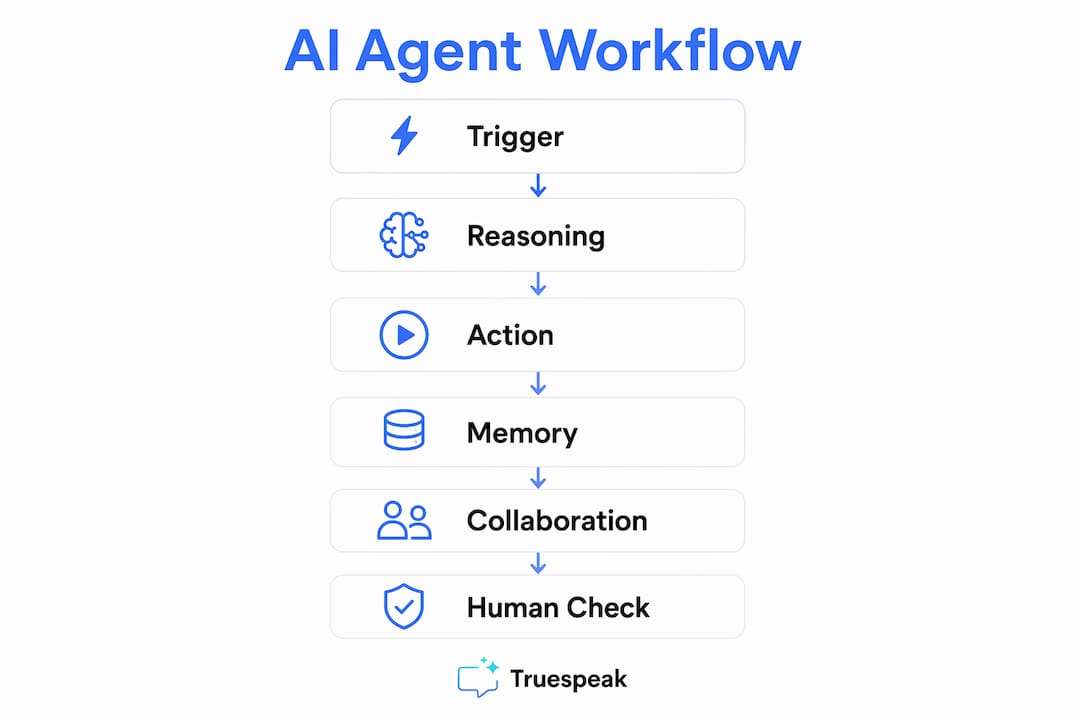
4. Memory systems Short-term memory keeps context within a single session. Long-term memory allows an agent to recall past interactions and apply that knowledge to future tasks. This is how an agent knows a client has already received two follow-up emails before sending a third.
5. Multi-agent collaboration Complex workflows often involve more than one agent. An orchestrator agent assigns subtasks to specialist agents, each handling a defined function such as data extraction, drafting, or approval routing. This division of labor mirrors how a well-run team operates.
6. Human-in-the-loop checkpoints Not every decision should be fully automated. Human oversight in agentic workflows is a deliberate design choice to manage risk and ensure business continuity, not a technology fallback. Sensitive actions like sending a payment request or updating a contract should pause for human review before proceeding.
Pro Tip: Map your workflow on paper before you configure any agent. Identify every decision point and mark which ones require human approval. Agents built on clear decision maps perform far better than those built on vague instructions.
What Design Principles Ensure Effective AI Agent Workflow Automation?
Good agent design is the difference between a system that runs reliably and one that creates new problems. These principles apply whether you are building your first agent or reviewing an existing one.
- Bounded task definitions. Every agent needs a clear start state, a defined end state, and measurable success criteria. Vague goals produce unpredictable behavior. Define what “done” looks like before you write a single instruction.
- Least-privilege access. Avoid broad system access for agents. Limit each agent to the data and functions it actually needs. An agent handling invoice reminders does not need access to your HR records.
- Decision logic mapping. Before configuring tools or prompts, map which actions the agent handles autonomously and which require escalation. This prevents the agent from making consequential decisions it was never designed to handle.
- Built-in approval checkpoints. For sensitive actions, require human sign-off. This is not a limitation. It is a control layer that protects your business and builds trust in the system over time.
- Audit logging. Every agent action should be logged with a timestamp and outcome. Logs let you trace errors, identify patterns, and support a review if questions arise.
- Outcome-focused monitoring. Monitoring AI agents requires focusing on business outcomes, exceptions, and corrections. A high task completion rate can still hide systemic errors if you are not tracking what the agent actually produced.
Pro Tip: Review your agent logs weekly for the first month after launch. You will spot edge cases and decision gaps that no amount of upfront planning can fully anticipate.
What Benefits Do AI Agents Bring to Small Business Workflow Automation?
AI agents deliver measurable operational gains for small businesses, particularly in areas where rule-based tools fall short.
AI agents enable small businesses to automate complex workflows involving multiple tools and variable data inputs, reducing manual workload and scaling operational capacity without new hires. That last point matters most for growing teams where every hour counts.
| Business function | What an agent handles |
|---|---|
| Customer service | Triaging inquiries, drafting responses, escalating complex cases |
| Finance and admin | Invoice reminders, payment tracking, expense categorization |
| HR and onboarding | Document collection, task assignment, status updates |
| Sales follow-up | Lead scoring, follow-up sequencing, CRM record updates |
| Reporting | Data aggregation, summary generation, exception flagging |
Agentic workflows improve operational efficiency by reducing error rates, increasing throughput, and freeing employees for higher-value tasks. The compounding effect is significant: fewer errors mean less rework, and faster throughput means more capacity without more payroll.
Agents interpret context and handle input variations better than rule-based automation. A rule-based system breaks when a form field is missing or a client responds in an unexpected format. An agent reads the situation and decides how to proceed.
That shift from reactive retrieval to proactive execution is where the real efficiency gain lives. Your team stops chasing tasks and starts managing outcomes.
How Can Small Businesses Implement AI Agents for Workflow Automation?
Implementation works best when you treat it as a phased process rather than a one-time deployment. Start narrow, prove value, then expand.
1. Select a bounded workflow. Choose a process with a clear trigger, a defined end state, and measurable success criteria. Invoice follow-up, new client intake, and lead response are strong starting points. Selecting workflows with clear triggers and bounded task scope is critical for successful implementation.
2. Start in draft or review mode. Configure the agent to produce outputs for human review before taking action. This builds trust in the system and surfaces errors before they reach clients or partners. Starting with controlled draft mode and human approvals enables gradual scaling without risk.
3. Define your success metrics. Decide upfront what success looks like. Hours saved per week, reduction in follow-up delays, and error rate improvement are all concrete metrics. Vague goals make it impossible to know whether the agent is working.
4. Launch, monitor, and adjust. Run the agent on live workflows and review logs daily for the first two weeks. Pay attention to edge cases where the agent made a wrong call or failed to act. Adjust decision logic based on what you find, not on assumptions.
5. Expand permissions and scope carefully. Once the agent performs reliably on a narrow task, extend its scope one step at a time. Add a new trigger, connect an additional tool, or hand off a new workflow category. Rapid expansion without validation is the most common cause of agent failures in small business deployments.
You can find practical frameworks for this process in the Truespeak blog, which covers AI operations for growing businesses in plain language.
Key Takeaways
AI agents for workflow automation deliver the most value when they are built on clear decision logic, bounded permissions, and outcome-focused monitoring rather than broad access and unchecked autonomy.
| Point | Details |
|---|---|
| Define triggers first | Every agent workflow requires a specific triggering event to function as automation, not just a capability. |
| Apply least-privilege access | Limit each agent to only the data and tools it needs for its assigned task to maintain security and control. |
| Build in human checkpoints | Require human approval for sensitive actions as a deliberate risk management layer, not a workaround. |
| Measure outcomes, not counts | Track error rates, hours saved, and throughput improvement rather than task volume alone. |
| Scale incrementally | Expand agent scope and permissions one step at a time after confirming reliable performance on narrow tasks. |
Truespeak Builds and Manages AI Agent Systems for Growing Businesses
Running a small business means every hour your team spends on admin, follow-ups, and reporting is an hour not spent on growth. Truespeak designs and manages AI agent workflows that handle those tasks around the clock, with human approval layers built in from the start.
Whether you need managed AI operations across your business or a focused solution for a single workflow like intake automation or CRM follow-up, Truespeak builds systems that fit your existing processes. Every deployment includes defined decision logic, audit logging, and ongoing monitoring so nothing drifts without you knowing. See the full range of Truespeak services to find the right starting point for your team.
FAQ
What Is the Difference Between an AI Agent and Traditional Automation?
Traditional automation follows fixed rules and breaks when inputs vary. An AI agent reasons through variable inputs, adapts its actions based on context, and completes multi-step tasks without a rigid script.
How Do AI Agents Handle Decisions That Require Human Judgment?
Well-designed agents include human-in-the-loop checkpoints for sensitive or high-risk actions. The agent pauses, routes the decision to a human, and continues only after approval is received.
What Workflows Are Best Suited for AI Agents in Small Businesses?
Workflows with clear triggers, variable inputs, and measurable end states work best. Invoice follow-up, lead response, client intake, and HR onboarding are strong candidates for early deployment.
How Do I Know If My AI Agent Is Performing Well?
Track business outcomes rather than task counts. Measure error rates, hours saved, and process throughput. A high completion rate that hides recurring errors is not a success metric.
Do I Need Technical Staff to Deploy AI Agents?
Not necessarily. Managed AI operations providers like Truespeak design, configure, and monitor agent workflows on your behalf, so your team focuses on outcomes rather than technical setup.