

An automated lead follow-up system is a software-driven process that sends timely, personalized outreach to prospects without requiring manual effort from your team. Most sales deals are lost not because of product fit or pricing, but because of follow-up failure. That single fact should change how you think about your sales process. The industry term for this approach is “sales follow-up automation,” and it covers three core components: CRM data integration, workflow rules, and multi-channel orchestration across email, SMS, WhatsApp, and voice. For small to medium-sized business owners, getting these components right means more conversions without adding a single person to your payroll.
What Tools Does an Automated Lead Follow Up System Need?
Building a working automated follow-up system starts with the right stack. You need at minimum three layers: a CRM that holds your lead data, a workflow platform that triggers actions, and communication channels that reach prospects where they actually respond.
The Core Tool Layers
Your CRM is the foundation. It stores contact details, tracks every interaction, and feeds real-time context into your outreach. Without a live data connection between your CRM and your automation platform, your messages arrive at the wrong time with the wrong information. That kills response rates before you even start.

Workflow platforms sit on top of your CRM and define the rules. They decide when a message goes out, which channel it uses, and what happens next based on the prospect’s behavior. Think of them as the logic layer that turns raw lead data into a coordinated sequence of touches.
Communication channels complete the stack. Multi-channel outreach across email, phone, SMS, and LinkedIn prevents channel fatigue and improves contact rates. The system tracks which channel each prospect responds to and adjusts future touches accordingly.
| Component | Basic setup | Full-featured setup |
|---|---|---|
| CRM | Manual data entry, static records | Live data sync, behavioral triggers |
| Workflow engine | Single-channel email sequences | Multi-channel orchestration with branching logic |
| Communication channels | Email only | Email, SMS, voice, LinkedIn, WhatsApp |
| Personalization | First name merge tags | AI-drafted messages using company, industry, and activity data |
| Reporting | Open and click rates | Connect rate, conversion rate, attempts per lead |
Pro Tip: Before buying any new tool, audit what your current CRM already supports. Many business owners pay for a separate automation platform when their existing CRM has workflow rules built in.
The goal is a connected system where every tool talks to the others. A disconnected stack creates data gaps, and data gaps create missed follow-ups.
How to Design Follow-Up Sequences That Actually Get Responses
Sequence design is where most business owners get it wrong. They set up a generic five-email drip and wonder why nobody replies. Effective sequences are built around prospect behavior, not arbitrary timelines.
Step-by-Step Sequence Design
- Audit your current process. Map every touchpoint from lead capture to close. Identify where leads go quiet. Those gaps are exactly where automation needs to step in.
- Define your triggers. A trigger is the action that starts a sequence. Common triggers include form submissions, demo requests, quote views, and inbound calls. Each trigger should launch a specific sequence tailored to that lead’s intent.
- Set your cadence rules. Decide how many touches happen, over how many days, and through which channels. A typical outbound sequence runs 8–12 touches over 14–21 days, mixing email, phone, and SMS.
- Build multi-channel coordination. Orchestration syncs touchpoints across channels to avoid overlapping messages and coordinate timing logically. A prospect should not receive an email and a cold call within the same hour unless that is intentional.
- Add branching logic. If a prospect opens your email three times but does not reply, that is a signal. Your sequence should branch to a phone call at that point, not another email. Branching logic turns a static sequence into a responsive one.
- Apply AI personalization with human review. AI-powered personalization drafts messages using CRM data like the prospect’s name, company, industry, and recent activities. A team member reviews before sending to catch tone issues. This approach keeps messages relevant without making them sound robotic.
Pro Tip: Use one-to-one email threading rather than mass marketing blasts. Threaded email replies feel like a personal conversation, not a newsletter. That single change lifts reply rates noticeably.
The best sequences feel like a thoughtful salesperson is following up, not a machine. That impression comes from good timing, relevant content, and knowing when to stop.
How to Run Your Automated Follow-Up System Day to Day
Setting up the system is one challenge. Running it without letting things slip is another. Daily management comes down to three areas: lead enrollment, outcome logging, and sequence adjustments.
Lead Enrollment and Routing
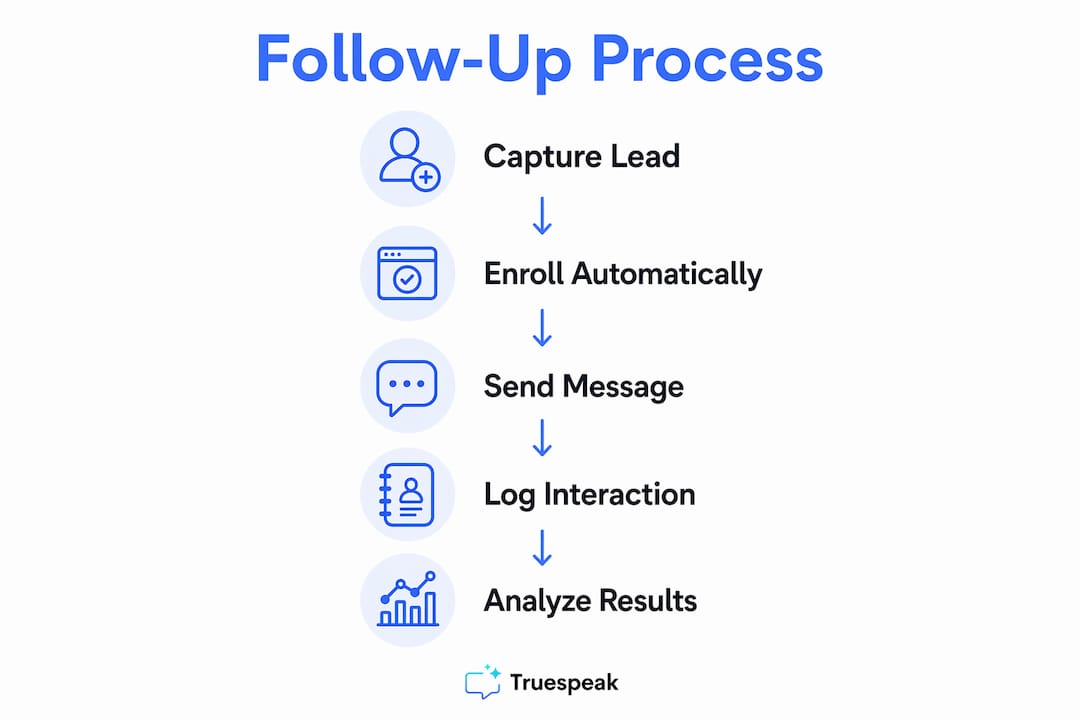
Leads should enter sequences automatically the moment they hit your CRM. Manual enrollment creates the same problem you were trying to solve. Set enrollment rules based on lead source, score, or stage so every new contact lands in the right campaign without anyone touching it.
Set a response target that reflects the enquiry type, business hours and team capacity. Automation can acknowledge and route enquiries promptly, while a named person remains accountable for the first useful response.
Outcome Logging and Next Steps
Every call, email, and SMS needs a logged outcome. When a call goes to voicemail, the system schedules the next attempt. When a prospect replies to an email, automated sequences stop immediately to avoid sending a follow-up that ignores the reply. When a call connects, the rep logs the result and the system queues the appropriate next step.
- Log every outcome in real time, not at the end of the day
- Set automatic next-step rules for each outcome type (answered, voicemail, no answer, replied, bounced)
- Use dialing modes such as preview, power, and progressive to match call volume to rep capacity
- Pause sequences for leads that request a callback at a specific time
- Flag leads that have received the maximum touches with no response for a manual review queue
Pro Tip: Review your “no response after full sequence” list weekly. Some of those leads just had bad timing. A short personal note from a rep, sent outside the automated sequence, converts a surprising number of them.
Handling Sequence Fatigue
Over-contacting is a real problem. If a prospect receives too many touches in too short a window, they mark you as spam or block your number. Set hard caps on daily contact attempts per lead and build mandatory wait periods between touches on the same channel.
How to Measure and Improve Your Follow-Up System
Measurement turns a working system into a great one. Without data, you are guessing which sequences work and which ones waste your team’s time.
Monitoring key metrics like connect rate, conversion rate, and attempts per lead gives you the signal you need to make real improvements. Connect rate tells you whether your timing and channel mix are right. Conversion rate tells you whether your messaging is landing. Attempts per lead tells you whether your cadence is efficient or wasteful.
- Contact rate: the percentage of leads you successfully reach across all channels
- Connect rate: the percentage of outbound calls that result in a live conversation
- Conversion rate: the percentage of contacted leads that move to the next pipeline stage
- Attempts per lead: the average number of touches before a lead converts or exits the sequence
- Reply rate by channel: which channel generates the most responses for each lead segment
Pull these numbers weekly, not monthly. Monthly reporting is too slow to catch a broken sequence before it wastes a full month of leads. When connect rate drops, check your call timing first. When reply rate drops on email, check your subject lines and send times. When conversion rate drops, the issue is usually in the message content or the offer itself.
Refine one variable at a time. Changing the channel, the timing, and the message simultaneously makes it impossible to know what actually moved the needle.
Key Takeaways
An automated lead follow-up system works because it removes the human error of forgetting to follow up, routes leads instantly, and keeps outreach consistent across every channel.
| Point | Details |
|---|---|
| Three core components | Every effective system needs CRM integration, workflow rules, and multi-channel orchestration. |
| Speed to lead matters | Contacting a lead within 5 minutes of capture dramatically increases qualification rates. |
| Sequence branching beats static drips | Sequences that respond to prospect behavior outperform fixed-step email chains. |
| Stop sequences on reply | Automated follow-ups must halt the moment a prospect responds to avoid redundant messages. |
| Measure weekly, not monthly | Weekly metric reviews let you fix broken sequences before they waste a full pipeline of leads. |
How Truespeak Handles This for Growing Businesses
Truespeak builds and runs managed AI operations for small to medium-sized businesses, including the full automated follow-up stack. That means CRM integration, multi-channel sequence design, speed-to-lead automation, and ongoing performance monitoring. You get a system that works 24/7 without adding headcount. If you are ready to stop losing leads to slow or inconsistent follow-up, Truespeak’s managed AI operations are built exactly for that. The system runs. The leads get followed up. You focus on closing.
FAQ
What Is an Automated Lead Follow Up System?
An automated lead follow-up system is a software process that sends timely, personalized outreach to prospects across email, SMS, phone, and other channels without manual effort. It uses CRM data, workflow rules, and multi-channel orchestration to keep leads engaged throughout the sales cycle.
Why Do Most Sales Deals Fail at the Follow-Up Stage?
Follow-up failure is the primary reason sales deals are lost, not product fit or pricing. Automation removes the human error of forgetting to follow up and keeps outreach consistent regardless of team workload.
How Quickly Should You Follow Up with a New Lead?
Respond promptly, with a target your team can actually meet. A confirmation is useful but should not be counted as a substantive response or a booked conversation.
What Metrics Should I Track in My Follow-Up System?
Track connect rate, conversion rate, contact rate, and attempts per lead. These four metrics show whether your timing, channel mix, and messaging are working, and where to make adjustments.
Does Automation Work for Real Estate Lead Follow-Up?
Yes. An automated lead follow-up system in real estate handles the high volume of inbound inquiries from property listings, open houses, and online ads. Multi-channel sequences keep buyers and sellers engaged between appointments without requiring an agent to manually chase every lead.