
You know the pattern. A web enquiry lands after hours, the office sees it late, the quote sits there, and the customer has already moved on. Meanwhile, your team is still chasing invoices, retyping job details, and trying to remember who last spoke to the client. That's automation in business territory, and for most Australian service businesses it's not about flashy software, it's about stopping good work from falling between desks.
The right way to think about it is simple. Process first, software second, people always in control of judgement calls. If you run a Sydney trade, install, or professional services business, you don't need more noise. You need a managed operating layer around the work you already do, so enquiries, follow-up, intake, CRM hygiene, and invoicing really move.
Table of Contents
- The Everyday Friction That Automation Solves
- What Automation in Business Actually Means
- Five Operating Desks Where Aussie Service Businesses Apply Automation
- How the Operating Desks Connect Into One Pipeline
- DIY Build or Managed Automation Partner
- A Realistic Implementation Roadmap for Australian SMEs
- Metrics That Prove Automation Is Working
- Common Pitfalls and How to Avoid Them
The Everyday Friction That Automation Solves
Monday morning in a Sydney trades office, the problem is rarely a lack of leads. It's the lead that arrived at 9:47pm on Saturday, sat unseen until Sunday lunch, and went to a competitor before anyone opened the laptop. That missed job can be enough to hurt the week.
The same pattern shows up everywhere else. A quote sits in draft for nine days because no one owns the next action. An invoice gets chased three times by phone because there's no reminder sequence. The CRM has no job notes, so the technician turns up cold and the customer has to explain the whole story again.
The Real Issue Is Not Effort, It'S Memory
Most small teams are running follow-up, intake, billing, and record-keeping on goodwill and human memory. That works until someone is busy, on site, or out sick. Then the system breaks.
Practical rule: if a task disappears when one person is overloaded, it was never a real process. It was a habit.
Automation fixes that by catching work that would otherwise slip. For a useful overview of how this looks inside a business, the benefits of business process automation are best understood as operational discipline, not tech theatre. One useful external reference on the same theme is Nexist's SME automation ROI guide, which is worth reading if you want a broader process lens.
The point is plain. Automation is the operating fix for recurring friction. It doesn't create the problem. It exposes the problem, then keeps the business from repeating it every day.
What Automation in Business Actually Means
Automation in business is the practice of turning recurring, rule-based work into a reliable system that runs without someone remembering to do it. It's not the app, the plugin, or the dashboard. It's the designed sequence of actions that keeps moving whether a person is at their desk or not.
A plumber's quote acceptance is a clean example. The trigger is the status change in the CRM. The action is a confirmation SMS and a calendar block. The guardrail is a manager override if the customer replies out of hours or the job needs a human decision. The software only matters after the rule is clear.
Plain-Language Translations of the Jargon
- Workflow means the step-by-step path a job follows.
- Trigger means the event that starts the next action.
- Integration means two tools passing information to each other without retyping.
- Agent means software that takes a task and acts on it with some level of autonomy.
- RPA means a bot doing repetitive screen work that a person used to do by hand.
If the step needs judgement, keep it with a person. If it only needs consistency, it's a candidate for automation. That's the test owners should use before they buy anything.
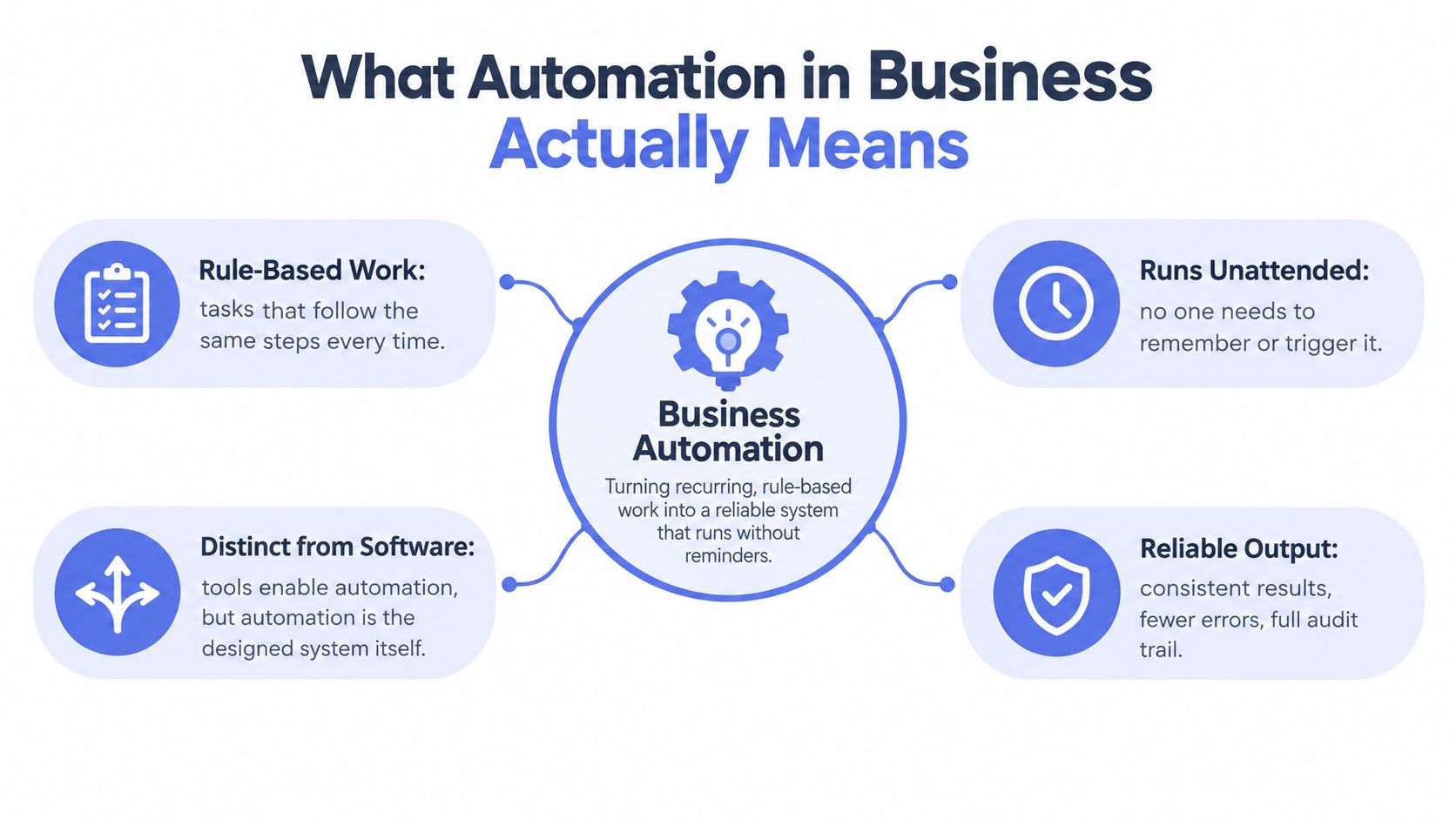
The useful distinction is between software and system. The same underlying logic can live in ServiceM8, HubSpot, Xero, a spreadsheet, or a managed layer on top of them. What matters is whether the rule is written down and enforced. If you want a practical comparison of how that thinking plays out operationally, SME automation ROI guide is a decent companion read.
Five Operating Desks Where Aussie Service Businesses Apply Automation
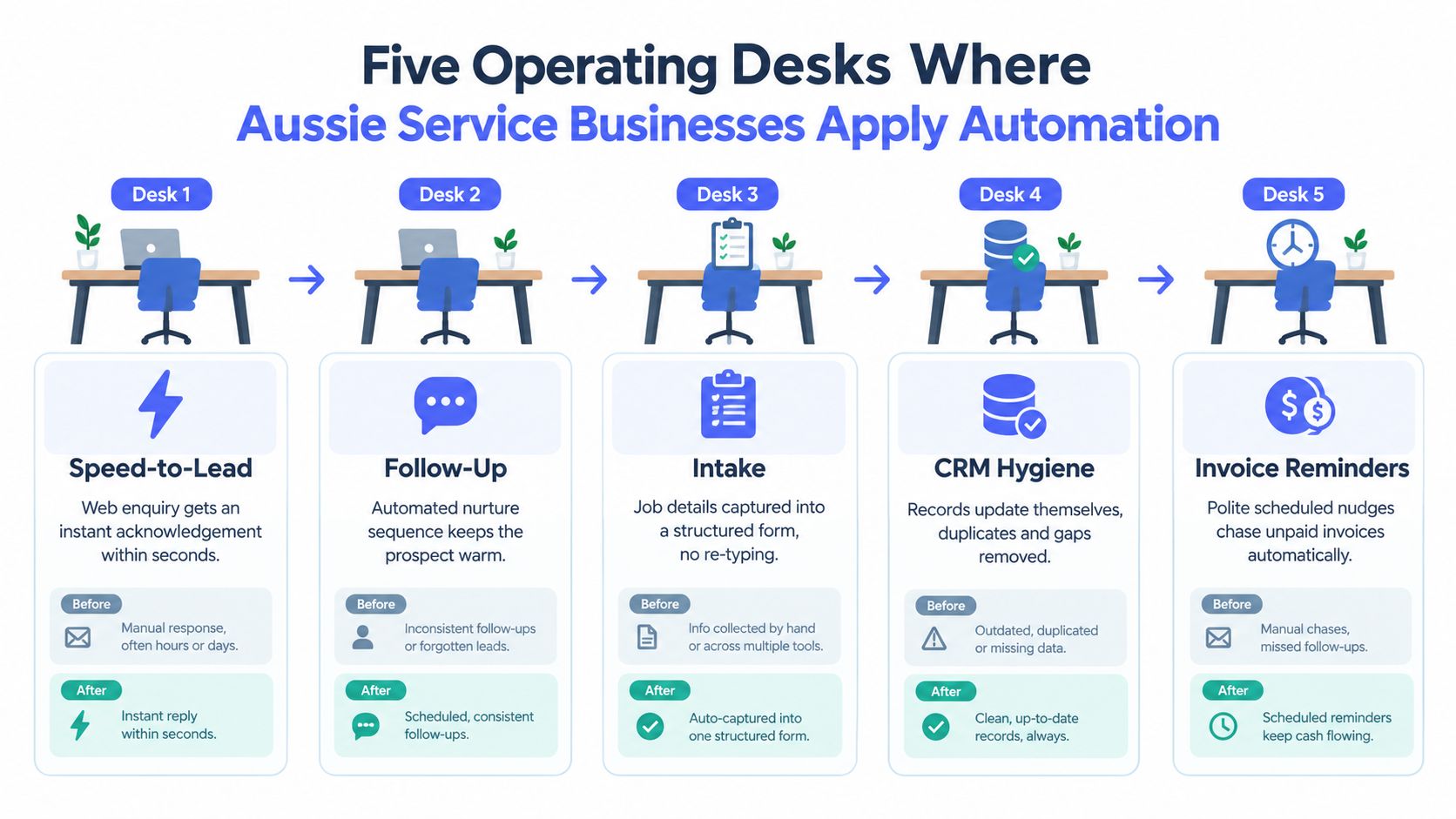
Think of a service business as five desks that never stop moving. If one desk is slow, the others feel it. If all five are linked properly, work flows instead of backing up.
1. Speed to Lead
A web enquiry or hipages lead lands in a shared inbox, the system sends an acknowledgement within seconds, and the booking link goes out while the lead is still warm. The human checkpoint is the quality of the next conversation, not the initial response. That is where automation protects revenue instead of merely saving admin time.
2. Lead Follow-Up
Unconverted quotes should never rely on memory. A structured three-touch sequence keeps the opportunity moving, while a person handles edge cases and negotiation. For a practical example of this style of setup, the AI workflow automation guide shows how the hand-off logic works when follow-up is managed properly.
3. Intake
A booking should trigger a digital form, a document request, and a reschedule link without a coordinator bouncing emails back and forth. That cuts retyping and makes the job ready for the next person faster. The human checkpoint is obvious, someone still reviews messy answers or unusual briefs.
4. CRM Hygiene
Every call note, job status, and invoice should attach to the right record automatically. That gives the next staff member the full picture without hunting through inboxes. CRM systems are built for this kind of centralisation, routing, and sales visibility, as customer relationship management guidance makes clear on Capterra Australia.
5. Invoicing and Reminders
When a job closes, the invoice should go out straight away, then a polite reminder sequence should handle the chase. Xero AU reports that customers spend 50% less time chasing payments when using automated invoicing and reminder workflows, and its guidance recommends reminder logic tied to invoice state rather than ad hoc follow-up Xero AU. MYOB's overdue invoice guidance also supports a staged reminder cadence rather than one-off nagging MYOB.
The point isn't to remove people. It's to stop people from doing the same low-value chase work over and over.
How the Operating Desks Connect into One Pipeline
The desks only work when they hand the file to each other cleanly. A web enquiry should become a CRM record, then an intake flow, then a quoted job, then a closed job, then an invoice and a reminder trail. If any of those hand-offs are missing, the pipeline leaks.
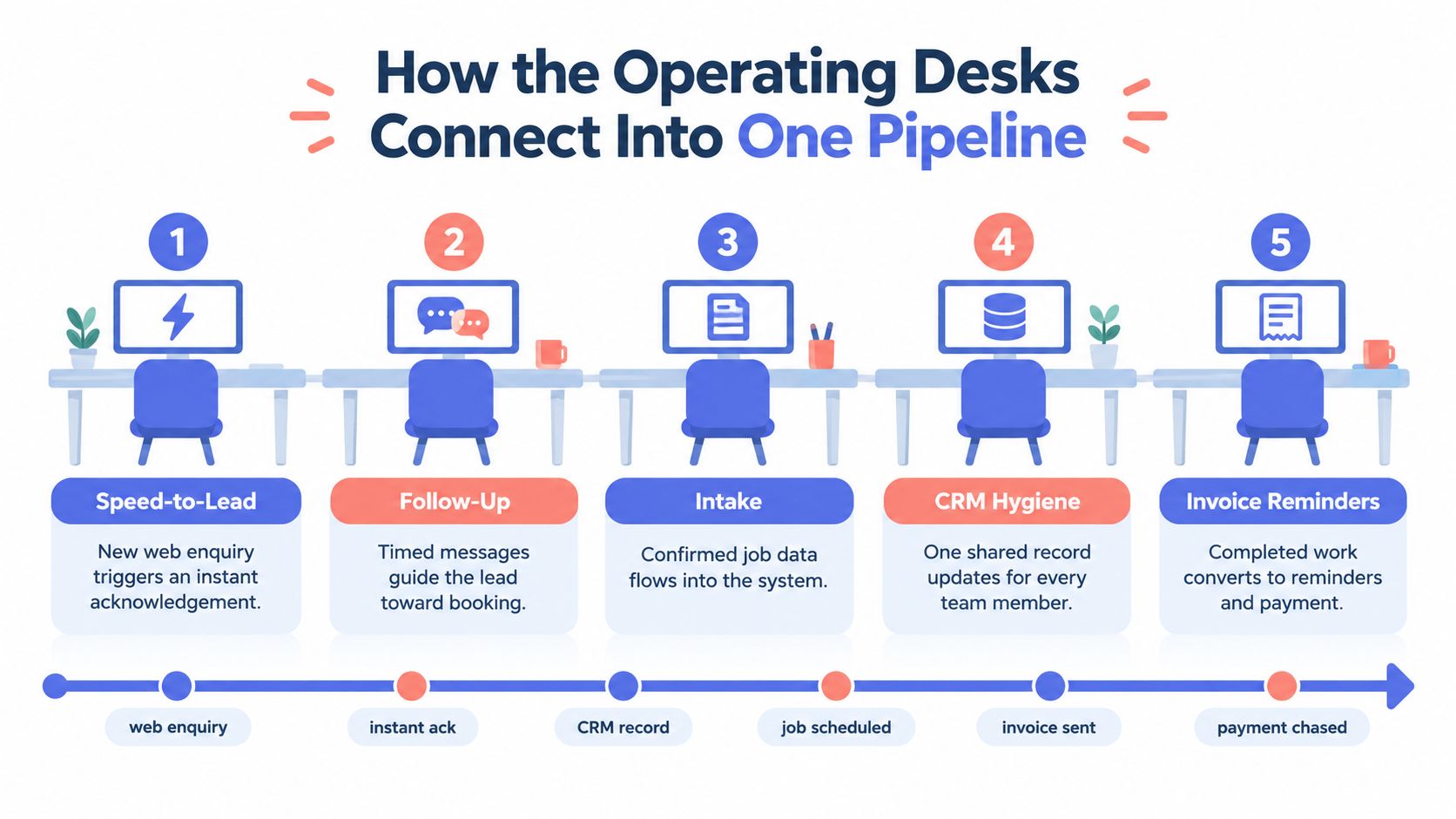
The usual break points are boring, which is why they last so long. A reply lands in an inbox but never gets written to the CRM. A quote is sent but never gets a follow-up trigger. A job finishes but no invoice fires. That's not a software problem first, it's a hand-off problem.
One Pipeline Beats Five Disconnected Tools
If you draw the workflow on a whiteboard, you can usually spot the failure before you buy anything. One record needs one owner, one next action, and one place where the truth lives. If a job can exist in three places with three different statuses, staff will waste time reconciling the mess.
The cleanest systems make every desk a handover, not a restart. That's why an integration map matters more than a new tool purchase. The tool is just the transport.
DIY Build or Managed Automation Partner
This choice is usually obvious once you're honest about capacity. If you've got one CRM, one inbox, and one simple reminder job, a DIY build can be fine. If your team is already stretched, the stack is messy, or customer-facing flows can't afford downtime, managed automation is the safer bet.
For a useful look at how teams use AI callers in the broader automation mix, the AI callers for small business page is a relevant reference point. It's most useful when you're trying to decide where machine assistance helps and where a human should still handle the conversation.
| Dimension | DIY Build | Managed Automation Partner |
|---|---|---|
| In-house capacity | Works when someone has spare time and enough curiosity | Works when the team is busy and needs an owner for the system |
| Risk if it breaks | Acceptable for low-stakes internal tasks | Better for customer-facing flows and revenue-critical hand-offs |
| Maintenance | You own the rough edges and updates | Ongoing monitoring, tuning, and exception handling are built in |
| Scope | Best for one CRM and one simple reminder flow | Better for linked workflows across enquiry, intake, CRM, and invoicing |
| Speed of rollout | Slower, because it competes with day jobs | Faster, because build and upkeep sit with the partner |
If two or more of those filters lean the managed way, stop pretending DIY is cheaper. It usually isn't once you count rework, delays, and the time lost patching edge cases. If you're looking at an automation partner model, Truespeak's AI automation agency approach fits that category, and Truespeak itself offers managed AI operations around first response, follow-up, intake, CRM hygiene, and invoice reminders. That's the right shape when the business needs a system, not another tool to babysit.
A Realistic Implementation Roadmap for Australian SMEs
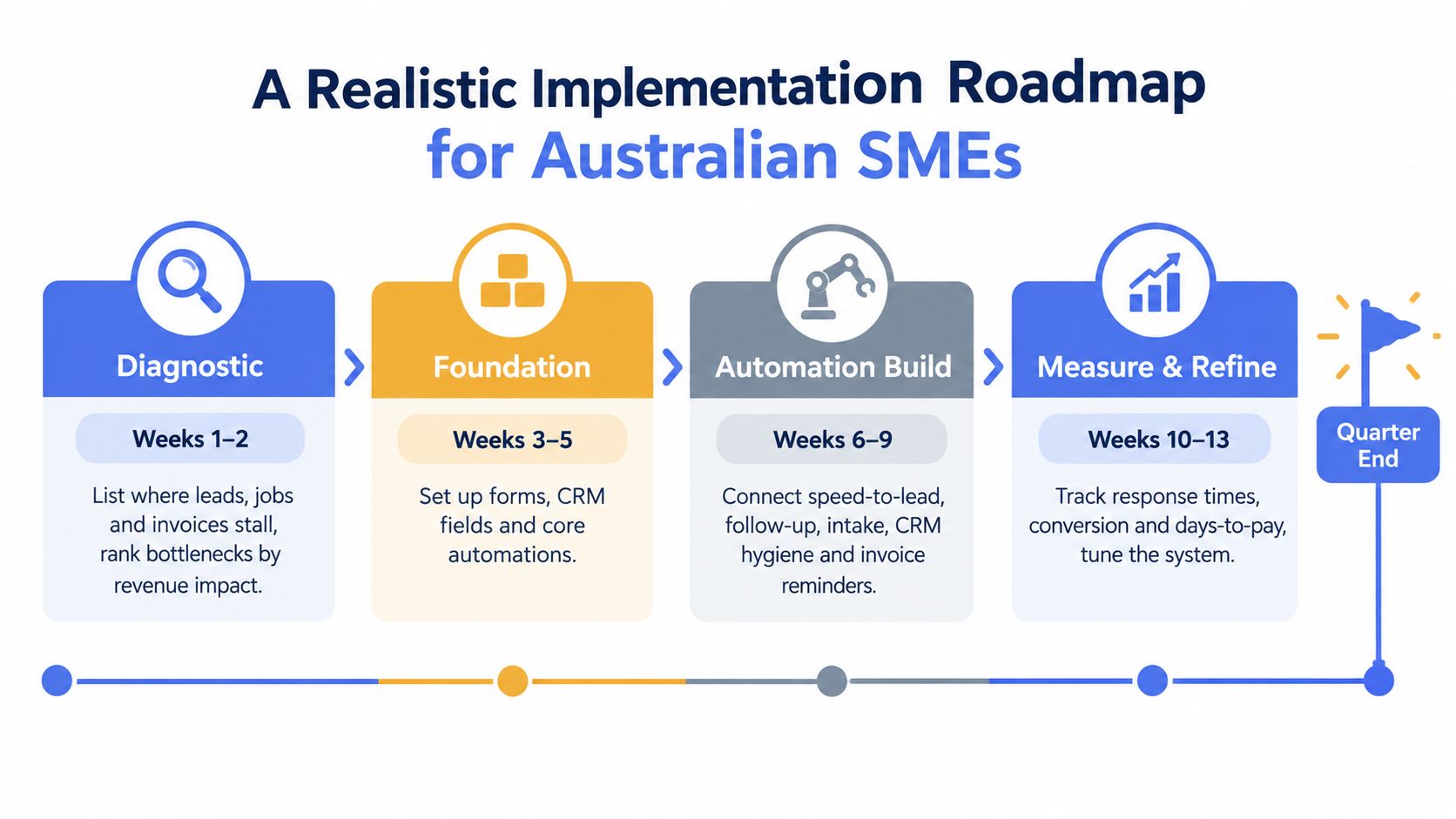
Start with a short diagnostic. List where leads, jobs, and invoices stall, then rank each bottleneck by revenue at risk. Don't choose software first. Choose the bottleneck that hurts the most.
Stage two is foundation work. Set up one source-of-truth CRM, a shared inbox, and a calendar that every later flow can write to. If the base records are messy, every automation on top will inherit the mess.
Build Lightly, Then Expand
Stage three is light automation. Turn on speed-to-lead, intake forms, and invoice reminders, but keep human review gates on anything customer-facing. Stage four is expansion, quoting follow-up, review requests, and reactivation campaigns, with weekly exception reviews and a simple scorecard. Roughly two weeks per stage is a realistic pace for a small Australian service business that wants to finish inside a quarter.
The rule is strict. No new tool enters stage three until stages one and two are stable. That keeps the business from layering automation on top of confusion.
Metrics That Prove Automation Is Working
Ignore vanity dashboards. The number of automated emails sent does not tell you whether the business is healthier. What matters is whether the operation moves faster and cleans up revenue leakage.
Watch the Metrics That Change Monday Decisions
- Baseline capture: record the starting point before anything changes.
- Time to first response: if this improves, speed-to-lead is doing its job.
- Lead-to-quote conversion: shows whether intake and follow-up are working.
- Quote-to-close rate: tells you if the follow-up pipeline is keeping deals alive.
- Invoice days outstanding: proves whether chasing is becoming more disciplined.
- Rework rate: shows whether intake and CRM hygiene are reducing mistakes.
If a metric doesn't change what you'd do on Monday morning, it doesn't deserve dashboard space. That's the standard. Everything else is decoration.
Common Pitfalls and How to Avoid Them
The first failure is simple. Teams automate a broken process and then blame the software when the workflow misfires. The fix is process mapping first, because automation makes bad logic happen faster.
The second failure is weaker than it sounds. A message goes out, but nobody reviews the draft or the hand-off, so bad data flows downstream. Weekly data audits and a human-in-the-loop review gate stop a small mistake from becoming a messy client interaction.
The Mistakes That Quietly Cost Money
- Undefined process: map the steps before you automate them.
- No review gates: check customer-facing messages and exception paths before send-off.
- Tool sprawl: keep one source-of-truth CRM so records don't conflict.
- Ignored exceptions: write a documented escalation rule for non-standard enquiries.
The third problem is tool sprawl. Overlapping platforms create conflicting records, then staff waste time deciding which system is right. A single source-of-truth CRM solves that better than another dashboard ever will.
The fourth problem is the exception path nobody planned for. Every business has weird jobs, urgent requests, and awkward edge cases. If the escalation rule isn't documented, those tasks slide back to staff and the automation becomes extra admin. The difference between value and cost is usually whether those exceptions were designed for upfront.
Truespeak designs, builds, and manages managed AI operations for Australian service businesses that need cleaner enquiry handling, better follow-up, stronger CRM hygiene, and reliable invoice reminders. If you want process-first automation around the tools you already use, visit Truespeak and look at how a managed operating layer can fit your business.