
Truespeak provides managed automation services. This is a comparison of use cases and trade-offs, not an independent product ranking or a claim of hands-on testing. Confirm current features, plans and pricing with each vendor.
The safest answer to best CRM automation software is not a universal winner. Australian teams get better results when they choose the platform that matches the pipeline they run, because a CRM only works if every enquiry has an owner, stage, source, last activity, next action and a clear outcome. Automation should support capture, enrichment, routing, reminders and consistent follow-up, while people keep judgement over relationships, exceptions and consequential decisions.
A CRM comparison is useful only after you define the CRM process it must support. Use practical CRM tips to list the records, permissions, routing rules and reports your team needs, then test the same workflow in each shortlisted system.
This comparison ranks seven platforms by process fit, not by a single score. Pricing is discussed as a consideration that needs vendor confirmation, because seats, contacts, tiers, add-ons, CRM implementation and regional requirements can change the actual cost far more than the headline plan. If your team also wants a managed layer around CRM hygiene, invoice reminders and follow-up discipline, the right setup may include service support around the software rather than more software alone.
Table of Contents
- 1. Salesforce Sales Cloud (AU)
- 2. HubSpot CRM + Sales Hub
- 3. Microsoft Dynamics 365 Sales
- 4. Zoho CRM
- 5. Pipedrive
- 6. Freshsales
- 7. ActiveCampaign Sales CRM + Automations
- Top 7 CRM Automation Tools Comparison
- Choose the System Your Process Can Run
1. Salesforce Sales Cloud (AU)
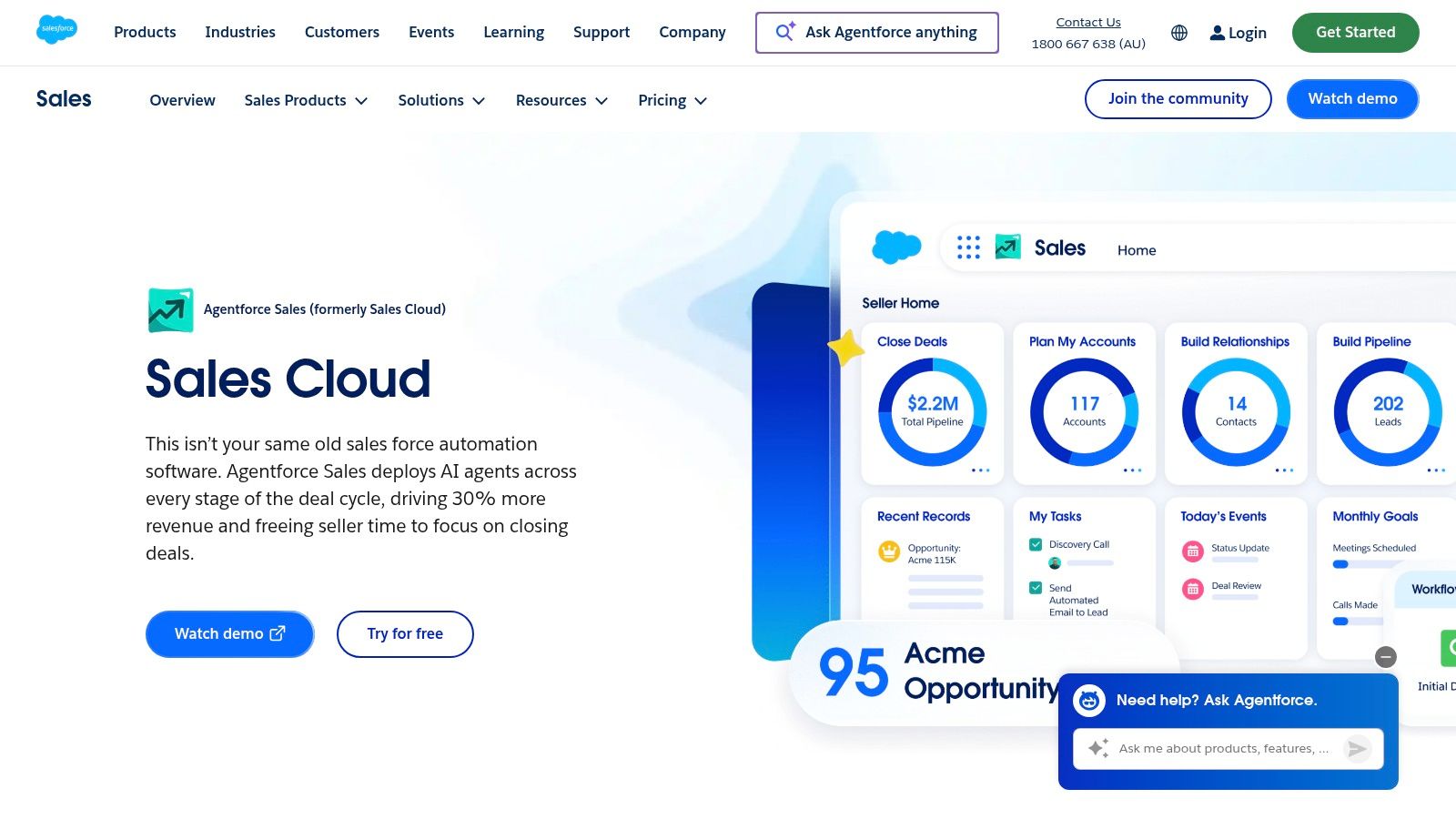
Salesforce earns a place here because it can handle the kind of pipeline complexity that smaller Salesforce alternatives often struggle with. Its Australian product page points to Sales Cloud as the core platform, and the broader Salesforce stack is built for complex automation, approvals, sequencing and reporting, with Australian hosting options available through Hyperforce on the local site (Salesforce Sales Cloud). For teams that need strict ownership rules, multi-step handoffs and deeper permission control, that combination is hard to ignore.
Where Salesforce Fits Best
Salesforce makes the most sense when the pipeline has multiple owners, approval layers or service-level expectations. The platform's strength is not just automation volume, it's the ability to let automation run across records, tasks and communications without losing the audit trail that larger teams need. That lines up with the operating reality of Australian firms that want a single source of truth rather than a stack of separate tools.
A useful way to think about Salesforce is this, it can support the CRM as a live workflow system, not just a database. If you need lead routing, follow-up cadences, escalations and reporting across teams, it offers the depth to build that structure, though configuration usually takes experienced help.
Trade-Offs to Weigh
The downside is complexity. Salesforce is rarely the easiest platform for a small team to launch quickly, and total cost can rise once you start adding editions, automation layers and specialist implementation. That makes it a strong option for businesses with a clear operating model and enough internal discipline to maintain it.
For Australian buyers, the key question is whether the team can keep the system clean after launch. If not, even a powerful CRM can become an expensive place to store stale records and unresolved tasks. For a process-led view of how CRM automation should support the pipeline, see this internal guide on sales process automation.
2. HubSpot CRM + Sales Hub
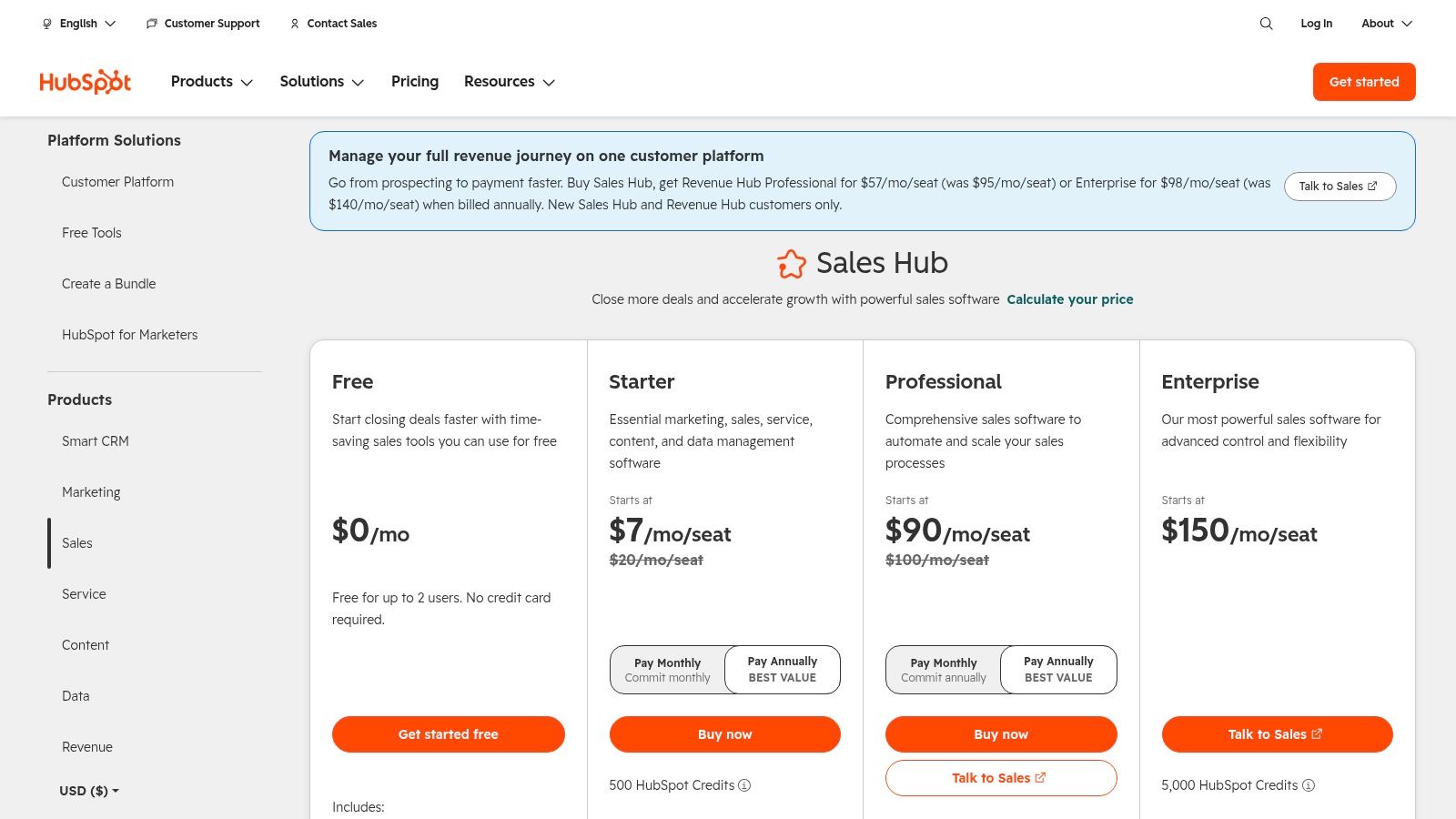
HubSpot is one of the clearest choices when the priority is getting speed-to-lead and handoffs under control without asking the team to live inside a heavy admin model. Its Sales Hub product is built around workflows, sequences and shared tools for sales teams, and the pricing page makes it clear that the product scales by seats and tiers, so real cost depends on how much of the stack you use (HubSpot Sales Hub pricing). For Australian service businesses that need follow-up discipline more than deep custom architecture, that structure is often the sweet spot.
Why Teams Adopt It Quickly
HubSpot is strong when the business wants the CRM to feel approachable from day one. The workflow builder, sequences, inbox tools and meeting booking features are easy to explain to non-technical users, which matters when the people who need to use the system are also answering phones, quoting work and chasing approvals. That ease of use is a real advantage in SMEs where the CRM must become a habit, not a project.
The practical fit is strongest when marketing and sales handoffs are part of the pain point. HubSpot's native structure makes it easier to connect enquiry capture, first response and pipeline movement in one environment, which is exactly the kind of operating flow many Australian service businesses need when leads move fast and admins are limited.
Where It Can Fall Short
The trade-off is that costs can climb as you add contacts, seats or more advanced hubs, and some deeper automation is gated behind higher tiers. That means the software can look simple at the start but become more expensive as the business matures. Buyers should test the path from starter use to scaled use before committing.
If you want a broader framework for choosing CRM automation tools around workflows and operational discipline, this internal piece on CRM automation tools is the right companion read.
3. Microsoft Dynamics 365 Sales
Dynamics 365 Sales fits organisations already standardising around Microsoft 365 and Azure. Microsoft places the product within its broader sales and pricing ecosystem, and the automation path runs through Power Platform, Outlook, Teams and Azure identity controls (Microsoft Dynamics 365 Sales pricing). That makes it a practical choice when the CRM has to sit inside the same operating environment as the rest of the business.
What the Microsoft Stack Does Well
Its clearest strength is cross-app automation. If a lead arrives in Outlook, a Power Automate flow can route it into Dynamics, assign an owner based on territory or product line, and create a next-action task without manual handoff. For teams already working in Outlook, Teams and SharePoint, that reduces tool-switching and keeps the record of action in the same ecosystem people use every day.
The Microsoft stack also helps with governance. Organisations already using Microsoft identity and security controls can extend those practices into the CRM, so adoption fits an existing operating model rather than forcing a separate one. For internal IT teams, that can make rollout and support easier to manage.
What Buyers Should Watch
The trade-off is licensing and administration. Dynamics can be less straightforward to buy and manage than simpler systems, and customisation often works better with an experienced admin or partner. Buyers should treat pricing and configuration as separate questions, because the product page shows the framework but not the full cost of a live deployment.
In process terms, Dynamics suits teams that want lead management, task routing and reporting to follow the same Microsoft rules they already use elsewhere. It ranks well on process fit where ownership, next actions and controlled handoffs matter. If the business does not already run on Microsoft tools, the setup burden can outweigh the benefit.
4. Zoho CRM
Zoho is one of the strongest value-oriented options for Australian SMEs that want proper automation without moving into enterprise overhead. Its CRM product page highlights workflow automation and a broad application suite, while Zoho also documents Australian data centre support, which matters for teams that care about regional hosting preferences (Zoho CRM). That combination makes it a serious contender for buyers who want breadth without the price and complexity profile of the largest platforms.
Where It Fits for SMEs
Zoho's strength is the amount of structure it gives you before you start paying for extra tools. Workflow rules, Blueprint, assignment routing and lead scoring are all useful for businesses that need the CRM to enforce a process instead of merely recording one. That's important for service businesses where lead ownership and stage discipline tend to slip when the week gets busy.
Blueprint is especially relevant if your sales process has clear stages that people must not skip. It helps standardise movement through the pipeline, which means the system can guide behaviour rather than just log outcomes after the fact.
Where Zoho Needs Care
Zoho's breadth can also be its drawback. The interface depth may take time to tune, and marketplace integrations are not always as plug-and-play as the best-known rivals. That usually means someone on the team has to own configuration, review records and keep the automation tidy.
For Australian buyers, Zoho is compelling when the priority is native capability, regional hosting options and a broad suite that can grow with the business. It's less compelling if the team wants a system that feels polished immediately with almost no admin input.
5. Pipedrive
Pipedrive is built for one thing above all else, keeping the pipeline visible and moving. Its product site centres the visual pipeline experience, and the broader ecosystem includes workflow automation, add-ons and more than 500 integrations, which makes it a good fit for teams that want discipline without a lot of ceremony (Pipedrive). For many Australian service teams, that simplicity is the point.
Why Pipeline-First Matters
Pipedrive works when reps need a clear, opinionated view of what to do next. The stage-based design helps keep ownership visible, and the automation layer can trigger tasks and follow-ups based on movement through the deal cycle. That makes it especially practical for businesses where salespeople need to act quickly and managers need a clean view of deal progress.
The platform's big advantage is adoption. Reps usually understand it fast, which matters because even strong automation fails if the team avoids the CRM. If the goal is to reduce friction and make pipeline hygiene normal, Pipedrive is one of the most straightforward tools in the category.
The Trade-Off
Pipedrive can become more expensive once you start layering on advanced reporting, optional modules and extra automation features. It's also less suited to organisations with very complex objects, approvals or cross-functional service architecture. In other words, it shines when the pipeline is the product.
For buyers in the Australian SME segment, that can still be a great trade. A simpler CRM that gets used every day usually beats a more powerful system that reps only check when a manager asks for an update. If your real problem is missed next steps, poor visibility and weak follow-up, Pipedrive deserves a close look.
6. Freshsales
Freshsales is a strong middle ground for teams that want modern automation, built-in communication tools and regional hosting considerations without moving into the weight of enterprise software. Freshworks documents its CRM product with workflows, sequences and Freddy AI, and it also provides Australian hosting information across its services, which makes it relevant for buyers who need to think about data location and processing controls (Freshsales).
Why It Works for Lean Teams
Freshsales is attractive because it bundles a lot of operational usefulness into a relatively modern interface. Workflow automation, sequences, telephony, SMS and collaboration tools help teams move from enquiry to action without stitching together too many third-party services. That matters when the business wants fast follow-up and sensible automation without a large implementation team.
It's also a sensible option for teams that want the CRM to support communication, not just record it. A sales rep can work inside a system that handles tasks, messaging and reminders in one place, which lowers the chance of leads falling through the gaps.
Where to Be Careful
The caution is that some features may depend on sub-processors or product-specific documentation, so Australian buyers need to confirm data-handling details before rollout. Freshworks also spreads information across product lines, which can make evaluation slower than it should be if you're trying to compare compliance and feature scope quickly.
Freshsales is a good fit when the team wants a practical balance of usability, automation and cost discipline. It's less ideal if the business needs a very deep enterprise object model or a single, tightly documented governance environment.
7. ActiveCampaign Sales CRM + Automations
ActiveCampaign suits teams that care more about follow-up discipline than about heavyweight CRM structure. Its sales CRM sits inside a broader automation platform, and the product page shows a system built around CRM fields, stages, lead scoring and trigger-driven automations (ActiveCampaign Sales CRM). For definitions and workflow patterns, see what is CRM automation. That combination makes it relevant for lean teams that need the software to keep acting on leads after hours, on weekends and across multiple touchpoints.
Where ActiveCampaign Is Strongest
ActiveCampaign is strongest where sequences matter. If your process depends on email follow-up, re-engagement, reminders and multi-step nurturing, it gives you a capable automation layer. The value is not just message sending, it is the link between CRM stages, lead behaviour and the next action a rep should take.
That makes it practical for businesses with longer sales cycles or opportunities that go quiet before converting. The CRM module is lighter than enterprise suites, but for many service businesses the automation depth matters more than deep object modelling.
What to Watch on Cost and Fit
The main caution is pricing, which depends on contact count. As the database grows, the economics can change quickly, so buyers should assess the full cost path, not only the entry point.
ActiveCampaign is less suitable for complex B2B CRM structures where the main need is multi-object governance and tighter sales controls. It fits better when the business wants follow-up discipline, cross-channel sequences and practical CRM support around those workflows.
Australian buyers should also confirm data handling and residency expectations directly with the vendor before rollout. That check matters as much as feature depth if compliance and processing controls are part of the buying brief.
Top 7 CRM Automation Tools Comparison
| Product | 🔄 Implementation complexity | ⚡ Resource requirements | 📊 Expected outcomes | 💡 Ideal use cases | Key advantages |
|---|---|---|---|---|---|
| Salesforce Sales Cloud (AU) | High, extensive configuration and specialist implementation required | High, premium licenses, skilled admins, integration effort; AU Hyperforce option | Enterprise-grade automation, complex routing/approvals, strong compliance | Large orgs needing multi-object automation, SLAs, AU data residency | Scalable ecosystem, mature integrations, native AI options |
| HubSpot CRM + Sales Hub | Low–Medium, fast setup with intuitive UI | Medium, seats/hubs add cost; limited advanced automation on lower tiers | Quick speed-to-lead, streamlined marketing→sales handoffs | Service businesses and SMBs wanting rapid deployment and easy pipelines | Strong UX, broad native features, fast time-to-value |
| Microsoft Dynamics 365 Sales | Medium–High, customisation often needs experienced admins/partners | High, licensing complexity, Power Platform skills, Azure integration | Tight Microsoft app automation, secure identity, enterprise reporting | Organisations standardised on M365/Azure needing cross-app flows | Deep Outlook/Teams integration, Power Automate & Copilot support |
| Zoho CRM (AU-ready) | Medium, admin tuning and UI configuration recommended | Low–Medium, cost-effective bundles; AU data centre available | Broad native features for SMBs, guided processes (Blueprint) | Cost-conscious SMBs wanting AU hosting and full-featured CRM | High value-for-money, extensive first-party app suite |
| Pipedrive | Low, very fast to roll out and adopt | Low, lightweight plans; add-ons for advanced needs | Disciplined pipeline movement, quick rep adoption, faster ROI | Sales-first teams focused on pipeline visibility and simple automation | Easy to use, opinionated pipeline UX, fast deployment |
| Freshsales (Freshworks) | Low–Medium, prebuilt templates ease implementation | Medium, built-in telephony/SMS; regional hosting config available | Good out-of-the-box automations and AI assistance (Freddy) | Teams wanting balanced features, cost and AU hosting options | Strong templates, native communications, AU hosting controls |
| ActiveCampaign (Sales CRM + Automations) | Low–Medium, intuitive visual automation builder | Low–Medium, pricing tied to contact counts | Powerful multi-channel sequences, scalable lead nurturing | Lean teams prioritising automated follow-ups and re-engagement | Extremely capable automation canvas for email/SMS/site triggers |
Choose the System Your Process Can Run
The best choice starts with a process map, not a product demo. List the exact flow your team needs to run, enquiry capture, qualification, routing, follow-up, handoff, reporting and outcome states. Then check whether each platform keeps ownership and next actions visible, because if those two things disappear, the CRM is just another place where work goes to die.
Cost needs the same discipline. Compare seats, contacts, tiers, add-ons, integrations, administration and implementation, then check the Australian hosting and data-processing requirements that apply to your business. A platform that looks affordable on the pricing page can become costly once you add the people, features and support needed to make it usable.
That's why smaller, well-designed systems can outperform bigger stacks. A CRM with strong human review, clean routing and consistent follow-up will usually beat a larger platform that fragments hand-offs and leaves stale records behind. If the team can't maintain it, the automation only scales the mess.
If you want help turning a CRM into a live operating system, not just a database, visit Truespeak. We design, build and manage CRM automation for Australian service businesses that need faster first response, cleaner follow-up and better visibility. If your team wants the pipeline to stay owned, reviewed and actioned after launch, Truespeak can help make that happen.