
You're in the ute between jobs. Your phone has a missed call, a Facebook message asking for a quote, two site visits that still aren't booked and a deposit that hasn't arrived. The plans are in an email, the quote is in your estimating software, and the last conversation with the client is buried in a message thread.
The problem isn't that you need more leads. It's that nobody can see, at a glance, which enquiry needs a response, which quote needs chasing and which invoice is holding up the next step. For a small building business, a CRM should make those obligations visible without creating another full-time admin job.
That means building a thin operating layer around the tools you already use. Capture the work once, assign an owner, record the stage and make the next action obvious. If slow first responses are part of the problem, speed-to-lead automation can help ensure an enquiry is acknowledged and routed while you're on site, without pretending a robot can replace a builder's judgement.
Table of Contents
- The Moment Enquiries Slip Through the Cracks
- What CRM for Builders Actually Means
- Core Workflows a Builder CRM Must Handle
- How to Choose and Integrate a Builder CRM
- An Implementation Roadmap That Does Not Break the Week
- Why Cash Flow Belongs in the CRM Conversation
- When a Managed AI Operations Partner Makes Sense
- Practical Examples and What to Measure Next
The Moment Enquiries Slip Through the Cracks
The ute is parked outside a job. A missed call is waiting, a Facebook message asks whether you can quote a renovation, and a client wants to know when someone can inspect their site. Meanwhile, an invoice remains unpaid and nobody's sure whether the deposit has cleared.
Each item looks manageable on its own. The trouble starts when they live in different places: enquiries in email and social messages, quotes in estimating software, decisions in texts, and payment status in accounting. If the next action exists only in someone's memory, it's easy for the team to miss it.
That's the everyday operational issue a builder CRM should solve. It isn't a contact list. It's a shared view of what needs attention, who owns it and what happens next, from the first enquiry through to payment follow-up.
The practical test: Can someone else in the business see what's overdue without asking the owner to reconstruct the week?
Australian construction includes a huge number of small operators. Infrastructure Australia reported 452,820 construction businesses operating nationally as of June 2024, with almost 98% employing fewer than 20 people. It also reported approximately 3,000 construction business insolvencies during 2023–24, representing 27% of all Australian insolvencies. Those figures help explain why missed follow-up and administrative sprawl aren't minor inconveniences for small builders. There's often little spare capacity to catch mistakes after they happen. (Infrastructure Australia's 2024 Infrastructure Market Capacity Report)
The fix isn't automatically a feature-heavy platform. Start with one reliable operating view that brings enquiries, quotes, jobs and money-related actions into focus. If your team's week resembles the scene in the ute, focus on fewer dropped tasks before you focus on generating more leads.
What CRM for Builders Actually Means
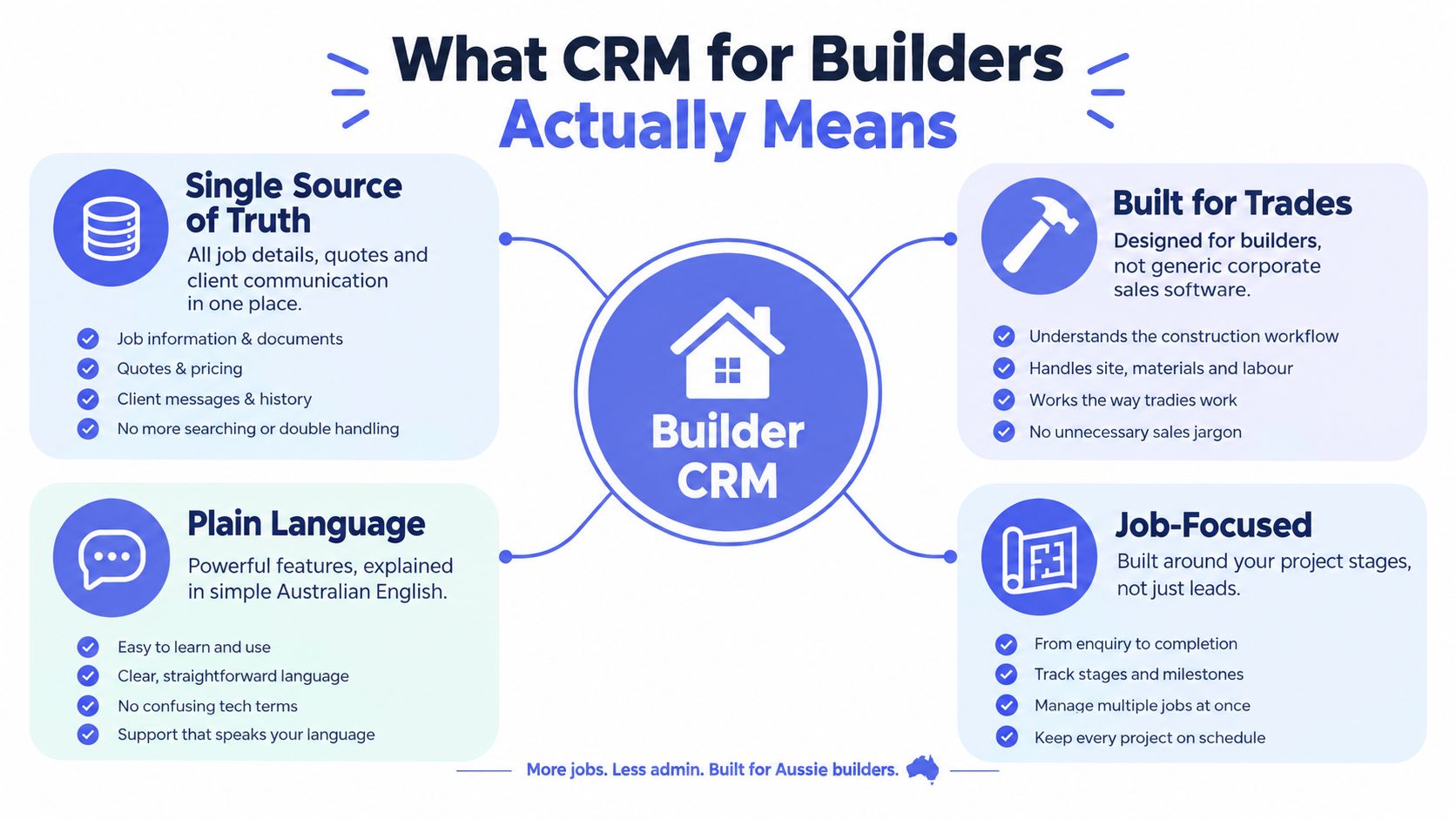
A CRM for builders is a pipeline plus an operating layer. It gives the team one dependable place to see the customer, the job opportunity, the current stage, the person responsible and the next action.
Think of it as a shared ledger for work in progress. It doesn't have to replace estimating, accounting or project-management software. Instead, it connects the information those tools need to share, so an enquiry doesn't lose its scope when it becomes a quote, or lose its payment context when it becomes an active job.
Three Kinds of Work to Keep Visible
A builder CRM should make three connected job families easy to manage:
- New business: Record enquiries, qualification, site visits, estimates, quotes and follow-up. Every opportunity needs an owner and a clear next step, even when the next step is to wait for plans.
- Active work: Connect the accepted scope to the job record. Track key handoffs, variations and client decisions without trying to turn the CRM into a complete scheduling or site-management system.
- Money: Keep deposits, progress claims, invoices and payment follow-up visible alongside the relevant project. The CRM can flag an action; the accounting system remains the authority for invoice status and balances.
Generic sales software is often designed around sales teams managing opportunities and accounts. That can work for builders, but the language and stages need to reflect actual construction work. “Qualified” isn't useful if nobody can tell whether the plans have arrived, whether the site visit is booked or whether the scope is ready for estimating.
The point isn't to find a CRM that does everything. It's to make the tools you already rely on work together around a single source of truth. In an industry where construction contributed 7.0% of national GDP in 2023–24, dependable records across clients, quotes and project handoffs have real commercial relevance. (Australian Bureau of Statistics data on the Australian construction industry)
Core Workflows a Builder CRM Must Handle
A small builder doesn't need a complicated sales machine. The CRM needs to handle repeatable work, keep exceptions visible and leave people in charge of decisions that affect clients or money.
The Essential Workflows
Lead intake and first response. Capture enquiries from calls, forms, email and social channels in one place. Record enough context to route them sensibly, then assign an owner and a next action. A fast acknowledgement is useful, but it shouldn't promise a site visit or a price before someone has checked the job.
Quote follow-up. When an estimate or proposal goes out, record the issue date, the estimator responsible and the agreed follow-up action. A reminder should carry the original enquiry and quote context, so the person following up doesn't have to search through inboxes before contacting the client.
Structured job intake. Before work moves to estimating or delivery, collect the information the next person needs. That can include scope, site address, drawings, selections, budget, target start date and decision-maker. NSW Government research found that 57% of Class 2 builders were at a basic stage of digitalisation, and 67% identified software and licence costs as a major barrier. A lightweight intake layer around existing tools is a more practical response than assuming the whole business can or should move onto one platform. (NSW Government research on digital readiness in construction)
CRM hygiene. Every open opportunity should have a contact, an owner, a stage and a next action. Flag likely duplicates by email or phone, and surface incomplete records and stale opportunities for review. A weekly exception list is more useful than a dashboard nobody checks.
Invoice reminders. Link the CRM record to the accounting system's invoice state and due date. Routine reminders can be queued automatically, but disputed claims, sensitive client relationships and high-value messages should go to a person for approval before sending.
The workflow is useful only if the team can see what needs attention. For a wider perspective on how customer records and project tasks can sit together, UI Lib's guide to CRM and project management software for agencies offers a useful comparison of the two system roles.
Here's a short walkthrough of the basic CRM workflow idea:
Use the video as a starting point, not a blueprint. Your own pipeline should match how jobs move through your business, with a person approving client-facing communication and any action that changes payment status or commits the team to work.
How to Choose and Integrate a Builder CRM
Don't start with the longest software feature list. Start by asking what gets lost between your current tools and what the smallest useful system needs to do.
A builder-specific CRM may suit a business that wants construction stages and job records ready to use. A generic CRM can work when the team needs a flexible lead pipeline and has someone willing to configure it. A spreadsheet-plus-automation setup can be enough when the process is simple, but it needs clear ownership and reliable controls or it will become another silo.
| Criterion | Why it matters for builders | Smallest useful system | Builder-specific CRM |
|---|---|---|---|
| Estimating and accounting links | Prevents repeated entry and keeps key context connected | Shared identifiers and a reliable handoff | Look for integrations that match the tools already in use |
| Mobile access | Staff need to check or update records between office and site | A mobile-friendly form or interface | Check that the field workflow is practical, not just available |
| Structured intake | Estimating needs a usable brief, not an email trail | Required fields and document links | Prefer stages and fields that fit the jobs you do |
| Action visibility | An owner needs to know what's overdue and who must act | A shared task or exception queue | Confirm that follow-up and handoffs are easy to see |
| Audit trail | Decisions, approvals and changes need context | Dated notes and linked records | Check how approvals and communications are retained |
| Data and access controls | Client and project information must be handled carefully | Restrict access to what each role needs | Review the provider's documented security and data-handling options |
Don't assume that a platform is better because it includes estimating, scheduling, accounting and client communications in one package. If your team already trusts its estimating or accounting tools, integration may be safer and easier to adopt than replacing them. NSW builders have identified software and licence cost as a barrier, which makes a small, useful system a sensible starting point rather than a compromise.
For a broader scan of CRM options for smaller businesses, Growth 4 Trades' small business CRM list can help you build a shortlist. For construction-focused comparisons relevant to local workflows, see Procore vs Buildxact for Australian builders.
Choose the setup that the team will maintain. If it takes too much effort to record a call, update a stage or find the next action from a phone, the system will drift no matter how polished the demo looked.
An Implementation Roadmap That Does Not Break the Week
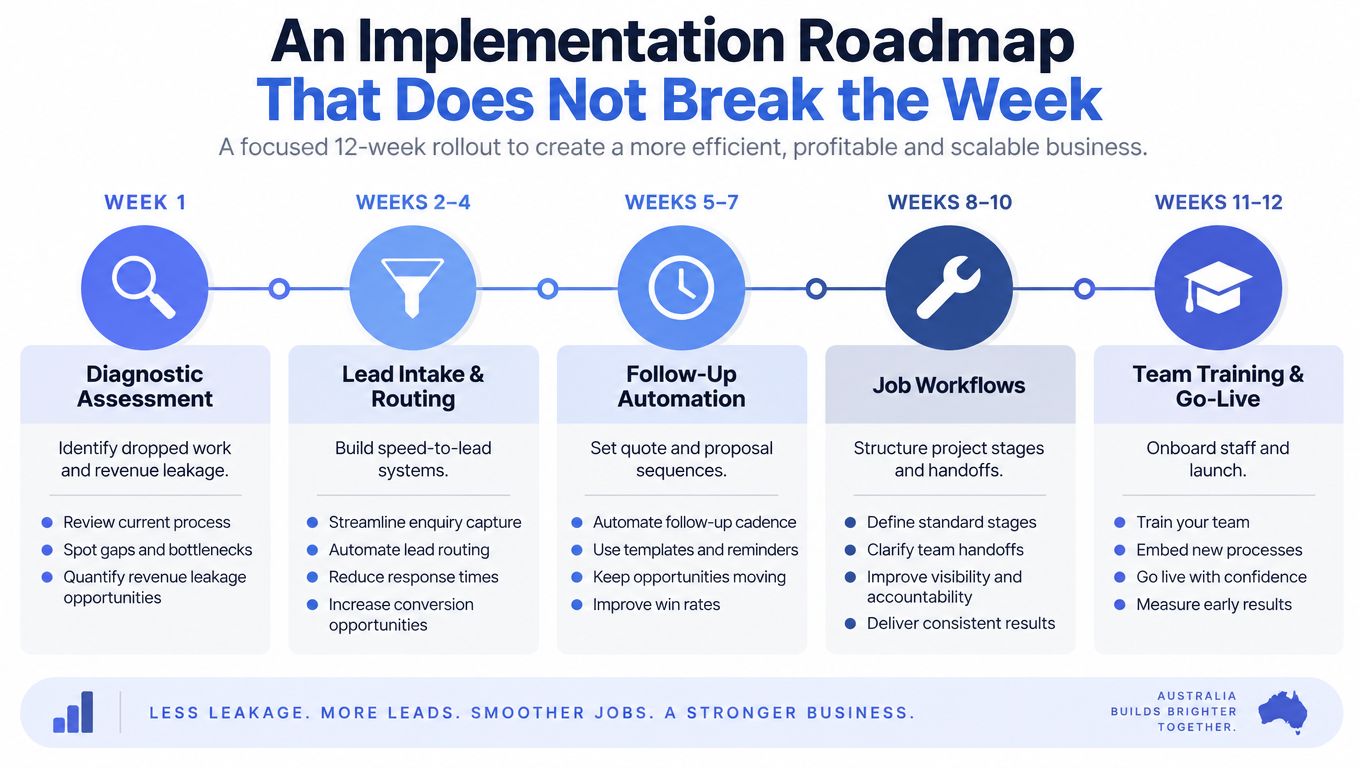
Roll out the CRM in phases. Keep the team's current work moving while you identify where records disappear and put the most useful controls in place first.
A Practical Rollout
- Week one, diagnose the gaps. Follow a few real enquiries from first contact to quote, job handoff and payment. Note where details get copied, where responsibility changes hands and where a task can be forgotten.
- Weeks two to four, centralise intake and routing. Set up the core record, required fields, owner assignment and first-response reminders. Test with real enquiries before connecting every channel.
- Weeks five to seven, organise quote follow-up. Add reminders for quotes and dormant opportunities, with the quote and enquiry context attached. Set clear rules for who approves messages and when a personal call is better.
- Weeks eight to nine, structure job intake and hygiene. Require the brief and key documents before handoff. Create a routine to review duplicates, incomplete records and opportunities with no current next action.
- Weeks ten to eleven, connect payment follow-up. Use invoice state and contractual due date from the accounting system to trigger reminders. Route disputes and unusual cases to a human rather than pushing them through a generic sequence.
- Week twelve, make the workflow visible. Review the action queue and reporting with the people who use it. Adjust rules that create noise, and document how staff should handle exceptions.
Keep People in the Decision Loop
Automation should prompt action, not make promises or settle disputes. A person should approve sensitive client messages, exceptions outside the normal process and any communication about a contested payment.
Queensland builders also need the contract status captured at intake. The QBCC says domestic building work priced above $3,300, including labour, materials and GST, requires a written contract, signed and dated by each party or an authorised representative. Keep the scope, value, signatures and contract status linked to the job record, and don't let a job move into operational handoff while required documents are missing. (QBCC guidance on domestic building contracts)
A rollout is working when staff can follow the process during an ordinary busy week. If the new system needs a special launch day to function, simplify it before adding more automation.
Why Cash Flow Belongs in the CRM Conversation
A builder can win plenty of enquiries and still run short of cash if deposits are missed, claims stall or follow-ups fall through. For a small team, better cash conversion and fewer dropped enquiries matter more than chasing leads the business cannot service. A CRM should connect the enquiry and job record to the next payment action, using the accounting and project tools already in place.

Make Receivables an Action Queue
The Payment Times Reporting Regulator reported an average payment term of 38.0 days for construction businesses, compared with 35.4 days across all industries. It also found that 57.3% of construction invoices were paid within 30 days, compared with 67.2% across all industries. (Payment Times Reporting Regulator's construction payment data) Those delays make payment follow-up part of the operating workflow, not a task to leave in someone's inbox.
Build a receivables queue that shows whether the deposit has arrived before work starts, what payment is due next, whether a claim is disputed and who approves the next message. Trigger reminders using invoice status and the contractual due date, with project and milestone context. Pause routine reminders when a client disputes a claim or the team still needs to provide information.
Queensland payment claims must identify the relevant work, goods or services, state the amount claimed and request payment. If the contract does not set a due date, payment is due within 10 business days after the claim is given to the respondent. (QBCC guidance on requesting payment) Configure reminders around the contract and claim status. A fixed sequence that ignores either can create avoidable disputes.
Link expected outgoings to incoming milestones with a forecast construction costs and payments. For the follow-up process, see how builders automate progress claim reminders. Keep approval with a person for disputed, high-value or client-sensitive messages, and log what was sent and why.
When a Managed AI Operations Partner Makes Sense
A managed operations partner isn't another CRM license. The role is to keep the system useful after setup: monitor the workflow, tune rules, review failures, handle exceptions and give the owner a clear view of what needs attention.
That distinction matters. A system can be technically live and still fail in practice if enquiries arrive outside the form, staff stop updating stages or reminders go out without enough context. A managed operator reviews those edge cases and adjusts the workflow while people retain control over judgement and client relationships.
What Good Operation Looks Like
- Monitoring: Check that intake, routing, reminders and integrations are working as expected.
- Approval gates: Hold sensitive client messages and payment-related actions for human review.
- Exception handling: Route unusual enquiries, incomplete briefs, disputes and failed handoffs to a named person.
- Weekly visibility: Surface stale opportunities, overdue tasks and incomplete records in a queue the team can act on.
- Runbooks: Document the rules, alerts, prompts and review cadence so the process doesn't depend on one person's memory.
For a builder with a lean office team, the choice isn't “software or admin hire”. Compare the ongoing cost and reliability of keeping the workflow maintained in-house with having a specialist operate the system around your current estimating, accounting and project tools. A managed approach makes more sense when nobody has time to own the rules, but replacing the systems the team already uses would create more disruption than value.
Assess the first 30, 60 and 90 days by checking whether the records stay current, exceptions reach the right person and staff can see their next actions. These are review points, not promised performance milestones. If the system creates extra admin or sends messages the team has to apologise for, fix the process before expanding it.
A good operating layer should make work visible without taking judgement away from the people who know the client and the job.
Practical Examples and What to Measure Next
Use a few clear workflows to test whether your CRM supports the way the business works. Keep the rules easy to inspect, and make sure staff know what happens when a record doesn't fit the template.
Four Workflows to Borrow
Enquiry to inspection. A form captures scope, site address, drawings, budget and decision-maker, then routes the opportunity to an owner. Set a 15-minute first-response target as an internal service standard if it suits your team, but treat it as a target to measure, not a guaranteed outcome. The owner decides whether the enquiry is a fit and confirms the inspection.
Quote follow-up. Create estimator prompts at day three, day seven and day fourteen after a quote is issued. Each prompt should show the original enquiry, scope and quote status, so the estimator can choose the right message or call rather than sending a blind reminder.
CRM hygiene. Flag leads with no activity for seven days, likely duplicates by phone or email, and briefs missing required details. Have a person review the flags, because a quiet record may be waiting on the client rather than forgotten.
Invoice follow-up. Trigger the action from the invoice state and contractual milestone. Route disputes and exceptions to an approver, and keep routine reminders linked to the relevant project and claim history.
Measure the Work, Not the Logins
Pick a baseline before changing the workflow. Then review the same measures regularly:
- Enquiry-to-first-response: How long does it take for a person to acknowledge and own an enquiry?
- Quote turnaround: How long between receiving a usable brief and issuing a quote?
- Quote-to-start conversion: Which quoted jobs progress to a start, and where do others stall?
- Days sales outstanding: How long does the business wait to collect invoiced work?
- Overdue invoices by ageing: Which payments need attention, and which are disputed?
- Reminder-to-payment conversion: Which follow-ups lead to payment, without inappropriate chasing?
Don't treat better CRM hygiene as a result by itself. Track duplicate rate, incomplete records and stalled leads in your own system over time, then review whether the changes help staff act sooner and keep context intact. The point is fewer missed enquiries, cleaner handoffs and more dependable visibility over money due.
Truespeak designs, builds and manages AI operating systems around the tools Australian businesses already use, including workflows for lead response, intake, CRM hygiene and invoice reminders. If you want a practical operating layer that keeps people in control of client communication and exceptions, visit Truespeak to discuss what would fit your building business.