

A CRM for service companies is a specialized software platform that centralizes customer data, job management, and communication workflows to help service businesses grow without losing control of their operations. The industry term is “Customer Relationship Management,” and for service businesses specifically, it goes well beyond a contact database. A well-configured CRM stores customer history, tasks, quotes, and documents so agreed work stays visible through the cracks as your team scales. Service businesses that skip this infrastructure typically hit a ceiling where manual processes and disconnected apps start costing them clients and revenue.
What Does a CRM for Service Companies Actually Do?
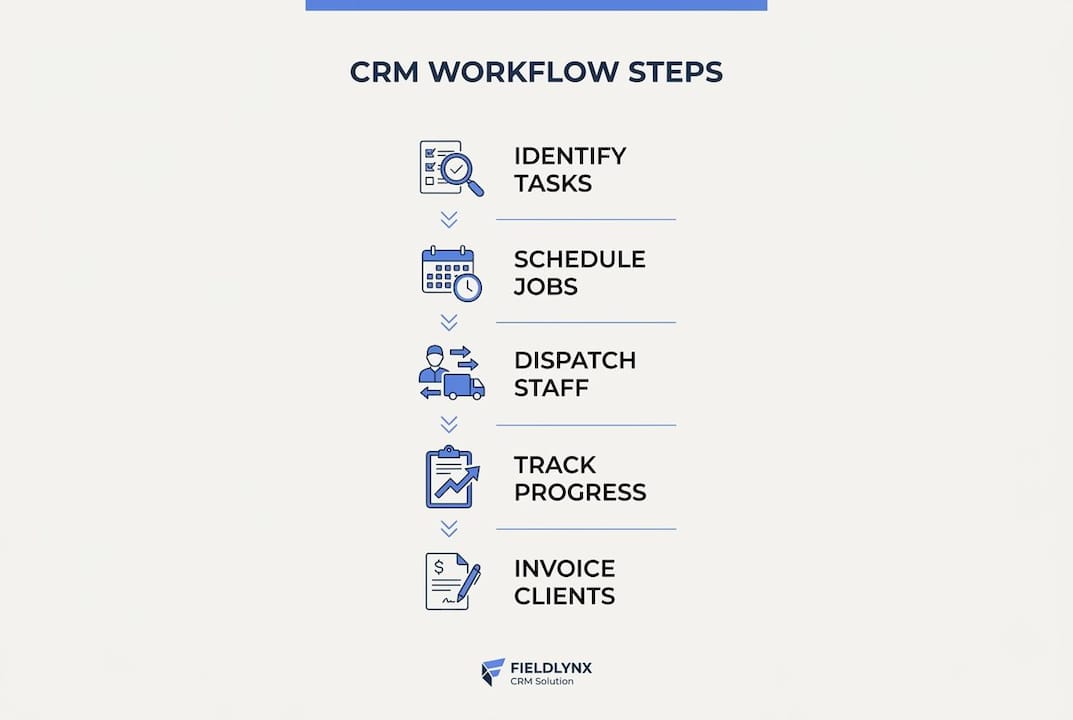
A service business CRM manages customer information, scheduling, dispatching, invoicing, and workflow automation across the full service lifecycle. That definition matters because it separates purpose-built service CRMs from generic sales CRMs designed for product companies. A plumbing company, an IT managed service provider, and a cleaning franchise all need the same core capability: one place where every customer interaction, job status, and payment lives together.

The operational payoff is real. When a technician updates a job status in the field, the office sees it instantly. When a client calls to ask about their invoice, your team has the full history in front of them in seconds. That kind of visibility is what separates service businesses that scale cleanly from those that grow chaotically.
Key Features to Look for in CRM Software for Service Providers
The right CRM for service providers does more than store contacts. These are the features that directly affect your day-to-day operations:
- Customer and job management in one place. Every client record should link directly to their jobs, quotes, communications, and payment history. No toggling between apps.
- Scheduling, dispatch, and route optimization. Technicians can view job details, update status, upload photos, and collect payments on-site through mobile CRM apps. This feature alone eliminates most of the back-and-forth between field teams and the office.
- Automated reminders and follow-ups. CRM automation saves time by automating lead capture, follow-ups, reminders, invoicing, and task handoffs. Automation here means fewer missed appointments and fewer leads that go cold because nobody followed up.
- Integrated invoicing and payment tracking. Billing should live inside the CRM, not in a separate tool that requires manual syncing.
- Mobile accessibility for field teams. If your technicians or service staff work off-site, mobile access is not optional. It is the feature that makes everything else usable.
- Workflow customization. Flexible CRMs shape systems around your unique operations rather than forcing you to adapt your processes to a rigid platform. This matters most as your business grows and your workflows get more complex.
Pro Tip: Before evaluating any platform, write down your five most common daily CRM workflows. A CRM that cannot handle all five without a workaround is the wrong CRM for your business.
How to Choose the Right CRM Solution for Your Service Business
Choosing the best CRM for the service industry requires more than comparing CRM automation software feature lists. The platform that works for a 5-person landscaping company will not work for a 50-person HVAC operation. Use this process to narrow your options:
-
Assess your business size, complexity, and growth plans. A solo operator needs simplicity. A team of 20 with multiple service lines needs workflow automation, role-based access, and reporting. Be honest about where you are headed, not just where you are today.
-
Prioritize ease of use and team adoption. The most feature-rich platform fails if your team avoids it. Diverse team input identifies must-have features and predicts adoption success. Get your frontline staff involved in the selection process early.
-
Evaluate integration capabilities. Your CRM needs to connect with the tools you already use: accounting software, email, scheduling apps, and payment processors. Poor integrations create the manual data entry you were trying to eliminate.
-
Consider vendor support and long-term scalability. A CRM that works at 10 clients needs to work at 500. Ask vendors directly about their support response times and how their platform handles growth.
-
Compare the full cost of the required plan, seats, usage, integrations, migration and ongoing support. Obtain current pricing directly from each vendor; a low entry price may not include the workflow you need.
-
Test with real workflows before you commit. Run your actual daily scenarios through any demo. A CRM that handles your real workflows in a trial will handle them in production.
Pro Tip: Ask the vendor for a reference from a business in your industry at your size. A 10-minute call with a real customer tells you more than any sales demo.
Benefits of Integrating Your CRM with Automation and Other Business Tools
Integration is where CRM solutions for service businesses move from useful to genuinely powerful. A CRM that sits alone manages data. A CRM connected to your marketing, billing, and communication tools reduces manual entry, human errors, and improves operational efficiency.
Common Integrations and Their Impact
| Integration | What it does for your business |
|---|---|
| Email and SMS platforms | Automates client communications and follow-up sequences |
| Accounting software | Syncs invoices and payments without manual data entry |
| Marketing tools | Tracks leads from first contact through job completion |
| Payment processors | Collects payments on-site or online, logged automatically |
| Scheduling and calendar apps | Keeps field teams and office staff aligned in real time |
The compounding benefit of these integrations is significant. When your CRM, marketing platform, and accounting software share data automatically, your team stops spending hours each week reconciling records. AI-driven insights and customizable workflows built on top of integrated data also let you personalize client communications at scale, something that is nearly impossible to do manually as your client list grows.
The practical result: your team spends less time on admin and more time on billable work. That shift compounds over months and quarters into real revenue gains.
Common CRM Adoption Challenges and How to Overcome Them
Most CRM implementations that fail do not fail because of the software. They fail because of how the software was introduced to the team. These are the challenges service businesses encounter most often, and how to address each one:
- Change resistance from staff. People protect their existing habits. Involve your team in the selection process and frame the CRM as a tool that makes their jobs easier, not a surveillance system. Show them specifically how it reduces their admin load.
- Tool fatigue from too many platforms. Small to mid-sized businesses often use six or more disconnected apps. Adding a CRM on top of that pile makes things worse. The goal is consolidation. Choose a platform that replaces at least two or three tools you already pay for.
- Over-customization that creates complexity. Customization is a feature, not a goal. Build only the workflows you need at launch. Add complexity after your team is comfortable with the basics.
- Poor data quality from day one. A CRM is only as useful as the data inside it. Audit your existing customer records before migration. Garbage in means garbage out, regardless of how good the platform is.
- Lack of stakeholder buy-in. If your operations manager does not believe in the system, adoption will stall. Tie CRM metrics to outcomes your leadership team already cares about: fewer missed follow-ups, faster invoicing, higher client retention.
The businesses that succeed with CRM adoption treat it as an operational change, not a software installation. The technology is the easy part.
Key Takeaways
A CRM built for service companies centralizes customer data, automates follow-ups, and connects your tools to eliminate the manual work that holds growing teams back.
| Point | Details |
|---|---|
| Centralize everything | Store jobs, communications, quotes, and payments in one system to eliminate missed follow-ups. |
| Match features to your workflows | Choose a CRM that fits your actual daily operations, not the most feature-rich option available. |
| Integration multiplies value | Connecting your CRM to billing, marketing, and scheduling tools removes manual data entry entirely. |
| Adoption requires change management | Involve your team early and frame the CRM as a tool that reduces their workload. |
| Consolidate before you add | Replace disconnected apps with your CRM rather than adding it on top of existing tools. |
Why Most Service Businesses Choose the Wrong CRM First
Choosing a CRM because another business uses it can miss the requirements of your own workflow. Test representative records, handoffs and reporting before committing to a migration.
The mistake is treating CRM selection as a software decision when it is actually an operations decision. The question is not “which platform has the best features?” The question is “which platform fits the way my team actually works today and can grow with us over the next three years?”
Adding another tool can create more repeated entry and fragmented records. Decide which system owns each record and whether the new tool replaces an existing step or adds another handoff.
My honest advice: spend more time on the automated lead follow-up configuration than on any other feature during setup. That single workflow, done well, recovers more lost revenue than anything else a service business CRM can do.
How Truespeak Helps Service Businesses Get More from Their CRM
Growing a service business means more clients, more jobs, and more admin. Most teams hit a point where the CRM is set up but nobody has the time to build the automations that make it actually work.
Truespeak builds and runs the systems that keep your operations moving 24/7, including CRM automation for follow-ups, reporting, and client communications. The managed AI operations model means you get the output of a full operations team without adding headcount. If your CRM is collecting dust or your follow-ups are still falling through the cracks, Truespeak builds the system that fixes that and keeps it running.
FAQ
What Is a CRM for Service Companies?
A CRM for service companies is software that centralizes customer records, job management, scheduling, invoicing, and automated follow-ups in one platform. It is designed specifically for businesses that deliver services rather than sell products.
What Features Does a Service Business CRM Need?
The core features are customer and job management, scheduling and dispatch, automated reminders, integrated invoicing, mobile access for field teams, and customizable workflows. Mobile access is non-negotiable for businesses with field staff.
How Much Does a CRM for Service Businesses Cost?
Cost varies with the platform, plan, seats and implementation. Compare a current quote for your actual workflow, including migration, integrations and ongoing support.
How Do I Get My Team to Actually Use the CRM?
Involve your team in the selection process before you buy. Show them specifically how the CRM reduces their daily admin work. Adoption fails when CRM is introduced as a management tool rather than a productivity tool.
How Does CRM Automation Benefit Service Companies?
CRM automation handles lead capture, follow-up sequences, appointment reminders, and invoice generation without manual input. This reduces human error and frees your team to focus on delivering the service rather than managing the paperwork around it.