
You open the diary on Monday and the same job appears three different ways. The website says the slot is free, a text from Friday still sits unanswered, and the person who was meant to call back is already on a site. A tidy booking page did not fix that. It only moved the confusion online.
An online booking system is worth buying when it turns an enquiry into one record with an owner, a stage and a next action, then keeps that record visible until the job is completed, cancelled or followed up. A prettier calendar does not do that on its own. I would score any shortlist on what happens after the customer clicks confirm, not on how the page looks in a demo.
Table of Contents
- Online Booking System Types Side by Side
- Calendar Sync and Availability Rules
- Intake Capture and Privacy at Collection
- Payments, Deposits and Cancellation Terms
- CRM Integration and Automation Triggers
- Choosing a System by Business Situation
- Roll Out a Booking System Without Creating Another Silo
Online Booking System Types Side by Side
Four types of system handle the same booked job in four different ways. A standalone page captures a time and stops there. Practice software ties the slot to a job card. A CRM module files it against a contact record. A booking tool with a workflow layer goes further and assigns an owner and a next action. The type you pick decides whether one enquiry stays one record or splits across the diary, the CRM and the invoice tool.
The cells below are typical patterns across those four types. Confirm each one against the vendor's current documentation before you buy.
| Criterion | Standalone booking page | Industry practice software | CRM with booking module | Booking tool with workflow layer |
|---|---|---|---|---|
| Calendar sync | Connector based, often one-way; confirm two-way sync | Staff roster sync, usually tied to jobs | Confirm write-back through the connector before you buy | Uses the booking calendar; confirm overrides and buffers |
| Intake capture | Basic form fields, limited branching | Job-specific intake, photos and documents common | Form fields linked to the contact record | Structured intake with routing and triggers |
| Payments and deposits | Often included; check refund and cancellation handling | Often included; check trade-specific invoicing | Usually through a linked payment provider | Linked to reminders and a human approval step |
| CRM integration | Usually by export or connector | Often a separate customer list; confirm the export path | Native record in one pipeline | Writes to the CRM and sets owner and next action |
| Automation triggers | Confirmations and reminders, limited branching | Reminders and job status updates | Workflow rules inside the CRM | Triggers on booking, reschedule, no-show and follow-up |
| Local compliance and availability | Check data hosting location and the outage process | Check data hosting and Australian support | Check hosting location and access controls | Check hosting location, approval gates and a manual fallback |
Read each row as a question to put to the vendor. Calendar sync asks whether two people can book the same technician. Intake capture asks whether the form collects what the quote needs. Payments and deposits asks who can refund. CRM integration asks where the record lives tomorrow. Automation triggers asks what fires without a person. Local compliance and availability asks where data sits and what staff do when the tool is down.
That last part is the one most demos skip. A polished booking page can still leave the record stranded the moment the customer confirms, and the gap only shows up weeks later when nobody owns the follow-up. The test that separates a useful system from a pretty one is simple: does every enquiry or booking enter one record with an owner, a stage and a next action?
Many Australian businesses now take orders online, so treat the booking as a business transaction to record, with customer details, service, time, status and follow-up attached. A local operator such as book with Prime Shine Hand Car Wash shows customers already expect a time they can take themselves. Score each shortlisted tool against the six rows, and mark any unknown cell with a question mark before the demo.
Calendar Sync and Availability Rules
One-way sync copies times out of the booking tool and into a staff calendar, or the other way, on a delay. Two-way sync writes changes back in both directions. A diary that refreshes every few hours can still double-book a technician, because the second customer sees a free slot until the first booking lands.
Controls Worth Checking Before You Commit
Walk the settings with a real week of jobs, not a blank demo calendar.
- Travel buffers: For a trade working across suburbs, block 30 to 60 minutes between jobs so the next arrival is honest.
- Lead time and cut-off: Set a minimum notice period and a same-day cut-off so a 4pm booking does not land on a crew already packed up.
- Blocks and overrides: Public holidays, staff leave and a per-technician or per-crew cap should override the public calendar.
- Duplicate prevention and audit logs: The tool should refuse a second booking on a taken slot and show who changed a time, and when.
A studio or tutor practice has the same problem in another shape. A calendar that handles recurring lessons has to protect a repeating slot when one week is cancelled, or the series and the exception drift apart.
The Royal Australian College of General Practitioners recommends planning for booking errors, last-minute cancellations, unexpected staff availability changes, system outages, and privacy or security incidents. Keep phone booking for customers who lack internet access or confidence with digital tools. A production setup needs real-time calendar synchronisation, cancellation and rescheduling rules, availability overrides, duplicate-booking prevention, an outage procedure, audit logs and a manual fallback.
Before you pay: If the vendor cannot show a two-way write-back on a live staff calendar, treat one-way sync as a known double-book risk, not as a minor setting.
A Three-Part Test
- Book the same slot from two devices at once and see which booking the calendar keeps.
- Cancel that job and confirm the slot reopens for the right person, with buffers still in place.
- Switch the connector off and note what the team can still see, and who they call.
Record the outage procedure, the manual fallback number and the named owner who checks the calendar each morning. Without that owner, sync settings are only a preference screen.
Intake Capture and Privacy at Collection
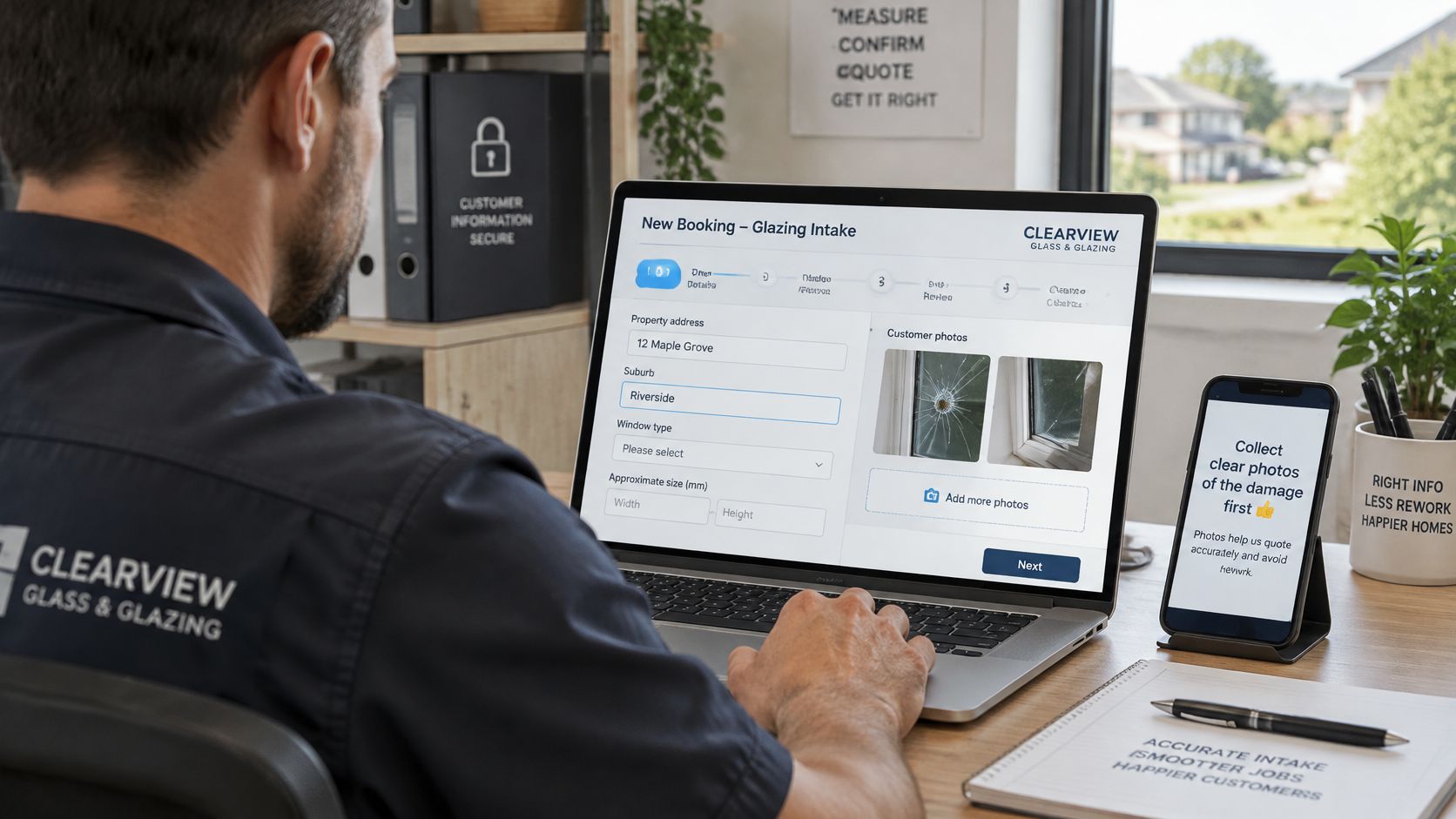
A glazier who quotes from "broken window, Tuesday" will drive out and find the wrong pane size, no parking and a strata rule nobody captured. Intake decides whether the booking hands the tradesperson a workable job or a return trip.
Give Every Field a Job
Each field needs an operational purpose. If nobody uses the answer to quote, route or prepare, drop it.
- Glazier: Ask for photos of the pane and the suburb before anyone prices the glass.
- Strata building: Ask for access rules, lift bookings and a site contact only when the job is inside a managed building.
- Consultant: Ask for the document type and the deadline, not a life story.
Branching keeps the form short. A site-access question appears only when the job type needs it. The same pattern suits photos and briefs collected before a person calls, which is the point of intake automation. A practical walk-through of form design sits in this guide to client intake software.
Say Why You Are Collecting It
Under Australian Privacy Principle 5, the Office of the Australian Information Commissioner requires an organisation to tell people why it is collecting their personal information and how it will use that information. A booking form is a collection point, so state the purpose where the customer hands over the details: a short line beside the form does more work than a policy page nobody opens. Collect only what the job needs, skip sensitive details you will never use, and limit who can open booking and payment data once it passes into the CRM or an action queue.
Ask one retention question before go-live: who can export photos and documents, and how long they stay attached to the record.
A short form that states its purpose beats a long form that quietly collects everything "in case".
Test the Form, Not the Screenshot
The booking form is part of the service. WCAG 2.2 Level AA is a sound benchmark for keyboard access, mobile reflow, large date controls and workable time slots, and it reflects the accessibility expectations Australian operators already work under.
Complete the form on a phone using the keyboard only. Then open the CRM and check the same answers landed on the contact, not in an email attachment nobody filed. A form that collects perfect answers and drops them in an inbox has moved the rework, not removed it. The test that matters is whether intake reaches the person quoting the job complete enough to act on.
Payments, Deposits and Cancellation Terms
The smoothest booking flow is not always the fairest one. A website booking can form a standard contract. Unfair terms can lead to penalties. A cancellation charge should be disclosed before the customer books, and it should reflect the actual cost of the lost appointment. Pushing a large deposit and a strict no-show rule to lift conversion can create disputes the moment the provider cancels, weather stops the job, or the platform books the slot twice.
As Bdog sets out in its guide for Australian operators, a booking widget also sits inside disability-discrimination expectations, so keyboard access, mobile reflow, large date controls and workable timing matter. Tools may store customer information overseas, which calls for reasonable safeguards and a clear disclosure where Australian privacy obligations apply.
Three Ways to Take Money
No payment suits a short consult where the cost of a missed slot is low and you would rather not gate the booking. A deposit should be proportionate to the cost of holding that slot, not a penalty dressed up as a booking fee. Full payment in advance fits a fixed package with a clear refund path if you cannot deliver. Apply the same test to a no-show fee: name it before booking, and tie it to the actual cost of the empty time.
Unpaid balances after the job are a different problem. Polite, human-approved chasing belongs in invoice reminder automation, not inside a surprise term on the booking page.
| Scenario | Required setting | Risk if missing |
|---|---|---|
| Provider cancels the appointment | Reschedule offer or full refund, no customer fee | Customer charged for a cancellation they did not cause |
| Customer cancels inside the notice window | Fee disclosed at booking and tied to the real cost of the slot | Unclear or unfair terms and disputes |
| Weather or site access prevents the job | Rescheduling rule with a notice period and who decides | Ad hoc decisions and inconsistent customer treatment |
| Customer needs an accessible alternative | Phone or another booking route kept open | Customers excluded from the service |
| Platform creates a duplicate booking | Duplicate-booking prevention and an audit log | Double-booked staff and refund confusion |
| Booking data stored outside Australia | Disclosed hosting location and restricted access | Privacy disclosure gap and unclear accountability |
Have the cancellation wording, the refund route and the accessible alternative reviewed by a qualified adviser before the page goes live. This is general guidance, not legal advice.
CRM Integration and Automation Triggers
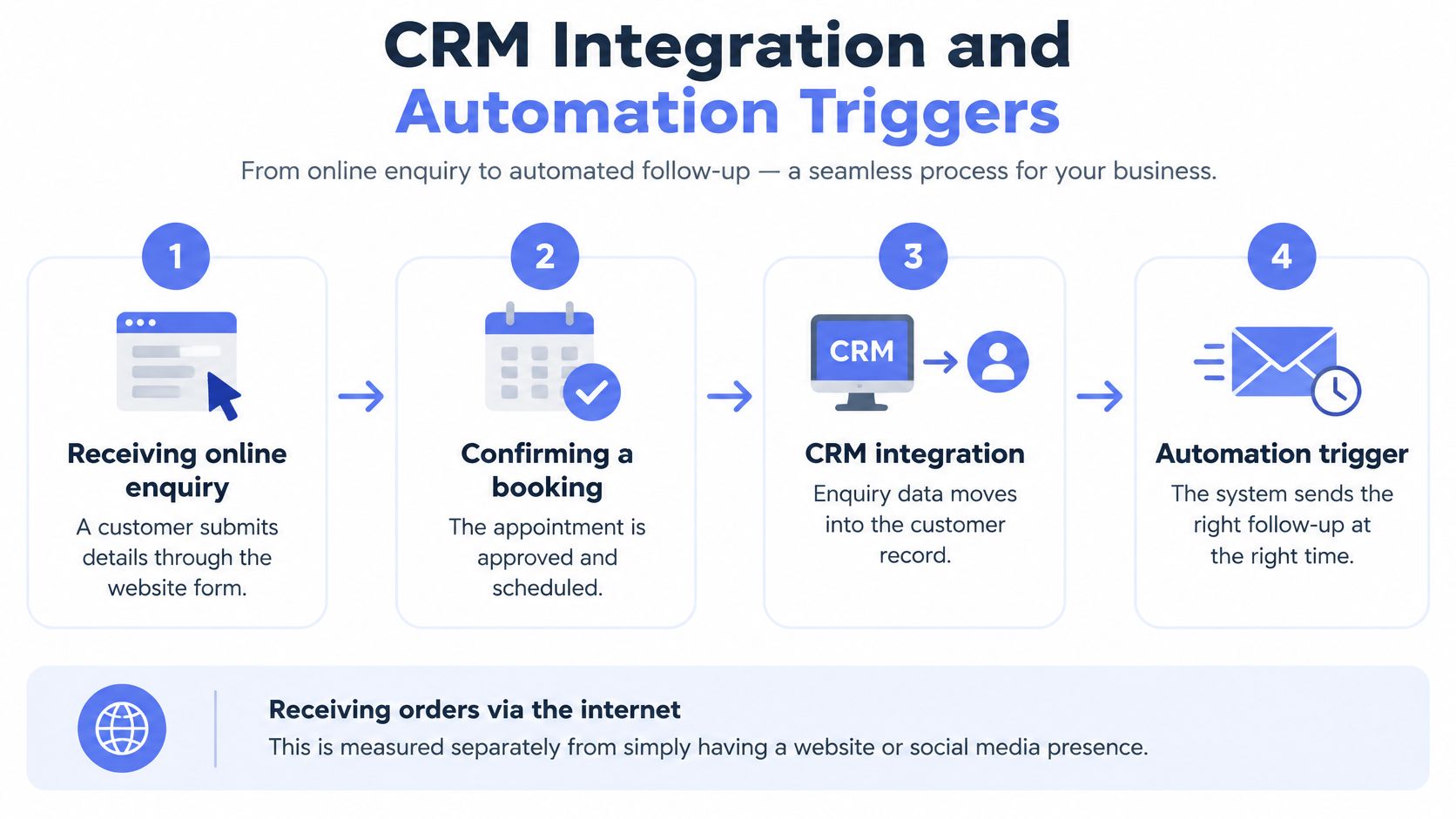
A customer fills in your form at 9pm. By morning the details sit in an inbox, nobody owns them, and the customer has already booked a competitor who answered first. An enquiry, a website visit or a social message is not a confirmed job. Government business surveys treat receiving orders over the internet as its own activity, separate from having a website or social presence, because attracting enquiries and converting them are different things. The gap between the two is the test a booking tool has to pass.
Judge the tool by what it does with that enquiry. Every enquiry, booking and outcome should land in one CRM record carrying an owner, a source, a stage, the last activity and the next action. Source matters because it tells you which channel produces attended jobs rather than just clicks. CRM automation earns its place here when it keeps hygiene routines and action queues current instead of letting records drift. A missed or cancelled booking then needs a person to follow up, which is what lead follow-up automation is for. Teams already on HubSpot can follow this guide on how to automate bookings with HubSpot Meetings.
| Status | Trigger | Owner action | Record fields |
|---|---|---|---|
| Enquiry received | Form or message submitted | Qualify inside the agreed response window | Source, contact, requested service |
| Booked | Time confirmed by the customer | Send confirmation and block the calendar | Appointment time, confirmation status, owner |
| Reminder sent | Set interval before the appointment | Log delivery and any reply | Reminder status, reply, last activity |
| Rescheduled or cancelled | Change request or no reply | Decide a re-offer or follow-up | Reason, new time, fee status, next action |
| Completed or no-show | Appointment time passes | Record the outcome and trigger follow-up or an invoice | Outcome, next action, invoice status |
What the System May Do, and What a Person Must Decide
Automation should create the record, set the reminder and raise the alert. A person decides exceptions, reschedules and any consequential call.
- Booking created with no owner: Route it to a named queue the same day.
- Confirmation not acknowledged inside the agreed window: Raise an alert, do not assume attendance.
- Reschedule request: Hold the old slot until a person accepts the new time.
- No-show: Mark the outcome, then start the agreed follow-up. Do not invent a revenue figure from the reminder alone.
- Completed job with no invoice: Flag it for billing. Do not close the record because the calendar entry ended.
Measure enquiry-to-booked, booked-to-attended and booking source, using the same qualification rules before and after any change. If the definition of a qualified booking shifts when the tool shifts, the comparison is meaningless. A tool switch is not, by itself, a conversion result.
This short walk-through shows how a booking moves from the form into a record and a follow-up, which is the hand-off to test in a demo.
Choosing a System by Business Situation
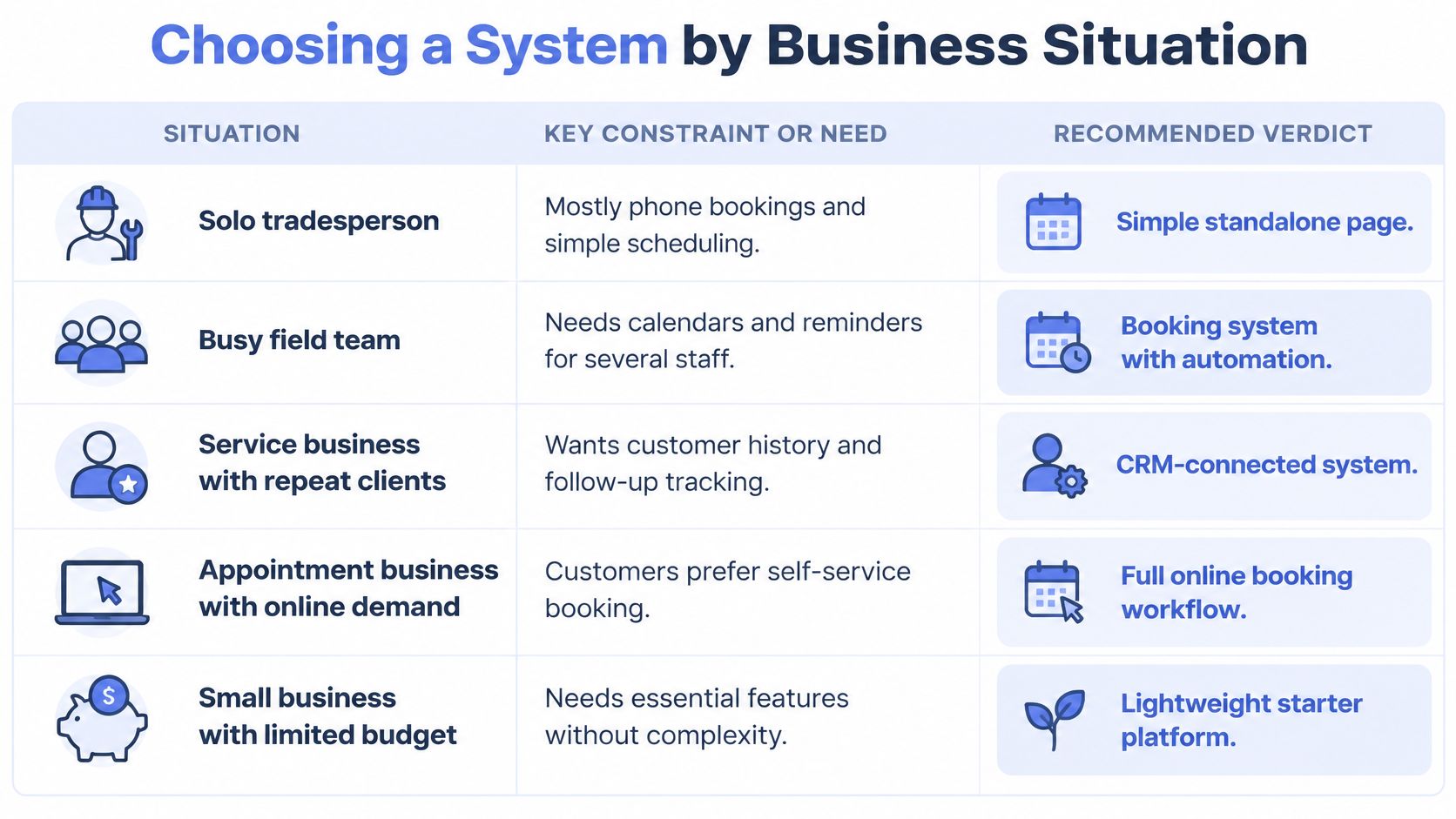
Match the tool to the constraint you have. A busy roster and a solo van do not need the same stack.
| Business situation | Verdict |
|---|---|
| Solo tradesperson, mostly phone bookings | Standalone booking page with a phone fallback and travel buffers |
| Multi-crew installer with rosters | Two-way calendar sync, travel buffers, photo intake and a daily owner for unassigned jobs |
| Professional firm running consultations | Strong intake and privacy controls, writing to the client or matter record |
| Broker or agency with an existing CRM | Keep bookings inside the CRM and add follow-up triggers |
| Business with a no-show problem | Reminders, a proportionate deposit and a reschedule rule before adding features |
A solo tradesperson who still books mostly by phone does not need a workflow platform. They need a simple page, a phone fallback and honest travel time. A multi-crew installer fails when jobs have no owner for the day, so roster sync, photo intake and a daily check on unassigned work matter more than a new brand of calendar.
A professional firm should write the booking into the client or matter record, with intake and privacy controls that match the documents they collect. A broker or agency that already has a CRM should not open a second diary. Keep the booking on the existing pipeline and add follow-up for dormant leads. A business losing people to no-shows should start with reminders, a proportionate deposit and a reschedule rule, then measure show rates before buying more features.
Home-service brands such as Simply Maid show how repeat visits depend on a clear next booking, not on a one-off form. The same logic applies if your repeat work lives in a CRM already.
If a CRM already holds the pipeline, add booking inside it. If no CRM exists, fix the record first.
Put these five questions to every vendor:
- Hosting: Where is booking data stored, and is that location disclosed?
- Approvals: Who can change a booking, a price or a refund?
- Sync: How do you prove two-way write-back on our calendars?
- Outage: What does the team see, and who do customers call?
- Exit: How is a customer's booking data exported or deleted on request?
Roll Out a Booking System Without Creating Another Silo
A booking widget on its own rarely changes profitability. CPA Australia's 2025-26 survey found that just 32% of Australian small businesses said technology investment improved profitability. Only 44% generate more than 10% of revenue through online channels, compared with 63% across the surveyed Asia-Pacific markets.
Most of that gap sits after the booking: what it triggers, who owns it, and whether it reaches a completed outcome. A page that takes the appointment and drops it into an inbox has just built another silo.
Six checks keep the booking connected from first click to outcome:
- Map intake fields, exceptions and the person who owns each outcome before any settings change.
- Connect booking to the CRM so every booking carries an owner, a source and a next action.
- Set cancellation, deposit, privacy and accessibility rules, and have them reviewed before go-live.
- Keep human approval for sensitive messages, refunds and client-impacting changes.
- Run a manual fallback for outages and for customers who book by phone.
- Schedule a weekly check that flags stalled bookings to a named person.
Agree security controls for each system before launch: limited access, appropriate data handling, operational logs, and approval gates for sensitive actions. Review the tools and the data before deciding what can be automated. From there, the operating layer can answer enquiries, update the CRM, chase invoices, draft work and report back, which is the shape of managed AI operations. Anything risky or client-sensitive waits for a person. A fast first response while intent is fresh belongs with speed-to-lead automation, and missed visits need their own path, covered in this guide to no-show follow-ups and rebooking.
Judge every option by the same test: does the booking stay visible until it is completed, cancelled or followed up?
Truespeak designs and runs booking workflows around the CRM you already use, including availability rules, confirmations, reminders and a clean hand-off into a live pipeline with an owner and a next action. Approval gates stay on refunds, reschedules and other client-sensitive steps, stalled bookings get watched instead of sitting in inboxes, and your team talks to the system from Slack, Telegram or WhatsApp. If you want that operating layer around your current tools, talk to Truespeak.