

You're answering enquiries from the ute, quoting after dinner and chasing invoices on Sunday. The work itself isn't hard. It's scattered, repetitive and easy to drop when you're busy. That's usually when owners start comparing outsourced admin support with hiring help in-house or buying more software.
The useful question isn't who's cheapest per hour. It's which model gives you faster first responses, cash collected sooner and fewer stalled handoffs, without handing over decisions that should stay with you.
Table of Contents
- What Outsourced Admin Support Covers
- Outsourced Admin Support Versus an In-House Hire
- Admin Tasks That Suit Outsourcing
- How Outsourced Admin Is Priced
- Managed AI Operations Versus Generic Virtual Assistants
- Security and Privacy Rules to Set First
- Choose the First Process to Hand Over
What Outsourced Admin Support Covers
Say a service business owner finishes a job at 6 pm. Two quotes aren't sent, enquiries sit in three inboxes, and two invoices are unpaid with no reminder logged. Nothing's broken in the trade work. The admin around it has no single owner.

Outsourced admin support means an external party runs defined, recurring admin work for you. That covers intake, data entry, scheduling, invoicing, follow-up and reporting, done through agreed systems and measured against a written process.
Three Models You'Ll Meet
- Offshore administrative staff: A person or team overseas completes tasks you assign.
- Local virtual assistants: An Australian-based assistant works remotely, often across varied tasks.
- Managed operations: A partner designs the process, runs it, monitors it and reports on results.
Think of a payroll bureau. The bureau handles calculations and deadlines, but you still decide who gets paid and how much. Admin outsourcing works the same way. Strategy, pricing, complaints and relationship judgment stay with you.
Contracting is also an established model here, not an unusual arrangement. The ABS Working Arrangements release recorded approximately 1.1 million independent contractors in August 2025, representing 7.6% of all employed people, and independent contractors accounted for 22% of people employed in Administrative and support services.
What matters next is practical. What does outsourcing replace, what does it cost, and where do the risks sit?
Outsourced Admin Support Versus an in-House Hire
The verdict first. Outsource repeatable, measurable work with changing volume. Hire in-house for constant, judgement-heavy work that needs daily presence. Many growing businesses end up with both, and that's fine.
| Factor | Outsourced admin support | In-house admin hire |
|---|---|---|
| Start-up time | Set by scope and access set-up, agreed before work starts | Includes recruitment, onboarding and training |
| Cost structure | Agreed fee for scope, hours or package | Salary plus on-costs, equipment and paid time whether or not work is available |
| Hours covered | Set by the agreement, some providers run outside business hours | Set by the employment contract |
| Scaling up or down | Adjusted within the agreement | Needs recruitment, or a formal process to reduce |
| Where process knowledge sits | Shared, and relies on a written process | Mostly with the staff member until documented |
| Control over access and tools | Granted and limited by the agreement | Direct management and system access |
| Employer obligations | Carried by the provider | Carried by your business, including superannuation and leave |
| Consistency over time | Set by documented process and scheduled review | Set by supervision and individual performance |
What the Salary Figure Misses
An in-house hire costs more than salary. Allow for recruitment, onboarding, equipment and leave cover, plus superannuation under the Superannuation Guarantee, administered by the ATO, and leave and minimum entitlements covered in Fair Work Ombudsman guidance for employees. There's also a quieter cost. When that person leaves, undocumented knowledge leaves with them.
For the finance side of this comparison, a guide to managing your business books from Stewart Accounting Services works through a similar in-house versus outsourced decision for bookkeeping.
What a Low Hourly Rate Hides
Outsourcing has its own traps. Quality drifts when processes aren't documented. Access rights stay unclear. Nobody reviews the work, so errors repeat.
There's also a classification risk. An individual virtual assistant engaged as a contractor must run an independent business. Fair Work Ombudsman guidance on independent contractors and sham contracting applies when a worker is in substance an employee. Ask any provider to state its engagement and employment arrangements in writing before you sign.
Decision rule: If the work is high-volume, rule-based and easy to document, outsourcing is usually the lower-risk start. If it needs local presence or constant judgement, hire in-house and outsource the surrounding admin.
Try this check today. List your last ten admin tasks and mark which ones needed judgement only you or a senior staff member could provide. The rest are outsourcing candidates.
Admin Tasks That Suit Outsourcing
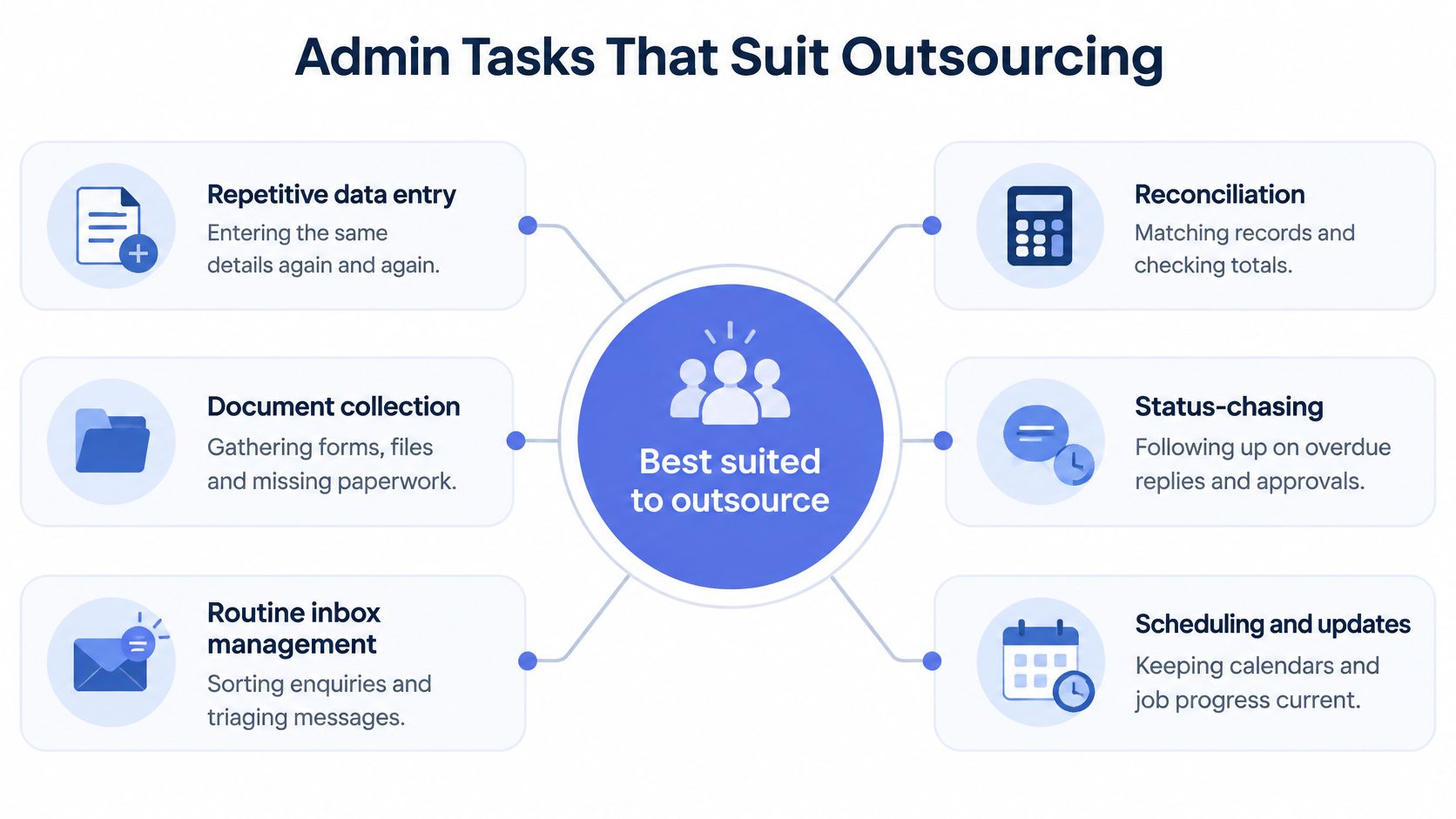
Start with one design principle. Target repetitive data entry, reconciliation, document collection and status-chasing. Don't add another software screen for your team to babysit.
The ABS Annual Report 2024-25 recorded 280,446 hours of business respondent time across 30 surveys in 2024-25. It identifies administrative data reuse and improved digital reporting mechanisms as ways to reduce provider burden. Your version of that is simple. Capture information once, reuse it everywhere.
This diagram shows where that principle applies first.
What a Good Workflow Looks Like
An enquiry arrives. A structured form collects the job address, scope, photos and budget. A CRM record is created with an owner, stage and next action, and a reminder fires if no next step is logged. That's intake automation reducing rework, because incomplete briefs are what cause extra calls and delayed quotes.
| Task | What the provider handles | What stays with your team | How to measure it |
|---|---|---|---|
| Invoicing and billing admin | Prepares invoices from approved jobs, sends them and tracks status | Pricing, credit and dispute decisions | Days from issue to payment, overdue count |
| CRM data hygiene | Completes required fields, removes duplicates and keeps stages current | Definitions of stages and ownership rules | Share of records with complete required fields |
| Enquiry intake and briefs | Collects job details, documents and photos through a structured form | Scope judgement and quoting | Time from enquiry to complete brief, rework rate |
| Lead and quote follow-up | Sends timely, context-aware reminders and logs responses | Relationship calls and negotiation | First-response time, quotes with a logged next action |
| Inbox triage and scheduling | Sorts, routes and drafts replies for approval | Complaints and sensitive matters | Response time, items waiting without an owner |
| Weekly reporting | Compiles pipeline, receivables and exception summaries | Interpreting results and making decisions | Report delivered on schedule with exceptions listed |
Data hygiene through CRM automation means enforcing required fields, removing duplicates and keeping stages consistent, so reports mean something. Follow-up through lead follow-up automation and payment chasing through invoice reminder automation work the same way. Each item gets an owner and a next step, or it shows up as an exception.
If your records need matching before anyone can chase payment, a practical bank reconciliation walkthrough from BankStatementWizard sets out the checking steps clearly. For the data entry side, our guide on how to automate data entry in a small business covers where manual re-keying usually hides.
This short video walks through how these task areas fit together in practice.
Keep the boundary firm. Pricing decisions, complaints, sensitive messages and relationship calls stay with people. Measure results by cycle time, rework rate, first-response time and completion rate, not hours alone.
How Outsourced Admin Is Priced
Published rates vary with scope, volume, systems access and hours of cover. Quotes rarely cover identical work, so compare what's included rather than the headline rate. Anyone who quotes before seeing your process is guessing.
| Model | How it is billed | Suits | Watch-outs |
|---|---|---|---|
| Hourly or time-based | Billed per hour worked at an agreed rate | Irregular or small, uncertain volumes | Cost rises with volume, little reward for streamlining |
| Monthly retainer | Fixed monthly fee for agreed hours or scope | Steady, predictable workload | Unused hours, scope needs clear boundaries |
| Per-task or package | Fixed fee per unit or defined package | Repeatable tasks such as invoice runs | Exclusions and change requests |
| Managed operations subscription | Ongoing fee for monitoring, tuning, reporting and exception handling | Processes that must keep running after launch | Confirm what is included after go-live |
| Build fee plus ongoing fee | One-off set-up fee followed by recurring operation | Defined workflows that need building before they run | Set-up scope must be written down before work starts |
What Each Model Rewards
Hourly billing rewards time spent, so it gives a provider little reason to streamline. Retainers protect predictable capacity but can leave hours unused. Packages suit repeatable tasks, though exclusions create surprises. Managed operations bundle monitoring and reporting, so confirm what's included after go-live. Build fees need written scope before work starts.
Cost drivers are consistent across models. Count the systems touched, approval steps, hours of coverage and exception complexity, and check whether the provider documents its process.
The ABS Characteristics of Australian Business release found that in 2024-25, 34% of businesses reported that ICT use improved responsiveness to customer needs, while only 10% actively collected or analysed data for informed decisions. That gap is why reporting belongs in the quote, not as an extra.
Run this check on any quote. Divide the total monthly fee by the completed items the provider commits to report, such as invoices issued or briefs completed with all required fields. Compare cost per completed item, then check it against completion, rework and first-response measures.
Finish with four questions. What does the fee include? What does it exclude? How are exceptions priced? How are results reported?
Managed AI Operations Versus Generic Virtual Assistants
Be fair to both options. A skilled virtual assistant is often right for varied, judgement-heavy tasks. A managed AI operations partner suits recurring processes that must run consistently, whether or not someone is at a desk.
| Factor | Generic virtual assistant | Managed AI operations partner |
|---|---|---|
| Main unit of work | Tasks completed by a person from instructions | Designed process with triggers, checks and actions |
| Tools | Mainly the tools they are given access to | Works around the existing CRM and tools, replacing them only when the stack blocks the workflow |
| Monitoring | Checked by the business or through the assistant's own routine | Scheduled and continuous checks with alerts |
| Exception handling | Raised to the business when noticed | Logged, categorised and reviewed on a set cadence |
| Approval gates | Set by the working agreement | Human approval for sensitive messages, pricing and client-impacting actions |
| Reporting | Shaped by individual habits | Regular reporting on response, follow-up and exceptions |
| After go-live | Ongoing task support | Monitoring, tuning, runbooks and a review cadence |
How the Managed Model Works
We design triggers, checks, actions, verifications and exception paths around the tools you already use, then monitor and tune the process against agreed measures. Our managed AI operations run scheduled tasks and continuous checks, including answering enquiries, updating the CRM, chasing invoices and reporting back. Anything risky or client-sensitive waits for human approval.
You don't manage the system internally. We run it, and you talk to it from Telegram, WhatsApp, Slack, or wherever your team already works. Managed AI Operations is the ongoing operating layer that includes monitoring, tuning, approval gates, reporting and exception handling after the first automation goes live.
Context matters here. The ABS media release on business adoption of artificial intelligence in 2024-25 reported around 11 per cent of small and micro businesses using AI, compared with 19 per cent of innovation-active small businesses. Those figures measure adoption, not productivity, so they don't support a fixed hours-saved claim for your business.
If a person is the better fit, Hirespot's guidance on how to find the right virtual assistant is a sensible starting point for screening. Either way, a managed model adds cost and dependency. You must still own the process documentation and exit terms.
Bottleneck test: If the constraint is a process that breaks whenever one person is away, choose a managed model. If the work is varied and needs a person in the room, choose a virtual assistant.
Security and Privacy Rules to Set First
A login created for an outside administrator on a Friday can reach your CRM, inbox and invoice history by Monday morning. Write the rules before that login exists.
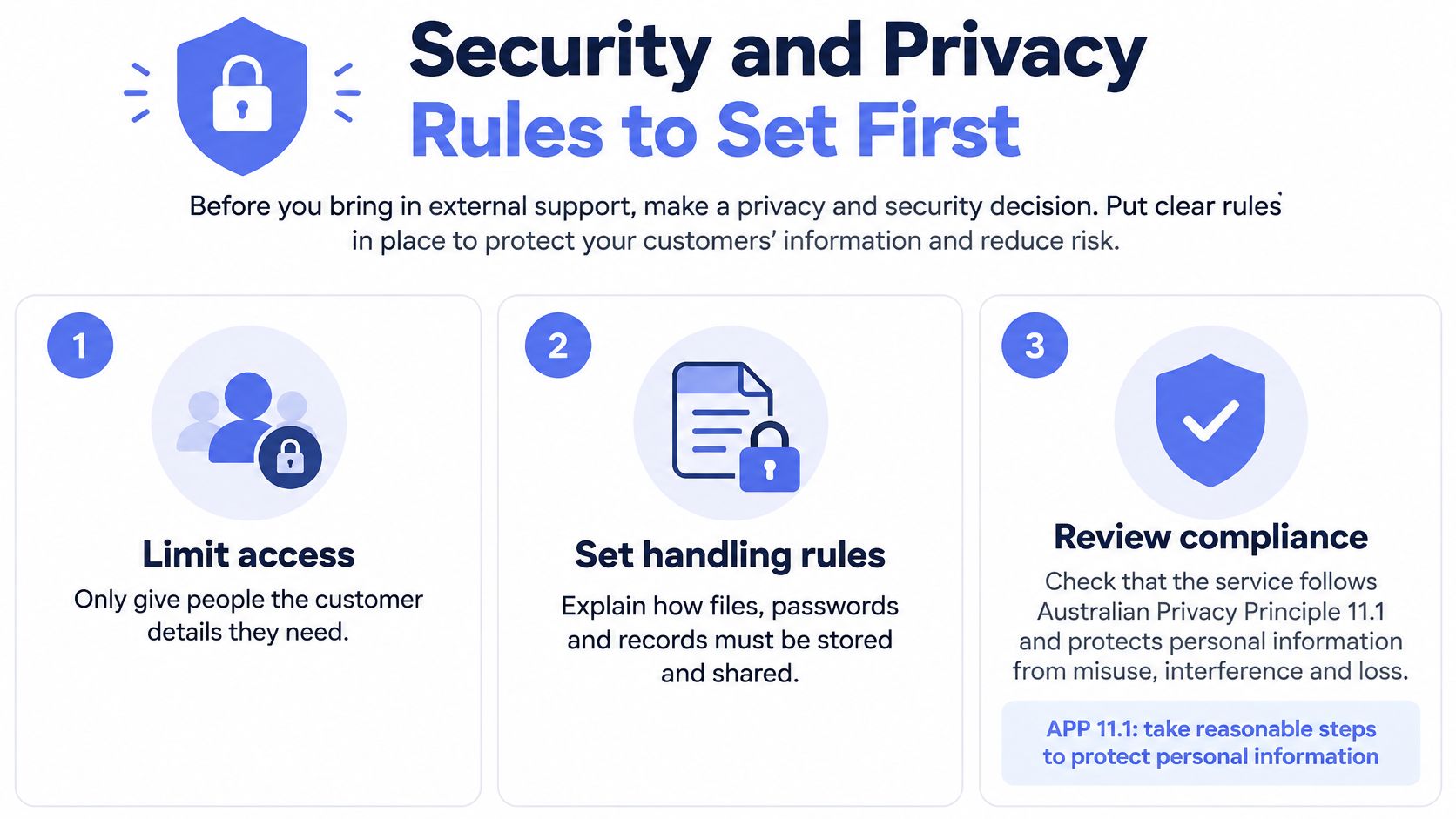
The ABS privacy impact assessment material on Australian Privacy Principle 11.1 explains that an APP entity must take reasonable steps to protect personal information it holds from misuse, interference, loss and unauthorised access, modification or disclosure. Third-party contractual arrangements are one part of those reasonable measures, so your agreement needs to cover access, retention and exit.
This checklist graphic summarises the starting point.
Your Pre-Start Checklist
- List the records: Name what the provider may access, such as CRM entries, invoices, emails, forms and reports.
- Individual logins: Never share credentials between people or businesses.
- Least-privilege access: Limit each login to what the task needs.
- Approval gates: Name actions needing human approval, including outbound pricing, complaints and payment matters.
- Action logs: Require a record of what was done and when.
- Retention and deletion: Set how long records are kept and how they're destroyed or de-identified when no longer needed.
- Incident escalation: Define who is told, how quickly, and who runs the response.
- Exit process: Document how access is removed and records returned or deleted.
Two points are often missed. If offshore administrators or overseas-hosted tools will handle customer information, name the countries involved and write down the contract terms covering where data is stored and how it is handled. The obligation sits with the business that collected the information, wherever the work is done. For incidents, agree in writing who gets notified, how quickly, who assesses whether the breach must be reported, and who runs the response. A verbal "we'll let you know" is not an incident plan.
Enforcement is where the checklist succeeds or fails. A solo administrator can agree to every item and still leave no record of what they touched. A managed operating layer builds the controls into the work itself: access is restricted, every action is logged, and sensitive steps pause for human approval. We use isolated systems, access controls and operational logging, with least-privilege access as part of the operating model, and we keep human control over policy, pricing, complaints and final approval on risky actions. Our article on whether it is safe to put client data into AI tools goes deeper on these controls.
For trades and professional firms holding personal and financial information, ask for written evidence before the first login: the access list, a sample of the action log, and the deletion terms.
Choose the First Process to Hand Over
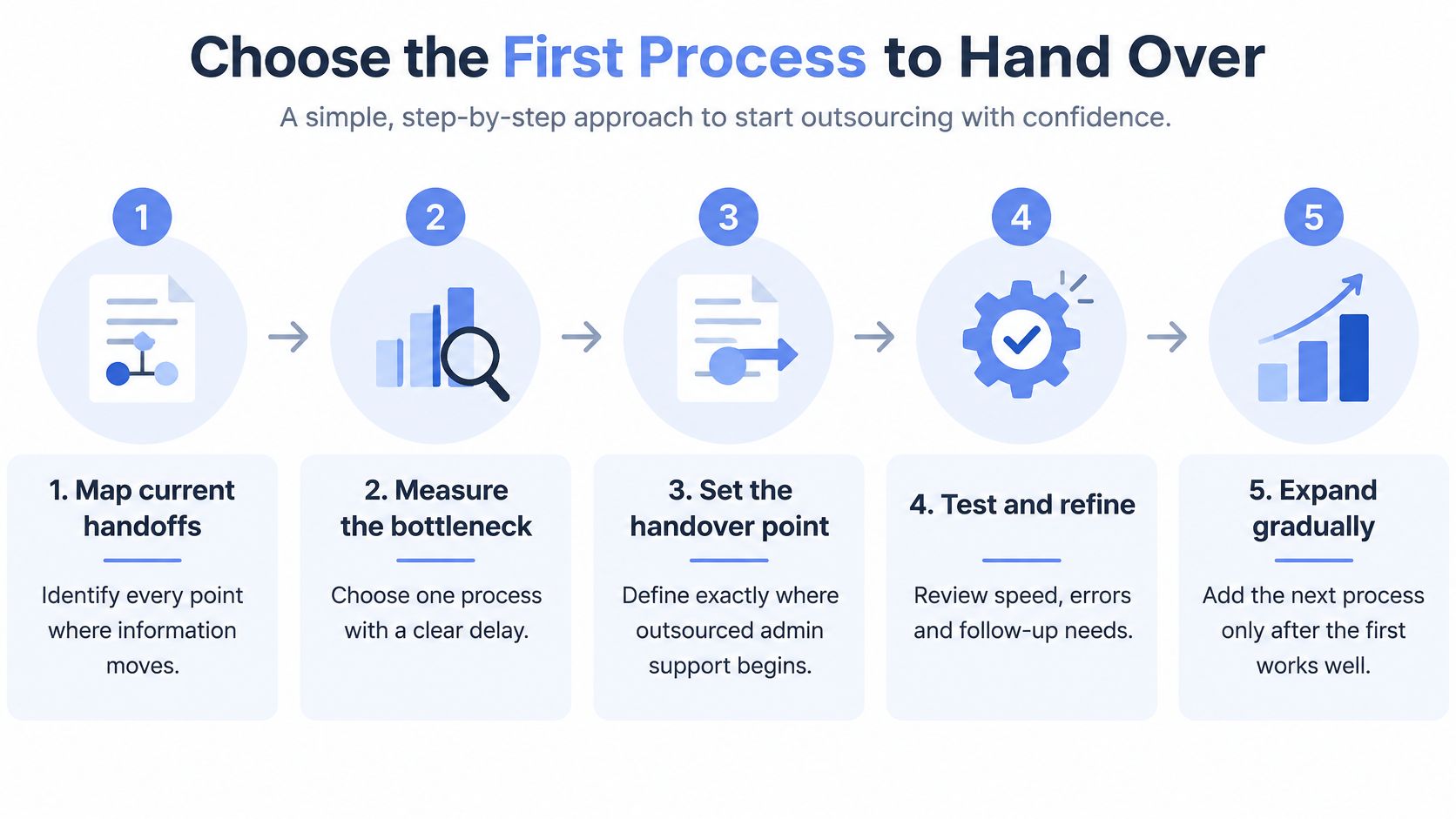
Start with one measurable bottleneck, not a whole department. We start by looking for the first operating gap worth fixing, such as response, follow-up, intake, CRM, invoices, admin or reporting. One process, proven properly, beats five half-finished handovers.
This flow shows the order to work in.
Seven Steps to a Clean Handover
- Map the handoffs: Trace one process end to end, including every point where information is re-keyed.
- Pick a visible bottleneck: Choose work with an obvious cost, such as quote follow-up or overdue receivables.
- Record a baseline: Use a recent period to capture first-response time, days to payment and the number of stalled items.
- Write the process: Define the trigger, required data, owner, approval point and exception route.
- Confirm access rules: Apply the security checklist before any login is created.
- Run a bounded pilot: A 30-day pilot is a practical planning choice, reviewed weekly against your baseline.
- Expand on evidence: Add the next process only when the measure improves and the exceptions are understood.
Alignment problems usually come from fragmented tools and unclear ownership, not from who does the admin. Fix that by making one live pipeline the source of truth, showing stage, owner, source, last activity and next action. Our guide on how to improve operations management covers that visibility habit in more detail.
A practical first move is to bring one messy handoff to a discovery call. We map what should be captured, drafted, approved and logged, using business process automation to connect enquiry handling, intake, follow-up, CRM updates, invoice reminders and reporting. If the process needs ongoing operation after launch, a managed model keeps it monitored instead of leaving it to drift.
Don't judge the pilot by hours saved. Judge it by response speed, cash collected and handoff delays. If those three don't move, the handover hasn't worked yet, whatever the timesheet says.
If quotes are waiting, invoices are drifting or follow-up depends on memory, bring one messy handoff to Truespeak and we'll map what should be captured, drafted, approved and logged. You'll leave with a clear first process to hand over, a baseline to measure it against, and approval gates that keep you in control. Start with the bottleneck that's costing you work this week.