
You check the shared inbox at 4.30pm and find an enquiry from Tuesday that nobody owns. Someone took a phone note, someone else put the name on the whiteboard, and the CRM still shows no next action. The work isn't hard, it's scattered across forms, email, spreadsheets and memory.
That is where learning how to improve operations management should start. Don't replace software first. Fix ownership, handoffs and exception handling, measure whether work moves faster, then automate the repetitive parts under rules you control.
Table of Contents
- Map How Work Actually Moves Today
- Set Baselines and KPIs Before You Change Anything
- Choose the Handoff Worth Fixing First
- Assign Owners, Approvals and Exceptions
- Automate Capture and Follow-Up Without Losing Control
- Roll Out Changes and Review Them Weekly
- Pick One Handoff and Measure It This Week
Map How Work Actually Moves Today
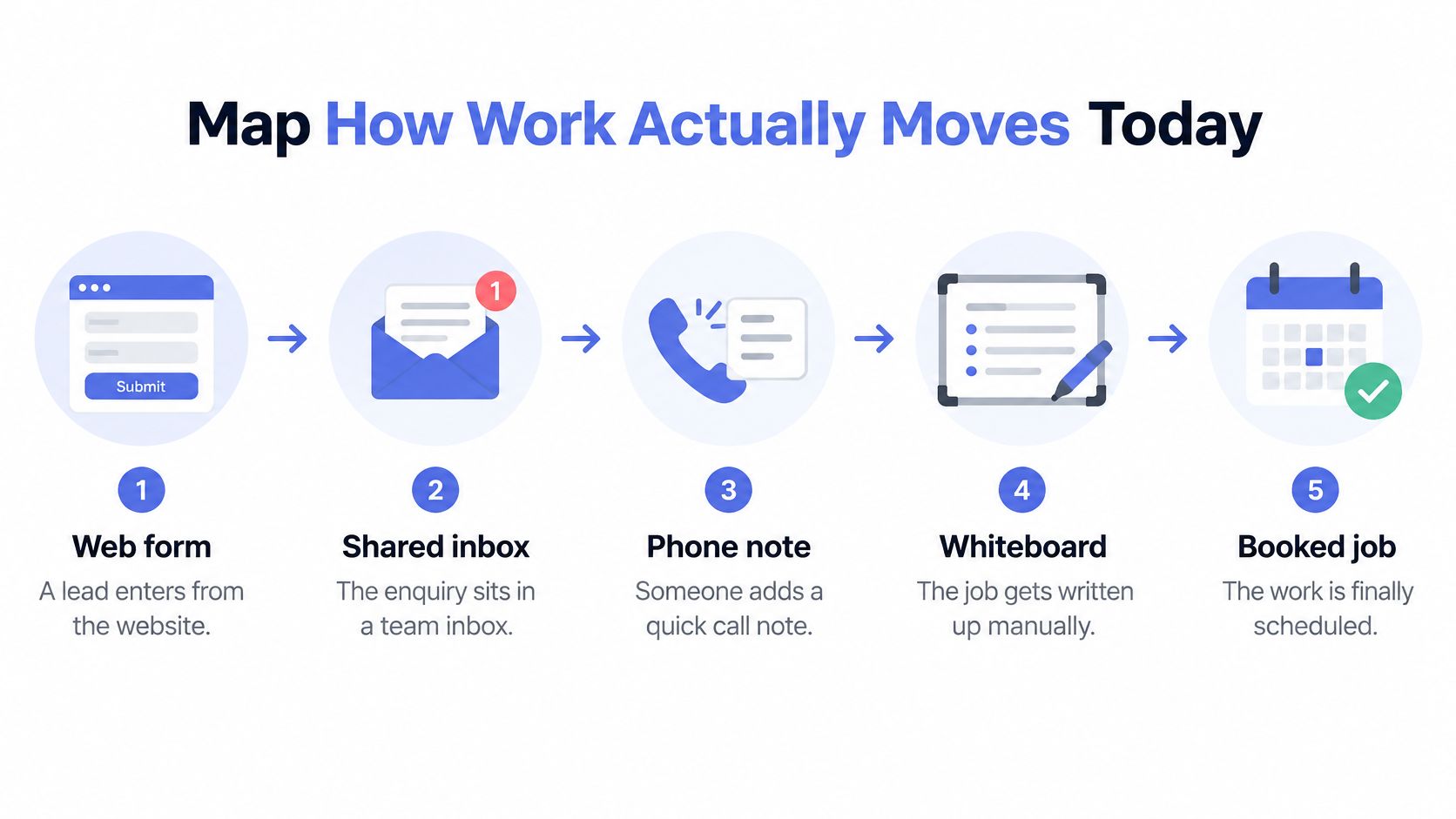
Say an owner assumes the CRM is the problem. In this illustrative scenario, not a documented client case, a lead moves from a web form to a shared inbox, a phone note and a whiteboard before anyone books a job. Each transfer loses time, context or both, and no measured outcome should be attributed to that example.
Structured change is a better starting point than a purchase. The Australian Bureau of Statistics reported that 46% of Australian businesses were innovation-active in 2024-25, and among innovating businesses, 32% reported increased productivity as a benefit. That doesn't prove mapping caused the gain, but it does support disciplined process work before tool selection.
Seven Steps for One Process
- Choose one recurring process. Start with enquiry to booked job or job completion to invoice, because a narrow scope gives you usable evidence.
- Write the trigger. Note what starts the work and who notices it first, since unnoticed triggers create silent delay.
- Walk the actual path. Include shortcuts people take that never appear in the official process, because those shortcuts show where the design fails.
- Mark every handoff. Pinpoint where a message, file or record changes hands, as that's usually where ownership blurs.
- Record waiting time. Note time spent waiting at each stage, not only working time, because queues often cost more than tasks.
- List exceptions. Name each exception and the workaround used, so you can decide what needs a rule and what needs a person.
- Define finished. State the point where the job counts as complete, otherwise teams chase work that should already be closed.
If you want a more formal notation for larger processes, using BPMN to map workflows can help you show decisions and parallel paths without relying on memory. For most small teams, though, plain boxes and arrows are enough if they're accurate.
A short diagnostic assessment can test whether your map exposes dropped work before you choose a fix. Keep this map as the baseline for every later decision.
The map should fit on one page, and someone outside the team should be able to follow it without an explanation from the owner.
Set Baselines and KPIs Before You Change Anything
Most owners change operations without knowing whether the change helped. The Australian Bureau of Statistics media release reported that only 7% of businesses measured the contribution of digital activities to overall business performance in 2024-25. That's the gap to close before you add another tool.
Collect a two to four week baseline from timestamps your CRM, inbox and accounting software already hold. Don't ask staff to maintain a separate spreadsheet if you can avoid it. A rough but consistent measure beats a precise number nobody updates.
Core Operations KPIs and How to Measure Them
| Metric | How to measure | Where the data lives | Review cadence |
|---|---|---|---|
| Time to first response | Enquiry timestamp to first reply | CRM or inbox log | Weekly |
| Time to qualify | Enquiry received to qualified or disqualified | CRM stage history | Weekly |
| Intake completeness | Share of jobs with all required fields at handoff | Intake form or CRM | Weekly |
| Stalled records | Open deals with no next action or date older than seven days | CRM pipeline view | Twice weekly |
| Overdue invoices | Count and value past due, by age band | Accounting software | Weekly |
| Cash collection days | Average days from issue to payment | Accounting software | Monthly |
| Rework events | Jobs returned for missing information or corrections | Team log | Monthly |
Use three rules when you set targets. First, avoid vanity measures such as automations built or emails sent, because activity isn't an outcome. Second, set targets from your own baseline rather than borrowed benchmarks. Third, care more about direction than precision at first, because a clear trend in response time or stalled records is enough to judge the first change.
Choose the Handoff Worth Fixing First
Don't fix the handoff that annoys you most. Score each one from 1 to 3 on frequency, the cost of delay in lost work or cash, and the rework it creates. Use timestamps and stage history, not memory, so a rare problem doesn't outrank a daily leak.
Add the three scores and pick the highest total with a clear owner. Truespeak recommends starting with the handoff costing the most time, revenue or trust. I would leave rare, interesting problems for later, even if they feel urgent in the moment.
Common Handoffs Scored for Fix Priority
| Handoff | Typical symptom | Cost if it stalls | Automation fit | Keep human |
|---|---|---|---|---|
| Enquiry first response | Replies arrive hours or days later | Lost buyer intent | High for acknowledgement and booking | Qualifying complex or high-value jobs |
| Quote and proposal follow-up | Quotes sit with no next date | Stalled deals | High for timed nudges | Pricing changes and negotiation |
| Intake and job brief | Missing details and repeat calls | Rework and extra site visits | High for structured forms and uploads | Scoping judgement |
| CRM updates | Stale stages and no owner | Missed follow-up and poor reporting | Medium to high for reminders and routing | Setting priority |
| Invoice follow-up | Overdue invoices and manual chasing | Delayed cash flow | High for scheduled reminders | Disputes and payment plans |
| Scheduling and rescheduling | Double bookings and back-and-forth messages | Idle crew time | Medium for confirmations | Emergency changes |
A high score doesn't automatically justify automation. A stalled quote may need a template, a due date and an owner before it needs a sequence. Intake may improve more from making five fields mandatory than from changing software. The score tells you where to look first, not which solution to buy.
Assign Owners, Approvals and Exceptions
Automation usually fails where nobody owns the exceptions. When a message bounces, a customer replies with a complaint, or a record is incomplete, someone named must receive it, decide and close it. A shared inbox isn't an owner.
For each decision, name one owner, one backup, what the system may do alone and what needs approval first. The useful shape is trigger, context, decision, action, approval, output and feedback. Truespeak's exact implementations shouldn't be copied blindly into another business, but that shape can be adapted.
Who Owns Each Decision and Where Approval Sits
| Decision | Typical owner | Automation role | Approval gate |
|---|---|---|---|
| Pricing or discounts | Owner or sales lead | Prepare figures only | Always human |
| Routine enquiry acknowledgement | Operations manager | Send and log | Approved template with sample review |
| Routing a qualified lead | Sales lead | Route by agreed rule | Rules reviewed monthly |
| Day-seven payment reminder | Finance or admin | Schedule and send | Approved template, human check on exceptions |
| Dispute or hardship request | Owner | Flag and hold | Always human |
| Change to a customer record | Admin | Suggest or update | Every change logged |
Sensitive or client-impacting decisions should always wait for a person. Routine steps can run under pre-approved rules, with a periodic sample review to catch poor wording or bad routing. A human-in-the-loop automation model makes that boundary explicit instead of relying on staff judgement in the moment.
Write the procedure down where staff will find it. A simple sop maker can turn the agreed steps into a usable document, which is especially helpful when the usual owner is away.
First Month Checklist
- After-hours failures: Name who receives alerts outside working hours and what can safely wait until morning.
- Morning exception queue: Assign one person to clear or escalate exceptions each morning.
- Rule-change trigger: Define what event requires a change, such as repeated bad routing.
- Review rhythm: Review rules monthly during the first quarter.
- Cover: In small teams, name the backup explicitly for every critical step.
Where roles are hard to fill, remove repeat checks and duplicate approvals before adding more coordination work.
Automate Capture and Follow-Up Without Losing Control
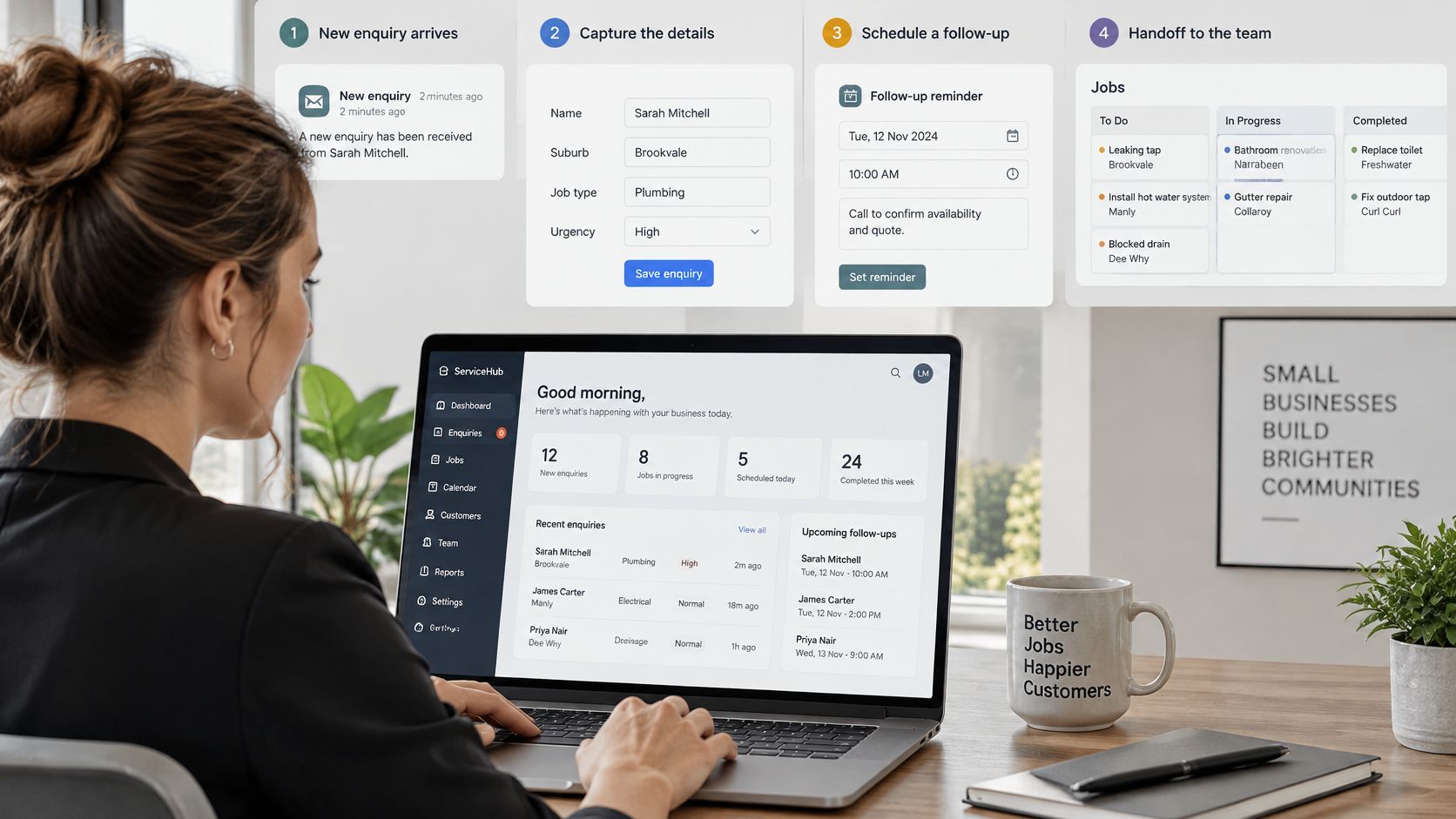
Start with repetitive capture and reminders around the tools you already use, as shown in the dashboard view below.
A quote goes out on Tuesday. By Friday nobody has called, and the record still sits in the same stage. That stall is where automation earns its keep.
Enquiry capture should acknowledge the person within minutes and collect name, suburb, job type and urgency in one step. That protects buyer intent while a staff member handles qualification. Intake automation can then gather structured details, photos and documents before the first call, so the conversation starts with facts rather than missing measurements, access notes or approvals.
Follow-up works best as timed nudges after a quote, with a stop rule as soon as the client replies. A sequence that keeps sending after a person has answered, objected or asked for a call actively damages trust. Selected business process automation use cases can help you separate safe reminders from messages that need drafting and approval.
For CRM hygiene, set required fields, stage rules and a daily queue of records with no next action. CRM automation should make stale work visible rather than just move records around. For invoices, schedule reminders at set ages using a template a person has approved, and route disputes out of the sequence immediately. That is the controlled pattern behind invoice reminder automation.
The short walkthrough below is useful for seeing how capture, status and next actions can sit in one view before you commit to a rule.
Before any rule goes live, apply the four-part minimum: one trigger, one action, one owner and one log entry. If it can't meet all four, it isn't ready. Truespeak runs scheduled tasks and continuous checks, including answering enquiries, updating the CRM, chasing invoices, drafting and preparing work, watching for problems and reporting back, while anything risky or client-sensitive waits for human approval.
Keep pricing, disputes, complaints and sensitive messages with people. Also make sure any promotional messages you send follow Australia's consent and sender-identification rules for commercial messages.
Roll Out Changes and Review Them Weekly
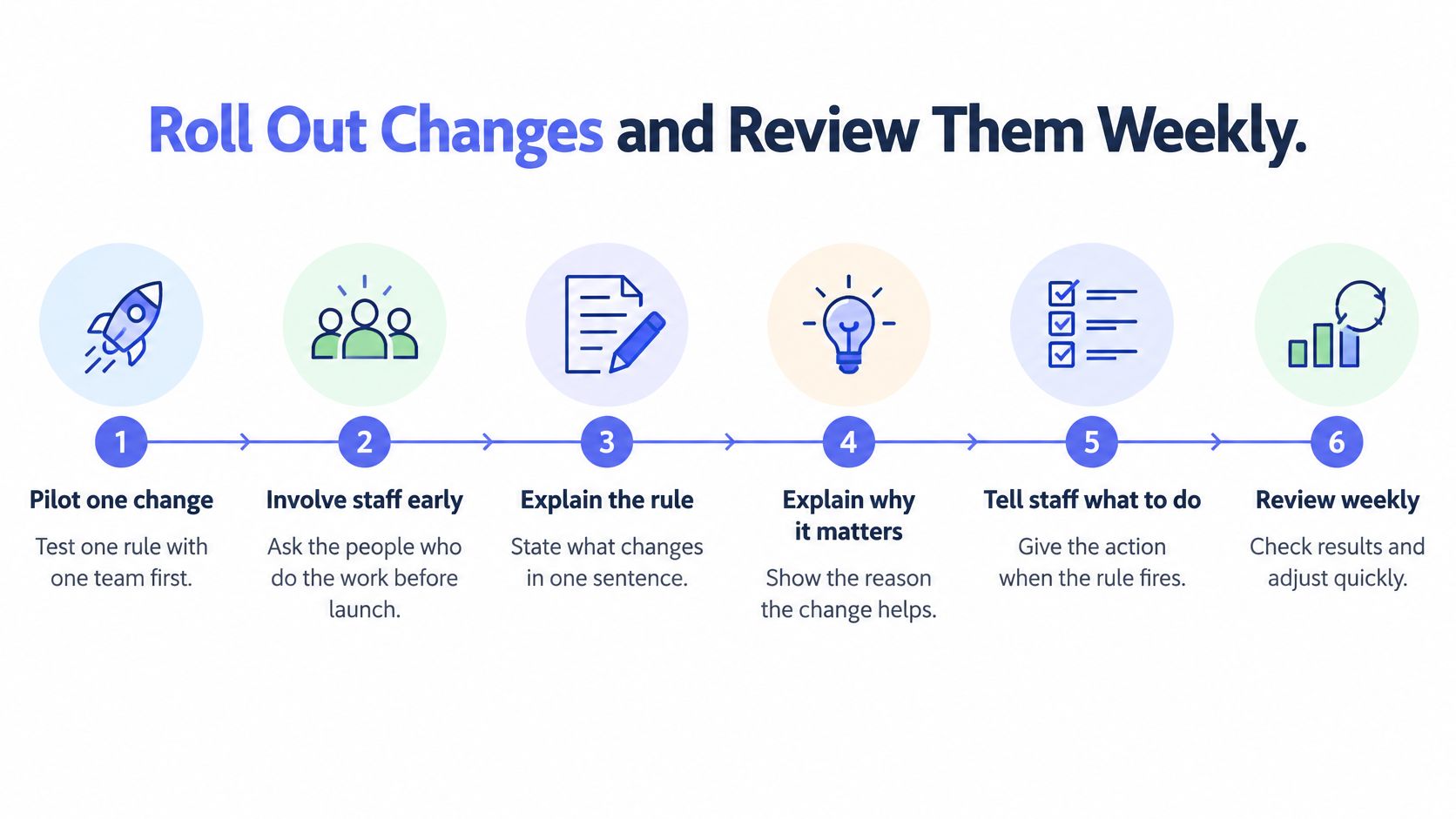
Pilot one change at a time and involve the people who do the work before launch. Staff who first hear about a rule when it fires will work around it, often for sensible reasons you missed during design.
Six Step Pilot
- Write the rule in one sentence. If you can't state it clearly, staff won't know when it should fire.
- Name the owner and backup. This prevents the pilot becoming everyone's problem and nobody's job.
- Set an alert or review point. Decide where failures and exceptions appear.
- Run it for two to four weeks. Give it enough volume to reveal normal variation and edge cases.
- Review exceptions weekly. Exceptions show whether the rule, form or approval gate needs adjustment.
- Keep, adjust or roll back. Judge the decision against your baseline, not enthusiasm for the tool.
Record each rule as trigger, information captured, destination system, human approval point, exception path and resulting action. The Australian Government AI Adoption Tracker uses monthly surveys of 400 completed responses from Australian SMEs and covers applications, challenges and business outcomes rather than treating installation as success. Use the same discipline in your own review.
Set a simple rhythm: check the stalled-record queue daily, hold a 30-minute weekly KPI review, and review rules monthly. This follows our four-step method to find dropped work, design the loop, build the smallest useful system, then run and tune. Managed AI Operations is the ongoing layer for monitoring, tuning, approval gates, reporting and exception handling after go-live.
Avoid changing several steps at once, leaving ownership vague, skipping frontline staff, or measuring activity instead of outcomes.
A change is only finished once someone reviews its exceptions.
Pick One Handoff and Measure It This Week
Pick one handoff this week, not five. Choose the highest-scoring one, draw its current path on one page, and write the owner and backup beside each decision. Then record the three baseline numbers that relate directly to it.
For a slow first response, that might be time to first response, time to qualify and stalled records. For late payment, use overdue invoices, cash collection days and rework events. Keep the evidence on one page so next week's review starts from facts, not a fresh debate about what usually happens.
Only then decide whether the fix is a rule, a template or a human change. Sometimes the answer is boring and effective: make suburb and urgency mandatory, require a next action before a record can change stage, or move quote follow-up from an inbox to a dated queue. Do that internally first if your team has capacity.
If the rule needs design support, our business process automation service covers mapping the trigger, context, decision, action, checks and exception paths. For monitoring and tuning after go-live, managed AI operations covers the ongoing operating layer.
To get started, bring one repeated process and an example of where it stalls. We'll look at the trigger, handoff, approval steps and what should confirm completion, then map what should be captured, drafted, approved and logged during a discovery call.
Bring one messy handoff to Truespeak and we'll map what should be captured, drafted, approved and logged, then design the smallest useful system around your existing tools. People keep judgement, pricing and exceptions, while the system handles repeatable capture, routing, reminders and reporting, with monitoring and tuning after launch.