
You can feel it before you can name it. A quote gets emailed, then sits in a shared inbox. A job note lives in someone's notebook. By Friday, the owner is asking which enquiries were followed up, and nobody can give a clean answer.
That's the moment business process management BPM stops being an abstract term and starts being practical. It's not about buying a big system on day one. It's about making the work visible so the business can see where enquiries go, who owns them, what happens next, and where things fall apart without notice.
Table of Contents
- The Moment a Service Business Realises It Needs BPM
- What Business Process Management BPM Actually Means
- The Building Blocks Inside Every BPM Flow
- Mapping an Enquiry From First Touch to Owned Opportunity
- How BPM Differs From BPA and Other Automation
- A Realistic BPM Roadmap for Small Service Businesses
- Metrics That Actually Prove BPM Is Working
- Starting Small and Avoiding the Enterprise Trap
The Moment a Service Business Realises It Needs Bpm
The first warning sign is usually not a dramatic failure. It's the slow leak, the missed reply, the duplicate follow-up, the job that seemed sorted until nobody could prove where it was up to. In an Australian service business, that often looks like forms in one place, email in another, and memory filling the gaps.
That's where business process management BPM earns its keep. It gives you a way to draw the path on paper before you touch software, so the hidden hand-offs become visible. Once the process is visible, you can judge it properly instead of blaming people for losing track of work that was never clearly owned.
Visibility Comes Before Automation
A lot of owners jump straight to tools because the friction feels technical. It usually isn't. The core issue is that the business can't answer basic questions like who owns the enquiry, what the next action is, and how you know it was completed.
Practical rule: if you can't describe the path in plain language, automation will only make the confusion faster.
That's why BPM starts with mapping, not buying. Australian business guidance on customer relationship management says a CRM should collect and manage interactions, help you follow up prospects, personalise communications, and track engagement, which is really just a formal way of saying one source of truth beats scattered memory and inbox archaeology. The useful first move is to make that source of truth explicit, then decide what belongs there.
What Business Process Management Bpm Actually Means
In plain English, business process management BPM is the ongoing practice of defining, running, checking, and improving the recurring work your business depends on. It's not a single app. It's the operating discipline that keeps repeat work from being handled differently every time someone is busy, absent, or new.
Consider it like a workshop floor plan. BPM is the plan that shows where each job starts, who picks it up, where it gets checked, and how it moves between stations. Business process automation is the power tool you install at one station so a repeat task goes faster and with less manual effort.
Bpm Is the Floor Plan, Automation Is the Tool
That difference matters for small teams. A floor plan can exist on a wall, in a spreadsheet, or in a shared naming convention long before any platform is introduced. The process still needs an owner, a review rhythm, and rules for exceptions, because a tool without a current operating model just automates yesterday's habits.
If you're comparing software options for a solo operator or a very small team, this overview of best BPM software for solo operators is a useful reference point because it sits closer to the problem of process shape than to enterprise theatre. The right question is not “what can this tool do?”, it's “what process are we trying to make reliable?”
A helpful way to separate the two:
| Approach | What it is | What it manages | What it doesn't solve |
|---|---|---|---|
| BPM | The operating method | Ownership, stages, exceptions, review cadence | Bad process design |
| BPA | Automation of repeat tasks | Specific hand-offs or actions | Whole-process visibility |
| RPA | Scripted task mimicry | Narrow, repetitive steps | Change in the underlying workflow |
| Ad-hoc automation | One-off rules or connectors | Isolated jobs | Ongoing governance |
The easiest test is simple. If the business needs to know who owns the next step, BPM is in play. If the business only needs one repeat action to happen automatically, that's automation inside a process, not process management itself.
The Building Blocks Inside Every Bpm Flow
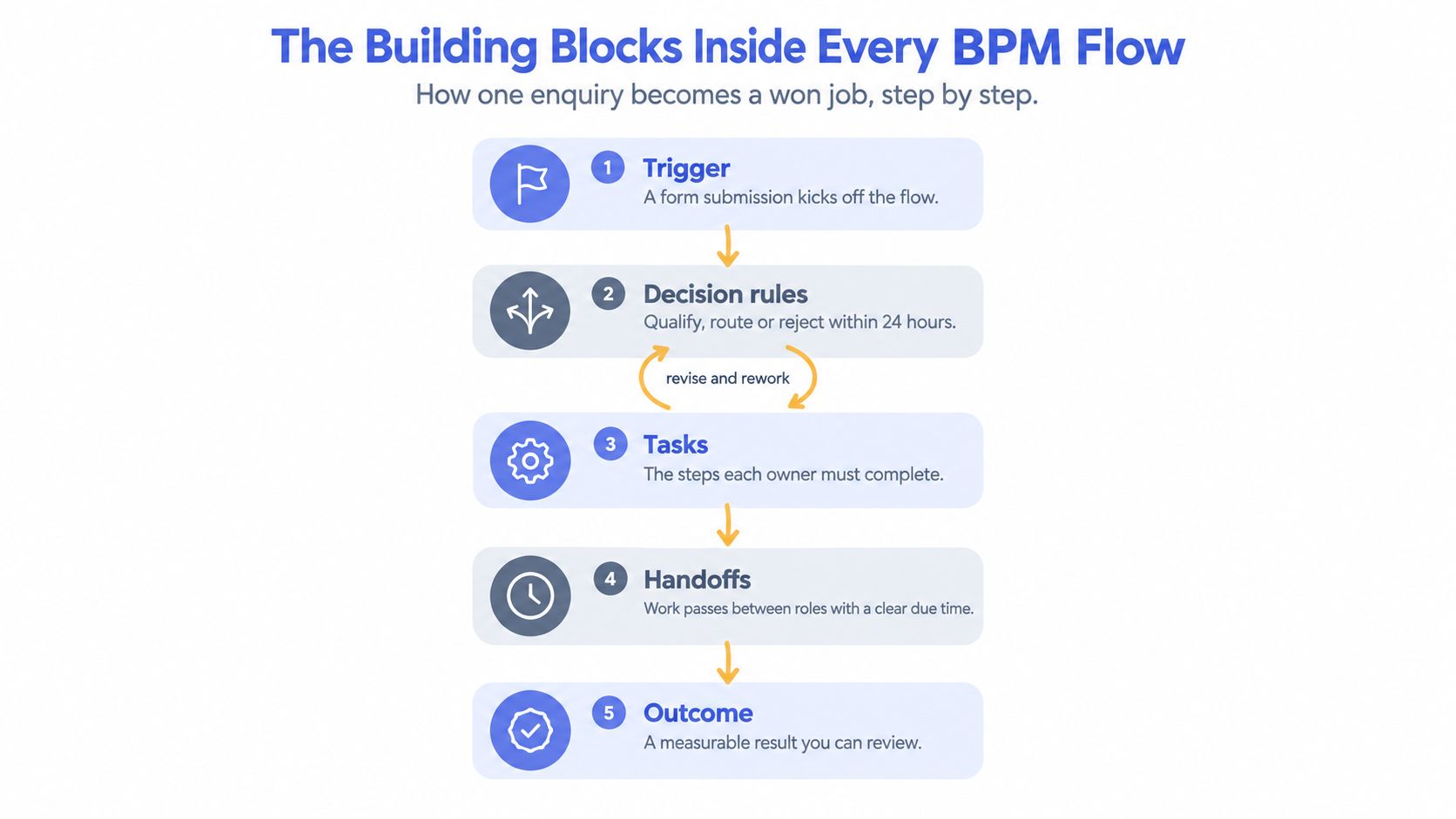
Every workable process has the same bones. A trigger starts it. A decision sends it one way or another. An action gets done. A verification proves the step finished. An exception path catches the bits that don't fit the happy path. Without those parts, work goes missing and nobody notices until the customer does.
What Each Piece Does in Real Work
An enquiry lands in your inbox or form, that's the trigger. Someone checks fit, urgency, and service type, that's the decision rule. A consultant calls back, the admin logs the note, or the quoting team drafts the scope, those are the actions. Then someone confirms the task is complete, which is the verification people often forget to design. If the customer doesn't answer, or the scope is unclear, the exception path tells the team what to do next instead of letting the task stall.
A process without an exception path is just a polite way of saying “we hope someone remembers.”
The process becomes measurable. A team can look at the flow and see whether enquiries are being routed properly, whether follow-up is happening on time, and whether jobs are bouncing back because the hand-off was incomplete. A good BPM flow doesn't just move work along, it exposes the points where work gets stuck so the owner can tighten the rule, fix the form, or clarify the next action.
For a broader view of process structure and governance, a contractor-oriented platform explainer like trust verified contractor platform by HomeProBadge can be useful as a reference point for how process control shows up in day-to-day operations. The core idea is the same whether you're in contracting, professional services, or field support, the work needs a visible route and a clear finish line.
Mapping an Enquiry from First Touch to Owned Opportunity
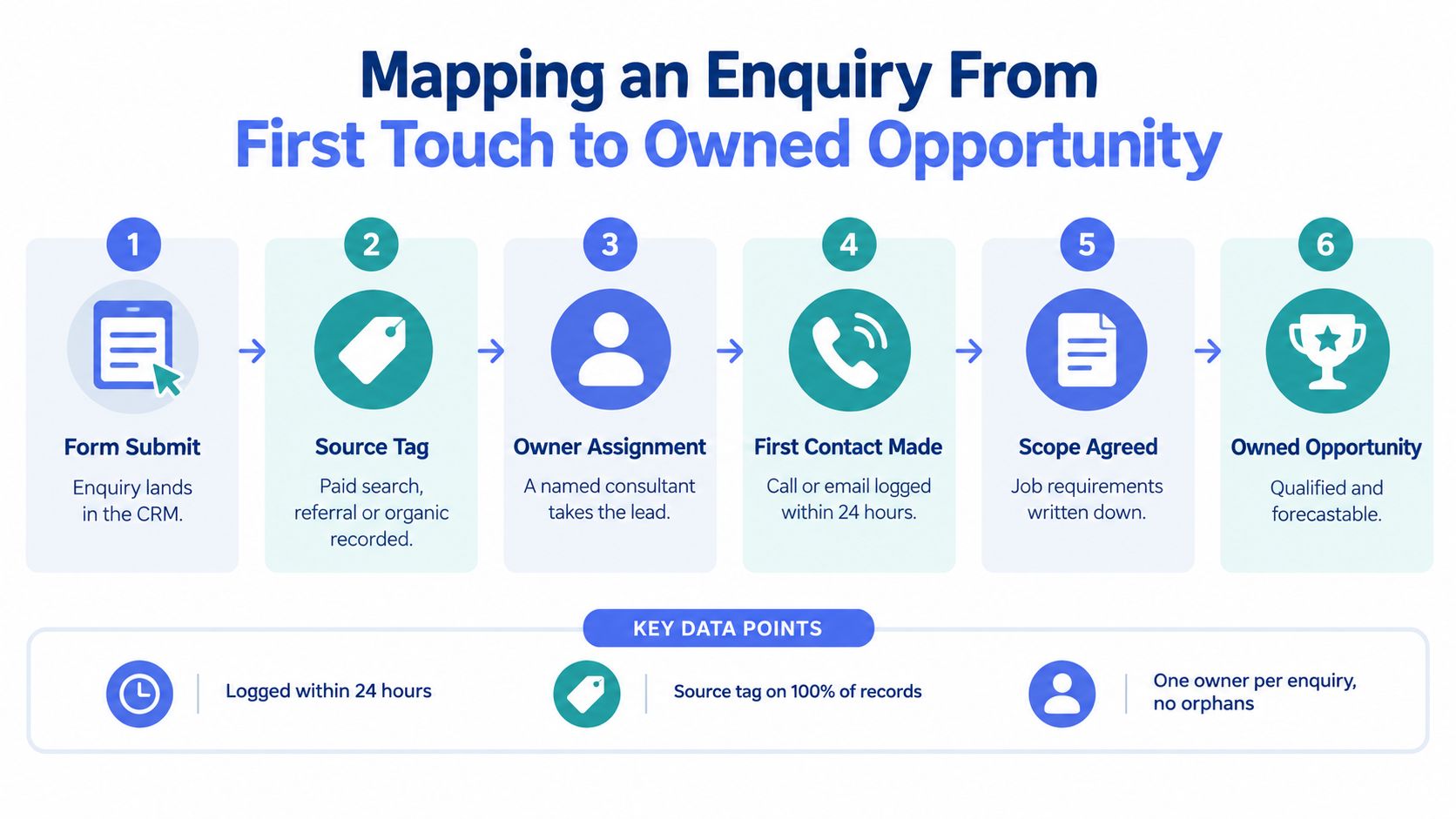
A service business usually doesn't need a grand redesign. It needs one enquiry to be owned properly from the moment it lands. That means the record carries a source tag, a named owner, a next action, and a clear result, instead of bouncing around inboxes and spreadsheets until someone remembers it.
A Simple CRM Path the Whole Team Can Read
An enquiry comes in through a form. The first record should show where it came from, who owns it, and what gets done next. If the consultant is meant to call back, that call needs a due time and a note field that proves contact was made. If the lead is not ready, it shouldn't disappear, it should move to nurture with a reason attached.
The same logic carries through to qualification, quote, and decision. The team should be able to read the pipeline and see whether the customer was contacted, whether the scope was agreed, whether the quote was sent, and whether the lead was won, lost, or parked for later. That's the difference between a CRM as a contact list and a CRM as a live operating layer.
If you want the follow-up side of that journey mapped in more detail, this internal guide on lead follow-up automation fits neatly beside the enquiry-to-opportunity flow. The useful point isn't the tool, it's the discipline of making ownership and next action visible at every hand-off.
Useful check: if a colleague can't tell at a glance who owns the next step, the process isn't mapped well enough yet.
The strongest first map is usually short. It doesn't need every possible branch. It needs enough detail that one person can open the pipeline and know what should happen next without asking around the room.
How Bpm Differs from Bpa and Other Automation
Owners often mix these terms because the tools sit close together. They're related, but they're not the same thing. The cleanest way to separate them is by scope, ownership, and how each one handles change.
| Approach | Scope | Ownership | Change pattern |
|---|---|---|---|
| BPM | The full workflow, including rules and exceptions | A process owner keeps it current | Changes when the business changes |
| BPA | Selected tasks inside the workflow | Usually shared across operations and admins | Changes when a step is worth automating |
| RPA | Repetitive screen-level actions | Often managed by technical support | Breaks when apps or fields change |
| Ad-hoc automation | One isolated action or connector | Often no clear owner | Fragile if nobody maintains it |
Why Fragile Automation Piles Up
A single Zap or template can be handy. The trouble starts when a business adds more of them without a process owner keeping the whole chain aligned. Then one small change in a form, a field name, or an inbox rule creates a silent failure somewhere else.
That's why BPM sits above the tooling layer. It governs the rules, the responsibilities, and the review cadence. BPA can then do the repetitive work inside that structure. RPA can mimic a task when there's no cleaner integration path, but it's still just a narrow mechanism, not the operating model.
For teams comparing process automation options, this internal explainer on business process automation AI helps separate the workflow logic from the mechanics of task execution. In practical terms, BPM keeps the map current, and automation follows the map instead of replacing it.
A Realistic Bpm Roadmap for Small Service Businesses
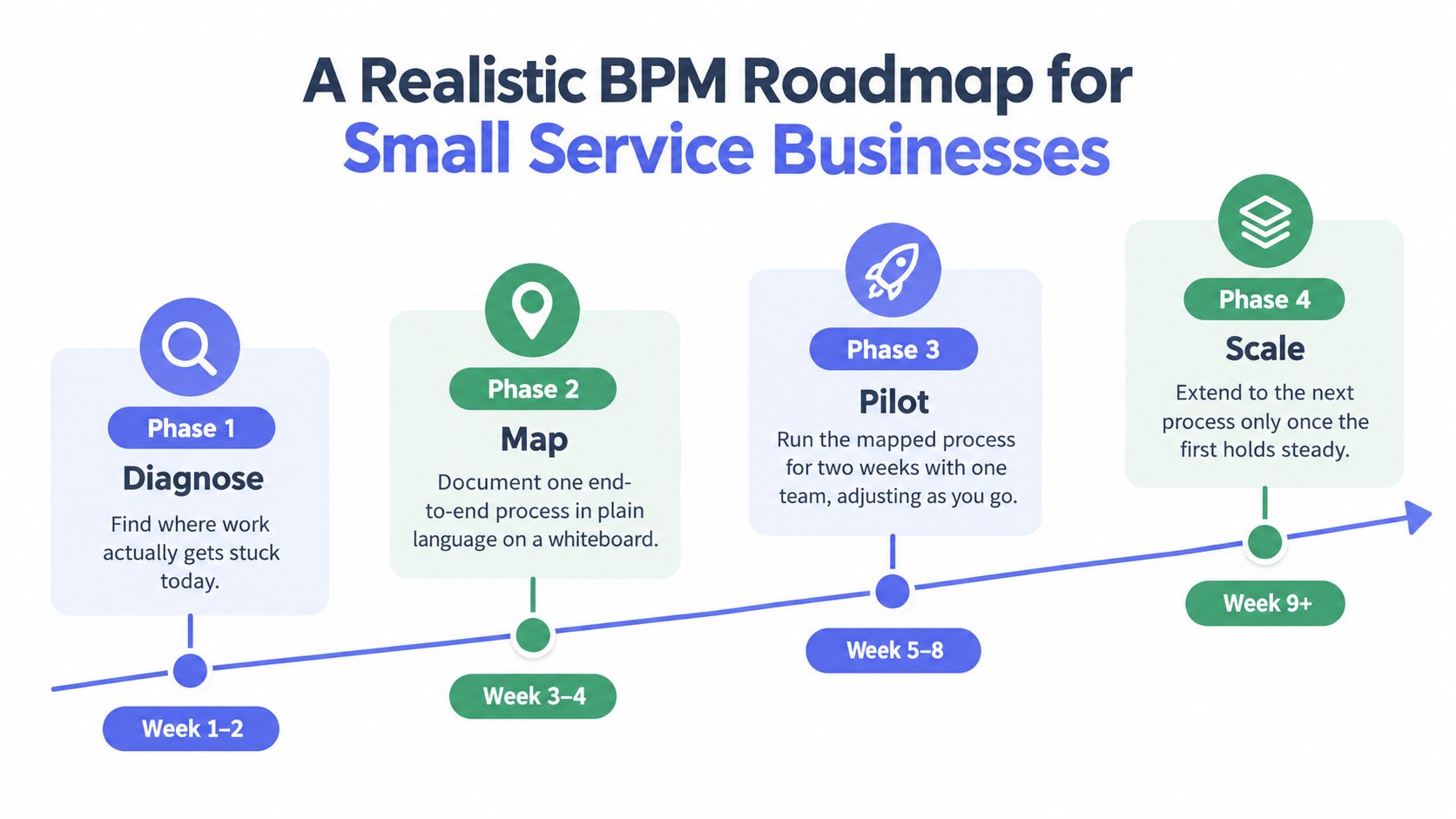
Small service teams don't need a transformation program to get value. They need a process that hurts, a clean map, and a first deployment that fits the tools already in use. The safest pattern is to start with the process that loses the most work, usually enquiry handling, then tighten the hand-offs before expanding anywhere else.
What the First Rollout Should Look Like
Start by finding where work gets stuck today. That usually means looking at missed replies, orphaned leads, unclear hand-offs, and the places where staff keep asking, "who's got this one?" Then map one end-to-end process on a wall or whiteboard, with the owner, next action, and outcome written beside each step.
From there, design the trigger, the decision rules, and the exception paths only for that flow. Deploy it inside the smallest useful system already in use, which might be the existing CRM, the shared inbox, or the intake form the team already trusts. Then watch the first few weeks closely and adjust the hand-offs before you add a second process.
A managed service like business process automation case study sits in this same practical lane when a business wants help turning a map into a live workflow. Truespeak also offers managed AI operations, CRM automation, intake automation, lead follow-up automation, and invoice reminder automation, which all fit the same principle of keeping the operating layer visible and human-controlled where it matters.
The point of the first rollout is not to prove ambition. It's to prove that the process is now clear enough that people can follow it without guessing.
Metrics That Actually Prove Bpm Is Working
Good BPM metrics show where the process is healthy, and where it's getting stuck. They don't need to be flashy. They need to show whether the flow is visible, owned, and moving at a pace the business can live with.
| Metric | What it exposes | Where the data lives | Review cadence |
|---|---|---|---|
| Enquiries by stage | Where work is piling up | CRM pipeline | Weekly |
| Time in stage | Where hand-offs slow things down | CRM activity history | Weekly |
| Stalled opportunities | Which records have no next action | CRM task queue | Weekly |
| First reply time | How quickly a human engages | Shared inbox or CRM log | Weekly |
| Hand-off completeness | Whether key fields travel with the job | CRM, intake, or delivery notes | Weekly |
Track the Flow, Not Just the People
These are process indicators, not performance theatre. A stalled opportunity tells you the workflow needs a clearer rule or a better reminder. A missing field at hand-off tells you the intake step wasn't strict enough. A slow first reply says the business hasn't set a reliable ownership rule yet.
Measure the work moving through the system, not the mood of the person doing it.
That distinction matters because BPM should expose friction in the system, not create pressure to perform for the sake of a dashboard. The review cadence can stay simple. One weekly check of stage health, stalled records, and incomplete hand-offs is usually enough to show whether the process is getting cleaner or drifting back into habit.
Starting Small and Avoiding the Enterprise Trap
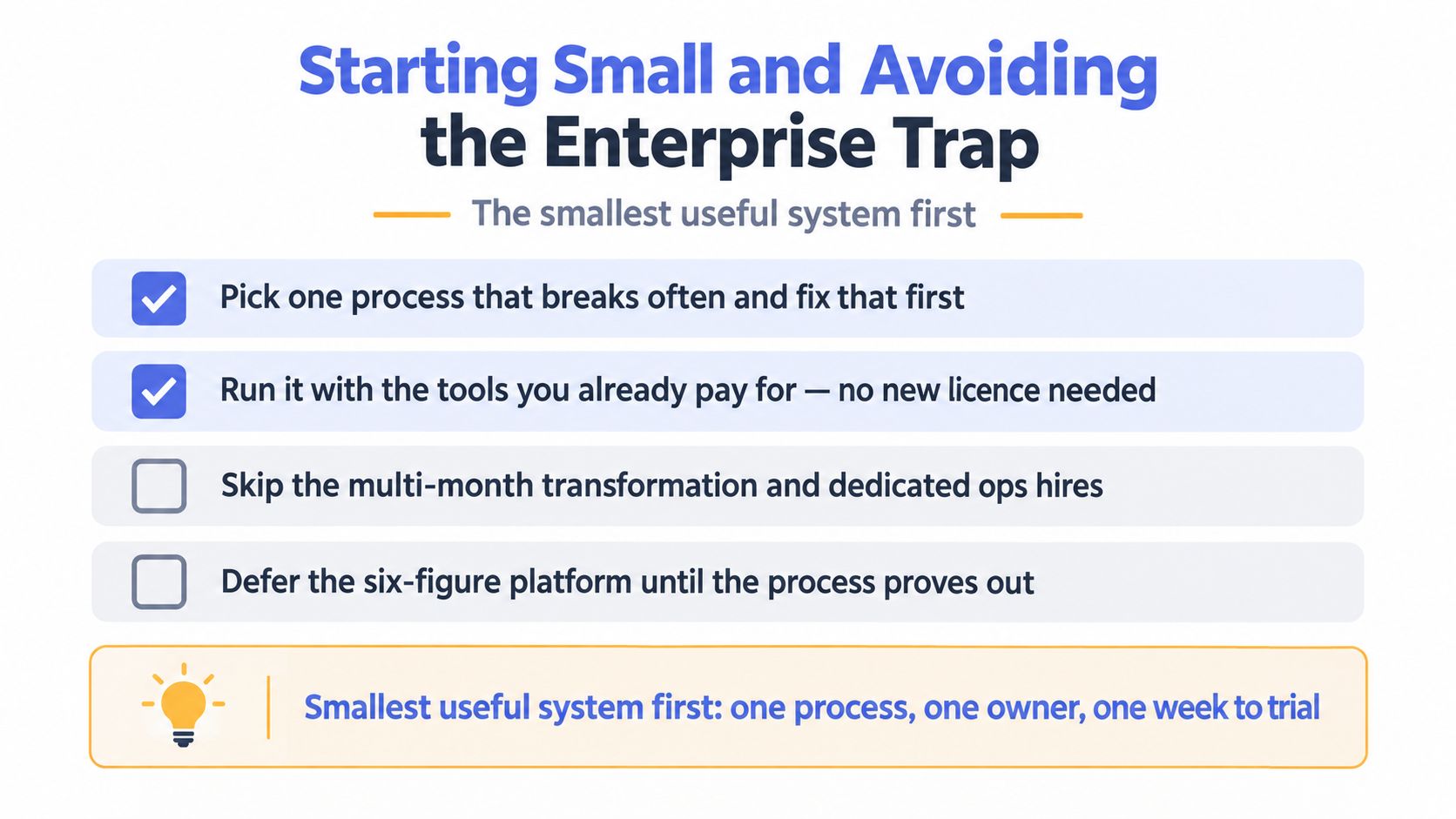
The biggest BPM mistake is treating it like a giant change program. Small teams don't need months of workshops, a new org chart, and a fresh platform all at once. They need one process made reliable, then the next one only after the first holds steady.
The Smallest Useful System First
Pick the process that breaks often and fix that first. Keep the scope tight enough to see it clearly, and use the tools you already pay for before you think about adding another layer. If the process proves out, then expand it. If it doesn't, the team has learned something useful without building a second mess on top of the first.
That's the enterprise trap in plain language. Teams document everything, redesign everything, and configure everything in parallel, then discover they've spent months producing diagrams instead of removing friction. Small businesses can't afford that kind of delay, especially when the core issue is usually a broken hand-off, not a lack of software.
The operational decisions worth making this quarter are simple. Choose the single process to map first. Name the owner. Define what success looks like in the flow itself. Set the first review date and stick to it.
If your team is still losing enquiries between forms, inboxes, spreadsheets, and memory, Truespeak helps you map the process first and then build the operating layer around it. If you want enquiry handling, follow-up, CRM hygiene, intake, or invoice reminders to run as one managed system, visit Truespeak and start with the smallest useful process.