
You've got enquiries in one inbox, quote follow-ups in another, intake details in a spreadsheet, and overdue invoices sitting in a CRM that nobody trusts completely. The work is there, but the path from first contact to finished job isn't visible, and when a staff member is away, things slip through cracks that nobody meant to create.
A business process management system is the missing operating layer that makes that work visible, owned, and measurable. It's not just another app to install. It's the structured way you map recurring work, set the next action, assign responsibility, route exceptions, and keep one live record of what happened so the job doesn't drift between inboxes and tools.
For Australian service businesses, that matters because the digital gap is still real. MYOB reported that approximately 466,062 Australian small and medium-sized enterprises, about one in five SMEs, had low levels of digitisation in 2022 and were at risk of falling into a productivity gap because they lacked effective digital tools and processes MYOB submission to Treasury. In plain terms, a BPMS turns scattered activity into a repeatable flow that people can run.
Table of Contents
- The Operations Gap Behind the Question
- The Core Components That Make a BPMS Work
- How a BPMS Differs from Task Automation
- Where AI, Automation, and Human Approval Fit
- Why Australian Service SMEs Need a Staged Approach
- Three Real Workflows a BPMS Can Govern
- When to Adopt, Extend, or Stay With Your Current Tools
- The Operating Layer That Makes Tools Work Together
The Operations Gap Behind the Question
A small service business rarely fails because the owner doesn't work hard enough. It usually slips because the same enquiry gets handled three different ways, the quote follow-up lives in someone's memory, and intake information arrives half-complete, then gets chased later when the job is already delayed. That's why people ask what is business process management system, they're looking for a way to stop work leaking between tools.
A Working Definition in Plain English
A BPMS is the operating layer that sits around your existing tools and tells work where to go next. It makes a process visible, gives it an owner, records the stage, and keeps track of the last activity until the item is won, lost, completed, or escalated. In that sense, it's closer to the way a good operations manager runs a floor than a piece of standalone software.
Practical rule: if a task can get lost in an inbox, it needs a process, not just a reminder.
That's why the term exists. Businesses need more than task lists, because task lists don't explain who owns the handoff, what happens when data is missing, or when a person should step in. A BPMS fills that gap by governing how work moves from start to finish.
It also matters because many teams already have the tools, but not the structure. The issue isn't always missing software, it's missing defined workflows.
The Core Components That Make a BPMS Work
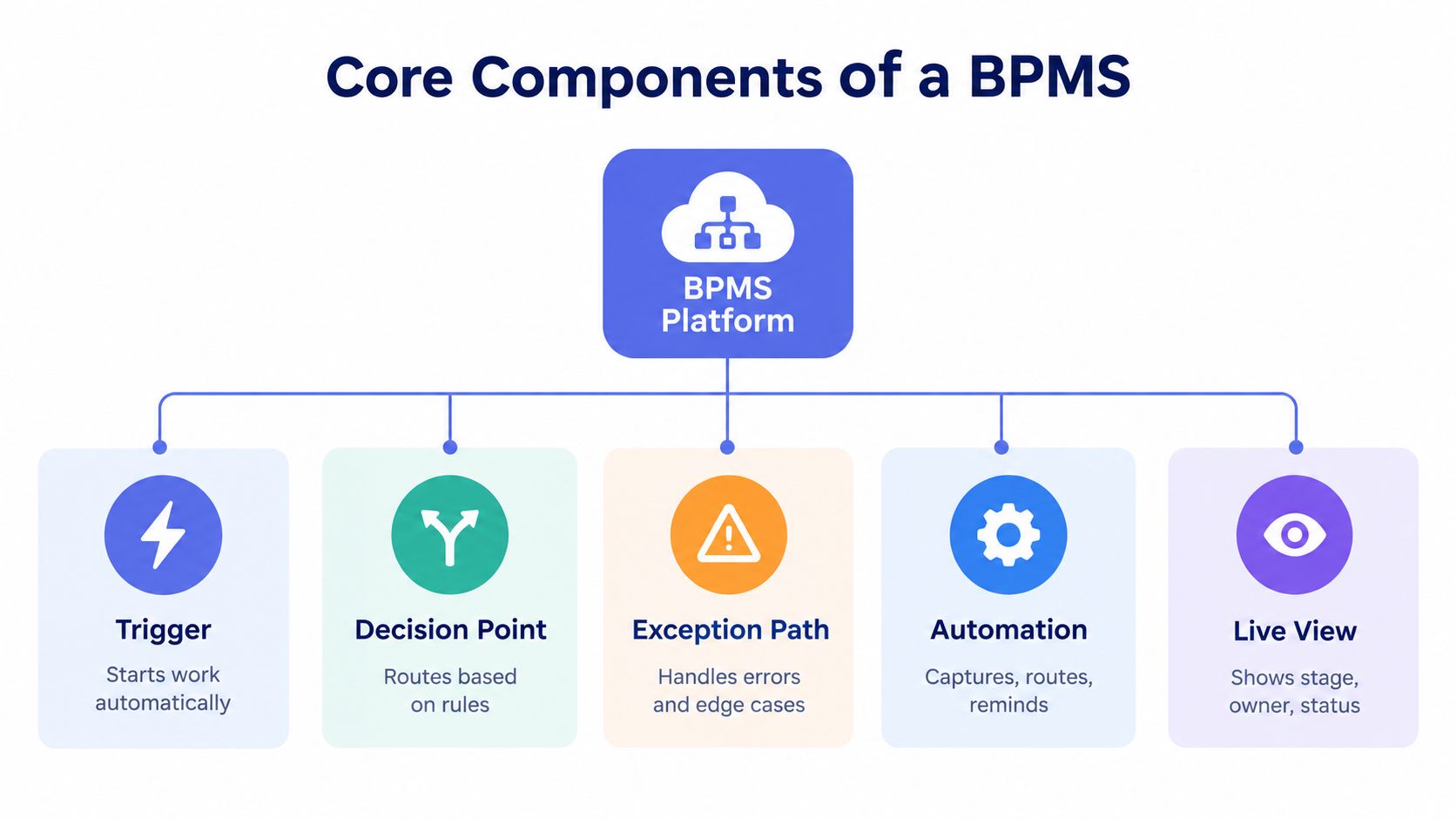
A BPMS becomes useful when you stop treating work as loose tasks and start treating it as a controlled flow. Something happens, the item moves, someone checks it, someone acts on it, and the result gets recorded. The system's role is to keep that flow visible and owned.
Start with the Trigger
A trigger is the event that starts the process. For an Australian service business, that might be a website enquiry, a referral, a signed quote, or a request for invoice support. Once the trigger fires, the work should move into a defined process with a named owner, not sit in someone's inbox.
Add the Decision Points
A decision point is where the system or a person decides what happens next. A new enquiry might be marked urgent, routine, not a fit, or ready for booking. Those decision points matter because they stop every item being handled the same way, even when the right next step is clearly different.
Build in the Exception Path
An exception path is where incomplete, stalled, or unusual items go. If a brief is missing, if a customer asks for something outside scope, or if an integration fails, the item should stay in a visible exception queue with a named owner and a review date until it is resolved. APRA's incident guidance reflects the same practical approach, detect the issue, escalate it, contain the impact, respond, remediate, then review APRA CPG 230.
Let Automation Do the Repeatable Work
Automation is useful when it captures, routes, reminds, and logs without forcing staff to copy details from one place to another. It can create a CRM task, send a follow-up draft, or move a record into the next stage. For teams still mapping their steps on paper, a guide to clearer team documentation is a useful reference.
A BPMS is a socio-technical platform for discovering, modelling, executing, monitoring, analysing, and continuously improving repeatable processes, connecting BPMN-style activities, events, gateways, roles, and exception paths to systems such as CRM, finance, forms, document repositories, and messaging tools CAIS research. In plain terms, it is the layer around your existing tools that decides what happens next and keeps the work governed.
Keep a Live View
The final piece is the live view. Someone in operations should be able to see the stage, owner, and latest activity without chasing three people for an update. That is what lets a small team manage the process while it is still moving, instead of discovering the problem after it has already gone off track.
How a BPMS Differs from Task Automation
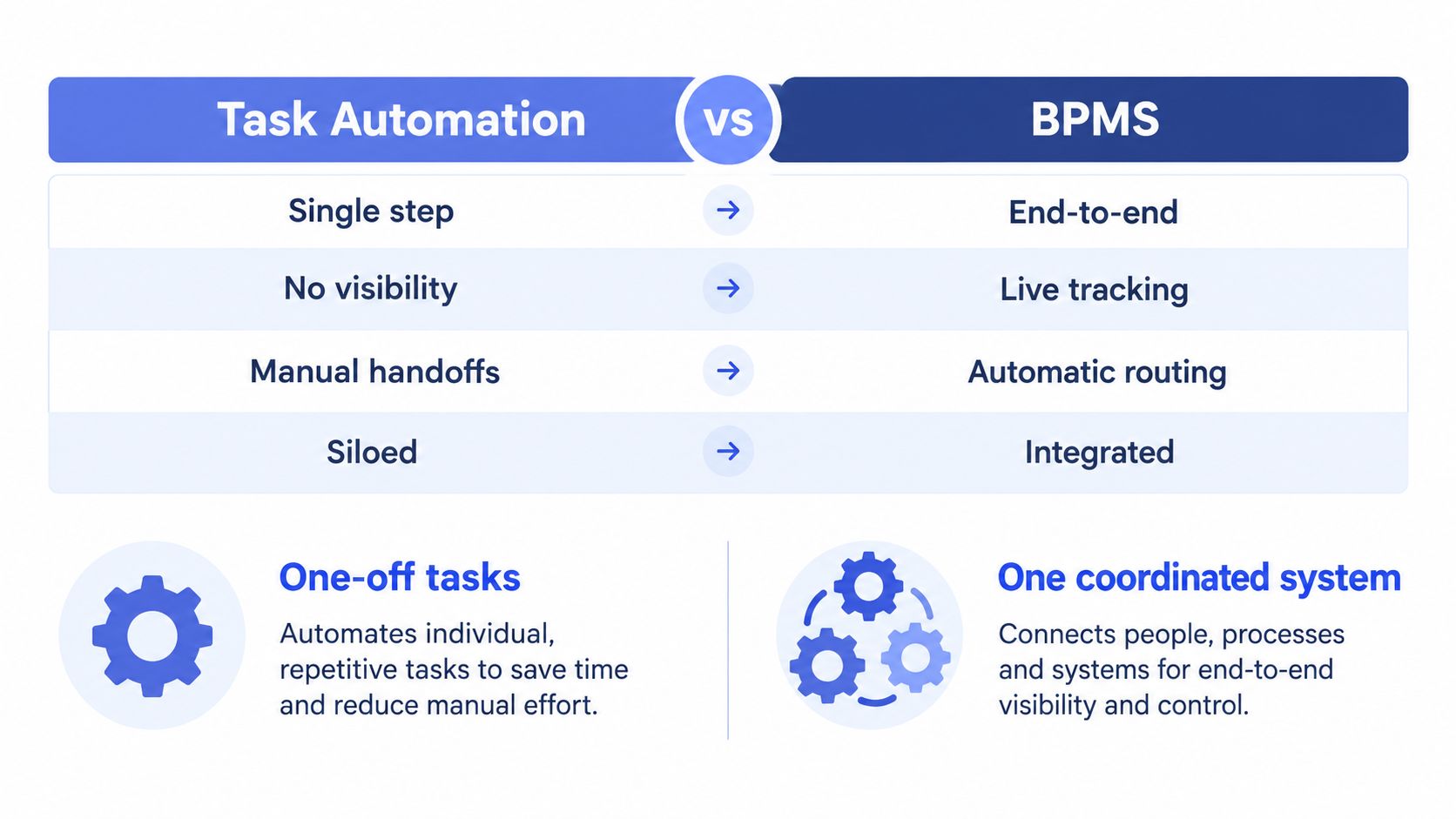
| Dimension | Isolated task automation | Business process management system |
|---|---|---|
| Scope | Single step | End-to-end |
| Visibility | Little or none | Live tracking |
| Handoffs | Manual | Routed and owned |
| Data model | Siloed | Integrated |
| Change control | Patchwork | Controlled and measurable |
Task automation is useful, but it's only one piece of the puzzle. It can send a reminder or fill a field, yet it won't necessarily show where the work sits, who owns it, or what to do when something goes wrong. A BPMS adds the control loop that keeps the process coherent.
The Control Loop Is the Real Difference
A proper BPMS compares what's happening in the business against the intended process. When the live flow diverges, the system flags the deviation and lets you revise routing, rules, or approval steps. That matters because work rarely fails at the neat, happy-path step, it fails when somebody goes on leave, a form comes back incomplete, or a customer asks for an exception.
A CRM can store records. A BPMS governs movement.
That's the useful distinction. A CRM often holds the data, while the BPMS tells the work what to do next and keeps that movement auditable. If you've ever had to ask, “Who picked this up?” or “Why did it stop here?”, you've felt the difference.
A managed operating layer can sit on top of the tools you already use. For teams looking at that option, Truespeak's business process automation perspective is one example of how process orchestration can be handled around existing systems rather than by replacing them.
Where AI, Automation, and Human Approval Fit
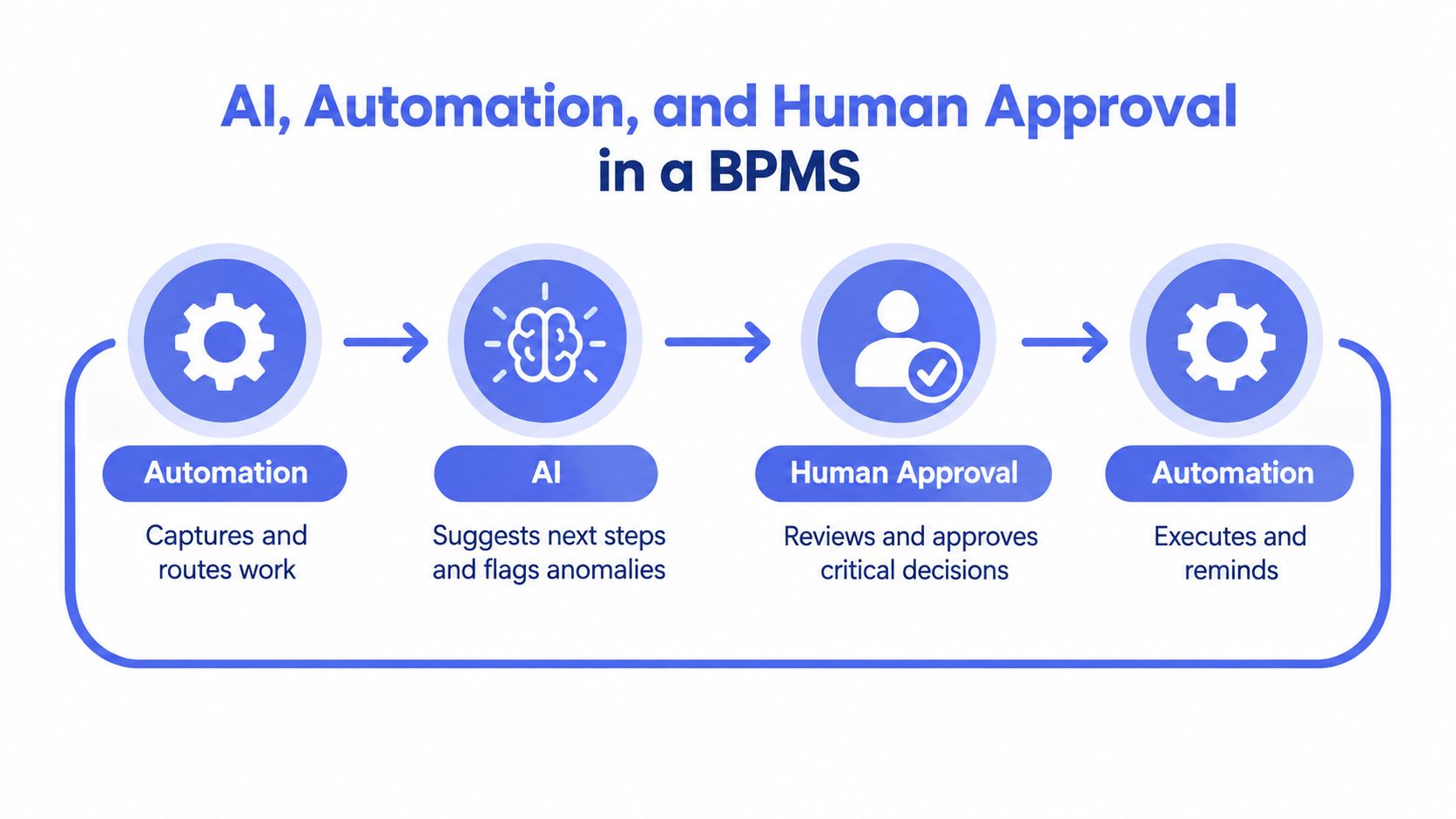
AI belongs inside the process, not beside it. The Australian Bureau of Statistics reported that 12% of businesses used artificial intelligence in 2024-25, compared with 1% in 2022-23, while 46% of businesses were finding savings and efficiencies through innovation and adopting new technologies, and AI uptake among small and micro businesses was approximately 11% ABS media release. That points to a practical shift, not a novelty, AI is becoming part of how work gets handled.
The Split That Keeps the System Trustworthy
Automation should handle the routine parts, like capturing data, routing work, drafting a response, or setting a reminder. AI can help classify an enquiry, suggest the next step, or flag unusual information. People should keep the right to review anything sensitive, ambiguous, or customer-facing before it goes out.
That's especially important because the Office of the Australian Information Commissioner states that, from 10 December 2026, APP entities must include information in their privacy policies where a computer program makes, or substantially and directly contributes to, a decision that significantly affects an individual's rights or interests and uses their personal information OAIC guidance. In practice, that means the workflow should show where a machine assisted, what it used, and who approved the outcome.
Approval Gates Aren'T Friction, They'Re Design
Human approval gates belong where judgement matters. That includes credit control, personalised client messaging, out-of-scope requests, and anything that could materially affect trust. If you're documenting that kind of operating model, the AI policy for subscription analytics resource is a useful reference point for thinking through governance language and review points.
Useful rule: the more consequential the decision, the more visible the approval step should be.
For practical design, the best systems keep a record of what was proposed, what information was used, and who changed the action. That's not paperwork for its own sake, it's how a process stays accountable.
Why Australian Service SMEs Need a Staged Approach
Big-bang automation projects tend to create more anxiety than capacity. The ABS figures above show a market moving quickly, but the same market still has plenty of smaller firms with limited appetite for heavy change. That's why a staged model is the sensible route for service SMEs, start with one measurable flow, prove it works, then expand.
Start Where the Volume Is High and the Pain Is Obvious
The strongest first candidate is usually the process that repeats often and creates visible friction. That might be first response, quote follow-up, intake, or invoice chasing. If a workflow only happens once a month, it's rarely the right place to build your first BPMS.
A sensible starting point also respects the limits of small teams. An Australian exploratory study of SMEs identified limited financial resources, time, and BPM knowledge as major barriers to implementation, supporting a staged architecture that begins with one high-volume, measurable process and preserves existing systems of record Deakin journal article.
Measure the Work Before You Expand It
The first metrics should be operational, not decorative. Look at response speed, stalled items, overdue actions, and whether every record has an owner and next step. If those basics improve, you've got evidence that the system is helping.
A disciplined rollout also keeps change manageable. Start with event logging, approval gates, role-based access, and exception queues, then expand only when the baseline is clear. If you're formalising the approach across functions, Truespeak's business process automation strategy is a useful way to think about sequence and scope without overreaching.
Three Real Workflows a BPMS Can Govern

Speed-to-Lead
A website enquiry lands in the inbox or form tool. A BPMS can turn that into a live case, assign an owner, and start a response clock at once. If the lead is a fit, the next step might be a qualification call or booking link. If it is outside scope, the case moves into an exception path instead of being lost.
A live speed-to-lead view should show the owner, the response clock, and the next action without asking three people what happened. That matters in small teams, where handoffs get messy fast.
Intake
Intake is where jobs often go off track before they begin. A brief arrives, but photos are missing, scope is unclear, or the contact details do not match the quote request. A BPMS keeps the item in a visible intake stage until the required information is complete, then routes it to the right person with the right context.
That works like a front desk checklist. Nothing moves until the basics are in place, which cuts rework later.
Invoice Reminders
Invoice reminders suit controlled automation because the pattern repeats, but the message still needs judgement. The system can identify overdue invoices, draft the reminder sequence, and queue the next action, while a person approves wording for sensitive accounts. For a practical example of how a managed workflow can sit around finance operations, see Truespeak's business process automation case study.
When to Adopt, Extend, or Stay with Your Current Tools
An Australian service business doesn't need to replace its stack just to get better process control. Often the smarter move is to keep the CRM, finance system, and forms you already rely on, then add an operating layer on top. The question is whether your current tools can support the flow without leaving gaps.
Use These Decision Signals
- Adopt a BPMS when: work keeps falling between systems, owners can't see stage clearly, or exceptions are handled ad hoc.
- Extend current tools when: the process is simple, the data already lives in one place, and the main problem is routing or reminders.
- Stay put for now when: the volume is low, the process changes often, or the team doesn't yet have a stable definition of the workflow.
The strongest warning sign is repeated rework. If staff keep asking for the same information twice, or if follow-up depends on memory, the process has already outgrown a purely manual setup.
Good adoption test: if you can't describe the next action for every live item, the process isn't controlled yet.
The Operating Layer That Makes Tools Work Together
A BPMS is less about buying software and more about building a reliable way of running work. It gives you one source of truth for the process, while automation handles the repeatable steps and people handle judgement, relationships, and exceptions. That's why controlled intervention often matters more than maximum automation.
The governance picture in Australia backs that up. A 2025 Australian survey found that only 13.5% of organisations reported AI governance covering compliance, ethics, transparency, privacy, and staff training, while 36% had an evolving model, 34.3% had only partial guidance, and 14.6% had no guidance KWM Directions 2025 report. In that environment, named ownership, approval gates, audit logs, exception queues, and a regular review cadence aren't extras, they're the operating basics.
If you're comparing tools or looking for a practical way to apply the model, Exayard AI estimating software is one example of how process support can be considered in a specific workflow context. The bigger point is simpler, choose one process, define the owner, measure the handoffs, and improve the flow before you scale it.
If you want help turning one messy process into a visible, manageable workflow, Truespeak designs and runs AI operating systems around the tools you already use. They work on first response, intake, CRM hygiene, follow-up, and invoice reminders, with human review built in where it matters.