
You've sent the proposal, checked your inbox twice, and heard nothing. The buyer might be waiting for approval, comparing quotes, missing information, or moving on. You don't know, and that's the problem. A good quotation follow up email after sending proposal shouldn't just chase a reply. It should clarify where the decision sits, remove one blocker, and leave a visible next action in your CRM.
Table of Contents
- Why Proposal Follow Up Needs a Clear Plan
- Set the Timing Around the Decision Window
- Write a Focused Follow Up Email
- Match Templates to the Buyer's Situation
- Respond to Silence Without Creating Pressure
- Keep Follow Up Personal and Compliant
- Build a Repeatable Proposal Workflow
Why Proposal Follow Up Needs a Clear Plan
A service business sends a detailed quote on Monday. By Friday, the owner assumes the job is lost, the estimator thinks someone else is following up, and the buyer is waiting for a manager to approve timing. Nobody can answer a basic question: who owns the next step, and when is it due.
Treat silence as an operational signal, not rejection. Your follow-up should confirm delivery, surface missing information, clarify the decision path, and create a recorded next action. If those four things aren't visible, you're guessing from an inbox instead of managing an opportunity.
Start in the CRM, Not the Inbox
Log the proposal before you draft any message. Record the owner, stage, proposal version, expected response, and scheduled follow-up date. That record stops follow-up relying on memory and lets a person decide whether to wait, email, call, or close the opportunity when the task falls due.
Don't claim one universal first follow-up interval. Set timing from the buyer's urgency, agreed decision date, and next action.
Separate Commercial Quotes from Formal Tenders
Private-sector quotes usually allow a concise confirmation message. Formal procurement is different. Australian Government open tenders must generally remain open for at least 25 calendar days, subject to specified exceptions, while formal evaluation can take considerably longer and unsolicited supplier contact may be inappropriate unless the process permits it. Use the stated channel and follow its contact rules.
| Opportunity type | Likely follow-up route | Key control |
|---|---|---|
| Private quote or proposal | Email, then phone if useful | Recorded owner and next action |
| Formal government tender | Stated procurement channel only | Process rules and permitted contact |
| Referred internal proposal | Forwardable summary to approver | Confirm who should receive details |
Set the Timing Around the Decision Window
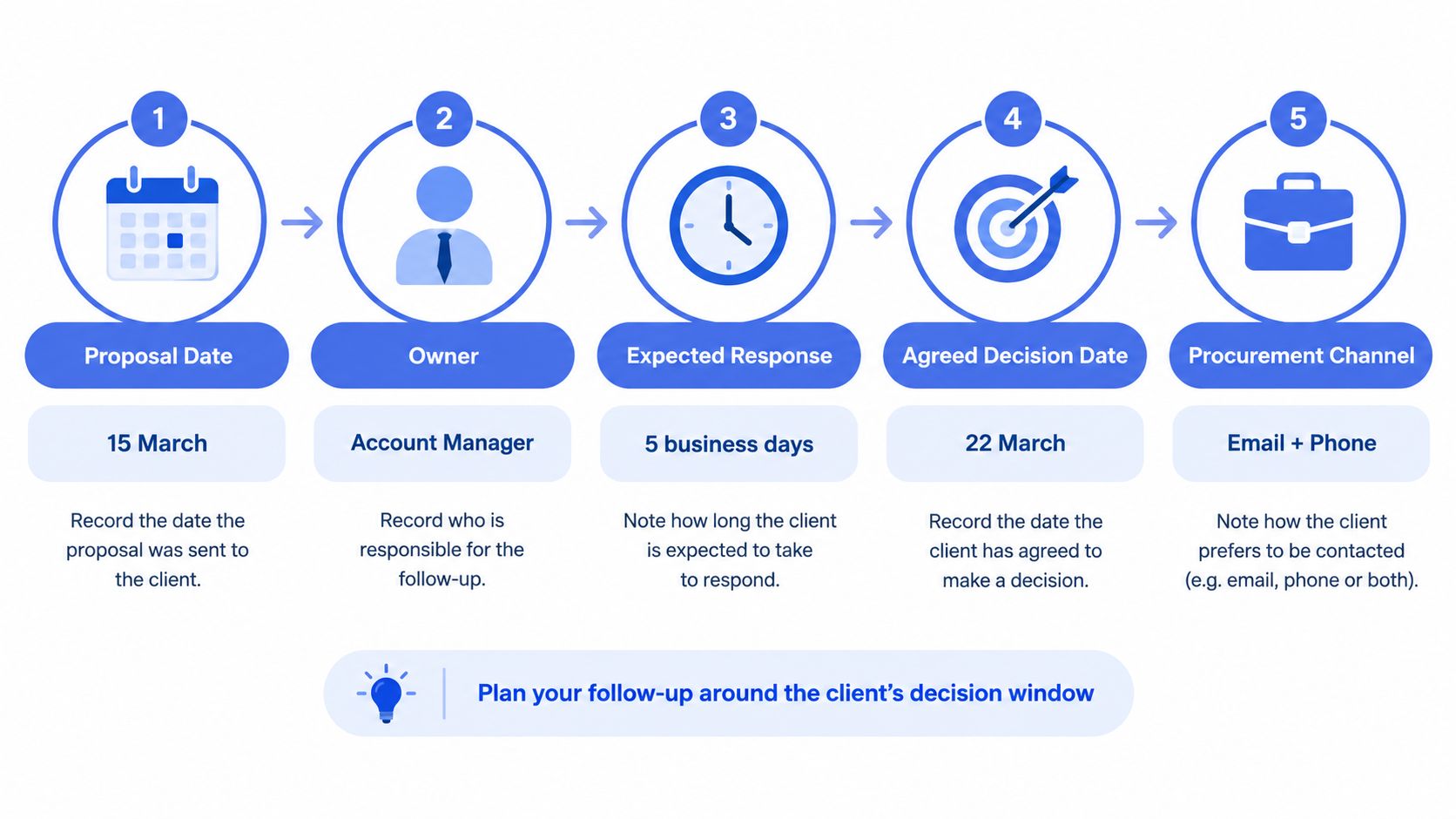
Build your timing plan the moment the proposal leaves your business. Record five fields immediately and review them together, rather than setting a vague reminder to chase later.
This timeline shows the minimum context your team should capture at dispatch.
Log the Decision Window
Capture the proposal date, accountable owner, expected response, agreed decision date, and procurement channel. If the buyer hasn't given a decision date, record your response expectation and the date you'll review it. Several quiet days matter more when the overall window is short.
Australian and New Zealand tender data illustrates that range. An analysis of 22,122 closed tenders found median response windows of 17 days for quotation requests, 21 days for expressions of interest, 27 days for full tender requests and 28 days for proposal requests. Don't turn those figures into a rigid rule for private buyers, but do use them to avoid drifting.
Give Each Message a Different Job
Use a staged, value-led cadence. Confirm delivery and surface friction early, add a useful clarification next, then ask for a specific decision or meeting, and finally close the loop or move the opportunity to nurture. That's decision management, not repeated checking in.
| Buyer situation | Timing basis | Primary purpose |
|---|---|---|
| Short quotation process | Agreed response expectation | Confirm receipt and missing details |
| Longer proposal review | Decision date or approval step | Clarify scope and next step |
| Formal evaluation | Procurement timetable | Monitor permitted channel |
| No reply after useful messages | Recorded review date | Change channel or ask if still active |
Where a signed acceptance is part of the process, reminder tools for contracts can support the document step, but they don't replace judgement about the message. A structured approach to lead follow-up automation should prompt the owner at the scheduled review point, not force another email automatically.
Write a Focused Follow Up Email
A focused email answers one question and makes one next step easy. It doesn't resell the whole proposal, attach a new version without explanation, or ask the buyer to solve five issues at once.
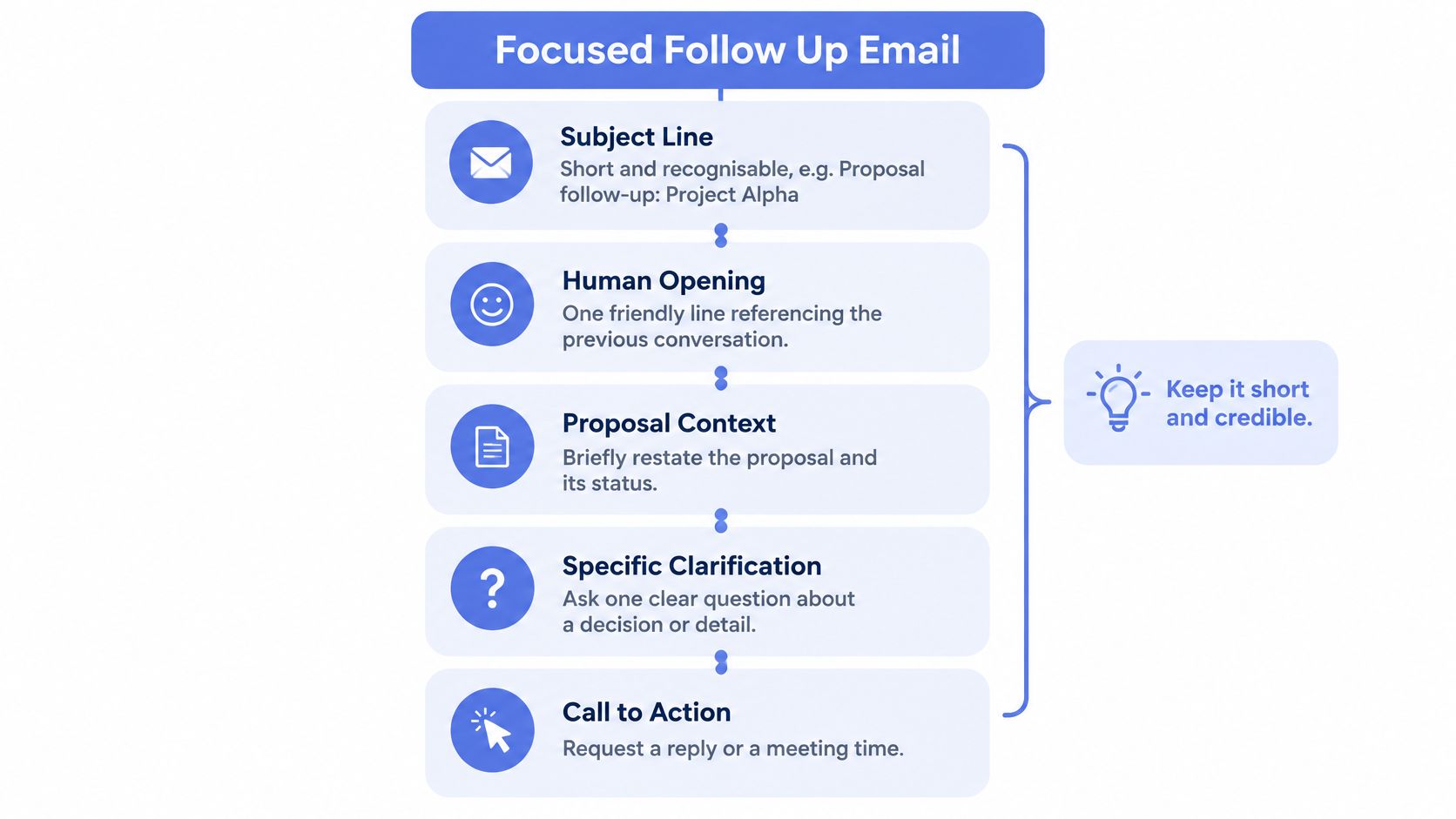
The structure below keeps the message short, recognisable, and credible.
Use Five Clear Elements
Start with a subject line that names the proposal, such as Proposal follow-up, [Project name]. Open with one human line tied to your previous conversation. Restate the outcome or scope briefly, then ask the single clarification or decision question that matters now.
Finish with a low-friction call to action. "Would Tuesday or Thursday suit a 15-minute review?" is easier to answer than "Let me know your thoughts." Also give the buyer a graceful correction path if scope, timing, or budget is wrong.
Prompt acknowledgement matters. Australian customer-service evidence reports that 62% of customers expect a response within 24 hours and 31% within 12 hours, which supports an early confirmation step rather than waiting indefinitely for the first check-in.
| Element | Reader question | Writing action |
|---|---|---|
| Subject line | What's this about? | Name the project or proposal |
| Context | Where are we up to? | Restate outcome and sent version |
| Clarification | What needs resolving? | Ask one specific question |
| Call to action | What happens next? | Offer a reply or brief meeting |
| Exit path | What if it's not right? | Invite a correction or decline |
Practical guidance on timing and personalisation for reminder emails reinforces a simple point. Personalisation should use real context, such as site access, equipment lead time, or the agreed outcome, not empty familiarity.
This short video is useful background on keeping follow-up clear and professional.
Before sending, check the recipient, proposal version, and requested action. If you're attaching a revised document, state exactly what changed and why. Version confusion creates silent stalls because the buyer can't tell which document they're approving.
Match Templates to the Buyer'S Situation
Don't reuse one generic message at increasing volume. Match the template to the buyer's likely blocker, keep it scannable, and use bracketed fields only where you'll insert real proposal context.
| Situation | Best-fit template | Primary CTA |
|---|---|---|
| Delivery unconfirmed | Receipt confirmation | Confirm arrival |
| Detail unresolved | Clarification | Answer one question |
| Approval pending | Approver check | Name the remaining step |
| Scope may not fit | Review offer | Book a brief call |
| No response | Close the loop | Confirm active, deferred, or closed |
Confirmation and Clarification Templates
Delivery confirmation, subject: Proposal for [Project], confirming delivery
Hi [Name], I'm confirming the proposal for [outcome] sent on [date] reached you. Is there any detail you need from us before you review it? A quick reply here is fine.
Use this when you don't know whether the document arrived or reached the right person.
Clarification, subject: One detail on [Project] proposal
Hi [Name], one point may affect timing. Does [site access date / equipment lead time / start window] still apply, or should we adjust the proposed schedule? Once I know that, I can confirm the next step.
Use this when one unresolved detail blocks an informed decision.
Approval, Review, and Close-the-Loop Templates
Internal approval, subject: Approval step for [Project]
Hi [Name], is the proposal waiting on another approver? If it helps, I can send a short summary covering scope, timing, and the decision needed for [approver role] to review.
Use this when your contact may not be the decision-maker. Ask who should be included before forwarding commercial details.
Scope or timing review, subject: Brief review of [Project] proposal
Hi [Name], would a 15-minute review help confirm whether the scope and timing still fit? We can keep it to [key decision], and I'll update the proposal only if something needs changing.
Use this when price, priority, or capacity may need a human conversation rather than another attachment.
Close the loop, subject: Should we keep [Project] open
Hi [Name], I haven't heard back, so I want to check whether [Project] is still active, deferred, or no longer proceeding. Any of those answers helps us plan. If timing has changed, tell me when to revisit it.
Surfacing commercial uncertainty early matters. Only 37% of B2B invoices in Australia were paid on time in 2025, while 52% were overdue and 11% were written off. That invoice data isn't proposal data, but it supports a disciplined lesson. Don't optimise only for persistence when labour, materials, and cash flow are also at stake.
After two useful, unanswered emails, change the channel or ask the active-project question. More identical reminders rarely create clarity.
Respond to Silence Without Creating Pressure
Diagnose the stall before you write again. Silence can mean missing information, internal approval, capacity pressure, price concern, an unconfirmed decision-maker, or no active project. Each cause needs a different response.
| Likely blocker | Useful response | CRM action |
|---|---|---|
| Missing information | Send the specific detail requested | Log question and answer date |
| Internal approval | Offer a forwardable summary | Record approver and next step |
| Timing or capacity | Offer a revised start option | Set a deferred review date |
| Price or priority | Invite a human scope discussion | Record objection without auto-discounting |
| Wrong contact | Ask who should be included | Update contact roles |
| No longer active | Ask to close or revisit later | Close with reason or nurture |
Know When to Wait, Switch, or Stop
Wait when the buyer has given you a clear review date and no new information is needed. Change the message when your last email asked for general thoughts but didn't identify the blocker. Switch channel when two useful emails have gone unanswered and a brief call is appropriate.
Stop chasing when the buyer says no, opts out, confirms another supplier, or repeatedly gives no active next step. Record not now, blocked internally, price objection, missing information, or no decision as distinct outcomes. Your CRM should become a history of decisions, not a list of unanswered sends.
The cost of endless chasing is real. Recent Australian data reports that 17% of surveyed SMEs estimated losing more than $2,500 per month because of late payments, while 20% spent six to twelve working days each year chasing overdue payments. Proposal follow-up is a different task, but the operating risk is similar. Unbounded chasing consumes time your team could spend on active work.
Keep price concessions, exceptions, and relationship-sensitive decisions with a person. Automation can create the task and surface the record. A thoughtful lead nurturing path is appropriate only when the buyer has indicated a future timing or continuing interest, not as a default for every unanswered quote.
Keep Follow Up Personal and Compliant
Automate timing, reminders, internal tasks, and approval gates. Don't automate judgement about price changes, concessions, deadline pressure, disputes, or messages that could affect the relationship.
| Task | Automation role | Human control |
|---|---|---|
| Follow-up reminder | Create task when due | Decide wait, email, or call |
| Draft message | Insert proposal context | Edit and approve wording |
| Price or scope change | Flag exception | Agree revised terms |
| Sensitive proposal | Restrict workflow routing | Confirm approved recipients |
| Opt-out request | Suppress future sends | Confirm record is updated |
Record the enquiry source, communication basis, marketing preference, proposal version, owner, status, scheduled action, and every handoff. That context lets the owner review the basis for contact before sending, instead of relying on a name and quote value alone.
Compliance boundaries are clear. The OAIC states that organisations must provide a simple way for recipients to opt out of future direct marketing and must stop sending it when requested; commercial emails must also comply with the Spam Act. Identify the sender accurately, preserve the original enquiry context, and include a functional unsubscribe mechanism where required.
For sensitive proposals, use the approved channel and share only necessary details. A human-in-the-loop automation model keeps the workflow consistent while ensuring a person approves anything commercially sensitive.
Build a Repeatable Proposal Workflow
Use one proposal record, one accountable owner, one current stage, one response expectation, and one scheduled next action. Work through the same rhythm each time, prepare context, send, record the next action, review the response, choose the right message, update the CRM, then close or nurture.
Recordkeeping supports that discipline. ASIC states that companies must keep financial records for at least seven years and be able to produce hard copies within a reasonable timeframe when requested. Operational guidance on standardizing processes with voice also points to making repeatable steps explicit, so the process doesn't depend on memory.
| Check | Pass condition | Owner |
|---|---|---|
| Recipient and version | Correct person and current proposal | Proposal owner |
| Message | One question and one clear CTA | Sender |
| Approval and opt-out | Sensitive wording approved, suppression checked | Accountable manager |
| CRM update | Reason open and next action recorded | Proposal owner |
Truespeak's lead follow-up automation can sit within this kind of workflow by prompting follow-up from the live pipeline while people retain approval over sensitive communication. Persistent follow-up should create visibility and a decision path, not manufactured urgency.
If sent proposals are disappearing into inboxes, Truespeak can help you build a managed follow-up workflow around your existing CRM, with clear owners, next actions, reminders, and human approval where it matters. Visit Truespeak to discuss a practical system that keeps quotes visible without flooding buyers with reminders.