
Approximately 12% of all businesses used AI in the workplace in 2024-25, compared with only 1% in 2022-23, according to the Australian Bureau of Statistics release on business adoption of artificial intelligence. That jump doesn't mean every business should add a chat widget tomorrow. It means an AI chatbot for business is now common enough that customers will judge yours against the best and worst they've already used.
I would treat the chatbot as a workflow, not a widget. It should capture an enquiry once, answer only what's approved, write a usable record, assign an owner, and hand judgement to a person. If it can't do that, it's conversation volume without completed work.
Table of Contents
- What an AI Chatbot Does for a Business
- Use Cases That Pay Off First
- How a Speed-to-Lead Chatbot Works Step by Step
- Where Humans Must Stay in Control
- Connecting the Chatbot to Your CRM and Data Rules
- Measuring Whether the Chatbot Is Working
- Choose Managed or DIY Before You Build
What an AI Chatbot Does for a Business
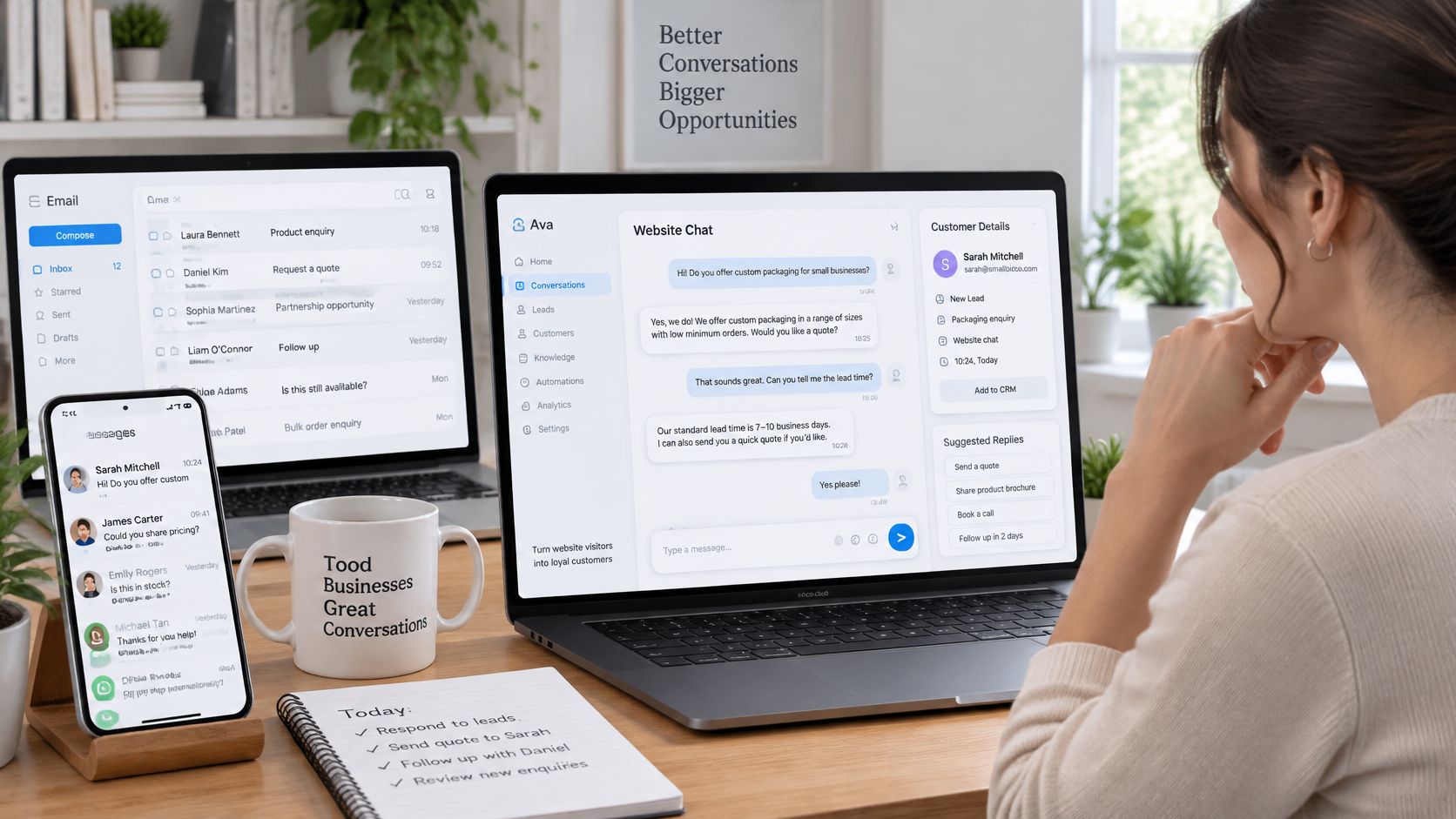
An AI chatbot for business is software that talks with customers or prospects in writing through website chat, messaging apps, SMS or email. It works out what they need, answers approved questions, collects the details needed for the next step, and passes the rest into the systems you already use.
A good bot works like a front-desk receptionist working from a clear checklist. Same greeting, same qualifying questions, same booking rules every time. Anything unusual gets walked to the owner, and it keeps doing this outside business hours without losing consistency.
The Three Parts That Make It Work
A working setup needs three parts beyond the chat window:
- Conversation layer: The chat, SMS, messaging or email interface the customer sees.
- Approved business information: Services, areas, hours, process steps and answers you've checked and own.
- System connection: A link to your CRM, calendar or inbox where the enquiry becomes a record with an owner.
Miss the third part and staff still copy details between tools while enquiries still go missing. The bot has moved the mess rather than cleared it. The record is what you measure against: each captured enquiry should show who owns it, what was promised and what happens next.
Adoption is no longer rare among smaller operators. In the Australian Government's AI Adoption Insights update, 43% of Australian SMEs reported some level of AI adoption during the December 2025 to February 2026 quarter. The practical question is whether your version is controlled well enough to trust with customers.
That control is also what customers expect. When CHOICE reported Australians' views on AI, 51% of Australians surveyed said AI chatbots for customer service were making their experience much worse and 70% disagreed that businesses should be trusted to use AI however they choose. A bot that identifies itself, stays inside approved answers and makes human handover easy is how you avoid becoming one of the bad experiences those respondents had.
Before you build, answer three fit questions. How many enquiries arrive outside business hours? How many disappear between first contact and a reply? How many routine questions consume staff time each week? If all three answers are near zero, fix your enquiry process first and add automation later.
Use Cases That Pay Off First
| Use case | Typical trigger | What the bot does | Typical channels |
|---|---|---|---|
| Speed-to-lead | New web, ad or form enquiry | Replies quickly, asks qualifying questions and offers a next step | Website chat, SMS, messaging app |
| Intake | Quote or job request | Collects service type, location, timing, photos and documents into a structured brief | Web form, messaging app, email |
| Lead follow-up | Quote or proposal sent with no reply | Sends timed, context-aware nudges and logs each response | Email, SMS |
| Invoice reminder | Invoice past its due date | Drafts scheduled payment reminders for approval before sending | Email, SMS |
| After-hours FAQ | Routine question outside business hours | Answers approved questions on services, areas and next steps | Website chat, messaging app |
| Booking and routing | Enquiry ready for a call or visit | Offers approved time slots and routes the enquiry to the right owner | Calendar, CRM |
Start where delay costs you most. For many service businesses, that's a quote request sitting untouched overnight while the prospect messages two competitors. For others, it's an invoice that slips past its due date because nobody wants to make the awkward call. Rank use cases by the cost of waiting, not by which demo looks cleverest.
After-hours FAQ looks easy, and it is, but easy isn't the same as valuable. Answering "Do you service Parramatta?" at midnight helps only if the visitor can then leave a structured enquiry. Otherwise you've built a polite dead end.
An Illustrative Conversation Path
Say a homeowner asks a builder about a bathroom renovation through website chat. The bot confirms the service needed and the suburb, asks about timing, and requests photos if they have them. It collects a name and mobile number, then sets a clear expectation, such as a person reviewing the brief and calling during the next business day.
Then it stops. It doesn't estimate a price, promise a start date, or comment on whether a wall can move. If the visitor mentions water damage, a dispute with a previous tradesperson, or anything outside the approved path, the bot routes the conversation to a person instead of improvising.
That's a typical pattern, not a measured result. It keeps repetitive questions off the live queue because routine information is captured once, in order, every time. Your team starts the morning with briefs they can act on rather than half-finished chat threads.
Practical rule: Pick a first use case with one clear trigger, repeatable answers, and a named person who'll check the output within one working day.
If you can't name that checker, you're not ready to launch that flow. Ownership after launch matters more than polish before it. One narrow workflow that someone reviews daily will teach you more, and break less, than five flows nobody watches.
How a Speed-to-Lead Chatbot Works Step by Step
Say a kitchen renovation enquiry arrives after 9pm. Here's the flow I'd expect a speed-to-lead chatbot to follow, step by step.
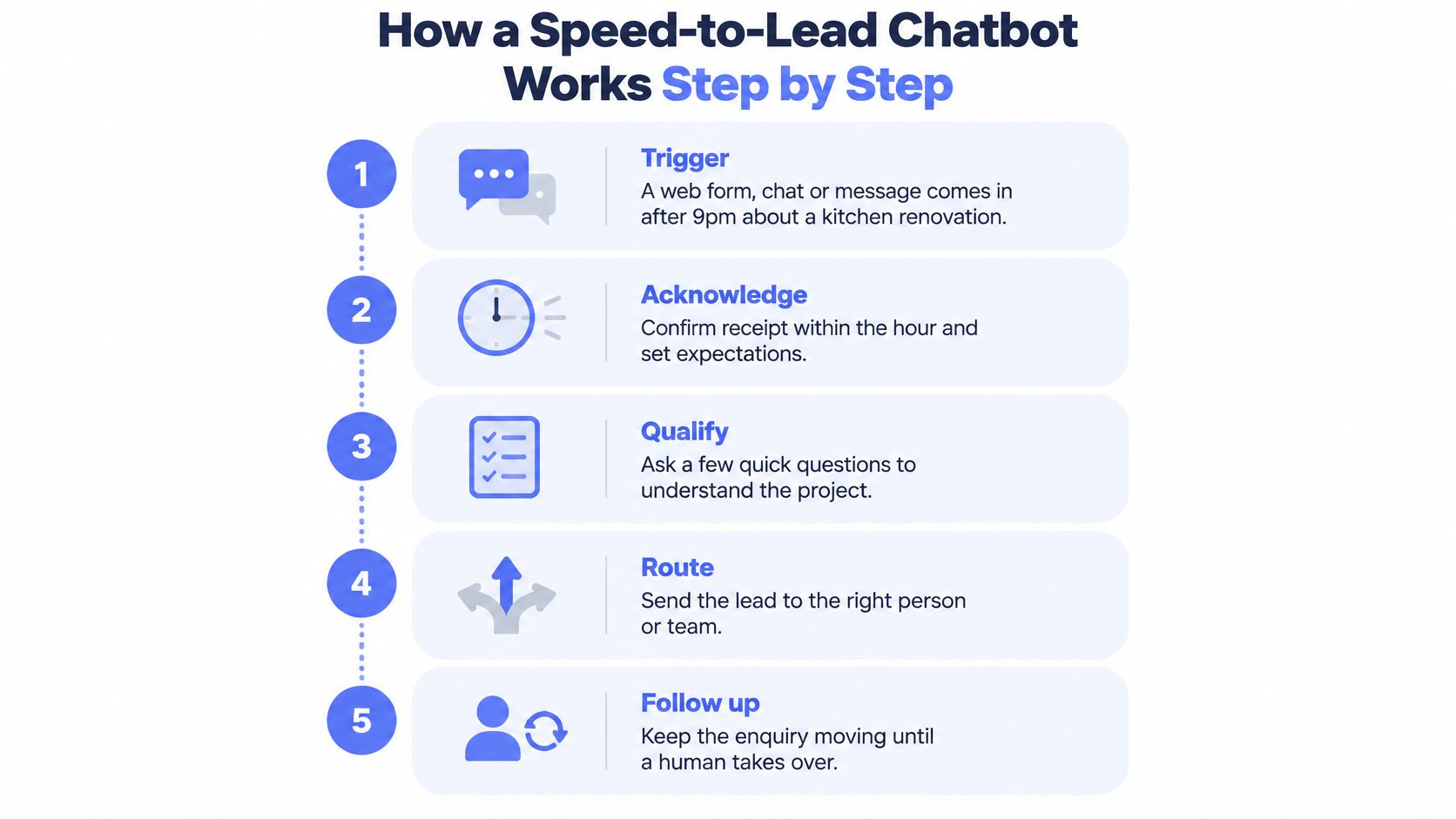
- Trigger: A web form, chat message or SMS arrives and starts the workflow.
- Acknowledge: The bot confirms receipt, identifies itself as automation, and says what happens next.
- Classify intent: It decides whether this is a quote request, a booking, a general question or a complaint.
- Extract fields: It captures name, suburb, service type, timing, any budget range the customer offers, and photos.
- Check exceptions: Complaints, safety issues, legal questions or work outside your service area go straight to a person.
- Offer approved next steps: It offers an inspection slot from the calendar or agrees a callback window.
- Write the record: It creates or updates the CRM entry with stage, owner and next action.
- Confirm the handoff: It tells the customer when a named person will reply, then stops.
This short video walks through the same kind of first-response sequence in practice.
The Two Checks That Decide Whether It Works
The confidence threshold at step 3 does the heavy lifting. If the bot can't classify intent confidently, it shouldn't guess and push the customer down a quote path. It should ask one clarifying question, and if the reply is still unclear, hand over with the transcript attached. A clean handoff beats a confident wrong answer every time.
The exception list at step 5 is your safety net, and it should be written down before launch, not discovered after a bad conversation. Include complaints, safety concerns, legal or contractual questions, requests outside your service area, and any mention of vulnerability or distress. When a message matches the list, automated replies stop and a person takes over.
The most common failure is duller than a wild hallucination. The bot books an inspection slot the team can't meet because the calendar it reads is stale or the travel time rules were never set. Fix that with approved slots only, buffer rules between jobs, and a daily check of what the bot booked. For the routing side, it's worth reading a clear explainer on automating lead assignment for faster follow-up so ownership rules are settled before messages start flowing.
Don't copy any provider's exact build blindly into your business. Copy the shape instead: trigger, context, decision, action, approval, output and feedback. That shape is what our speed-to-lead automation work follows, and it holds up whether the enquiry arrives by chat, SMS or form.
Where Humans Must Stay in Control
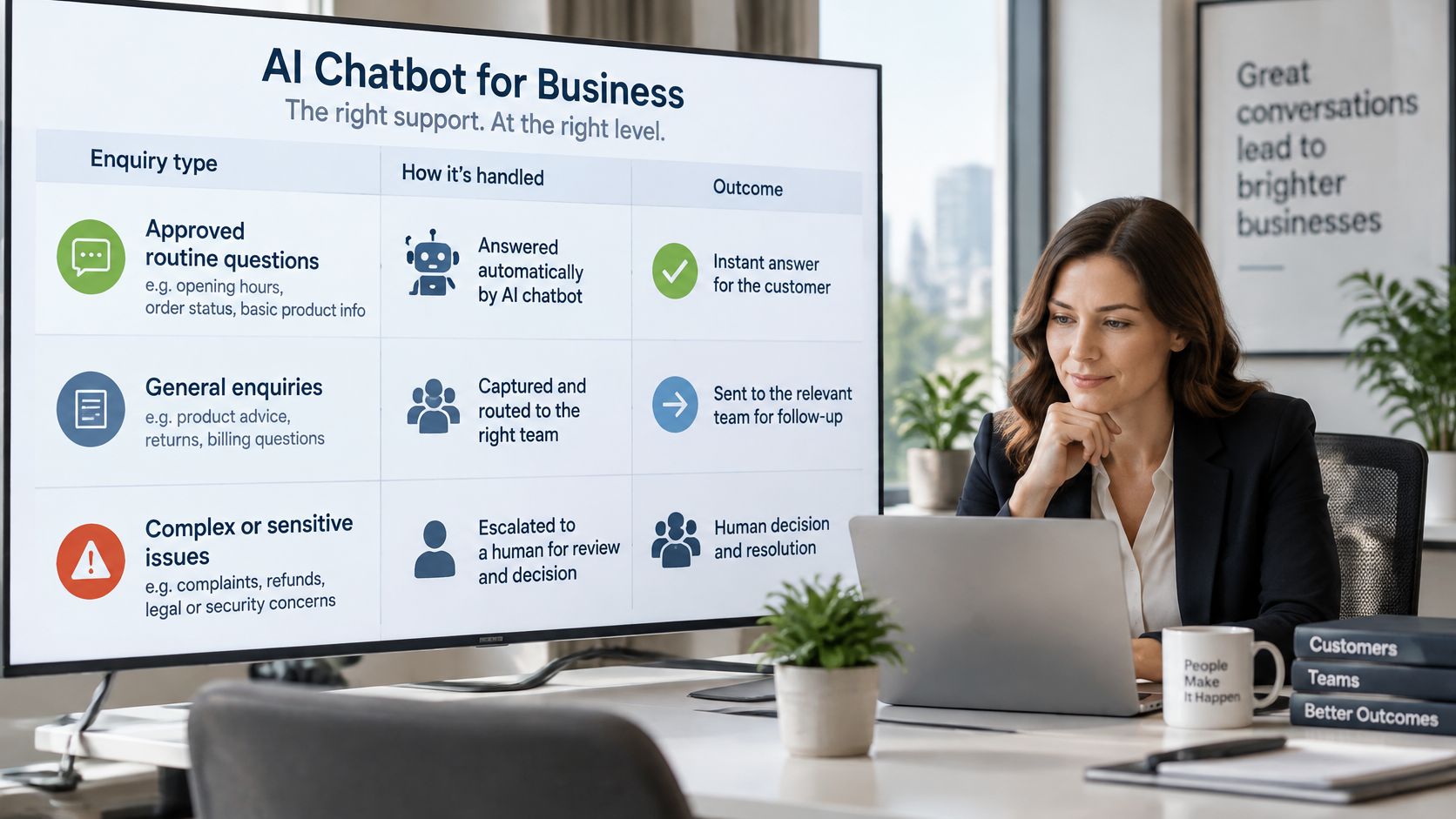
Three tiers of control keep a chatbot useful without letting it overreach. The bot may answer approved routine questions on its own. The bot may capture and route anything that needs context or a customized reply. A person must decide anything involving money, risk, relationships or judgement.
| Enquiry type | Bot may | Person must |
|---|---|---|
| Routine questions on services and availability | Answer from approved content | Review only when the answer is unclear |
| Tailored quote or pricing | Capture scope, location and photos | Set the price and approve the quote |
| Contract or commercial commitment | Collect details and log the request | Decide, approve and sign off |
| Complaint or dispute | Acknowledge, record the conversation and route with urgency | Investigate and respond personally |
| Refund or payment dispute | Pause automated reminders and flag the account | Decide the outcome |
| Legal, safety or vulnerable customer | Stop automated replies and escalate immediately | Respond personally |
| Low-confidence or unclear request | Hand off with the full transcript | Reply personally |
| Relationship-sensitive request | Capture and route | Judge and reply personally |
We recommend that pricing, advice, disputes, relationship-sensitive messages, commercial judgement and edge cases stay human, while the system carries repetitive work around judgement. That split isn't caution for its own sake. It's where the money and the reputation sit.
There's a legal reason behind it. Australian Government guidance on applying the Voluntary AI Safety Standard discusses chatbot customer service and uses the Air Canada case to illustrate that a business may be held responsible for information provided by its chatbot. Your bot's promises about availability, eligibility, turnaround, scope or pricing are your promises, so it should never confirm those things unless the answer comes from an approved source.
The Handoff Standard
A handoff is only real if it meets a standard your team can check:
- Named owner: Every queue has a person accountable for picking it up, not a shared inbox nobody owns.
- Full transcript: The conversation attaches to the record so the customer never repeats themselves.
- Clear expectation: The customer is told what they'll receive and when a person will reply.
- Human option: Anyone can ask for a person at any point, without arguing with the bot.
- Early disclosure: The customer knows from the start that they're talking to automation.
Support those rules with three mechanics. Maintain one approved knowledge source the bot answers from, and retire old pages instead of letting it read everything. Log every conversation so a disputed exchange can be reconstructed. Require human approval before any client-impacting commitment is sent, including quotes, dates and payment arrangements.
Our thinking on human-in-the-loop automation goes deeper on where approval gates belong. The short version is simple. If a wrong answer would cost money, trust or safety, a person approves it first.
Connecting the Chatbot to Your CRM and Data Rules
A chatbot earns its place by what it writes down. Start with the stack you already run: CRM, calendar, messaging channels, invoicing tool and inbox. Connecting the bot to those tools beats replacing them, because replacement projects stall and staff work around whatever gets imposed on them. The bot sits as an operating layer over familiar systems, and the main thing that changes is the quality of what lands in them.
Keep its writing rights narrow. Let it write only defined fields such as stage, owner, next action, service type and a short summary. Free-text notes belong in a separate field, because unstructured paragraphs can't drive routing rules, reminders or reports.
Validate Before Anything Is Written
Check the data before a record is created, rather than during a clean-up months later:
- Phone numbers: Confirm the format and length look like a real Australian number before saving.
- Postcodes and suburbs: Match them against your service area so out-of-area work routes to the right queue.
- Required fields: Block record creation until the fields your next decision needs are present, or flag the gap for a person to resolve.
If you're weighing how the pieces connect, this guide on how to connect CRM with marketing automation is a useful primer on keeping records consistent across tools. Our notes on CRM data quality cover the hygiene routines that stop those records decaying after launch.
Keep an audit trail for every write the bot makes: which record it touched, what went into each field, and any human approval that sat behind the action. When a customer disputes what they were told or a deal goes cold, you reconstruct the exchange from logs instead of relying on memory. In the client systems we run, that scope covers business records such as CRM entries, invoices, emails, forms, reports or workflow logs, agreed with each client, with access limited to what the system needs.
Collect only what the next business decision needs. Everything beyond that is storage risk you're carrying for no operational gain.
That principle is data minimisation, and it carries regulatory weight. The Department of Industry guidance on the legal landscape for AI adoption notes that privacy laws require reasonable steps to protect personal information and require organisations to destroy or de-identify information once it is no longer needed, and that transparency provisions for some substantially automated decisions are due to apply from 10 December 2026.
In practice, ask for contact details, location, service type, urgency, and only the documents or photos needed to prepare a brief. Store personal documents in private locations, restrict which staff and systems can open them, set retention rules, and record why each item was collected. Personal information should pass an approval gate before it goes to an external AI service or into a customer-facing reply. This is the data discipline behind sound /crm-automation work, and it's cheaper to build in than to retrofit.
Measuring Whether the Chatbot Is Working
Conversation volume, deflection rate and chats handled tell you almost nothing on their own. A bot can deflect customers by frustrating them into giving up, and the dashboard will still look green. Measure completed work instead: enquiries captured, owned, followed up and closed out properly.
| Measure | How to calculate it | Baseline needed | Warning sign |
|---|---|---|---|
| Median first response time | Minutes from enquiry to first reply, median per week | A stable period of several weeks before launch | Response times rising after launch |
| Qualified-lead rate | Qualified enquiries divided by total enquiries | Pre-launch qualification rate from the same channels | Captured leads with no owner or next action |
| Intake completeness | Briefs with all required fields divided by total briefs | Pre-launch share of complete briefs | Frequent back-and-forth to get missing details |
| CRM field completeness | Records with stage, owner and next action divided by total records | Pre-launch audit of a sample of records | Blank owners or stale stages |
| Follow-up completion | Open enquiries with a logged follow-up on schedule divided by open enquiries | Pre-launch sample of open enquiries | Overdue next actions |
| Escalation rate | Conversations handed to a person divided by total conversations | Trend tracked from launch | Sudden rise, or a very low rate alongside complaints |
| Complaints about automated replies | Complaints mentioning automated replies per month | Pre-launch count of similar complaints | Any repeated complaint about the same flow |
Baseline First, Opinions Later
Capture a few weeks of pre-launch figures from the same channels before you switch anything on. Pull first response times from your inbox and phone logs, audit a sample of CRM records for missing owners, and count how many open enquiries have no next action. It isn't glamorous work, but a comparison without a baseline proves nothing, and any lift anyone claims without one is marketing.
Use medians rather than averages for response time. One enquiry that sat for a weekend will drag an average around for weeks and hide whether the typical customer is getting a faster reply.
The Weekly Review Rhythm
Run a short weekly check with three parts. Review the seven measures against baseline. Have a person read a sample of recent conversations end to end, because tone problems and awkward loops don't show up in percentages. Log every exception that needed a human, and decide whether each one means a content fix, a routing fix, or a flow that should stay manual.
Set stop rules in advance, while you're calm. Pause a flow if complaints about it repeat, if enquiries without an owner start rising, or if staff are working around the bot. Pausing one flow to fix it protects the whole system. The test that matters stays constant: are enquiries captured once, owned, followed up on time, and kept visible until they're won, lost, disqualified or nurtured?
Choose Managed or DIY Before You Build
| Factor | DIY build | Managed service |
|---|---|---|
| Set-up effort | Your team designs flows, prompts and integrations | The provider designs, builds and tunes the system |
| Ongoing tuning | Done internally when someone has time | Scheduled reviews of exceptions and failures |
| Skills needed | Internal admin, automation and prompt skills | Provider holds the build skills; you approve outcomes |
| Approval gates | Designed and maintained by your team | Designed up front and reviewed after launch |
| Data control | Full control, plus responsibility for security settings | Access scoped and agreed in writing, with your review |
| Cost structure | Software subscriptions plus staff hours | Service engagement scoped per client; get written fees before starting |
| Best fit | One clear workflow, a technical owner and time to maintain it | Several workflows, no spare technical staff or a need for coverage outside hours |
| Main risk | Drift and abandonment after launch | Dependence on a provider and unclear exit terms |
DIY suits a business with one clearly defined workflow, a technical owner who has spare time, and tolerance for maintaining prompts, integrations and exception lists after the novelty wears off. Be honest about that spare time. Most DIY chatbots don't fail at launch. They fail three months later when services change, nobody updates the approved answers, and the bot keeps quoting last season's process.
A managed model suits businesses running several connected workflows, with no internal admin or automation capacity, a need for coverage outside hours, or a cupboard full of tools that were set up and abandoned. Truespeak offers business process automation services that connect enquiry handling, intake, follow-up, CRM updates, invoice reminders and reporting for Australian service businesses, and we work with businesses across Australia, mostly remotely from Sydney. Judge any provider, including us, against written criteria rather than a polished demo. If you want a structured way to weigh the decision, this analysis on Sviluppare o acquistare AI per PMI sets out the build-versus-buy trade-offs for smaller firms.
The Verdict by Situation
- Single workflow, technical owner: Build it yourself, keep the scope narrow, and review output daily at first.
- Multiple workflows, small team: Go managed, because the tuning and exception handling will outgrow spare-time maintenance.
- Regulated or high-trust work: Start with managed support or a tightly scoped pilot with strict approval gates, and expand only on evidence.
Whichever route you choose, take these steps before signing or building anything:
- Map one workflow end to end, from trigger to closed record, on one page.
- Record your baseline figures so you can tell improvement from activity.
- Define your approval gates and exception list in writing.
- Get written terms covering scope, access arrangements, fees and exit conditions before work starts.
If a provider-run option fits your situation, look at /managed-ai-operations and assess it against those same four steps. A provider who welcomes that scrutiny is telling you something useful.
If your enquiries are arriving faster than your team can capture, own and follow them up, we can design, build and run a chatbot workflow around the tools you already use, with approval gates where judgement matters and weekly visibility on what's improving. Visit Truespeak to see how that managed approach works and whether it fits your business.