
It's Tuesday morning and your inbox holds a photo of a handwritten site sheet, a supplier invoice as a PDF, a scanned intake form the customer filled in sideways, and three attachments from a certifier. Someone will retype most of it before a job can be booked, quoted or paid, and somewhere in that retyping sits a transposed digit nobody catches until the invoice is wrong.
AI document processing doesn't remove the judgement from that work. It removes the copying. That distinction matters, because copying is where the errors live and judgement is where your business runs.
Table of Contents
- How AI Document Processing Moves a Document From Upload to Action
- Document Types Worth Automating First
- Validating Extracted Data Before It Is Used
- Human Review and Exception Handling
- Privacy, Access and Retention Controls
- Measuring Accuracy Before You Trust Automation More
- Start With One Document Flow This Month
How AI Document Processing Moves a Document from Upload to Action
AI document processing is software that reads a scan, photo or PDF, turns the text into data, works out what kind of document it's holding, and pulls out named fields such as a supplier's ABN, an invoice total or a site address. The closest everyday comparison is a careful junior clerk who copies, sorts and checks everything, then hands anything unusual to a senior.
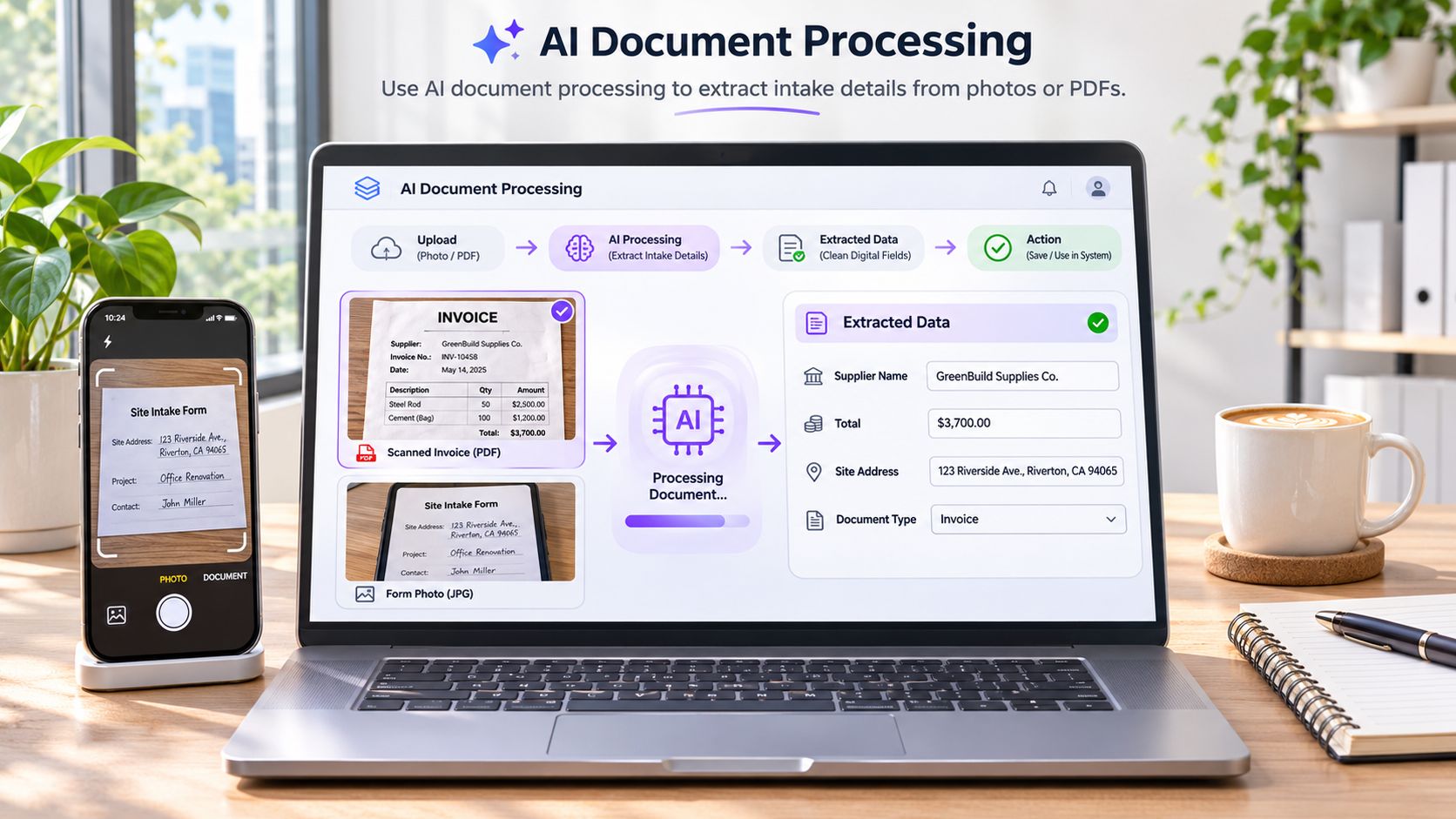
That clerk isn't working from a rigid template. Documents arrive in hundreds of layouts, which is why models that recognise a tax invoice from a first-time supplier beat fixed templates so easily. The software reads and sorts. The rules around it decide what happens next.
The seven stages, in order
- Capture. A scan, phone photo, email attachment or portal upload lands in a single queue. One entry point matters more than a clever one, because documents spread across two inboxes and a shared drive never get counted.
- Classify. The system decides whether it's holding a tax invoice, an intake form, a compliance certificate or something it has never seen. Misclassification is the quiet failure here, because a supplier invoice treated as a quote sails straight past accounts payable.
- Extract. Optical character recognition turns the image into text, and the model pulls out fields. Every field carries a confidence score.
- Validate. Values meet rules and records: is the ABN the right length, do the line items add up to the total, does this customer already exist in the CRM, does the purchase order match a supplier you know?
- Route. Records that pass every check move on. Low-confidence or conflicting records go to a review queue.
- Write. Approved fields update the system of record, with a link back to the source file so anyone can check the original.
- Log. Corrections and exceptions are recorded. That log is the raw material for every improvement you'll make in the following month.
Errors tend to sit inside a single stage rather than across the whole pipeline. A blurry photo clears capture and fails extraction. A perfectly legible invoice with a transposed number clears extraction and fails validation. Because each stage fails on its own, classification, extraction, validation and approval need to stay separate, so you can see which one let you down.
Manual handling runs the same seven steps, just less reliably. The difference is that a person doing stage four holds the checks in their head, and those checks disappear at 4.30pm on a Friday. The same handoff shows up in legal work, where documents are read to produce correspondence rather than payments; this walkthrough of faster demand letter drafting is a useful illustration of where extraction stops and drafting begins, which is the boundary that keeps a pipeline auditable.
None of it works until the current route is written down. Our process mapping documents how work moves today, including the shortcuts, exceptions and manual checks people have added over the years without telling anyone. A new system has to replace those or it inherits every gap. The shape worth copying stays the same across tools: trigger, context, decision, action, approval, output and feedback. What doesn't transfer is another business's exact implementation, because the trigger and the approval step belong to their customers and their appetite for risk.
Ambition is running ahead of evidence in the wider market, which is a reason to be deliberate rather than fast. The Australian Bureau of Statistics reported that 46% of businesses were finding savings and efficiencies through innovation and new technologies in the 2024-25 period, according to its business adoption of AI release, which tells you the prize is operational rather than spectacular.
Document Types Worth Automating First
Not every document deserves the same treatment. Sort them by what a wrong value costs you, not by what's easiest to extract.
| Document | Typical fields extracted | Routed to | Risk if wrong |
|---|---|---|---|
| Supplier tax invoice | Supplier ABN, invoice date, GST amount, total, bank details | Accounts payable or payment queue | High, wrong bank details can misdirect a payment |
| Customer intake form | Name, contact details, site address, requested service, preferred dates | CRM record and job booking | Medium to high, a wrong address sends a crew to the wrong site |
| Site photo or job sheet | Materials, quantities, site notes, hours | Quote preparation and job sheet | Medium, a misread quantity changes the scope |
| Compliance certificate | Licence or certificate number, issuer, issue and expiry dates | Compliance register | High, an expired certificate may go unnoticed |
| Quote PDF or email attachment | Line items, validity date, scope summary | Quote follow-up task | Low to medium, mostly affects timing |
| Purchase order or remittance | PO number, supplier name, amount, payer reference | Payment matching | High, mismatched amounts create silent finance errors |
Read the table top to bottom and the logic is plain: the documents that move money or prove someone's right to be on site carry the strictest checks. Those are also the ones to automate last.
Scale isn't the obstacle it once was. The Services Australia document-lodgement pilot processed more than 25,000 submitted documents per day and achieved accuracy above 95%, cutting processing time from weeks or days to seconds. The architecture is the instructive part: OCR, machine-vision learning, natural-language processing, classification and validation against internal and external sources, joined in one API-based pipeline, with staff shifted from reviewing every submission to handling exceptions. It's a government benchmark on government document types, and the same account warns that a 95% aggregate result can conceal weaker performance on handwritten fields, unusual templates or missing pages.
A renovator chasing supplier invoices and site photos wants the invoice captured and the photo filed against the job. A law firm taking intake forms cares more about names, dates and scope than totals. An installer tracking compliance certificates needs expiry dates caught before they lapse, not after. Start with the dullest high-volume flow, usually an intake form, and add payments and certificates once validation has proven itself on plain text. Where that first flow is enquiry or intake forms, the matching service is intake automation.
Three questions settle which flow goes first:
- How many of these documents arrive each week?
- How often are the same details re-keyed into a second system?
- What does a wrong value cost in money, rework or client trust?
No verified source names one document type as the main cause of rework, and anyone who claims otherwise is guessing. Track it yourself for a month: count missing information, clarification requests and repeat handling by document type before choosing. If invoices are the sticking point, this guide to AI invoice processing for SMBs goes deeper on the accounts side. Then judge the result against your own receipt-to-ready baseline, because a government pilot's numbers don't transfer automatically to a four-person practice.
Validating Extracted Data Before It Is Used
Extraction is the part everyone demonstrates. Validation decides whether an extracted value is allowed to touch your accounts, and it runs on rules you set in advance. A BSB can be read perfectly off the page and still belong to a different supplier; only a check against the record on file catches that.
| Field type | Examples | Review rule | Progresses automatically |
|---|---|---|---|
| Payment details | Bank account, BSB, payee name, payment amount | Human approval before any payment, whatever the confidence score | Never |
| Identity and licence details | ABN, licence number, certificate number | Checked against the source or a register, with review below the high-confidence threshold | Only after a validation match |
| Customer contact and address | Name, email, mobile, site address | Review if confidence is low or the value differs from the existing CRM record | Yes, when it matches the existing record |
| Dates and deadlines | Due date, expiry date, appointment date | Review where the date drives a deadline or compliance action | Yes, at high confidence and with logic checks passed |
| Quantities and scope | Materials, hours, square metres, requested services | Review before a quote or job is allocated | Limited, with sampling |
| Descriptive notes | Free-text site notes, job descriptions | Spot-check a sample each week | Yes |
Every extracted field arrives with a confidence score, and the threshold you set decides whether it proceeds or waits. Set thresholds per field group rather than with one global number. A customer's name tolerates more uncertainty than a BSB and account number, and treating both the same way is how quiet payment errors begin.
Start narrow and widen on evidence. Let only the cleanest records pass automatically at first, then spot-check a weekly sample. When a field group stays accurate over several weeks of samples, widen its threshold one step. When errors appear, tighten it again. That is partial automation working as intended: the system handles the routine volume and routes the doubt to a person, instead of chasing a higher automation percentage for its own sake.
Checks That Don'T Rely on AI Judgement
Some validation is arithmetic and lookup, and it should never be delegated to a model's opinion. ABN format, GST arithmetic, line items summing to the total, an expiry date falling after an issue date, a purchase order matching a supplier already on file. Each check either passes or fails, and a failed record stops. These rules are cheap to write and they catch what confidence scores miss, because a model can be confident and wrong in the same breath.
Australian localisation belongs at this layer, not on the interface. GST treatment, Australian currency and the export formats your accounting platform accepts decide whether an extracted total arrives in Xero or MYOB as a reconcilable figure or as a string someone has to fix by hand.
Test five failure cases before trusting a flow: a low-confidence field, two documents that disagree, a handwritten note, a missing page, and a supplier who changes their template. Each should produce a visible exception rather than a plausible guess. That discipline matches Australian Government guidance on AI for small business, which warns that AI can produce unreliable outputs, leak data, create privacy breaches and introduce supply-chain vulnerabilities, and recommends explicit data-sharing rules, vendor due diligence, output verification and human oversight.
The rule that keeps this safe: any field that changes money or a person's details gets validated before use, and anything that fails a check becomes a visible exception rather than a silent guess.
Human Review and Exception Handling
People sit in one specific place: between extraction and any consequential use of personal or payment data. Not before extraction, which defeats the purpose, and not after a payment has already left the account.

The reviewer's job is narrow and repeatable. Check the flagged fields, resolve anything that disagrees, and confirm or reject the next action. Everything else stays out of their queue, which is why exception-based review costs minutes rather than hours.
A review screen earns its place when it shows three things:
- Source beside output. The scan or photo sits next to the extracted fields, so a reviewer compares without opening a second window.
- Confidence flags on the fields that matter. Not every field needs a flag, but payment, identity and date fields do.
- One clear choice per record. Approve, correct or escalate, with no silent default that lets a record drift through because nobody clicked.
This short walkthrough covers the review step in practice.
Exceptions are where most automation projects fail, because the happy path gets built and the unhappy paths get improvised. Define them before launch.
| Exception | Action | Owner |
|---|---|---|
| Missing information | Send a clarification request to the customer instead of guessing a value | Intake coordinator |
| Conflicting documents | Hold the record and escalate to a senior reviewer | Senior reviewer |
| Unreadable photo | Return it to the sender for a clearer re-upload | Intake coordinator |
| Repeated failures from one supplier template | Trigger a template review of the extraction rules | Operations lead |
| Low-confidence payment or bank detail | Block the write until a person approves it | Accounts reviewer |
The OAIC checklist for commercial AI products supports exactly this arrangement, recommending human oversight with a human user responsible for verifying the accuracy of personal information obtained through AI, and asking whether a product has been tested for the intended use, how oversight can be embedded, and who can access the information entered into or generated by it. It also says unclear or missing information should create a task rather than a gap that gets filled without review.
Deciding which steps belong to a person is the design question underneath all of this. We split each process into the parts that are rules-based, the parts that need judgement, and the parts that should never be automated at all, because people keep responsibility for pricing, complaints, policy calls and the unusual case. The same split is what makes human-in-the-loop automation a working control rather than a rubber stamp.
Every exception needs an owner, a due time and a logged resolution. An exception without an owner is a lost document with better formatting.
Privacy, Access and Retention Controls
A photo of a signed job sheet on a kitchen bench can expose a name, an address and a phone number before anyone reads a single field. Personal information in a processing queue deserves the same care as personal information in a filing cabinet.
The Privacy Act 1988 and the Australian Privacy Principles apply to AI use involving personal information by organisations the Act covers, including using AI to train, test or operate a system, according to the Office of the Australian Information Commissioner. Many small businesses sit below the turnover threshold that brings an organisation under the Act, but designing your document flow as if it applies remains the safer brief, since the same controls are what make the automation auditable.
None of what follows is a settings toggle. Each is a decision to settle before a tool is connected to anything:
- Purpose and necessity: why the document is collected, and whether AI processing is reasonably necessary for that activity.
- Upload rules: what staff may put into a tool, and what they must route elsewhere.
- Data minimisation: send the page the fields live on, not the whole 40-page pack.
- Storage and access: where raw files and extracted fields sit, and which role can retrieve each.
- Retention and correction: how long raw documents are kept, and how extracted values are fixed or deleted.
- Provider terms: model-training use, subcontractors, data location, breach notification and evidence of deletion.
Australian Privacy Principle 11 requires reasonable steps to protect personal information from misuse, interference, loss, and unauthorised access, modification or disclosure, and the OAIC guidance on the privacy principles says organisations should document the practices, procedures and systems they rely on. Separating raw documents from extracted operational fields is a practical way to meet that bar: the CRM receives the fields it needs rather than full scans, and an audit trail links each record back to its source file.
That separation is also what keeps a partially automated system reviewable. A person can check a field value without handling the full document, and the document itself stays behind tighter access for the rare case where someone genuinely needs it.
Our client systems may process business records such as CRM entries, invoices, emails, forms, reports or workflow logs, with scope agreed with each client and access limited to what the system needs. Security controls are agreed for each system, including limited access, appropriate data handling, operational logs and approval gates for sensitive actions. For the everyday question of what belongs in a tool at all, the tests in whether it's safe to put client data into AI tools give you a practical starting point.
Measuring Accuracy Before You Trust Automation More
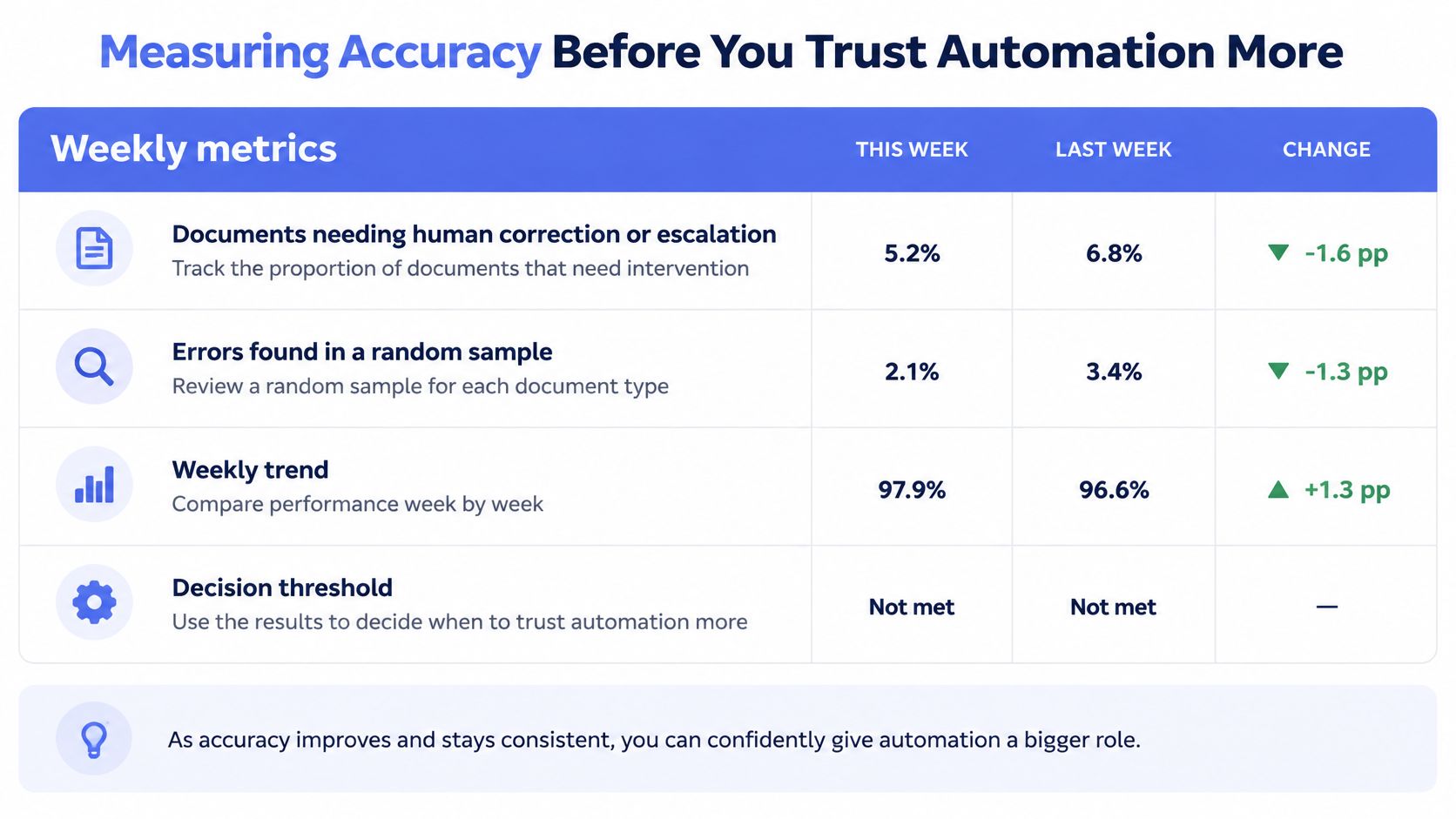
Trust should follow evidence, and evidence comes from a weekly check you can run in under an hour. Not a vendor dashboard, not an annual review, a routine you own.
| Metric | How to calculate | Action trigger |
|---|---|---|
| Documents needing correction or escalation | Corrected or escalated documents divided by total processed in the week | A rising share prompts a review of the template or extraction rules |
| Errors in reviewed sample | Errors found in a fixed random sample divided by sample size, per document type | Any error pattern in one document type triggers a closer review of that type |
| Critical field errors | Errors in payment, identity and other consequential fields, counted separately | Any error stops automatic progression for that field until the cause is fixed |
| Clarification requests | Count of missing-information requests per document type | Repeated gaps point to a redesigned intake form |
| Receipt-to-ready time | Hours from receipt to the job or matter being ready to start, compared with the pre-automation baseline | No improvement after several weeks means the bottleneck is elsewhere |
| Repeat handling | Documents touched more than once before approval | A rising count signals a gap in validation rules |
The Weekly Routine
- Pull every document processed that week, including the ones that failed or disappeared.
- Sample a fixed number per document type, the same number each week so the comparison holds.
- Check critical fields first, then formatting.
- Record corrections and escalations with their causes, in one place, in plain words.
- Compare receipt-to-ready time and repeat handling against the baseline you measured before automation started.
- Decide whether to widen, hold or narrow the flow, and write the decision down.
Critical fields are counted separately for a clear reason. A wrong account number costs far more than a misformatted date, and averaging them together hides the error that matters most. The proportion of documents needing human correction or escalation is the headline number, and the reviewed sample is what tells you whether that number is honest.
The trust rule: widen automation only when reviewed results support it, and keep human oversight of consequential decisions no matter how good the weekly figures look.
No benchmark figure is assumed here, and you shouldn't import one. Set targets from your own baseline and judge any pilot, government or otherwise, against your own receipt-to-ready numbers rather than against a headline accuracy claim.
Start with One Document Flow This Month
A certifier sends a photo of a form, someone re-types it, the job waits, and the mistake surfaces only when the invoice is already late. Start with that one flow, not the whole back office. Choose a repeated document with a visible stall, such as intake forms or supplier invoices, and run it in review-only mode for a fixed period before any automatic write is enabled.
- Name the document and the point where it stalls. Be specific: the certifier's PDF that arrives as a photo and gets re-typed into the job system.
- Map the trigger, fields, checks, approver and the event that confirms completion. If nobody can say what "done" looks like, the automation cannot either.
- Set thresholds by field group, with payment and identity fields always reviewed.
- Run review-only for several weeks, recording every correction and how long each took.
- Measure against the baseline using receipt-to-ready time, repeat handling and the corrections recorded, rather than impressions.
- Widen only when the results hold across two consecutive review periods, and keep consequential approvals with people.
For a decision-maker view of the same workflow choices, the IamVera.AI document automation guide is a useful companion.
If you want help scoping that first flow, Truespeak's discovery call starts with one messy handoff and maps what should be captured, drafted, approved and logged. The build stays around existing CRMs and tools where they still work, with approval gates on payments, client-sensitive actions and final risky decisions. Rules-based steps can be automated, judgement stays with people, and some exceptions should remain manual. Visit Truespeak to see how that operating layer works for Australian service businesses.