
You're on a ladder, in a meeting or under a house, and your phone rings again. You can't answer, the caller doesn't leave a message, and by the time you check your messages at lunch there's no name, no suburb and no idea what job they wanted. That gap between an enquiry arriving and someone owning it is where small service businesses lose work they never see.
An AI receptionist for small business use isn't mainly about a clever voice. It's about turning that missed moment into a record with an owner, a stage and a next action, while keeping people in charge of judgement, pricing and relationships.
Table of Contents
- What an AI Receptionist Is and Is Not
- Core Capabilities From First Reply to Invoice Follow-Up
- Why Small Businesses Add One and Where It Pays Off
- Managed Versus Self-Service Models Compared
- Integration, Security and Privacy Checks Before Launch
- Keeping People in Control With Approval Gates
- Measuring Results Without Chasing Vanity Numbers
- Map One Messy Handoff Before You Choose a System
What an AI Receptionist Is and Is Not
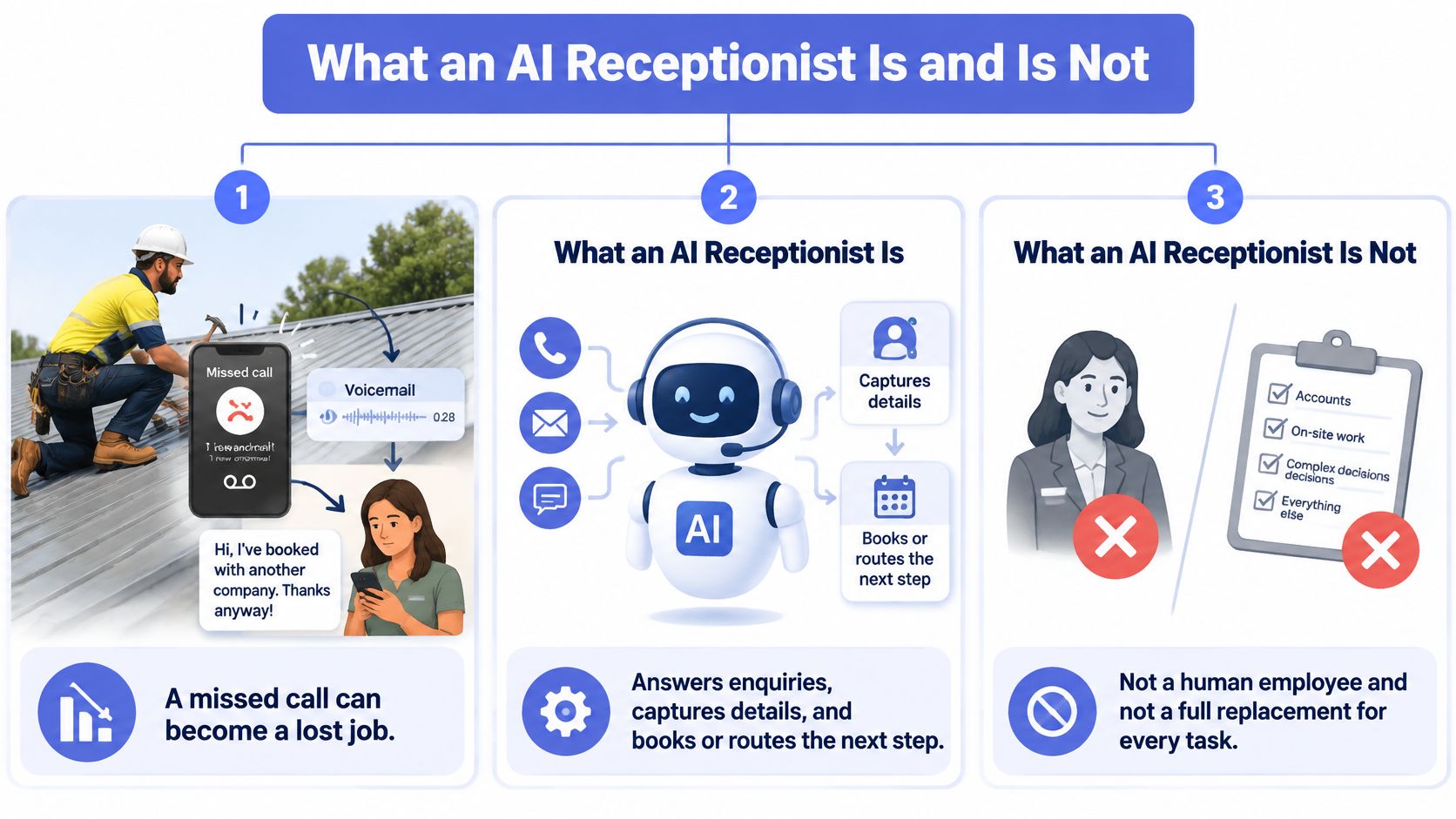
An AI receptionist is a system that answers enquiries by phone, web chat, form, email or text, asks the questions a good receptionist would ask, writes a structured record, routes it to an owner and schedules the next action. It's not a human employee, and it's not a replacement for every front-desk conversation.
Take this illustration. A tradie on a roof misses a call, the enquiry sits in voicemail, and by the time the owner calls back the customer has booked someone else. The problem isn't effort. It's that nobody captured the suburb, service, urgency or property type while the caller still wanted help.
Three Layers Working Together
A tidy front desk with three trays. Capture collects name, contact details, suburb, service type, urgency, property details and budget range in a fixed order. Decide and route checks fit against your rules and assigns an owner. Act and record books or requests the next step and writes everything to your CRM.
A chatbot often stops at answering questions and doesn't own the record. A traditional answering service takes a message for someone else to re-type and act on later. An AI receptionist is useful only when it closes that loop.
| Front-desk option | Answers after hours | Captures structured details | Updates CRM | Human review point |
|---|---|---|---|---|
| Business-hours receptionist | Only if staffed | Notes in the person's own format | Only if disciplined | Built into every call |
| Traditional answering service | Yes | Takes messages | Rarely, re-typed by staff | Message passed on after the call |
| Website chatbot | Yes | Form fields | Sometimes, via integration | Only if an escalation rule is built |
| AI receptionist (managed) | Yes | Defined qualification fields | Yes, via integration | Approval gates for sensitive actions |
Practical test: If enquiries regularly wait, get lost between inbox, spreadsheet and memory, or go unanswered after hours, you've got a front-desk operations problem first and a technology question second.
Core Capabilities from First Reply to Invoice Follow-Up
Follow one enquiry from arrival to payment and the capabilities fall into a natural order. You don't need to switch them all on at once. You need each one you do use to leave a clean record for the next person.
First response means a prompt acknowledgement and approved answers to common questions about services, areas and hours. It doesn't mean a final quote. That distinction matters, because a fast, useful reply buys time for a person to assess the job properly. This is the logic behind speed-to-lead automation, and it works best when your phone system routes calls cleanly in the first place, which is why understanding how business VoIP phone systems work helps before you layer automation on top.
Qualification, Booking and Intake
Lead qualification asks the same fit, intent and urgency questions every time, so records can be compared instead of guessed at. Booking offers times only from published availability and confirms them in writing. Intake then collects photos, documents and job details before the first human call, so your team doesn't start every conversation from scratch. Structured intake automation and consistent lead follow-up automation reduce the rework that comes from half-finished forms and forgotten callbacks.
CRM Hygiene and Getting Paid
CRM hygiene keeps each contact's owner, stage and next action current, and flags duplicates and stale records for a person to merge or delete. Without that discipline, CRM automation just moves messy data faster. At the end of the job, invoice follow-ups send scheduled reminders after the due date, with a person approving the sequence and stepping in for disputes or payment plans through invoice reminder automation.
| Capability | What the system does | Where a person steps in | Record it writes |
|---|---|---|---|
| First response | Acknowledges the enquiry and answers approved common questions | Pricing, complaints and unusual requests | Timestamp of first reply |
| Lead qualification | Asks fit, intent and urgency questions in a fixed order | Borderline or high-value leads | Qualification fields and reason for the score |
| Booking | Offers times from published availability and confirms | Exceptions, rescheduling disputes and double bookings | Booked date, owner and next action |
| Intake | Collects details, documents and photos before handoff | Incomplete or unclear briefs | Structured brief with attachments |
| CRM hygiene | Fills missing fields and flags duplicates and stale records | Merges and deletions | Updated contact and stage, with change log |
| Invoice follow-ups | Sends scheduled reminders after the due date | Disputes, payment plans and changes in tone | Reminder history and payment status |
A trades business might switch on first response and intake first. A law firm might start with intake and CRM hygiene. Pick the one capability that removes the most manual re-entry today, and prove it before adding the next.
Why Small Businesses Add One and Where It Pays Off
The strongest case is simple. Homeowners search at night, tradies can't answer on site, and professional firms receive intake forms missing the details needed to quote. In each illustration, the enquiry exists but nobody can act on it until someone chases missing information the next day.
Systems that run 24/7, including overnight and weekends, capture and route those enquiries instead of leaving them until Monday. That's different from promising a sale. It means the lead gets answered and work gets prepared outside business hours, ready for a person to judge. If you're reviewing your phone setup at the same time, choosing features for business VoIP is worth checking so call routing, voicemail and transfers support the workflow rather than fight it. Our guide to measuring and improving lead response time shows how to assess your own gap.
Adoption is already broad, though uneven. In 2025, 64% of Australian small businesses reported using AI regularly, including 38% using it for customer service and 37% for administrative tasks, according to Intuit QuickBooks' Australian Small Business Insights Survey. The capability gap by size is sharper in the Productivity Commission report, which found 33% of firms with 0-4 employees had adopted AI in the first quarter of 2025, compared with 82% of firms employing 200-500 people.
Treat those figures as context, not a benchmark. Vendor and government surveys differ in method and scope from each other, so none of them tells you what your business should do.
Where the Case Is Weaker
Low enquiry volume, high-touch sales where every call needs a senior person, and pricing that changes case by case all weaken the case. Automating a conversation that needs judgement from the first minute creates corrections, not capacity.
Count last month's enquiries that waited more than one working day, went unanswered, or lacked the details needed to quote. A high count points to the front desk as the bottleneck. A low count suggests your effort belongs elsewhere.
Managed Versus Self-Service Models Compared
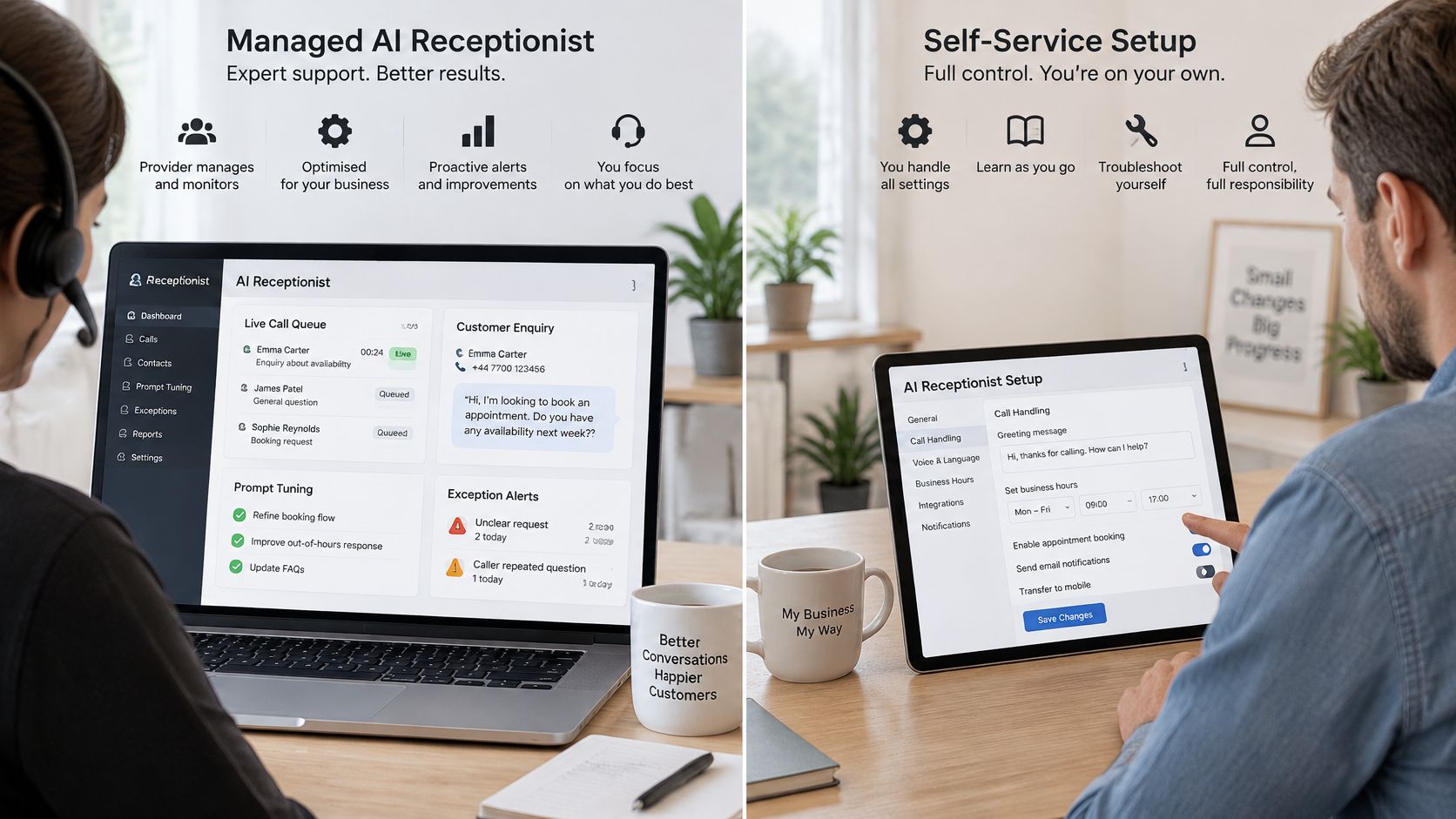
A managed service means a provider designs the workflow, builds it, monitors it, tunes prompts and rules after real failures, and reports exceptions on an agreed cadence. A self-service tool means you buy software and your own team configures prompts, rules and integrations, then reads the logs itself.
| Factor | Managed service | Self-service tool |
|---|---|---|
| Setup | Provider maps the workflow, builds and launches | Your team configures prompts, rules and integrations |
| Monitoring | Provider reviews logs and exceptions on a set cadence | Staff must find and read failed calls themselves |
| Tuning | Prompts, routing and rules updated after real failures | Changes made when someone has time |
| Accountability | Named provider owns fixes within agreed scope | Business owns every fix |
| Cost structure | Ongoing service fee plus tool costs | Software fee plus internal staff time |
| Best fit | Owners who want capacity without another system to run | Teams with an operations person who enjoys configuration |
A managed model works as an operating layer around tools you already use, such as your CRM, calendar and accounting system. It's the same reasoning that leads growing firms to consider managed cloud ERP for growing businesses instead of administering every system themselves. In our operating model, scheduled tasks and continuous checks cover answering enquiries, updating the CRM, chasing invoices, drafting work, watching for problems and reporting back, while anything risky or client-sensitive waits for human approval.
Start narrow either way. The Australian Bureau of Statistics media release reported that around 11 per cent of small and micro businesses were using AI in the 2024-25 financial year, so use among the smallest businesses is still at an early stage. Begin with administrative work that has clear rules, capturing an enquiry, recording details, assigning an owner and creating a next action, and leave unusual or sensitive matters with staff.
Choose managed if nobody will read logs weekly. Choose self-service if you already have a person who will. Some owners start managed to learn the workflow, then take over the runbooks once the routine is stable. Confirm fee structures in writing rather than comparing headline prices.
Integration, Security and Privacy Checks Before Launch
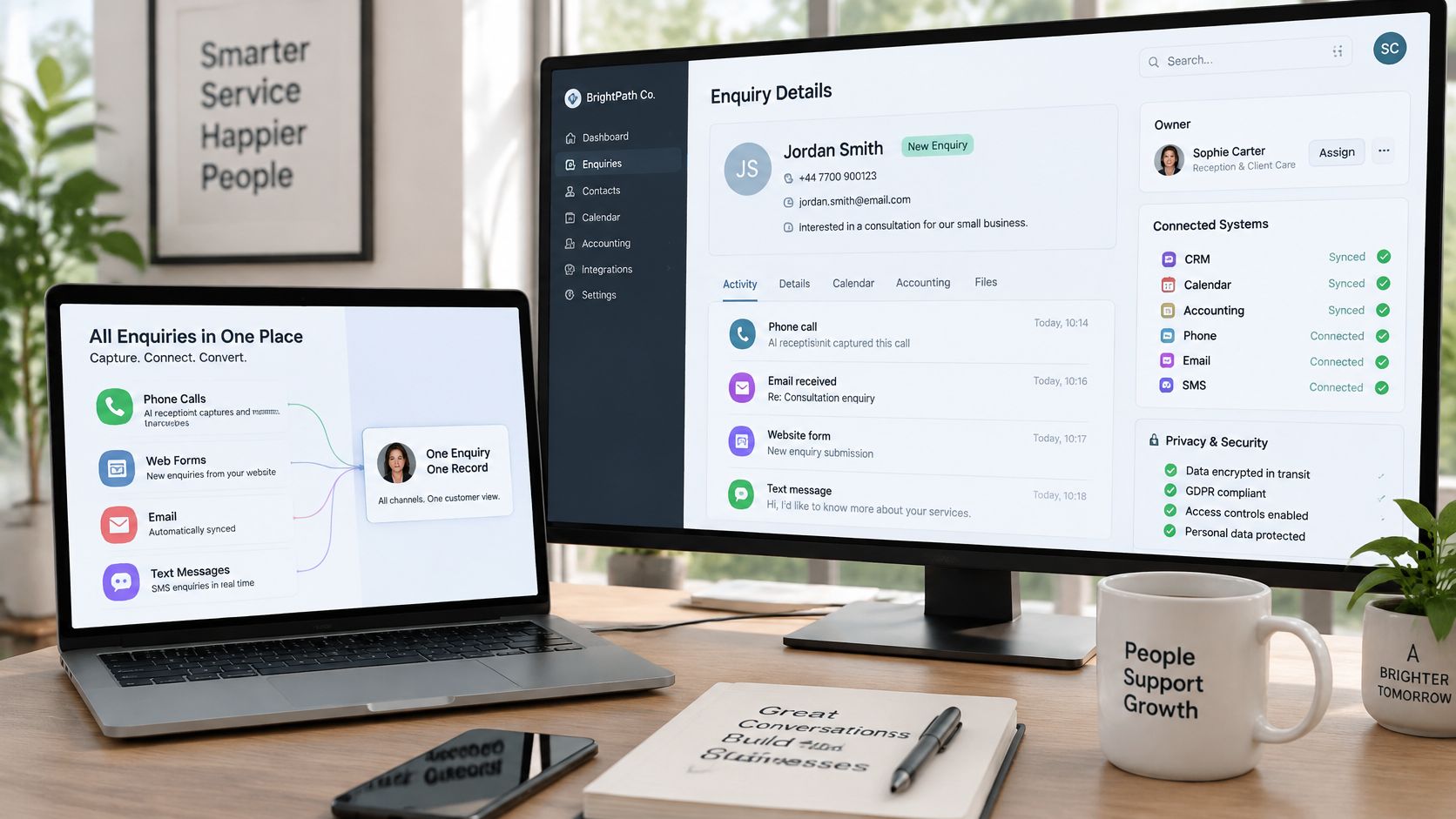
Start with a map, not a purchase. List where enquiries arrive, by phone, web form, email and text, and where records live, in your CRM, calendar and accounting system. Connect them so one enquiry produces one record with an owner and a next action, as set out in our overview of practical AI integration for existing systems.
The workspace below shows the destination for that work, a single screen where staff can see the enquiry, its owner and what happens next.
Data Rules Before Go-Live
Collect only the fields needed to qualify and route. Keep raw call audio for a short period, write redacted summaries to the CRM, and pass structured fields downstream rather than full transcripts. Our client systems may process CRM entries, invoices, emails, forms, reports or workflow logs, with scope agreed with each client and access limited to what the system needs.
Tell callers they're speaking with an AI assistant, offer a route to a person, and obtain consent before recording or capturing sensitive information. The Australian Ombudsman's Automated Decision-Making Better Practice Guide summarises Privacy Act obligations including collecting information only when reasonably necessary and protecting it from misuse, loss and unauthorised access. The OAIC guidance on privacy and commercially available AI products recommends due diligence, privacy-by-design assessments, human oversight and transparent disclosure for public-facing AI tools.
- Access controls: Use role-based access and encryption in transit and at rest.
- Audit trail: Log prompts, actions and overrides so you can review a complaint.
- Rights requests: Plan how access, correction and deletion requests will be handled.
- Launch gate: Complete a documented privacy impact assessment for higher-risk uses.
The short video below walks through how these checks fit together before a system goes live.
One future threshold needs noting. The OAIC consolidated APP guidelines state that from 10 December 2026, privacy policies must include additional information when a computer program makes decisions that could significantly affect an individual's rights or interests. Routine capture and routing may fall short of that threshold, but refusing service or determining eligibility could meet it. Agree in writing what data the system processes and who can access it.
Keeping People in Control with Approval Gates
An approval gate is a stopping point. The system handles routine, reversible steps on its own and pauses at anything that commits money, changes a relationship or affects someone's rights. That boundary is what separates a governed process from a black box, and our explanation of human-in-the-loop automation in practice sets out how we apply it.
It is similar to setting clear boundaries for a junior staff member. They can book a standard inspection, but they cannot discount a quote, promise a start date, or respond to a complaint without checking first. The AI receptionist requires the same written limits.
Triggers That Send Work to a Person
- Pricing requests: The system captures scope and books a callback instead of quoting.
- Complaints or distress: The conversation moves to a person with the full context attached.
- Unusual jobs: Anything outside your service area, trade scope or capacity goes to the exception queue.
- Commitments: Refunds, contract changes and sensitive outbound messages wait for approval.
Set one fixed handoff rule and don't soften it. If a caller asks for a person, the system hands off immediately or books a callback, and the reason is logged. Arguing with that request damages trust faster than a slow reply.
Then run the review loop. Check the exception queue weekly, record every override with a reason, and use those overrides to update rules and prompts. If staff keep correcting the same field, the question or rule is wrong, not the staff member.
The goal isn't zero human involvement. It's fewer surprises, fewer dropped enquiries, and a clear record of who approved what and why.
Measuring Results Without Chasing Vanity Numbers
Record a baseline before launch using records you already have, form timestamps, call logs, CRM stages and accounting data. Without that starting point, you can't tell whether the system improved anything or whether the month was busier.
Measure first-response time as the gap between the enquiry timestamp and the first acknowledgement. Report the median and the slowest tenth, so one slow weekend doesn't hide inside an average. Counting calls answered says little on its own, because an answered call with no owner and no next action still goes nowhere.
| Metric | How to measure it | Source system |
|---|---|---|
| First-response time | Enquiry timestamp to first acknowledgement, median and slowest tenth | Form tool, call log, CRM |
| Complete enquiry capture | Share of enquiries with contact and job details filled | CRM fields |
| Qualified lead rate | Share of enquiries the owner marks as fit | CRM stage history |
| Booking conversion | Share of qualified enquiries that reach a booked job | Calendar and CRM |
| Human handoff rate | Share of conversations escalated to a person | Exception queue |
| Correction rate | Share of AI-written records edited by staff | Override log |
| Average days overdue | Average days past due before and after reminders | Accounting system |
Define a qualified lead as one the owner marks as fit, track booking conversion from qualified enquiry to booked job, and watch the correction rate closely. A rising correction rate means the system is writing records your people must fix. Review the numbers monthly, change one rule at a time, and log each change so results can be explained. Outcomes vary by business, so treat early improvement as a signal to review, not proof.
Map One Messy Handoff Before You Choose a System
Don't start by comparing vendors. Start with the handoff that frustrates your team most, and work through these steps in order.
- Pick one messy handoff: Choose a single path, such as enquiries that arrive by email and get re-typed into a spreadsheet.
- Map the record: Write down what should be captured, drafted, approved and logged for that handoff.
- Record a baseline: Use timestamps and existing records for a few weeks so you can see delays and missing fields.
- Check integration and privacy: Confirm system connections, data rules, disclosure and access controls before any launch.
- Choose the operating model: Decide between a managed service and a self-service tool based on who will read logs weekly.
- Launch narrow, then expand: Start with the smallest workflow and widen it only when logs show stable classification and low correction rates.
We connect enquiry handling, intake, follow-up, CRM updates, invoice reminders and reporting for Australian service businesses, often starting with managed AI operations around the tools already in place. Where slow first replies are the chosen handoff, speed-to-lead automation is usually the narrower starting point.
Bring one messy handoff to a discovery call and we'll map what should be captured, drafted, approved and logged. Sonny will reply by email to arrange a 15-minute discovery call. Which single handoff will you map this month?
If enquiries are waiting in voicemail, inboxes and spreadsheets while your team is busy doing the work, Truespeak can help you map that front-desk handoff and build a governed AI receptionist process around your existing CRM, calendar and accounting tools. Visit us to arrange a short discovery call, bring one messy handoff, and leave with a clear view of what should be captured, approved and logged before you commit to any system.