
A Sydney-based service firm can grow from a couple of operators into a busy team without changing its basic workflow. Enquiries still arrive through a website form, a shared Gmail inbox, Facebook messages and voicemail. Follow-up sits in someone's memory. Quotes get drafted in one system, jobs are scheduled in another, and invoices are chased when somebody notices they're overdue.
Then the cracks become visible. Three quotes go out late, an invoice is duplicated, and a deposit is missed. Nobody has necessarily made a dramatic mistake. The business has outgrown hand-offs that were never designed to carry a larger team.
AI integration is the connective layer between those hand-offs. It isn't a chatbot bolted onto a website. Done properly, it turns scattered intake, qualification, follow-up, scheduling and invoicing into a controlled operating system with clear ownership, approval points and audit trails.
For a small Australian service business, the priority isn't to automate everything. It's to make one important workflow visible, repeatable and measurable, then expand only when the evidence supports it.
Table of Contents
- The Moment an Australian Service Business Realises It Needs AI Integration
- What AI Integration Actually Means for a Service Business
- Core Architectures and the Touchpoints That Matter Most
- Where AI Integration Plugs Into Your CRM, Inbox, Intake and Accounting
- Governance, Security and Human-in-the-Loop Patterns
- Common Pitfalls That Sink AI Integration in Legacy Systems
- A Practical Migration and Launch Playbook
- FAQs on AI Integration for Australian Service Businesses
- How long should a first useful integration take?
- What if the CRM or accounting platform has no usable API?
- What does managed AI operations cost for a small firm?
- Where do privacy rules affect the design?
- How should an owner evaluate a managed partner?
- What happens when an AI action needs to be reversed?
The Moment an Australian Service Business Realises It Needs AI Integration
The warning sign usually isn't a broken AI tool. It's a customer asking, “Did anyone get back to them?” and nobody being able to answer quickly.
Consider a typical growing trade or professional service firm in Sydney. A new enquiry arrives through a form, another comes into the shared inbox, and a third is left as a voicemail. One person assumes the office administrator owns the follow-up. The administrator assumes the salesperson is handling it. The salesperson has copied the details into a spreadsheet and plans to call later.
The business has tools. What it doesn't have is a reliable intake-to-action hand-off.
Practical rule: If an enquiry can enter the business without creating an owner, a stage and a next action, the system is already leaking work.
The same pattern appears after the first contact. A quote is sent but no follow-up task is created. A customer's details sit in an email thread rather than the CRM. A job brief is missing photos or site information, so the operator has to call back. An invoice reminder is sent manually, inconsistently, or not at all.
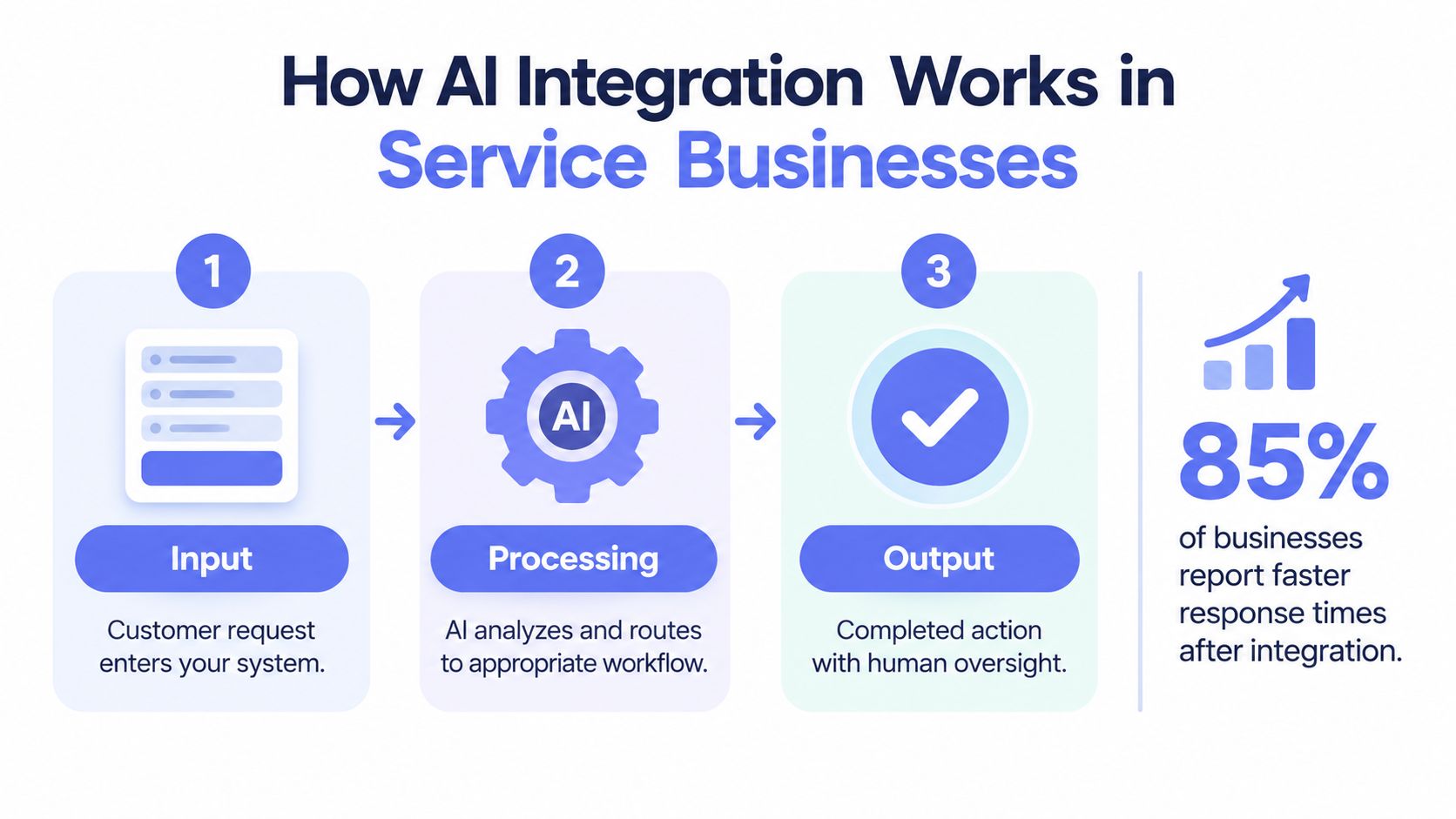
AI integration gives those moments a defined path:
- Capture: Collect the enquiry, message, document or voicemail transcript.
- Interpret: Extract the customer, job, urgency, location and requested service.
- Route: Create or update the CRM record and assign the next owner.
- Act: Draft a reply, schedule a reminder, prepare a job brief or queue an invoice follow-up.
- Verify: Send sensitive communication only after the responsible person approves it.
The CRM should become the source of truth, not another place where information is copied after the actual work has happened. Humans should retain judgement over customer fit, commercial commitments, unusual circumstances and consequential decisions.
The rest of the operating stack should support that principle. Start with the workflow where missed hand-offs are easiest to see, establish a baseline, and add AI only where it removes repetitive administration without hiding the decision trail.
What AI Integration Actually Means for a Service Business
A useful way to understand AI integration is to think about a commercial kitchen. The model is the chef, but the restaurant depends on the pass, tickets, timers, recipes and the manager who checks each plate before it reaches the customer.
A service business needs the same separation of responsibilities. The model can classify, summarise, draft and recommend. The surrounding system decides what information it receives, what action it's allowed to take, who approves the result and what gets recorded.
Four Operating Layers
The capture layer receives information from web forms, email, phone systems, booking pages and uploaded documents. Its job is to preserve the original request and collect enough structured information for the next step.
The decision layer combines AI models with ordinary rules. It can identify the service requested, detect urgency, find missing information, suggest a category, draft a response or recommend a routing queue. Rules should handle straightforward conditions. AI should handle language and context where a rigid rule would be brittle.
The action layer writes approved outcomes into the systems people already use. That might mean creating a CRM record, assigning a task, preparing a calendar booking, updating a job card, or placing an invoice reminder into a review queue.
The governance layer controls access, approvals, exceptions and records. It answers the questions that tool demonstrations usually avoid: who can approve a customer-facing message, what happens when the data is incomplete, and how does the business reverse an incorrect action?
Integration is the wiring between these layers. Buying an AI subscription doesn't create that wiring. A model that produces a polished email but fails to create an owner and next action has produced content, not an operating result.
For a broader conceptual overview, this guide to AI integration is useful because it separates the model from the systems and workflows around it.
A practical integration should leave behind four things:
- A trigger: What starts the workflow?
- A context package: Which approved records and fields can the AI use?
- An allowed action: What may happen automatically?
- A control record: What was suggested, approved, changed or rejected?
The final test is simple. If the team can't explain the workflow on a whiteboard, it's too broad to automate safely.
Here's a short visual explanation of the operating sequence:
Core Architectures and the Touchpoints That Matter Most
The architecture should follow the customer journey, not the vendor catalogue. Start where information enters, define how it gets interpreted, then specify the approved action and the reporting record.
Australian adoption data shows why this distinction matters. The Australian Bureau of Statistics reports that approximately 12% of businesses used AI in 2024-25, compared with 1% in 2021-22. Adoption reached about 35% among large businesses, while small and micro businesses recorded approximately 11%. Access to AI is spreading, but smaller firms still face a practical integration gap.
The government's SME tracker reported that 41% of small and medium-sized enterprises were adopting AI in June 2025, an increase of 5 percentage points from the previous quarter. It also reported that 22% of businesses experienced faster decision-making and 18% reported productivity optimisation. Those findings support a workflow-first approach, because operational outcomes depend on how AI connects to existing systems, not just whether staff can open an AI application. The figures come from the Australian Government AI Adoption Tracker release.
The Sequence to Design
- Capture: Forms, Google Business Profile enquiries, telephony, email and document uploads feed a controlled intake point.
- Orchestrate: Prompts, retrieval and business rules identify the request, gather context and select a workflow.
- Write back: The CRM, calendar, job platform, accounting system or document tool receives the approved result.
- Report: The owner sees response times, incomplete records, pending approvals, exceptions and ageing work in a dashboard or digest.
A strong architecture is small and observable. It doesn't attempt to connect every application on the first release. It starts with one workflow where triggers and outputs can be checked by a person.
| Layer | What It Owns | Common Australian Tools | Hand-off Produced |
|---|---|---|---|
| Capture | Enquiries, messages, forms and documents | Website forms, Gmail, Outlook, phone systems | Structured request with source and timestamp |
| Decision | Classification, enrichment, drafting and routing | AI model, rules engine, knowledge base | Suggested category, priority, owner and next action |
| Action | Approved updates and communications | HubSpot, Pipedrive, Salesforce, job platforms, Xero, MYOB | CRM record, task, booking, job brief or reminder |
| Governance | Permissions, reviews, exceptions and logs | Approval queue, audit log, alerts, private data store | Approved, rejected, amended or escalated outcome |
| Reporting | Baselines, trends and operational exceptions | CRM reports, dashboards, weekly digest | Visibility of response, rework, ageing and failure points |
A regional firm needs an even more conservative design. National reporting found AI adoption among 40% of metropolitan organisations compared with 29% of regional organisations, while 26% of regional businesses were unaware of AI opportunities, as documented in the National AI Plan. That gap makes managed support, clear ownership and low-complexity workflows operational necessities, not optional extras.
For a deeper look at process design, the AI workflow automation article provides a useful reference point. The key recommendation remains straightforward: connect fewer surfaces, make each hand-off visible, and expand after the first workflow has earned trust.
Where AI Integration Plugs into Your CRM, Inbox, Intake and Accounting
Most service businesses don't need a new software estate. They need the tools they already own to exchange useful information without relying on copying, memory and private spreadsheets.
Start with the five touchpoints below. For each one, identify the trigger, the system of record, the allowed action and the person who owns the exception.
The Practical Hand-Offs
A CRM should receive the enquiry, contact details, service category, source, owner, stage and next action. AI can parse the language of an enquiry and suggest fields, but it shouldn't overwrite a commercial record without a trace.
A shared inbox is where context often gets trapped. AI can summarise a thread, identify whether it relates to a new lead or existing customer, draft a response from approved information and create a follow-up task. The approval gate should remain in place for pricing, scope, complaints and commitments.
Forms and phone intake should collect structured information before the team spends time qualifying the request. AI can turn a free-text submission or call transcript into a job brief, identify missing details and send a request for clarification.
The calendar and booking system should receive only approved appointments. AI may propose a suitable slot or prepare a booking, but a person should review conflicts, travel constraints, service capacity and unusual requests.
Xero or MYOB should receive controlled financial actions. Invoice reminders can be drafted and queued according to agreed rules. Credit notes, disputed invoices and changes to payment terms require human review.
A practical AI website workflow integration guide can help owners think through the path from web enquiry to downstream action, but the same logic applies to inbox, phone and accounting workflows.
| Touchpoint / System | AI Action | Owner | Approval Gate |
|---|---|---|---|
| CRM | Create or enrich a record, classify the request and assign a next action | Sales or operations lead | Review duplicate matches and low-confidence classifications |
| Shared inbox | Summarise the thread, draft a response and create a task | Inbox owner | Approve customer-facing replies and commercial statements |
| Web form or phone intake | Extract details, identify gaps and prepare a job brief | Operations coordinator | Confirm scope, urgency and missing information |
| Calendar or booking system | Suggest a slot and prepare the booking | Scheduler or team leader | Approve conflicts, unusual travel and capacity exceptions |
| Xero or MYOB | Prepare reminder sequences and match invoice context | Finance or admin owner | Approve disputed accounts, credits and escalations |
| Documents | Pull relevant fields from briefs, photos or attachments | Job owner | Check extracted values before they affect a quote or job |
The guidance on AI access to inboxes and CRMs is relevant before granting broad permissions. Give the AI the smallest data set and action scope it needs. An integration that can read an entire customer database because it needs one conversation history is poorly designed.
Governance, Security and Human-in-the-Loop Patterns
The durable part of AI integration isn't the model. It's the control surface around the model.
The Office of the Australian Information Commissioner's guidance on privacy and commercial AI products recommends reviewing data-management practices, checking vendor data-handling policies, defining what staff must not upload, and removing or anonymising personal details where possible. For a small business, that becomes a practical access procedure rather than a policy document that sits unread.
Four Controls to Implement
Role-based access limits what each workflow and user can see or change. The intake workflow may need a customer's request and contact details. It probably doesn't need the entire accounting file.
Scoped data sources prevent irrelevant records from entering the AI context. Use approved folders, fields, inbox labels and CRM objects. Don't treat broad access as convenience.
Human approval queues cover customer-facing and irreversible actions. AI can draft a response, recommend a classification or prepare a reminder. A named person approves sensitive messages, unusual cases and financial actions.
Audit logs record the input, relevant context, model output, human amendment, approval and final action. The log should make it possible to answer what happened without reconstructing events from scattered inboxes.
Human control isn't a theoretical concern. About 65% of non-adopting SMEs cited distrust of AI decision-making or a preference to retain human control, while only around half of current AI users reported checking outputs before they affect customers, according to Australian AI adoption insights. The same source reports that 47% of surveyed organisations had no work-based AI training, so approval gates must be paired with practical training on when to challenge an output.
Control principle: Automate preparation and prioritisation first. Automate irreversible action only when the business can explain, monitor and reverse it.
A data path inventory guide is useful for mapping where customer, personal and financial information travels. For regulated clients, the Privacy Act, the Notifiable Data Breaches scheme, APRA expectations and security frameworks such as ISO 27001 may shape the control environment. The exact obligations depend on the business and its clients, so get specialist advice where the workflow handles sensitive information.
Common Pitfalls That Sink AI Integration in Legacy Systems
Most “AI didn't work” stories are process failures wearing a technology label. The business connected a model to an unclear workflow, gave it too much authority, and then judged the result by whether the demo looked impressive.
Automating a Messy Hand-Off
First symptom: Leads appear in multiple lists, and nobody knows which record is current.
Cause: Forms, email, spreadsheets and memory all act as competing sources of truth.
Correction: Choose one live pipeline. Route every intake source into it, assign an owner and require a next action before the record can move forward.
Skipping Approvals Because the Team Is Small
First symptom: A customer receives a confident but incorrect answer, or an invoice reminder goes to the wrong account.
Cause: Familiarity gets mistaken for control. The owner assumes trusted staff will catch every unusual output.
Correction: Define approval gates for pricing, scope, complaints, financial changes and irreversible actions. Small teams need fewer gates, not no gates.
Ignoring Legacy Constraints
First symptom: The workflow works in a demonstration but fails against MYOB Desktop, an older CRM without a usable API or an on-premises Exchange setup.
Cause: The design assumes modern connectors and clean data that the business doesn't have.
Correction: Keep the legacy system in place while introducing a controlled bridge, export, inbox queue or human confirmation step. Replace a system only when it blocks a measured operational outcome.
Trusting an Outdated Knowledge Base
First symptom: Draft replies contain old service descriptions, superseded quote language or incorrect operating assumptions.
Cause: The AI can retrieve information, but nobody owns the source material.
Correction: Create an approved knowledge set with an owner, review dates and an escalation rule for missing or conflicting information.
Launching Too Many Surfaces at Once
First symptom: The team can't tell whether a failure came from the form, CRM, prompt, connector, approval queue or accounting system.
Cause: The rollout has no baseline and no narrow production boundary.
Correction: Pilot one workflow, record its starting performance, review exceptions and expand only when the team can explain the result.
Australian evidence reinforces the need for this discipline. Government reporting found 88% of surveyed organisations had difficulty integrating AI with legacy systems, and 93% said they couldn't effectively measure AI return on investment, according to the AI Deployment Monitor. The answer isn't a larger rollout. It's a smaller one with better records.
A managed AI operations partner can catch these anti-patterns before they reach production by monitoring exceptions, tuning workflows and maintaining the runbook after launch.
A Practical Migration and Launch Playbook
A service business can introduce AI without stopping normal operations, but it needs sequencing. Don't begin with a platform decision. Begin with the work that currently disappears.
Phase One, Diagnose the Hand-Offs
Map how an enquiry moves from entry to final action. Record every form, inbox, spreadsheet, CRM field, approval, exception and manual re-entry. Assign an owner to the map and choose one outcome baseline, such as lead-to-quote time, invoice cycle time, after-hours response rate, CRM completeness or rework.
The deliverable is a workflow map and a short list of failure points. No automation should go live before the owner can describe the current process.
Phase Two, Pilot One Friction Point
Choose a bounded workflow such as structured enquiry intake, CRM deduplication, quote follow-up or human-approved invoice reminders. Keep the existing systems in place. Add the smallest useful connection, define the permitted action and route uncertain cases to a person.
The approval gate is production readiness. The pilot should show whether the workflow creates reliable records and useful next actions, not merely whether the AI can generate text.
Phase Three, Expand Adjacent Actions
Once the first workflow has a baseline and an exception log, add a connected surface. An intake workflow might extend into CRM routing. A quote follow-up workflow might add calendar tasks. An invoice reminder workflow might add an escalation queue.
The owner should approve each expansion against evidence from the live runbook. Don't add a new channel just because the connector exists.
Phase Four, Operate and Review
Post-launch work includes monitoring, prompt and rule tuning, permission reviews, drift checks, incident handling and quarterly re-baselining. Assign someone to review exceptions and someone else to approve consequential changes.
| Phase | Duration | Owner | Deliverable | Approval Gate | Operating Desk |
|---|---|---|---|---|---|
| Diagnostic | Initial mapping period | Owner or operations manager | Current-state map, failure points and baseline | Confirm the workflow and success measure | Diagnostic assessment |
| Pilot | Controlled launch period | Named process owner | One live workflow with logs and exception queue | Approve production boundaries | Relevant workflow desk |
| Expansion | After pilot evidence | Operations manager | Adjacent integration and updated runbook | Review baseline and exception trends | CRM, intake, follow-up or finance desk |
| Ongoing operations | Continuous | Internal owner with operations support | Monitoring, tuning, reporting and review cadence | Approve material rule or permission changes | Managed AI operations |
This approach preserves the legacy stack until measurable value is visible. It also gives staff a clear answer when something goes wrong: pause the action, inspect the log, correct the record and route the exception to its owner.
FAQs on AI Integration for Australian Service Businesses
How Long Should a First Useful Integration Take?
A first useful workflow can take several weeks when the scope is narrow and the source systems are accessible. The deciding factors are data quality, approval design, legacy constraints and how quickly the owner can validate the current process. If a provider promises a launch without mapping hand-offs, ask what happens when the first exception appears.
What If the CRM or Accounting Platform Has No Usable API?
Don't replace it immediately. Use a controlled export, email queue, middleware connection or human confirmation step, then measure whether the bridge creates reliable records. Replacement is justified when the existing platform prevents a critical workflow from being observed or controlled.
What Does Managed AI Operations Cost for a Small Firm?
There's no responsible single figure. Cost depends on the number of workflows, systems, approval requirements, data sensitivity, monitoring cadence and support needed. Ask for a defined operating scope, not a vague automation package.
Where Do Privacy Rules Affect the Design?
They affect what data enters the AI context, which vendor processes it, where credentials are stored, how long records are retained and how a business responds to an incident. Map those flows before connecting inboxes, CRMs or accounting systems, and seek privacy advice for sensitive customer information.
How Should an Owner Evaluate a Managed Partner?
Ask to see the diagnostic method, workflow map, approval design, audit-log approach, exception process and reporting format. A polished demonstration proves very little if the provider can't explain how it handles incomplete intake, duplicate records, disputed invoices or an incorrect draft.
What Happens When an AI Action Needs to Be Reversed?
The workflow should support a pause, correction and documented override. CRM updates need a change history, customer-facing messages need a human approval record, and financial actions need a clear escalation path. If reversal depends on finding an old email and remembering who clicked what, the integration isn't ready.
Truespeak designs, builds and manages AI operating systems around existing CRM, inbox, intake and accounting workflows, with approval gates, monitoring, reporting and exception handling after launch. Visit Truespeak to arrange a diagnostic conversation about the hand-off that's currently costing your team the most time.