
The popular advice is to build an AI employee that runs the business end to end. For most Australian service businesses, that's the wrong target. If your team already loses enquiries, lets quotes stall, collects incomplete job details or chases overdue invoices manually, giving an unsupervised system access to every customer and commercial decision won't fix the operation. It will make errors faster and harder to spot.
The better target is a monitored agent around an existing workflow, with clear permissions, visible ownership and approval gates where judgement matters. Australian businesses are adopting AI quickly, but the depth of adoption remains uneven. The Australian Bureau of Statistics reports that approximately 12% of Australian businesses used AI in 2024-25, compared with 1% in 2021-22. Adoption reached about 35% among large businesses, 22% among medium businesses and approximately 11% among small and micro businesses.
That gap matters. A small operator doesn't need a science project or a replacement CRM. You need a reliable process that captures work, moves it to the right person, records what happened and surfaces exceptions before they become lost revenue.
Table of Contents
- Why the Fully Autonomous Agent Is the Wrong Goal
- What Autonomous AI Agents Are
- Where Agents Earn Their Keep in a Service Business
- Risks, Approval Boundaries and the Autonomy Line
- Implementing Your First Agent Without Betting the Business
- Choosing Between Vendor Tools and Managed AI Operations
- Your Next Steps and How to Judge Progress
Why the Fully Autonomous Agent Is the Wrong Goal
An agent that answers every enquiry, sets prices, promises delivery dates, handles complaints, issues refunds and updates financial records without review sounds efficient. It also combines the highest-risk decisions in one probabilistic system. A fluent response can still contain the wrong assumption, use stale information or create a commitment nobody authorised.
Australian adoption data points to a more practical conclusion. The Australian Government's AI Adoption Tracker reported that 41% of participating Australian small and medium-sized enterprises were adopting AI in June 2025, up 5 percentage points from the previous quarter. Among participating businesses, 22% reported faster decision-making and 18% reported productivity optimisation. The same evidence shows that integration, training and governance remain serious obstacles.
Practical rule: Automate the movement of work first. Keep judgement, relationship management and commercial accountability with people.
A service business usually has plenty of repetitive work that doesn't need a person to wait beside it. An agent can capture a website enquiry, extract the suburb and job type, check whether required details are present, create a CRM record, assign an owner and prepare the next reminder. It can keep routine follow-up visible instead of relying on memory.
It shouldn't decide whether a customer deserves a discount, interpret a disputed contract, respond to a safety complaint or send a sensitive message without a defined approval path. Those decisions affect trust, money, privacy and reputation.
The Australian SME Reality
The Australian Government's AI ecosystem research reports that approximately 37% of SMEs had adopted AI, while 22% said they weren't aware of how to use it and a further 40% weren't yet planning to use it. That distribution doesn't support a broad “AI employee” rollout. It supports a narrow workflow with measurable states and a named owner.
The right question isn't “How much work can we hand to the agent?” Ask instead:
- Which step is repeatedly delayed?
- What information must exist before the next step?
- Which actions are reversible?
- Where does a mistake change a relationship or create a commitment?
- Who reviews an exception, and how quickly?
This article takes that position throughout. Autonomous AI agents are useful when they operate inside a visible process. Their value comes from consistency, not from pretending that a model can replace the owner's judgement.
What Autonomous AI Agents Are
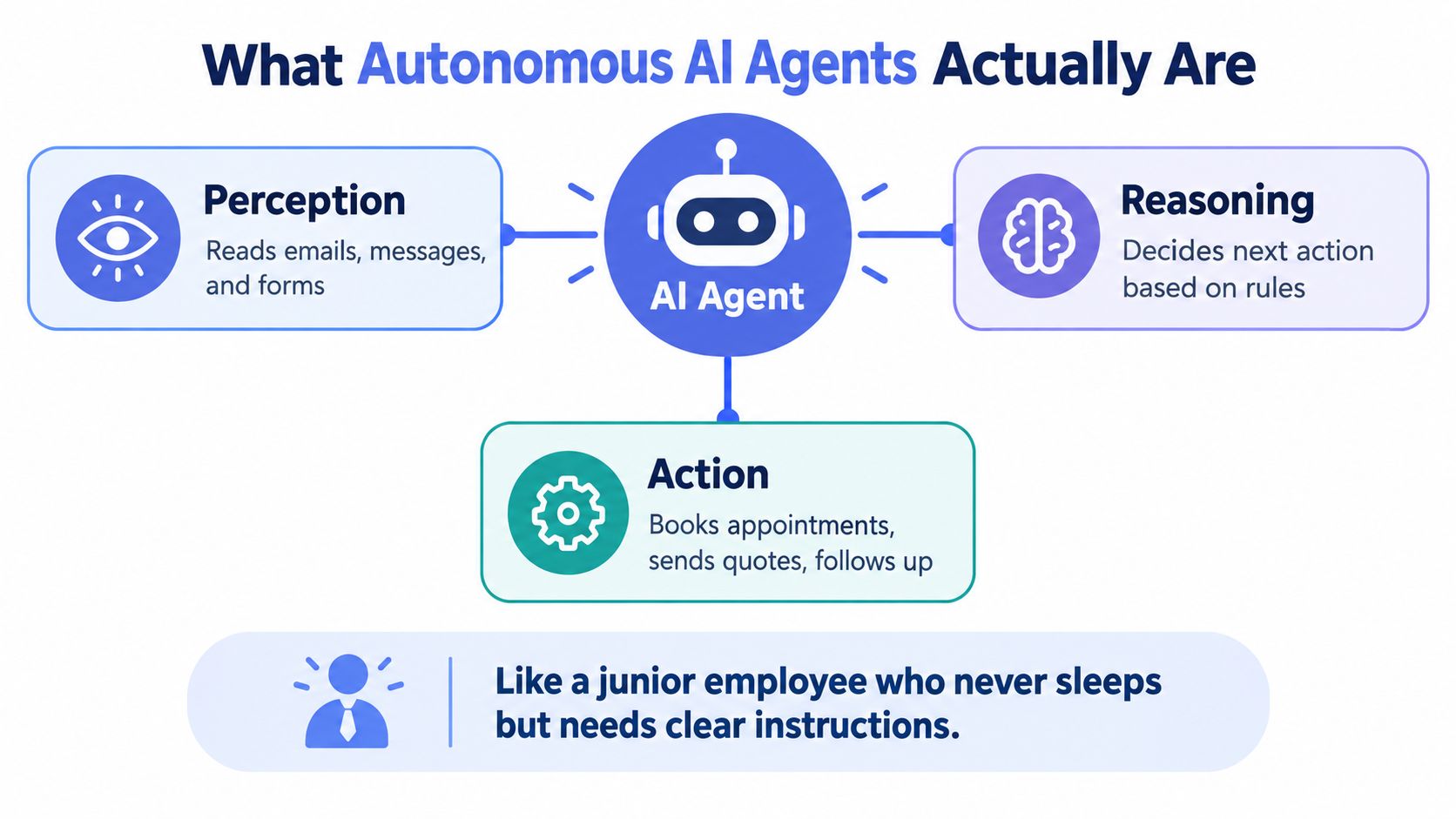
An autonomous AI agent is software that can observe a trigger, pull the right context, follow a defined workflow, use connected tools and complete approved actions without being prompted at every step. In practice, it works more like an operations layer than a magic assistant. If the process is clear, it keeps moving. If the situation is ambiguous, sensitive or outside policy, it should stop and hand off.
That distinction matters.
Standard generative AI answers a prompt. An agent works through a process. It can read an email or form, decide the next allowed step, update a record, send a pre-approved message, create a task and escalate an exception. The Australian Government's cyber security guidance on agentic AI describes these systems by their ability to make decisions, interact with tools, access enterprise systems and take actions with limited human intervention.
The Working Parts
A useful agent has distinct parts, and each one needs boundaries.
- Trigger: A new enquiry, email, form submission, calendar event, CRM change or invoice status starts the workflow.
- Context: The agent retrieves permitted records, previous messages, service areas, job types and required fields.
- Decision logic: Rules determine whether the item is complete, suitable for routing, ready for a reminder or needs a person.
- Tool access: The system may read or write to a CRM, inbox, calendar, form system or accounting platform.
- Verification: The workflow checks required fields, duplicate records, identity details, allowed values and action limits before proceeding.
- Exception path: Unclear, sensitive, stalled or high-impact cases move to a queue with an owner and next action.
This architecture is where people get misled. Fluent writing is not the same as reliable operations. An agent can draft a convincing reply and still fail to update the CRM, keep a required field intact or route the enquiry correctly. If you want something dependable, use structured schemas, narrow tool permissions and deterministic checks. That is how you turn probabilistic output into bounded behaviour.
For a broader plain-English introduction to agent design concepts, the AgentGrown blog is a useful reference. Use it for background, then write your own approval rules and operating procedures around the workflows that matter.
What Agents Can Handle Reliably
Agents earn their keep on repetitive admin with clear inputs and low-risk outcomes. They can classify enquiries, detect missing information, create tasks, remove duplicate records, prepare reminders and route work according to defined rules.
They become unreliable when the answer depends on unrecorded context, negotiation, emotion, legal interpretation or an unusual exception. That is the autonomy line. If the process has uncertainty, the agent should not invent confidence. The right end state is often “needs owner review”, not a forced answer.
That is why the best setup is usually a monitored agent wrapped around your existing CRM, with approval gates in the spots that affect trust, money, privacy or reputation.
Where Agents Earn Their Keep in a Service Business
The strongest use cases sit close to the work your team already does, but far enough from judgement that the rules can be made explicit. An agent shouldn't become another inbox. It should turn incoming work into an owned, staged and observable process.
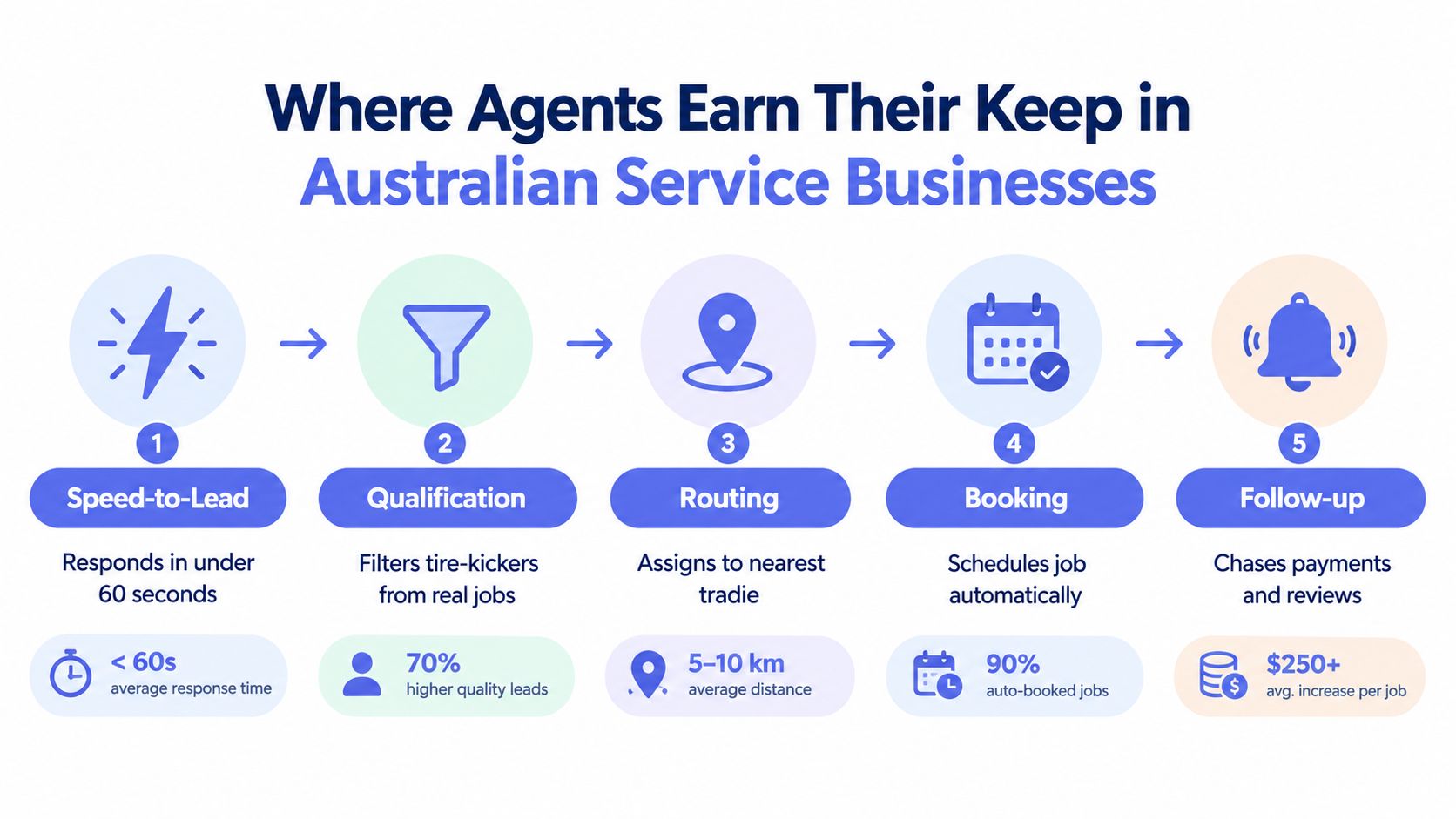
1. Speed to Lead
A new enquiry arrives through a website form, email or messaging channel. The agent captures the contact details, checks the service area, identifies the job category, detects missing information and creates the record in the CRM. It can send a useful acknowledgement, assign the next action and offer a booking path where the rules are clear.
A person still decides whether the job is commercially suitable, technically unusual or worth a custom response. For businesses losing work between enquiry and first contact, speed-to-lead automation is a sensible starting point because the workflow has visible states from capture to qualification to booking.
2. Lead Follow-Up
Quotes and proposals often stall because the next reminder lives in someone's head. An agent can check the last interaction, identify the current stage, prepare a context-aware follow-up and schedule the next task. It can stop when the customer replies, the opportunity is marked lost or a person takes ownership.
The team keeps control of pricing, negotiation and relationship-sensitive language. A reminder can be automated. A promise about scope, timing or outcome shouldn't be.
3. Structured Intake
For builders, installers, trades and professional services, the first brief often arrives incomplete. The agent can collect forms, photos, documents, site details and preferred timing, then flag what's missing before the job reaches the estimator or operator.
That reduces avoidable back-and-forth. It doesn't replace the specialist who decides whether the brief is technically adequate or whether a site visit is necessary. The useful boundary is straightforward: the agent checks completeness, while the team checks suitability.
4. CRM Hygiene
A CRM becomes valuable when it reflects reality. An agent can detect missing owners, stale stages, duplicate contacts, absent next actions and records that have stopped moving. It can create an action queue and notify the responsible person rather than closing the item without a word.
The CRM automation service approach is useful here because it treats the CRM as the operating record, not a reporting archive. The agent maintains structure. The owner decides what the relationship means.
5. Invoice Reminders
An agent can prepare polite payment reminders based on invoice status, previous contact and approved wording. It can schedule follow-up steps and stop when payment is recorded or a finance team member takes over.
A person should approve exceptions, disputes, sensitive accounts and messages that could damage a relationship. Invoice reminder automation works best when it accelerates routine administration without pretending that every overdue invoice has the same cause.
This short video provides a visual explanation of how workflow automation can connect these operational stages:
For a small business perspective on connecting agents to real workflows, this guide to AI agents for workflow automation gives useful context. The principle remains the same: automate the repeatable movement of work, not the decisions that define the customer relationship.
Risks, Approval Boundaries and the Autonomy Line
The risk is not whether an agent can do the work. The risk is letting it act where your business cannot explain the decision, stop the action, or clean up the mess when it gets it wrong.
That is why the fully autonomous "AI employee" pitch is the wrong target for a service business. Once an agent can reach into your CRM, send messages, change records or trigger financial steps, the problem shifts from output quality to operational control. Keep the autonomy line tight. Give the agent room to handle routine movement of work. Put approval gates around anything that changes price, promise, reputation, privacy or cash.
A Workable Boundary Model
Let low-risk actions run automatically only when the inputs are structured, the rule is clear and the outcome is easy to reverse.
- Capture and enrichment: Extract details from a form, email or document into defined fields.
- Routing: Assign work using service area, job type, availability or an explicit owner rule.
- Deduplication: Identify likely duplicate contacts for review or merge where the rule is deterministic.
- Task creation: Add a next action when a record reaches a defined stage.
- Reminder preparation: Draft or schedule approved routine reminders within set limits.
Everything else needs a human decision before the system acts.
- Pricing and quotes: A person confirms scope, price, assumptions and exclusions.
- Contractual commitments: A person approves promises about delivery, warranty, service levels or terms.
- Complaints: A person handles emotionally charged or reputationally sensitive communication.
- Refunds and financial actions: A person confirms eligibility, amount and authority.
- Sensitive data: A person reviews access, use and disclosure where privacy or risk is material.
The Australian Cyber Security Centre's agentic AI guidance makes the standard clear. Review, test and formally accept outputs and actions before operational use. A fluent answer is still just a proposal until your controls prove otherwise.
The model can recommend. The application must enforce.
Make the CRM the Control Point
Do not let the agent become the source of truth. The CRM should stay the control point because that is where ownership, stage, next action and outcome can be checked by a human.
This matters in day-to-day operations. An agent may classify an enquiry, suggest a record update or draft a message. Policy should decide whether that action can run automatically, whether approval is required, and what must be logged. The boundary sits in the workflow, not in the model's confidence.
That design is more reliable than chasing maximum autonomy. A monitored agent around an existing CRM usually gives more value than an unsupervised system with broad permissions, because you can see what it did, approve what matters and reverse what should never have happened.
If you want the practical operating model, human-in-the-loop automation for CRM and workflow approvals explains the point well. Human review is not a failure of automation. It is how you keep consequential actions accountable.
Implementing Your First Agent Without Betting the Business
Start with leakage, not technology. Map where enquiries wait, quotes lose momentum, intake arrives incomplete, CRM records become stale or invoices require repeated manual chasing. If you can't identify the dropped step, you won't know whether an agent improved anything.
Choose one workflow with clear state transitions. “Enquiry to qualification to booking” is usually easier to measure than “improve operations”. Capture the starting position for:
- First-response latency
- Follow-up completion
- Intake rework
- Record staleness
- Overdue-invoice days
- Human-review rate
- Exception frequency
- Cost per completed workflow
The figures you collect become your baseline. Don't borrow generic performance claims from a vendor and call them your business case.
Build for Failure from the Start
A reliable workflow needs more than a prompt. Use structured schemas so the agent must return the fields your process requires. Add verification steps before writes and external messages. Make tool calls idempotent so a retry doesn't create duplicate records, tasks or reminders.
Bounded retries matter too. If the system can't obtain a required field or resolve an ambiguity, it needs a terminal state such as “owner review required”. Endless retries hide failure and create unnecessary load.
The B2B SEO agent setup guide for 2026 is useful background for thinking about agent configuration and implementation detail. For a service business, apply the same discipline to your operational workflow: define the input, permitted action, verification and escalation before connecting the tool.
Decide Whether to Expand
Review the agent after launch against the baseline. Check whether work is moving more consistently, whether people spend less time on routine administration and whether exceptions remain manageable. Track false actions, missed actions, repeated retries and the minutes required for human review.
If monitoring and exception handling consume more effort than the workflow saves, stop expanding it. Redesign the process, narrow the permissions or remove the agent. A smaller system that remains visible is more valuable than a broader system nobody trusts.
Choosing Between Vendor Tools and Managed AI Operations
Vendor tools and managed AI operations solve different problems. A vendor tool can give an organised team a quick starting point. A managed service suits a business that needs the workflow designed, monitored and tuned without creating another internal administration role.
The right choice depends less on the model and more on who owns the operating burden after launch.
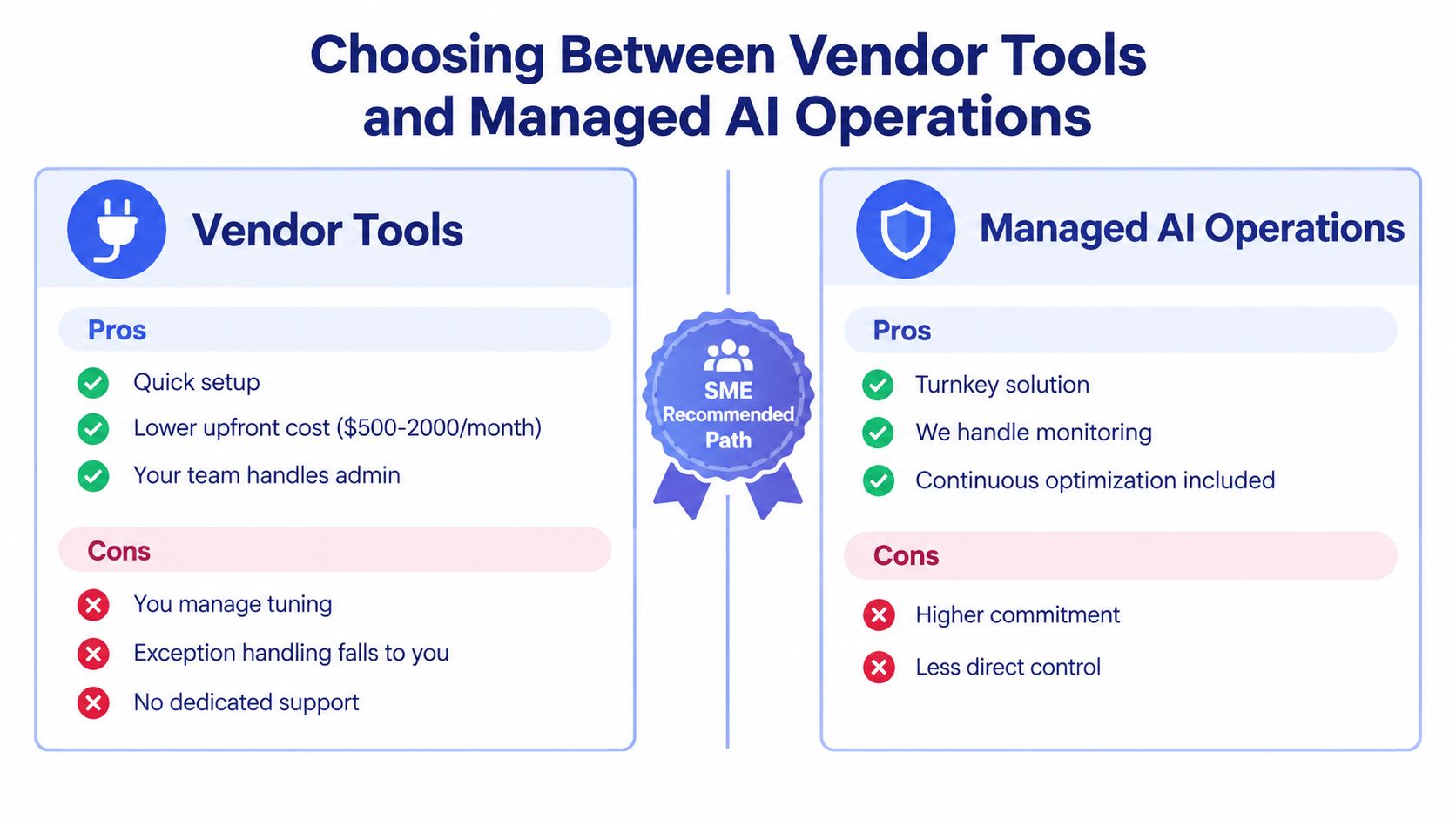
| Criteria | Vendor Tool | Managed AI Operations |
|---|---|---|
| Setup scope | Usually configured by your team around a defined feature | Workflow is mapped, built and connected around existing tools |
| Ongoing administration | Your team manages prompts, settings and integrations | The service provider monitors, tunes and maintains the workflow |
| Human-in-the-loop controls | Available where the product supports them, but your team must configure and enforce them | Approval gates, named owners and exception paths are designed into the operating process |
| Monitoring and tuning | Internal staff review failures and adjust the system | Monitoring, exception handling and post-launch iteration are part of the operating model |
| Suitability for teams of 2-50 people | Works when someone has time and confidence to administer it | Useful when owners need capacity without adding another software workload |
A vendor tool is the sensible first step when the workflow is simple, the data is clean and one person can own monitoring. Don't pay for managed operations if your team can maintain the process.
The managed route becomes more practical when your CRM is already important, exceptions affect customers or staff won't consistently review alerts. The point isn't to hide the system. It is to keep the system visible while someone owns the runbook, tuning and escalation.
For readers comparing specialist options, this overview of best AI SEO agents in 2026 offers a useful reminder that product selection should follow the workflow, not lead it. SEO agents and service-operation agents may use similar building blocks, but their approval boundaries and failure costs differ.
Managed AI operations can be a fit when you want an operating layer around your CRM, inbox, forms or accounting tools rather than another platform for your staff to administer. Truespeak designs, builds and manages workflows covering capture, follow-up, intake, CRM hygiene and invoice reminders, with human approval for sensitive actions.
Your Next Steps and How to Judge Progress
Use this week to establish control before you choose a tool. Start with the work that disappears between enquiry and invoice, then document who owns each step and what should happen next.
- Map the workflow: Record the path from enquiry, quote and intake through to delivery and payment.
- Find the delays: Identify the three steps where work most often waits, gets duplicated or loses an owner.
- Choose one workflow: Select a narrow process with defined states, such as enquiry to qualification to booking.
- Set the boundary: Mark every action as automatic, approval-gated or manual before connecting systems.
- Capture the baseline: Record response latency, follow-up completion, rework, stale records, review effort and exceptions.
- Set the review cadence: Decide who checks the logs, how stalled work is surfaced and when the workflow is redesigned.
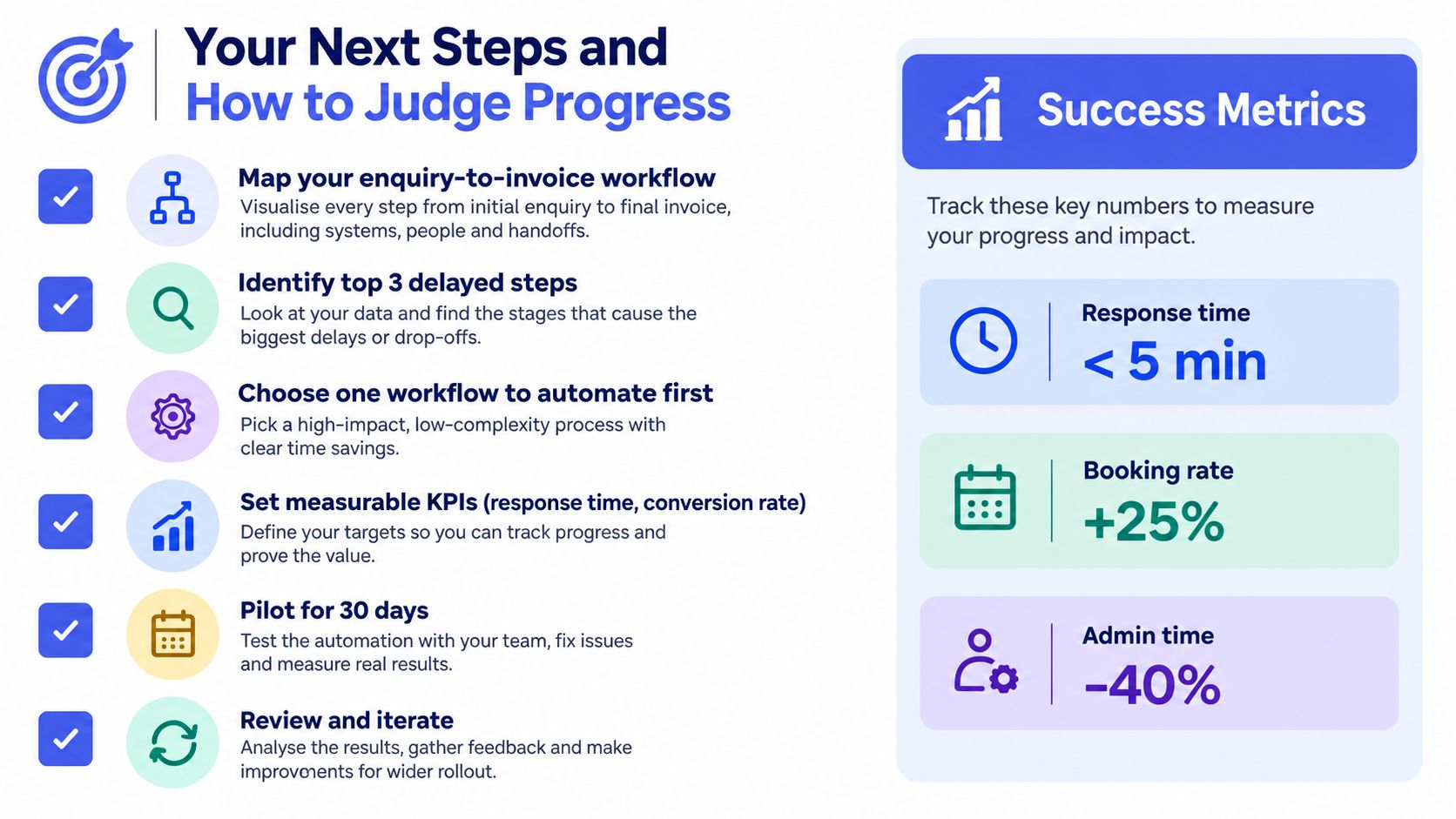
Judge progress objectively. Look for consistent capture, clear ownership, complete next actions, better pipeline visibility and disciplined follow-up. Don't claim a conversion lift or time saving unless your own baseline and post-launch records support it.
A successful first deployment should make the business easier to supervise. If the owner still needs to inspect multiple inboxes, spreadsheets and disconnected automations to understand what happened, the agent hasn't created an operating system. It has added another source of uncertainty.
Start with the smallest useful system, prove that the workflow stays visible and expand only when the evidence supports it. If your internal team can't own monitoring, tuning and exception handling, consider a managed partner rather than leaving the agent to run unattended.
Truespeak designs, builds and manages human-in-the-loop AI operations for Australian service businesses, including enquiry response, follow-up, intake, CRM hygiene and invoice reminders. Visit Truespeak to discuss one narrow workflow, define its approval boundaries and build from evidence rather than hype.