
Your inbox is full, the form notifications are coming in, and someone from the team has already said, “I'll get back to them after I finish this job.” By the time the day settles down, one enquiry has gone cold, another quote still needs a follow-up, and the invoice reminder you meant to send is sitting in a draft folder. That's the day-to-day problem business automation Sydney owners keep running into, not a lack of tools, but a lack of a reliable operating layer around the tools they already use.
The fix isn't usually another app. It's a managed process that makes sure every lead has an owner, every task has a next action, and every exception is visible before revenue slips away. For Sydney service firms, that matters because the pain is rarely at the point of capture, it's in the hand-off between inbox, CRM, quote, and finance.

If you want a simple starting point, the most useful framing is to look at small business automation as a way to reduce leakage before you add more software. The logic behind that approach is set out in Truespeak's overview of small business automation, which fits the reality many owners face, existing systems are already there, but follow-through is inconsistent.
Table of Contents
- Introduction to Business Automation in Sydney
- What Business Automation Really Means for Growing Teams
- Why Local Managed Services Matter in Sydney
- How to Choose the Right Automation Partner in Sydney
- From Diagnostic to Daily Operations and How Engagement Works
- Real World Applications That Reduce Leakage and Save Time
- Next Steps for Sydney Businesses Ready to Automate
Introduction to Business Automation in Sydney
A Sydney owner usually doesn't wake up thinking, “We need automation.” They wake up to a stack of small misses. A lead came in through the website, someone replied on a personal inbox instead of the CRM, the quote went out late, and the follow-up got pushed because the team was busy on site.
That's why automation makes sense only when it sits around the work people already do. It should catch the enquiry, route it, remind the right person, and keep the pipeline visible. It shouldn't create another dashboard nobody checks.
The Real Problem Is Leakage, Not Effort
Most small teams already work hard. The issue is that the work fragments across tools, people, and memory. Once a message lives in a personal inbox, or a quote depends on someone remembering to chase it, the business starts losing momentum in places no one can see.
Practical rule: if a lead, task, or invoice needs someone to remember it, the process is already leaking.
Sydney businesses often ask for “automation” when what they really need is a cleaner flow from enquiry to outcome. That usually means one source of truth, clear ownership, and visible next actions. The technology matters, but the process matters first.
The rest of this guide follows that logic. It starts with what automation really is, then looks at why a managed local partner can be more useful than more software, and ends with how to choose a setup that helps your team work faster without handing control to opaque systems.
What Business Automation Really Means for Growing Teams
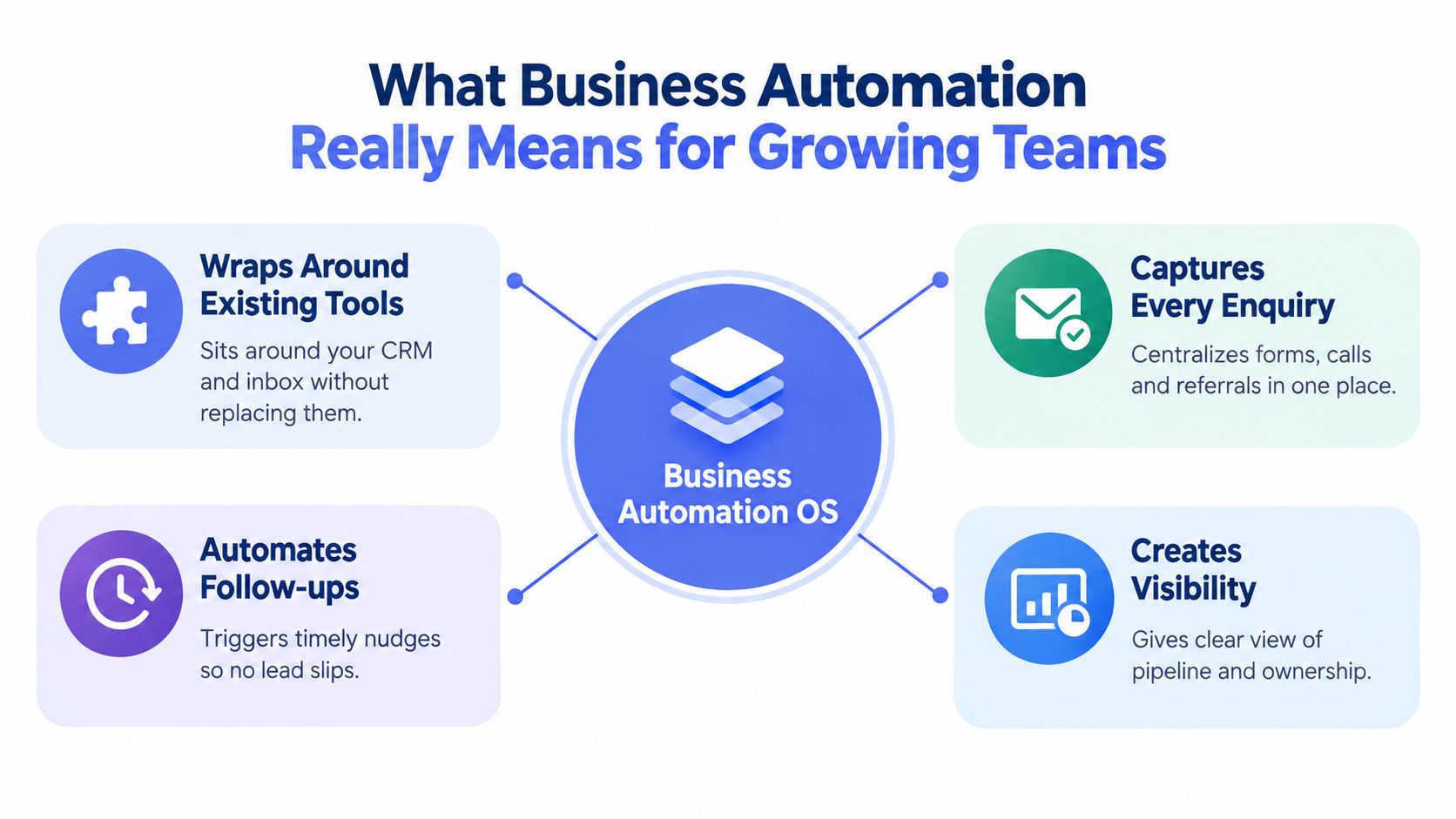
Think of business automation as an operating system, not a replacement for your stack. Your CRM, inbox, forms, accounting software, and messaging tools can stay in place. Automation sits around them, moving work, surfacing exceptions, and keeping each step visible.
That distinction matters because a lot of businesses buy tools before they define the workflow. The result is more admin, not less. A managed layer works better when the process is already visible, the source of truth is clear, and each record has an owner, a stage, a next action, and a defined outcome.
How the Moving Parts Fit Together
A useful workflow usually starts with a trigger. That trigger might be a web form submission, a new referral, a quote request, or an overdue invoice date. From there, the system checks context, such as lead type, urgency, or account status, then decides what happens next.
Common actions are simple and practical. Send a first response. Create a task. Route the lead to the right person. Log the activity. Escalate the exception if the situation is sensitive or high value.
Automation works best when it handles the repeatable part and leaves judgement with people.
That human-in-the-loop model is important in Sydney service businesses because relationships still matter. A system can remind someone to call back, but it shouldn't make relationship-sensitive calls on its own. The approval gate keeps consequential decisions where they belong.
Why the Operating Layer Idea Helps
Owners often think they need a bigger system when the actual issue is poor hand-offs. A managed layer helps the team by removing the burden of remembering every next step. It doesn't just “do tasks”, it creates a cleaner path through the work that already exists.
For teams that want a broader sales-process lens, automating outside sales workflows is a useful companion concept because it shows how routing and follow-up can be structured without turning the whole process into a software project. The same logic applies to service businesses, where the goal is consistency, not complexity.
The best automation setups also create visibility. When the pipeline is live, the business can see what's waiting, what's stuck, and what needs human review. That's where the value sits, not in the tool itself, but in the reduction of hidden work.
Why Local Managed Services Matter in Sydney
Sydney businesses already have enough software to manage. What they usually lack is a disciplined way to run it. That's where a managed partner becomes useful, because someone still has to monitor the workflow, tune the rules, and handle the edge cases that software alone won't solve.
The adoption picture helps explain the gap. The National AI Centre tracker reported 43% of Australian SMEs using AI in the December 2025 to February 2026 quarter, while an ABS survey covering nearly 7,000 businesses found only about 12% of Australian businesses reported using AI in the workplace for 2024–25. Those are different measures, but the gap shows something important. Many businesses are experimenting, while far fewer have embedded AI into core operations. Source reference
Managed Support Reduces Operational Drift
A local managed service is less about geography and more about continuity. Someone watches the rules, notices when a workflow starts failing, and adjusts the process when the business changes. That matters when tools are fragmented and the team is still relying on memory, inboxes, and ad hoc follow-up.
Automation also needs maintenance. Leads get labelled badly, records drift, and manual work sneaks back in. If nobody owns the system, the business slowly returns to the same leakage it was trying to fix.
Key takeaway: software can run, but it can't stay accountable on its own.
A Sydney-based partner can also help keep approval gates in place. That's useful for client-facing actions, invoice follow-up, or anything where tone and judgement matter. The point isn't to remove people from the loop, it's to keep them in the right loop.
Why the Managed Model Fits Service Businesses
For builders, trades, installers, and professional services, the smallest useful system usually wins. These businesses don't need a giant rebuild. They need reliable capture, routing, reminders, and visibility across existing tools.
That's why a managed partner is often better than buying another platform for the team to administer. The partner builds around the current stack, keeps the process visible, and handles the ongoing tuning. In practice, that means fewer hand-offs go missing, fewer enquiries sit unanswered, and fewer invoices drift into the background.
For a more process-focused view of that model, Truespeak's AI automation agency overview shows how managed operations are framed as an ongoing service rather than a one-off software install.
How to Choose the Right Automation Partner in Sydney
A Sydney owner often looks at automation the wrong way at first, by comparing tools before comparing who will carry the process after launch. A software-only vendor may promise speed, but your team still ends up owning setup, maintenance, exception handling, and the drift that appears when workflows age. A managed service changes that load. It acts like an operating layer around the tools you already use, with human checks where judgement matters.
Here's a simple way to compare the main options.
| Evaluation Criteria | Managed Service | Software Only |
|---|---|---|
| Ongoing monitoring | Included, with tuning and exception handling | Your team owns it |
| Human review gates | Built into the workflow | You have to design them yourself |
| Source of truth | Built around existing CRM and ops tools | Often depends on new platform adoption |
| Scope | Smallest useful system first | Usually feature-led |
| Maintenance burden | Shared with the partner | Mostly internal |
| Fit for 2 to 50 employee service businesses | Often stronger, because it reduces admin load | Can work, but adds internal admin |
What to Look for Beyond the Sales Pitch
Start with one question, does the partner build around your current tools or try to replace them. Replacement can make sense when the stack is broken. Most service firms need a better operating layer on top of what already works, so lead capture, follow-up, and receivables do not leak through the cracks.
Check how they handle human review. If the system touches quotes, payments, or sensitive customer communication, someone should approve the action before it goes out. That is not extra bureaucracy. It is the gate that keeps the machine from sending the wrong thing at the wrong time.
Security and Practical Support Matter Too
Look for isolated environments, restricted access, and private handling of raw personal data. Ask who maintains the system after launch. That is where a lot of automation projects go soft, because no one owns tuning, logs, alerts, or review cadence. Once that happens, the workflow starts to drift and the business slips back into manual work.
A Sydney-Fit Lens Helps
Local availability matters because the team has to work with your hours, your clients, and the way Australian service businesses operate. A partner who understands that rhythm can usually build something more realistic than a generic software package. They are more likely to keep the process practical, keep the hand-offs clear, and handle the follow-up without turning it into another internal admin job.
For teams that want a more technical view of the managed model, Truespeak's business process automation and AI discussion explains the idea in more detail.
From Diagnostic to Daily Operations and How Engagement Works
A good engagement starts by finding where work is already leaking. That means looking at dropped enquiries, slow quotes, stale records, and overdue invoices before anyone starts talking about tools. If the process is unclear, the automation will just make the confusion faster.
The Sequence That Usually Works
- Diagnostic assessment. Review where enquiries, follow-ups, and invoice reminders are falling through.
- Workflow design. Map triggers, decisions, actions, verification steps, and exception paths around the current stack.
- Implementation and integration. Connect the system, define the rules, and set the approval gates.
- Daily operations and optimisation. Watch the logs, review exceptions, and tune the workflow based on what happens.
This sequence matters because it stops the project from turning into a software shopping exercise. The diagnostic comes first, not the platform. That's how you keep the work tied to real leakage instead of shiny features.
Runbooks Keep the Work Alive
Once the workflow is live, the team still needs rules, prompts, logs, alerts, and review cadences. Those are the runbooks. They make the process repeatable and keep people accountable for exceptions.
Automation should be monitored like a service, not left like a finished spreadsheet.
That approach also makes iteration easier. If a reminder sequence is too aggressive, if a route is sending the wrong lead to the wrong person, or if an approval step is slowing things down, the system can be adjusted. The point is to improve over time, not to launch once and hope for the best.
Real World Applications That Reduce Leakage and Save Time
The clearest way to understand automation is to look at the places where small businesses lose time without noticing it. Forms arrive, inboxes fill, referrals get mentioned in passing, and someone has to decide who owns the next step. If that decision lives in memory, the business leaks.
A better setup is straightforward. Forms, inboxes, and referrals feed one CRM. Leads are checked for fit, intent, and urgency. The live pipeline shows the stage, owner, last activity, and next action. That turns scattered admin into a visible work queue.
Lead Response and Follow-Up
Speed matters because buyer intent fades quickly. Australian lead-response analysis shows average B2B web-enquiry response times ranging from 42 hours to more than 29 hours in vendor audits, while the odds of contacting a lead can fall up to 100x between minute 5 and minute 30 after enquiry submission. Another Australian source notes that responding within 5 minutes instead of 30 minutes makes a business about 21 times more likely to qualify the lead, and the odds of making contact drop by more than 10 times within the first hour. speed-to-lead research
That does not mean every lead should get the same treatment. The first response should be event-driven, SLA-bound, and quick enough to keep intent alive. The system can qualify and route, then hand the high-value cases to a person.
Invoice Reminders and Receivables
Late payments are another place where small teams lose time. Australian small-business reporting says invoices are commonly paid about 6.1 to 6.9 days past due on average, and one Xero-based benchmark noted average payment at 24.1 days after invoice issuance in the March quarter 2026. That means a 30-day terms invoice can stretch to roughly 36 to 37 days in practice. Source reference
That is why polite, human-approved reminder sequences work better than occasional chasing. Start shortly after the due date, escalate gradually, and keep sensitive accounts under approval. The process should support accounting, not replace judgement.
Hygiene Routines That Stop the Backflow
CRM cleanup matters because dirty data creates extra work everywhere else. Australian guidance recommends connecting CRM and accounting tools to create a single source of truth, then using a five-step cleanup process, audit the database, define a Golden Record, deduplicate records, add automated validation at entry points, and schedule regular review intervals. Source reference
Practical rule: if the CRM is not trustworthy, every automation built on top of it will wobble.
For a closer look at how workflow design and AI can support that kind of operating layer, Truespeak's business process automation and AI article sits in the same practical lane. The point is not the tool category, it is whether the process gets cleaner for the people using it.
Next Steps for Sydney Businesses Ready to Automate
The right next move is usually smaller than owners expect. Start with the process people already feel, slow first response, inconsistent follow-up, messy intake, or overdue invoice chasing. Then check whether the workflow is visible enough that someone can own it from start to finish.
A simple readiness checklist helps:
- Visible process: can you see where the enquiry or invoice goes at each stage?
- Single source of truth: is there one CRM or operational system the team can trust?
- Clear ownership: does every lead, task, or reminder have a named owner?
- Approval gates: are human decisions kept in place for sensitive or client-facing actions?
- Clean data habits: are CRM and accounting records reviewed regularly so automation doesn't drift?
The broad adoption trend shows the market is moving, but the key win comes from execution, not experimentation. In Sydney, that usually means building a managed layer around the systems you already use, then improving it as the business grows.
If you're trying to reduce leakage without adding another internal admin burden, the smartest first step is a diagnostic conversation about your current workflow. Truespeak designs and manages AI operating systems around lead response, follow-up, intake, CRM hygiene, invoice reminders, and practical reporting, so you can keep people focused on judgement while the routine work stays visible.
If you want help turning your enquiry flow, CRM hygiene, and invoice follow-up into a managed operating layer, visit Truespeak and start a conversation about the processes that are costing your team time today.