
You can feel the problem before you can name it. The inbox has enquiries sitting unanswered, a quote went cold, someone on the team has half-updated the CRM, and an invoice is now old enough to need a follow-up that nobody owns. That's the point where most service businesses start talking about software, when the issue is that the work isn't visible, repeatable, or controlled.
Business process automation is what you put in place when you want the routine parts of that work to run the same way every time, with fewer handoffs and clearer ownership. For an Australian service firm, that usually means the CRM or operational system becomes the source of truth, every item has an owner and next action, and people stay responsible for judgement, exceptions, and client-impacting decisions. Automation should make the business calmer, not more opaque.
Table of Contents
- The Moment a Service Business Realises It Needs Automation
- A Working Definition of Business Process Automation
- Core Components of an Automated Workflow
- What Australian Data Tells Us About Adoption and Outcomes
- Real Use Cases in an Australian Service Business
- The Biggest Misconception About Automation in Australia
- Measuring Whether Automation Is Working
- A Practical Starting Point for Australian SMEs
The Moment a Service Business Realises It Needs Automation
The morning usually starts badly in a 10 to 40-person firm. A new enquiry is buried in a shared inbox, someone assumed another person had replied, and a quote that should have been chased last week has already drifted out of sight. By the time the owner spots it, the problem is not the email. Nobody can tell whether the work exists, who owns it, or what happens next.
That is what process trouble looks like in a service business. Another tool will not fix it if the workflow is still vague, informal, and dependent on memory. The cleaner setup is plain enough, every enquiry gets an owner, a stage, a next action, a response expectation, and a clear outcome.
Practical rule: if you cannot see the work, you cannot automate it properly.
The Australian Government's process standard, published on 2 February 2024, makes the same point in more formal language. Automation starts with turning hidden work into managed work.
That changes the conversation in a useful way. You stop asking what app you need and start asking where the work stalls, who should own it, and what should happen automatically before a person has to step in. For a service firm, that is the shift. People still make the judgement calls, but the routine path is visible, tracked, and controlled.
A Working Definition of Business Process Automation
A service firm does not need another vague tech label. It needs a working definition that tells the owner what gets automated, what stays human, and what the system is meant to control.
The cleanest Australian reference point is the Business Process and Workflow Standard, published by the Australian Government on 2 February 2024. It treats process and workflow solutions as systems that consolidate one or more business processes, apply workflow management, and enforce rules consistently from beginning to end. It also covers automation, standardisation, and integration into larger systems, which is broader than many people mean when they say “automation”.
For a service business, that distinction matters. A business process automation definition should not be limited to AI, chatbots, or anything flashy. It should mean using software to run the repeatable parts of a visible, well-designed process, capture, routing, decisions, actions, verification, approvals, and follow-up, while people keep ownership of judgement and exceptions.
A practical internal definition looks like this: business process automation is the monitored use of software to move repeatable work through defined triggers, decisions, actions, verification, and escalation, with the CRM or operational system as the source of truth. That is the level of control a 10 to 40-person firm needs. It keeps the process observable, which matters more than chasing tools.
Useful test: if the process still depends on someone remembering to chase, copy, forward, or update, it is not automated enough yet.
For a plain-English companion view of how workflows are set up, the guide on workflow automation is useful. If you want to see how this gets applied locally, automation support for your Redcliffe business shows the same idea turned into working systems.
The point is simple. Automation is broader than AI and narrower than a full transformation project. It is monitored operating capability, with people still in charge, not a handover to software.
Core Components of an Automated Workflow
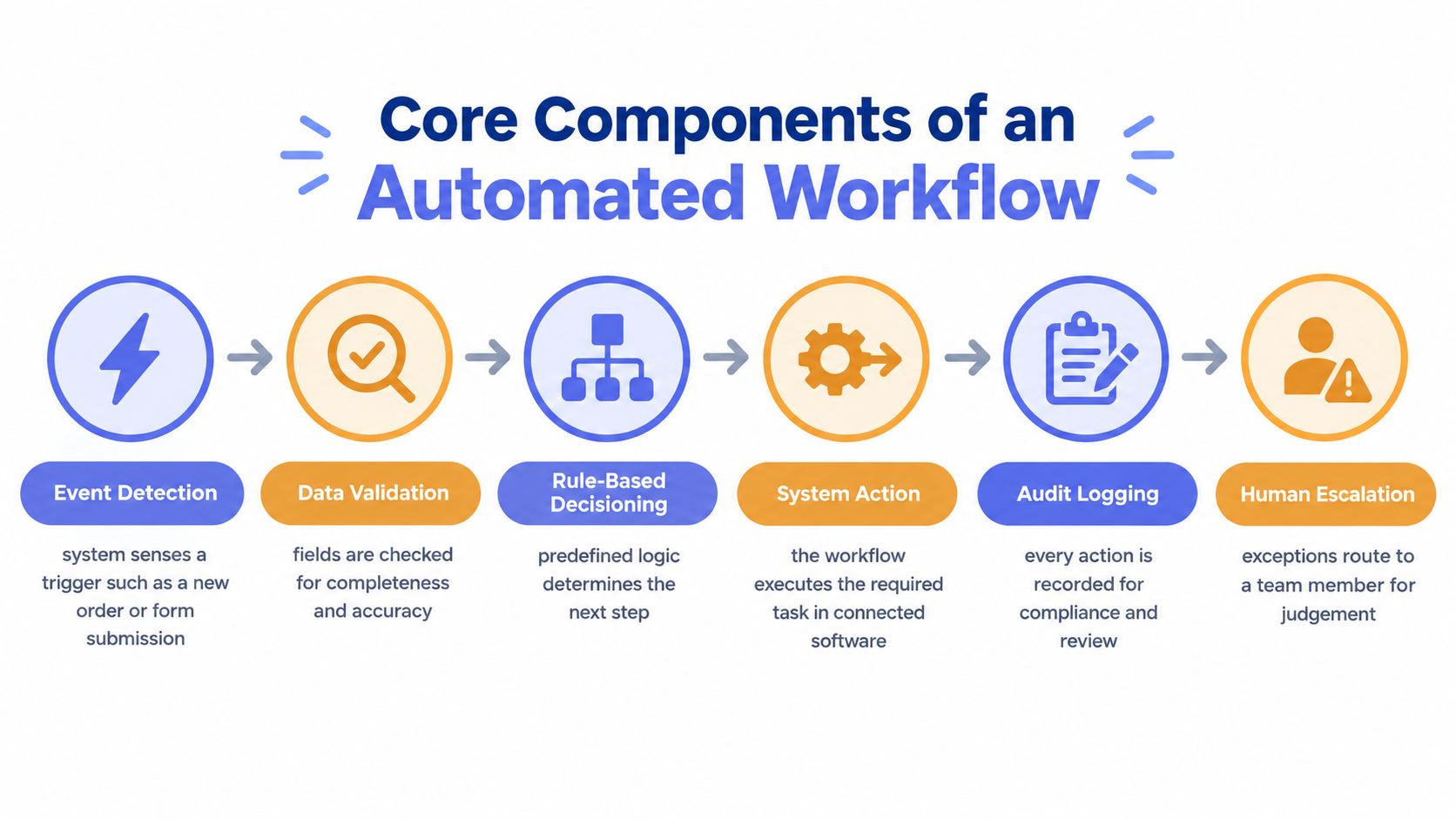
A solid workflow is not one thing. It's a chain of parts that all need to work, or the whole thing breaks in predictable ways, duplicate emails, wrong records, invoices sent to the wrong customer, or follow-up that disappears because nobody owned the next step.
Start with the Trigger and the Rules
The first step is event detection. Something happens, a form is submitted, a web enquiry lands, an invoice ages past due, or a document arrives. That trigger should be obvious and visible, not buried in someone's inbox.
Next comes data validation. The system checks whether the fields are complete and accurate before anything else moves. If the phone number is missing or the customer record doesn't match, the workflow should stop or route to a person.
Then comes rule-based decisioning. The workflow uses predefined logic to decide what happens next, for example, route a high-intent lead to sales, send a reminder, or create a task for a staff member. The point isn't to be clever. The point is to be consistent.
Then Make the System Act and Log What It Did
After that, the workflow needs system action. It should create the task, update the CRM, send the reminder, or open the next queue item in the connected software. If the software does nothing, it is just a fancy checklist.
Audit logging comes next. Every meaningful action should be recorded so the business can review what happened, when it happened, and why. That matters for accountability, but it also matters when a process goes wrong and you need to see where it broke.
Finally, there's human escalation. If confidence is low, risk is high, or the data is incomplete, the item goes to a person. That's not a failure of automation, it's good design.
The Australian model should always leave room for human approvals where communication, privacy, financial decisions, or client impact require oversight. If you want the workflow mapped properly, SMS cart recovery guide is a useful example of how sequence and timing change outcomes in practice.
The short version, automation works when the workflow has triggers, decisions, actions, verification, exception handling, and ownership. Leave out any one of those, and the business just moves its mess from one place to another.
What Australian Data Tells Us About Adoption and Outcomes
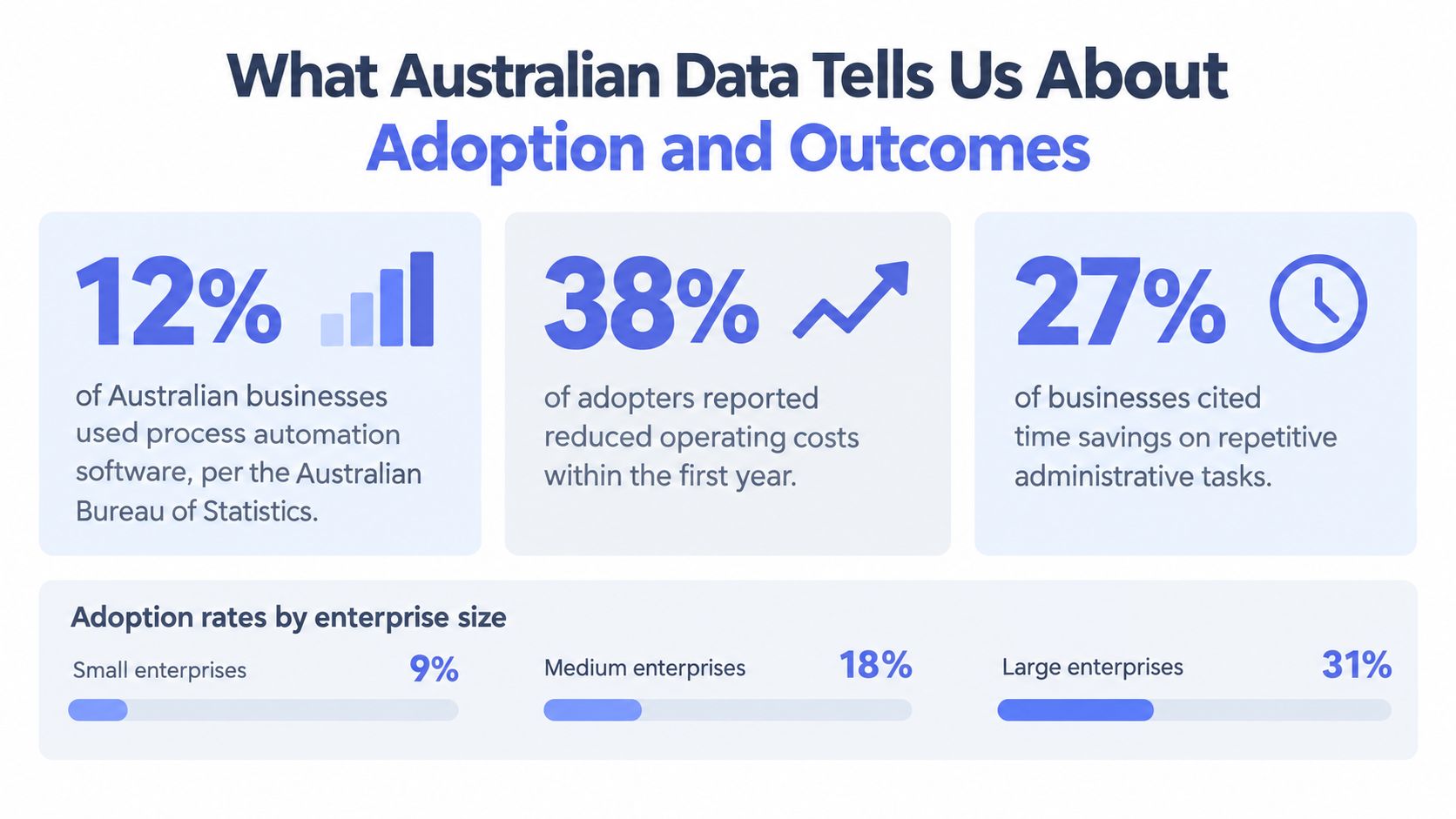
Australian business data is useful because it cuts through the hype. The ABS reported that 46% of businesses were innovation-active in 2024-25 and that about 12% used artificial intelligence in the workplace, up from 1% in 2022-23. Adoption among small and micro businesses sat at around 11%, while innovation-active small businesses recorded 19% AI adoption versus 4% among small businesses that were not innovation-active, and the share of businesses measuring the contribution of digital activities rose from 3% in 2021-22 to 7% in 2024-25. ABS business adoption of artificial intelligence accelerates in 2024-25
That pattern matters more than the technology label. Adoption is clearly moving, but the stronger signal is that businesses already improving their processes are more likely to adopt digital tools at all. In other words, technology tends to follow process maturity, not replace it.
The Australian Government's AI Adoption Tracker adds a practical lens. It reported that 41% of small and medium enterprises were adopting AI, 22% reported faster decision-making, and 18% reported improved productivity. It also noted lower adoption in regional organisations than metropolitan ones, 29% versus 40%. Australian AI Adoption Tracker report
What That Means for a Service Business
Don't read those numbers as a promise. Read them as a benchmark. A workflow should be designed to reduce queue time, duplicate entry, manual follow-up, and avoidable rework before anyone talks about “transformation”.
Practical takeaway: a smaller, monitored workflow is usually more useful than a broad technology replacement project.
The ABS also found that the share of businesses measuring the contribution of digital activities more than doubled over the period reported. That should push owners toward measurement discipline, not more tools. If the process is hidden, adoption looks like activity. If the process is visible, adoption becomes operating improvement.
Real Use Cases in an Australian Service Business
The fastest wins in a service firm sit where work is already messy. You can see the bleed straight away, slow replies to enquiries, quotes that go cold, incomplete intake, stale CRM records, and invoice chasing that depends on someone having a quiet afternoon.
Speed to Lead, Follow-Up, Intake, CRM, and Invoices
Speed-to-lead automation is the first obvious use case. A new enquiry triggers a response, qualification, routing, and next action instead of a generic “we got your message” followed by silence.
Lead follow-up automation keeps quotes and proposals warm, handling the nudges that usually get lost when a salesperson is juggling site visits, calls, and admin.
Intake automation turns an incomplete brief into structured capture before handoff. It earns its keep when the team keeps chasing missing documents, photos, or details after the job has already been accepted.
CRM automation is for hygiene, not glamour. It keeps records moving into the right stages, creates action queues, and stops the database from turning into a graveyard of stale opportunities.
Invoice reminder automation handles polite follow-up on overdue accounts with human review where needed. It suits firms that want consistency without turning collections into a blunt instrument.
Managed Service or Self-Serve
| Workflow | Managed-service signal | Self-serve signal |
|---|---|---|
| Speed-to-lead | Lead handling is time-sensitive, and missed replies cost real work | A simple sequence is enough, and the team can maintain it |
| Intake | Documents, photos, or structured briefs need ongoing tuning | Forms are stable, and the process is clear |
| CRM hygiene | Records drift often, and someone needs to watch exceptions | The internal team already owns CRM discipline |
| Follow-up | Sales cycles are inconsistent, and timing matters | The workflow is narrow and easy to review |
| Invoice reminders | Approval gates and tone control matter | Chasing is simple, and the team can manage the cadence |
A managed-service model fits when the business wants the workflow built, monitored, tuned, and reviewed by someone outside the day-to-day noise. Self-serve makes sense when the process is simple enough that the team can own the build and maintenance without neglecting it. For many 2 to 50-person firms, the test is whether the business can keep the thing current after launch.
A system like Truespeak's business process automation sits in the managed-service bucket, because the work does not stop at launch. The workflow has to be operated, checked, and adjusted as the business changes.
The Biggest Misconception About Automation in Australia
The biggest mistake is thinking automation is about replacing people. Australian SMEs are more cautious than the hype suggests, and for good reason. A 2025 University of Technology Sydney Human Technology Institute study of 133 Australian SMEs found that concerns about accuracy and data risk remained major inhibitors, and nearly half of SME leaders identified a need for oversight and review practices. UTS Human Technology Institute report
That's the right instinct. The safe default for a service business is not maximum autonomy, it's managed human-in-the-loop automation. Let software handle the routing, reminders, logging, and routine administration. Let people handle judgement, sensitive communication, financial commitments, and anything that uses personal data in a way the business can't defend.
CPA Australia's 2025 Business Technology Report points to the same worry, data privacy risk and overreliance on automation with reduced human oversight. That's not an argument against automation. It's an argument for better design.
Where Automation Should Stop
Low-risk work can be automated more freely, creating internal action queues, sending internal reminders, and moving records between known systems. Client-impacting steps need approval gates, restricted access, audit logs, and clear exception ownership.
Straight answer: if the decision can affect a customer's rights, money, or privacy, don't make it fully autonomous.
That trade-off is especially important for builders, trades, installers, and professional-service firms. They don't need a black box. They need coordination, accuracy, and a system that keeps people responsible when the outcome matters.
Measuring Whether Automation Is Working
A workflow is only useful if you can tell whether it's helping. That's where most businesses get sloppy. The 2025 Governance Institute of Australia survey found that 93% of respondents could not effectively measure AI return on investment, and 88% reported difficulty integrating AI with existing systems. Governance Institute AI deployment report
The fix is not a grand ROI model. It's a basic operating scorecard.
What to Baseline Before You Switch Anything On
Track cycle time, first-response latency, handoff count, rework rate, exception rate, cash-collection delay, and human-review rate. If you don't know those numbers or patterns before launch, you won't know whether the workflow improved anything, it'll just feel busier.
Automation should be measured on process behaviour, not just financial outcomes. A faster lead response, fewer handoffs, cleaner data, and lower exception volume are all useful signs that the workflow is doing its job.
Keep the Regulatory Side Simple and Explicit
From 10 December 2026, an APP entity's privacy policy must address automated decision-making where a computer program makes, or does something substantially and directly related to making, a decision that could reasonably be expected to significantly affect an individual's rights or interests. OAIC ADM Issues Paper
That means routine admin and consequential decisions are not the same thing. Routing an enquiry is one thing. Making a decision with real impact on a person is another. Keep the approval gates where the risk sits, not where it's convenient.
The OAIC also states that the Privacy Act 1988 and Australian Privacy Principles apply when AI uses personal information, including for training, testing, or operation, and that APP 6 generally limits use or disclosure to the primary purpose for which the information was collected unless an exception applies. OAIC guidance on commercially available AI products
A Practical Starting Point for Australian SMEs
Start with one visible workflow, not five. New enquiry handling or invoice follow-up is usually the right place, because the pain is obvious and the process is easy to see. If the team can't describe the current path clearly, don't automate it yet.
Use the managed-service versus self-serve choice. If the workflow needs monitoring, tuning, and exception handling, the in-house team will usually let it decay. If the workflow is narrow and stable, self-serve can be fine.
Before launch, baseline the metrics that matter, then review them weekly. Keep a human in the loop for client-impacting, financial, and personal-data steps, and document the workflow so staff changes don't erase the logic. The operational checklist in this business process automation strategy guide is a useful reference if you're mapping the first one.
A good Australian service business doesn't automate to look modern. It automates so enquiries don't slip, follow-up stays consistent, invoices get chased on time, and the team stops relying on memory to run the business.
If you want a working view of what this looks like in practice, Truespeak builds and manages automation around enquiry handling, intake, CRM hygiene, follow-up, and invoice reminders. Visit Truespeak if you want a managed setup that keeps people in control while the routine work runs properly in the background.