
An enquiry lands in the shared inbox while your estimator is on site. Someone copies the details into the CRM, someone else replies from their phone, and the quote ends up in a spreadsheet without a follow-up date. By Friday, nobody's sure who owns the next call.
CRM integration connects your customer relationship management system with the tools your team already uses. But the connector is the easy part. The harder work is deciding which system controls each field, who handles failed transfers, and which actions need approval before a customer sees them.
Table of Contents
- Choose One Workflow and Set Its Baseline
- Map Triggers, Actions and Owners Before Connecting Anything
- Choose a Connection Path After the Map
- Clean Records Before Any Data Moves
- Decide Which Actions Need Human Approval
- Build, Test and Launch the Pilot
- Measure Payoff and Keep a Post-Launch Runbook
Choose One Workflow and Set Its Baseline
Choose the workflow where work gets dropped, not the largest system in your business. Slow first responses, ownerless enquiries and quotes without follow-up dates are better starting points than a wholesale software replacement.
Compare a small shortlist by how often the problem happens, how much revenue or cash is waiting behind it, and how many people touch the work. A frequent, clearly owned problem makes a better pilot than an ambitious process spanning every department.
Record the Starting Position
Use the previous month's existing records as a practical baseline window. Capture average time to first response, quote follow-up completion and the share of open opportunities with a next action, using consistent definitions. If timestamps or activities are missing, record that gap rather than guessing.
Keep the original extract. Otherwise, staff can tidy records during implementation and unintentionally erase the evidence needed to judge improvement.
Truespeak's CRM Automation turns stale records into action queues, call cards, updates and useful weekly visibility. That's a useful scope when the immediate problem is knowing which customer needs attention, rather than adding another dashboard.
Confirm Readiness Before Connecting
Don't switch on the connector until this checklist is complete:
- Workflow owner: A named person accepts responsibility for the outcome.
- Field rules: Required fields, matching rules and data ownership are agreed.
- Approval matrix: Everyone knows which actions can run automatically.
- Baseline: Starting figures and their calculation methods are saved.
- Review date: Put an error-queue review in the diary within the next fortnight.
Practical rule: If nobody owns a failed handoff, the workflow isn't ready to automate.
For a discovery discussion, have the workflow map, field rules and approval matrix ready. Sonny will reply by email to arrange a 15-minute discovery call.
Map Triggers, Actions and Owners Before Connecting Anything
Copy this trigger-and-action map for a service business enquiry workflow into a spreadsheet before touching a connector. Each row should describe an event, the record change it permits and the person accountable for checking the outcome.
| Trigger | Record and field action | Owner | Follow-up action |
|---|---|---|---|
| New enquiry from website, phone or email | Match against existing contacts, create record only if no match | Intake owner | Assign owner and create follow-up task |
| Qualification complete | Populate qualification fields and set lifecycle stage | Sales or estimator | Set next-action date |
| Quote sent | Log quote value and send date | Account owner | Reminder at the agreed interval |
| Quote accepted | Move opportunity to won | Operations lead | Create scheduling or job set-up handoff |
| Mandatory field missing | Hold record unchanged | Admin or data owner | Route to exception queue |
| Duplicate detected | Block second record creation | Data owner | Send both records to merge review |
| No owner available | Place record in unassigned queue | Office manager | Escalate by agreed time |
The ABS business technology methodology defines CRM software as technology used to manage a company's relationships and interactions with customers and potential customers. Treat it as the operational record for ownership, status and next action, not just an address book.
Specify What Each Event Actually Means
For a new enquiry, match against existing contacts before creating anything. Qualification completion should mean the agreed information is present, not merely that somebody clicked a button.
A sent quote needs a value, send date and reminder rule. An accepted quote needs a handoff that operations can acknowledge, with scheduling or job changes subject to the relevant approval.
Missing information must produce a visible exception. A suspected duplicate should stop creation, while an unavailable owner should trigger escalation rather than leave the enquiry unnoticed.
If you're reviewing form inputs, the Kiwiform form and quiz builder is a resource to consider alongside your current form tool. Write the required questions and destination fields first, then check whether the chosen form can supply them without staff retyping answers.
Trace the Work Across Existing Tools
Review inboxes, forms, CRM records, documents and spreadsheets together. A quoting spreadsheet may contain the sales status even when the CRM says otherwise.
We review those existing tools before choosing the connection path. Include the people doing the work in that review, because the office manager's workaround may reveal a missing decision that the software configuration doesn't show.
Replace role labels in the working spreadsheet with named people and backups. Any row without a named owner isn't ready to automate.
Choose a Connection Path After the Map
Choose the connection method by testing the required workflow, not by counting logos on an integrations page. A supported connection might create contacts but lack the ability to update opportunities, carry attachments or report rejected records.
Connection paths compared against the workflow map
| Path | Strengths | Limits | Best fit |
|---|---|---|---|
| Native connector | Quick to set up and low maintenance | Limited to supported fields and triggers | One or two tools with simple routing |
| Workflow automation platform | Multi-step routing and exception handling | Another platform to maintain and secure | Several enquiry sources with branching rules |
| Custom API build | Full control of field rules and error handling | Developer time and ongoing maintenance | Unusual data or strict, documented rules |
A native connector is sensible when its supported behaviour matches the map. Don't add middleware because it offers more options.
A workflow platform such as Zapier or Make suits branching processes, but someone still needs to maintain credentials, rules and alerts. The guide to Zapier integrations for service businesses can help frame that comparison.
Apply the Operational Tests
Check vendor documentation for supported objects, authentication, rate limits and failed-event reporting. For API scoping, use SourceLoop's CRM integration API best practices as a discussion checklist, then verify capabilities against the actual products you use.
Test each option against these requirements:
- Visible failures: Can it write rejected events to a queue your owner can inspect?
- Approval gates: Can it pause an action until a person approves it?
- Event history: Does it retain timestamps and outcomes?
- Readable rules: Can a non-technical owner understand and review the logic?
A custom build offers control, not freedom from maintenance. Document how it's deployed, supported and changed before commissioning it.
Reject any connection path that can't make failures visible, however quick the setup looks.
Clean Records Before Any Data Moves
The Experian Australia Information Difference report cites research showing 77% of surveyed companies acknowledge data-quality problems, 82% of executives identify data quality as a barrier to successful data-integration projects, and 67% are uncomfortable using data from their own corporate systems. That's a reason to inspect records before synchronisation, not after.
Field rules to check before synchronisation
| Field | Rule before sync | If the rule fails |
|---|---|---|
| Email address | Valid format, one primary address per contact | Flag for correction, don't send automated email |
| Mobile number | Valid format, one primary number per contact | Flag for correction, suppress automated SMS |
| Suburb and state | Standard list values only | Map to standard value or route to review |
| Owner | One named owner per open opportunity | Route to office manager queue |
| Lifecycle stage | One of the agreed stages | Hold record unchanged |
| Consent and communication preference | Recorded before any automated message | Block automated sends for that contact |
| External ID | Unique and stable per record | Block sync until resolved |
| Next-action date | Present on every open opportunity | Flag as stale for owner review |
Profile First, Then Resolve Conflicts
Run a profiling extract and measure missing values, duplicate candidates, invalid email and phone formats, stale ownership and inconsistent suburb or state values. Check conflicting customer identifiers separately, because a valid-looking contact detail doesn't prove you've matched the right person.
Set survivorship rules, meaning the rules for deciding which conflicting value to retain. Keep the most recently verified contact details, preserve source-system history and send ambiguous merges to review rather than overwriting records.
Use a stable external ID for updates. Configure repeated processing to update the existing record rather than create another one.
Make Correction Someone'S Job
Illustrative example: A trades business has the same customer recorded twice, once with an abbreviated suburb and once with the full suburb name. Different staff members each believe they own the follow-up.
Standardising the address helps identify the potential match, but it doesn't settle ownership. The data owner must verify identity, reconcile open opportunities and assign responsibility before approving a merge.
Keep a short runbook and review exception categories weekly. The CRM data-quality guide provides further context for organising that work.
If you're considering filling gaps with external information, the Fetchin guide to enrichment workflows is a useful planning resource. Treat enriched values as candidates for validation, not permission to overwrite verified customer details.
A successful first API connection isn't evidence of clean data.
Decide Which Actions Need Human Approval
Approval levels belong in the operating model, alongside triggers, owners, exception queues and the review cadence. If they are left to whoever configures the connector, the riskiest step is usually the one that gets automated first because it is easy to wire.
An incorrect internal task is inconvenient. A payment reminder sent to the wrong customer can damage the relationship.
Separate Routine Work from Consequential Decisions
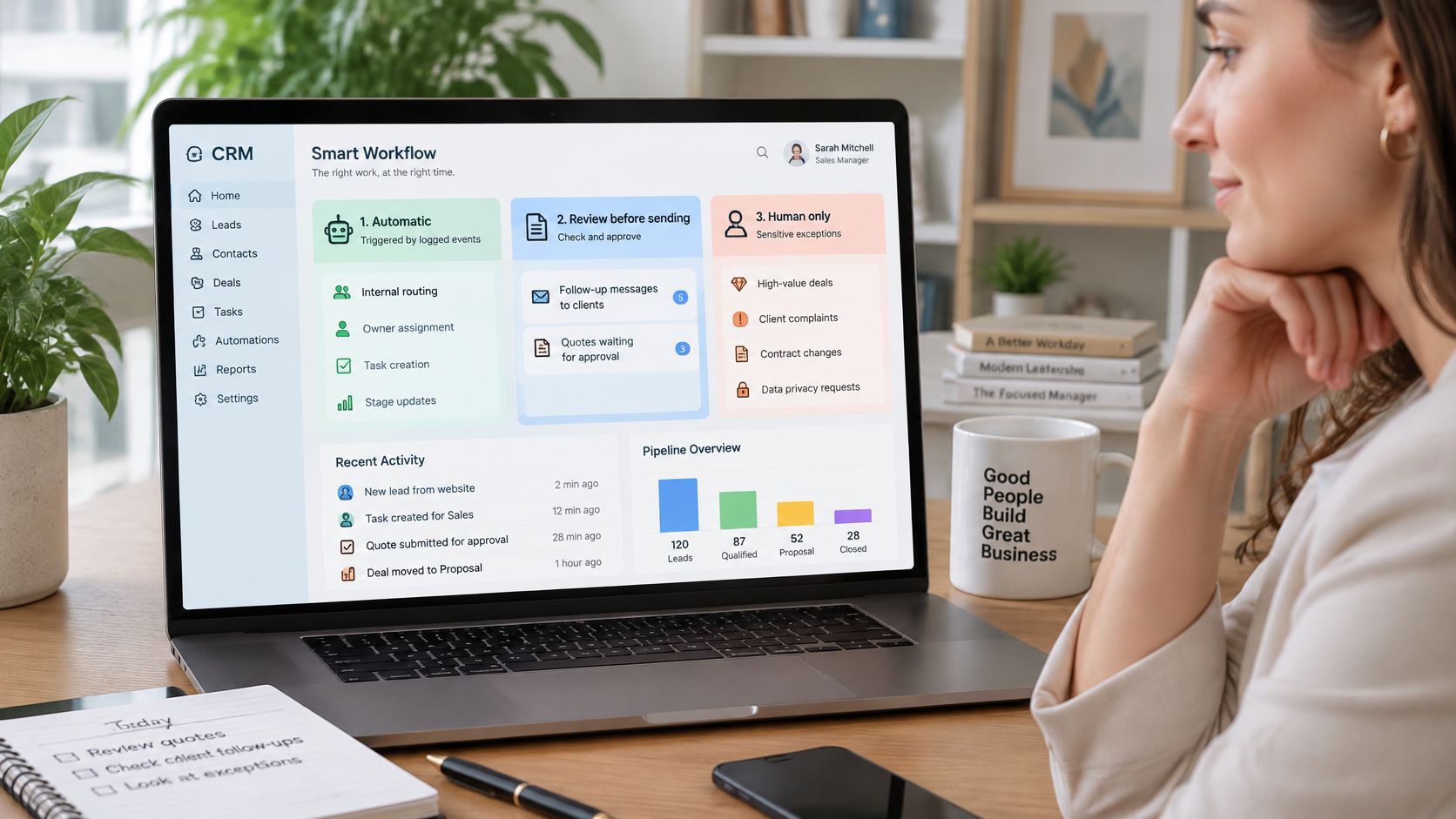
- Automatic: Internal routing, owner assignment, task creation and stage updates supported by logged events.
- Review before sending: Client follow-up messages, quotes and payment reminders, where wording and customer matching need checking.
- Never automatic without approval: Merges that delete or overwrite data, messages involving unclear consent, and actions that change money, bookings or a client's job.
The useful split is preparation versus execution. A workflow can draft the follow-up, propose a stage change or flag a suspect merge, then hold it until the named owner approves it. That keeps routine work moving while consequential decisions stay accountable.
The human-in-the-loop automation guide explains how to place those pauses inside a workflow. Make the approver visible, set the channel they answer in, and define the fallback when they are unavailable so the queue does not stall.
Treat Privacy as Part of the Design
The Office of the Australian Information Commissioner publishes guidance on the Australian Privacy Principles and when a Privacy Impact Assessment is needed, so check its current guidance before launch.
Document which fields you need and why, who can access them, where connected services store them, and how correction and deletion requests are handled. Judge whether the project needs a Privacy Impact Assessment rather than assuming an existing CRM already covers the new data flows.
Enquiry forms that accept photographs, call notes or documents need particular care. Don't copy an entire attachment into every connected tool when the recipient only needs a job reference. Give each connected service the minimum context required for its step.
Security controls should be agreed system by system: limited access, appropriate data handling, operational logs and approval gates for sensitive actions. Review the tools and data before deciding what can be automated, then test the gates during the pilot against the baseline you set earlier.
Finish with a one-page approval matrix naming each action, its tier, the approver, the fallback and the evidence kept after approval.
Build, Test and Launch the Pilot
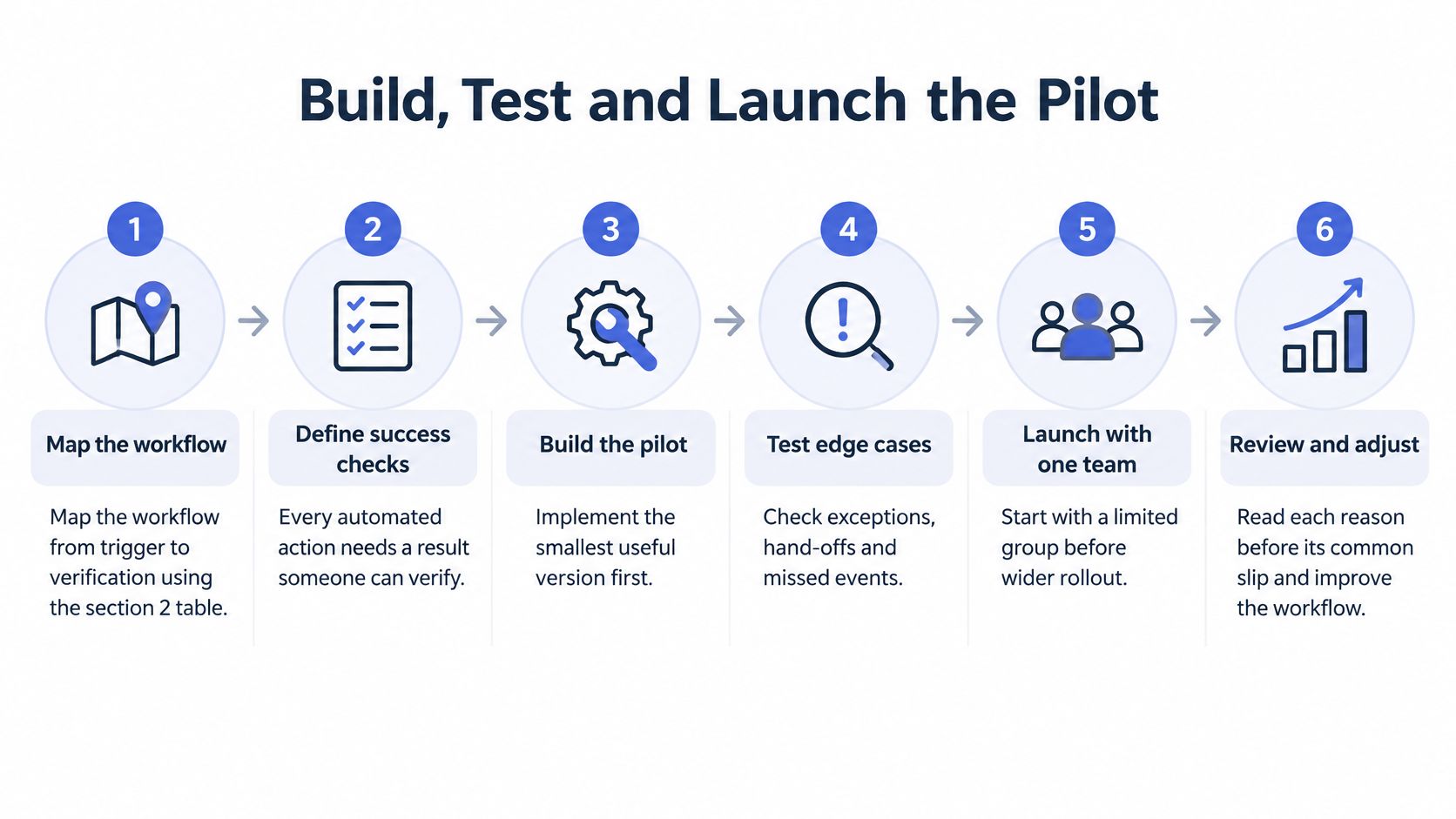
Build the smallest useful workflow with a result someone can verify. Keep the initial scope narrow enough that you can trace a faulty outcome to its trigger, mapping or decision rule.
The COSBOA State of Small Business report provides context for connecting existing digital tools. For implementation, judge success by completed work and handled exceptions, not the number of apps connected.
Build with Verifiable Outcomes
Map the workflow from trigger to verification. Use the trigger-and-action spreadsheet to define what proves completion. An enquiry isn't handled merely because a webhook arrived; the intended record, owner and task must exist. The common slip is mapping only the happy path and leaving missing fields or unavailable staff undefined.
Define the canonical customer record and field ownership. Specify which system supplies each field across the CRM, website form, accounting platform, email and messaging tools. The accounting platform might control invoice status while the CRM controls opportunity ownership. Don't let connected tools repeatedly overwrite the same field without an explicit conflict rule.
Clean and deduplicate before synchronising. Save a recoverable extract, apply the field rules and resolve uncertain matches. The reason is straightforward: synchronisation distributes existing errors into more places. Syncing first and cleaning later makes it harder to identify the original trusted value.
Build a narrow pilot. Limit it to a single enquiry source and a defined stage path, then launch with a small internal team. Keep customer-facing actions gated while staff inspect the outputs. Connecting every source at once makes faults harder to isolate and recovery harder to control.
Run edge-case tests against written expectations. Record the expected and actual outcome for each test. A test without an inspected result is only an attempted action.
- Duplicate enquiry: Submit a repeat and confirm the matching rule catches it.
- Failed API call: Force a safe test failure and confirm it reaches the visible error queue.
- Outside-hours enquiry: Check the timezone, due date and next-business-day handling.
- Opt-out: Confirm suppression prevents the next automated message.
- Attachments: Test files at and above the tool's documented size limit.
- Approval gates: Confirm each gated action stays paused until authorised.
Expand only after exceptions are understood. Review failures with the workflow owner and correct the underlying rules before adding sources or stages. A successful initial transfer proves connectivity, not launch readiness. Keep a way to pause processing without losing incoming enquiries.
Check the First Week'S Operating Health
During the first week, inspect the workflow rather than relying only on a dashboard. Check that every new enquiry has an owner, stage and next action, that someone reviews the error queue daily, and that source and CRM counts reconcile.
Matching counts need explanation, not blind equality. A repeat enquiry may correctly attach to an existing contact, while a rejected event should remain accounted for in the exception queue.
Launch check: Your team should be able to explain where every incoming enquiry went, including the ones automation couldn't safely process.
Measure Payoff and Keep a Post-Launch Runbook
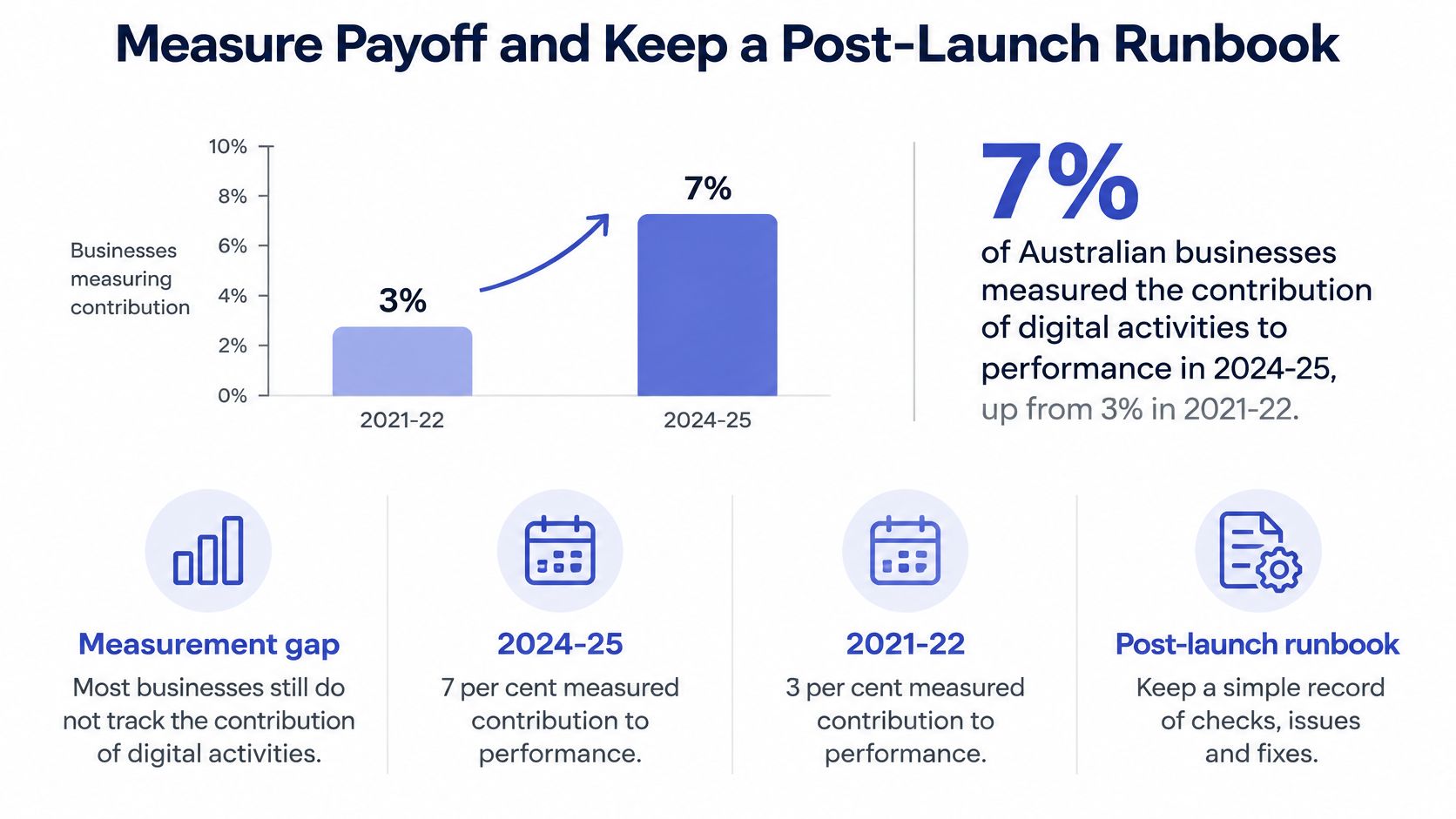
ABS figures reported in CPA Australia's Business Technology Report 2026 show that 7% of Australian businesses measured the contribution of digital activities to overall performance in 2024-25, up from 3% in 2021-22, while 10% actively collected or analysed data for informed decisions. Don't let your integration become another investment whose contribution nobody can explain.
More connections can reduce visibility when teams use different definitions or count the same event differently. Keep the scorecard short enough to use in an operating meeting.
Operating metrics for a CRM integration
| Metric | How to measure it | Review cadence |
|---|---|---|
| Speed to first response | Time from enquiry timestamp to first reply, human or automated | Daily |
| Lead-to-booking conversion | Bookings divided by qualified enquiries in the period | Weekly |
| Open records with a next action | Open opportunities with a future next-action date divided by all open opportunities | Weekly |
| Duplicate rate | Duplicate pairs found in the weekly profiling extract | Weekly |
| Sync failure rate | Failed events divided by total events | Daily |
| Quote follow-up completion | Quotes with a logged follow-up inside the agreed window | Weekly |
| Overdue invoice days | Average days overdue across open invoices | Monthly |
Compare Like with Like
Measure these against the saved pre-launch baseline. Keep qualification criteria and follow-up windows stable so changes reflect operational performance rather than a new definition.
Label automated acknowledgements separately from useful human responses. Otherwise, an instant receipt can make the response metric look better without helping the customer.
The duplicate measure above is a count; add a consistent denominator if you need a comparable percentage as the database grows. For conversion, allow enquiries enough time to become bookings rather than comparing fresh leads with mature opportunities.
Ask which minimum data flows produce a reliable daily action queue. Don't expand scope just because the platform permits it.
Keep the Operating Instructions Current
Write a runbook naming the workflow owner, field mappings, approval matrix, log contents, alert conditions and review cadence. Logs should identify the event, affected record, timestamp, outcome and any retry or approval.
Regression-test mappings whenever a CRM or accounting update changes a field. Record the change and test result so the next person can understand why a rule exists.
We run scheduled tasks and continuous checks, watch for problems and report back. Risky or client-sensitive actions wait for human approval.
At the monthly review, ask: Which exception category grew, and what rule would prevent it? That question turns ongoing maintenance into a specific improvement decision.
Truespeak designs, builds and manages workflows around existing tools, connecting enquiry handling, CRM updates, follow-up and reporting with monitoring after launch. Visit Truespeak to discuss the workflow that's dropping work, with your baseline, field rules and approval decisions ready for a practical discovery conversation.