
Most advice on CRM vs spreadsheet treats the decision like a software graduation ceremony. Once you hire a few people, the usual script says, you ditch Excel or Google Sheets and buy a CRM. That advice gets the problem backwards. Swapping cells for database records won't fix a broken sales or job process if nobody owns follow-ups, stages mean different things to different staff, and enquiry details still sit trapped in personal inboxes.
For Australian service businesses with 2 to 50 staff, spreadsheets aren't a sign of falling behind. According to the Australian Bureau of Statistics, 17.2% of Australian businesses used CRM software in the 2021-22 financial year, even though 59.1% used cloud technology and 85.0% used at least one information and communication technology. Usage rose steeply with headcount, moving from 11.6% among businesses with 0 to 4 employees to 23.8% for 5 to 19 employees, 41.0% for 20 to 199 employees, and 55.4% for those with 200 or more.
More software also fails to guarantee tighter operations. In the 2025 HubSpot Business Growth Australia report, 90% of surveyed businesses had digitalised to some extent in 2025, yet only 18% were fully digitalised and only 18% reported fully integrated systems. Rather than comparing feature checklists, diagnose where your pipeline breaks: ownership, follow-up, hand-offs or reporting. Once you name the failure mode, you can choose the smallest fix that stops revenue leakage without piling new admin onto your team.
Table of Contents
- CRM vs Spreadsheet at a Glance
- Tracking Leads and Follow-Up Without Dropped Enquiries
- Ownership, Hand-Offs and Double Entry
- Reporting and Scale Limits to Measure
- Keep, Add Controls or Move by Situation
- How to Move Off a Spreadsheet in Six Steps
- Run a Four-Week Test Before You Switch
CRM vs Spreadsheet at a Glance
A spreadsheet is a sensible operating tool for one owner managing low enquiry volume across stable steps, while a CRM earns its place when several staff share the pipeline, follow-ups require named owners and due dates, and managers need reliable history.
| Criterion | Spreadsheet | CRM |
|---|---|---|
| Lead capture | Manual entry or exported form data, easy to miss | Forms and email capture can create a contact record automatically |
| Owner per enquiry | Usually a column that is rarely enforced | Owner field with assignment and visibility across the team |
| Next action and due date | Relies on someone filtering and remembering | Due dates drive tasks and reminders |
| Stage rules | Free-text stages that drift over time | Defined stages, with fields that can be required before progression |
| Shared history | Spread across tabs, inboxes and job files | One activity log per contact or job |
| Reporting | Flexible, but built by hand and prone to formula errors | Standard pipeline and activity reports from the same records |
| Duplicate control | Manual checks against the sheet | Duplicate rules and a single contact record |
| Setup and admin | Low setup cost, heavier as users and rows grow | Higher setup and training effort, less chasing once running |
| Best fit | One owner, low volume, stable steps | Several staff, rising volume, frequent hand-offs |
Key differentiator: The real dividing line between a spreadsheet and a CRM is whether your system enforces record ownership and dated next actions, not how many features sit in the sidebar.
Hold this table against how your business ran last week rather than how you intend it to run next quarter. If you want broader sector context before auditing your own rows, you can compare CRM adoption rates by industry on ReportDoor to see how different service trades treat pipeline tooling.
Neither tool wins every row. A spreadsheet stays faster to adjust when one director tracks twenty active quotes a month, whereas a CRM wins on auditability and team coordination once enquiries pass between reception, estimators and delivery staff. Mark the specific rows where your team already loses time or drops commitments, because those pressure points determine whether you need tighter sheet rules, targeted automation or a full switch.
Tracking Leads and Follow-Up Without Dropped Enquiries
An enquiry only turns into booked work when six steps happen reliably in sequence, whether they live in Google Sheets or a dedicated CRM. The infographic below maps that full lifecycle from first contact through to a recorded outcome.
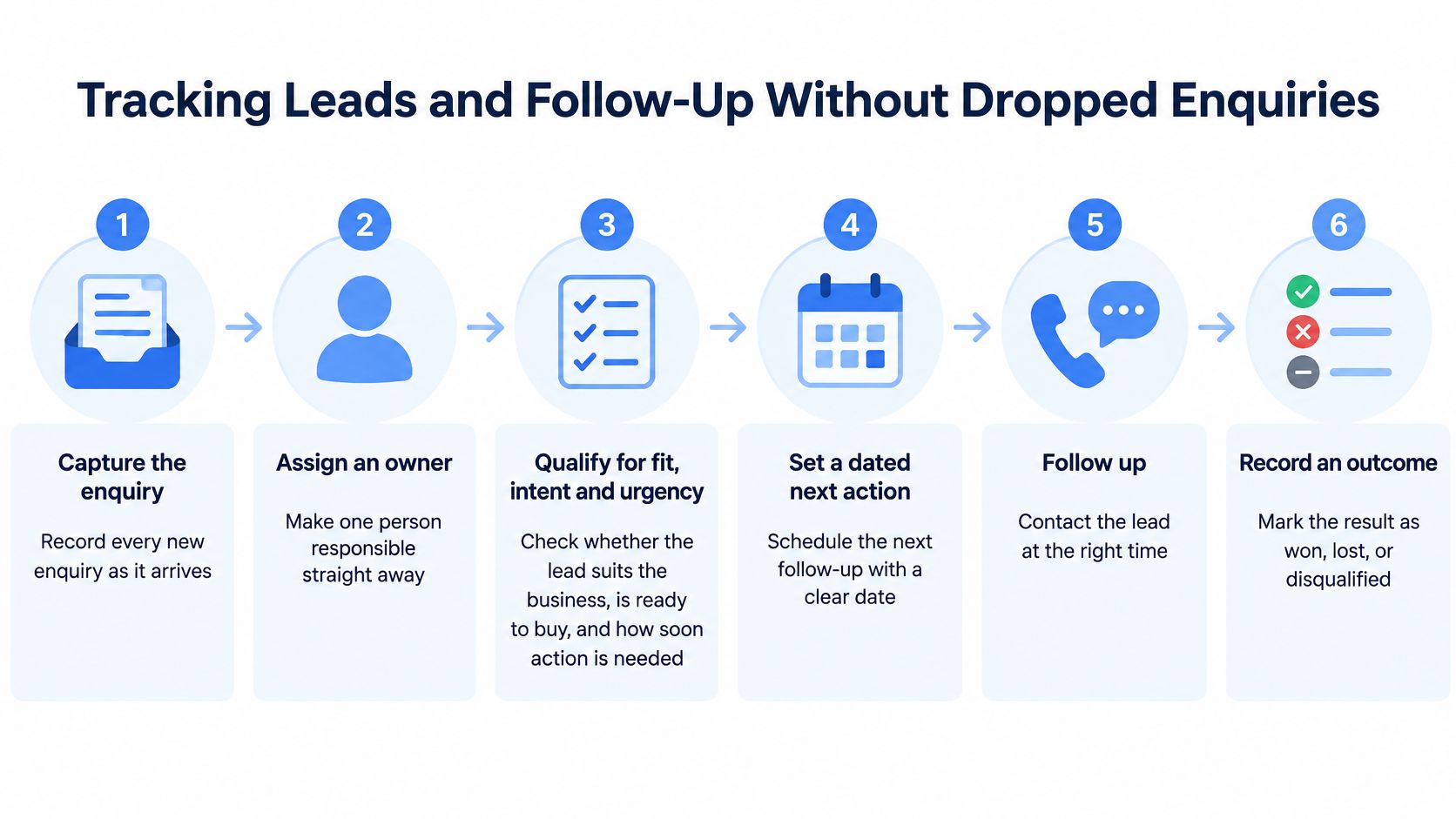
- Capture the enquiry. In a spreadsheet, web forms, phone messages and emails rely on someone pasting details into a new row, which breaks down on busy afternoons. A CRM pulls form submissions and tracked emails straight into a contact record with a timestamp.
- Assign an owner. A sheet can hold an "Owner" column, yet nothing stops a team member from saving a row with that cell blank. A CRM forces an explicit owner assignment so everyone sees who carries the ball.
- Qualify for fit, intent and urgency. Spreadsheets usually collect rough notes in a single comment box, making it hard for a colleague to tell whether a prospect is ready to buy this month or just pricing options. Structured CRM fields capture service fit, buying intent and timing consistently so the process record shows status, notes, dates and next actions, with enough detail for a colleague to pick up the work.
- Set a dated next action. Without a next-action date, an open row sits in the middle of a hundred other rows until someone sorts the sheet by hand. A CRM links that date directly to an overdue queue or calendar task.
- Follow up on schedule. Spreadsheets leave call-backs and quote checks to memory or sticky notes on a monitor. A CRM triggers daily task lists or reminders when the scheduled date arrives.
- Record an outcome. Marking every opportunity clearly as won, lost, disqualified or nurtured keeps active queues clean and shows why deals stall. In a free-text spreadsheet, staff invent casual labels like "waiting", "maybe" or "called twice", which blurs active work with dead leads.
Where Manual Sheets Quietly Drop Qualified Work
As an illustrative example, suppose a qualified commercial enquiry goes quiet after receiving a detailed proposal, and nobody records a next action date. Inside a spreadsheet, that proposal only resurfaces if someone remembers to filter the right status column during a quiet hour that week. Inside a CRM, a scheduled hygiene routine flags the stalled opportunity automatically, prompts the assigned owner to review prior notes and emails, and creates a follow-up task so a person can confirm whether the client still needs the work.
Manual maintenance carries measurable error risk across every stage of that lifecycle. A 2024 literature review led by researchers at Central Queensland University, reported by ZME Science, examined 35.5 years of journal research and 10.5 years of conference research on spreadsheet quality and found faults occurring commonly across input data, formulas, formatting, logic flow, testing and maintenance, with a reported headline finding that approximately 94% of business spreadsheets contain errors. That headline figure draws on international evidence rather than an Australia-only sample, and a tightly controlled spreadsheet can still support good follow-up habits if one person audits it rigorously. The risk escalates as soon as multiple staff edit the same file and follow-ups depend on memory.
Sometimes the primary leak isn't your tracker at all, but how long a fresh prospect waits for an initial reply. Checking speed to lead benchmarks from Captiwate helps you judge whether slow first contact is costing you jobs before a quote even goes out. If rapid acknowledgement is the gap, speed-to-lead automation can qualify and route new enquiries immediately. Where proposals stall after first contact, lead follow-up automation and our guide on building structured follow-up sequences show how to sustain timely check-ins without turning every enquiry into a manual chase.
Ownership, Hand-Offs and Double Entry
Double entry is often the first sign that the tracking problem has moved beyond follow-up and into ownership. In a growing trades or professional services office, reception takes a phone enquiry and enters the caller's details into a master leads spreadsheet. Someone then retypes a summary into an email to an estimator, copies the address into a calendar invite for a site visit, and later keys the same customer details into a quote template and an accounting platform such as Xero or MYOB.
Every manual transfer creates a fresh copy that can drift out of sync. A phone number changes in the email thread, the scope shifts during the site visit, and the spreadsheet still shows the original brief from three weeks ago. Because spreadsheets lack native record-level ownership, the owner cell frequently stays blank. Hand-offs then rely on hallway updates or chat messages, leaving the next person to work out which version is current.
This fragmentation appears across Australian SMEs at scale. A 2025 Salesforce survey of Australian small and medium-sized businesses found that 50% reported data inconsistencies between their business tools, while the average small business used seven different apps to run daily operations. The survey measures broad tool inconsistency rather than spreadsheet use alone. Even so, it matches the pattern created whenever teams copy customer information across disconnected files.
Treat the break as one of three failure modes. If the owner field is blank or shared, ownership is the problem. If a hand-off contains only a status such as "contacted", context is being lost; the record needs status, notes, dates and a next action in enough detail for a colleague to pick up the work. If contact details differ across the spreadsheet, inbox, quote and accounting file, double entry is the problem. Each failure needs a different control, and buying a CRM before fixing ownership gives the same gaps more fields.
Privacy Exposure and Practical Controls
Uncontrolled spreadsheet copies create a governance risk alongside wasted admin hours. Every time a staff member emails a customer list as an attachment, saves a working copy onto a personal drive, or duplicates contact details into standalone job folders, your business multiplies the places holding personal information. Privacy obligations depend on a business's size and circumstances, but any service business holding customer names, contact details, site photos and job briefs should know where each copy sits and which record is authoritative.
Before buying new software, lock in three operating controls that stop hand-offs from unravelling:
- Mandatory owner field: Require every live enquiry to carry one named staff member before anyone moves it past intake. Shared ownership between "the office" and "sales" usually means no one is accountable for the next action.
- One authoritative record: Designate a single file or CRM object as the source of truth for contact details and job status. Email can carry discussion, but daily updates belong in the authoritative record rather than in spreadsheet attachments.
- Weekly exception review: Spend fifteen minutes every Friday reviewing unowned rows, blank next-action dates and records unchanged for more than your target follow-up window. Assign every exception to a person before the review ends.
A CRM makes these controls easier to sustain once headcount grows because ownership, status history and hand-offs can sit on one shared record. For day-to-day maintenance habits that stop records from degrading, use our practical CRM tips for keeping pipelines clean. Truespeak typically builds an operating layer around existing tools rather than replacing the customer's CRM or spreadsheet. The first pass connects intake, status updates and hand-offs across the tools already in use; replacement only makes sense when the current tool blocks the work.
Reporting and Scale Limits to Measure
Never switch platforms based on a single hectic week or a gut feeling that admin feels heavy. Capture a four-week baseline inside your current setup before changing anything, because one public holiday or one large project quote can distort a seven-day snapshot. Measuring actual response delays, overdue actions, duplicate effort and lost-opportunity reasons tells you whether you have a software limit or a habit gap.
| Measure | How to calculate it | What a worsening trend signals |
|---|---|---|
| Median enquiry-to-first-response time | Hours from enquiry timestamp to first reply, taken from inbox or form data | Enquiries are waiting too long, and intent is cooling |
| Open opportunities with a dated next action | Items with a due date divided by total open items | Follow-up depends on memory rather than a system |
| Quote follow-up completion | Quotes followed up within the agreed window divided by quotes sent | Quotes are going cold without a decision |
| Stale-opportunity rate | Open items with no activity for the agreed period divided by total open items | Priorities are obscured by old records |
| Duplicate-contact rate | Duplicate records divided by total contacts | Double entry is creating conflicting information |
| Days sales outstanding | Average days from invoice date to payment | Follow-up on invoices is slipping, tying up cash |
Track overdue actions, response delays, duplicate work and lost-opportunity reasons over four full weeks rather than assuming a guessed dollar figure for what your spreadsheet costs you.
Reading Australian Benchmarks Without Over-Reading Them
Local benchmark data provides useful context when building a business case for tightening your systems. MYOB's January 2025 Business Monitor, which surveyed 1,024 Australian business owners, managers and directors between 28 October and 4 December 2024, found 24% using sales and CRM solutions, while 22% had increased the number of online tools used during the preceding 12 months. The same survey associated digitisation with productivity improvements for 44% of respondents, getting more work for 35%, increased profitability for 31% and faster payment for 30%.
Treat those figures as a reference point rather than a guaranteed return. They show an association between broader digitisation and business performance, not proof that installing a CRM alone caused those gains. Your own four-week baseline will tell you far more than any national average about where money is leaking out of your pipeline.
You also don't have to abandon spreadsheets altogether to fix reporting. Keep Excel or Google Sheets for custom cashflow modelling or ad-hoc margin analysis exported from clean records, while letting a CRM serve as the system of record for live customer interactions and commitments. Where your baseline exposes high stale-opportunity rates or messy duplicates, CRM automation uses stale records to prepare task lists, call cards, updates and useful weekly reports. If days sales outstanding is the metric climbing fastest, invoice reminder automation adds polite, human-approved payment follow-up without relying on awkward manual chasing.
Keep, Add Controls or Move by Situation
Team headcount is a poor trigger for buying a CRM. A five-person advisory practice closing four retainers a month can run smoothly on a disciplined sheet, while a three-person installation business fielding forty enquiries a week across phone, web forms and supplier referrals will outgrow manual rows quickly. The signal to move is recurring difficulty tracking stages, coordinating hand-offs or keeping records current across several people.
For most growing service businesses, the work already costing time or revenue is slow response, inconsistent follow-up, messy intake, missed CRM tasks or invoice chasing. Match your exact situation in the table below to see whether you should keep your spreadsheet, add controls around it, or migrate.
| Situation | Keep the spreadsheet | Add controls or automation | Move to a CRM |
|---|---|---|---|
| One owner, few enquiries, stable steps | Keep, with required columns and a weekly review | Not needed yet | Not yet |
| Two or three staff sharing one pipeline | Keep only with locked stage definitions and an owner column | Add reminders and structured intake | Move when hand-offs regularly stall |
| Follow-ups depend on memory | Not sufficient on its own | Add dated next actions and reminders | Move, or automate around the current tool |
| Enquiry volume rising faster than admin capacity | Not sufficient | Automate first response and capture | Move when the record cannot keep up |
| Managers cannot reproduce why a status changed | Not sufficient | Add change history and locked fields | Move to a system with activity logging |
| Existing CRM already blocks the workflow | Not applicable | Work around the current tool first | Replace only when the tool blocks the work |
Look closely at the middle column before committing to a full migration. When two or three staff share one pipeline, locking dropdown stage values, adding a mandatory owner column and layering structured form intake onto your current tool often buys months of calm growth. Equally, if follow-ups depend on memory or enquiry volume outpaces admin hours, automating first response and dated reminders solves the immediate leak faster than a sprawling software rollout.
Watch out for the final row as well. Many service businesses blame their existing CRM when the culprit is poorly configured stages or missing integrations with their inbox and quoting tool. Work around the current tool first and fix the workflow; replace a CRM only when the platform itself actively blocks daily operations.
Why Digital Maturity Scales with Operating Discipline
Small teams often feel pressured to buy enterprise-grade software before their internal processes can support it. Research from the Australian Bureau of Statistics Digital Intensity Index found that in 2021-22, only 5% of Australian businesses with 0 to 4 employees were classified as having an established level of digital intensity, compared with 53% of businesses employing 200 or more people (across all Australian businesses, 3% were non-digital, 50% baseline, 37% developing, 9% established and 1% advanced). The ABS notes this relationship with employment size may reflect the greater resources available to larger businesses for adopting digital practices.
Operating rule: Scale your operating discipline to match your enquiry volume and hand-off complexity, rather than buying software complexity your team doesn't have the bandwidth to maintain.
A three-person service business doesn't need a massive platform built for a national sales floor. At the same time, it can't assume informal spreadsheets will stay accurate once active jobs, quotes and staff hand-offs multiply. Start with proportionate controls and upgrade the underlying tool only when the operating strain proves it's necessary.
How to Move Off a Spreadsheet in Six Steps
If your diagnosis points toward moving to a CRM, resist the urge to import ten years of messy rows and build twenty custom dashboards on day one. The roadmap below outlines a clean, low-disruption transition you can complete without halting daily work.
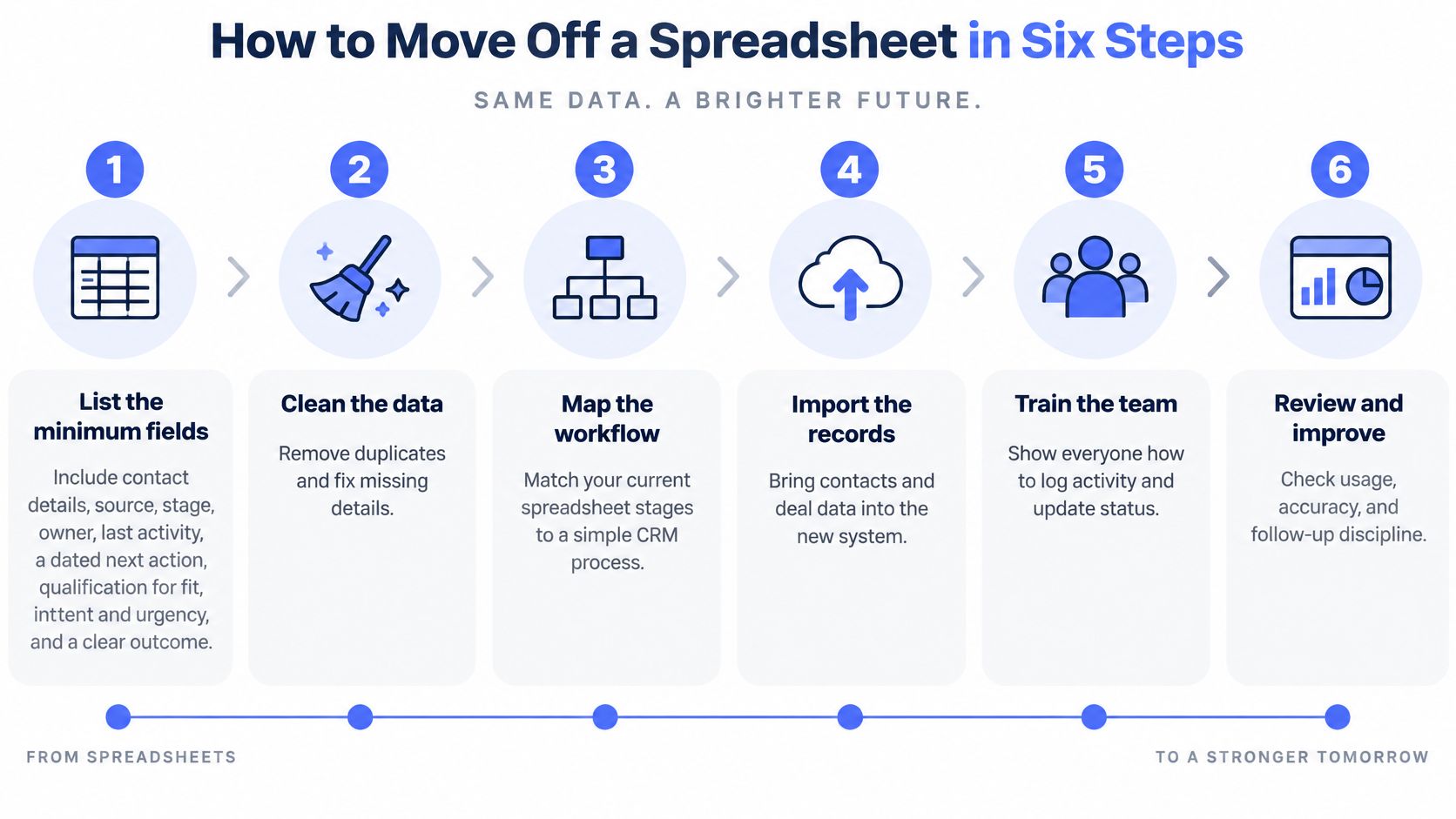
- List the minimum fields. Strip your pipeline down to the essentials: contact details, lead source, stage, owner, last activity, a dated next action, qualification for fit, intent and urgency, and a clear outcome (won, lost, disqualified or nurtured). Limiting fields to what staff use prevents form fatigue and keeps record completion high.
- Clean the current sheet before anything moves. Deduplicate repeated contacts, fill in blank owners, archive dead leads from previous years and choose one authoritative file as your staging copy. Bringing dirty records into a new system only speeds up confusion, so follow a disciplined checklist for switching to a CRM without losing data.
- Define every stage with a clear entry rule. Write down the exact proof required before an opportunity advances, such as requiring a quoted dollar value and a follow-up date before a deal enters "Quote sent". Clear entry rules prevent optimistic pipeline inflation and make weekly reviews fast.
- Set the operating routine. Lock in a ten-minute daily check of actions due today for each owner, paired with a weekly manager review of overdue and stale items. Software cannot enforce accountability if nobody looks at the exception list.
- Import open records for a controlled trial. Bring active enquiries and live quotes into the CRM first rather than migrating every historic contact at once, or test locked dropdown fields inside your spreadsheet if you're trialling controls first. Adopting a phased path lets you retire spreadsheets one workflow at a time, as SIX ERP recommends when moving off legacy workbooks.
- Add automation only to the repetitive bottleneck. Once humans follow the clean routine reliably, connect intake automation for structured forms and document collection, or layer business process automation onto enquiry capture, reminders, call cards and first response where rules are repeatable and people remain visibly in control.
What to Leave Out on Day One
For a 2 to 50 person service business, what you leave out matters as much as what you include. Skip elaborate lead-scoring formulas, complex multi-object executive dashboards and autonomous client-facing decisions during your first pass. Those features require high data volume and constant tuning; adding them early buries your team in configuration work before basic hygiene habits take hold.
Watching a practical walkthrough of how fields, stages and daily habits fit together can help clarify where spreadsheets stop and structured CRM workflows begin.
Focus your first month strictly on getting every active enquiry into one shared pipeline with a named owner, clean stage rules and a dated next action. Once your hygiene routines and task queues run smoothly without reminders from management, you'll have real operational evidence showing which reports or automations deserve attention next.
Run a Four-Week Test Before You Switch
Commit to one clear decision rule before changing tools: if overdue actions and duplicate records fall and median response time improves without a sharp rise in admin hours, your new setup is working. If admin time climbs and records still go stale, pause and fix your daily routines before buying more software.
Run that decision through a structured four-week test instead of an open-ended rollout:
- Week one captures the clean baseline. Log your overdue actions, median enquiry-to-first-response time, duplicate entries, record completeness and lost-opportunity reasons inside your current process, adding a one-line note explaining why each lost opportunity fell away.
- Weeks two and three change one lever at a time. Introduce mandatory owner and next-action fields in week two, then switch on automated follow-up reminders or structured enquiry capture in week three. Isolating one change per week proves which adjustment moved your metrics.
- Week four compares results against week one. Put your week-four numbers side by side with your baseline and ask every user candidly whether updating records takes less time or more time than before.
Does a CRM Cut Admin or Add Another Database
The question most software comparison guides skip is whether a CRM lowers admin or merely creates another database your staff have to update alongside their inbox and accounting app. Evidence from the 2025 COSBOA and Square State of Small Business Report found that businesses using APIs to connect systems such as accounting, CRM, inventory and analytics processed 2.6 times more sales volume than non-API users. That finding doesn't prove CRM software alone caused higher sales; it highlights that connected workflows, rather than replacing spreadsheet cells with standalone database records, drive operational efficiency.
When you evaluate the total cost of a switch, count setup, data clean-up, staff training, ongoing field completion and weekly supervision alongside licence fees. A lean spreadsheet backed by structured intake and automated reminders will often outperform a disconnected CRM that nobody updates on Friday afternoon.
Pick one concrete action this week: audit your last twenty enquiries and name the first operating gap costing you time or revenue, whether that's response speed, follow-up, intake, CRM hygiene or invoice chasing. That diagnostic starting point is how Truespeak approaches every engagement, targeting the single highest-friction leak before adding new software. Once your workflow is running, you can keep the weekly review cadence in-house, or use managed AI operations if you want ongoing monitoring, exception handling and tuning handled without adding another dashboard for your team to administer.
If your team is losing enquiries between spreadsheets, shared inboxes and quoting tools, Truespeak designs, builds and manages practical AI operating layers around the software Australian service businesses already use. We start by pinpointing your first high-value gap across first response, follow-up, intake, CRM hygiene or invoice reminders, then keep the system monitored and tuned after launch so records stay clean without adding headcount. Explore how we help growing service operators tighten their workflows at Truespeak.