

The popular advice is to start with a feature checklist and buy the field service management software with the longest list. I'd start somewhere less exciting. Count the enquiries nobody returned, the quotes nobody chased, the jobs sitting between the office and a technician's phone, and the invoices still waiting for a reminder.
That's your buying test. A small Australian operator doesn't usually lose money because a dispatch board lacks one extra view. Work leaks when nobody owns the next action, the brief is incomplete, or the owner is unavailable and everything pauses. Buy for continuity first, then for scheduling depth.
Table of Contents
- Field Service Management Software Options at a Glance
- Match Your Situation and Decide Who Runs It
- Scheduling, Dispatch and Mobile Intake Features
- Connecting Field Jobs to CRM, Booking and Accounting
- Selection Criteria for a Two-to-50-Person Operator
- Privacy, Security and Data Handling for Field Jobs
- Rolling Out Field Service Software Without Losing Jobs
Field Service Management Software Options at a Glance
Start with the category, not a brand name. The right row depends on where work stops moving.
| Category | Core strength | Best fit | Main strain |
|---|---|---|---|
| Dedicated field service suite | Dispatch board, scheduling, mobile job cards, GPS | Several technicians on the road each day | Heavier setup and more modules to administer |
| CRM with field add-ons | Strong customer and enquiry history | Sales-led businesses with occasional site visits | Shallower dispatch and job costing |
| Trade job-management platform | Quoting, job costing and invoicing in one place | Smaller crews who need jobs and money together | Limited depth for complex routing |
| Scheduling or booking tool with job board | Low-cost start and simple calendar | One or two operators with predictable jobs | Weak status tracking once work changes hands |
| Thin operating layer around existing tools | Intake, follow-up, reminders and approval gates | Businesses whose main leak is dropped work | Needs clear process ownership and monitoring |
How to Use the Table
A dedicated suite earns its cost when several technicians move between jobs daily and dispatch decisions change through the day. If you've got one technician and predictable work, that depth becomes admin you didn't need.
A CRM with field add-ons protects customer history and enquiry follow-up, but it may not handle parts, job costing or reassignment well. A trade job-management platform suits smaller crews who want quoting, jobs and invoicing together, provided routing stays fairly simple.
The thin operating layer is different. It doesn't replace your CRM or accounting package. It applies automation for tradies to enquiry response, intake, follow-up and invoice reminders around them, with approval gates for customer-impacting actions.
That option fits the installed base. The Australian Bureau of Statistics Characteristics of Australian Business release for 2019-20 reported that 55% of Australian businesses used paid cloud-computing services during the 2019-20 financial year, including 48.7% of businesses with 0-4 employees. Many operators already have cloud finance, email and documents. They don't always need another suite.
Make three counts before a demo. Count technicians away from the office at once, name the system that holds customer records, and name the system that holds invoices. Then pick the category that closes the bigger gap.
Ask how each vendor charges, whether per user, per job or per module, and get the full cost in writing. This guide quotes no prices because a cheap licence with paid integrations isn't cheap.
Match Your Situation and Decide Who Runs It
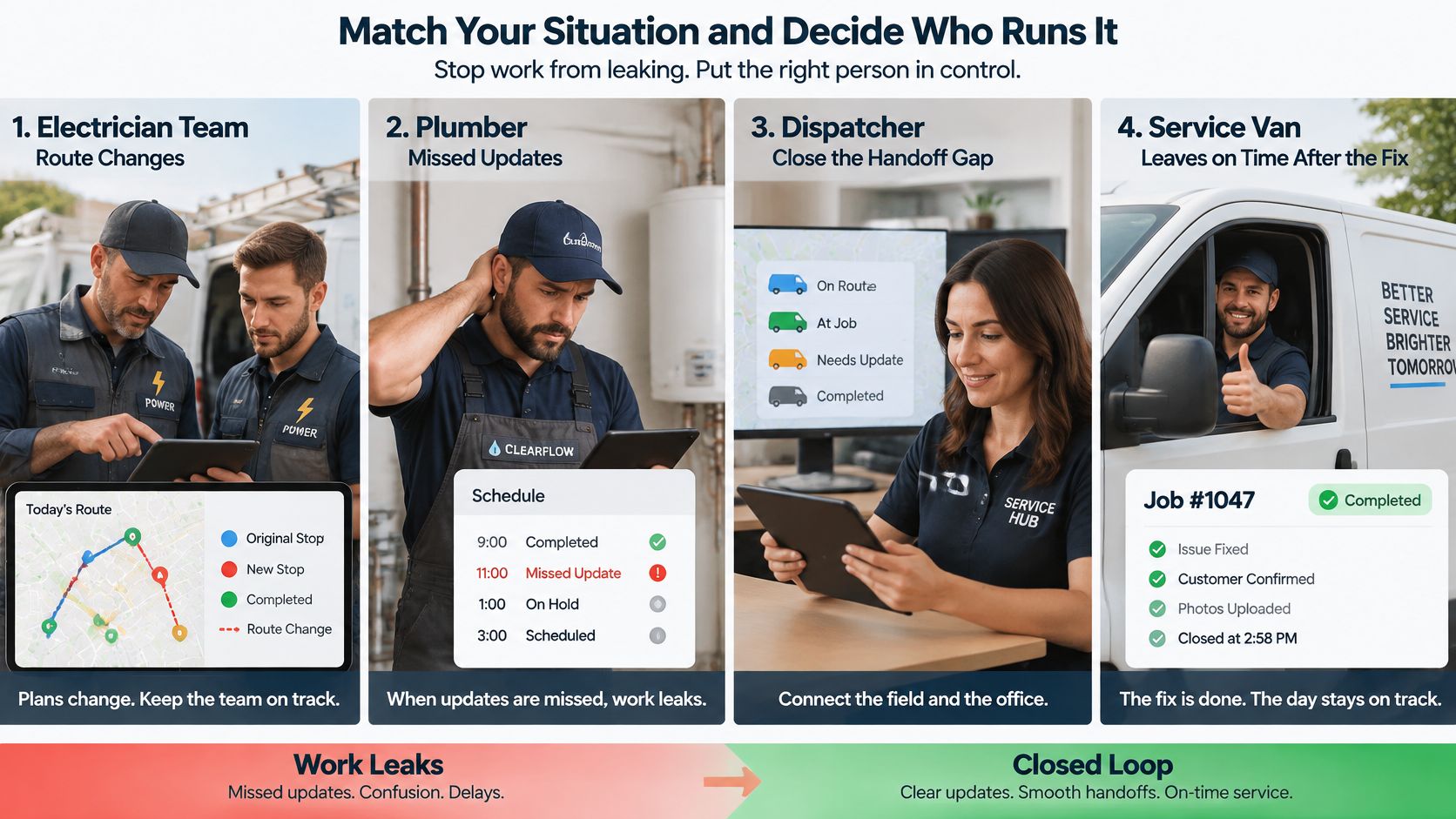
Four common situations point to four different starting points. Match yours before you watch a polished demo.
- Daily route changes: A crew of four to ten electricians or plumbers needs dispatch, GPS and offline job cards from a dedicated suite or trade platform. Dispatch is the bottleneck.
- Quotes that stall: A builder or installer needs CRM follow-up sequences plus quoting in the job platform. The leak happens before work is won.
- After-hours enquiries: A maintenance firm needs structured intake and first response before dispatch, so the morning board starts with qualified jobs, not voicemail.
- Tiny office, one technician: A scheduling tool with reminders and invoice follow-up may be enough. Don't buy complexity to solve a reminder problem.
Buy for the place where work is lost, not where the software looks most impressive.
Who Carries the Work
Software doesn't run itself. Someone maintains status rules, watches exceptions and fixes failed messages. If your team is already stretched, compare your in-house capacity against outside help, including home service virtual staffing options for routine coordination, before assuming a new licence creates capacity.
The diagram below shows the handoffs that need an owner under any setup.
| Setup | Maintains routes and status rules | Monitors exceptions | Approves pricing and risky messages |
|---|---|---|---|
| Self-run software | Office manager or trained admin | Business staff | Business staff |
| Managed operation | Provider, under agreed rules | Provider, escalates to staff | Business staff |
| Hybrid | Business, with outside checks | Outside team runs intake and follow-up checks | Business |
Self-run software suits a business with one trained administrator and few exceptions. It fails when that person goes on leave and nobody else knows the rules.
A managed operation suits a business without a spare admin, especially with after-hours enquiries. Under our managed AI operations model, Truespeak builds and runs managed AI operations systems that handle follow-ups, CRM, admin and reporting 24/7 without adding headcount. Clients don't manage the system internally. We run it, and clients talk to it from Telegram, WhatsApp, Slack, or wherever their team already works.
A hybrid keeps your software and final call, while an outside team runs intake and follow-up checks. Our CRM Automation turns stale records into action queues, call cards, updates and useful weekly visibility, which suits that middle path.
Under every setup, pricing, complaints, relationship judgement, unusual exceptions and final approval on risky actions stay with a person. Automation can draft, route and remind. It shouldn't decide a discount or handle an angry customer alone.
Name the situation you most resemble. If your shortlist fails on exception handling or audit trail, price a managed operation. If it passes, map one real handoff with your own team before signing.
Scheduling, Dispatch and Mobile Intake Features
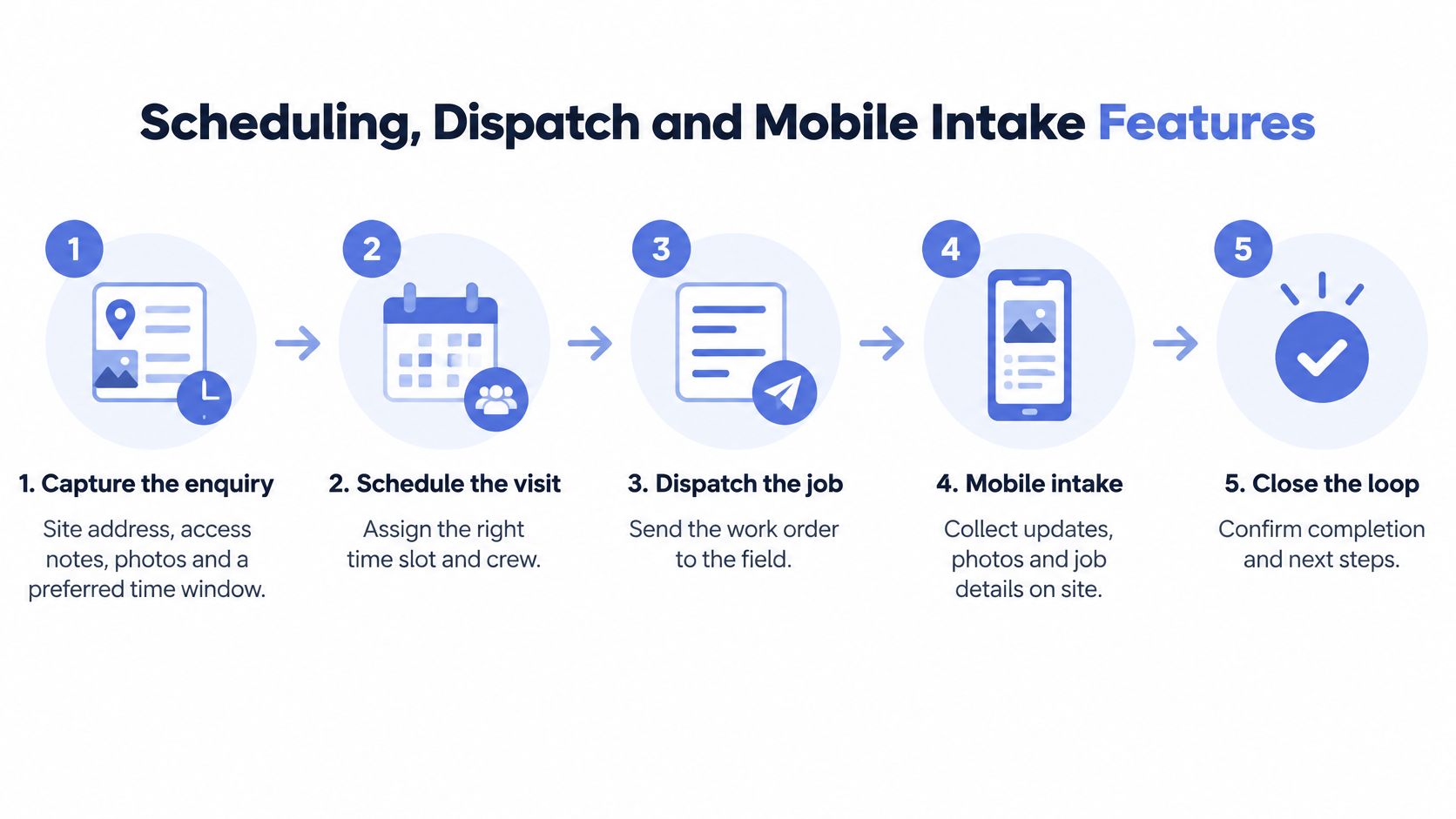
Judge features by the job lifecycle, not by a menu tour. The process flow below sets out the stages to test in order.
Technicians and trades workers accounted for 12.9% of employed people in the 2021 Census, 1,554,313 people nationally, according to the Australian Bureau of Statistics 2021 Census QuickStats. That scale is why informal handovers break. Job information has to travel cleanly between office staff, schedulers and workers away from the office.
The Seven Stages to Test
- Capture the enquiry: Record site address, access notes, photos and a preferred time window. A structured start, supported by good client intake software, stops the first visit beginning with a call back for basic facts.
- Create the job: Give it one owner, a current stage and a next action. If nobody owns it, it isn't scheduled work. It's a note.
- Schedule the visit: Match technician skills, location and availability, and show overruns on the dispatch board before they affect the next customer.
- Dispatch with context: Send instructions, parts list and customer history in the mobile app. Practical guidance to streamline work orders for field technicians is useful here because the work order, not a phone call, should carry the brief.
- Complete on site: Use a checklist, photos, customer signature, and time and parts recorded, including with no signal. Test whether offline completion syncs without duplicates.
- Update the customer: Send a status message at each change, but hold any message that needs approval. A late-running notice is routine. A price change isn't.
- Invoice and close: Make the stage visible to office and field until payment or closure. A finished job that nobody invoices is still unfinished work.
Watch for three common slips during a trial. Photos stored outside the job record get lost. Reassignment that leaves the original technician still holding the job creates two owners and no accountability. Offline records that sync as duplicates corrupt job history.
The short video below is worth watching with one question in mind, whether a technician can finish the record without phoning the office.
When the lifecycle runs cleanly, the office sees every open job on one board. Technicians open the job, see what to do, record what happened and trigger the next office action. That's the working day you're buying.
Connecting Field Jobs to CRM, Booking and Accounting
Integration is where field service management software either becomes your system of record or becomes another silo. In an Australia-specific benchmark, the Salesforce State of Field Service Australia report found only 18% of Australian organisations reported that field and back-office technology operated on a unified platform, while 53% still relied on spreadsheets and 37% on manual or paper logs.
That gap matters more than one extra dispatch feature. Test the five links below with a single test job.
| System | Data that must sync | Failure to test for | Check during a trial |
|---|---|---|---|
| CRM | Contact, site address, lead source, job stage | Duplicate customers created from each booking | Create one test customer and check for duplicates |
| Website or booking form | Enquiry details, photos, preferred time | Enquiries land in a shared inbox, not a job | Submit three test enquiries and track each one |
| Accounting software | Quotes, invoices, payment status | Invoice drafted twice, or a paid job still open | Close one test job and check invoice and payment status |
| Calendar and rostering | Technician availability and job times | Double-booked technician | Move one job and confirm both calendars update |
| Customer messaging | Appointment confirmations and status updates | Messages sent from a personal phone with no log | Send one confirmation and check the sender and the log |
Where Links Break First
Duplicate customer records usually appear first because a form, a phone booking and a repeat customer create three versions of the same person. Double-booked technicians follow when the roster and dispatch board don't update together. An invoice drafted twice costs more time than a late reminder because someone has to reconcile money, not just resend a message.
CRM depth is still thin for many businesses. The Australian Bureau of Statistics Characteristics of Australian Business release for 2021-22 reported only 17% of Australian businesses used CRM software, while 59% used cloud technology. Many firms have cloud tools but no standard customer workflow joining them.
You've got two integration patterns. A full suite replaces the CRM, which can work if your current records are weak, but it forces migration. An operating layer captures enquiries and forms, routes them to an owner and writes stage changes back to the existing CRM and accounting system.
We can usually use your existing business process automation software. Our business process automation work connects enquiry handling, intake, follow-up, CRM updates, invoice reminders and reporting for Australian service businesses, rather than creating a second source of truth. If you already run a trade platform, our guide to Simpro integrations and what to connect shows the same test logic.
Before signing, complete one job from enquiry to paid invoice. Confirm every system shows the same stage, owner and amount. If they don't, you haven't bought integration. You've bought reconciliation.
Selection Criteria for a Two-to-50-Person Operator
Turn vendor claims into questions you can score. The checklist below groups the decision into four areas to work through in a demo.
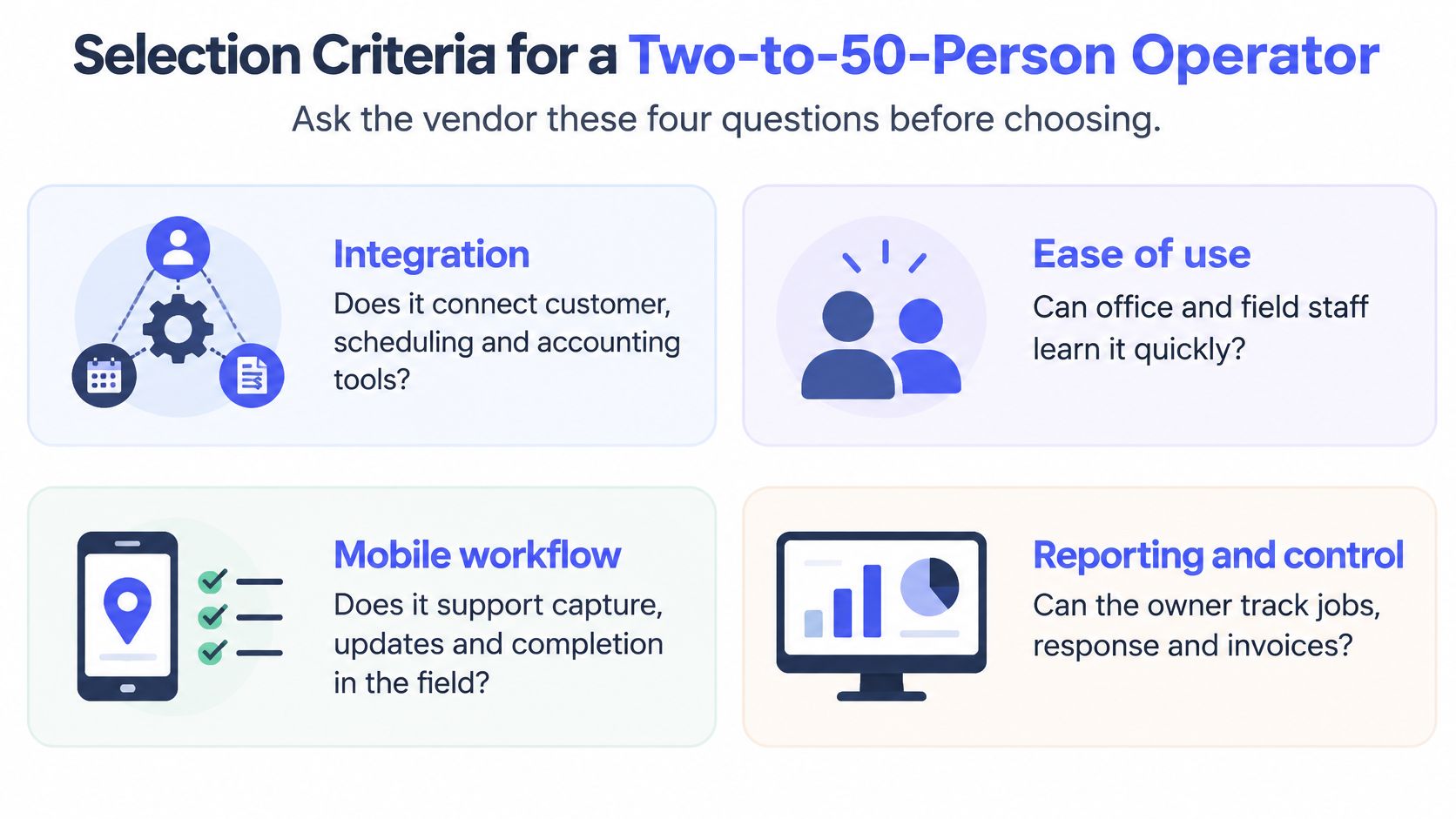
Start with integration, because connection between customer records, schedules, GPS and accounting affects every job. Then test mobile and offline execution, audit trail and exception handling. Those three decide whether work survives a dead zone, a sick day or a dispatcher on leave.
| Criterion | Question for the vendor | Red flag |
|---|---|---|
| Integration depth | Which CRM, accounting and calendar tools connect natively, and how is sync tested? | Integration only through a separately quoted add-on with no test |
| Mobile and offline work | Can technicians complete jobs with no signal, and when does the app sync? | Completed jobs lost when signal drops |
| Audit trail | Who changed a job's stage or invoice, and when? | Edits overwrite history with no log |
| Exception handling | What happens when a job has no owner or a message fails to send? | Failures hidden instead of flagged |
| Human approval | Which customer-facing messages and invoice reminders need sign-off before sending? | Every message sends without approval |
| Data access | Which roles can see customer addresses, photos and payment details? | Shared logins or no role limits |
| Exit and measurement | Can job history, customers and invoices be exported, and can stage durations and stalled jobs be reported? | No export, or only a single completion figure |
How to Score the Answers
Mark each row met, partly met or missing during the demo, not from a brochure. Ask the vendor to show the failure, not just the happy path. Disconnect the phone, create a job with no owner, and change an invoice amount.
Red flag rule: A missing audit trail or export should outweigh a lower price. You can renegotiate cost. You can't recreate lost job history.
Human approval deserves its own test. We run scheduled tasks and continuous checks, including answering enquiries, updating the CRM, chasing invoices, drafting work, watching for problems and reporting back, while anything risky or client-sensitive waits for human approval. Ask any vendor where that line sits and who can move it.
Finish with measurement you'll use. You need stage-to-stage duration, stalled jobs and missed follow-up, defined as created, dispatched, started, finished and closed. One headline completion figure hides where jobs wait. I'd reject a product that can't show waiting work, however strong its routing looks.
Privacy, Security and Data Handling for Field Jobs
Field jobs concentrate sensitive information in one place, including customer addresses, entry notes, photos, signatures and payment details. That convenience creates obligations you can't outsource to a vendor.
Under the Privacy Act 1988 and the Australian Privacy Principles, the Office of the Australian Information Commissioner expects reasonable security for personal information and notice of eligible data breaches under the Notifiable Data Breaches scheme. The Australian Cyber Security Centre's Essential Eight gives a practical baseline, including multi-factor authentication, application control and regular backups. This is general guidance, not legal advice, and your obligations depend on your business.
The risk isn't theoretical. The Australian Bureau of Statistics Characteristics of Australian Business latest release reported 21% of businesses experienced a cyber-security incident in 2024-25 and 28% reported having no preventive measures in place. Among adversely affected businesses, 36% reported lost time and 17% reported service downtime, which field teams feel as missed jobs and silent phones.
A Short Control Checklist
- Limit roles: Technicians see only their own jobs, not the full customer database.
- Separate personal data: Store customer personal data separately from general job notes where the system allows it.
- Keep audit logs: Turn them on before rollout and retain them, don't enable them after a dispute.
- Require multi-factor sign-in: Remove shared logins for office and field staff.
- Protect devices: Enable encryption and remote wipe for phones and tablets.
- Control the shared inbox: Limit who can read, forward or delete enquiry emails.
- Confirm hosting in writing: Ask where data is hosted and who can access it.
A narrow, monitored workflow with least-privilege access and approval gates can be safer than spreadsheets, shared passwords and untracked text messages. Speed and security aren't opposites when exceptions are visible.
Rolling Out Field Service Software Without Losing Jobs
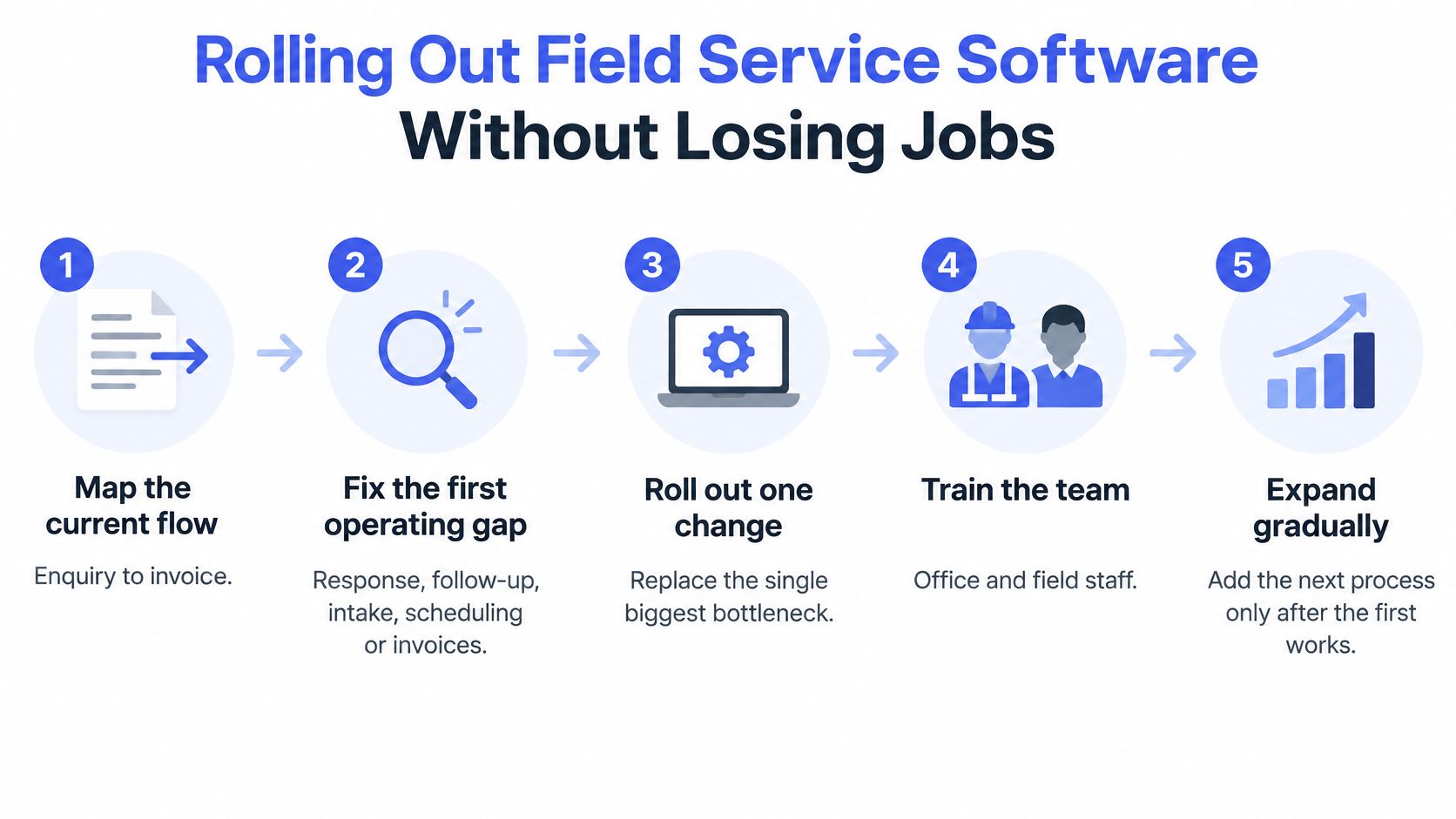
Don't migrate everything at once. We start by looking for the first operating gap worth fixing, such as response, follow-up, intake, CRM, invoices, admin or reporting, then expand from evidence. The rollout sequence below keeps open work visible while you change tools.
Nine Rollout Steps
- Map one real job: Trace it from enquiry to invoice and note every handoff, inbox and spreadsheet it touches.
- List every open job: Record owner, stage and next action before migration. Jobs without those three fields aren't ready to move.
- Pilot with one crew: Run a fixed period while the old tool keeps running in parallel, so a failed sync doesn't stop work.
- Migrate open jobs intact: Move owner, stage and next action with each record. Our guidance on CRM migration without losing data covers the same discipline for customer records.
- Create an exception queue: Review jobs with no owner, failed messages or missed appointments daily during the pilot.
- Train offline completion: Technicians practise completing a job with no signal and syncing at day's end.
- Set security controls: Apply least-privilege roles, separate personal data storage, audit logs and approval gates from day one.
- Write and test a runbook: Staff should be able to continue manually when an integration fails, using exported open-job lists.
- Retire the spreadsheet last: Switch it off only after the pilot runs without untracked jobs.
Continuity matters because people change roles. The Australian Bureau of Statistics Job Mobility release reported technicians and trades workers represented 15% of people who changed jobs during the year ending February 2026. Job history, instructions, completion evidence and outstanding actions therefore belong in a shared system of record, not in one worker's phone or memory.
Build the pause into the process. When data is missing or risk is high, our systems pause with context rather than hiding the failure, so a person sees what blocked the job and what happens next. Exceptions still need human judgement. The normal path should be explicit and auditable.
If you can't map your current handoff clearly, start there before another demo. We offer a discovery call where you bring one messy handoff and we map what should be captured, drafted, approved and logged.
If dropped enquiries, stalled quotes or untracked jobs are costing you work, we can map the first gap and build a managed operating layer around the tools you already use, with human approval where it matters. Visit Truespeak to book a discovery call and bring one messy handoff for us to map with you.