
A Monday morning in Sydney, and the business owner is already behind before the first job starts. Coffee in one hand, phone in the other, they open Xero and find unpaid invoices scattered through the aged receivables report. One customer has gone quiet, another says the invoice never arrived, and a third has promised payment without anyone recording when that payment is expected.
The obvious response is to switch on automated invoice reminders. That's useful, but it isn't the first job. Xero reminders work properly only when the billing process is visible, owned and maintained. Otherwise, Xero sends polite emails to the wrong contact, chases a disputed variation or continues reminding someone after a payment has landed but hasn't been reconciled.
This guide explains how to send invoice reminders in Xero without treating automation as a substitute for credit control. The practical sequence is simple: make the workflow clear, prepare the invoice data, configure the reminders, define exceptions and bring a person back in when the customer or context requires judgement.
Table of Contents
- Why Xero Reminders Only Work Once the Billing Process Is Visible
- Preparing Your Xero Billing Setup Before Turning Reminders On
- Enabling and Customising Automated Xero Invoice Reminders
- Choosing a Reminder Cadence That Fits Australian Payment Behaviour
- Handling Disputes, Part Payments and Sensitive Accounts
- Tracking Outcomes and Retuning Your Reminder Workflow
- A Practical Checklist and When to Bring in a Managed Layer
Why Xero Reminders Only Work Once the Billing Process Is Visible
An automated reminder can only act on the information inside the invoice record. It can't know that a builder handling progress claim reminders is waiting for a signed variation, that a professional services client has changed accounts payable contacts or that a customer has already called the office to query part of the bill. If those details sit in someone's inbox or a spreadsheet, the reminder engine doesn't have the context.
Xero describes invoice reminders as a staged process. Businesses can check unpaid invoices as the due date approaches, send a message before or on the due date, and follow up once the invoice is overdue. A useful reminder email identifies the invoice number and due date, addresses the customer by name, states the amount outstanding and asks when payment can be expected. Xero's Australian invoicing guidance also explains how scheduled emails can continue until payment is received.
That sequence only helps when four operational questions have clear answers:
- Who owns the invoice? Someone must be responsible for checking that the work was billable, the invoice was issued and the customer has what they need to approve it.
- What terms were agreed? The invoice should reflect the terms in the contract, engagement letter or accepted quote.
- Who receives the reminder? A current accounts contact matters more than a generic company inbox.
- What happens when payment doesn't arrive? A person needs to own disputes, incorrect details, requests for extensions and important relationships.
Practical rule: Don't automate an invisible process. If your team can't explain who raises, reconciles and escalates an invoice, Xero will only make the confusion faster.
For many trades and professional services firms, the first improvement isn't another reminder template. It's a single visible list of sent, unpaid invoices with an owner and next action beside each one. That list lets an operations manager distinguish a normal late payment from a missing purchase order, a credit note, a part-payment or a customer who needs a phone call.
Good accounting systems support that visibility. If you're reviewing broader options for cloud accounting with Cloudvara, keep the same principle in mind. The platform matters, but the operating discipline matters more. Xero should remain the source of truth for invoice status, payment information and customer details, while automation handles predictable follow-up around that record.
The reminder engine is the last layer of the workflow, not the first. Set it up after payment terms, ownership, contact records and exception handling are clear, and the emails become useful prompts rather than background noise.
Preparing Your Xero Billing Setup Before Turning Reminders On
Before activating anything, run a billing pre-flight. The aim is to make every invoice eligible for the right follow-up and make every exception visible to a person.
Start with the terms. Australian Government business guidance recommends stating payment terms in invoices and contracts, including when payment is expected, accepted payment methods, credit conditions and how overdue debts will be collected. The payment terms guidance from business.gov.au also recommends beginning with a polite phone or email reminder because the customer may have forgotten.
Write the agreed terms into the engagement letter, quote or contract, then apply them consistently in Xero. Don't let one staff member describe terms in an email while another selects a different due date on the invoice. A customer is more likely to respond to a reminder that matches the agreement they accepted.
Clean the Contact and Invoice Records
Check the billing email address before you rely on automation. Confirm the customer's legal and business details, identify the accounts payable contact and remove duplicate contact records that could split communication between the wrong people.
Then review the invoice itself:
- Status: Reminders apply to invoices marked as Sent. Draft invoices won't enter the normal reminder workflow.
- Due date: Confirm it reflects the agreed terms and any approved variation.
- Payment method: Keep the online invoice or payment link available, and include the PDF when the customer's process requires it.
- Description: Make sure the work, dates, purchase order details and supporting documents are clear enough for approval.
- Exception flag: Mark invoices that are disputed, awaiting evidence, subject to a credit or reserved for personal follow-up.
A firm that manages property work, projects or recurring services may also benefit from reviewing specialist approaches to real estate invoice management, particularly where multiple stakeholders approve the same bill. The principle still applies in Xero: keep one reliable invoice record and avoid scattering the approval trail across disconnected tools.
Assign the People Behind the Workflow
Name the person who raises invoices, the person who reconciles bank receipts and the person who makes the human call when automation stops. Those roles may belong to one owner in a small trade business or several people in a growing consultancy, but they must be explicit.
Use Xero user permissions and internal procedures to make ownership clear. Review the aged receivables report as part of the operating rhythm, and don't allow invoices to sit in Draft because the team assumes someone else sent them. For a wider review of the systems that support service delivery, see this guide to the best Xero integrations for service businesses.
Only switch on reminders once the team can answer three questions for every overdue invoice: who owns it, what is the next action and why hasn't it been paid?
Enabling and Customising Automated Xero Invoice Reminders
Xero's menu labels can change, so confirm the current workflow in Xero Central's invoice reminder documentation before changing a live process. In the Australian Xero interface, the relevant settings are reached through the sales and invoice settings area, then Invoice Reminders.
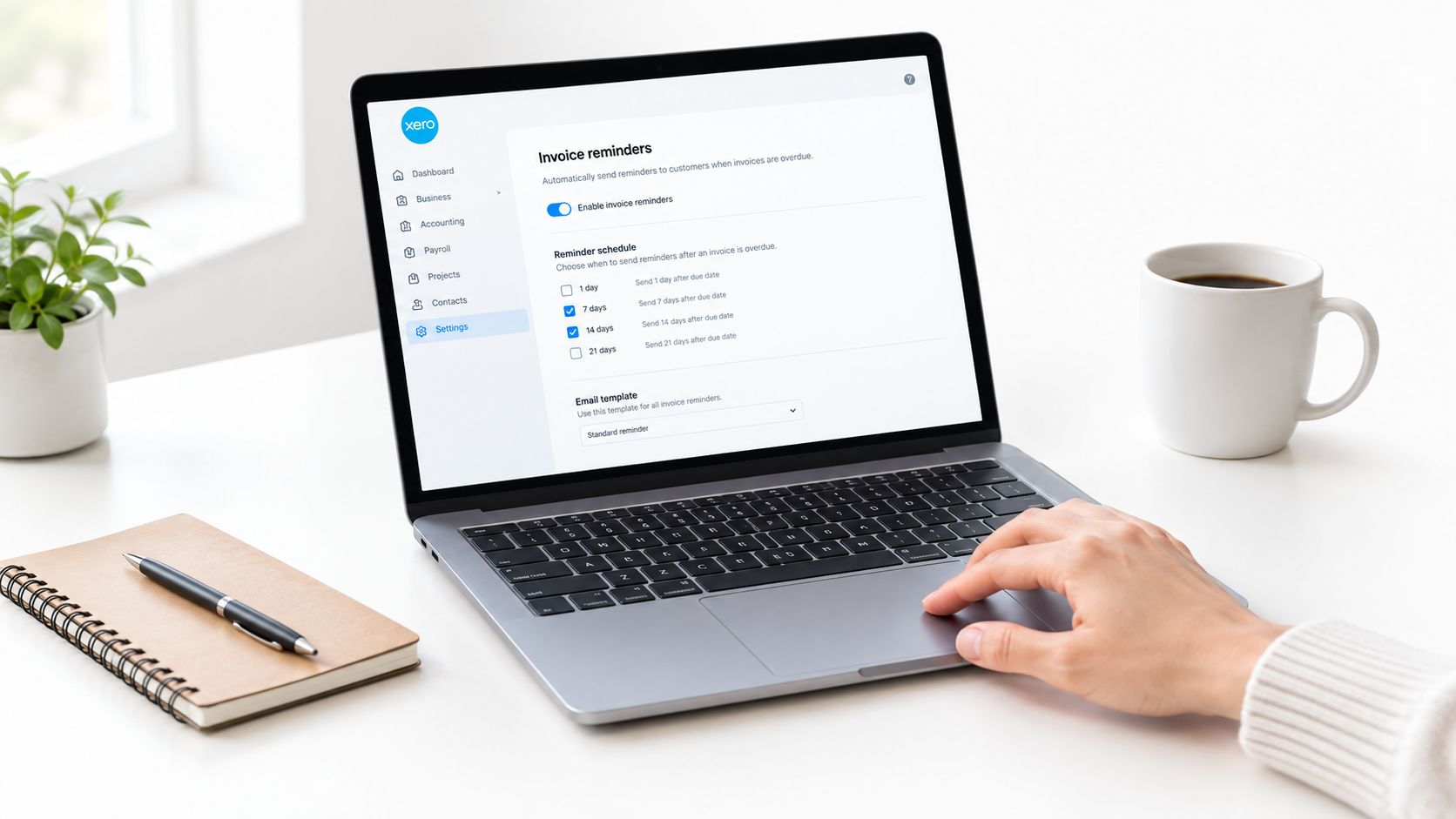
The setup sequence is:
- Open Business settings and go to the invoice settings under Sales.
- Select Invoice Reminders.
- Activate email reminders.
- Add rules for before the due date, on the due date or after the invoice becomes overdue.
- Edit the customer-facing message for each rule.
- Choose whether to include the online invoice and payment option, attach the invoice PDF link or suppress reminders below a minimum value.
- Save the settings and test the wording against a real, non-sensitive invoice record.
Xero sends reminders only for invoices marked Sent, so check the contact email, invoice status, due date and payment options before activation. A reminder rule doesn't fix a draft invoice, an invalid contact or a payment received into the bank account that hasn't been matched to the open invoice.
Write Messages That Sound Like Your Business
Use Xero's available contact and invoice placeholders so the email can identify the customer, invoice number, amount and due date. Avoid vague wording such as “your account requires attention”. The customer should know what is due, when it was due or will be due, how to pay and how to raise a query.
A practical template is factual and short:
Payment reminder: Hi [contact name], invoice [invoice number] for [amount] is due on [due date]. You can pay through the online invoice link. If there's a query with the work or documentation, reply to this email so we can review it.
Keep the early message friendly. Make the overdue message firmer without using threats, inflated urgency or language that suggests a dispute has already been decided. Your branding settings should remain consistent with the invoice itself, so the customer recognises the sender and can match the reminder to the original record.
Xero's native settings are enough for straightforward follow-up. For a broader explanation of how outsourced finance teams use AR software, look for the same controls: a reliable source record, scheduled communication, payment reconciliation and an exception queue.
Add an Approval Gate for Exceptions
Xero's reminder settings can automate the routine sequence, but the business still needs a management rule for high-value invoices, first-time customers, strategic accounts, disputed work, credits and missing documentation. Hold those items for review instead of allowing every overdue invoice to progress automatically.
When Xero records an invoice as paid, further reminders should stop for that invoice. Reconcile receipts promptly and suppress any reminder that no longer matches the balance. A managed process can add review queues and audit notes around Xero. Read more about invoice reminder software, but don't assume another tool removes the need for an owner.
Before publishing a rule, send a test to an internal address. Check the subject, greeting, invoice link, PDF option, reply address and wording on a mobile screen. A reminder that looks correct in the settings editor can still create confusion if the customer can't identify the invoice or respond to the right person.
Choosing a Reminder Cadence That Fits Australian Payment Behaviour
A flat weekly reminder is easy to set up, but it is a lazy default. Australian payment behaviour calls for a cadence that starts before the due date, then changes tone as the invoice moves from expected payment to overdue exception.
Xero's Australian small-business data reports that customers took an average of 22.9 days to pay in the June 2026 quarter and paid invoices an average of 6.0 days late. The same Xero late-payment guidance reports that 41% of Australian small businesses said payments arrived more than 14 days overdue. That does not justify blasting out more emails. It means the first reminder needs to land early enough to catch a forgotten invoice, and later escalation needs to be deliberate.
Use this as a working cadence, then adjust it against your own invoice results:
| Stage | Timing | Tone | Goal | Generic weekly cadence |
|---|---|---|---|---|
| Early reminder | Three to seven days before the due date | Friendly and helpful | Put the invoice back in the customer's workflow | May send without regard to the agreed terms |
| Due-date notice | On the due date | Clear and neutral | Confirm the amount and payment path | Often misses the payment baseline |
| Overdue follow-up | Around seven to fourteen days overdue | Firm but professional | Ask for a payment date or identify a query | Can repeat the same message without context |
| Human escalation | After the agreed automated stages | Personal and specific | Resolve the reason for non-payment | May continue sending emails when a call is needed |
The early reminder should name the invoice number, amount, due date and payment link. The due-date message should stay short. The overdue follow-up should ask whether the customer needs anything to process payment and give them a direct reply path for disputes. Keep the wording tight and practical, which is where a good invoice reminder email template helps before you tailor it to the customer and the job.
For government and public-sector work, the timing discipline is even clearer. Treasury reporting sets a benchmark of 90% for correctly rendered small-business invoices paid within 30 days, while the reported period still included 17,245 invoices paid 31 to 44 days after invoicing, 7,148 paid 45 to 60 days after invoicing and 8,153 paid after 60 days. The Treasury payment performance report is a reminder to watch invoices as they approach their due date, not after a large overdue balance has already built up.
Agreed longer terms need a different cadence. A customer on 45-day terms should not get language written for a severely overdue account. Match the timing to the terms, the customer type and your exception rules, then keep a human involved once the account stops behaving like a routine payment.
Handling Disputes, Part Payments and Sensitive Accounts
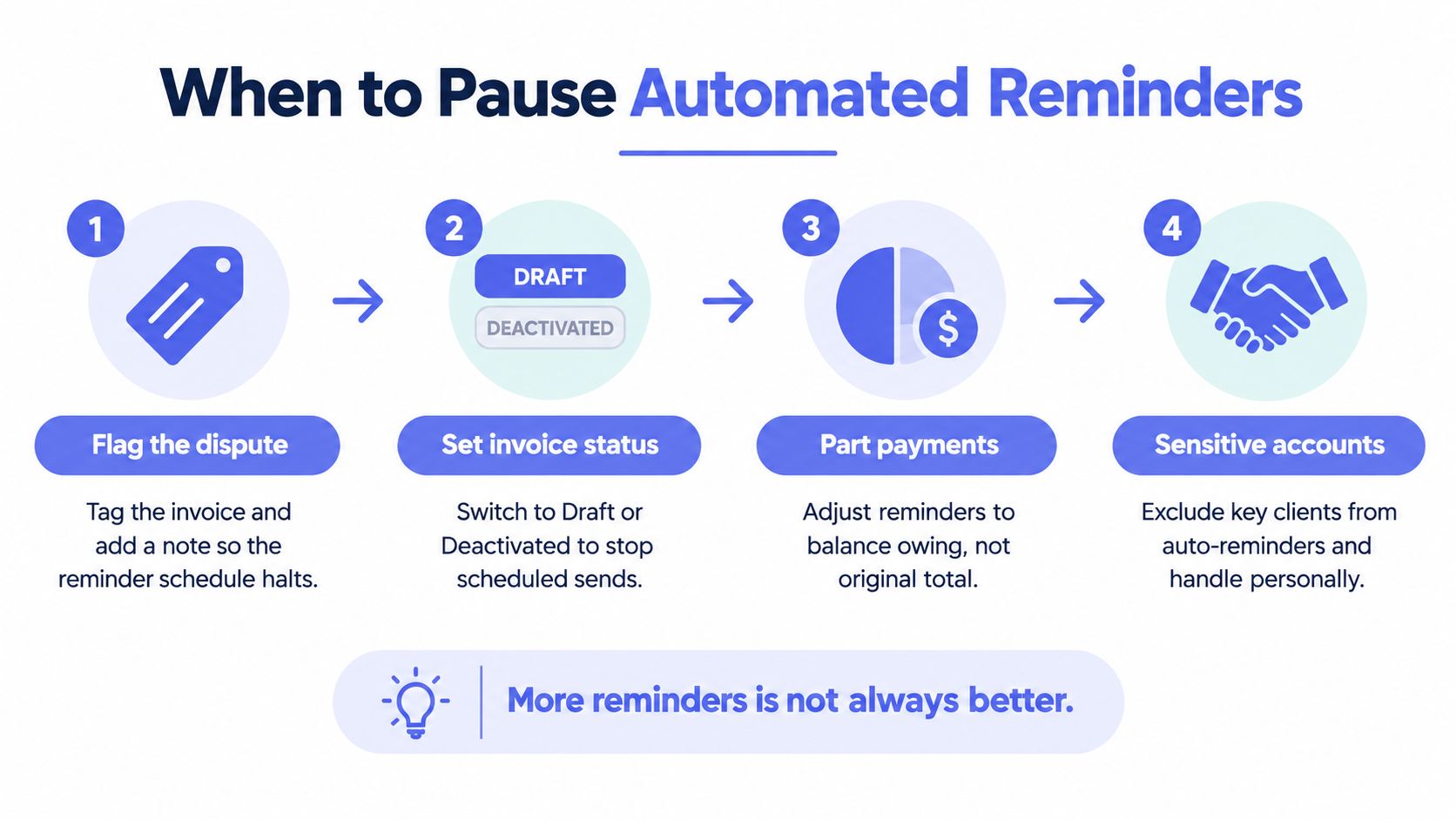
More reminders aren't always better. If the customer is disputing a variation, waiting for a compliance document or dealing with a credit, another automated email can make a straightforward operational issue feel like a collections escalation.
Xero should contain the financial record, while your internal process should contain the decision about whether an invoice is safe to chase automatically. When a customer raises a dispute, add a clear note, flag the invoice for review and remove it from the routine reminder path until someone confirms what remains payable. Don't mark an invoice paid merely to stop an email if money hasn't been received.
Reconcile the Balance Before the Next Message
A part-payment changes the amount that should appear in the next reminder. Record the receipt against the open invoice and confirm the remaining balance before another message is released. The customer should never receive a reminder for the original total after paying part of it.
If a credit note has been issued, a payment plan has been agreed or a promise-to-pay date is recorded, pause the normal sequence and document the next action. The same applies to a long-standing client, a sole trader experiencing hardship, a project retainer or an account where the commercial relationship makes an automated escalation inappropriate.
Give People a Defined Escalation Point
Xero provides a practical escalation pattern: send a friendly reminder on the due date, follow with a more urgent reminder after three to five days, call after seven to ten days to discuss the payment timeline and begin a formal collection process after 15 or more days overdue. Xero's invoicing process guidance supports moving from scheduled messages to a person when the account remains unresolved.
For an Australian service business, the human handover should include:
- A named owner: Identify who will call or write to the customer.
- A complete history: Record the reminders sent, replies received, part-payments, credits and promised dates.
- A decision: State whether the invoice is being corrected, paused, escalated or prepared for formal recovery.
- A customer-safe message: Keep the conversation factual and avoid implying misconduct where the issue is an administrative delay.
You can suppress a customer or invoice from a specific schedule through the available Xero settings and internal exception process. Confirm the current controls in Xero Central, and keep the invoice record intact. Suppression should stop an inappropriate message, not erase the debt, the history or the owner's responsibility.
Tracking Outcomes and Retuning Your Reminder Workflow
Once reminders are live, review the process instead of assuming the first setup was right. The useful question is simple: are invoices being paid, queried, or left unresolved after each stage?
Build a monthly review from Xero Reports, the Aged Receivables Summary, and the reminder activity log. Track what changes, not just what gets sent.
- Days to payment: Compare how long invoices take to clear across similar periods and customer groups.
- First-touch outcomes: Count how many invoices are paid after the first reminder, rather than only after later follow-up.
- Dispute patterns: Note which customer segments, services, or invoice types trigger questions.
- Ageing movement: Check whether overdue balances are shrinking, flat, or drifting into older buckets.
- Exception volume: Record invoices removed from automation because contacts are missing, disputes are open, credits exist, or the paperwork is unclear.
Treat the review as a tuning exercise. If the first reminder is ignored but payment comes through after a later one, tighten the subject line, cut the body, or move the timing closer to the due date. If customers keep asking for the same backup document, fix the invoice preparation step instead of sending more reminders.
As noted earlier, a healthy payment environment can still leave a late-payment queue. Australian Government payment reporting shows that invoices can sit in later categories even when most are paid on time. That is why ageing deserves attention, not just total collections.
Review templates and rules monthly while the process is settling. After that, retune them quarterly, or sooner if your terms, customer mix, or service model changes. Turn reminders off as soon as reconciliation is complete, route repeated disputes to the owner, and keep a clear record of why any rule changed. A wording tweak only matters if the team can see whether it improved payment, reduced queries, or just pushed the problem elsewhere.
A Practical Checklist and When to Bring in a Managed Layer
Run this checklist before you turn on Xero reminders, and repeat the review when the business changes:
- Confirm the agreement: Payment terms, accepted methods, credit conditions and overdue actions appear in the contract or engagement documentation.
- Check each contact: The billing email, customer details and accounts payable owner are current.
- Audit invoices: Sent invoices have the correct due date, amount, payment link and supporting information.
- Review exceptions: Disputes, credits, part-payments, payment plans, sensitive accounts and missing documentation are flagged.
- Assign ownership: Someone raises invoices, someone reconciles receipts and someone handles overdue conversations.
- Enable reminders: Activate the Xero rules only after checking the current Xero Central workflow.
- Customise the messages: Use the invoice number, amount, due date, customer name and payment path.
- Set a human gate: Decide which high-value, new or relationship-sensitive invoices need approval before escalation.
- Review the queue: Inspect aged receivables and reminder activity on a regular operating rhythm.
- Retune the process: Change timing or wording based on paid, queried and unresolved invoices.
A managed accounts-receivable layer becomes relevant when manual chasing is taking owners away from billable work, invoice volume makes individual follow-up uneconomic, the same customer repeatedly disputes charges or overdue balances keep worsening despite consistent reminders. It's also useful when growth has left the business without a clear credit-control owner.
That managed layer should sit around Xero, not replace it. Xero can remain the source of truth for invoices, payments, reporting and BAS work, while an operating layer monitors due dates, prepares routine messages, records reminder history, routes exceptions and keeps a person involved in consequential decisions.
The right question isn't whether you can send more emails. It's whether every invoice has a clear status, owner, next action and appropriate tone.
If your Xero reminders are sending into an unclear or fragmented billing process, Truespeak can help map the workflow, prepare human-approved invoice follow-ups and route disputes or sensitive accounts to the right person. Visit Truespeak to discuss an operating layer around your existing Xero process, rather than adding another disconnected system.