
In 2025, 17% of Australian small and medium-sized businesses reported losing more than $2,500 per month because of late payments, according to Accountants Daily's report on GoCardless's Pursuing Payments research. That reframes what a useful solution for small business should do. It isn't another dashboard to maintain. It's a visible process that stops enquiries, invoices and hand-offs slipping through inboxes, spreadsheets and memory.
Table of Contents
- Why Small Australian Businesses Need Practical Solutions
- Five Solution Types for Operations, Sales, Finance, Intake and Records
- How to Map Your Workflow Before You Pick a Tool
- Criteria for Choosing a Solution That Fits
- Benefits and Trade-offs of Each Approach
- Worked Examples for Australian Service Businesses
- Where Human Approval Gates Belong
- Confirm Your First Fix This Month
Why Small Australian Businesses Need Practical Solutions
The Australian Bureau of Statistics recorded 2,662,998 businesses in June 2024, and 97.2% had fewer than 20 employees, the ABS definition of a small business, in figures compiled by the Australian Small Business and Family Enterprise Ombudsman's summary of ABS business counts. Almost none of them carry a dedicated automation or IT team. The work of running systems lands on the same people who answer phones, send quotes and chase payment.
That scale sets the design rules. A practical solution for small business fixes one operational bottleneck at a time through workflow automation, works alongside the CRM, inbox, forms and accounting software already in use, and can be introduced in increments. A fix you can test this month beats a rebuild you can only evaluate next year.
Tight Budgets Shape the Choice
Money reinforces the point. Under the Australian Taxation Office's common turnover definition, annual turnover of $10 million or less, the overwhelming majority of Australian businesses count as small. A large platform replacement has to compete with wages, materials, vehicles and tax. Incremental fixes that recover missed enquiries, tidy records or shorten invoice chasing are easier to fund and easier to judge.
Judging them needs a baseline first. Measure the current state before changing anything: hours spent chasing invoices, enquiries answered within a day, jobs handed over without rework. Without that number, "it feels better" is the only evidence you will ever have. The same discipline applies to what you automate. An invoice reminder that fires unchecked can chase a client who has already paid, which spends goodwill while trying to protect cash flow. Anything that touches customers or money deserves an approval gate.
This guide is for owners and operations managers of Australian service businesses. If you're weighing the broader technology stack as well, Wistec's small business technology guide covers the hardware and support choices that sit underneath workflow tools. Whatever you pick, treat it as a process with a named owner and a measurable result, not a tool you install and forget.
Five Solution Types for Operations, Sales, Finance, Intake and Records
Start with the map below, then choose by where a missed step costs you most.
| Business function | Typical bottleneck | Solution type | Working result |
|---|---|---|---|
| Operations | Work scattered across inboxes, spreadsheets and memory | Business process automation with defined triggers and owners | Each job has a trigger, an owner and a next action |
| Sales | Slow first response and uneven quote follow-up | Speed-to-lead and lead follow-up automation | Enquiries are answered, qualified and routed with a stated response expectation |
| Finance | Overdue invoices and manual chasing | Invoice reminder automation with human approval | Reminders go out on schedule and exceptions reach a person |
| Intake | Incomplete briefs and rework before handoff | Structured forms and document collection | Required fields and documents arrive before work is scheduled |
| Records | Stale contacts and no pipeline visibility | CRM hygiene routines and routing rules | One record per enquiry with stage, owner and follow-up date |
Read It by Bottleneck Cost
Don't start with the department that shouts loudest or the tool with the longest feature list. Start where delay turns into lost revenue or rework fastest. If weekend enquiries sit unanswered until Monday, sales is your first row. If completed work waits weeks for payment while someone remembers to chase it, finance comes first, and it's worth reading how invoice automation software handles reminder timing and exceptions before you automate a single message.
Records underpin every other row. The Australian Bureau of Statistics reported that 17% of businesses used customer relationship management software during the year ended 30 June 2022, even though 85% reported using information and communication technologies, in its Characteristics of Australian Business release for 2021-22. Cloud technology reached 59% in the same dataset. Having digital tools clearly doesn't guarantee pipeline visibility.
A solution isn't a tool on its own. It's a tool plus a defined process that staff can see, own and follow.
That distinction matters when you buy. A CRM licence without consistent fields, stage rules, ownership and follow-up dates just gives stale records a tidier home. The ABS measure records whether a technology was used, not how effectively it was operated, so adoption alone proves nothing about performance.
Operations and intake usually come next. Once enquiries land in one place with an owner, you can standardise the brief, collect documents before scheduling, and define what triggers the next job. I'd fix them in that order rather than launching all five at once. Your first decision is narrow: which single function gets fixed first?
How to Map Your Workflow Before You Pick a Tool
Map the work before you shop for software. A tool chosen against an unmapped process will automate whatever confusion already exists, only faster. The map doesn't need specialist software. A whiteboard, a shared document or sticky notes will do, provided the eight steps below are written down where the whole team can read them.
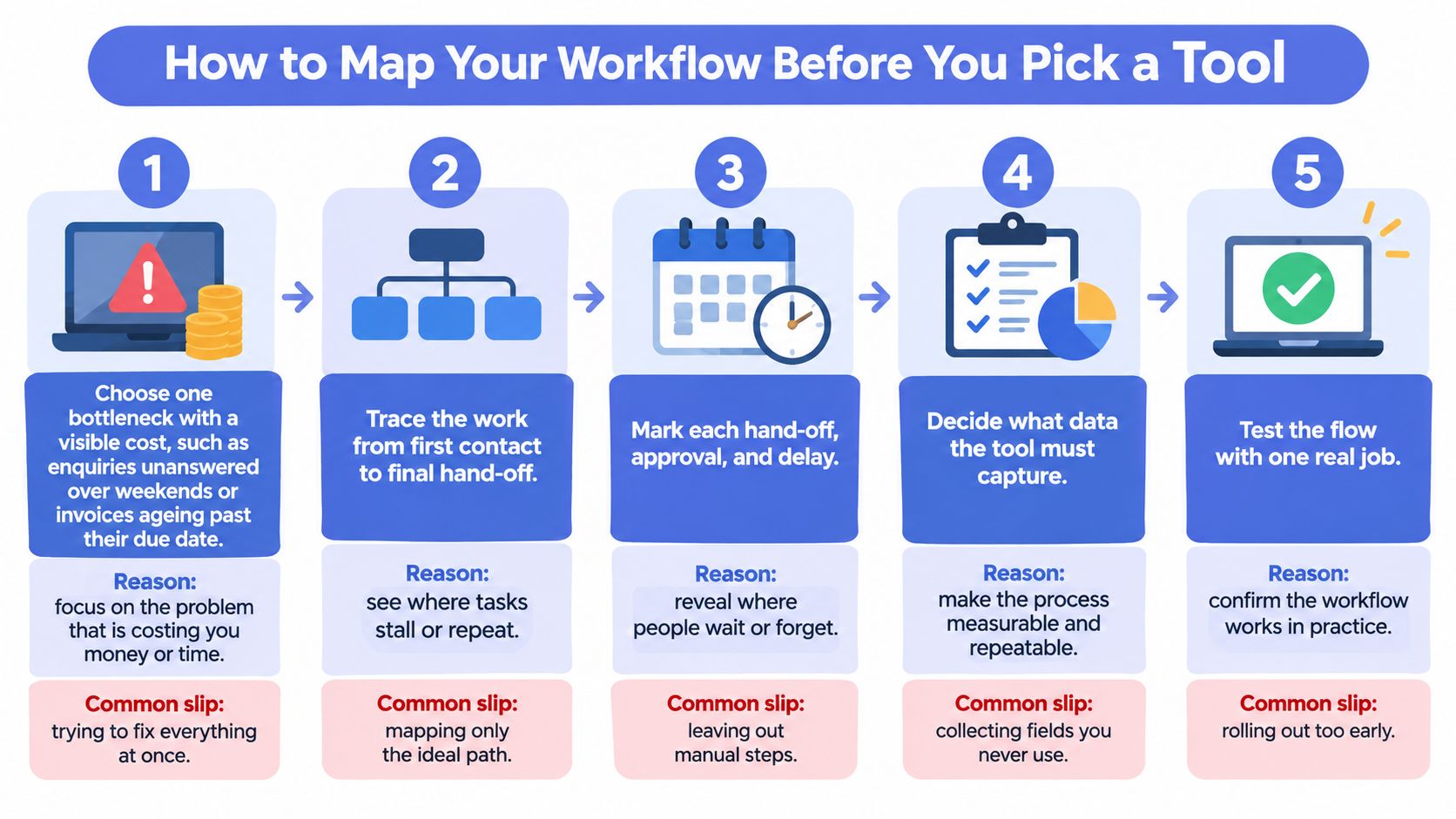
The visual below summarises the mapping sequence in five stages.
The Eight Mapping Steps
- Choose one bottleneck with a visible cost. Pick enquiries unanswered over weekends or invoices ageing past their due date, not "admin in general". A named cost keeps scope honest. The common slip is trying to fix everything at once.
- Name the trigger that starts the work. A web form submission, a referral email or an invoice passing its due date all qualify. If nobody can say what starts the process, nothing reliable can follow it. The slip is leaving the trigger as "when someone notices".
- List the context fields needed to act. Source, service type, suburb, urgency and consent status cover most service enquiries. Collect only fields someone will use to route or prioritise. The slip is building a long form that staff ignore.
- Write the decision rules. Route by service type, hold a reminder when an invoice is disputed, escalate urgent jobs to a person. Rules written in plain language can be tested. The slip is keeping rules in one person's head.
- Define the action and who completes or approves it. Send a confirmation, book a site visit, draft a reminder for sign-off. Every action needs a named owner. The slip is assigning work to a shared inbox.
- Define verification. Confirm the booking appears in the calendar or the CRM stage changed. Verification catches silent failures early. The slip is assuming a sent message means a completed step.
- Set the exception route to a person, with a deadline. Missing documents, disputed amounts and unclear requests go to a named human, not back into the queue. The slip is letting exceptions wait without a response expectation.
- Log timestamps and outcomes before you change anything. Record response times, booking outcomes or days-to-pay for a representative period first. That baseline is how you'll judge any tool later, and examples of structured assessments like these diagnostic assessment examples show the level of detail to aim for. The slip is changing the process before measuring it.
Truespeak's exact system implementations shouldn't be copied blindly into another business, but the useful shape can: trigger, context, decision, action, approval, output and feedback. Apply one test at the end. Can someone who wasn't involved follow the map and run the process correctly? If not, the map isn't finished.
Criteria for Choosing a Solution That Fits
Use the eight checks below on every option, and apply this scoring rule: a red flag in any of the first three rows stops the purchase until it's resolved.
| Criterion | Question to ask | Red flag |
|---|---|---|
| Fit with existing tools | Does it run alongside the CRM, inbox, forms and accounting software in use? | Requires replacing the whole stack before any value is delivered |
| Visible process | Can staff see each trigger, decision, action and exception path? | Logic sits in a black box that no one on the team can read |
| Ownership | Is a named person responsible for each record, stage and exception? | Exceptions go to a shared inbox with no owner |
| Human approval | Which messages and actions wait for sign-off before sending? | Sensitive messages such as payment reminders send automatically |
| Data handling | Where is personal data stored, who can access it and how long is it kept? | Access, storage and retention rules are unclear or unwritten |
| Measurement | Can response time and days-to-pay be read from CRM or accounting data? | Success is judged only by the number of messages sent |
| Support after launch | Who reviews logs, failures and overrides, and how often? | Set and forget, with no review cadence |
| Scope | Does phase one target one measurable bottleneck? | A large upfront build before any evidence exists |
Why Each Criterion Earns Its Place
Fit with existing tools decides most cases, because replacement adds migration and retraining before you've fixed anything. Visible process matters because staff can't correct logic they can't read. Ownership matters because unowned exceptions are where enquiries and invoices fail.
Human approval protects money and trust, since a wrong reminder or pricing message costs more than a slow one. Data handling matters because CRM records and invoices contain personal information that needs written access and retention rules. If documents form part of your workflow, choosing document software for small businesses is a useful companion read on storage and retrieval choices.
Measurement keeps you honest: judge response time and days-to-pay from your own CRM or accounting data, not message volume. Support after launch matters because integrations break and rules drift. Scope keeps phase one small enough to prove.
Three models can pass these checks: a DIY stack of point tools, a full platform replacement, or a managed operating layer around what you already run. We typically build that operating layer around existing tools rather than replacing a customer's CRM or other software. Replacement stays the exception, justified only when the current stack blocks the workflow outright.
Benefits and Trade-Offs of Each Approach
Think of it as renting a fitted-out workshop versus building your own. Renting gets you working sooner with someone else maintaining the hoist. Building gives you full control, and full responsibility when something breaks.
| Approach | Main benefit | Main trade-off |
|---|---|---|
| DIY stack of point tools | Low initial commitment and full control | Staff stitch tools together and fragmented hand-offs return |
| Managed operating layer around existing tools | Monitoring, tuning and exception handling without a new hire | Dependence on a partner, so data access and reporting rules must be written down |
| Full replacement with an all-in-one platform | One data model where the current stack is failing | Migration effort, retraining and disruption during change |
DIY Stack of Point Tools
You keep control and start cheaply, connecting a form tool, an inbox rule and a spreadsheet replacement one piece at a time. The trade-off arrives. Nobody owns the joins, so a changed password or updated app breaks a hand-off and the old fragmentation returns. For background on the efficiency side of that equation, this explanation of how process automation improves efficiency sets out where time savings come from.
Managed Operating Layer Around Existing Tools
Someone else monitors logs, tunes rules and handles exceptions, so you gain capacity without hiring. The trade-off is dependence. You need written data access rules, clear reporting and an exit path for your records before you sign.
Full Replacement with an All-in-One Platform
One data model can be the right answer when the current stack can't support the workflow. The cost is disruption: migration, retraining and a period where staff work around the new system. Benefits are easiest to judge when an approach removes a repeated task. Trade-offs grow when ownership is unclear, whichever model you pick.
Price the whole thing, not the licence. Total cost is the subscription, set-up effort, staff time on exceptions, and the cost of one missed enquiry or one late invoice. Check each provider's current published pricing and documentation, then compare against your logged baseline. Ask every provider one question: what happens to this workflow when a staff member leaves or a tool changes?
Worked Examples for Australian Service Businesses
The three scenarios below are illustrative. They show workflow shape, not client results, and no outcome figures are claimed for any of them.
The graphic below shows how the three scenarios connect leads, intake and follow-up.

Three Illustrative Scenarios
Scenario one, an electrical or solar installer. Web enquiries arrive after hours and wait until morning. The workflow captures service type, suburb and urgency, confirms consent, routes urgent jobs straight to a person and books routine site visits into the next available slot. Every enquiry lands in the CRM with an owner and a next action.
Scenario two, a builder on progress invoices. Reminders previously went out whenever someone remembered. The workflow runs reminders from the due date, holds the sequence when a dispute flag is set, and requires a person to approve any message after the second reminder. Chasing becomes scheduled rather than emotional.
Scenario three, a small law firm. Intake forms arrived with missing identity documents, so consultations turned into document hunts. The form now requests identity documents and a short matter summary before a consultation can be booked. Staff review complete briefs instead of chasing attachments.
The short video below walks through how this kind of enquiry and follow-up workflow fits together in practice.
What the Payment Benchmarks Mean
Australian Government analysis of 10 million invoices issued or received by 76,817 firms found that 36% of trade-credit payments to small businesses took more than 30 days to arrive, as set out in the Australian Taxation Office's published explanatory analysis.
| Measure | Reported figure | What it means for your workflow |
|---|---|---|
| Trade-credit payments to small businesses taking more than 30 days | 36% | Track actual days-to-pay rather than relying on stated terms |
| Average payment time when payment exceeded 30 days | 63 days | Set escalation points against real payment behaviour |
| Trade-credit payments made late | 53% | Reminders are needed even when invoice terms are short |
| Average days overdue for late payments | 23 days | Group overdue invoices into ageing buckets for follow-up |
Shorter stated terms didn't prevent late payment in that analysis, so don't rely on the terms printed on the invoice. Record issue date, due date and payment status, trigger reminders at due and overdue points, and route exceptions to a person. One caution closes the loop: reminders can worsen a dispute if they reach a contested, duplicated or incorrectly addressed invoice, which is why the dispute flag in scenario two exists.
Where Human Approval Gates Belong
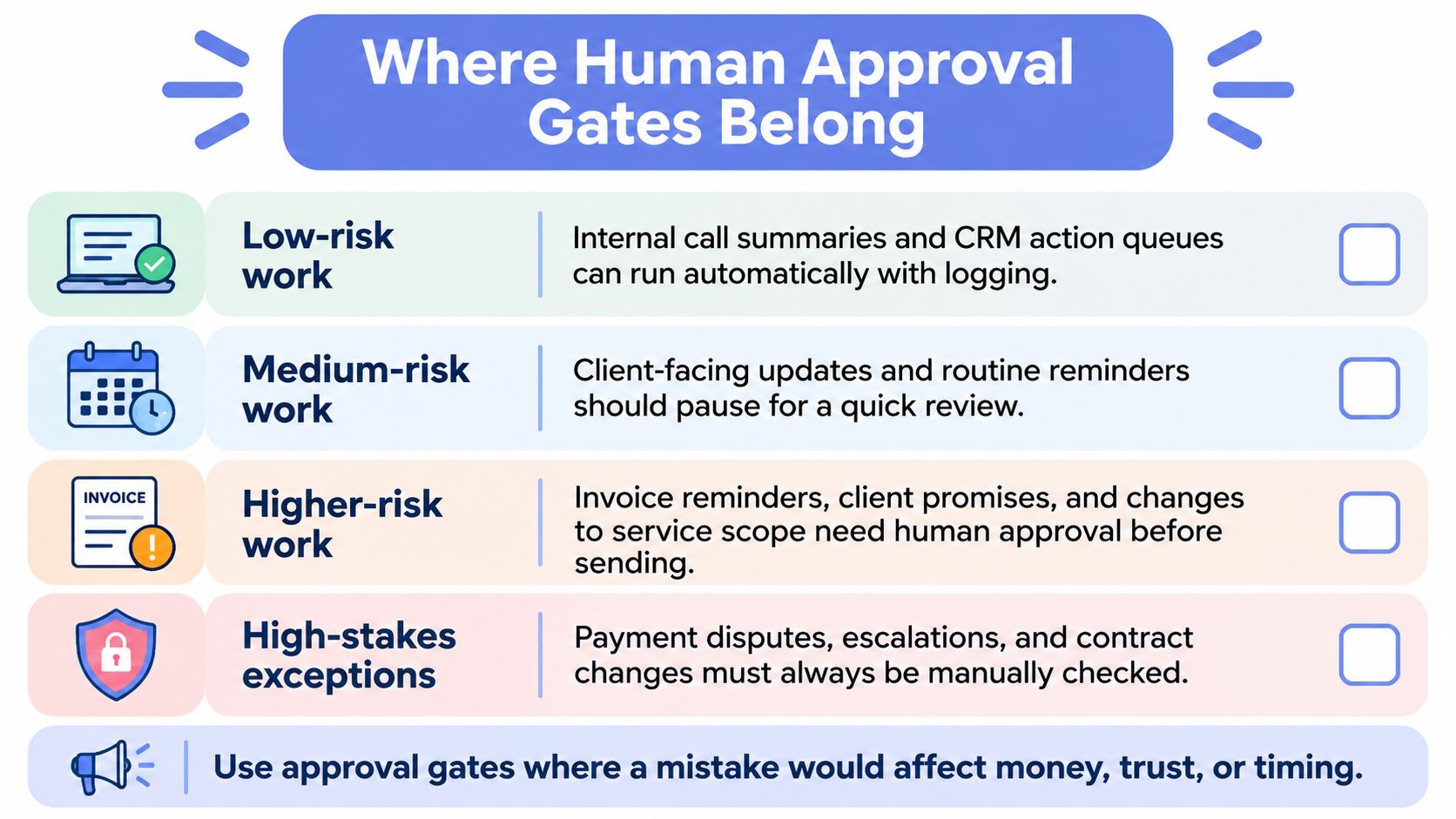
Approval gates belong where a wrong send costs money or trust. Give each workflow a named owner, a measurable baseline such as response time or days overdue, and a defined stop point before anything client-facing goes out. Australian responsible-AI evidence found that 78% of surveyed organisations believed they were implementing AI safely and responsibly, but only 29% were assessed as doing so, across 38 practices covering accountability, safety, fairness, transparency and contestability, as reported by the Minister for Industry and Science's media release on safe AI adoption. Declared safety and demonstrated safety are different things.
The diagram below sorts common work into risk tiers so you can place gates deliberately.
A Risk Tier Checklist
- Low-risk work: Internal call summaries and CRM action queues can run automatically, provided every action is logged and an owner reviews the exceptions.
- Medium-risk work: Client-facing updates and routine reminders pause for a quick human review before sending.
- Higher-risk work: Invoice reminders, client qualification, pricing communication and document handling sit behind an approval gate with restricted permissions and private storage for personal data, because payment chasing affects both cash flow and the client relationship.
- High-stakes exceptions: Payment disputes, escalations and contract changes always go to a person, with no automated send at all.
When consent, a required field or confidence is missing, the task goes to a person. It never guesses.
That fallback is the heart of sensible human-in-the-loop automation, and it mirrors how we run things: scheduled tasks and continuous checks handle enquiries, CRM updates, invoice chasing, drafting and reporting, while anything risky or client-sensitive waits for human approval. Our client systems may process records such as CRM entries, invoices, emails, forms, reports or workflow logs, with scope agreed with each client and access limited to what the system needs.
Evidence and Legal Boundaries
Keep operational evidence, not assurances: logs, approval records, test cases, incident handling and a review cadence. Monitor for false routing, unsupported claims, missing consent, duplicate records, failed integrations and human overrides, and feed each exception into a runbook rather than retrying it. The owner reviews these on a set cadence so the gate keeps matching how the business operates.
Two legal boundaries apply before launch: commercial electronic messages need consent, sender identification and a working unsubscribe facility, and personal information in your CRM and invoices must be handled under Australian privacy law. Write access, retention and disclosure rules into the approval gate itself, not into a policy folder nobody opens.
Confirm Your First Fix This Month
You don't need a quarter-long project to start. You need one bottleneck, one baseline number and a review date.
- List the three operational gaps that cost you most in the last 30 days, such as slow replies, overdue invoices or incomplete intake.
- Pull one current number from your CRM or accounting system, such as average first response time or days overdue, to set the baseline.
- Pick one function from the solution table and run the eight criteria checks against it.
- Map that single workflow using the eight mapping steps, including the exception route and approval gate.
- Decide the first fix and set a review date to compare results against your baseline.
If you'd rather not do that alone, match the help to the gap. A messy process points to business process automation, payment chasing points to invoice reminder automation, and ongoing monitoring, tuning and exception handling point to managed AI operations. We start by looking for the first operating gap worth fixing, across response, follow-up, intake, CRM, invoices, admin or reporting.
On a discovery call, we look at your business beforehand and come prepared with at least one specific gap and what it costs, with no pitch deck and no obligation. Judge any provider, including us, by your own live pipeline: stage, owner, last activity and next action. The first fix should target the first operating gap worth fixing, not a full rebuild.
If enquiries, follow-up or invoice chasing are slipping through your current tools, Truespeak can map the workflow, build a human-approved operating layer around the software you already use, and manage it after launch. Start with one measurable bottleneck and a baseline from your own records, then visit Truespeak to book a discovery call where we'll arrive with a specific gap from your business already identified.