
It's Thursday afternoon before a payment run, and you're staring at three versions of the same subcontractor bill. One arrived as a PDF in the general office inbox, another came as a blurry phone photo from a site supervisor, and the third has a different total with no purchase-order number attached. Nobody is quite sure who approved the extra labour hours, and the bookkeeper won't post it without an answer.
Most Australian service businesses don't have an invoice-volume problem at first. They have a rework problem. Every missing Australian Business Number (ABN), unclear account code, or stalled email approval forces someone to stop their actual work, trace a paper trail, and fix a bill that should never have entered the queue half-baked.
Buying accounts payable automation software without diagnosing that rework moves messy habits into a faster screen. A more reliable approach treats automation as a rework-control decision: log where supplier invoices get held and why, fix the rules, owners, and exception paths those holds expose, and automate or buy only what the log justifies. Judge the result by correction rates and handling time, not by how many PDFs a tool claims to capture.
Table of Contents
- What Accounts Payable Automation Software Does
- The Invoice Workflow Stages and the Rework Each Removes
- Validation Rules Intake Should Check First
- Matching, Coding and Approvals Where Rework Hides
- Assessing Fit With Your Accounting and Approval Tools
- Warning Signs That Software Alone Will Not Fix
- Where Managed Automation Helps With Invoice Follow-Up
- How to Measure Results and Pick Your First Step
What Accounts Payable Automation Software Does
Think of an incoming supplier invoice like a parcel landing in a busy mail room. Someone has to open it, check the contents against what was ordered, take it to the right manager for sign-off, and file the paperwork once it's cleared. If any step is skipped, the parcel ends up on a desk with a sticky note waiting for someone to remember what it was for.
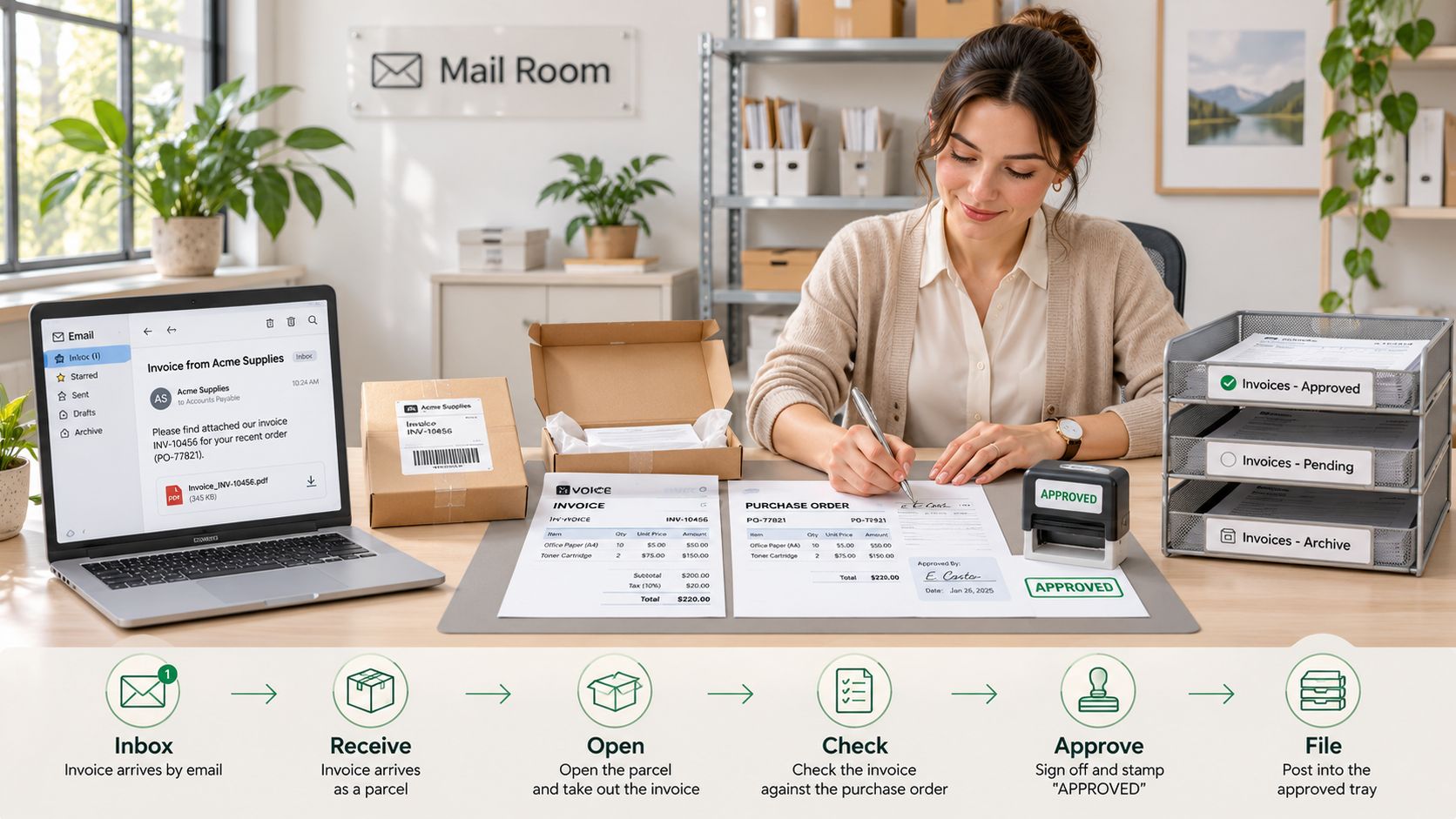
Accounts payable automation software handles the repeatable parts of that mail-room journey. It captures incoming invoice data, checks mandatory fields, matches line items against purchase orders or service records, routes the bill to a named approver, flags exceptions, maintains an audit trail, and prepares payment actions inside your accounting system. For a clearer breakdown of the core building blocks, Matil's overview of how AP automation works walks through how capture, approval routing, and ledger posting fit together.
That's very different from basic optical character recognition (OCR) scanning. OCR reads characters off a PDF and drops numbers into boxes, yet it decides nothing about whether the supplier is legitimate, whether the GST treatment makes sense, or who has authority to approve the spend.
The scale of manual handling across Australia explains why so many businesses get stuck here. According to the Australian Treasury consultation paper on eInvoicing, Australian businesses exchange more than 1.2 billion invoices annually, and approximately 90% of invoice processing remained either fully or partly manual. The same consultation noted that only about 10,000 of Australia's estimated 2.4 million businesses were registered for Peppol eInvoicing at that time.
Automation handles the routine checks, routing, and record keeping. A person still owns discrepancies, unusual GST treatment, and final payment decisions.
Getting clear on that boundary helps three people who feel AP friction differently: the accounts payable clerk chasing missing details, the business owner clearing supplier bills between client jobs, and the operations manager accountable for keeping cash flow and compliance intact.
The Invoice Workflow Stages and the Rework Each Removes
Every supplier bill travels through eight distinct stages from the moment it arrives until it sits safely in your archive. Skipping a stage doesn't save time; it pushes the error downstream where it's harder and more expensive to unwind.
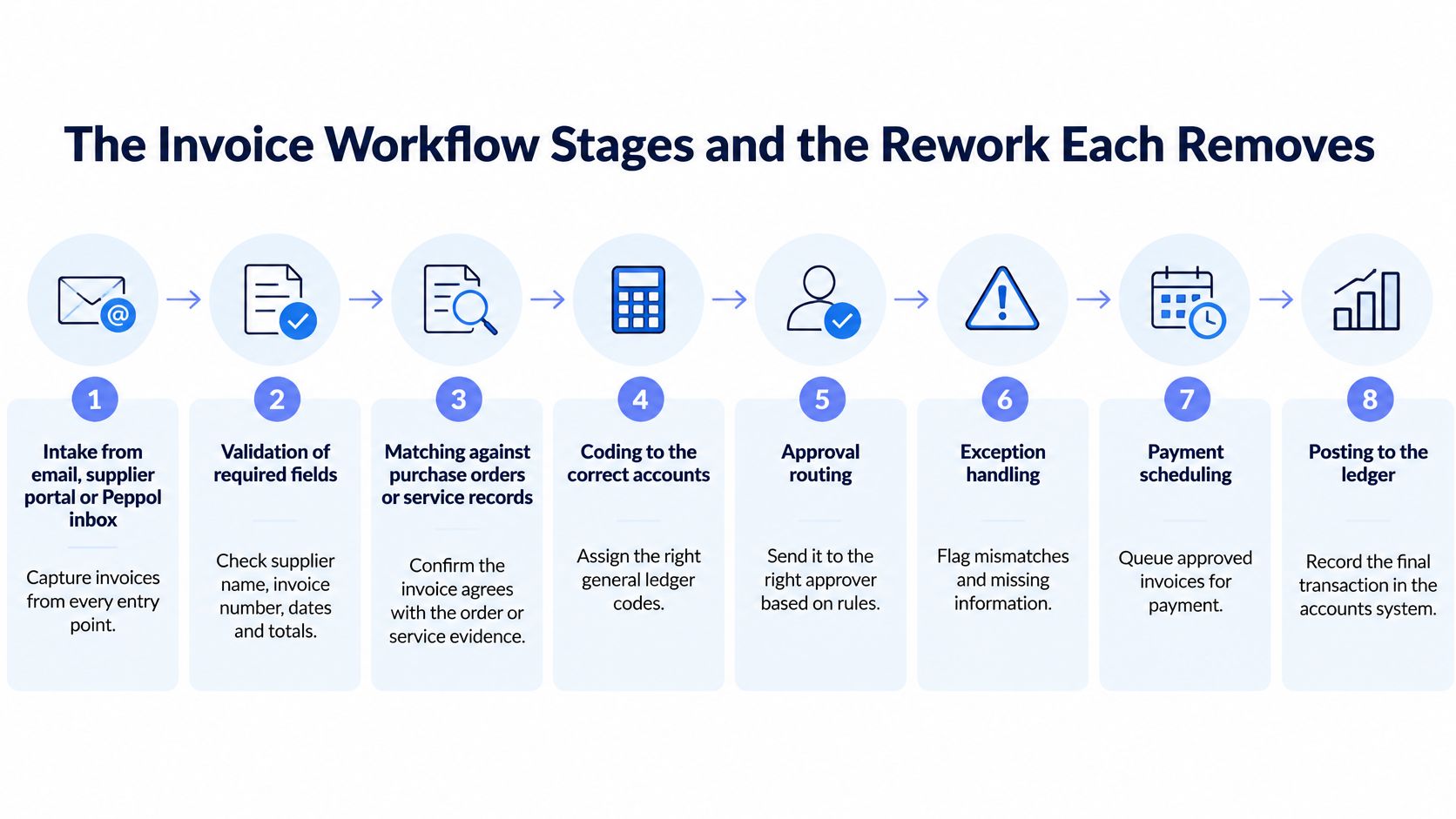
Walk through the sequence in order: intake from email, a supplier portal, or a Peppol inbox; validation of required fields; matching against purchase orders or service records; coding to your chart of accounts; approval routing to a named approver; an exception queue for anything held; payment preparation with duplicate checks; and an audit trail and retention record. If you want to see how document capture connects to downstream controls, DBotMaker's walkthrough on how to automate invoice processing step by step illustrates each handoff, while our guide to AI document processing explains how structured extraction prepares records for review.
| Stage | What the software does | Rework removed | Human gate kept |
|---|---|---|---|
| Intake | Captures invoices from email, portal or Peppol inbox | Retyping invoice data | Confirming unknown suppliers |
| Validation | Checks required fields and tax invoice details | Invoices returned later for missing information | Deciding on unusual GST treatment |
| Matching | Compares invoice with purchase order or service record | Manual line-by-line comparison | Ruling on price or quantity variances |
| Coding | Applies coding rules from the chart of accounts | Inconsistent or wrong account codes | Assigning an owner for unclear coding rules |
| Approval routing | Sends invoice to the named approver | Lost invoices in inboxes and reply-all chains | Reviewing invoices above delegated limits |
| Exception queue | Groups held invoices with a reason code | Chasing exceptions through scattered emails | Resolving disputes and discrepancies |
| Payment preparation | Checks for duplicates and prepares payment | Duplicate or misdirected payments | Approving changed bank details |
| Audit trail and retention | Keeps original invoice, approvals and coding evidence | Searching for records at tax or audit time | Controlling who can access records |
Why the Human Gates Stay in Place
Notice that every single stage pairs an automated action with a human gate. Software excels at spotting a missing ABN, flagging a second bill with the same invoice number, or nudging a project manager whose approval is two days overdue. It can't tell whether a $400 price jump on copper piping was verbally agreed on site or whether a bank-account change email came from a compromised supplier inbox.
Keeping the original record intact matters just as much at the final stage. Under the Australian Taxation Office guidance on GST records, Australian businesses must retain supporting GST records for five years, measured from when the records were prepared or obtained, or from when the related transaction or act was completed, whichever is later. Storing only a payment status or an extracted dollar total won't satisfy a Business Activity Statement (BAS) review; your workflow must preserve the original tax invoice, approval history, coding evidence, and related purchase documents with controlled access.
Before buying a single software licence, map those eight stages on paper first. Effective business process automation defines what starts the work, what information is required, which decisions apply, what checks run, and where odd cases go when something doesn't line up.
Validation Rules Intake Should Check First
A bad invoice caught at the front door takes thirty seconds to return. The same missing field caught after approval, during BAS preparation, can take twenty minutes of emails and rechecking.
For Australian GST-registered businesses, the ATO tax invoice rules give your intake step an exact baseline. A valid tax invoice for a taxable sale under $1,000 must contain the core details listed here: that the document is intended to be a tax invoice, the seller's identity and ABN, the issue date, a brief description of the items including quantity and price where applicable, and either the GST amount or a statement that the total price includes GST. For sales of $1,000 or more, the buyer's identity or ABN must also appear, and the ATO notes that digital invoices transmitted to a customer must still carry all required details to be valid.
| Field | When required | Intake check |
|---|---|---|
| Tax invoice wording | All taxable sales | Hold if the document is not identified as a tax invoice |
| Seller identity and ABN | All taxable sales | Hold if missing or not matching the supplier record |
| Issue date | All taxable sales | Hold if missing or outside the expected period |
| Item description, quantity and price | All taxable sales (quantity and price where applicable) | Hold if the description is vague or lines do not reconcile |
| GST amount or statement that total includes GST | All taxable sales | Hold if GST treatment is not stated |
| Total amount | All taxable sales | Check against line items and purchase order |
| Buyer identity or ABN | Sales of $1,000 or more | Hold if absent on higher-value invoices |
| Purchase-order reference | Where your policy requires one | Route to matching instead of approval |
Caveat: These intake checks reflect ATO guidance on standard taxable supplies. Confirm unusual cases, such as GST-free, input-taxed, or mixed supplies, with your accountant before locking rules into software.
Business Checks Beyond the Tax Minimum
Tax validity is only half the filter. A structured intake automation step should also enforce commercial controls that protect cash and stop billing errors from slipping through.
- Duplicate invoice numbers: Flag any invoice carrying the same supplier and invoice number as a previous bill so it is checked before posting.
- Changed supplier bank details: Quarantine any bill whose BSB or account number differs from your master supplier record until a person verifies the change through an independent phone call. The guide on invoice fraud and how to stop it outlines the verification steps that block payment redirection.
- Missing purchase-order references: Hold invoices from suppliers covered by your purchase-order policy so operations staff confirm the work was authorised.
- Line-item maths mismatches: Stop any bill where the individual lines and GST do not add up to the stated total, rather than letting software overwrite or round the figure.
Every held invoice should land in an exception queue stamped with a plain-English reason code, never deleted or auto-corrected behind the scenes. That queue acts like a labelled tray on a busy desk: the clerk can see why each bill stopped, who needs to act, and what evidence is still missing.
Apply one simple test to your intake setup: can an accounts clerk open a held invoice and tell within ten seconds why it stopped, without calling anyone? If the answer is no, the rule needs better wording or a clearer owner before it goes into accounts payable automation software. The goal is fewer repeat questions, not just fewer invoices entering the system.
Matching, Coding and Approvals Where Rework Hides
Owners often ask which single task wastes the most time in a small business accounts payable team: matching, coding, chasing missing info, or waiting on approvals. There's no verified universal ranking across Australian SMEs, because a commercial builder with staged subcontract claims hits completely different bottlenecks from a consulting firm paying software subscriptions and contractors.
The fastest way to find your real bottleneck is to stop guessing and log it. Before you sit through a single vendor demo, watch where bills stall inside your own office.
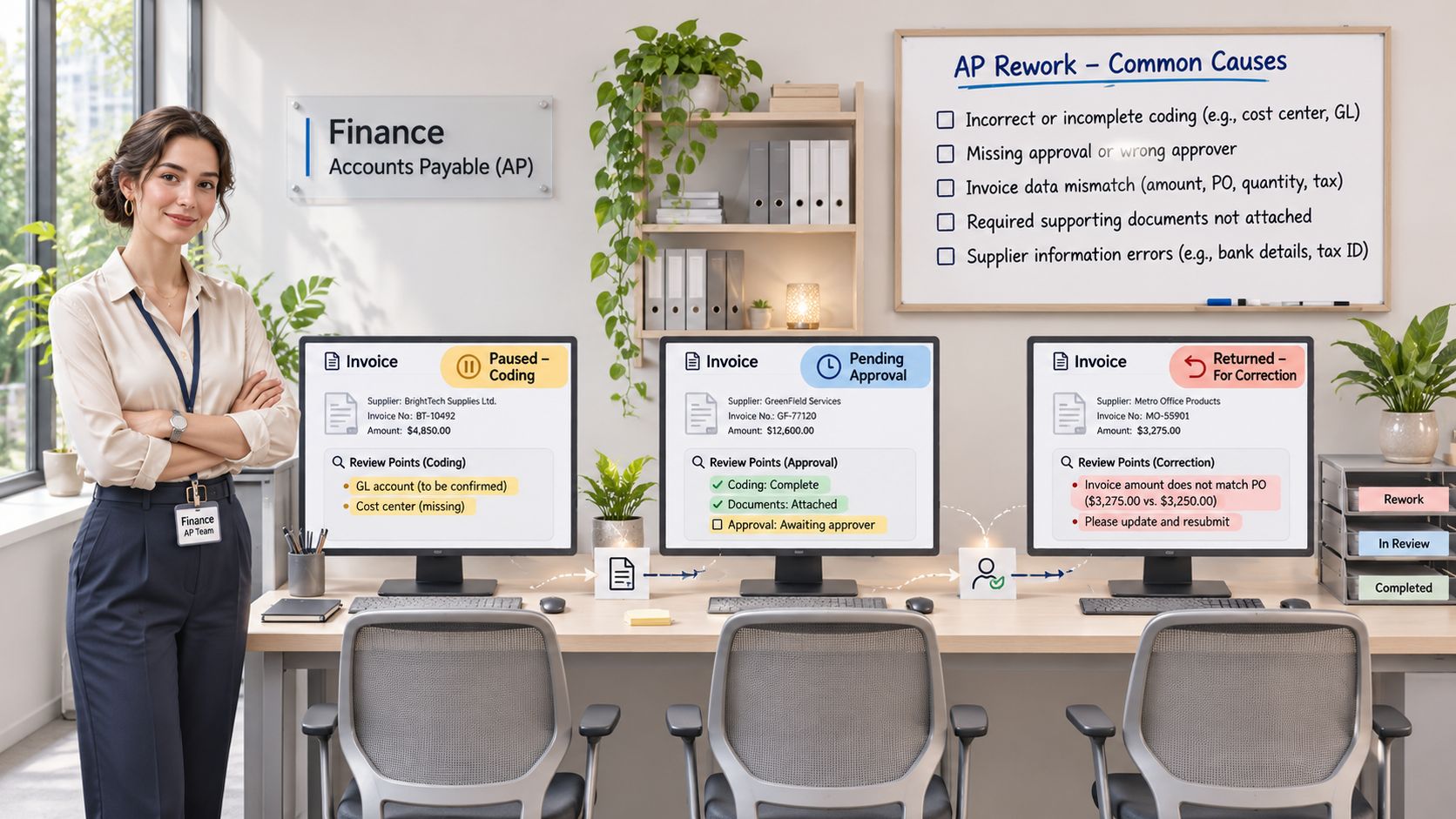
Run a simple two-to-four-week rework log in a shared spreadsheet using three steps:
- Record every held invoice. Each time a bill stops, note the supplier, the reason code, how many minutes someone spent fixing it, and who resolved it.
- Sort every hold into four codes. Use missing information, unclear coding rules, matching discrepancies, and delayed approvals so patterns stay visible instead of fragmenting into dozens of one-off excuses.
- Total the minutes by code and fix the largest one first. The first process worth automating is always the handover that costs the most time, revenue, or trust.
Breaking Down the Four Rework Categories
Once your log highlights the biggest drain, fix the underlying rule before you ask software to enforce it. If each invoice follows a different path or nobody owns the decision, agree on how the work is done before automating it.
Matching discrepancies usually show up as price variances, partial deliveries, or service bills that never had a purchase order in the first place. Decide your tolerance threshold in writing (for example, whether a $25 freight variance can pass automatically or requires review) and name the exact role authorised to sign off variances above that line.
Unclear coding rules happen when your chart of accounts has overlapping categories like "Site Materials", "Job Consumables", and "Tools and Equipment" with no notes explaining what goes where. Write a one-page coding guide covering your top thirty suppliers and set one escalation rule: if an expense doesn't clearly fit, route it to the finance lead instead of letting staff guess.
Delayed approvals are rarely a software problem. They almost always point to three missing pieces: no named primary approver, no backup approver when that person is on leave or on site, and no delegated dollar limits. Define all three, then trigger an automated reminder after a fixed window, such as 48 business hours.
Watch how invoice automation platforms handle these approval and exception handoffs in practice before deciding which rules your own team needs to document first:
To see how these pieces connect, consider an illustrative example (not a reported client outcome). Say a 15-person electrical service business replaces three personal inboxes with one dedicated accounts email, requires an ABN and job number on every bill, and assigns one named approver per job value tier. Incomplete invoices automatically route to an exception queue with a reason code, scheduled nudges prompt overdue approvals, and a person steps in only for price variances or disputed hours. To know whether the change worked, the business doesn't assume fewer errors or admin hours; it compares its correction rate and average handling minutes per invoice from the baseline log against the same figures six weeks later.
Assessing Fit with Your Accounting and Approval Tools
Most Australian service businesses already run Xero, MYOB, or QuickBooks alongside email, job-management software, and a shared drive. The fit question isn't whether those tools are the newest platforms on the market. It's whether they can maintain a reliable source of truth and clear ownership across the invoice cycle.
Score your current stack against seven operational criteria before looking at new licences.
| Criterion | Good sign | Warning sign | Likely action |
|---|---|---|---|
| Accounting system as source of truth | One chart of accounts and reliable ledger posting | Duplicate ledgers or manual rekeying into spreadsheets | Fix the chart of accounts before automating |
| Invoice intake channels | One inbox, supplier portal or Peppol access | Invoices arrive by phone, photo, paper and text | Set one intake channel first |
| Approval tool and owners | Named approvers with delegated limits | Approvals given by reply-all email | Define owners and limits before choosing software |
| Structured data and Peppol readiness | Supplier ABNs verified and invoices structured | Only emailed PDFs read by OCR | Prioritise structured invoices and keep review gates for PDFs |
| Audit trail and retention | Original invoice and approvals kept for five years | Only payment status stored | Confirm retention rules before go-live |
| Integration with accounting software | Connects through a supported import or API | No export and manual re-entry | Automate around the tool, and replace it only if it blocks the work |
| Visibility of open items | Status of each invoice visible to the team | Status known only by asking staff | Add a status log and an exception queue |
Why Peppol eInvoicing Beats PDF Scanning Alone
When evaluating intake and structured data, it helps to separate emailed PDFs from genuine eInvoicing. As the ATO eInvoicing guidance for businesses explains, eInvoicing is a direct software-to-software exchange over the Peppol network, not emailing a PDF attachment, and the ATO doesn't receive copies of invoices exchanged between businesses. Even with direct transmission, businesses must keep ABN records current, treat eInvoices as digital records under standard record-keeping rules, and still verify fields and route mismatches for human review.
The efficiency gap between the two methods is substantial. The ATO overview of Peppol eInvoicing reports that paper and PDF invoices generally cost approximately $27 to $30 to process, while eInvoicing can lower the processing cost to below $10 per invoice. Because Peppol delivers supplier identity, ABN, invoice number, GST components, purchase-order references, and payment terms in machine-readable fields, your accounting workflow avoids repeated re-keying while keeping human approval gates on unusual GST treatment, missing purchase-order data, changed bank details, and bills above delegated limits.
Fit rule: Structured transmission removes typing, not judgement. Keep human sign-off on anything that changes cash exposure or tax treatment.
Keeping Existing Tools Versus Replacing Them
Ripping out an accounting ledger or job system mid-year creates disruption that often outweighs the original AP friction. At Truespeak, we can usually work with your existing accounting and business process automation tools rather than replacing them from scratch. Our first pass normally connects and automates work across the systems you already run, and our technical walkthrough on how to connect AI to Xero, MYOB and QuickBooks shows how those integrations operate in practice.
Replacement is justified only when material gaps in visibility, controls, or integration can't reasonably be solved through process changes and automation around your current stack. If your audit confirms that your current tools block the work and you need a standalone platform, reviewing AP automation vendors ranked by Rankozo offers a structured starting point for comparing dedicated software options against your seven criteria.
Warning Signs That Software Alone Will Not Fix
Buying software to cure a broken accounts payable process is a bit like buying a faster ute when nobody has written down the delivery addresses. You'll cover more ground, and you'll arrive at the wrong spot sooner.
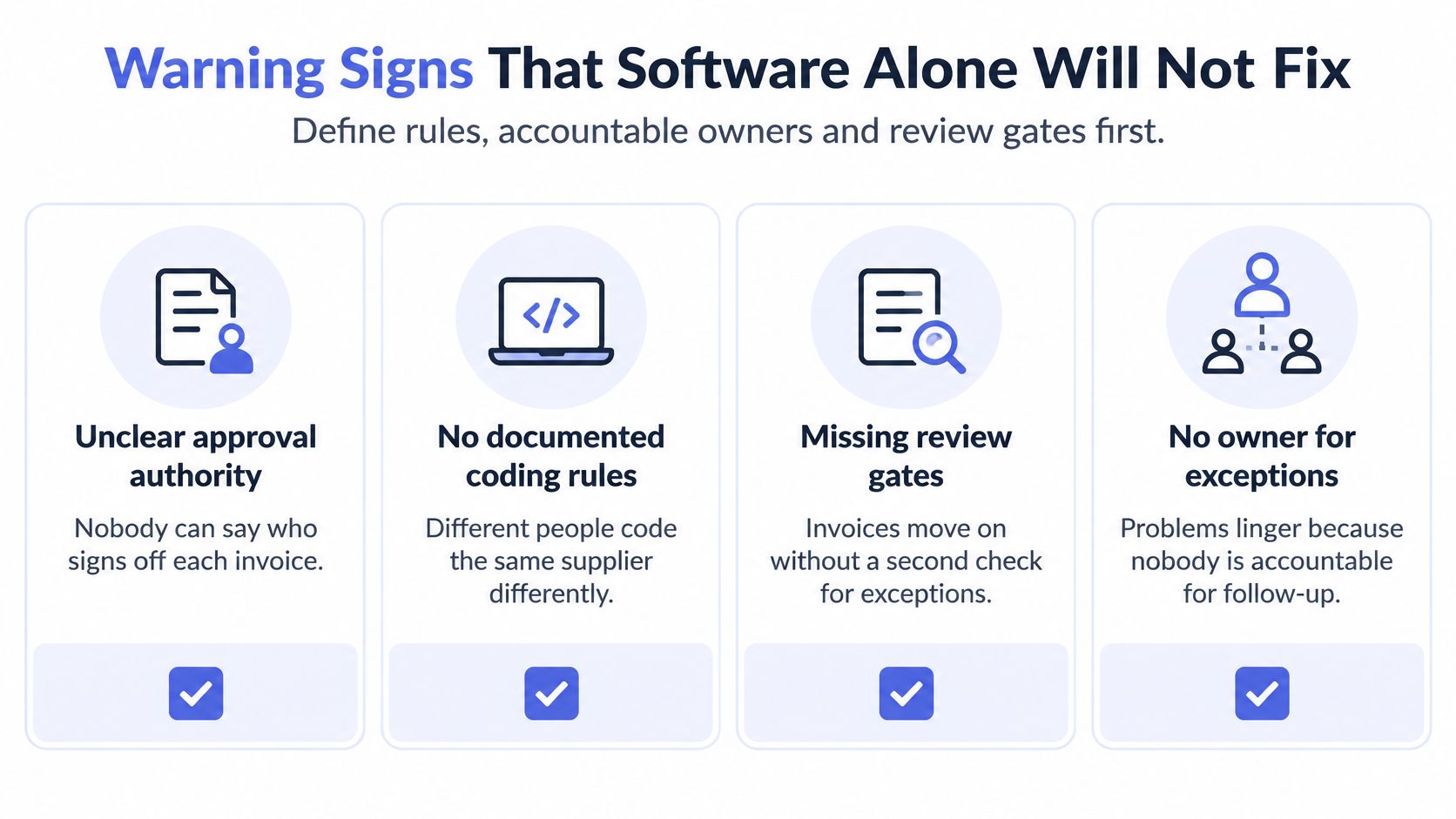
Four operational warning signs tell an Australian SME that off-the-shelf software alone will fail:
- Unclear approval authority: Nobody can say who signs off a routine supplier bill versus a high-value invoice, so managers approve bills in casual reply-all email threads that no tool can govern.
- Inconsistent coding rules: The same supplier invoice lands in three different expense accounts depending on who processed it, while duplicate codes clutter the chart of accounts.
- Missing invoice information: Required ABNs, dates, job descriptions, or purchase-order numbers aren't checked at intake and only surface halfway through the payment run.
- Exceptions resolved through scattered emails: Disputed or incomplete bills sit buried in personal inboxes with no reason code and no named owner responsible for closing them out.
If two or more of those signs describe your office right now, pause software shopping and fix the foundations first. Set one intake channel, clean up the chart of accounts, appoint named approvers with delegated limits and a backup, and build a shared exception queue with clear reason codes.
The same governance principle applies when businesses look to software for payment timing. In GoCardless's 2025 Australian payments research, 41% of surveyed Australian small businesses reported that payments were typically more than 14 days late, 17% said payments were typically 30 days late, 48% were waiting longer for payments than 12 months earlier, and more than one-quarter spent up to an hour each week chasing late payments. Those pressures tempt owners to turn on aggressive automated chasing without rules, which risks damaging good client relationships when an invoice is disputed. Automate routine checks and nudges, yet keep accountable people in charge of discrepancies, changed bank details, unusual GST treatment, and sensitive customer conversations.
Where Managed Automation Helps with Invoice Follow-Up
A supplier changes its invoice format while your usual approver is on leave. The workflow still runs, but invoices start waiting for manual attention. Getting automation live is the beginning of maintaining it.
Treat those holds as a rework log: record why each invoice stopped, who owns the next action, and what needs correcting. Use that record to fix rules and exception paths before adding more automation.
Managed AI Operations provides ongoing monitoring, tuning, approval gates, reporting and exception handling around existing tools, without another dashboard for your team to administer. Regular reporting can support reviews of exceptions and handling time. People remain responsible for decisions, and missing information or high-risk work pauses with context rather than disappearing into a workaround.
Separating Supplier Payables from Customer Collections
Supplier-side accounts payable governs what your business owes, validates, approves and pays. Customer-side accounts receivable follows up invoices you have issued. They need separate rules because a reminder to a customer carries different relationship risks from an internal approval request.
The Treasury government response on payment times reported that close to 40% of small businesses experienced significant cash-flow pressure from late customer payments, cited Xero findings that suppliers waited an average of 34 days on 30-day terms, and reported that businesses with more than 500 employees paid an average of 18.2 days late.
Consistent reminders need a clear stopping point when a dispute requires attention.
Truespeak's invoice reminder automation, through Invoice Nudge, drafts polite reminders and logs invoice status so the business can see what has happened and what remains open. Tone, disputes and relationship-sensitive accounts stay under human control.
Judge follow-up by reminder-to-payment conversion, dispute resolution time, and escalation rates, alongside correction rates and handling time. Sending more messages is useful only when it reduces unresolved work without creating more corrections.
How to Measure Results and Pick Your First Step
Software vendors love showcasing how many invoices a system captured in a month. Capture volume tells you almost nothing about whether your admin team spent fewer hours fixing mistakes or whether duplicate bills stopped reaching the bank batch.
Record your baseline across nine operational measures before changing a single tool, then compare the same numbers after rollout. The table below covers both supplier-side payables and customer-side invoice follow-up.
| Measure | How to calculate | What it tells you |
|---|---|---|
| Straight-through processing rate | Invoices passing without manual touch divided by total invoices | Whether routine invoices now flow without staff |
| Exception rate | Invoices sent to the exception queue divided by total invoices | Whether intake and validation rules are catching the right problems |
| Duplicate rejection rate | Duplicates stopped divided by total invoices received | Whether duplicate payment controls are working |
| Minutes per invoice | Total handling minutes divided by invoices processed | Whether admin effort is falling |
| Correction rate | Invoices returned for correction divided by total invoices | Whether errors reaching approval are dropping |
| Days sales outstanding | Receivables divided by average daily credit sales | Whether customers are paying faster |
| Dispute resolution time | Average days from dispute logged to resolved | Whether discrepancies are being cleared promptly |
| Reminder-to-payment conversion | Invoices paid after a reminder divided by reminders sent | Whether reminders are working without damaging relationships |
| Escalation rate | Accounts escalated to a person divided by accounts in reminder sequence | Whether sensitive accounts are being routed to human review |
Four Steps to Roll Out Automation Without Creating New Rework
With your baseline recorded, sequence the work so every layer rests on clear rules:
- Stabilise the foundations. Clean up your chart of accounts, lock in one invoice intake channel, and write down named approvers with delegated dollar limits and a leave backup.
- Automate intake validation and exception routing. Let software check required fields, flag missing data or duplicates, and route holds into a shared exception queue while people still rule on discrepancies and bank changes.
- Layer in customer invoice reminders once payables are steady. Switch on polite, human-approved follow-up sequences for overdue receivables only after your internal billing records are reliable enough that you won't chase already-paid or disputed accounts by mistake.
- Re-measure after four to six weeks. Pull your rework log again and compare correction rates, minutes per invoice, and overdue balances directly against your starting baseline before expanding the scope.
Automation works best on processes repeated often enough to set clear rules, with people visibly in control of every judgement call. Once that first workflow is live, an ongoing managed operations layer keeps your exception queues monitored, your rules tuned as suppliers change, and your monthly metrics clear without adding another system for your team to babysit.
If your finance or operations team is losing hours to scattered invoice approvals, missing bill details, or manual payment chasing, Truespeak builds and manages practical automation around the accounting and workflow tools you already use, with human approval gates on every sensitive decision. Explore how we map rework, automate routine checks, and run ongoing invoice follow-up at Truespeak.