
Most Australian service businesses don't lose work because the team is lazy or the offer is weak. They lose it in the gaps, the missed call, the slow callback, the quote that sits untouched, the invoice that needs three reminders, the handoff where nobody quite knows who owns the next step. AI customer care matters because it can sit on top of those gaps and keep the work moving without asking you to hire a second admin team.
That's the practical lens here. In Australian service operations, the issue isn't whether a bot can answer a simple question. It's whether your process can keep context, carry intent, and hand the right job to the right person before revenue leaks away.
Table of Contents
- The Reality of Customer Demand for Australian Service Businesses
- How AI Customer Care Actually Works in Practice
- Practical Use Cases for Daily Operations
- Managing Risks and Preserving the Human Touch
- Choosing Between DIY Software and Managed AI Operations
- Starting with the Smallest Useful System
- Measuring Outcomes and Preventing Revenue Leakage
The Reality of Customer Demand for Australian Service Businesses
The pressure is already visible in the time customers spend waiting. ServiceNow's 2026 customer experience research reported Australians spent 113.5 million hours on hold in 2025, down 10 million hours year on year, and average issue-resolution time fell from 11.1 hours to 9.3 hours (ServiceNow research). That is not a theoretical productivity debate, it's a reminder that delay is still a major part of the customer experience.
For service SMEs, the same friction shows up in quieter ways. A builder misses the first enquiry from a hot lead, a professional services firm takes a day to reply to a quote request, or an accounts inbox grows full of overdue invoices that someone has to chase manually. Each delay makes the business look slower than it really is.
Why Customers Are Moving Away from Waiting
Australian customers are also signalling that they want less friction before they pick up the phone. In the same ServiceNow research, three-quarters of Australians preferred self-service before calling a representative, and almost half preferred using technology to make complaints, troubleshoot, or resolve issues (ServiceNow customer experience report). That matters because self-service is no longer a nice extra, it's part of the default service path.
Fast service isn't just about being first, it's about being usable before the customer gives up.
The operational takeaway is simple. AI customer care works best when it acts like an always-on front desk, not a replacement for skilled staff. It captures intent, keeps the queue visible, and stops good work from disappearing into inbox chaos.
How AI Customer Care Actually Works in Practice
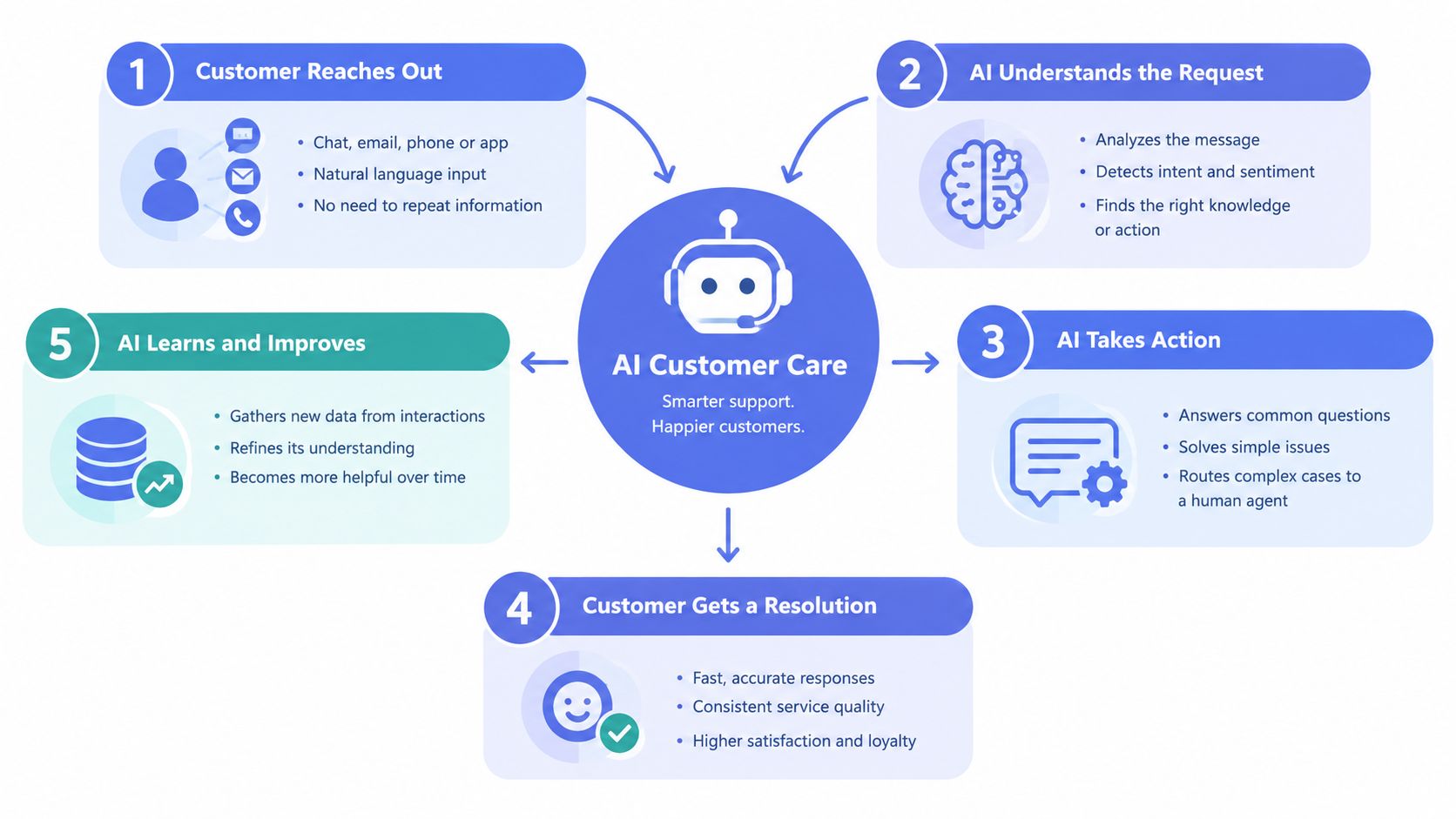
The easiest mistake is to treat AI like a fancy chat box. In practice, useful systems sit around your CRM, phone, email, website forms, and messaging channels, then move work through a visible path. The AI classifies what the customer wants, captures enough context to be useful, and routes the job to the next step without making people repeat themselves.
The Part Most Businesses Get Wrong
The failure point is usually context continuity. In a 2026 Australia study, nearly 70% of consumers said they walked away when an AI service exchange did not remember them or earlier conversations, and 77% said they were still forced to repeat basic information (IT Brief study summary). That tells you the actual task is not just answering, it's remembering.
A good system carries customer history through the workflow. It keeps the enquiry, the previous touchpoint, the quote stage, the booking status, and the next action tied together in the CRM. When the issue needs a person, the handoff should include the conversation summary, the customer record, and the reason for escalation.
What the Operating Layer Should Do
A practical setup follows a simple pattern.
- Capture the enquiry from the channel the customer used.
- Classify the intent, such as booking, quoting, follow-up, or support.
- Route the task to the right queue or owner.
- Assist the human with summaries, reminders, and relevant history.
- Learn from exceptions so the next handoff is cleaner.
If you want a deeper breakdown of the system design side, the architecture for AI support agents is a useful reference point. The point isn't to make every reply autonomous. It's to make sure every customer interaction lands somewhere useful, with less repetition and less lost context.
Practical Use Cases for Daily Operations
The strongest use cases remove repeat administration while keeping commercial judgement with the team. Speed-to-lead automation, structured intake, quote follow-up, and invoice reminders usually create more operational value than a broad chatbot project. Australian benchmark reporting shows 58% of consumers expect an online messaging reply within 35 minutes, so first response needs a defined workflow, not an occasional manual check (customer service benchmark data).
Where the Work Moves
A lead arrives after hours. The AI layer acknowledges the enquiry, records the job type, checks the customer's existing CRM context, and creates the next task for the right person. That continuity matters when the customer returns later. The team can see what was requested, what has already been said, and whether the opportunity is waiting for a quote, a booking, or a decision.
Quote follow-up uses the same structure with a different trigger. The system checks whether the prospect has replied, prompts the assigned owner when action is due, and keeps the opportunity visible instead of allowing it to disappear in an inbox.
Intake is another practical fit. For trades, installers, and professional service firms, AI can request photos, documents, site details, or a short brief before the job is passed on. The result is less back-and-forth and fewer incomplete handoffs that force staff to chase basic information.
For teams that need structured workflow support, Truespeak's AI workflow automation approach reflects this operating pattern: capture the request, route it to the correct queue, and keep ownership and the next action visible.
Invoice Chasing Without Sounding Robotic
Invoice reminders need their own timing and tone. Australian payment terms should be stated clearly, and reputable guidance recommends a polite reminder the day after the due date, followed by a more direct follow-up about one week later (Xero guidance). A managed process can apply that sequence consistently while preserving the customer record and giving staff visibility of replies, disputes, or promised payment dates.
A follow-up layer can sit alongside CRM hygiene and reminder logic, so a job does not become stranded between an accepted quote, completed work, and payment.
The goal is fewer dropped jobs, clearer ownership, and a tighter next step.
Managing Risks and Preserving the Human Touch
The biggest risk with AI customer care is not that it talks too much. It's that it talks when it shouldn't, or it removes the easy path to a human when the issue gets sensitive. Twilio's 2025 Australian consumer data found 50% of consumers said AI in customer service makes them less patient, while 46% wanted the ability to escalate to a human agent when needed (Twilio consumer data).
Human-in-the-Loop Is Not Optional
That means approval gates matter. AI can draft, sort, summarise, and remind, but people should approve anything that affects tone, money, exceptions, or trust. If a customer is upset about a delay, a billing issue, or a missed service window, the workflow should move quickly to a human owner with the full context attached.
Many DIY setups fall down here. They automate the easy parts, then leave the hard parts exposed. The result is a system that sounds efficient internally but feels cold or fragmented to the customer.
Keep Escalation Obvious
A sensible design makes escalation visible from the start. The customer should be able to get a human when the conversation becomes urgent, emotional, or financially sensitive. AI should help the team respond faster, not trap the customer in a loop.
For teams that want a process-oriented setup, Truespeak's human-in-the-loop automation is the kind of operating discipline that keeps replies useful without stripping out judgement. The practical rule is straightforward, automate the routine, review the consequential, and always leave a clear handoff path.
Choosing Between DIY Software and Managed AI Operations
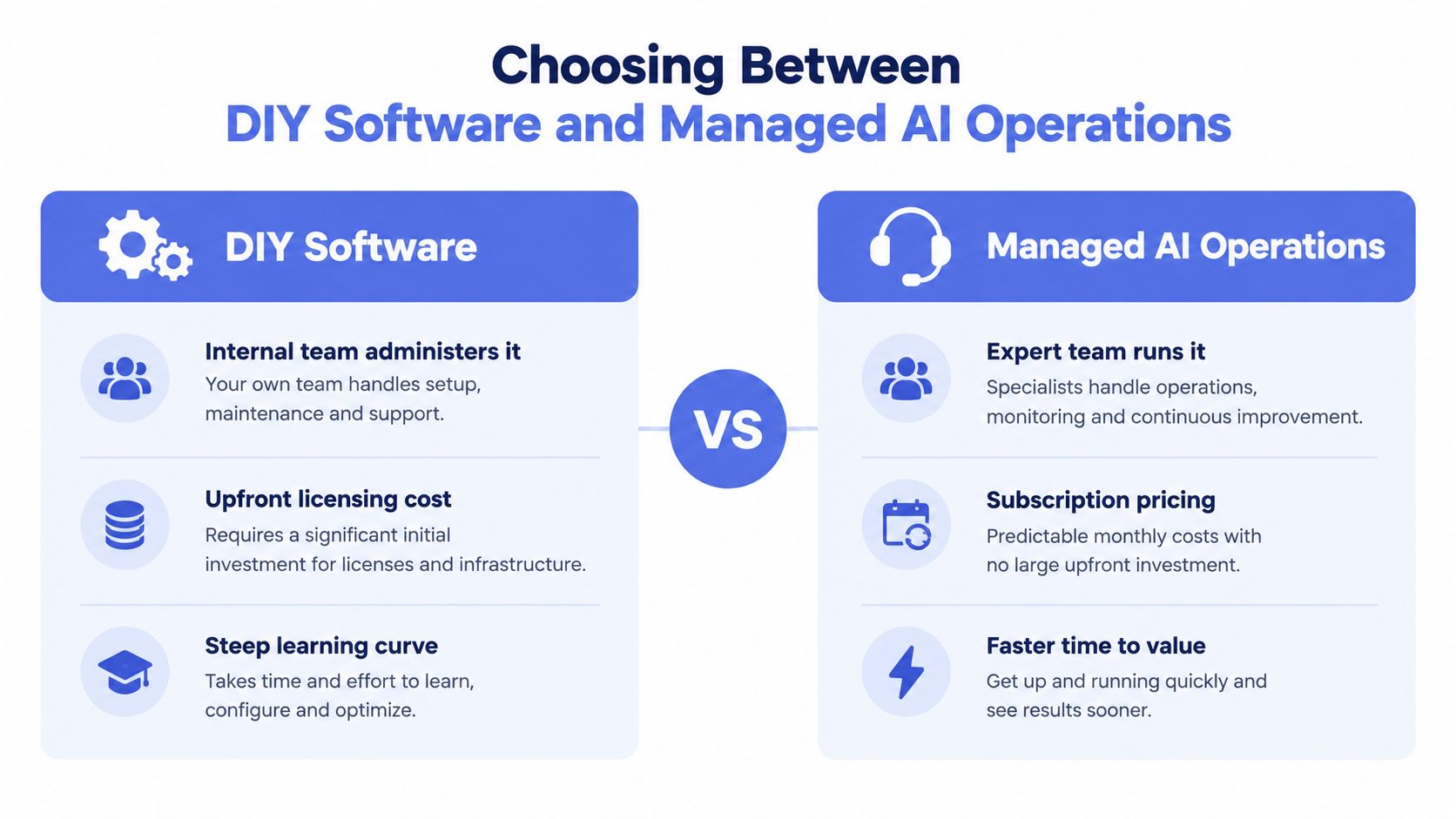
DIY software looks cheaper at the start because the licence is visible and the problem seems narrow. What doesn't stay visible is the work around it, prompt tuning, exception handling, CRM hygiene, testing, retraining staff, and fixing the logic when real customers do something unexpected. That hidden admin is where many projects stall.
Two Operating Models, Two Different Burdens
If your team administers the system internally, someone has to own it every week. That means monitoring failures, updating workflows, and deciding when a change is safe to push. The software may be powerful, but the business still carries the operating load.
Managed AI operations shift that burden. The system is monitored, tuned, and improved after launch based on real exceptions and observed failures. That matters because customer care is never static, enquiries change, scripts go stale, and CRM data drifts if nobody is keeping an eye on it.
Capterra's 2024 Australia customer-service technology research found 57% of Australian businesses were already using AI-enhanced tools, while industry reports showed only 4% of centres were successfully scaling end-to-end automation across multiple workflows (Capterra research). That gap says a lot. Adoption is real, but scaling is still hard.
A Practical Way to Choose
If your team has spare operational bandwidth and strong process ownership, DIY can work for narrow use cases. If your business already struggles with admin pressure, missed follow-up, or inconsistent CRM discipline, a managed model is usually the safer fit.
Start with the smallest useful system, not the broadest one you can imagine.
For a service business wanting a managed path, Truespeak's AI automation agency model sits in that category, operating around the existing stack instead of turning staff into software administrators. The question is whether you want another tool, or a working layer that keeps the process alive.
Starting with the Smallest Useful System
The safest rollout starts where the work is repetitive, visible, and low risk. That usually means one channel, one task, and one owner, then a narrow expansion only after the workflow proves stable under real traffic. A small build is easier to audit, easier to fix, and far less likely to create new admin.
Good Starting Points
A 2025 industry report found post-call and during-call automation are the strongest technical entry points, with automatic call summarisation already used by 35% of centres to reduce handling friction (ACXPA report). That makes summarisation a sensible first layer because it reduces after-call work without trying to replace the whole conversation.
From there, the order of operations should stay simple.
- Identify one repetitive channel so the team knows exactly where the system lives.
- Define a single task, such as summarising calls, acknowledging enquiries, or collecting intake details.
- Deploy to a small cohort so exceptions can be seen quickly.
- Measure and expand only when the workflow remains clean under load.
Use the CRM as the Source of Truth
The CRM has to stay authoritative. If the AI layer and the CRM disagree about status, next action, or ownership, the business will create more confusion than it removes. The system should write back cleanly, preserve history, and make it obvious who is doing what next.
A strong launch also needs a post-launch runbook. That means rules, alerts, review cadences, and a clear path for humans to override the system when the edge cases arrive. For service SMEs, that's the difference between a helpful operational layer and another piece of software no one trusts.
Measuring Outcomes and Preventing Revenue Leakage
Measure what the AI changes. The right test is whether fewer enquiries go cold, deals move faster, and admin stops being handled twice. For invoice chasing, track the share of invoices followed up inside the agreed reminder window, then compare that with days sales outstanding before and after the sequence runs.
Track Work That Used to Slip Through
Measure the number of enquiries that get owned, not just answered. Measure how many quotes have a next action attached. Measure how many invoices are chased on time instead of when someone notices them. Those are the practical signs that the business is running a visible operating layer rather than relying on memory and goodwill.
Pull three months of enquiry records and mark every instance where the next action field was empty for more than 48 hours. Those are the leakage points. Check where customers went silent, where follow-up stalled, and where CRM records went stale. AI customer care can help close those gaps, but only if the workflow makes the gaps visible first.
Focus on Consistency, Not Vanity
Speed matters, but consistency matters more. A fast first response that loses context is still a bad outcome. A slower reply that lands with the right history, the right owner, and the right next step is often better than a clever but hollow automation.
What matters is operational clarity. Every enquiry should be owned, staged, and resolved in a way the team can see. That is when AI stops being a novelty and starts supporting the service desk.
If you want AI customer care that works around your existing CRM, keeps human review where it matters, and reduces the admin that slows service teams down, Truespeak can help design and manage the operating layer. Visit Truespeak to see how managed AI operations, follow-up automation, intake, CRM hygiene, and invoice reminders can fit into your current workflow.