

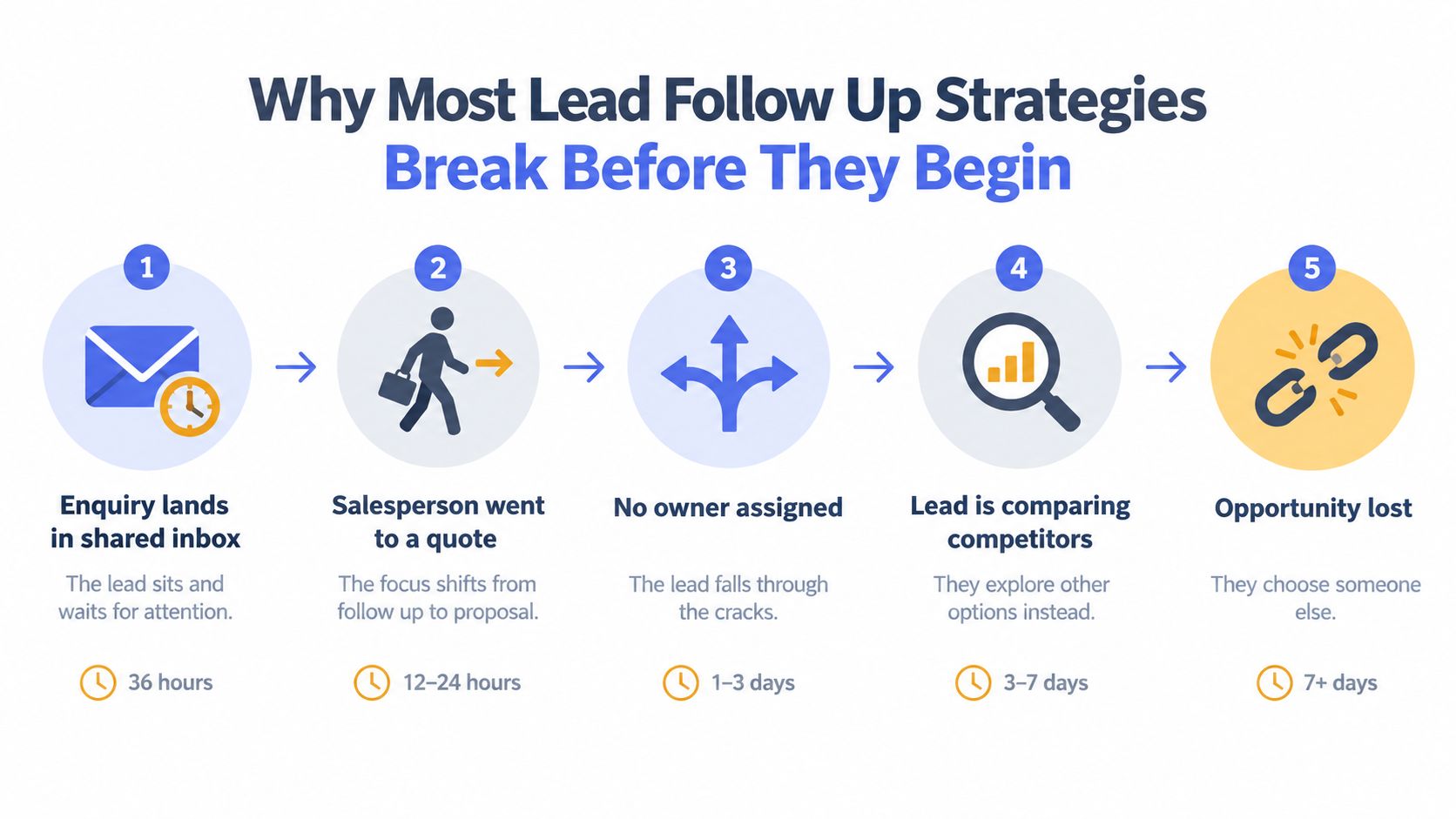
It's a Tuesday morning in Sydney. A homeowner submits a bathroom renovation enquiry before work, a website form drops into a shared inbox, and nobody owns it. By the time someone notices, the salesperson who usually handles those jobs is out measuring a site, the enquiry has sat untouched for 36 hours, and the homeowner is comparing two competitors who replied first.
That silence usually isn't a motivation problem. It's an operating problem. There's no named owner, no response rule for different levels of intent, no expiry date on a stale lead, and no clear action for the next 15 minutes, the next day or the next week.
A practical lead follow up strategy treats every enquiry as work moving through a managed process. Qualification, sequencing, routing, measurement and rollout all need written rules, human judgement and visible ownership. A drip campaign that sends the same message regardless of context may create activity, but it won't reliably move a quote, proposal or dormant opportunity towards a decision.
Table of Contents
- Why Most Lead Follow Up Strategies Break Before They Begin
- Qualifying and Routing Leads Before Any Message Goes Out
- Designing the Three Core Sequences That Do the Heavy Lifting
- Building a Multi-Touch Cadence With Human Approval Gates
- Metrics That Tell You Whether the Strategy Is Working
- Rolling Out and Monitoring the System Over 90 Days
- The Real Job Is Reducing Dropped Work, Not Sending More Emails
Why Most Lead Follow Up Strategies Break Before They Begin
The first failure often happens before the first follow-up message. An enquiry lands in the wrong inbox, a team member assumes someone else will respond, or a missed call never becomes a task. Australian SME analysis published in August 2026 found that small businesses missed roughly one in ten customer calls before anyone answered, based on more than 207,000 inbound calls across 858 client businesses in nine industries. The operational lesson is simple: an unanswered lead needs an immediate recovery path, not a note to “get back to them later”. The Australian missed-call analysis explains why inbound capture needs to include calls as well as forms.
The Quiet Gaps Are Process Defects
A response SLA gives the team a control point. Australian guidance recommends acknowledging an enquiry immediately and making the first genuine contact attempt within 5 minutes, with a personal call or message within the hour for high-intent leads. AxisO's guidance on Australian response expectations turns a vague intention into an assignable operating rule.
The commercial case for speed is also clear in the Australian benchmark data. A good response time is under 5 minutes, best-in-class teams respond in under 60 seconds, and contact odds can fall by up to 100 times between minute 5 and minute 30, according to the Australian lead response benchmark roundup. The same source references a Harvard Business Review audit of 2,241 companies, in which only 16% replied within 1 to 24 hours. Those figures don't tell you precisely what your business will achieve, but they do show why a delayed first touch deserves operational attention.
Practical rule: Every new enquiry should have a named owner, a next action and an expiry time before it enters a sequence.
Why Drip Campaigns Create False Confidence
A generic automation can acknowledge a form, but it can't decide whether the customer needs an urgent repair, a detailed quote or a planning conversation. It may send a cheerful reminder while a project manager is already discussing scope, or continue contacting someone who has asked not to be contacted.
A working system pauses when a person replies, books a meeting, changes stage or flags a sensitive issue. It also routes exceptions, such as out-of-area work, supplier enquiries, duplicates and incomplete briefs, instead of forcing every record through the same path.
Start by documenting five things:
- Qualification: What must be known before the lead can be prioritised?
- Sequencing: Which cadence matches the lead's intent and stage?
- Routing: Who owns the next action, and when does escalation happen?
- Metrics: Which measures expose dropped work rather than message volume?
- Rollout: How will the system be tested, reviewed and improved?
The objective isn't to send more messages. It's to ensure that every legitimate enquiry receives the right next action, with a person accountable when judgement matters.
Qualifying and Routing Leads Before Any Message Goes Out
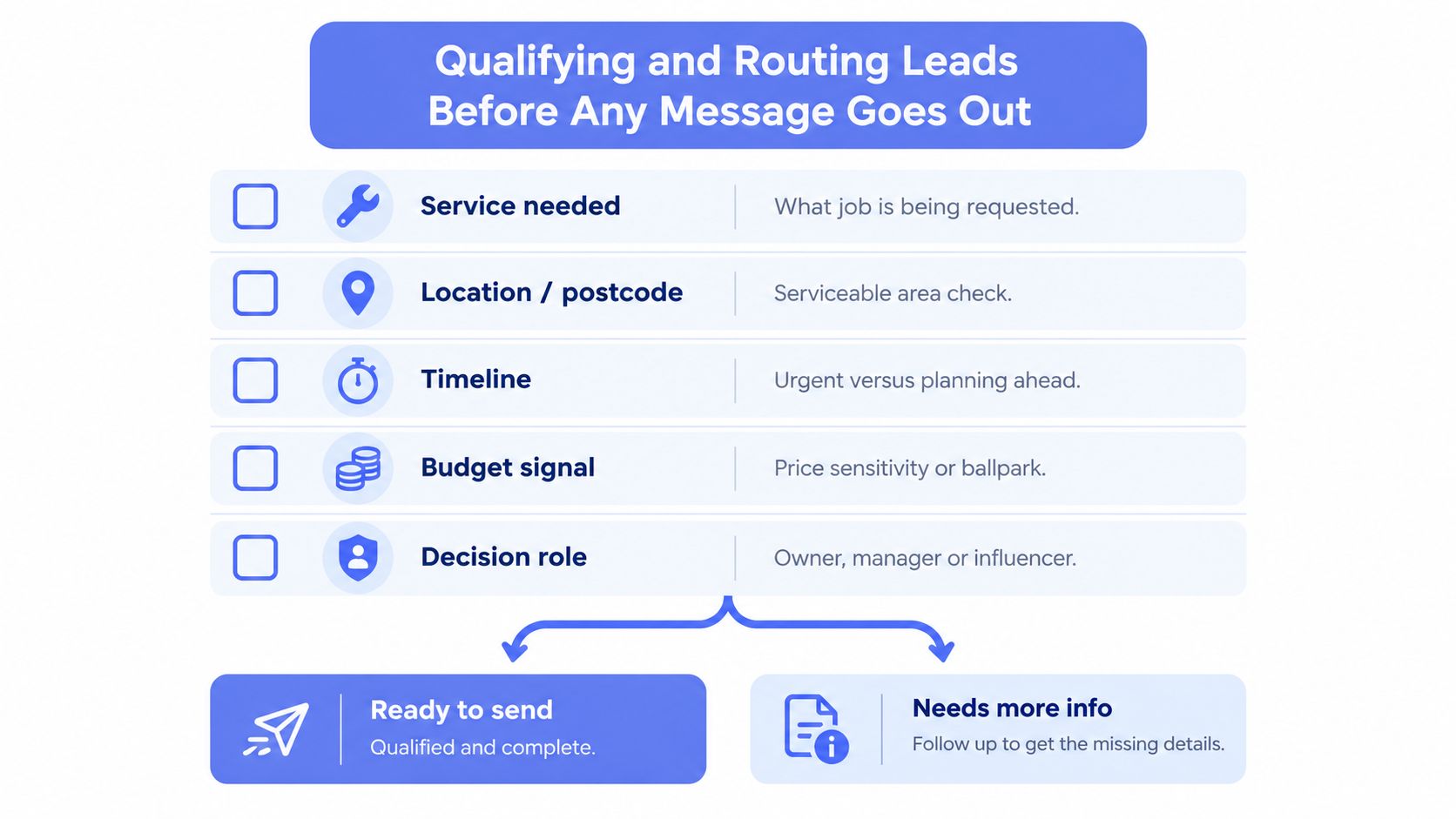
Qualification should happen before sequence enrolment, even if the first response only confirms receipt. A useful minimum record captures service needed, location or postcode, timeline, budget signal, decision role and source. These fields let an operations manager filter and route work. A free-text note that says “wants renovation” doesn't.
Use dropdowns wherever the answer needs to drive a workflow. For example, timeline can be “urgent”, “this quarter” or “planning ahead”. Location can identify serviceable postcodes. Decision role can distinguish owner, manager, tenant, procurement contact or influencer. The CRM should also record whether the enquiry came from organic search, paid advertising, referral, social media, phone or a contact form.
Use Buckets That Change the Next Action
A three-bucket model is usually enough to create sensible routing without pretending that a score is perfectly objective.
- Hot or A-grade: The service fits, the location is workable and the customer has a near-term need. Route the lead to a senior closer for a fast human response.
- Warm or B-grade: The customer is a reasonable fit but timing, scope or budget needs clarification. Assign a callback, then use useful nurture content while the owner gathers missing information.
- Cold or C-grade: The timing is distant, the fit is uncertain or the enquiry lacks a clear project. Keep it out of active sales chasing and place it in controlled re-engagement.
Each bucket needs an SLA, not just a label. For A-grade leads, the rule might require an immediate acknowledgement and an assigned call task. For B-grade leads, the owner might have a defined same-day action. For C-grade records, the system should set a future review date and prevent accidental high-pressure messaging.
Learn about lead routing best practices when you're mapping assignment rules across people, territories and service types.
Decide What Happens to Incomplete Enquiries
An unfielded enquiry shouldn't disappear into an “uncategorised” view. Give it a temporary owner, send a short acknowledgement that asks for the missing detail, and set a deadline for reclassification. If nobody can confirm the service, location or timeline, move the record to an exception queue for an operations manager.
Before enrolling anyone into a sequence, check:
- Source and campaign: Can you trace where the enquiry came from?
- Owner: Is one person accountable for the next action?
- Last touched date: Has anyone contacted the lead?
- Stage: Is the record new, qualified, quoted, awaiting approval or dormant?
- Consent and preferences: Is the selected channel appropriate for the contact?
This hygiene makes follow-up safer and more useful. It also stops marketing activity from masking a sales handoff that never happened.
Designing the Three Core Sequences That Do the Heavy Lifting
Speed-to-lead, nurture and re-engagement solve different operational problems. They shouldn't share one endless cadence because the customer's intent, the acceptable pressure and the human decision required all change by stage.
For Australian businesses, channel choice needs attention. An Australian fitness-industry study found that email enquiries averaged nearly 7.5 hours before a response, Facebook messages averaged 19 hours, and Instagram enquiries averaged 31 hours. The Australian fitness enquiry response study shows why social and email leads need their own monitoring rather than being treated as secondary inbox traffic.
| Sequence | Trigger | Channel Mix | Human Gate | Duration | Stop Condition |
|---|---|---|---|---|---|
| Speed-to-Lead | New enquiry, missed call or high-intent form | SMS, email and phone | Person confirms fit and next action before later automated touches | First 48 hours | Reply, meeting booked, disqualified or do-not-contact request |
| Nurture | Warm lead not ready to proceed | Email, approved SMS where appropriate and relevant remarketing | Owner approves the topic and checks the lead has not progressed | 14 to 21 days for the active cadence | Explicit no, qualification upgrade, meeting booked or move to long-term nurture |
| Re-engagement | Stalled opportunity with no activity for 30 or more days | Low-pressure email, call task or one approved message | Owner selects a new reason to reopen the conversation | Up to three attempts | Reply, clear no, invalid record or recycle |
The speed-to-lead sequence should create contact and clarity, not attempt to sell the entire service in one automated message. The first response can acknowledge the enquiry and confirm the next step. A human then decides whether the lead needs a call, a site visit, more photos or a scope conversation.
Nurture works when the lead has a legitimate reason not to buy yet. A professional services firm might send a preparation checklist. A builder might explain the information needed for a useful quote. The message should answer the customer's current uncertainty, not repeat “just checking in”.
Re-engagement is different again. A stalled opportunity may need a new angle, such as a changed timeline, an unanswered scope question or a simpler next step. If there's no meaningful reason to reopen the conversation, recycle the record rather than keeping it in an automated loop.
Australian guidance commonly recommends 5 to 7 messages across 14 to 21 days, while another Australian small-business source describes a denser 10 calls in 10 days approach for connection. The Australian CRM and lead nurture guidance supports using a cadence as a starting point, not as a universal rule. Choose the lighter path when the customer is still evaluating, and reserve denser outreach for high-intent situations where a human has approved the approach.
Building a Multi-Touch Cadence with Human Approval Gates
A useful cadence gives every touch a purpose. It also makes the next message conditional on what the customer did, not just on the calendar.
A Practical 21-Day Pattern
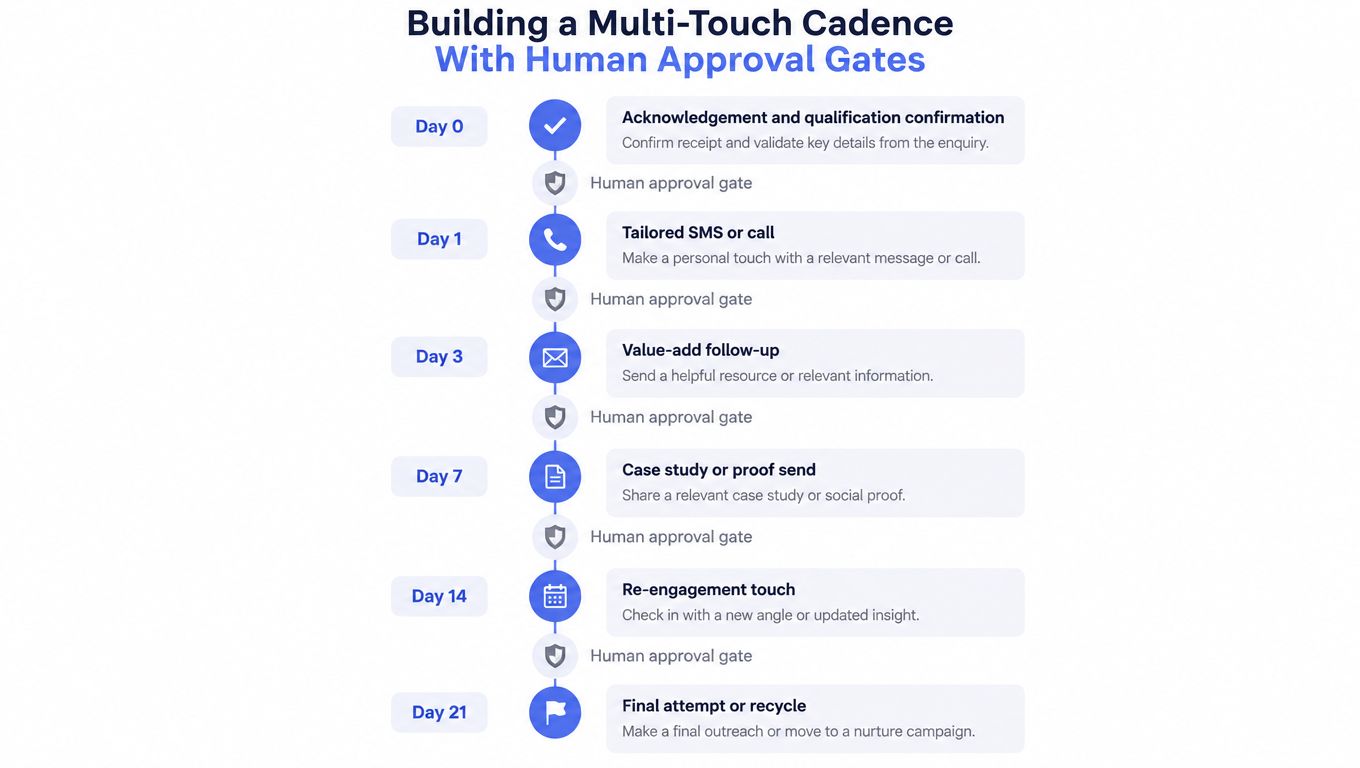
Day 0, acknowledgement and qualification confirmation. Send a concise confirmation through the channel the customer used where consent and business rules allow it. State what you understand, identify the missing detail and explain when a person will respond. The workflow should create an owner task immediately.
Day 1, personalized SMS or call. The owner checks the record, then sends a message that uses the customer's stated problem. For a Sydney bathroom renovation enquiry, that might be: "Hi Sarah, thanks for the details about updating the main bathroom in Marrickville. Are you working towards a particular start date, and have you already chosen the fittings?" The point is to open a useful conversation, not to paste a generic sales line.
Day 3, value-add email. Send a short explanation, preparation checklist or scope guide that addresses the stated concern. The CRM should pause this touch if the owner has already replied, booked a call or changed the stage.
Day 7, proof or relevant example. A case study, testimonial or project explanation can reduce uncertainty, but the owner should approve the content before it sends. Don't send proof that doesn't match the lead's service, location or decision stage.
Day 10, softer check-in. Ask whether the project is still active and offer a clear choice, such as a call, a scope review or a later follow-up date.
Day 14, re-engagement with a new angle. Change the reason for contact. For the bathroom enquiry, that might be an invitation to confirm whether the customer needs help narrowing the scope, rather than another request to book.
Day 21, final active attempt. A sales lead approves the message before release. If there's no response, move the record into long-term nurture or recycle it with a documented reason.
Make Approval a Real Control
Human approval shouldn't mean a person vaguely knows that an automation exists. The approver needs to see the lead's source, previous messages, current stage and proposed copy, then click approve, edit or reject inside the working system. The workflow should stop automatically when the contact replies, books a meeting or is marked do-not-contact.
That same pattern applies to other operational automations where a sensitive action needs sign-off. Teams evaluating approval tools for Meta Ads pauses can use the same principle here, separate the automated preparation from the human decision.
For a deeper treatment of review gates, see human-in-the-loop automation. The practical test is whether the person can intervene before the customer receives the message, not whether the workflow has an approval label.
Metrics That Tell You Whether the Strategy Is Working
A CRM dashboard should show whether work is progressing, not merely whether the team is busy. Separate predictive measures from vanity measures, then give each one an owner and review rhythm.
The first useful signal is speed-to-lead, measured as a median and a 90th percentile in minutes. The median shows the typical experience. The 90th percentile exposes the tail where leads wait because a shared inbox, roster or handoff failed. This guide to lead response time is useful when defining the field, timestamp and reporting logic.
| Metric | Predictive or vanity | Target threshold | Where to find it |
|---|---|---|---|
| Speed-to-lead median | Predictive | Set a business-hour SLA by lead bucket | CRM created time, first response time and lead priority |
| Speed-to-lead 90th percentile | Predictive | Review when it rises above 45 minutes | CRM report filtered by source, owner and business hours |
| First reply to second touch interval | Predictive | Review when it exceeds four days | Activity timestamps and sequence step history |
| Qualification-to-meeting conversion by source | Predictive | Compare against the business baseline | Lead source, qualification stage and meeting record |
| Meeting-held rate | Predictive | Investigate missed meetings by owner and source | Calendar integration and opportunity stage |
| Revenue closed per enquiry dollar | Predictive | Track by source and qualified enquiry cohort | Campaign cost, enquiry record and closed revenue |
| Email open rate in isolation | Vanity | No standalone threshold | Email reporting, used only with reply and progression data |
| Total touches sent | Vanity | No volume target | Sequence activity log |
| Lead count without qualification filter | Vanity | No target without fit and stage | CRM pipeline view |
The exact target should reflect your capacity, service model and business hours. What matters is that the threshold triggers a review, rather than becoming a decorative number on a dashboard.
Build Three Views for Three Decisions
The daily operations dashboard belongs to the sales lead. It should filter open records by owner, age, current stage, missed SLA, last touch date and next action. The daily check is about rescuing stalled work.
Management needs a weekly funnel view covering a consistent date range. Compare source, qualification, meeting booked, meeting held, quote issued and closed stages. This reveals whether the problem sits in acquisition quality, response speed, qualification or post-meeting follow-through.
A monthly source-quality review should compare qualified enquiry volume with meetings held and revenue closed per enquiry dollar. Don't let a large lead count hide poor fit. The source that produces fewer but better-qualified opportunities may deserve more attention than the source producing the most forms.
If the 90th percentile response time rises above 45 minutes, or the second-touch interval moves beyond four days, trigger a process review. Check roster coverage, routing failures, missing fields and approval queues before rewriting every message.
Rolling Out and Monitoring the System Over 90 Days
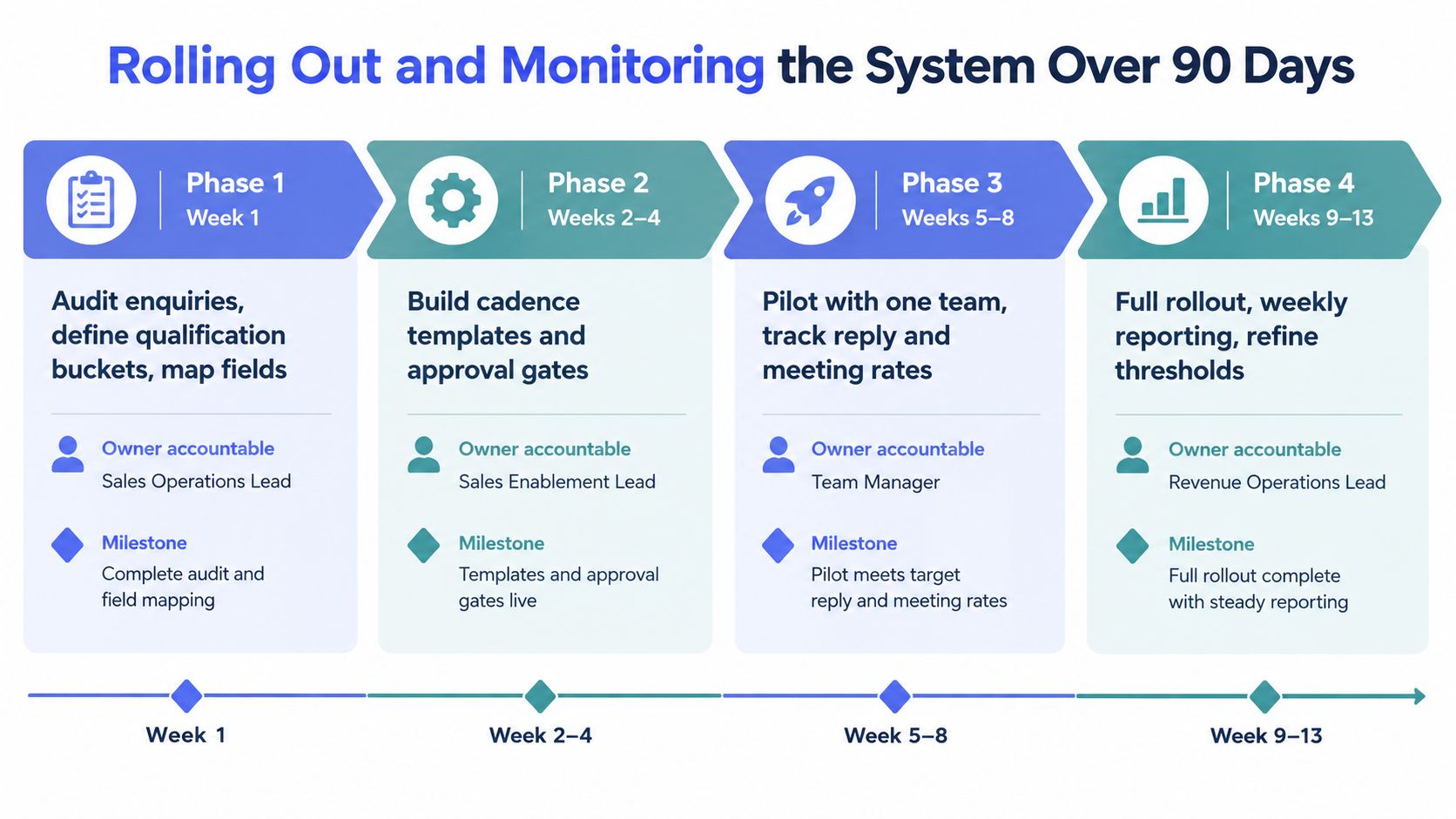
A follow-up system should be introduced in stages. Large launches hide defects because nobody knows whether a failure came from the fields, routing, message, approval gate or reporting.
Week One Sets the Operating Baseline
Audit the existing enquiries, missed calls, forms, quotes and dormant opportunities. Define the qualification buckets, map the fields already present in HubSpot, Pipedrive or Zoho, and identify where information is lost between inboxes and the CRM.
Draft the first response, owner task, nurture and re-engagement templates. Build routing rules for service area, urgency and owner availability. Assign one person to approve the workflow and another to review exceptions. The first milestone is not a launch. It's a documented path for every common lead type.
Month One Tests the Workflow Under Supervision
Switch on the three core sequences for a controlled group. Use shadow sends first, so the assigned owner can inspect the proposed message without the customer receiving it. Record the baseline for speed-to-lead, second-touch interval, qualification-to-meeting conversion and meeting-held rate.
Hold a weekly 30-minute operations review. Look at dropped leads, duplicate records, unassigned enquiries, out-of-area requests, spam, supplier enquiries and contacts who asked for a different channel. Fix the rule that failed instead of manually rescuing the same category every week.
Quarter One Tightens the System
Use the first eight weeks of data to adjust approval gates, remove sequences that underperform against predictive measures and expand re-engagement into a 90-day cold bucket where that matches the service cycle. Document exception handling in plain language, including who makes the decision and what stage the record receives.
The monitoring rhythm should remain simple:
- Daily: Check stalled leads, missed SLAs and unassigned records.
- Weekly: Review funnel movement, response intervals and owner queues.
- Monthly: Audit source quality, field completeness and campaign attribution.
- Quarterly: Reset the strategy, retire weak paths and update qualification rules.
Managed AI operations can support monitoring, tuning, approval gates, reporting and exception handling around an existing CRM, but the business still needs to own the policy. Automation should preserve the operating standard when staff are away, not remove accountability from the team.
The Real Job Is Reducing Dropped Work, Not Sending More Emails
More touches aren't automatically better. A sequence can become a hiding place for weak handoffs, stale records and messages that nobody has approved. The Australian guidance already points towards multi-touch follow-up, but persistence only helps when each touch has a reason and a stop condition. This Australian guidance on lead follow-up also highlights the need to consider channels, scoring and routing rather than relying on one-off outreach.
Ask three uncomfortable questions:
- Where do leads stall between marketing-qualified and sales-qualified? If the answer is a shared inbox or an unowned CRM view, fix the handoff before adding another message.
- Who owns opportunities that have been idle for more than 14 days? A stage without an owner isn't a forecast. It's a storage location.
- How many booked quotes receive no follow-up after the meeting? Post-meeting drift often costs more than a slow first response because the business has already invested time in the conversation.
Review the sequence and keep the touches that earn replies or move a stage forward. Redirect the recovered capacity into qualification, quote preparation, meeting follow-through and clean CRM notes. The point isn't restraint for its own sake. It's protecting the work your business has already paid to generate.
Truespeak helps Australian service businesses build and manage operating systems for first response, context-aware lead follow-up, intake, CRM hygiene and exception handling around the tools they already use. If dropped enquiries, stale quotes or inconsistent handoffs are costing your team attention, visit Truespeak to discuss a practical system with human approval where it matters.