
Australia had 30.4 million mobile phone services in operation against a population of 27.5 million at June 2025, according to the ACCC's Communications Market Report. Mobile connectivity isn't the missing piece when a customer can't reach your business. The missing piece is often what happens after the ringing stops.
Missed call text back sends a short acknowledgement after an unanswered inbound call, then gives the enquiry somewhere useful to go. For an owner answering between Sydney job sites, that should mean a logged conversation with an owner and a next action, not another inbox to check after dinner.
Table of Contents
- Why SMS Still Fits a Missed Call
- Phone and SMS Architectures Compared
- How to Run Missed Call Text Back
- Service Texts and Australian Spam Rules
- Timing Templates and a Single Owner
- Callers Who Should Not Get a Text
- Run the Desk from Your Own Baseline
Why SMS Still Fits a Missed Call
A missed-call text-back is one short service SMS sent after one unanswered inbound call. It names the business, acknowledges the call and offers a next step, such as replying with the job details or requesting a return call.
In ACMA's nationally representative survey of Australian adults, 98% used a mobile phone for calls and 96% used SMS in the six months to June 2025, both unchanged from 2024. That makes SMS a practical first-response channel, not a guarantee that someone will read or answer your message.
The basic message has a deliberately narrow job.
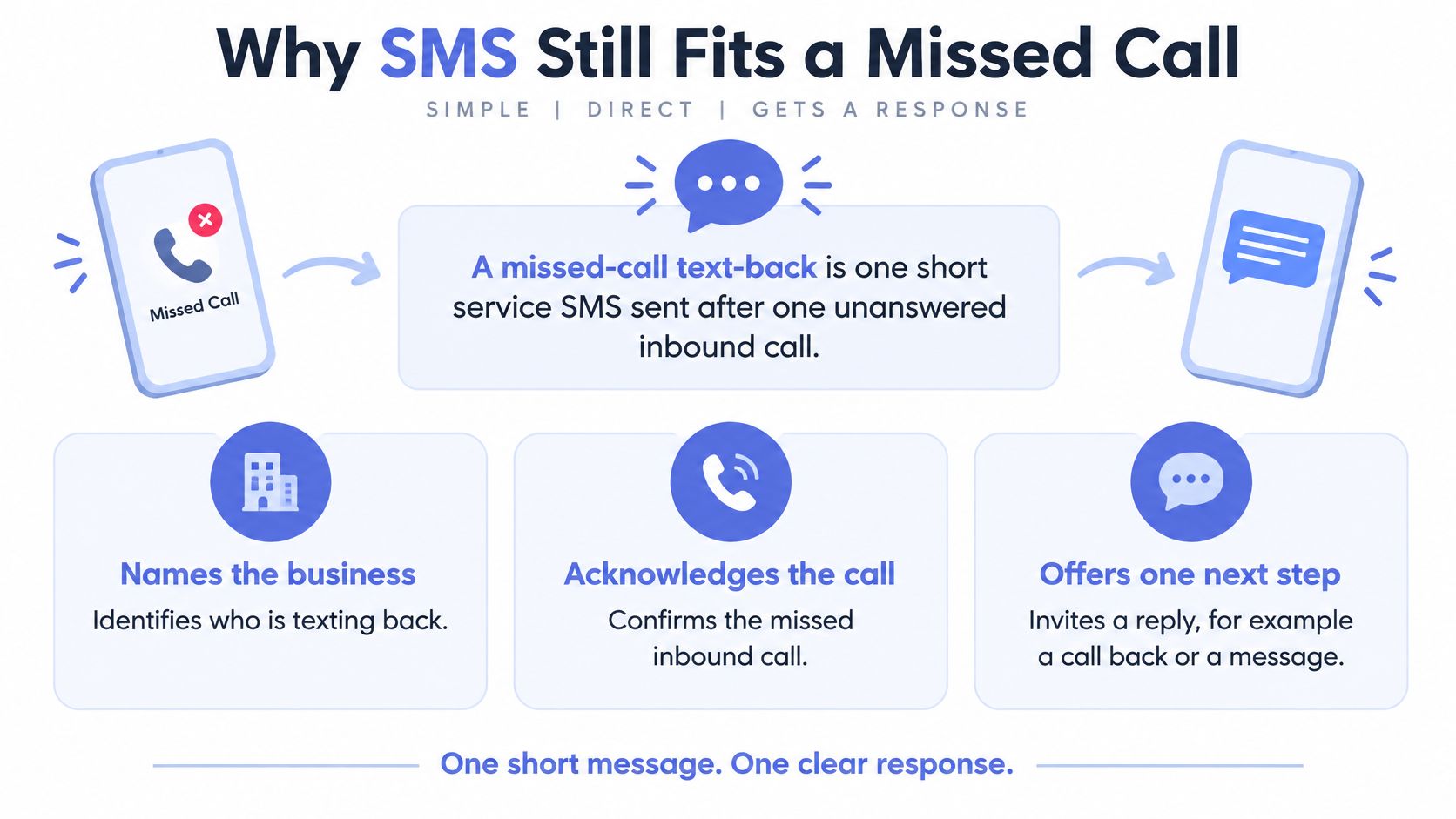
An owner on a roof, driving a van or serving another customer can't necessarily take a second call either. A useful acknowledgement gives the caller another way to explain what they need without pretending someone is already available.
Industry-reported findings reinforce the intake problem: a trade lead-response article attributes a 2023 finding that 27% of Australian trade enquiries received no reply to ASBFEO, while a summary citing the 2023 Hipages Tradie Insights Report reports that 62% of homeowners seeking trade services wouldn't leave a voicemail after an unanswered call. Treat these secondary reports as directional, not as your business's baseline.
Practical rule: Build the response path before switching on the text.
That means choosing a small stack, using gated sending, assigning the conversation, stopping unsuitable messages and separating service communication from marketing.
Phone and SMS Architectures Compared
Choose the smallest stack that can detect a miss once, validate the caller's mobile number, send a service acknowledgement and update your existing CRM. A phone-system replacement shouldn't be the opening move.
| Architecture | Best fit | Main trade-off | Required handoff |
|---|---|---|---|
| Cloud telephony with an SMS API | A business willing to move its main number | Migration and routing changes need testing | Call event and delivery receipt feed the CRM |
| Existing PBX, divert or mobile plus a separate SMS API | A team keeping its current number and carrier arrangement | Duplicate or incomplete call events | Webhook or call-detail record creates a deduplicated task |
| Unified inbox with calling and SMS | A desk already triaging messages together | Staff can mix service replies with promotional messaging | Conversation gets a named CRM owner |
Keep the Number Unless It Blocks the Workflow
Cloud telephony can make the event trail easier to follow because call status and SMS delivery can sit within the same platform. Test what the system calls a missed call, though. An unanswered extension isn't necessarily an unanswered customer call if another staff member picked up elsewhere.
Keeping a PBX or mobile setup avoids unnecessary disruption. The integration needs a dependable webhook, meaning an event notification, or a usable call-detail record. Confirm that it preserves the caller ID and distinguishes answered calls, abandoned calls and voicemail outcomes.
A separate messaging service introduces another place where retries can occur. If the phone provider repeats an event and the integration treats it as new, the caller receives duplicate apologies.
Decide Where People Actually Work
A unified inbox suits a staffed desk that already reviews email and SMS throughout the day. It's less useful when everybody assumes somebody else owns the shared inbox. Restrict saved replies so an operational acknowledgement doesn't become a sales offer through a careless click.
Across all architectures, the business keeps responsibility for consent evidence and sender identity. A vendor dashboard isn't a substitute for records you can retrieve and explain.
If you're deciding whether to answer calls differently rather than recover missed ones, compare the operating responsibilities in this guide to an AI receptionist for small business. Answering and text-back solve different points in the intake process.
Replace the phone system only when the current setup can't emit a reliable missed-call event. Otherwise, concentrate on CRM automation that turns the event into assigned work, rather than a side-channel chat nobody reviews on Monday.
How to Run Missed Call Text Back
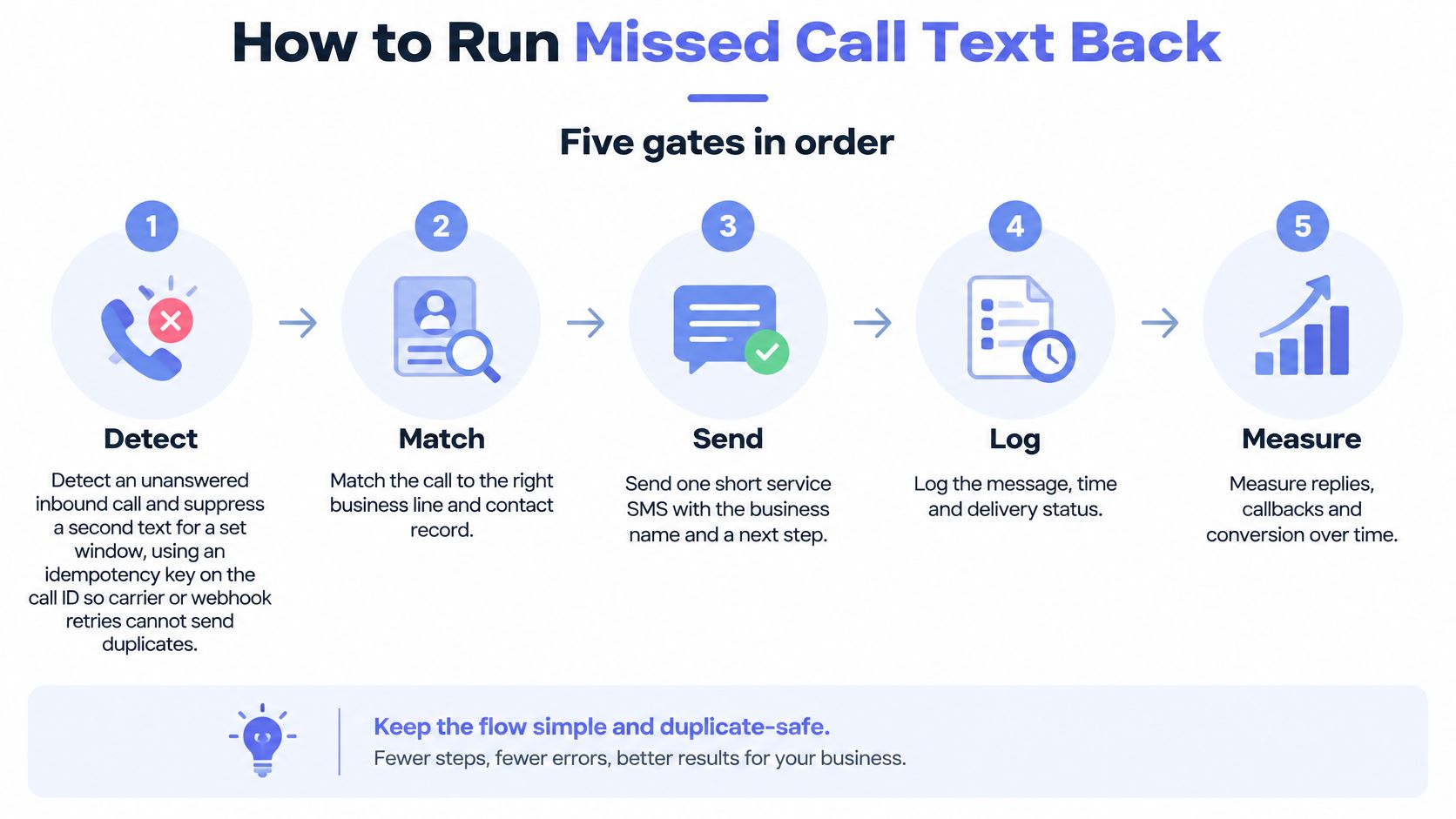
Run the workflow through five gates, with a clear failure path at each gate. Don't connect an unanswered-call trigger directly to an unrestricted message sequence.
Use this visual as a simple operating overview, then configure the eligibility and exception rules in the actual workflow.
Put the Gates in Order
Detect the unanswered inbound call. Use the call ID as an idempotency key, so processing the same event again doesn't send another message. Add a caller-level suppression window for repeated attempts, otherwise someone ringing again can receive another acknowledgement even though the integration handled each call correctly.
Confirm an eligible Australian mobile. Normalise the number format, check the number type and match the receiving business line before selecting a message. Landlines, short numbers and withheld caller IDs must leave the SMS path, preventing failed sends and messages to the wrong contact.
Send a narrow service acknowledgement. Name the business and offer a reply or callback path, without a discount, price pitch or campaign invitation. Check suppression status immediately before sending, not just when the call first enters the queue.
Classify the response. Separate booking interest, urgent issues, wrong numbers, opt-outs and no response. Keep ambiguous replies available for human review rather than forcing them into a sales stage.
Write the outcome to the owned CRM record. Record timestamps, message purpose, delivery status, consent basis where relevant, and the next action. This prevents the conversation disappearing when the original notification scrolls off somebody's phone.
Add Brakes Before Adding Volume
Apply a quiet-hours hold to non-urgent texts and cancel a queued acknowledgement when a person has already started returning the call. Recheck the contact's status when releasing held messages, because the enquiry may have been resolved while the message waited.
Keep later promotional follow-up behind a separate consent field. Business.gov.au's email and text marketing guidance explains that commercial electronic messages require consent, sender identification and an unsubscribe facility, and that a single enquiry doesn't usually establish inferred consent for ongoing marketing.
For appointment-based teams, Bonna Beauty's beauty studio SMS communication setup offers a separate workflow example to review when mapping booking communication. Keep the missed-call acknowledgement distinct from later booking messages.
The following video provides another way to review the text-back mechanism.
Use a speed-to-lead workflow to qualify and route a fresh enquiry while a person remains responsible for the conversation. The sequence is finished when the CRM shows an owner and a next action, not when the SMS status says delivered.
Service Texts and Australian Spam Rules
Edit for purpose before editing for tone. A message acknowledging a missed call and arranging a return call needs to stay that narrow. Adding an offer, a discount or a promotional nurture sequence changes the assessment.
The OAIC's APP 7 direct-marketing guidelines define direct marketing as using or disclosing personal information to communicate directly with someone to promote goods or services, including by SMS. Where APP 7 applies, the rules address reasonable expectations, consent and simple opt-out mechanisms, subject to the applicable circumstances and interaction with other legislation.
A service label in your CRM doesn't decide the legal position. The message's actual content and purpose matter, and privacy obligations don't replace the separate rules for commercial electronic messages.
Keep Evidence, Not Assumptions
Your contact record should distinguish why you can respond to an enquiry from why you can send marketing. Don't let an integration populate a marketing-consent checkbox merely because it received a phone number.
Keep these records accessible:
- Message purpose: The enquiry or service event the message responds to, plus the template version used.
- Consent evidence: When and how permission was obtained, what it covered and any supporting form or conversation record.
- Sender details: The business identity and monitored contact path presented to the recipient.
- Suppression history: Opt-outs, wrong-number reports, shared-line restrictions and the action taken.
- Audit trail: Trigger, send decision, delivery outcome, reply and responsible staff member.
A former customer needs particular care. A past job may explain who they are, but it doesn't automatically justify starting a promotional series when they call again.
Keep Operational Messages Separate
Appointment reminders need their own purpose and channel decisions. TOOLii's guide to choosing appointment reminder timing and channels is useful context when mapping that separate communication, rather than treating every message after an enquiry as interchangeable.
Staff shouldn't append a campaign to a callback conversation just because the SMS thread is already open. Lock promotional templates behind the relevant permission checks and make the unsubscribe route easy to find whenever required.
For uncertain wording or sensitive circumstances, get Australian legal advice before enabling the workflow. Outsourcing the send doesn't outsource your business's responsibility, and a neutral acknowledgement shouldn't be treated as a universal legal exemption.
Timing does not turn a promotional text into a service text.
Timing Templates and a Single Owner
Start with a message your team can fulfill. These are illustrative service templates, not scripts with a verified reply-rate advantage.
Choose the Action Before the Wording
Template A, a callback window
[Business name] here, sorry we missed your call. Reply YES and we'll call you between 2pm and 4pm.
The window is an example, not a recommended sending time. Use it only when a named person has capacity to make those calls, and change it when the roster changes.
Template B, basic job details
[Business name] here, sorry we missed your call. Reply with the suburb and the job so we can start on your enquiry.
This suits a service-area check before a callback. Don't ask for a long brief or sensitive documents in the opening message, and don't imply the enquiry has been accepted as a booked job.
There's no winning script or verified reply rate to copy. Choose wording that matches your business's voice and gives the caller a manageable next step.
Set the Record Before the Send
Before debating punctuation, require these fields:
| CRM field | What it must establish |
|---|---|
| Owner | The person accountable for reviewing the reply |
| Next action | The task that moves the enquiry forward |
| Expected response | A reply, a callback window or no further chase |
In a typical Truespeak engagement, the acknowledgement is triggered as soon as the missed call is logged, while leaving room for someone already calling back to take over. We don't claim a verified send-time, and the timing isn't built around an unpublished speed target.
When a reply arrives, keep it on the same CRM record. Qualify fit, intent and urgency, update the stage and notify the owner, rather than creating a disconnected lead for every message.
For example, a suburb outside your service area may need a polite human response and disqualification. A caller asking about an existing booking belongs with the service team, not in a new-business pipeline.
Remind the Team, Not the Caller
If the next action stalls, send an internal reminder to the accountable person or their backup. Don't automatically send another customer-facing text because a staff task became overdue.
Context-aware lead follow-up automation should continue the actual enquiry, not start a campaign unrelated to what the caller said. Keep the record visible until the opportunity is won, lost, disqualified or appropriately nurtured.
Pricing, complaints, sensitive client messages and consequential decisions stay with a person. At Truespeak, missing information, failed steps and decisions needing judgement pause with context, rather than being hidden behind an apparently successful automation status.
Callers Who Should Not Get a Text
Landlines, withheld numbers and uncertain shared lines shouldn't enter an automatic SMS sequence. Text is a recovery path, not a fix for every unanswered call. A bad send can move the failure from voicemail to an unwanted message.
The failure cases described in this Australian missed-call text-back overview are useful operational cautions, not evidence of a universal conversion gain. Don't build a business case around dramatic industry revenue-loss estimates without reliable evidence that applies to your operation.
When to Skip the Text
| Caller situation | Send the text? | Use this path instead |
|---|---|---|
| Valid Australian mobile, identifiable person | Yes, one service acknowledgement | CRM record with owner and next action |
| Landline, short number or non-mobile | No | Human callback queue |
| Withheld or blocked caller ID | No | Voicemail review if a recording exists |
| Shared switchboard or unclear personal number | Pause | Confirm a person expects a message |
| Reply says wrong number or STOP | No further messages | Suppression list and audit note |
| Urgent, distressed or ambiguous | Pause automation | Same-day human review |
For blocked caller IDs, a callback may be impossible unless the caller leaves contact details. Put the available information into a voicemail-review queue rather than creating a task nobody can complete.
Shared numbers need another check. A mobile attached to a company account may be used by several workers, and an old CRM contact name may no longer identify the person holding the phone.
Give Exceptions a Usable Destination
Name the alternative queues so staff can act without interpretation:
- Callback required: A usable voice number exists, but SMS is unsuitable.
- Identity check: A shared or uncertain number needs confirmation before contact.
- Urgent human review: Safety concerns, distress or unclear intent need a person.
- Suppressed contact: A wrong-number or stop request prevents further automated messaging.
Same-day review isn't an emergency response service. If your business handles urgent work, define a staffed escalation path and make any limitations clear instead of implying an unattended queue is being monitored.
Offer a voice callback window or a short web form when someone can't or won't use SMS. Consider language and accessibility needs when assigning the person who will respond.
Use intake automation only for eligible conversations where details such as suburb, job type or a photo are still missing. Before the shift ends, the operator should be able to name the queue, the person responsible and what that person must do next.
Run the Desk from Your Own Baseline
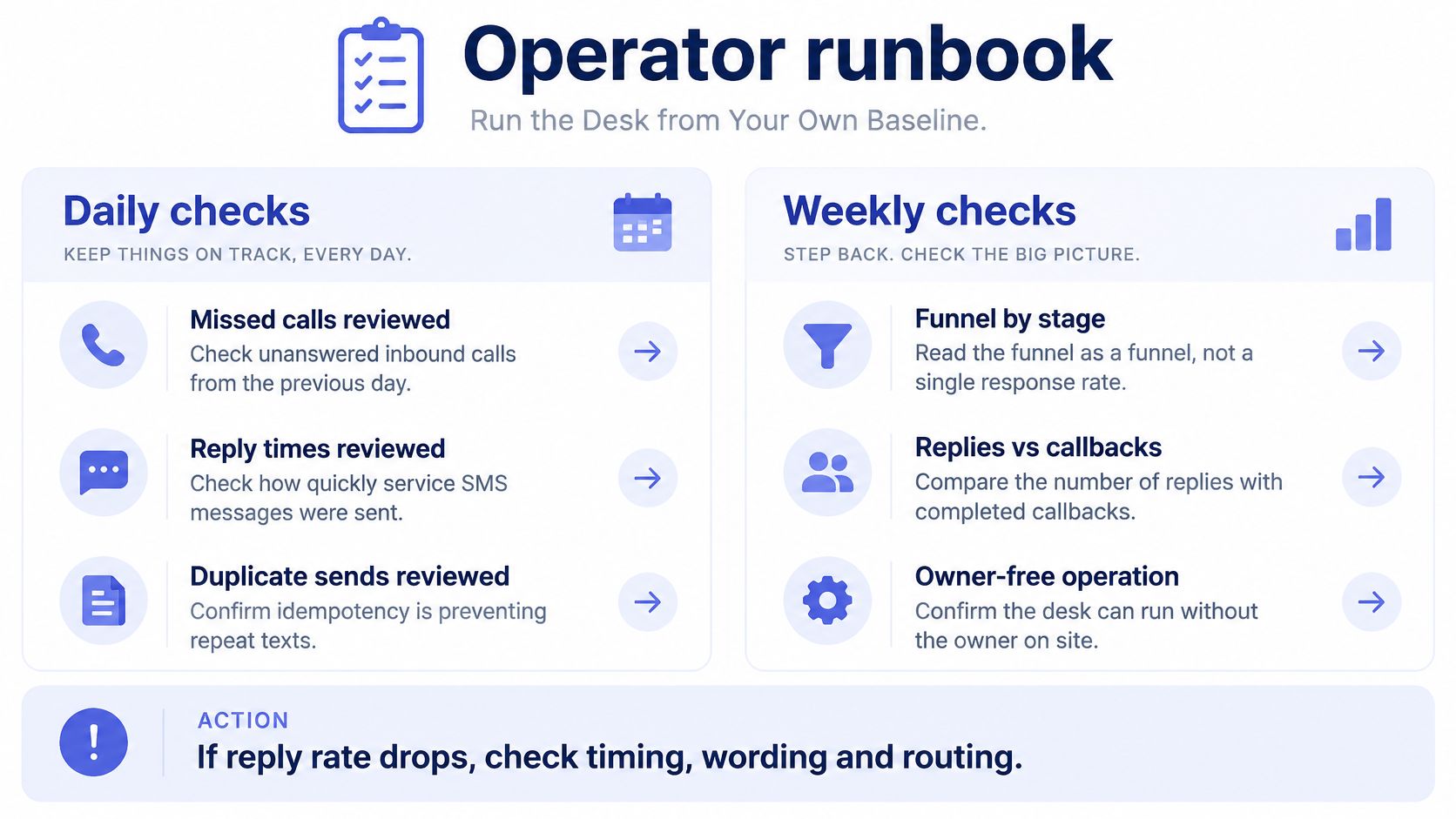
Daily and Weekly Runbook Checks
| Check | Cadence | Action if flagged |
|---|---|---|
| Failed carrier deliveries | Daily | Retry eligible transient failures, then route to a callback queue |
| Duplicate-send alerts | Daily | Check the call-ID idempotency key and suppress the extra send |
| Replies with no owner | Daily | Assign an owner before end of shift |
| Opt-outs not yet suppressed | Daily | Suppress now and verify completion against the legal deadline |
| Median time from call end to send | Weekly | Investigate drift from the configured timing |
| Reply latency and human escalations | Weekly | Move stalled replies to the named owner |
| Funnel by source and job type | Weekly | Compare the text-back branch with a comparable period |
| Complaints and wording review | Weekly | Re-check every template against the purpose test |
Under ACMA's email and SMS unsubscribe rules, unsubscribe requests must be actioned within 5 working days, cost no more than a normal SMS and remain functional for at least 30 days after the message. Suppress immediately where possible rather than using the deadline as a processing target.
Keep the runbook visible to whoever opens the desk.
Read the Funnel, Not Just Replies
Track missed calls detected, eligible mobiles, texts delivered, replies, qualified conversations and booked jobs. Split those stages by lead source and job type, alongside delivery failures, reply latency, opt-outs, complaints and human escalations.
Run a controlled rollout using a branch or call source with text-back against a comparable period or source without it. Compare qualified-contact and booking rates, not just message replies, and account for differences in enquiry mix.
Build the baseline over several weeks. Where volumes support statistical comparison, report confidence intervals by call volume, service category and lead source, rather than presenting a small change as a proven lift.
A customer using Total Plumbing & Hot Water Systems' form to request help with blocked drains illustrates another intake path worth mapping separately. Compare outcomes by channel and urgency instead of assuming a web enquiry and an urgent missed call are equivalent.
Review lead response time alongside completed callbacks and qualified conversations. A fast acknowledgement with a stalled handoff is still unfinished work.
Make the Desk Work Without the Owner
Include retry handling, stop-word classification, duplicate prevention and urgent-case routing in the review. Test the backup owner's access and instructions, not just whether the automation sends successfully.
At Truespeak, we start with the first operating gap worth fixing, whether that's response, follow-up, intake, CRM, invoices, admin or reporting. Our scheduled tasks and continuous checks cover enquiry handling, CRM updates, invoice chasing, preparation, problem monitoring and reporting, while risky or client-sensitive actions wait for human approval.
Use a managed operating approach to keep those checks active after launch. The next useful step is usually mapping a messy handoff, not buying another phone system.
Bring one missed-call handoff to a Truespeak discovery call, and we'll map what should be captured, drafted, approved and logged. Visit Truespeak to arrange a conversation about the first gap worth fixing, whether that's the acknowledgement, the reply queue or the CRM task nobody owns.