
The most popular advice about choosing a CRM is to compare features, count integrations and pick the platform with the most room to grow. For a service business, that can mean buying complexity while site photos, quote revisions and invoice disputes still sit in someone's inbox. Start with how work moves, not with the software shortlist.
The best CRM for service business operations is the one that preserves context from enquiry to paid work, and that your team can keep accurate after launch. Sometimes that means a job-based platform. Sometimes it means fixing the connections around the CRM you already have.
Table of Contents
- Quick Picks for Builders, Trades, Installers and Professional Firms
- Three CRM Types Compared on the Criteria That Matter
- How Each Option Connects to Your Existing Tools
- Record Standards That Keep the CRM Trustworthy
- Consent and Privacy Limits on Automated Follow-Up
- Where Automation Fits Speed-to-Lead and Follow-Up
- Invoice Reminders and Cash-Flow Controls
- Confirm the Fit Before You Migrate
Quick Picks for Builders, Trades, Installers and Professional Firms
Fit beats feature count. Choose a setup around the work your staff must complete, including the awkward hand-offs between sales, office administration and service delivery.
CRM software is already mainstream, but adoption isn't universal. CPA Australia's Business Technology Report 2025 reports CRM usage among 62% of surveyed Australian businesses, with reported business-segment rates ranging from 52% to 72%.
That doesn't mean every business needs the same platform. A builder managing scope changes needs a different working record from an adviser managing proposals and billing.
Quick-pick CRM setup by service business situation
| Situation | Best-fit setup | Deciding factor | Watch for |
|---|---|---|---|
| Builders with variations and subcontractors | Job-based platform with quote and document linkage | Variation and cost history held on the job | Pipeline-only tools that lose job context |
| Trades with dispatch and repeat work | Field-service platform with scheduling and mobile updates | Crew can update jobs from site | Heavy admin setup that crews stop using |
| Installers with surveys and handovers | Job-based platform with photo and intake forms | Intake captured before the site visit | Contact-only tools with no photo or document capture |
| Professional services with matters | Pipeline CRM linked to documents and billing | Matter stages and billing status visible | Over-customised deal stages nobody maintains |
| Owner-operators with fewer than five staff | Lightweight contact-led tool with a strict record standard | Speed of adoption | Outgrowing it once quotes and invoices multiply |
Choose Around the Difficult Hand-Off
For builders, test what happens when a customer approves a variation after the original quote. The office needs to distinguish the accepted scope from an earlier revision, and the supervisor needs the current instructions without searching email.
For trades, scheduling and repeat service history may matter more than advanced sales forecasting. Installers need survey information, access details and photos attached before someone arrives on site. Professional firms need a clear distinction between winning an engagement and delivering the matter.
Owner-operators should resist building a miniature enterprise system. A contact-led tool can be sensible when a short task queue and reliable notes cover the work, provided quotes and invoices remain traceable.
Field test: Can a crew member update the record from a phone on site, on the same day, without help from the office?
Run that test with a realistic job, not an empty demonstration account. Ask the crew member to attach a photo, record a scope issue and hand the next task to the office. If they can't do that comfortably, the setup is a poor fit for field work, whatever its feature list.
Three CRM Types Compared on the Criteria That Matter
Job-based platforms are the strongest starting point when value sits in site updates, variations and completed work. Pipeline-first CRMs suit firms managing proposals and engagement stages. Lightweight contact tools suit owner-operators who prioritise adoption and accept a lower operational ceiling.
The matrix describes selection patterns, not verified promises about individual products. Treat every verification cell as a demonstration requirement against current Australian vendor documentation and the plan you're considering.
Feature matrix by CRM type
| Capability | Job-based platform | Pipeline-first CRM | Lightweight contact tool |
|---|---|---|---|
| Enquiry-to-job linkage | Strong, built around jobs | Partial, often through add-ons | Limited, manual links |
| Quote and variation history | Strong when revisions stay on the job | Requires configured quote records | Usually attachments |
| Mobile updates from site | Field-oriented workflow | Test task and attachment handling | Basic notes and contact updates |
| Automated reminders and next actions | Job-task focused | Deal-task focused | Basic reminders |
| Invoice status visibility | Verify accounting link and fields | Verify accounting link and fields | Usually manual |
| Approval gates before messages send | Verify workflow controls | Verify workflow controls | Require demonstrated approval control |
| Audit log of changes | Verify scope and export | Verify scope and export | Verify scope and export |
| Admin effort after launch | Moderate | Moderate to high | Low |
What Good Looks Like in a Demonstration
Follow the capabilities in order. Enquiry-to-job linkage should preserve the original request when work becomes a job. Quote history should show every revision with its date and author, rather than replacing the previous attachment.
Mobile updates should put site notes against the correct job. Reminders should create dated actions with accountable owners. Invoice visibility should show the accounting system's current status, not a manually maintained paid checkbox.
For approval gates, require a draft to remain unsent until the authorised person approves it. For the audit log, request a traceable change showing who altered a record and when. For ongoing administration, identify who maintains fields, routing and reports after launch.
Wisely's resource on connected workflows for lead management provides another workflow-design perspective when considering how lead handling connects with subsequent work. Use that perspective to shape test scenarios, not as a substitute for product documentation.
A CRM that holds job context serves trades well. One that only holds contacts pushes job context into spreadsheets and memory.
The trade-off is straightforward: lighter tools generally require less administration, but give you less room for variations, invoicing and operational reporting. Customisation can extend that ceiling, but someone must maintain it.
How Each Option Connects to Your Existing Tools
Australian organisations reportedly use an average of 1,034 applications, yet only 25% are connected, according to Salesforce's Australian CRM business-case benchmarks. That's an organisational benchmark, not a typical trades business software count, but the connection problem is relevant: staff retype information when systems don't exchange it reliably.
Start by inventorying inboxes, enquiry forms, spreadsheets, document folders and accounting records. Identify where someone copies information, checks another screen or asks a colleague what happened.
Connection paths for existing tools
| Connection path | Works best when | Main risk | Maintenance owner |
|---|---|---|---|
| Native connector | Accounting and email tools are on the vendor's supported list | Connector covers fewer fields than you need | Vendor plus office admin |
| API or webhook link | An internal or outsourced operator can maintain it | Silent failures when a field changes | Named technical owner |
| Form-to-CRM capture | Enquiries arrive through website or ad forms | Duplicate records from repeat submissions | Office admin |
| Operating layer around the stack | Tools already work and the gaps sit between them | Exception ownership left unclear | Managed operator with approval gates |
| Manual import or re-keying | Volume is low and data is simple | Errors and stale records build up | Whoever enters the data |
Test the Connection, Not Just Its Existence
A native connector is useful only if it transfers the fields your workflow needs. Check whether it handles payment status, document references and updated customer details, rather than merely creating a contact.
An API or webhook link offers more control, but needs failure alerts and a technical owner. A renamed field can stop a workflow while the office assumes it's still running. Form capture needs duplicate matching and a route for incomplete submissions.
At Truespeak, we review your current inboxes, forms, CRM, documents and spreadsheets before choosing the connection path. We can usually use your existing business process automation software, and typically build an operating layer around existing tools rather than replace them.
Keep accounting and email where they work. Replace a system only when it blocks the required workflow.
Your selection checklist should include documented APIs or webhooks, field-level mapping, duplicate detection, routing rules and exportable audit logs. Capture enquiries first; add quote and invoice workflows once the records remain reliable.
For the acceptance test, push a sample enquiry from a web form through to a quote and paid invoice. Count every manual re-entry, then assign responsibility for each connection and each failure alert.
Record Standards That Keep the CRM Trustworthy
The Australian Government's business.gov.au customer relationship guidance describes CRM software as collecting and managing interactions and information about customers, suppliers and other businesses. Recording contact details and feedback, and identifying and following up prospective customers, are core uses.
That makes a CRM a working record, not an address book. A useful pipeline shows stage, owner, source, last activity and next action without requiring someone to interpret scattered notes.
Minimum record standard by field
| Field | Rule | Why it matters | Check frequency |
|---|---|---|---|
| Owner | Every enquiry has one named person | Prevents unclaimed leads | Daily queue review |
| Source and service type | Capture at intake from a fixed list | Shows which channels earn work | Weekly |
| Stage | Use one value from a short fixed list | Keeps the pipeline honest | Weekly |
| Next action and due date | Mandatory on every open record | Stops stalled work | Daily |
| Consent status | Record before any promotional message | Supports marketing message rules | At intake and on change |
| Duplicate check | Match phone and email before creating a record | Prevents split histories | At creation |
| Closed reason | Won, lost, disqualified or transferred to nurture, with a reason | Shows outcomes and causes | Monthly |
| Last activity date | Update on every customer contact | Flags stale records | Weekly |
Make Missing Information Visible
Create a daily exception queue for open items without owners or dated next actions. Review stale records weekly, with the threshold matched to the service cycle rather than applied indiscriminately.
For example, a team might flag an open enquiry after seven days without activity. That's a proposed operating threshold, not a universal benchmark: a live emergency repair and a long-term construction proposal need different expectations.
Keep nurtured opportunities out of the active sales queue unless they have a genuine current action. Otherwise, staff can mistake dormant interest for work likely to proceed.
The practical controls in this CRM data quality guide are useful when turning those rules into an ongoing routine. Don't make the office correct every record manually if the system can identify omissions and put them in front of the responsible person.
Our CRM Automation turns stale records into action queues, call cards, updates and useful weekly visibility. Evaluate CRM automation against the same record standard rather than assuming generated summaries make incomplete records trustworthy.
Measure hygiene changes against your own starting position: overdue follow-up tasks, unassigned enquiries and stale opportunities. Any time saved should be established from reduced duplicate effort and stalled work, not inferred from a generic productivity claim.
Consent and Privacy Limits on Automated Follow-Up
Promotional follow-up needs controls before it needs a sequence. Under the Spam Act framework, ACMA's guidance on avoiding spam says commercial email and SMS generally require consent, including when another business sends on your behalf; messages must identify the sender, provide contact details and offer a clear unsubscribe method, with unsubscribe requests generally actioned within five working days and the mechanism functional for at least 30 days after sending.
ACMA's email and SMS unsubscribe fact sheet explains the need for consent evidence and clear information about purpose, users, channels and withdrawal, and says people mustn't need an account or additional personal information to unsubscribe.
Build the Rules into the Record
- Capture evidence: Store the source, consent wording, date, channel and withdrawal status.
- Block inappropriate sends: Prevent promotional automation when consent is absent or withdrawn, including messages sent by contractors.
- Separate message purposes: Don't assume an enquiry response authorises a subsequent marketing campaign.
- Check address quality: CleanMyList's guidance to verify business email addresses before sending can support list hygiene, but verification doesn't establish consent.
For APP entities, the OAIC's Australian Privacy Principles guidance requires reasonable practices, procedures and systems supporting compliance, alongside a current privacy policy and processes for privacy enquiries, complaints, access and correction.
Collect only information needed for the stated purpose. Restrict access by role, preserve a usable correction and complaint history, and name the person who handles exceptions involving uploaded photos or documents.
Before enabling a sequence: Confirm message purpose, permission and suppression behaviour, not just the wording.
These are operational controls, not a compliance certification. Check current ACMA and OAIC guidance when implementing or changing the workflow.
Where Automation Fits Speed-to-Lead and Follow-Up
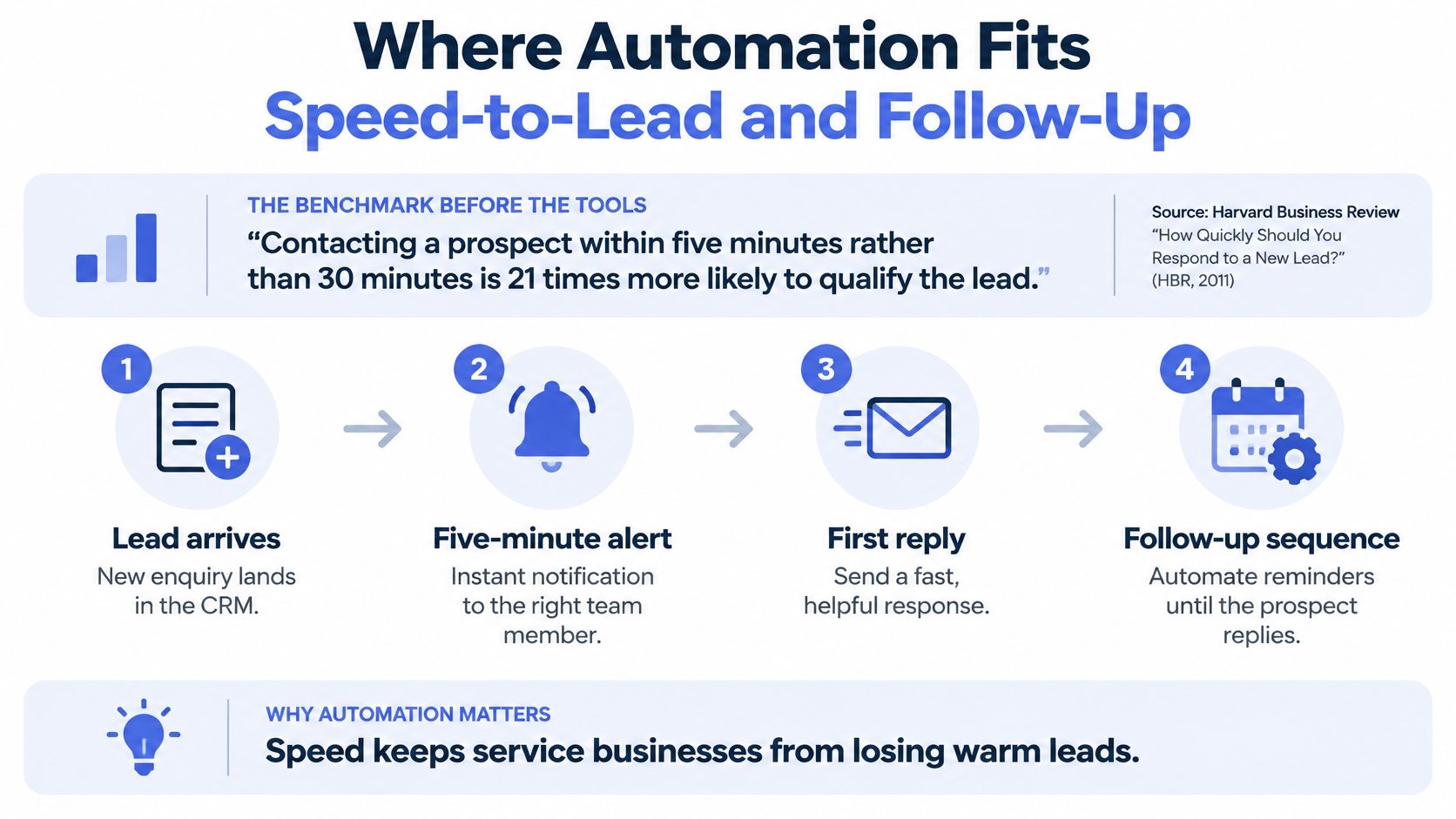
Use a sub-five-minute response target as a pilot benchmark, not a promised conversion result. The historical lead-response comparison summarised by NJIN's lead-response management overview reports contact roughly 100 times more likely and qualification roughly 21 times more likely when contacting prospects within five minutes rather than 30 minutes; it isn't a forecast for an Australian service firm.
The operating flow should distinguish an automated acknowledgement from a person making contact.
Give Every Enquiry a Controlled Path
- Capture the enquiry from each channel into the appropriate customer record.
- Send a useful acknowledgement that's clearly automated. State what happens next without pretending someone has reviewed the request.
- Create an owner task with source and service type attached.
- Route by service type, service area and available capacity.
- Escalate enquiries still unworked after the team's agreed interval.
- Have a person make the first real contact and judge suitability.
- Start contextual follow-up with stop rules for replies, bookings and opt-outs.
After hours, acknowledge receipt and create a task for the next staffed period. Don't imply immediate human availability if nobody is rostered to respond.
Our Speed-to-Lead Automation provides fast, useful first responses that qualify, route and book the next action while buyer intent is fresh. Our Lead Follow-Up Automation supports timely, context-aware follow-up after enquiries, quotes, proposals and dormant opportunities.
Measure Contact, Not Message Volume
Track median first-response time, the share answered within the response target, completed human contact, time to qualification, booking rate and leads without a next action. Report automated acknowledgements separately so a fast receipt message doesn't disguise slow personal follow-through.
Use the lead follow-up automation guide when defining sequence conditions and ownership. We run scheduled tasks and continuous checks across enquiries, CRM updates, invoice chasing, preparation, problem monitoring and reporting; risky or client-sensitive actions wait for human approval.
Use this video alongside a practical review of your own response workflow.
People should retain judgement on fit, pricing exceptions and sensitive conversations. A sequence should support those decisions, not continue sending while someone is resolving them.
Invoice Reminders and Cash-Flow Controls
Invoice follow-up belongs in CRM selection because payment conversations depend on customer context. Australian Government payment-times analysis found 36% of trade-credit payments to small businesses took longer than 30 days, those payments averaged 63 days to arrive, and approximately 13% took more than 60 days.
Separately, the Payment Times Regulator's July 2025 update reported that only 68.1% of small-business invoices were paid on time. These findings justify evaluating collection workflows alongside lead conversion, without treating different payment measures as interchangeable.
The working record needs the invoice linked to the job or quote, current payment status, last customer interaction, a named owner and a dated next action. Accounting should remain authoritative for balances and payments.
Use a Reminder Ladder with Pauses
- Due-date reminder: Send a courteous message referencing the invoice and payment instructions, after confirming it remains unpaid.
- After an agreed interval, prepare another reminder for human approval. Check whether the customer has replied elsewhere.
- Personal contact: Have the responsible owner call when written reminders haven't resolved the issue.
- Escalate to a manager or discuss a payment arrangement, with a person deciding the next action.
Require human approval beyond the first reminder. A dispute flag should pause all reminders, a promised payment date should suspend the sequence, and every sent message should enter the audit trail.
For wording, AurenWell's examples of how to follow up on unpaid invoices can help shape a respectful draft. The invoice reminder software guide is also useful when assessing workflow controls rather than email templates alone.
Keep Collection Connected to Service Delivery
Our Invoice Reminder Automation provides polite, human-approved payment follow-up without relying on awkward manual chasing. Business process automation connects that workflow with enquiry handling, intake, follow-up, CRM updates and reporting around existing tools.
Measure overdue invoices by age band, days from due date to payment, and invoices without a next action. Check disputed and promised-payment items separately so staff don't mistake an intentional pause for neglected work.
A CRM that can't flag overdue accounts or record the last customer interaction can hide revenue leakage inside administrative work. More reminders won't fix that missing context.
Confirm the Fit Before You Migrate
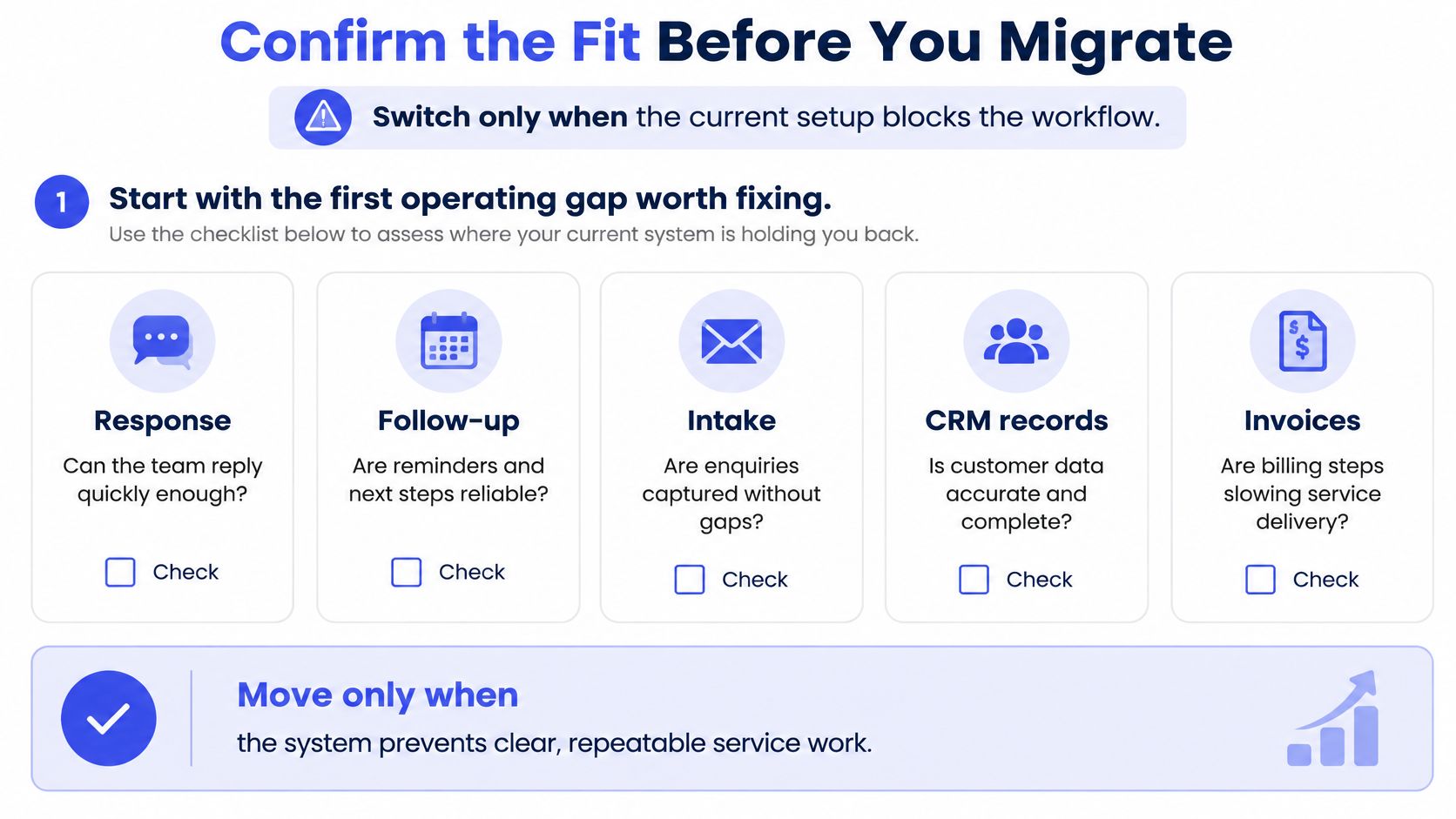
Switch only when the current setup blocks the workflow. Start with the first operating gap worth fixing: response, follow-up, intake, CRM records, invoices, administration or reporting.
That's how we begin at Truespeak. A migration is justified when it removes a demonstrated obstacle, not merely because another platform presents a cleaner dashboard.
Use this decision flow before committing to replacement.
A Practical Pilot and Migration Checklist
- Establish the baseline. As a practical pilot design, record four weeks of first-response time, overdue follow-ups, unassigned enquiries and overdue invoices. Keep definitions consistent so the comparison is meaningful.
- Shortlist two or three CRM types using the quick-pick table. Remove any option that can't support the difficult hand-off in your business.
- Audit before importing. Find duplicates, missing owners and stale records. Include consent status and privacy notice coverage, and confirm the old system can export a customer's records on request.
- Test three representative enquiries end to end: a web form, a phone call and a referral. Use appropriately protected records or test copies, and carry each scenario through quote and invoice.
- Check permissions, approval gates, audit logs and mobile updates against the matrix. Include an exception, such as an amended scope or disputed invoice, rather than testing only the straightforward path.
- Run a contained pilot. A four-week trial with one channel or team is a workable starting design. Record failures, staff workarounds and manual re-entry alongside dashboard results.
- Clean records before import, preserve a read-only copy of the old system and migrate in phases. Reconcile record counts and relationships before retiring access to the previous workflow.
- Assign post-launch ownership. Name who monitors failed connections, handles exceptions and reviews the dashboard weekly. Give that person a runbook, escalation route and authority to pause unsafe automation.
Decide from the Operating Evidence
Continue when staff can complete the tested workflow and the baseline comparison supports the change. Adjust when the process is sound but configuration or training causes friction. Switch only when the platform itself prevents the required work.
Where a managed operator is useful, evaluate our CRM Automation service for hygiene routines, action queues and weekly visibility against this checklist. The selection standard shouldn't change because someone else operates the system: clear ownership and observable outcomes still matter.
Truespeak designs, builds and manages connected workflows for enquiry handling, intake, CRM hygiene, follow-up and invoice reminders around the tools your business already uses. Visit Truespeak to discuss the first operating gap worth fixing and whether your current CRM needs better connections, ongoing management or replacement.