
Two enquiries landed on Friday. One came through the website form, one arrived as a phone call while you were on site, and a third is still sitting in a text message you haven't opened. By Monday morning you're fairly sure someone replied to at least one of them, but you couldn't say who, or what was promised, or whether anyone is chasing it today.
That gap usually gets blamed on software. More often it's a records problem. There's no single place where the enquiry, the person responsible and the next step sit together, so the work lives in someone's memory and drops out of it the moment the week gets busy.
Customer database software fixes that, but only when it's built around your daily routine rather than a feature list. The distinction matters more than it sounds, because most buying decisions start with a product comparison before anyone has written down the process the product is meant to support.
Table of Contents
- What Customer Database Software Does for Your Business
- Core Features and the Fields They Depend On
- How an Enquiry Moves Through the Database
- Access and Privacy Controls to Set Up First
- Criteria for Choosing Customer Database Software
- Improve Your Database or Replace It
What Customer Database Software Does for Your Business
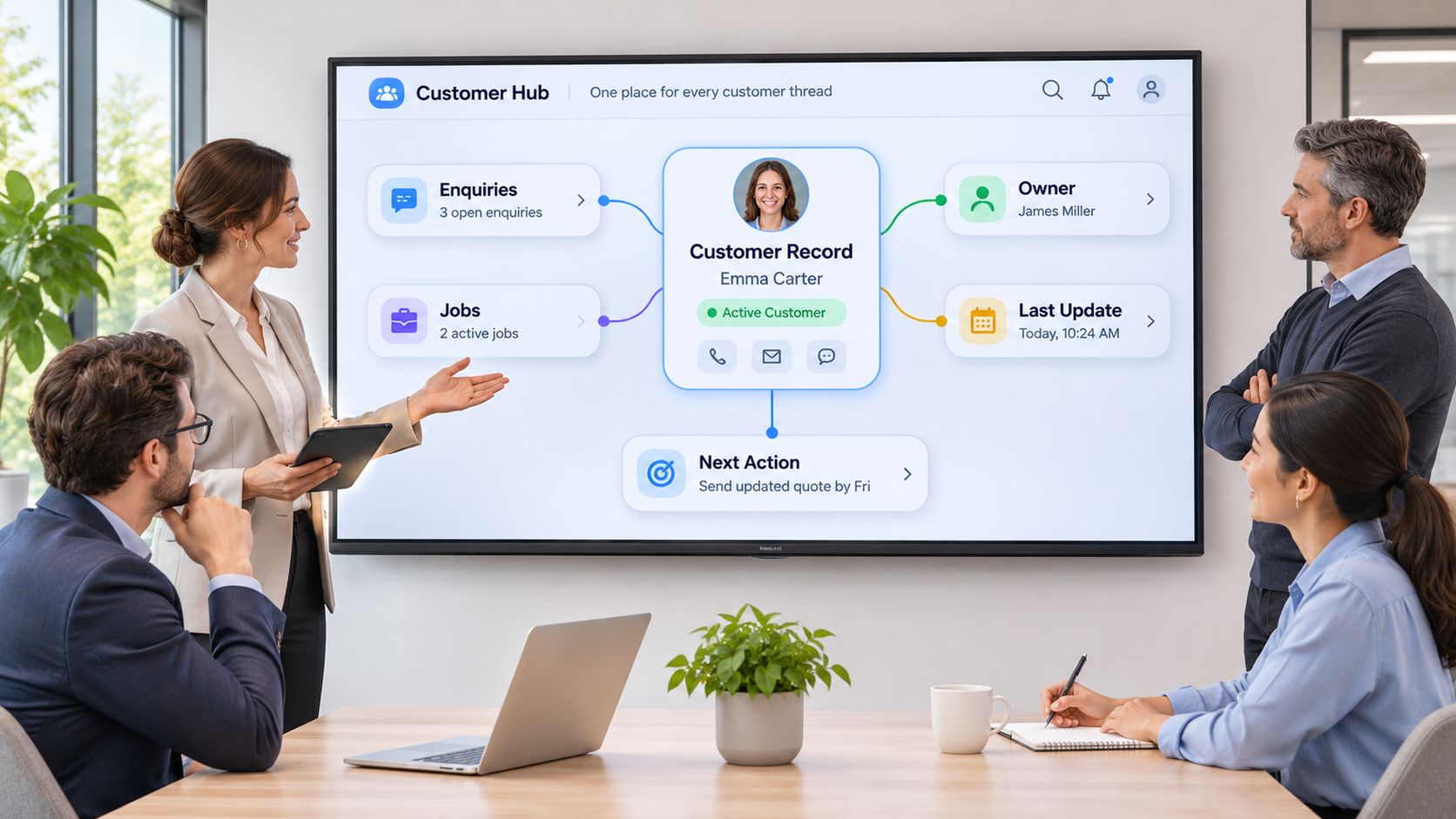
A contact list tells you who someone is. A customer database works more like a shared job board: every customer, enquiry and job sits on a card that carries a name, a stage and a due date, and anyone who opens the board can see whether the card has moved since Friday.
That board holds the three things a spreadsheet rarely keeps: who owns the record, what happened last, and what happens next. The software earns its place by making follow-up visible instead of remembered, which is why the same product can run one business's week and sit idle in another's. The difference is the routine around it, not the feature list.
Three Questions to Answer Before You Compare Products
- How do you capture enquiries? Website form, phone, email, referral, or a message that lands in someone's personal phone. If the answer is more than one channel, the database needs one front door.
- Who decides who responds next? If the honest answer is whoever notices, you don't have an ownership model yet.
- How do you track follow-up through to an outcome? Chasing a quote until it's accepted, declined or marked dormant, with the reason recorded.
Each answer exposes a gap in ownership, a gap in visibility, or a job someone repeats by hand every week. That's the useful starting point, because it tells you what the software has to fix before you've seen a single demo. It also gives you a fair test of the tools you already pay for: if a shared sheet with an owner and a due-date column would close the gap, a new platform won't.
The temptation is to assume a structured system is standard equipment in Australian business. It isn't. The Australian Bureau of Statistics reported that 17% of Australian businesses used CRM software in the year ended 30 June 2022, against 59% using cloud technology and 63% using cybersecurity software. Customer records sit behind infrastructure and risk tools in the adoption queue.
Adoption also tracks capability. In the 2019-20 characteristics of Australian business release, CRM software was used by 9% of businesses that were not innovation-active compared with 26% of innovation-active businesses. Read plainly, the gap is a warning: the software rewards a process that already exists, so the process comes first.
The database is where the next action becomes someone's job.
Before you read further, write down your answers to those three questions for last week's enquiries. One page, no software involved. That page becomes the specification you measure every product against, including the option of fixing the system you already have.
Core Features and the Fields They Depend On
A working customer database is defined by a short list of fields and three or four functions the team uses daily. Long feature lists are a distraction at this size of business, because people only maintain what they use.
Start with the minimum that supports follow-up:
- Customer name and contact details. Phone and email, formatted consistently every time.
- Enquiry or service need. What the customer asked for, in their words.
- Source. Website form, phone, referral or repeat customer.
- Pipeline stage. New, quoted, booked, won or lost.
- Owner. One person accountable for the next step.
- Last activity. The date and type of the most recent contact.
- Next action with a due date. A task with a deadline, not a vague intention.
- Outcome. Won, lost or no response, with a reason attached.
Fit, intent and urgency earn a field only where they change the order you'd pick work up. Everything else you collect becomes something you must store, permission, and eventually delete. If a field doesn't change what someone does next, it belongs in the job file rather than the customer record.
What Each Feature Has to Hold
The table below pairs each core feature with the data it carries, a service-business example and the failure that follows when it's missing.
| Feature | What it holds | Example for a service business | What breaks without it |
|---|---|---|---|
| Customer record | Name, contact details and one stable identifier | One record for a homeowner who made two enquiries | Duplicate records and conflicting details |
| Enquiry source | Where the lead came from | Website form, phone call or referral | No way to judge which marketing works |
| Pipeline stage | New, quoted, booked, won or lost | Quote sent on Monday, awaiting reply | Work stalls without anyone noticing |
| Owner | The person accountable for the next step | Estimator assigned to a bathroom renovation | Enquiries wait because nobody claims them |
| Last activity | Date and type of the most recent contact | Call logged on Tuesday morning | Repeat calls or missed contact |
| Next action and due date | The next task and when it's due | Follow up quote by Thursday | Follow-up depends on memory |
| Priority signals | Fit, intent and urgency where they help rank work | Urgent leak repair ranked above a quote for later | Every enquiry treated equally |
| Outcome | Won, lost or no response, with a reason | Lost to a competitor on price | No learning from lost work |
| Permissions | Who can view, edit or export records | Office staff edit, technicians view | Everyone can see and export everything |
Read the last column as a list of symptoms you've probably met already. Duplicates in the customer book, quotes that went quiet, a technician ringing the office to ask what was agreed.
The test that keeps the table honest is simple. Every feature should answer a question the team asks each day: who's waiting for a reply, which quote has gone quiet, which job has no booked date, and what did we quote this customer last time. A feature that answers none of those is decoration.
Field discipline is the difference between a database people trust and one they stop updating. The routines that keep records accurate are set out in this guide to CRM data quality.
How an Enquiry Moves Through the Database
Follow one enquiry from the moment it lands. The route is short, and each step produces something the next person can see without asking.
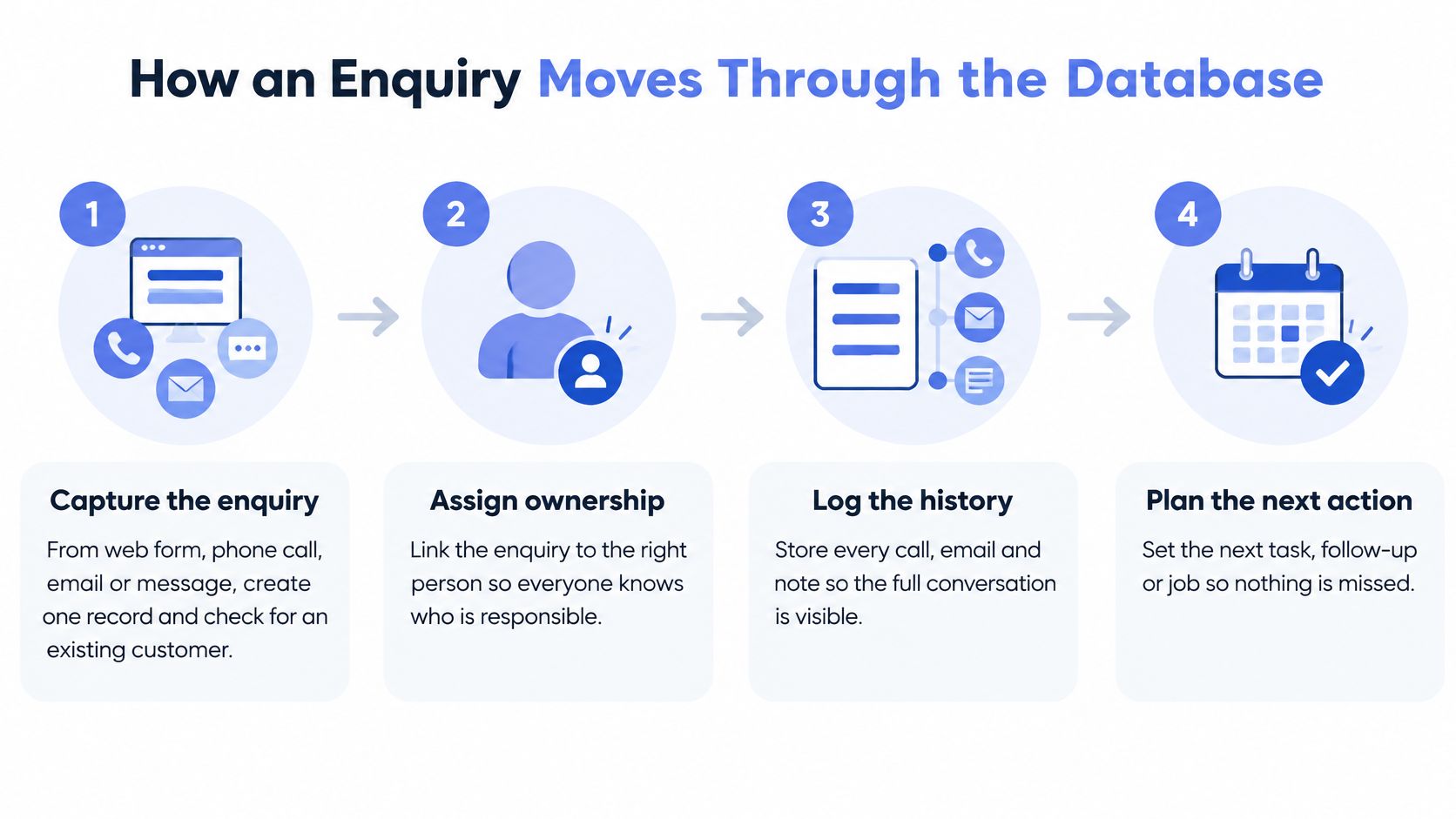
- Capture it once. Search for the customer before you create anything. If they already exist, add the enquiry to their record rather than starting a second one.
- Record the source and set the stage. Source tells you what's working. Stage tells everyone where the job sits.
- Assign an owner by rule. Service area, trade or current workload, written as a rule rather than decided case by case.
- Set the first response and a next action with a due date. Two commitments, not one, because the reply and the follow-up are separate jobs.
- Send the response and log it. If the call or email isn't on the record, the next person has to guess what was said.
- Trigger follow-up until the quote is accepted or declined. Marking an enquiry dormant is a decision someone makes, not something that happens by neglect.
- Record the outcome and hand the job on. Won or lost with the reason, then straight into scheduling and invoicing.
The database goes quiet at three points: a record with no owner, a next action with no date, and a call that never got logged. Each one is invisible until a customer rings to ask why nobody got back to them.
Work stalls where the record has no owner or no date. Fix those two fields and most of the rest follows.
An action queue is the simplest visibility tool you can build. Each morning it lists what's overdue: quotes past their follow-up date, jobs with no booked start, enquiries that have sat untouched for two days. Someone owns the queue, and they clear it before the day fills up.
Time-sensitive steps are where automation earns its keep. Our speed-to-lead automation sends a fast, useful first response that qualifies, routes and books the next action while intent is fresh. Our lead follow-up automation carries context-aware sequences across quotes, proposals and dormant opportunities, and our invoice reminder automation runs the payment chase with human approval before anything leaves.
If you'd rather watch the flow than read it, this walkthrough covers the same sequence from capture to handoff.
The front of that flow matters as much as the middle. When enquiries arrive through a chat widget, automated live chat for small businesses can turn a conversation into a structured record while the customer is still on the page. The stages and handoffs behind it are covered in more detail in CRM process steps.
The check you can run today: take every enquiry from last week and confirm each one produced a traceable next action with a name and a date against it. Any enquiry that didn't is your real backlog.
Access and Privacy Controls to Set Up First
A common setup gives every staff member the ability to view or export all customer records, regardless of role. The office administrator can download the whole book, so can a technician on a phone, a contractor three weeks into a job, and someone who left the business last month.
The moment a database starts holding documents, payment details and full conversation histories, it stops being a contact list and becomes a high-risk store of personal information. Feature-led buying advice rarely covers this, and most vendors won't raise it, because permissions are configuration work rather than a selling point.
The scale of the risk isn't theoretical. The Australian Bureau of Statistics 2024-25 business characteristics data records that 21% of Australian businesses experienced a cyber-security incident in 2024-25, with 36% of affected businesses reporting lost time, and that 28% of businesses reported having no cyber-security measures in place. A smaller, tightly governed database is often safer than an all-in-one platform holding every document and message.
The Setup Sequence
- List each person and the duties they perform. Include contractors and anyone who covers leave.
- Map roles. Typically owner, office, field staff, bookkeeper and contractor, each with a clear scope.
- Restrict view, edit and export by role. Export is the permission that does the damage, and it's the one most often left open.
- Keep sensitive documents out of the database. Contracts, identification and payment details belong in a separate store with tighter access.
- Name an approver for permission changes. One person, not a committee, or everyone assumes someone else checked.
- Remove access the day someone leaves or changes duties. Build it into the offboarding checklist so it doesn't depend on memory.
- Review exceptions and export activity monthly. The list of exceptions is short and tells you which roles are drifting.
- Confirm who owns backups and what happens after an incident. Named owner, written steps, and a decision about how customers would be told.
Practical rule: give people the access their job needs this week, then re-check the list every month. Access granted for one project quietly outlives the project.
A named person should stay accountable for approving permissions and reviewing exceptions. When the responsibility is diffuse, the default becomes everyone with full access.
Finally, check whether the Privacy Act 1988 applies to your business, since some small operators fall below its turnover threshold, and follow the Office of the Australian Information Commissioner's guidance on handling personal information where it does.
If we run systems for a client, they may process business records such as CRM entries, invoices, emails, forms, reports or workflow logs, with scope agreed with each client and access limited to what the system needs.
Criteria for Choosing Customer Database Software
Buy on workflow reliability, not feature count. The question that settles a purchase is whether every enquiry ends up with a traceable owner and a traceable next action, inside the software, without anyone remembering to make it happen.
Integration deserves the same status. The Council of Small Business Organisations Australia reported that 85% of surveyed businesses used at least one digital tool, and that businesses using APIs to connect platforms such as accounting, CRM, inventory and analytics processed 2.6 times more sales volume than non-API users.
That's an association rather than proof that an API raises sales. Treat it as a benchmark anyway. If connected businesses move more volume, a system that only shares data by manual export is carrying a cost, not a feature.
What to Put in Front of a Vendor
Run each criterion as a question in the demo and write the answer down. The red flag column is where most disappointments start.
| Criterion | What to check | Red flag |
|---|---|---|
| Workflow reliability | Every enquiry produces a traceable owner and next action | Reports show records with no owner or no due date |
| Role-based permissions | View, edit and export can be set by role | Only one access level for all users |
| Integration | API or webhooks, idempotent writes and sync timestamps | Manual export and import is the only route |
| Duplicate control | Matching rules and merges that keep history | Merging deletes interaction history |
| Data quality | Required fields, name and phone normalisation | Free text for every field with no validation |
| Reporting | Weekly view of overdue actions and stage movement | Reporting needs a separate spreadsheet every time |
| Mobile access | Field staff can view and update jobs from a phone | Desktop-only access for technicians on site |
| Hosting and retention | Where data is stored, plus retention and deletion rules | Vague answers on location or deletion |
| Admin effort | Who maintains fields, views and automations | Only the vendor can change a field |
| Exit options | Full export in a usable format | Data cannot be exported without an extra fee or a request |
Measures to Run During a Trial
Put live enquiries through the shortlist rather than watching a scripted demo. Four numbers tell you most of what you need:
- Duplicate rate. How many new enquiries create a second record for an existing customer.
- Synchronisation latency. The delay between a form submission and the record appearing.
- Failed-event recovery time. How long it takes to notice and repair a broken sync.
- Share of records with a current next action. The clearest signal of whether the system holds process or just stores names.
Before choosing any connection path, we review your current inboxes, forms, CRM, documents and spreadsheets, because the right integration depends on where the data already lives rather than on what a vendor prefers to connect.
Industry changes the weighting. Hospitality operators judging reservation history and repeat visits will read Purple Engage's guide to restaurant CRM software differently from a builder weighing quote follow-up, but both come back to the same test: does the record produce a next action?
Improve Your Database or Replace It
Say a service business already has a CRM holding every customer's name, address and job history. Enquiries still stall, because nobody is clearly responsible once the enquiry is entered and the next action isn't recorded anywhere the team can see. The software isn't broken. The process wrapped around it is missing.
Adding consistent stages, an owner field and follow-up reminders can close that gap without replacing anything. The decision should turn on whether the existing system can reliably support the required process, not on how modern the interface looks.
The outcome to aim for is operational rather than technical. In the ABS 2024-25 business characteristics results, 34% of Australian businesses said ICT use improved responsiveness to customer needs, up from 31% in 2021-22, while 23% reported better sales or marketing methods (ABS). Responsiveness is the figure worth chasing. It's what an enquiry looks like when it's captured consistently, routed to an accountable person and followed through to a recorded outcome.
Match the Symptom to the Cause
Most stalled systems fail in one of five recognisable ways. The table separates the ones a process fix will solve from the ones that justify a move.
| Symptom | Likely cause | Improve first when | Replace when |
|---|---|---|---|
| Enquiries sit with no one responding | No owner field or owner rule | Owner and stage fields can be added and reported on | The system cannot assign or report on owners at all |
| Follow-ups are forgotten | No next action or due date recorded | Reminders or due-date views can be configured | Reminders cannot be set or fail silently |
| Duplicate customer records | No duplicate check or merge process | A merge tool or a clear matching rule is available | Merging loses history and no safe fix exists |
| Data scattered across spreadsheets | No single customer record | Existing records can be consolidated into one structure | The system cannot hold the fields the workflow needs |
| No visibility of open work | No pipeline or weekly reporting view | Standard views can show stages and overdue actions | Reporting depends on manual exports every time |
A Four-Week Test Before You Switch
- Write the current path for one week of enquiries. Capture, owner, first response, follow-up, outcome. One page is enough.
- Count the gaps. How many records have no owner, no next action and no outcome.
- Compare those gaps with the table above. Most will point to configuration rather than capability.
- Shortlist two or three options and test them on real enquiries. A paid trial with live work beats any demo.
The decision rule: if the gaps sit in ownership and follow-up, fix the stages and the process first. If the software can't hold the process reliably, replace it.
Then run the improved stages for four weeks and count stalled enquiries at the end of each week. That gives you a number to compare against anything you trial later, and it stops a replacement decision being made on frustration alone.
An operating layer usually does the job. We typically build around the tools you already use rather than replacing your CRM, because the missing pieces tend to be routing, reminders and visibility rather than storage.
Where the gap is in the software itself, CRM automation turns stale records into action queues, call cards, updates and useful weekly visibility. Where the gap is in running the process consistently, managed AI operations keeps the routines monitored and tuned after launch instead of leaving them with your team to administer.
If replacement is justified, plan it around your data rather than the demo. This guide to switching CRM without losing data covers mapping fields, cleaning duplicates on import and setting a cutover date.
Thirty days later, ask the same three questions again. How enquiries are captured, who decides who responds next, and whether follow-up reaches a recorded outcome. If the answers have changed, the fix was process. If they haven't, you now have evidence for a different buying decision.
Truespeak builds and runs the routines that keep a customer database useful: first responses, lead follow-up, CRM hygiene and invoice reminders, working around the tools you already own rather than replacing them. If enquiries are stalling and you can't yet tell whether the problem is the software or the process around it, that diagnostic step is where we start. Visit Truespeak to see how the operating layer is built and managed.