
A quote goes out on a Tuesday afternoon. The scope is right, the price is right, and the customer says they'll come back to you. They don't. Three weeks later you ask whether it was ever chased and get a shrug, because the quote is a PDF in a sent folder, the customer's questions are buried in an inbox, and no job exists in the schedule because nobody marked the work as won.
That gap isn't a document problem. It's an ownership problem, and it runs the length of the lifecycle: enquiry, scope, pricing, sending, follow-up, acceptance, invoicing and payment. Any step without a named owner and a visible status is where revenue stalls.
Table of Contents
- Why Quotes Stall Before Revenue Is Realised
- Four Quote Management Approaches Compared
- Quote Features and Security Checks Worth Testing
- Integration Trade-Offs With Your CRM and Accounts
- How to Follow Up Quotes Before They Go Cold
- From Accepted Quote to Paid Invoice
- Measuring Quote Performance and Return on Investment
- Choose the Approach That Matches Your Team
Why Quotes Stall Before Revenue Is Realised
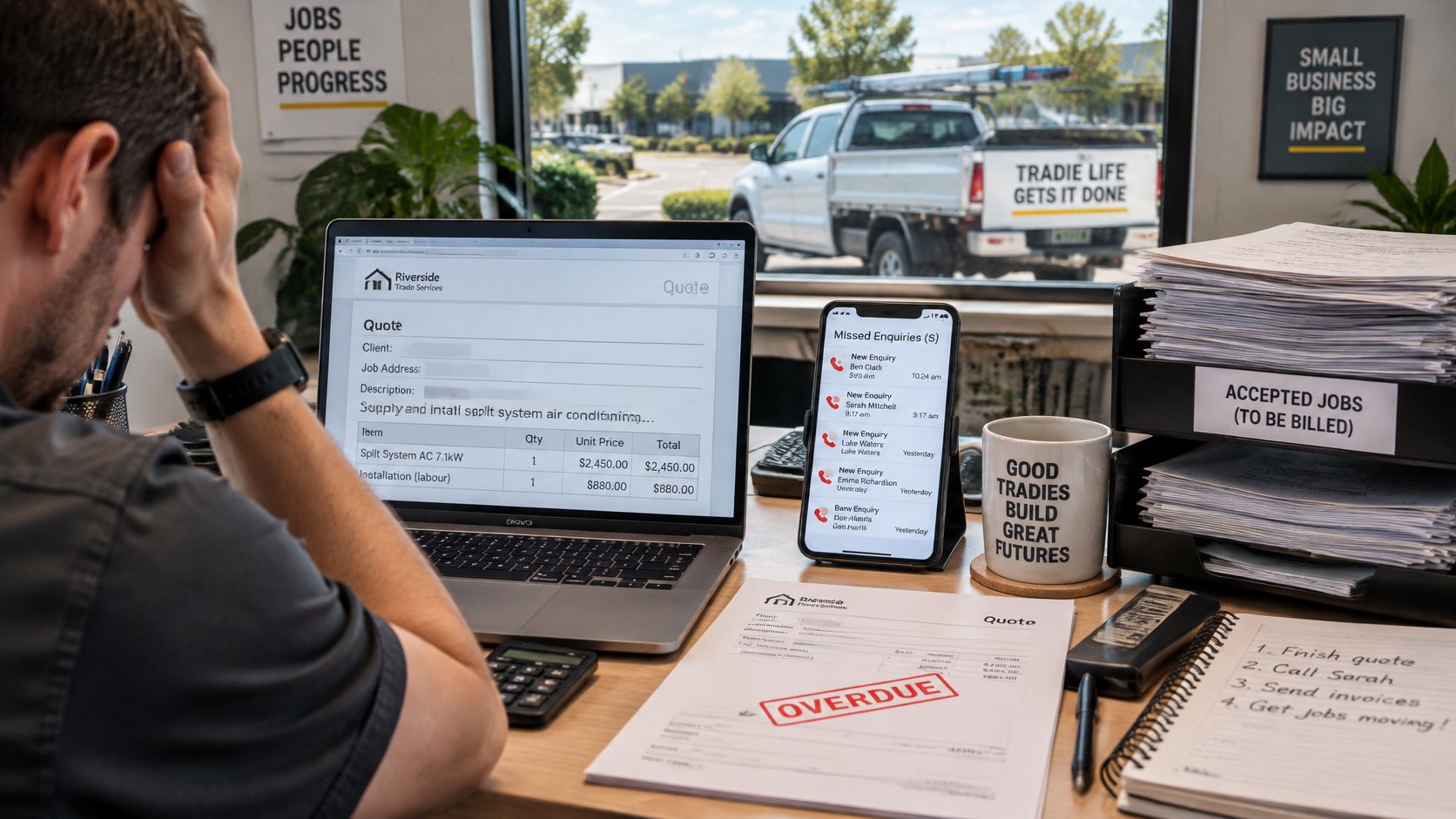
Picture the same failure with a bathroom renovation attached. The quote is built in Word from an old job, the tile allowance is checked by text message, the approval happens verbally on site, and the whole thing goes out as a PDF with no expiry date. By the time the customer queries a PC sum, nobody can find the version they were looking at.
The administrative weight behind that chain is measurable. In research cited by Australia's Productivity Commission, SME owners reported spending approximately 40% of their working time on administrative tasks, with recording transactions the most frequently identified activity at 57% of respondents, followed by entering transactions into accounting records at 40% and BAS or tax reporting at 36%. Another 39% said the burden reduced their enjoyment of running the business.
Those figures cover admin broadly rather than quoting alone, but quoting sits inside the same workflow of customer records, pricing inputs, approvals and conversion to invoices. That's why quote management software is better understood as an operational-control tool than a document generator. A template makes a quote look professional. It won't tell you which quote expires in three days, who owns the follow-up, or whether the accepted version includes the revised tile allowance.
For a firm of 2 to 50 people, the owner or office manager usually absorbs all of it personally, which is why so much quoting runs out of an inbox and a spreadsheet. E-signature tools and proposal templates solve one slice of the problem, the signature or the presentation, and leave the rest of the chain untouched.
Practical rule: if a tool can't tell you the age of an open quote and who owns it, it isn't managing quotes. It's formatting them.
Four Quote Management Approaches Compared
Four approaches dominate what Australian service firms buy. They differ less in features than in where they place the work.
| Approach | What It Handles Well | What Stays Manual | Best Fit |
|---|---|---|---|
| Standalone quote tool | Templates, pricing tables, e-signature and PDF output | Follow-up, CRM updates and invoice handoff | Owner-run businesses with a few quotes each week |
| CRM-native quoting | Quote linked to contact, deal stage, owner and next action | Reminder design and exception handling unless configured | Teams already running a CRM with clean records |
| Field service or job suite | Scope, scheduling and conversion from quote to job | Sales follow-up and reporting, depending on configuration | Trades that schedule and run jobs from one platform |
| Managed AI operations layer | Reminders, drafts, status checks and reporting around existing tools | Pricing, complaints, relationship messages and final approvals | Operators wanting ongoing monitoring without adding headcount |
Reading a Row Against Your Own Bottleneck
Most buyers pick the row that demos best, which is usually the standalone quote tool, because it looks finished in ten minutes. The more useful exercise is to name where your last five quotes stalled and choose the approach that fixes that stage. If quotes go out quickly and then sit unanswered, better template design changes nothing.
A standalone quote tool is fast to adopt and produces a clean branded document with a validity period. The work it leaves behind is the work that leaks: the CRM record goes stale, the reminder lives in someone's head, and the invoice gets retyped from the PDF. It suits an owner who personally chases every quote.
CRM-native quoting attaches the quote to a contact, stage, owner and next action, so the pipeline report reflects reality. It only works when records are clean. A CRM full of duplicate contacts and half-finished deals produces confident-looking reports that are wrong, and staff stop trusting them within a month.
Where the Field Suite and the Managed Layer Differ
A field service or job suite puts scope, scheduling and job conversion in one platform, which is a genuine advantage for trades running crews. Sales follow-up is usually the weak link, because the platform is built around jobs rather than opportunities, and reminder behaviour depends heavily on configuration.
A managed AI operations layer wraps monitoring, drafting, status checks and reporting around the tools already in place, with people still handling pricing, complaints, relationship messages and final approvals. It fits operators who own the tools but not the capacity to run the routine work around them.
Document tooling is a separate purchase from quote workflow, and it's worth seeing where the two overlap before buying both. AI Tool Seekers publishes a Pitchly review and editorial score that's useful context on the document-automation side of that boundary.
Most businesses end up running a quoting tool, a CRM and an accounting package in parallel. The decision that matters is which layer owns follow-up and status, because when two systems both claim to, staff trust neither. Where that routine work is the gap, Truespeak builds and runs managed AI operations systems that handle follow-ups, CRM, admin, and reporting 24/7 without adding headcount.
Quote Features and Security Checks Worth Testing
Demos reward polish. A vendor will assemble a beautiful quote in ninety seconds and send you home without telling you whether an accepted quote creates an invoice draft or whether a junior account manager can edit the margin.
The cost of that blind spot isn't cosmetic. In November 2021, Master Builders Australia cited MYOB modelling estimating that nearly 80,000 Australian construction SMEs had no or very low digitisation of their business processes, and linked digitisation with more accurate pricing of building products and specialist tradespeople in quotes. The same release reported that digitally advanced SMEs were 50% more likely to succeed in growing, an association the source reports rather than proof that software alone produces the outcome.
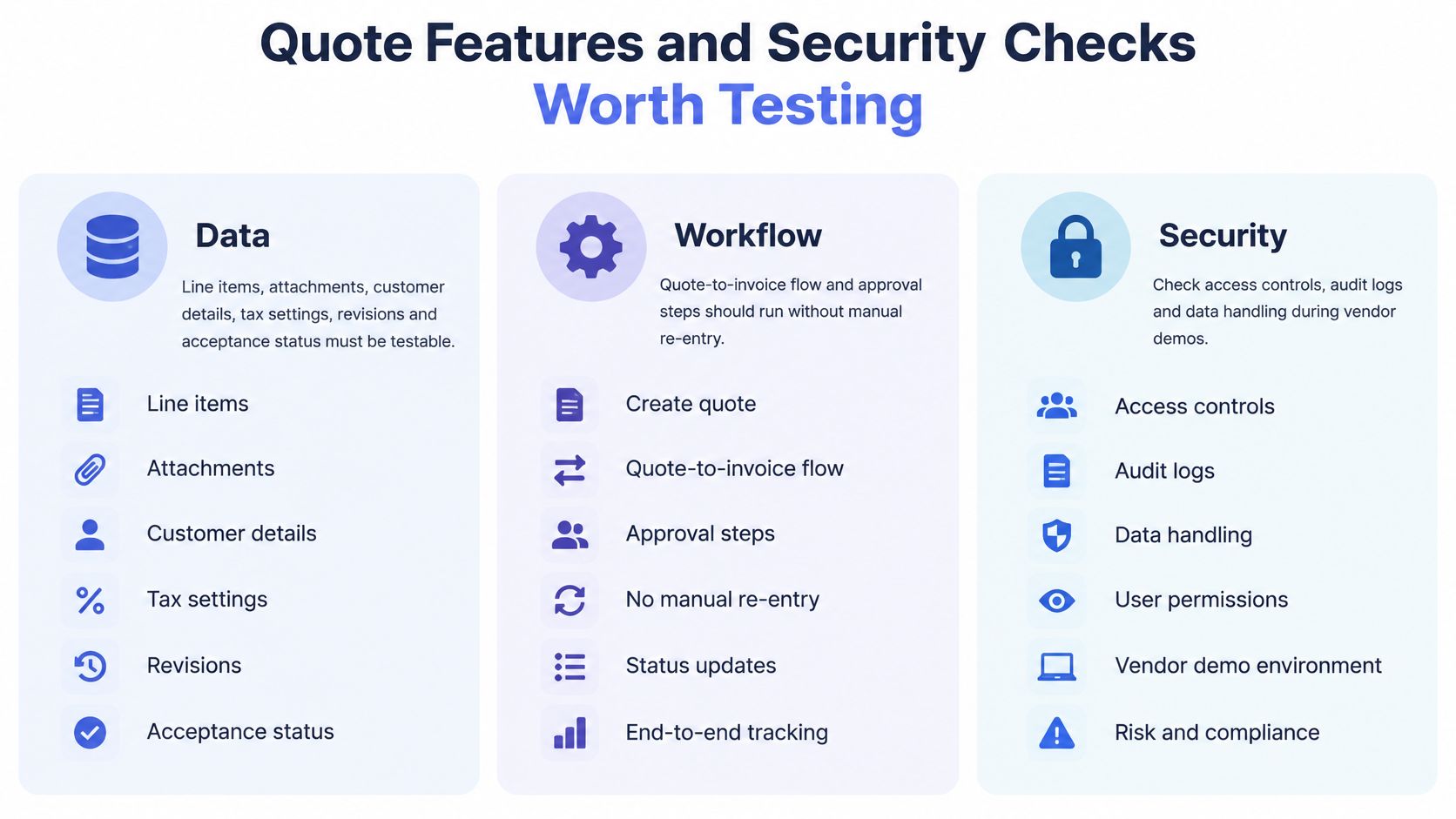
Run these tests yourself in a trial account, using a real quote with a real variation, rather than watching a salesperson drive.
| Check | Plain Test | Why It Matters |
|---|---|---|
| Line items, tax and totals | Edit a quote on mobile, reopen it on desktop, confirm GST and AUD totals match | Stops pricing drift between devices |
| Acceptance and revisions | Accept a revised quote and confirm the earlier version is marked superseded in history | Keeps a record of what the customer approved |
| Downstream handoff | Accept a quote and confirm a job or invoice draft is created with no re-keying | Removes the most repeated manual step |
| Integration visibility | Export or call the API and confirm quote status and conversion date are returned | Lets reports and reminders use the same data |
| Role-based access | Log in as a junior user and confirm pricing and export actions are blocked | Limits pricing changes and data exposure |
| Data location and export | Ask for the storage location in writing and run a full export | Avoids vendor lock-in |
Security deserves its own line of questioning. Ask where records are stored, whether client data is isolated from other customers, and who inside the business can change pricing or export the full record set. For personal information, ask how the vendor handles it and check the answer against the Privacy Act 1988 and current OAIC guidance rather than accepting a compliance badge at face value. Our own client systems may process business records such as CRM entries, invoices, emails, forms, reports or workflow logs, with scope agreed with each client and access limited to what the system needs.
Trades rarely run one tool. A Deloitte Access Economics survey of 954 construction and engineering businesses across Australia and five Asia-Pacific markets found 50% use construction-management cloud software, 47% use mobile apps and 56% use data analytics, so test how the quote record sits alongside the software already on site. Then ask for four numbers in writing: median time from structured intake to a send-ready quote, the share of quotes needing manual re-entry, the sync-failure rate, and the share of accepted quotes invoiced without duplicate entry. Interoperability and exception handling matter more than another template.
Integration Trade-Offs with Your CRM and Accounts
The integration question usually arrives as "does it connect to Xero?" It should arrive as "which system is the record for quote status?" Get that wrong and every connection becomes a source of conflicting truth.
| Path | Strength | Trade-off | Best When |
|---|---|---|---|
| Native connector | Quickest to set up | Limited to fields the vendor supports | The vendor supports your CRM and accounts |
| API or webhook | Flexible field mapping and status events | Needs developer time and ongoing monitoring | Custom fields or several systems must stay in sync |
| Middleware automation | Inexpensive to start | Adds failure points that someone must watch | Simple flows across two or three tools |
| Manual re-entry | No set-up cost | Errors and delay grow as quote volume rises | Very low volume, and only in the short term |
Take a six-person electrical business with contacts in a CRM, invoices in an accounting package and quotes in a spreadsheet. Three decisions follow, and none of them are technical. The CRM holds quote status and next action, because that's where the sales conversation lives. The accounting package holds the invoice and the payment. Line items flow one way from the accepted quote, and payment status flows back, because a paid invoice is a sales fact rather than a finance one. Duplicate contacts get merged on the CRM's rule, and one named person fixes failed syncs each morning before the crew is dispatched.
That decision comes earlier than most owners expect. The Australian Bureau of Statistics reported that 17.2% of Australian businesses used CRM software in 2021-22, ranging from 11.8% of micro businesses with 0-4 employees to 40.1% of businesses employing 20-199 people. Plenty of small operators need a reliable quote record before they have anything resembling a mature CRM workflow, and a quote tool that assumes one will sit unused.
If you're still working out what that record should live in, this comparison of the best CRM for a service business covers the practical trade-offs. We review the inboxes, forms, CRM, documents and spreadsheets already in use before choosing a connection path, and can usually build on the business process automation software you already pay for. The question that separates vendors is simple: what happens when the sync fails? A system that retries, queues and alerts someone is worth more than one that drops the record.
How to Follow Up Quotes Before They Go Cold
Australian businesses are spending more on automation than ever: ABS figures show business expenditure on AI research and development reached $668.3 million in 2023-24, up 142% from 2021-22. None of that spending proves small operators have solved follow-up, which is the least glamorous and most expensive part of the process.
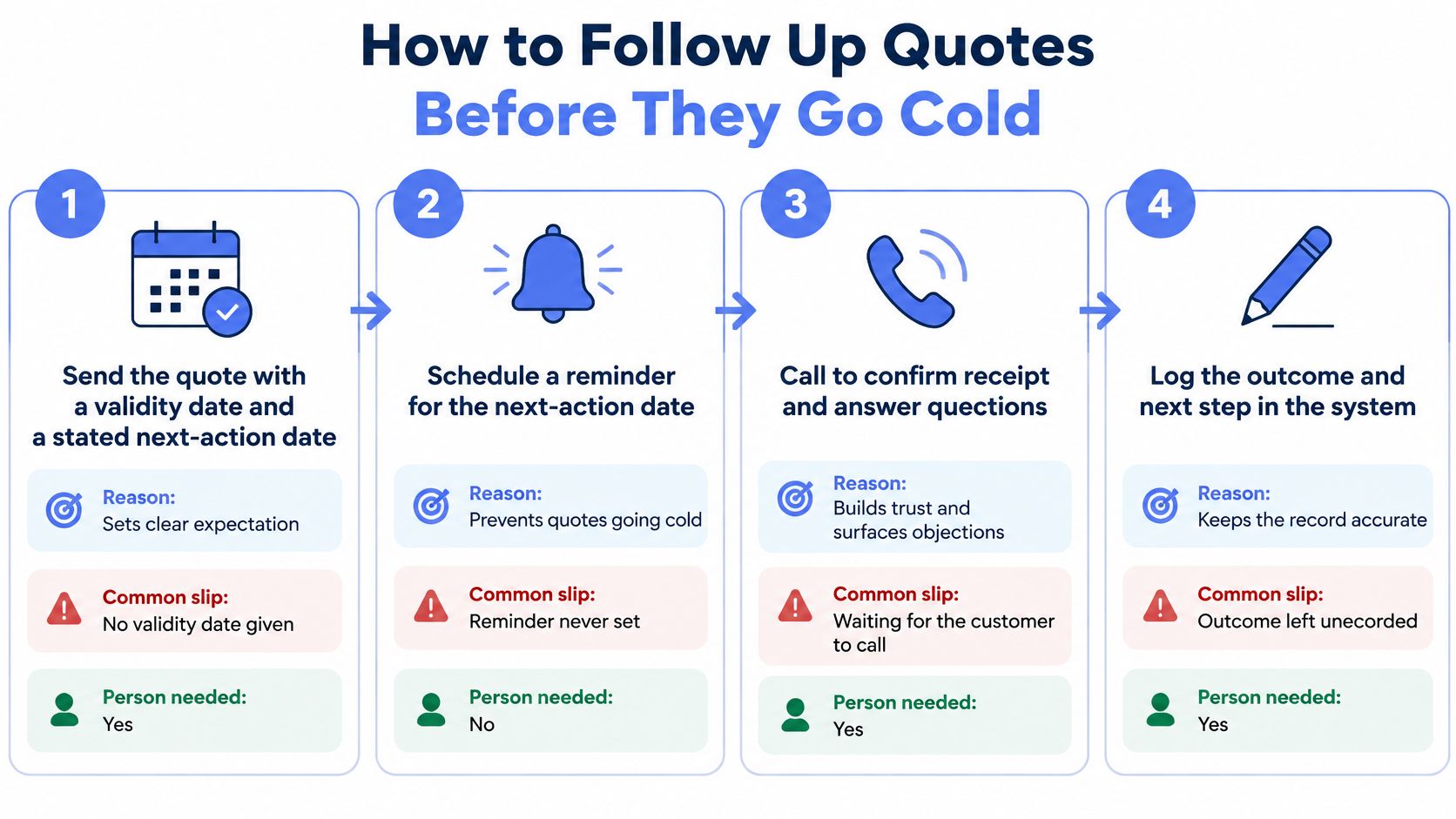
Here's the routine that works. Each step carries a reason, a common slip and a decision about whether a person is needed.
- Send with a validity date and a stated next action. "This is valid for 14 days and I'll call Thursday" removes the guessing. The slip is sending without either, so nobody knows when to chase. No person required.
- Log the first response inside an agreed window. Answer enquiries while intent is fresh. The slip is responses sitting unlogged in a shared inbox for a day. A person answers.
- Schedule a context-aware reminder on the planned date, quoting the scope the customer saw. The slip is a generic "just checking in" that forces them to reopen the PDF. Approve the draft first.
- Route discount requests, scope changes and complaints to a person for approval. The slip is an automated reply to a pricing question, which is how margin disappears.
- Record a lost reason when a quote is declined. Without it, pipeline reports flatter you. A brief entry is enough.
- Review dormant quotes monthly and decide to reactivate, reprice or close. Stale quotes left open indefinitely distort every conversion figure you report.
Faster quote generation doesn't raise revenue if nobody follows up, and it doesn't raise it either if two people record the same quote at different stages.
Map where work leaks between enquiry, site visit, proposal, acceptance, scheduling and payment before automating anything, and judge the result using the measures set out below. If the follow-up is the part nobody owns, this walkthrough of a quotation follow-up email after sending a proposal is a useful starting template.
For teams weighing a managed option, Truespeak's lead follow-up automation provides timely, context-aware follow-up after enquiries, quotes, proposals and dormant opportunities, while speed-to-lead automation covers the first response so buyer intent isn't lost in a queue.
From Accepted Quote to Paid Invoice
An accepted quote is a promise, not cash, and the gap between the two holds the most expensive manual work in the whole chain. Deloitte research cited in an Australian Treasury submission estimated processing costs of approximately $30 for a paper invoice, $27 for an emailed PDF and less than $10 for an e-invoice. The same submission reported that one-third of invoices on MYOB's platform took more than 30 days to be paid, and that 29% of SMEs identified cash flow as an extreme or substantial pressure.
The path from acceptance to payment should run in this order, with a person at the gates that involve money or relationships:
- Acceptance recorded once, with the version the customer approved and the date they approved it.
- Invoice created from that record, not retyped, carrying the ABN, GST treatment and any purchase order reference.
- Delivery through a channel the customer receives, including Peppol eInvoicing where they're enabled for it.
- Payment status written back to the CRM, so the sales view and the finance view agree.
- Reminders approved by a person before sending, starting only after the due date passes.
Say a builder has a variation accepted at 9am on a Friday and needs the invoice out that day so the customer can claim it in the current cycle. If the variation has to be retyped into the accounting package, the invoice slips to Monday and the reminder sequence starts late. If the accepted quote carries structured line items, the invoice is issued in ten minutes and the first reminder fires only once the due date has passed.
Report days to payment segmented by customer type and payment channel rather than as one average. A builder, a strata manager and a retail customer pay on different rhythms, and a blended figure hides the segment that's costing you.
Two checks belong on the finance side of this path: an audit trail showing who issued or changed an invoice, and a full export so the record set isn't locked to one vendor. If you handle your own books, invoicing features for freelancers is a fair benchmark for what a solo operator should expect as a baseline rather than a paid upgrade. And if Zoho CRM and Xero are already in your stack, this guide to connecting Zoho CRM and Xero for invoicing covers the field mapping worth testing.
Chasing overdue accounts is where goodwill gets spent. Truespeak's invoice reminder automation handles that with polite, human-approved follow-up rather than awkward manual chasing.
Measuring Quote Performance and Return on Investment
Two vendors can each show you a quote created in under a minute and produce no difference in your business. Measurement is what separates a tool that helps from a subscription you renew out of habit.
| Measure | How to Calculate It | Data Source |
|---|---|---|
| Enquiry-to-quote time | Median hours from structured enquiry to send-ready quote | CRM timestamps |
| Quote-to-close time | Median days from quote sent to won or lost | CRM stage history |
| Quote-to-acceptance rate | Accepted quotes divided by quotes sent, by job type | CRM and quote records |
| Open quote age | Number of open quotes older than an agreed number of days | CRM pipeline report |
| Acceptance-to-invoice delay | Median hours from acceptance to invoice issued | Accounting system timestamps |
| Days to payment | Median days from invoice to payment, by customer type | Accounting ledger |
| Dormant quotes recovered | Value of reactivated quotes won in the period | CRM reactivation log |
The ROI Calculation That Survives Scrutiny
Calculate return on investment as measured financial benefits minus total costs, divided by total costs, over the same period for each option. Costs include licence or service fees, implementation, integration, training, maintenance and the internal oversight time nobody budgets for. Run the identical calculation for a standalone licence and for a managed service, or you're comparing a subscription price against a service fee and calling it a comparison.
Benefits come through four channels: administrative effort, response speed, follow-up consistency and attributable gross profit. Count saved time as a financial benefit only when it releases usable capacity or removes a cost.
The counting rule: an hour saved becomes a benefit when it turns into a booked job, a hire you didn't make, or a cost you removed. Otherwise it stays an hour.
Measure enquiry-to-quote time and quote-to-close time separately, using consistent CRM timestamps before and after any change. A faster quote that still takes three weeks to close isn't progress. Report won, lost and still-open opportunities together, because faster wins in a short report can hide the quotes that went nowhere, and compare similar enquiries rather than the entire pipeline. Set a baseline period before go-live so the comparison is fair rather than flattering.
We scope the work before quoting and compare the full operating cost with the time and capacity it can realistically save, because an ROI model built on optimistic assumptions is just a sales document with a spreadsheet around it.
Choose the Approach That Matches Your Team
Match the approach to the constraint in front of you, not to the strongest demo. The size of the team and the state of the records narrow the choice faster than any feature list.
Under five staff, a few quotes a week. A standalone quote tool or a CRM-native quote does the job, provided one person owns the chase. At that volume the risk isn't volume, it's the quote that gets forgotten during a busy fortnight.
Five to 19 staff with a CRM already running. CRM-native quoting plus a fixed follow-up routine is usually the first move. You already have the system of record. What's missing is the discipline of a next action and a review cadence.
Trades that schedule and run jobs. Look first at a field service or job suite, on one condition: the crew will use it on site. A platform the installers ignore turns into an office-only tool with a second set of records.
Twenty to 50 staff, or an owner losing days to chasing. That's where a managed operations layer earns its place, specifically around follow-up, reporting and invoice reminders. In every scenario, pricing, complaints, relationship messages and final approvals stay with people, which is how we design these systems.
AI adoption is worth keeping in perspective here. Only around 12% of Australian businesses reported using AI in 2024-25, with small business uptake at about 11%, according to the ABS. The managed layer should be justified by a named gap, not by the fact that it exists.
The next step costs nothing. Pull your last 20 quotes, mark where each one stalled, and note which stage had no owner. Patterns show up fast: quotes sent without a validity date, acceptances with no invoice, invoices with no reminder. Bring one messy handoff to a discovery call and Truespeak will map what should be captured, drafted, approved and logged, which is the same exercise behind the managed AI operations model.
Truespeak designs and runs the follow-up, intake, CRM hygiene and invoice reminder work around the quoting tools you already use, with your team keeping pricing, complaints and final approvals. If quotes are going quiet between send and invoice, fix that gap before buying another subscription. Visit Truespeak to see how the managed operations model works in practice.