
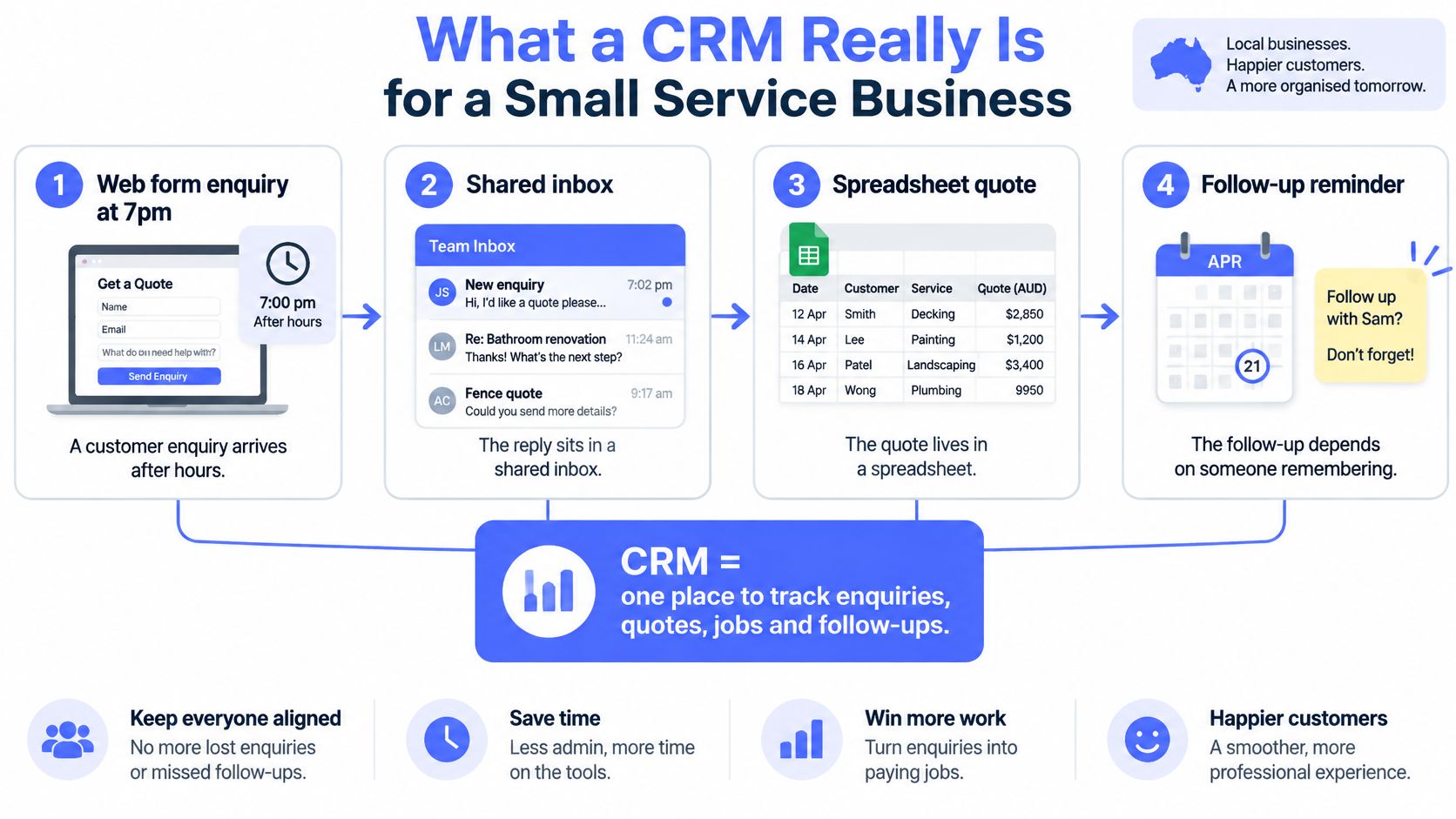
The enquiry lands at 7pm on a Tuesday through the quote form on your website. Someone reads it on their phone, decides to deal with it in the morning, and by then it's the fourth unread item in a shared inbox. The reply goes out on Wednesday afternoon. The quote gets built in a spreadsheet two people can find. The follow-up depends on whether the person who wrote the quote remembers to chase it between jobs.
None of that is a failure of effort. It's a failure of memory. A business with eight staff, three vehicles and forty open quotes can't hold its commercial obligations in people's heads, and when one person takes a week off, the context goes with them.
So it's worth being blunt about the framing. CRM for small business isn't a software category you shop in. It's an operating routine you run every week, and the software is just where the routine lives. Get the routine right and almost any reasonable platform will carry it. Get it wrong and the most expensive system on the market becomes a very costly address book.
Table of Contents
- What a CRM Really Is for a Small Service Business
- Core Features to Look For Before You Buy
- How to Set Up a Minimum Viable CRM
- Integration and Automation Around Your Existing CRM
- CRM Use Cases for Australian Service Businesses
- The Numbers That Show Whether Your CRM Is Working
- Common CRM Pitfalls and How to Fix Them
- Pick the First Gap Worth Fixing This Week
What a CRM Really Is for a Small Service Business
Four things happen to the same enquiry in most small service businesses. It arrives through a form, gets answered from a shared inbox, gets priced in a spreadsheet, then waits for somebody to remember it exists. Each step is sensible on its own. Together they mean no single place holds the truth about that customer, and no one can say with confidence how many open quotes are sitting unanswered right now.
A CRM, in one sentence, is a shared system that keeps one record per customer and prospect, showing where each one stands, who owns it, and what happens next.
The Front Counter Test
Think about the front counter of a shop. Whoever is standing there can answer a question about an order without walking out the back, because the information sits at the counter rather than in the memory of whoever took the order. A CRM is that counter for a service business. Nothing depends on whose turn it is to answer the phone, and nothing depends on catching the one person who knows.
That matters most between two and fifty staff. Below that, memory and a group chat do work. Above it, demand arrives across web forms, email, phone calls, text messages and referrals, and coordination by memory starts failing. The failure rarely looks dramatic. It looks like a quote nobody chased, a customer who rang twice, and two staff calling the same lead on the same afternoon.
The Gap Is Structural, Not Personal
Australian adoption data makes it clear this isn't a discipline problem in your business alone. The Australian Bureau of Statistics reported that only 17% of Australian businesses used customer relationship management software in 2021-22, and its business-size breakdown put CRM use at 9% among businesses with 0-4 employees against 26% among businesses with 20 or more.
So the small operator running on inboxes and a spreadsheet is in the overwhelming majority, not the negligent minority. The practical question is narrower: does your current arrangement lose context, ownership or follow-up? If a customer rings and the person who answers can't see the last three conversations in under a minute, you have the gap.
Core Features to Look for Before You Buy
Strip away the marketing and a service business needs six things at launch. One record per customer with source and history. A pipeline with stages that match how jobs move. An owner, stage and next action on every open record. Task and reminder automation. Email and form integration. Role-based permissions. Everything else is a second-year improvement.
| Feature | What it does | Why it matters for a small team | Priority |
|---|---|---|---|
| Contact and lead management | Keeps one record per customer with source, history and notes | Stops leads living in inboxes, spreadsheets and memory | Must-have |
| Sales pipeline with stages | Shows each deal moving from enquiry to qualified, quoted, won or lost | Makes workload and stalled jobs visible at a glance | Must-have |
| Owner, stage and next action fields | Forces accountability onto every open record | Prevents duplicated or missed follow-up between staff | Must-have |
| Task and reminder automation | Prompts follow-ups and flags records going idle | Keeps standards consistent without constant supervision | Must-have |
| Email and form integration | Links shared inboxes and web forms to the right record | Captures context without manual copying or re-keying | Must-have |
| Role-based permissions | Limits who can view or edit customer records | Supports privacy obligations and clean data | Must-have |
| Quote and proposal tracking | Attaches quotes to deals and tracks their status | Connects selling activity to the actual job outcome | Should-have |
| Accounting and calendar integrations | Syncs with tools such as Xero, MYOB and shared calendars | Avoids double entry across finance and scheduling | Should-have |
| Mobile app | Lets staff update records from site or the road | Suits field-based trades, installers and builders | Should-have |
| Reporting dashboard | Shows response times, conversion and pipeline by stage | Turns weekly activity into simple decisions | Should-have |
The Criteria a Feature Table Can'T Carry
Fit the workflow you already have. A builder quoting from site needs mobile capture and photo attachment more than a beautiful kanban board. A law firm or accounting practice needs structured intake, document collection and conflict-check details far more than a mobile app, because their work begins with a brief rather than a site visit.
Buy for the least technical person who has to use it. If admin staff can't update a record without training, they won't update it. The best system in a five-person office is the one the office manager opens without sighing.
Check native integrations before you sign. Confirm the platform talks to the accounting, email and calendar tools already in place. Bolted-on connectors create sync failures that nobody owns, and a half-synced record is worse than no record because people trust it.
Confirm the automation is included. Reminders, routing rules and duplicate checks should be part of the base product, not a higher tier you discover in month three.
Compare total cost, including the admin time. A cheaper platform that needs an hour of manual tidying each week costs more than a pricier one that runs its own hygiene checks.
If you're weighing up whether you need a sales pipeline at all, this CRM versus helpdesk capabilities explained comparison is a sensible starting point, because a helpdesk bought to manage sales enquiries rarely fits and the mistake is expensive to unwind.
Shortlist two or three platforms, then trial them against the exact setup routine below rather than against the demo. The rule I'd give any owner: buy the system the whole team will keep updated, not the one with the longest feature list.
How to Set Up a Minimum Viable CRM
The setup that works is deliberately small. It runs in a week rather than a quarter, and it produces a pipeline where you can check completeness, duplicates and overdue actions in minutes.
Before You Switch Anything On
Export the existing spreadsheets and inbox contacts first. Remove obvious duplicates, map each column to the fields you're about to create, and import only records that are still active. Importing three years of dead quotes teaches the team that the system is full of noise, and that impression is hard to reverse. A fresh pipeline with 120 live records beats a full one with 2,000 stale ones.
Define one pipeline with stages that match how jobs move. Typically enquiry, qualified, quoted, won or lost, plus a nurtured stage for leads that aren't ready. Two pipelines in month one means nobody knows which is real.
Make owner, stage and next action mandatory on every open record. Give the next action a date. A field without a date is a wish; a date creates a queue.
Capture every enquiry once. Connect web forms, shared inboxes and phone intake to the CRM, and retire the side spreadsheets the same week. If a lead can arrive somewhere that doesn't feed the pipeline, it will.
Assign an owner automatically or within one business day. Unclaimed enquiries are the single most expensive form of delay in a service business, because the customer is often contacting three suppliers at once.
Set follow-up standards. Pick a first-response target you can realistically hold, plus a reminder that fires before a record goes idle. Write the standard down, because "we usually get back quickly" isn't something anyone can be held to.
Run a weekly hygiene review. Filter for records with no owner, no next action, duplicated contact details, or opportunities idle past a threshold you set. Fix them in the meeting rather than scheduling another one.
Restrict access with role-based permissions, and keep personal details out of uncontrolled spreadsheets and chat threads. Under the Privacy Act 1988, information that identifies an individual, or from which identity can reasonably be ascertained, is personal information. That covers a prospect's name, contact details and enquiry history. The Act expects organisations to keep personal information accurate, up to date, complete and relevant, and to protect it from misuse, loss and unauthorised access. Those expectations are exactly what weekly hygiene and controlled intake already deliver, which makes the routine an operational safeguard rather than sales admin.
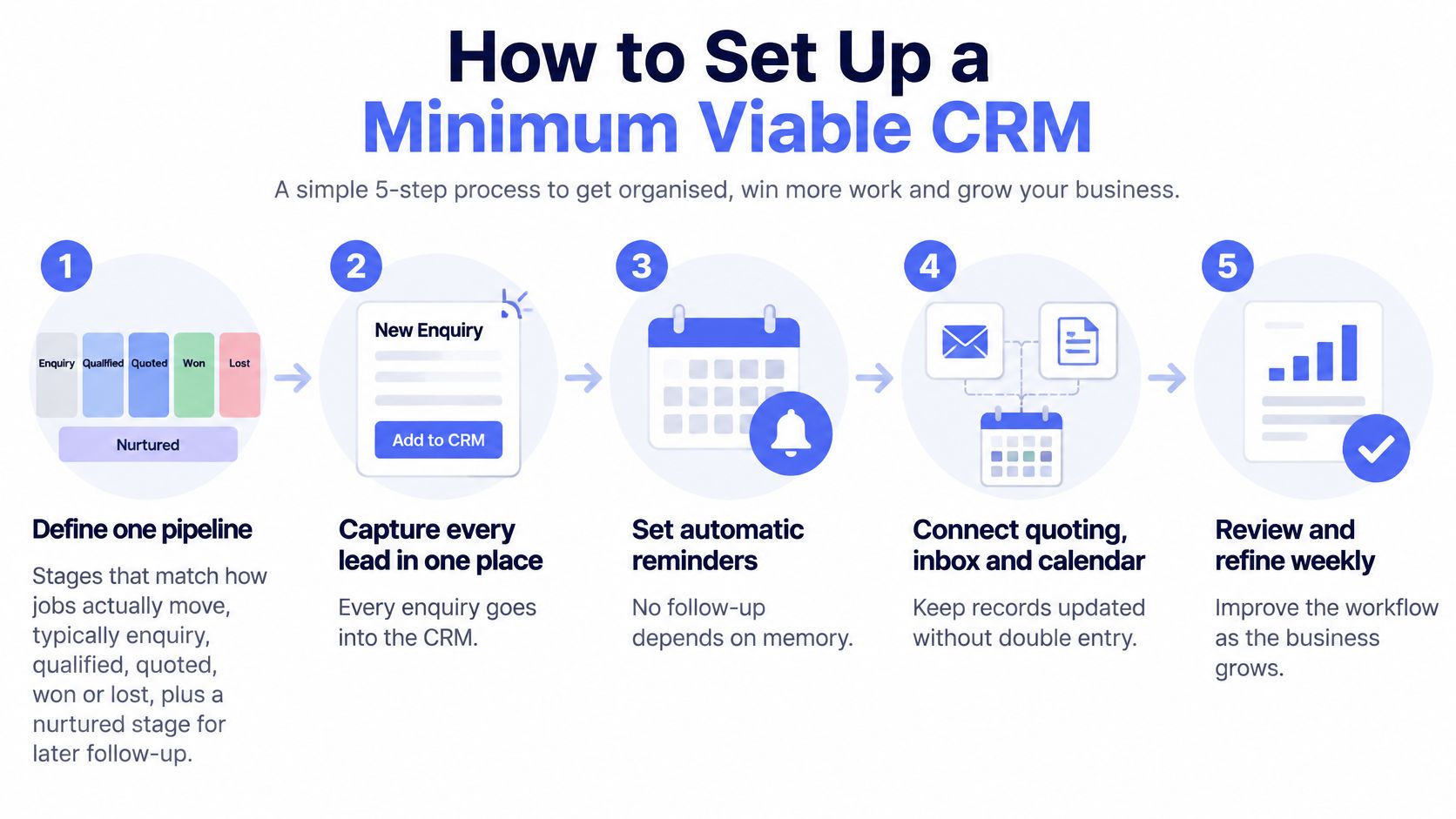
The one thing to resist is heavy customisation in the first month. Every extra required field is another reason for a busy estimator to close the tab and go back to email. Add fields only when a specific workflow breaks without them. If you want the fuller sequence laid out, this walkthrough of CRM process steps covers the same ground in more detail.
Practical rule: launch with five mandatory fields, not fifteen. You can always add complexity once the team is entering data willingly.
Integration and Automation Around Your Existing CRM
Integration comes before automation, because automation on top of disconnected tools just moves the mess faster. Connect the CRM to web forms, the shared inbox, quoting tools, calendars and accounting software such as Xero or MYOB, so each record updates without double entry. Sync only the fields the workflow needs, since every extra synced field is another way for two systems to disagree.
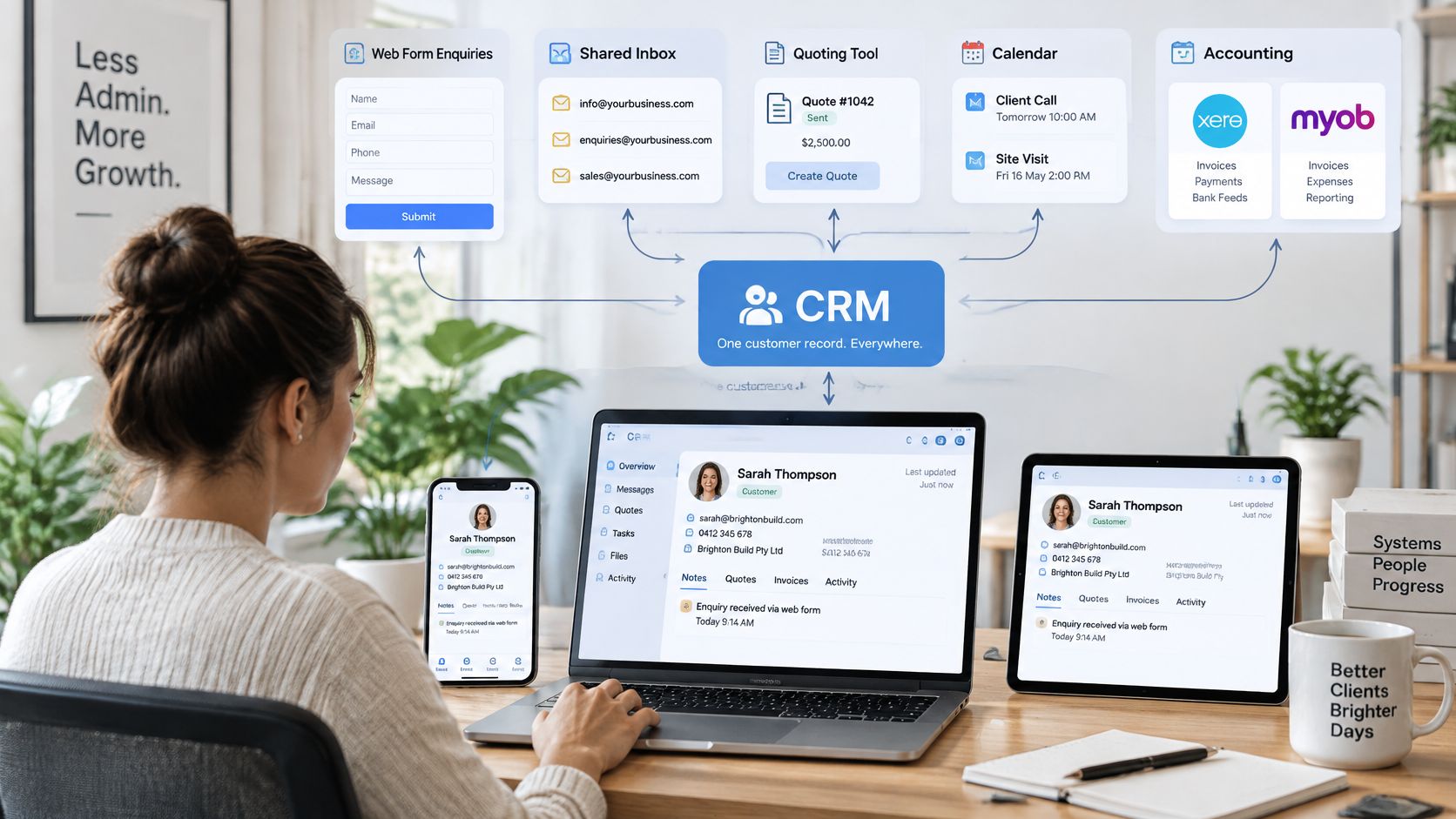
We typically build an operating layer around existing tools rather than replacing your CRM or other software, and the first step is reviewing your current inboxes, forms, CRM, documents and spreadsheets before choosing the connection path. Replacement is a last resort, used only when the current stack blocks the workflow.
The Automation Order That Works
- Capture and route every enquiry with an owner and next action attached. This single automation removes more manual chasing than anything that follows.
- Follow-up sequences for quotes, proposals and dormant leads, timed around the actual sales cycle rather than a generic three-day nudge.
- Structured intake for documents, photos and briefs, so the estimator or solicitor receives a complete pack instead of a request to call back.
- Hygiene checks: duplicate detection, missing-field flags and an action queue for records going cold.
- Invoice reminders once a job is complete, with wording that reflects the relationship.
- Reporting dashboards, last, because there's no point measuring a workflow that hasn't stabilised.
Govern each step before you widen it. Automation can route work and send reminders, but customer-facing messages on sensitive matters need a human approval gate, access should be limited to the data each workflow needs, and prompts, edits and exceptions should be logged against a named owner. Test each new automation on a small set of records and keep a manual fallback for incomplete ones. If you're new to the category, this explanation of what CRM automation actually covers is a useful grounding before you configure anything.
Four Questions Before You Switch on Any AI Feature
Generic claims that AI will save time are worthless to a five-person firm. Australia-specific evidence explains why the governance questions matter more than the feature list. The auDA 2025 research into the digital lives of Australians found that fewer than one-quarter of Australian small businesses had a cybersecurity policy or staff cyber training, while 51% said they could not operate without the internet. A CRM or AI failure in that environment isn't a technical inconvenience; it's an outage, a privacy incident or a dent in customer trust.
So answer these four before an AI feature reads a single customer record. Which customer data can the system access? Which messages require human approval before sending? How are prompts, edits and exceptions logged? What happens when a generated reply is wrong? If a vendor can't answer all four in plain language, the feature isn't ready for client-facing work. If you're mapping the wider sales stack alongside this, this overview of B2B sales tools is worth a read for how the pieces normally fit together.
Treat "AI CRM" as a governed operating layer with restricted access, human review for anything sensitive, and measurable exception handling. That is more useful to an Australian service business than another feature comparison.
CRM Use Cases for Australian Service Businesses
The same five moves, capture once, qualify, assign, follow up on a standard, review weekly, look different in each trade. Four patterns cover most service businesses.
The home builder. Enquiries arrive from display-home forms, phone calls and referrals, often at night or on weekends. The CRM captures each one once, qualifies on fit, intent and urgency (budget range, block status, build timeline), routes it to the right estimator or salesperson, and keeps quote follow-up visible until the customer decides. The failure mode this prevents is the enquiry that gets an enthusiastic first call and then nothing for three weeks while the customer signs with someone else.
The law firm or accounting practice. Intake is the bottleneck, not selling. Structured intake automation collects the brief, documents and conflict-check details up front, moving a matter from enquiry to engagement letter without anyone re-keying a client's details into three places. The payoff is fewer incomplete files and fewer second calls to ask for the same document twice.
The mortgage broker. Here the CRM is a call list with reasons attached. A client-book review surfaces who to call now for a rate review, who has a fixed rate expiring, and which dormant clients deserve a message. The broker stops guessing who to ring on a quiet Tuesday and works from a ranked list with context already loaded.
The trade or installer business (solar, pools, landscaping, ducted systems). Field staff update job status from a phone on site, admin sees every open job without ringing around, and invoice reminders follow completion on a schedule. The visible change is that the office stops being a switchboard for information that should already be in the system.
Read across all four and the pattern is identical. Capture once. Qualify against criteria the business agrees on. Assign a named owner. Follow up on a written standard. Review weekly. Industry changes the fields, never the sequence.
If you can't say which of those four patterns matches your business, that's your first fix, not the software choice.
The Numbers That Show Whether Your CRM Is Working
Measure the work, not the hours you hope to save. An unverified time-saving figure is worth nothing at a board meeting; a falling median first-response time is worth a lot.
| Metric | How to measure it | What to look for |
|---|---|---|
| Median first-response time | Time from enquiry received to first substantive reply, using the median | Falling week on week; review daily during rollout |
| Pipeline completeness | Share of open records with an owner, stage and dated next action | Trending towards 100 per cent |
| Overdue next actions | Count of records past their next-action date | Near zero at the weekly review |
| Duplicate rate | Duplicate contact records per 100 new entries | Falling once the weekly duplicate check is running |
| Quote-to-win conversion | Won quotes divided by quotes issued in the period | Judge the trend over a quarter, not one week |
| Opportunity ageing | Open deals older than your normal sales cycle | Flag and review stalled stages for a decision |
| Revenue by source | Won revenue grouped by lead source | Shows where marketing and referral effort pays off |
Build the Scorecard from Timestamps
Capture six events on every record: enquiry received, first response, qualification completed, quote issued, follow-up attempted, and outcome recorded. Everything in the table above is calculated from those fields. Use the median rather than the average for response time, because one three-day reply can drag an average far enough to hide a genuine problem or invent one that doesn't exist.
Then segment. Response time by channel tells you whether web form enquiries are slower than phone. Conversion by service type tells you which work is worth quoting. Overdue actions by staff member tells you where the process is being bypassed, which is usually a workload signal rather than a discipline problem.
Set a short weekly cadence: leads with no next action, quotes older than a defined age, records missing source or outcome values. Fifteen minutes, same time each week, with the same three filters.
The national context makes even this lightweight routine an advantage. The ABS 2024-25 business characteristics results show that 10% of businesses reported actively collecting or analysing data to make informed decisions, while 34% said ICT use improved responsiveness to customer needs. Only a minority are instrumenting their operations at all. A small firm that can see its own response times and overdue actions is already ahead of most of its market.
Watch three numbers week on week: pipeline completeness rising, overdue next actions falling, median response time shortening. When all three move in the right direction for a month, the routine is holding. For more on keeping the underlying records trustworthy, this guide to CRM data quality covers the checks worth automating first.
Common CRM Pitfalls and How to Fix Them
The most common mistake isn't the wrong platform. It's using the CRM as a contact list rather than a live source of truth, so enquiries stay scattered across forms, email, spreadsheets and memory with no owner, stage or next action. The system gets a login and then loses to email, because email is where the work already happens.
| Pitfall | What it looks like | Fix |
|---|---|---|
| Contact-list CRM | Records entered once and never updated; real deal status lives in email and memory | Give every enquiry an owner, a stage and a dated next action |
| No clear ownership | Two staff call the same lead while other enquiries wait unclaimed | Assign owners automatically or route enquiries within one business day |
| Duplicate and stale records | The same customer entered three ways; dead quotes linger for months | Run weekly duplicate checks and review records idle past a set threshold |
| Over-customisation | Months of setup, unused fields and a team that resists entry | Launch the smallest useful pipeline and add fields only when a workflow needs them |
| Automation without guardrails | Customers receive wrong, duplicated or unapproved messages | Keep human approval gates for sensitive communication and log every exception |
| No measurement | Decisions rest on feel rather than response times and conversion | Review a weekly scorecard covering completeness, overdue actions and response time |
| Bypassing the system | Staff keep private spreadsheets and inboxes as the real source of truth | Make the CRM the only place a deal exists and simplify fields so updating is easier than avoiding it |
Why Small Firms Struggle with This Specifically
The constraint is rarely willingness. CPA Australia's 2025 business technology research shows CRM use remains uneven across business sizes, with smaller firms trailing larger ones, and the gap widens further for business intelligence, ERP and robotic process automation. Cost and technical complexity remain the stated barriers, and 38% of surveyed small-business owners wanted technical training while 34% wanted ongoing IT support. Both answers point at the same thing: they want someone to help them run the system, not another licence.
The same research contains a more useful signal. Businesses with API-connected workflows processed 2.6 times more sales volume and 1.8 times more transactions than those without, which is evidence about connected routines rather than software ownership. Buying a CRM doesn't create process maturity. Connecting it to the way work flows, and staffing the routine that keeps it clean, is where the difference sits.
The Three Fixes That Do the Most Work
Simplify the fields until updating is easier than avoiding. If a record takes ninety seconds, staff will do it. If it takes four minutes, they'll email themselves instead.
Make the CRM the only place a deal exists. Private spreadsheets are the true competitor, not the rival software vendor. If a spreadsheet survives, it wins.
Put human approval in front of anything customer-sensitive. Scheduled checks can answer enquiries, update records, chase invoices and report back, but risky or client-sensitive messages should wait for a person. The exception path is part of the design, not an afterthought.
Score your current setup against the seven rows above and pick two fixes for this month. Two is enough. Attempting all seven produces a project; two produces a habit.
Pick the First Gap Worth Fixing This Week
Block out an hour and run a leak audit. List every place an enquiry can arrive: web forms, shared inboxes, phone calls, text messages, social media messages and verbal referrals. Next to each one, write whether it lands in a system with an owner, a stage and a next action. The entries with a blank column are your revenue leak, and they're usually in places nobody checks daily.
Then fix one. For most service businesses the first gap is capture: every enquiry into one pipeline with clear ownership. Add routing rules and follow-up reminders only once capture is reliable, because automating a broken intake just distributes the breakage. Widen into intake, hygiene and invoice reminders as the weekly numbers prove the routine is holding.
If nobody internally can own that administration, the alternative is having it designed and operated for you. Truespeak's CRM automation service turns stale records into action queues, call cards, updates and useful weekly visibility, and the usual starting point is identifying the first operating gap worth fixing across response, follow-up, intake, CRM, invoices, admin or reporting.
A CRM succeeds as a weekly operating routine. Judge yours on three things only: leads captured, records clean, follow-up consistent.
If your pipeline has records nobody has touched since last quarter, the fix is a routine rather than another subscription. Truespeak designs and operates CRM automation for Australian service businesses, building an operating layer around the tools you already use so every enquiry gets an owner, a stage and a next action. Start by identifying the first gap worth fixing this week at Truespeak.