
At 9:14 on a Saturday night, a homeowner fills in the quote form on your website. The notification lands in the shared info@ inbox, which one person checks between site visits and nobody opens on weekends. By Monday morning it sits fourth in a stack of nineteen emails, behind two supplier invoices and a reminder about last month's quote. The reply goes out at 11:40, and it reads: "Hi, thanks for getting in touch, what can we help with?" The homeowner booked someone else at 8:30 that morning.
Nothing in that sequence was a marketing failure. The advertising worked, the form worked, and the enquiry was real. What failed was the hand-off. No single place held the record, no named person owned it, and no deadline forced a reply.
Lead capture software closes that gap, but only if you understand it as the first stage of an owned workflow rather than a form with a database behind it. Most tools will collect a name and a phone number. Far fewer will make sure somebody in your business has to act on it before a clock runs out.
Table of Contents
- What Lead Capture Software Does for a Service Business
- How Lead Capture Software Fits the Enquiry Workflow
- Where Enquiries Leak and How to Spot a Workflow Producing Junk
- Which Qualification Signals to Capture at First Contact
- Handling Privacy and Data Retention in the Capture Design
- How to Choose and Launch Lead Capture Software
What Lead Capture Software Does for a Service Business
Lead capture software answers one narrow question: what happened to that enquiry, and who is doing something about it? Everything else worth having follows from being able to answer it for every enquiry, every time, without asking anyone to remember.
Working definition: lead capture software is the part of a business system that turns an inbound enquiry from any channel into a structured record with a named owner and a visible next action, then keeps that record in front of someone until it reaches an outcome.
That is narrower than most product pages describe, and the narrowing matters. Three related things get confused with it. A web form collects an enquiry and then stops, because nothing downstream knows the form exists. A CRM on its own stores records but triggers nothing, so a record can sit untouched for a fortnight and look perfectly healthy in a report. A chatbot covers one channel and ends at the edge of your phone line and your inbox.
Strip the feature lists back and capture does four jobs.
- Capture with context. Channel, timestamp, service interest and service area arrive together, so nobody phones the customer back to ask which suburb they're in.
- Start the clock. The timestamp belongs to the enquiry, not to the reply. Without it you can't measure anything accurately.
- Qualify against a written rule. Fit, intent and urgency, decided the same way by everyone who touches the record.
- Keep it visible until someone progresses it. One owner, one due time, one next action, and an escalation when the deadline passes.
Adoption across Australia is uneven, which tells you how many businesses are running enquiries on memory. Australian Bureau of Statistics data reported by Business-Software.com puts CRM use at 17.7% of Australian businesses in 2024-25, at 23.8% among businesses with 5 to 19 employees and 42.6% among those with 20 to 199 employees. Most smaller service businesses, in other words, are handling inbound demand without a system built for it.
The commercial case is real but should be read carefully. A survey of more than 500 SMEs across Australia and New Zealand, reported by Inside Small Business, associated each 10-percentage-point increase in CRM usage with a 1-percentage-point increase in annual revenue growth, about $30,000 a year on average. That is a correlation between firms that adopt CRM and firms that grow, not proof that buying software produces revenue. It does suggest the businesses putting structure around enquiries tend to be the ones pulling ahead.
Structure is also the difference between a website that looks tidy and one that produces pipeline. If your site gets traffic but your inbox stays quiet, why tidy websites produce few leads is worth reading, because the fix is usually routing rather than redesign.
How Lead Capture Software Fits the Enquiry Workflow
Every enquiry passes through the same seven stages, whether or not your business has a system for them. Writing the stages down is how you find the one dropping leads.
| Stage | What happens | What it must leave behind | Where it commonly breaks |
|---|---|---|---|
| Capture | A form, phone call, chat, email, marketplace listing, referral or walk-in lands in one place | Record with channel, timestamp, service interest and service area | Enquiries spread across inboxes, mobiles and paper with no shared record |
| Acknowledge | Immediate receipt confirming the enquiry arrived and what happens next | Reply within minutes stating the next step and when contact will come | Auto-reply that promises contact but assigns nobody |
| Qualify | Fit, intent and urgency checked against a written rule | Fit decision, service or project type, suburb, timing and decision-maker | Forms that collect marketing detail but never capture urgency |
| Assign | A named owner and a response deadline by channel and time of day | Owner name, due time and an escalation path when the deadline passes | Shared inbox where everyone assumes someone else replied |
| Respond and book | A useful first reply that answers, qualifies and offers a time | Booked call, site visit or quote appointment, or a logged reason for no fit | Fast reply that fails to qualify or offer any next action |
| Follow up | Scheduled nudges on quotes, proposals and dormant enquiries | Sequence with dates, prior context and stop conditions | Follow-up depends on somebody remembering to do it |
| Record and report | Outcomes written back to the CRM and reviewed weekly | Source, qualification decision, booking, outcome and staff time | Records not updated after contact, so reporting becomes guesswork |
In our builds the workflow starts with a trigger, such as an enquiry, an invoice date, a stale CRM status, an uploaded file, a meeting note, a message or a scheduled check. The trigger decides which record gets created and which clock starts.
One Enquiry Traced Through All Seven Stages
Take the Saturday night form again. At capture, it should arrive as a single record carrying the channel, the timestamp of 21:14 Saturday, the service interest (bathroom renovation) and the service area. At acknowledge, a receipt goes back within the minute stating that someone will call before 9am Monday. This is the stage where speed to lead automation earns its place, because an event fires the reply rather than a person remembering to check a folder.
At qualify, three questions decide whether the job is worth a site visit: is the work inside your scope, is it a live job or early research, and can the person enquiring approve the spend. At assign, the record gets a name and a due time, 8:30am Monday, with an escalation to the owner's mobile if the clock passes 9:30.
At respond and book, the first useful reply answers the question, confirms the service area and offers two appointment times. At follow up, a sequence starts if the customer goes quiet, with a stop condition the moment they reply or book. At record, the outcome is written back: booked, lost to price, out of area, no response after three attempts.
Set the response expectation in writing: a first useful reply inside 15 minutes during business hours, and before 8am the next business day for anything arriving after hours. Those are working targets you choose, not industry standards, and they only function when a person is accountable for hitting them.
An auto-reply is not a response. A receipt that promises contact and assigns nobody is decoration. The acknowledgement counts as a response only when it carries a named owner and a due time.
Phone enquiries are the harder half. If you're weighing a human answering service against software for after-hours calls, compare virtual receptionists for plumbers to see where each one helps a trade business.
Follow-up is where the workflow earns the money, and where it most often dissolves. A quote sent on Tuesday needs a scheduled nudge on Thursday and another on the following Monday, each carrying the prior context so the customer isn't asked to explain their job twice. Lead follow-up automation exists because that sequence should not depend on anyone's memory.
One record, one owner, one next action. Two owners is the same as none, and a record with three open next actions has no next action at all.
Where Enquiries Leak and How to Spot a Workflow Producing Junk
A quote arrives at 4:40pm. The owner is on site, the office manager is finishing invoices, and the enquiry sits in an inbox beside three unread messages. By morning, the customer has asked two other businesses. This is the leak lead capture software is meant to expose: the moment when buyer intent exists, but nobody owns the next step.
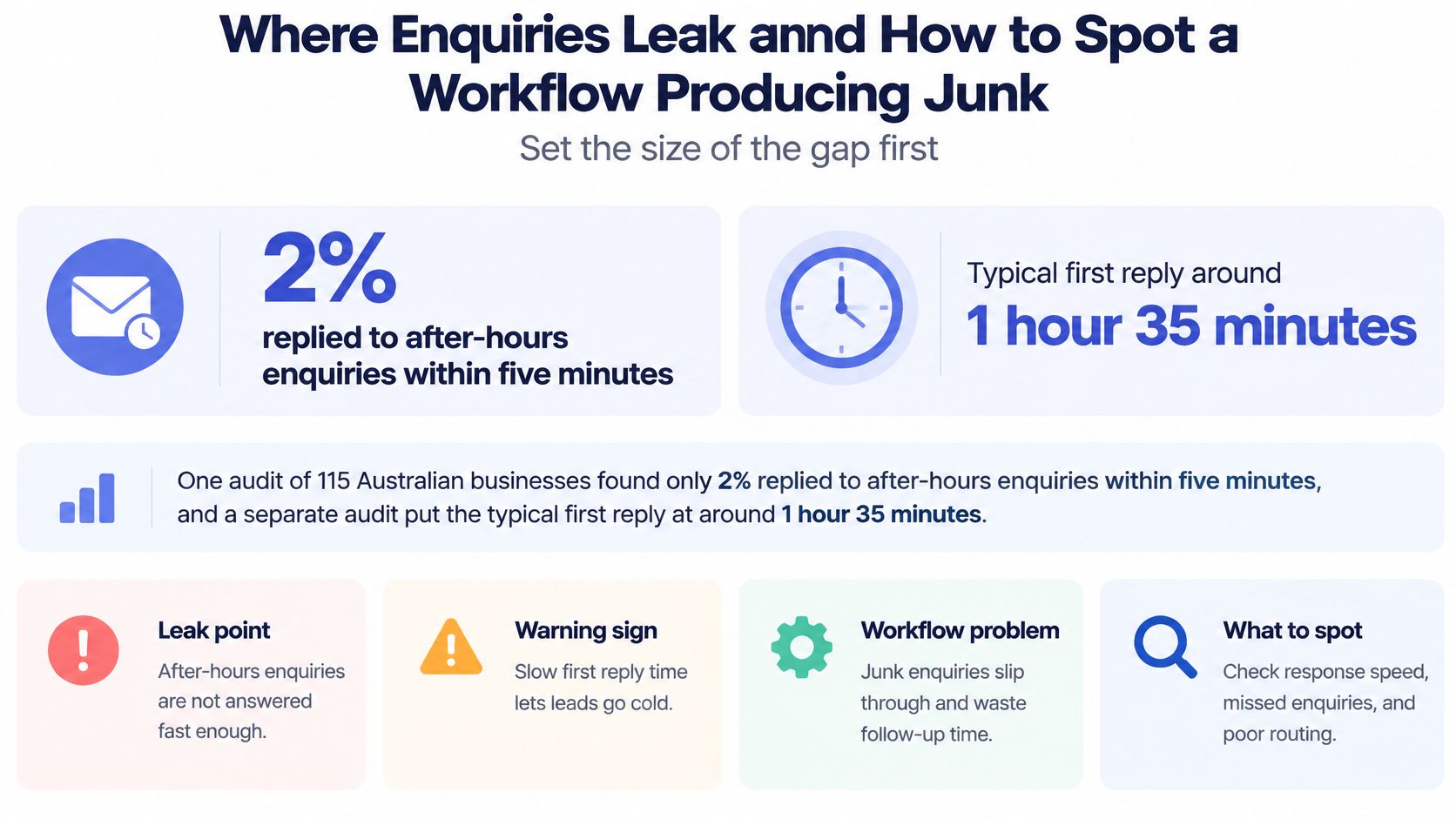
One published audit of Australian reply times found that only 2% replied to after-hours enquiries within five minutes and reported a typical first reply of around 3.5 hours during business hours, with after-hours enquiries commonly deferred until the next morning. Treat those figures as observational benchmarks, not controlled estimates. They do not prove that every slow reply lost a job. They do show that unattended demand is common, and that answering quickly is rare enough to matter.
Digital capability is part of the explanation. An Australian Communications and Media Authority review found that three in five Australian SMEs reported low digital literacy as a barrier to running their businesses efficiently. The same review found medium-sized SMEs were more likely to have adopted digital CRM tools, particularly when they already maintained a customer database in some format. That pattern suggests a practical design rule: capture works better when it strengthens a customer record the business already uses, instead of asking staff to move into a new platform before the workflow is clear.
Capture is the first stage of an owned workflow, not a lead-generation tactic. A form, chatbot or call answer only creates a record. The workflow then has to decide what was captured, who owns it, what happens next and what evidence will be kept if the enquiry later becomes a job. Australian privacy and measurement questions belong in that same design conversation. If you collect a suburb, phone number, roof type or budget context, you should also know why that field is needed, who can see it, how long it stays and whether it improves the next action.
The Hand-Off Nobody Owns
The mechanism owners recognise is ordinary. Enquiries arrive through forms, email and referrals, and each channel waits on a different person. The plumber checks texts between jobs, the office manager lives in the inbox, and the owner scrolls Facebook messages twice a week. Nobody can see the whole week's demand, so the enquiry that lands while everyone assumes someone else has it goes quiet.
In most growing service businesses, the work already costing time and revenue is slow response, inconsistent follow-up, messy intake, missed CRM tasks or invoice chasing. Fixing capture only helps if it addresses one of those problems. A diagnostic comes before the tool because the same symptom can have different causes. A late reply might come from after-hours routing, a form that misses the service area, or a CRM stage that lets a lead sit without an owner.
The test is to follow one real enquiry from first touch to outcome. Write down where it arrived, who saw it, which fields were captured, where the details were copied, when the first useful reply was sent and what next action was logged. If two systems hold different versions of the same customer, capture has already failed. If the only record lives in a phone thread, the business has no measurement base. If the reply asks the customer to repeat details they supplied in the form, the hand-off has wasted the value of capture.
Buying a Tool Is Not the Same as Changing Operations
The Australian Government's June 2025 AI Adoption Tracker reported that 41% of Australian small and medium enterprises were adopting AI, up 5 percentage points from the previous quarter. That shows broad interest, but interest is not the same as operational change. AI can sit at the edge of a business without changing who responds, how fast, or what the customer is offered.
The practical question is whether the tool changes the workflow. A capture system that creates a record, assigns an owner and schedules the next action gives the business something to measure. A subscription that collects messages and generates drafts, while staff still decide in their heads who should follow up, leaves the leak intact. It has added a new invoice to the same process.
A small business needs to be candid about process problems. If the company has no written fit rule, software will not decide which jobs are worth chasing. If nobody approves proposals, automation can draft them but cannot make the commercial decision. If the CRM is stale, a new front end will only capture new mess on top of old mess. Truespeak business process automation services are designed around that wider chain, connecting enquiry handling, intake, follow-up, CRM updates, invoice reminders and reporting for Australian service businesses. The useful question is which link in that chain is currently failing.
Symptoms of a Capture Workflow Producing Junk
A growing contact list is not the same as a growing pipeline. Use the symptoms below as a diagnostic against your own records. Look for patterns across channels, because each channel can appear healthy while the shared workflow is weak.
| Symptom | What it usually means | What to tighten |
|---|---|---|
| Duplicate records for the same person | Different channels writing to different records | Match on phone and email at entry, one record per enquiry |
| High volume, low fit | Fields capture interest but not scope or service area | Make service area and project type required |
| Leads progress without qualification | Stage rules allow the qualify step to be skipped | Require a qualification decision before any stage change |
| Contact list grows, pipeline does not | New records carry no owner, next action or outcome | Require an owner and next action at record creation |
| Follow-up stops after the first reply | No scheduled next step is created | Build a follow-up sequence with dates and stop conditions |
| Staff hours per enquiry rising | Too many required fields and manual re-keying | Cut required fields and connect forms directly to the CRM |
| Reporting never matches the CRM | Outcomes are not written back after calls | Make the post-call update part of the workflow |
A junk-producing workflow usually has one of three faults. It captures interest without context, captures context without ownership, or captures ownership without a measurable outcome. Each fault creates a different kind of waste. Interest without context fills the CRM with enquiries nobody can qualify. Context without ownership produces good notes that nobody acts on. Ownership without outcome leaves staff busy, while the business cannot tell which work turned into revenue.
What to Measure Every Month
Pick a fixed set of measures and review them on the same day each month, so the trend is visible rather than argued about. Use the same definitions each time, otherwise the numbers become a debate about labels. Keep the privacy boundary clear too: measure the operational need for each field, and avoid retaining details that the workflow does not use.
- Useful first reply rate. The share of enquiries that received a reply answering the question, not merely acknowledging it.
- Median and 90th percentile time to first useful response, segmented by channel, business-hours status, service area and lead type. The 90th percentile is where your reputation is damaged.
- Qualified-lead rate. How many captured enquiries met the written fit rule.
- Booked next action rate. The share that produced a call, site visit or quote appointment.
- Quote follow-up coverage. Proportion of open quotes with a scheduled next contact.
- Duplicate and stale record count. CRM automation is worth having mainly because hygiene work stops happening the moment it becomes optional.
- Revenue recovered from dormant opportunities. Jobs that were quoted, forgotten and later revived.
- Staff hours per enquiry. The cost side of the ledger, and the first number to move in the wrong direction.
Two questions will tell you more about last month than any dashboard. For every enquiry, who owned it, and what next action was recorded? If the honest answers are "whoever saw it" and "reply when we can", the software is not the problem yet.
The trap is that automation can raise apparent lead volume while overwhelming a small team with poorly qualified work. A system that captures more enquiries and qualifies none of them will bury you faster than a quiet inbox. That is why business process automation should be judged on what happens at the exception, not only on the happy path. When data is missing or risk is high, the system should pause with context rather than hide the failure. A useful capture workflow behaves like a good front desk: it takes the message, records the facts, hands the person to an owner and knows when to ask for help.
Which Qualification Signals to Capture at First Contact
Most forms collect too much and qualify too little. A three-page enquiry form asking for budget, timeline, referral source and company size will collect fewer completions, and still won't tell you whether to call the person back.
Sort every field into one of three signals: fit, intent and urgency. Then decide, field by field, whether it belongs on the first-contact form or later in intake. Field count is a design decision with a measurable cost, and contact form UX patterns covers the mechanics of asking for less without losing the ability to qualify.
| Signal | Field | What it tells you | At first contact |
|---|---|---|---|
| Fit | Service or project type | Whether the work is inside your scope | Yes |
| Fit | Suburb or service area | Travel time and scheduling feasibility | Yes |
| Intent | Timing or start date | Whether this is a live job or early research | Yes |
| Intent | Comparing quotes | How much comparison shopping is under way | Optional |
| Intent | What prompted the enquiry | The trigger behind the search, useful for framing the reply | Optional |
| Urgency | Decision-maker | Whether the person enquiring can approve the work | Yes |
| Urgency | Access constraints or hard deadline | Whether a site visit or start date is even possible | Yes |
| Commercial | Budget band or finance interest | Whether to quote, and at what level | Optional |
| Detail | Photos, plans, bills or documents | Scoping accuracy and rework reduction | Later, during intake |
| Contact | Name, phone and email | How to reply and on which channel | Yes |
Four to seven required fields is the working range. Everything else moves to intake automation after the first reply, when the buyer has a reason to invest effort because you've already been useful.
Three Trade Examples
For a solar installer, qualification happens in the first response, not the first call. Bill upload, roof type, phase, battery interest, finance and whether the buyer is still collecting quotes all change what you offer, and collecting them in the reply means the first human conversation starts at the right level instead of restarting the discovery.
A home builder works on a longer fuse. Land status, budget band, build stage, suburb, timeline and decision-maker context determine whether a quote is worth building at all, since a detailed proposal for someone who hasn't bought land yet is a week of unpaid design work.
An accountant faces a document problem rather than a scoping problem. Prior returns, notices, a job brief and the fee conversation do most of the qualifying, and document collection can run automatically while professional decisions stay with practice staff. The division of labour matters here: automation can gather and chase, but recommendations belong to a person with a registration on the line.
The field test: if a field doesn't change who responds, how fast they respond, or what they offer, it can wait.
What happens to the record after the first reply is a separate design problem, and the customer intake form guide covers the handover from captured lead to usable brief.
Handling Privacy and Data Retention in the Capture Design
The highest-converting intake form is not automatically the best-designed one. A form that captures a licence number, a photo of a switchboard and a date of birth will convert differently from one that captures a suburb and a job type, and it creates obligations most small businesses never plan for.
The Australian Privacy Principles work in a specific way for enquiry forms. APP 3 limits collection to personal information reasonably necessary for the business's functions. APP 5 requires reasonable steps to notify the collector's identity, the purpose of collection and relevant disclosures. APP 6 generally limits use and disclosure to the primary purpose unless an exception applies, such as consent, reasonable expectation or legal authority.
AI adds a layer that catches people out. OAIC guidance on commercially available AI products confirms the principles apply whenever personal information is entered into an AI system or appears in its output, and that AI-generated or inferred information can itself count as a collection under APP 3. A tool that infers a household is renovating from an uploaded photo has collected something.
Turn each principle into a decision you can make this week.
- Separate necessary from optional. Qualification fields are necessary. Enrichment fields are a choice, and each one needs a reason on file.
- State the purpose in one sentence directly above the submit button, naming who collects the information and why.
- Restrict who can see the sensitive items. Photos, plans, addresses and financial details belong behind a named group, not in a shared drive.
- Set a retention period for abandoned enquiries and delete at the end of it rather than archiving forever.
- Log consent and any withdrawal, including the time and channel it was given or removed.
- Confirm where processing happens, because an offshore provider changes what you must disclose.
The ABS general enquiry collection notice is a useful pattern to copy. For enquiries through its form or 1300 service, it records the purpose of the enquiry, the channel used, consent to call recording and transcription, how withdrawal works during the call, and which staff can access the record. It preserves the terms of collection rather than copying contact details into a general database.
Design rule: collect what changes the next action, tell people why you're collecting it, and delete what you never used.
Approval gates are where this becomes practical rather than theoretical. In managed AI operations the rule is straightforward: sensitive items sit behind a named approver, and raw personal data stays in a restricted vault rather than being copied into every draft, summary or template.
After-hours capture is the other soft spot. If a call is recorded at 10pm, the notice, the withdrawal option and the retention rule all still apply, which is why after hours answering service decisions should be made with the privacy design in view rather than after it.
How to Choose and Launch Lead Capture Software
Australia's customer relationship management market was valued at AUD 2.60 billion in 2025, according to ResearchAndMarkets. That scale explains why every vendor demo looks similar on a feature list, and why the workflow design, not the software, decides the outcome.
Here is the sequence to run, ideally inside a fortnight.
A First Fortnight in Seven Steps
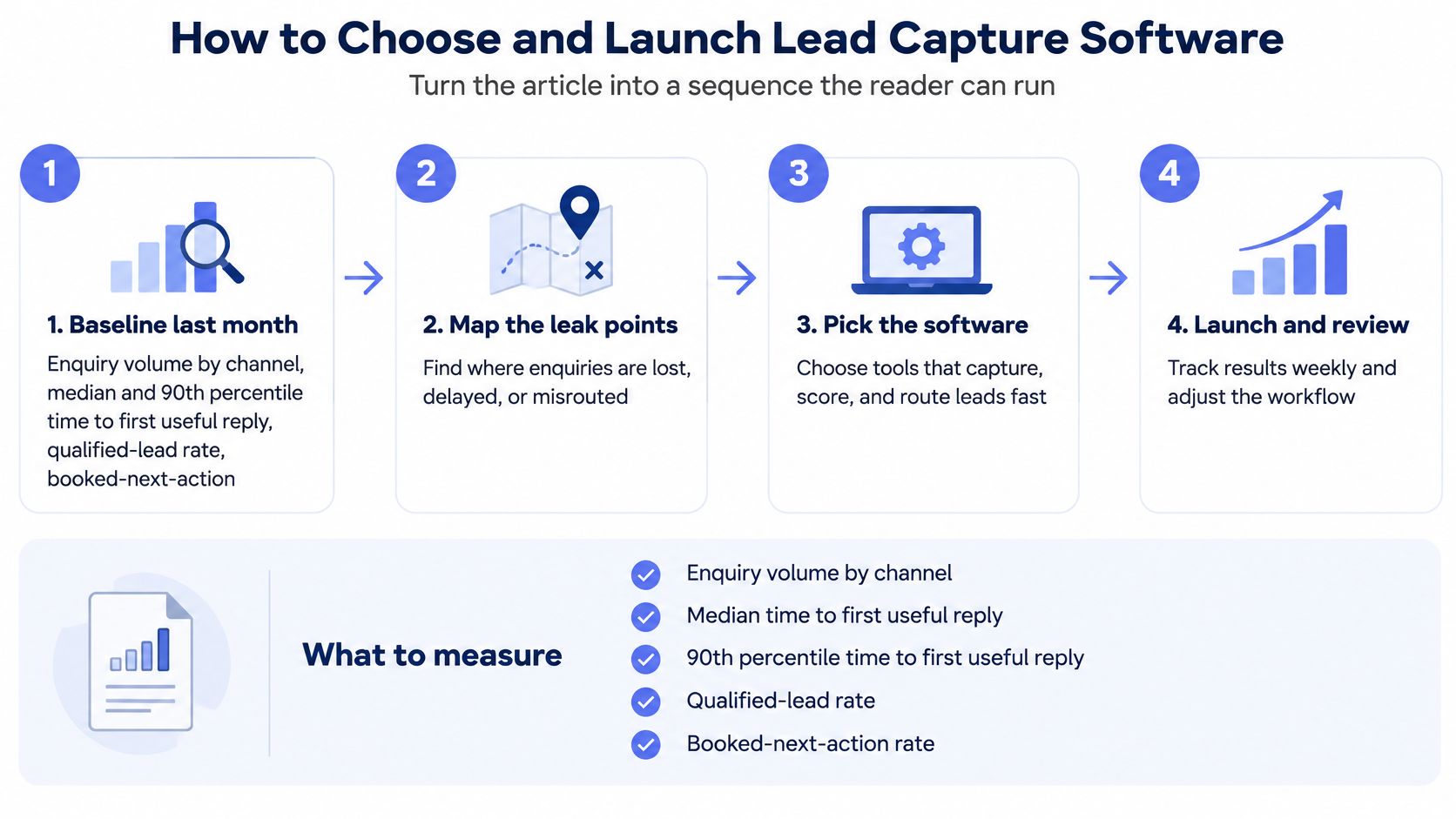
- Baseline last month. Enquiry volume by channel, median and 90th percentile time to first useful reply, qualified-lead rate, booked-next-action rate and duplicate count. Without this you can't tell improvement from noise.
- Choose the single first gap. Speed of first response, follow-up on quotes, intake quality, CRM hygiene or invoice chasing. One, not four.
- Decide between a new tool and a workflow. Replacement is warranted when the current stack actively blocks the work, not because the demo was smoother. We can usually work with the automation software you already run, and where cash collection is the leak, invoice reminder automation is a smaller first build than a capture rebuild.
- List the integrations you cannot lose. Forms, phone, email, calendar, quoting and accounting. If one of those breaks on day one, the project fails regardless of features.
- Test three scenarios before committing. An after-hours web form, a phone enquiry nobody answers, and a referral sent by text. For each, check the record created, the owner, the response and the follow-up.
- Write the operating rules. Message approvals, retention periods, escalation paths and who can edit templates.
- Review at 30 and 90 days against the baseline from step one, not against your impressions of the launch.
The Lookup to Take into the Vendor Conversation
Score each answer against the three test scenarios rather than against the feature list, and record it in writing so your operating rules describe what the tool does rather than what the demo implied.
| Criterion | What good looks like | Question to ask |
|---|---|---|
| Capture channels | Form, phone, email, chat, marketplace and referral enquiries create one record type | Can a phone enquiry and a web form land as the same record? |
| Response and acknowledgement | Event-triggered receipt that states the next step and names an owner | What happens to the enquiry at 9pm on a Saturday? |
| Routing and ownership | Named owner by service area, channel or job value, with escalation when the deadline passes | Who is notified when nobody has responded in time? |
| Qualification | Required fields change who responds, how fast or what is offered, against a written rule | Can we change qualification fields without a developer? |
| CRM and calendar sync | One record per enquiry, no re-keying, outcome written back automatically | Does the outcome write back to the CRM and the calendar? |
| Follow-up | Scheduled sequences carrying prior context, dates and stop conditions | Can follow-up stop when the customer replies or books? |
| Reporting | Median and 90th percentile first response, qualified rate, booking rate, staff time per enquiry | Can we segment response time by channel and time of day? |
| Privacy and data handling | Purpose notice at collection, access controls, retention rules, overseas processing disclosed | Where is the data stored and who can see photos, addresses and documents? |
| Integrations you cannot lose | Quoting, accounting, phone and email tools keep working on day one | Which of our current tools must work unchanged? |
| Migration and exit | Every record exportable with owners, next actions and outcomes intact | Can we export records and their full history if we leave? |
If the connection between the capture layer and the rest of your stack is the part you're least sure about, this explanation of CRM integration is a sensible primer before you shortlist anything.
A short walkthrough of the workflow view, if you want to see the shape of it before you start:
The practical next step is a discovery call where you bring one messy hand-off. We look at the business beforehand and arrive with at least one specific gap and what it costs, with no pitch deck and no obligation. Speed to lead automation is usually where the value shows first, because fast, useful first responses that qualify, route and book the next action while buyer intent is fresh change the numbers within weeks rather than quarters.
Truespeak builds and runs the capture layer for Australian service businesses: first responses, qualification, routing, CRM updates and follow-up that keeps every enquiry in one record with a named owner and a visible next action. If enquiries are sitting in an inbox while a competitor answers first, bring us the messiest hand-off you have and we'll map what should be captured, drafted, approved and logged, then run it as a managed service around the tools you already use. Visit Truespeak to book a discovery call.