

You've finished the work, sent the invoice and checked the bank account. There's still no payment. Before sending another email, someone needs to check whether the customer has paid part of it, queried the work or asked for a copy that never arrived.
A useful outstanding invoice template makes those checks easier. It's a controlled record with consistent facts, a clear next action and a named owner, not just firmer wording for another reminder.
Table of Contents
- Overdue Invoice Reminder Templates and Subject Lines
- Core Fields Every Outstanding Invoice Template Needs
- Reminder Timing, Approval and This Week's Audit
- Adjusting the Template for Disputes, eInvoices and Hardship
- Record-Keeping Fields and How to Track Results
Overdue Invoice Reminder Templates and Subject Lines
Subject lines and tone by overdue stage
| Stage | Subject line | Tone |
|---|---|---|
| Before due date | Upcoming payment: invoice [number] due [due date] | Neutral and factual |
| Day after due date | Invoice [number] payment: quick check | Brief and without blame |
| About one week overdue | Invoice [number] may have been missed, copy attached | Assumes an oversight |
| About three weeks overdue | Invoice [number] balance of $[balance] overdue | Direct, states the amount |
| Final notice before escalation | Final notice: invoice [number], response needed by [date] | Firm, offers a plan or dispute route |
Timing matters as much as tone. The Payment Times Reporting Scheme reported an average common payment term of 29 days, yet only about 80% of small-business invoices were paid within 39 days, making structured follow-up a normal operational requirement rather than an exceptional response (Payment Times Reporting Regulator update).
Keep the invoice, payment record and reminder visible together when preparing the message.

Copy-Ready Reminder Bodies
Before the due date
Hi [first name],
Invoice [number], dated [issue date], for $[original amount] is due [due date]. Balance owing: $[balance]. Pay by bank transfer to [BSB and account] or through [payment link], using [number] as the reference.
Please confirm everything is ready for payment by the due date.
[Contact name], [phone number]
First overdue day
Hi [first name],
A quick check on invoice [number], dated [issue date], for $[original amount], due [due date]. Balance owing: $[balance]. Pay by bank transfer to [BSB and account] or through [payment link], using [number] as the reference.
Could you confirm whether you need anything from us to process payment?
[Contact name], [phone number]
About one week overdue
Hi [first name],
Invoice [number], dated [issue date], for $[original amount] may have been missed. It was due [due date], and the balance owing is $[balance]. A copy is attached.
Pay by bank transfer to [BSB and account] or through [payment link], using [number] as the reference. Please confirm payment timing, or let us know if you need the invoice resent elsewhere.
[Contact name], [phone number]
About three weeks overdue
Hi [first name],
Invoice [number], dated [issue date], for $[original amount] remains overdue following its [due date] due date. Balance owing: $[balance]. Pay by bank transfer to [BSB and account] or through [payment link], using [number] as the reference.
Please reply by [response date] with the date payment will be made.
[Contact name], [phone number]
Final notice before escalation
Hi [first name],
Invoice [number], dated [issue date], for $[original amount] remains unpaid after its [due date] due date. Balance owing: $[balance]. Pay by bank transfer to [BSB and account] or through [payment link], using [number] as the reference.
Please respond by [response date] with payment confirmation, a payment-plan request or details of any dispute. Without a response, [responsible person] will review the account for [agreed next step].
[Contact name], [phone number]
Keep the Facts Consistent
Replace every placeholder before sending. Only mention an attachment when it's attached, and only name an escalation step the business is authorised and prepared to take.
Invoice number, original amount, current balance, due date and payment instructions must agree across email, SMS and customer portals. The stage wording changes. The underlying figures don't change unless the payment record changes.
Core Fields Every Outstanding Invoice Template Needs
The reminder never replaces the tax invoice. It sits above the original document and helps the customer identify what remains payable.
Under the ATO's tax-invoice requirements, taxable sales below AUD 1,000 require seven core details: the tax-invoice designation, seller identity, ABN, issue date, supply description with quantity and price where relevant, GST amount or an appropriate GST-inclusive statement, and taxable extent. At AUD 1,000 or more, the buyer's identity or ABN must also appear; digital tax invoices need the same required information, and requested tax invoices generally must be supplied within 28 days, except for sales of AUD 82.50 or less, including GST.
Required and reminder fields in an outstanding invoice template
| Field | What the template shows | Why it matters |
|---|---|---|
| Document label | Tax invoice for GST-registered businesses; standard invoice if not registered | Sets the correct document type |
| Seller identity and ABN | Seller or trading name and Australian Business Number | Required on every tax invoice |
| Issue date and due date | Both dates plus agreed payment terms | Anchors the days-overdue count |
| Description, quantity and price | Item or service, quantity and unit price where relevant | Helps customers check what was supplied |
| GST treatment | GST amount or appropriate GST-inclusive statement and taxable extent | Required on tax invoices |
| Buyer identity or ABN | Customer identity or ABN when the threshold above applies | Meets the buyer-identification requirement |
| Amount invoiced, paid and owing | Running balance reflecting each part-payment | Shows the exact amount payable |
| Payment methods and reference | Bank details or payment link plus invoice number | Lets the customer act without requesting instructions |
Separate Transaction Details from Follow-Up Details
The table combines tax-invoice information with operational reminder fields. A due date, running balance and accepted payment methods help manage collection, but they aren't substitutes for the required tax-invoice particulars.
Use the original due date rather than replacing it with the date of the latest reminder. Label any new response deadline separately. Otherwise, the customer may reasonably wonder whether you've extended the payment terms.
For partial payments, show the original amount, payments received and remaining balance. Don't alter the original invoice amount to make it resemble the current debt.
Business.gov.au's invoicing guidance recommends clear payment terms, payment methods and detailed descriptions. Put that information where the recipient can use it, rather than burying it in a footer.
Practical rule: Copy transaction facts from the source record. Calculate the current balance from reconciled payments, not from the last reminder someone sent.
If the source invoice is wrong, correct it through the accounting process first. A reminder shouldn't introduce a different price, GST treatment or description without anyone noticing.
Reminder Timing, Approval and This Week'S Audit
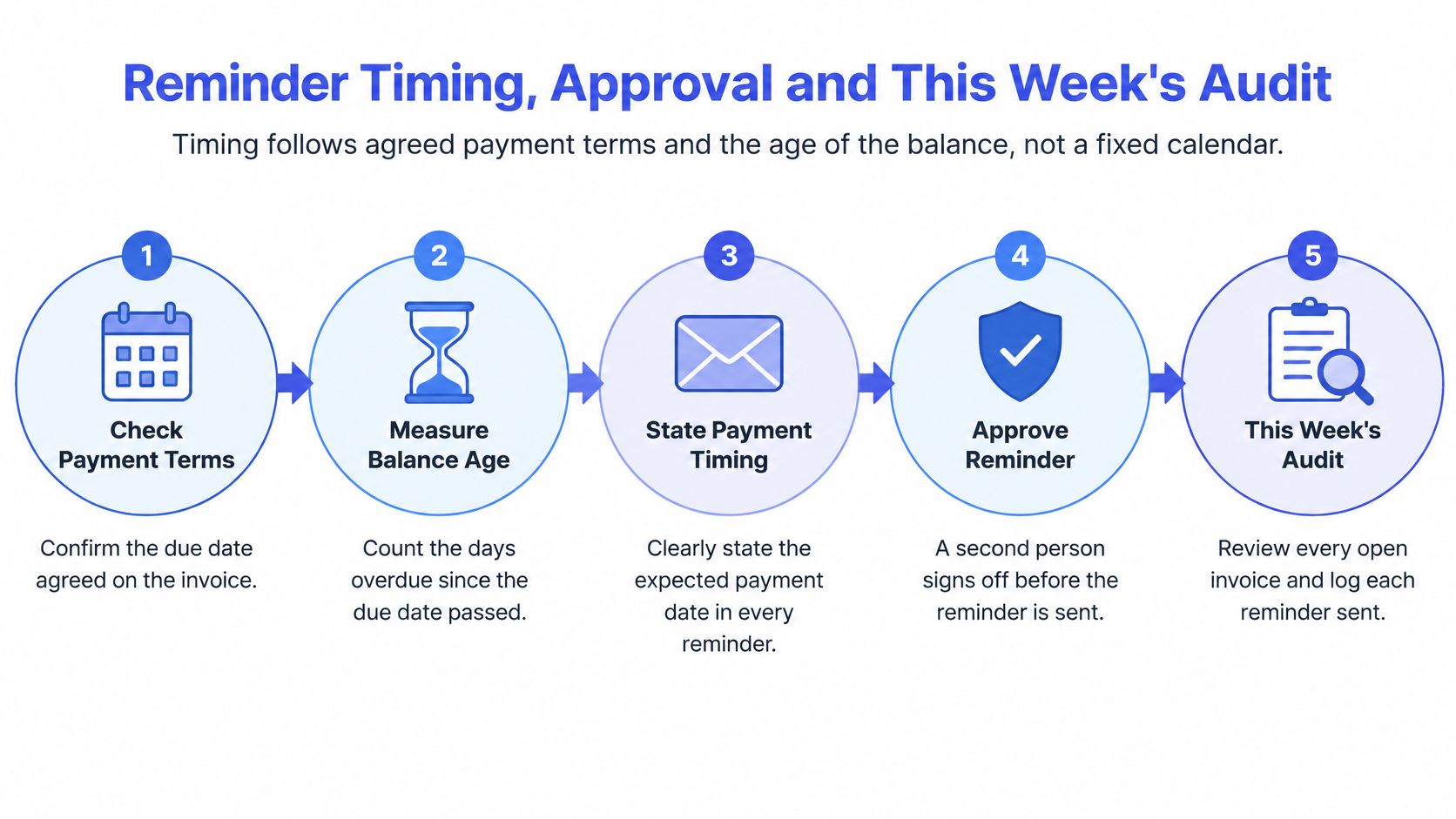
Start with the agreed terms. Print the due date and accepted payment methods on the original invoice. Follow the Australian government's payment-terms guidance by stating payment timing, credit conditions and overdue-debt collection steps in invoices and contracts.
Send a neutral reminder before payment is due. Include the invoice reference, amount, due date and payment instructions. Don't describe an account as late while it's still within terms.
On the first overdue day, ask for confirmation. Keep the message short. Find out whether the customer needs information before assuming they're avoiding payment.
After your defined escalation interval, request a payment date or dispute reason. Choose the interval around the agreed terms, balance age and account context, rather than repeatedly emailing everyone on a fixed calendar.
Hand unresolved or high-value accounts to a person. Attach the invoice, delivery evidence, approvals and communication history. The recipient shouldn't have to reconstruct the account from separate inboxes.
Use this workflow as a checkpoint before releasing reminders.
Decide When the Sequence Should Stop
A schedule is useful until new information makes the next message inappropriate. Build these checks into the queue:
- Partial payment received: Reconcile it before sending another balance.
- Dispute open: Stop routine escalation and assign the issue for review.
- Written escalation unanswered: Phone the customer or their accounts contact.
- Promise missed: Call to establish what changed, then document the revised commitment.
- Work pause proposed: Proceed only where the contract permits it and the amount is undisputed. Get appropriate advice where obligations are unclear.
- Sensitive relationship: Have a person consider customer history and project stage before sending firmer wording.
A missed promise needs a conversation, not just a more forceful subject line. Equally, a good customer experiencing temporary difficulty needs a documented arrangement, not an indefinite exemption from follow-up.
Use the unpaid invoice collection guide when deciding what should happen after routine reminders stop. Keep that decision separate from the automated sending schedule.
Run This Week'S Audit
Pull an overdue invoice and check it against the field table. Confirm the payment record, customer contact and delivery status, then correct the source record before drafting anything.
Match its days overdue to the appropriate subject-line stage. Send only the message that fits the account's current position, rather than releasing every missed reminder in a batch.
Assign an owner, a next action and a review date. Record whether the next step is a call, an approval check, reconciliation or payment follow-up.
The accompanying video is available below.
Truespeak's scheduled tasks and continuous checks cover enquiries, CRM updates, invoice chasing, drafting and preparation, problem monitoring and reporting. Anything risky or client-sensitive waits for human approval.
Our Invoice Reminder Automation provides polite, human-approved payment follow-up without relying on awkward manual chasing. On a discovery call, you can bring a messy handoff and we'll map what should be captured, drafted, approved and logged.
Automation can identify what needs attention and prepare the message. A person still decides what to say when the account needs judgement.
Any message threatening action, or going to a long-standing client, should be approved by a person before it sends. Disputes and hardship cases stay with a person throughout.
Adjusting the Template for Disputes, eInvoices and Hardship
A reminder gets firmer three times. The customer still does not pay. The invoice was never approved because the purchase order was wrong. The wording was fine. The path was wrong.
Treat the reminder as a controlled record. It repeats the same facts as the original tax invoice: invoice number, issue date, due date, amount, tax treatment, purchase-order number, ABN and routing contact. What changes is the path the account takes next. A dispute pauses collection wording. An eInvoice failure goes back to the transmission data. Hardship moves to dated instalments.
The ATO's eInvoicing business-case considerations report that Peppol registrations passed 400,000 during 2025 (ATO eInvoicing business-case considerations). Keep PDF, email and eInvoice routes in the same working record so a rejected transmission does not read as an unpaid invoice.
Response by overdue case
| Situation | Signs | Template response |
|---|---|---|
| Technical rejection of an eInvoice | Invoice fails validation or is returned | Correct the data, resend once, log the reason |
| Administrative delay | Customer confirms receipt but no approval | Request the purchase order or approval route |
| Commercial dispute | Customer questions work, quantity or price | Pause reminders, run the reconciliation checklist, record dispute status |
| Genuine inability to pay | Customer asks for time or reports hardship | Offer a dated payment plan and record the promise to pay |
Diagnose Before Resending
Keep delivery, acceptance and payment as separate statuses. A successful transmission doesn't establish that the customer has approved the invoice or paid it.
Retain a human-readable copy linked to the same transaction, not a duplicate debt. Carry the purchase-order number, ABN, tax treatment, due date, routing contact and dispute status into the working record.
For a technical rejection, identify the error before resending. If the underlying transaction needs correction or crediting, the accounts owner decides the accounting action. Sending the same document again does not fix the record.
Before contacting a customer about a disputed balance:
- Completion: Confirm the work or relevant project stage was completed.
- Scope and price: Compare quantities and charges with the accepted quote.
- Authorisation: Locate the purchase order and approvals.
- Evidence: Attach delivery records or other supporting documents.
For hardship, agree dated instalments and record each promised date and amount. Keep the arrangement visible so routine reminders don't contradict it.
Residential consumers, commercial clients and construction principals often need different contacts and escalation routes. Check that your invoicing software in Australia supports those distinctions before relying on a single default sequence.
Record-Keeping Fields and How to Track Results
Place reminder date, invoice owner, dispute status, next action, promise-to-pay date and amount, and message-history link beside the source invoice facts. Name a specific person as owner, not "accounts", so responsibility doesn't disappear between inboxes.
The ATO's tax-invoice ruling distinguishes an invoice notifying an obligation to pay from a tax invoice meeting specified information requirements. Keep that underlying document intact while recording follow-up activity alongside it.
Measure the Process, Not the Wording Alone
Metrics to track template performance
| Metric | How to calculate | Review cadence |
|---|---|---|
| Median days to payment | Middle value of days from issue date to payment | Monthly |
| Share paid before first escalation | Invoices paid before escalation divided by all invoices in the same eligible reminder cohort | Monthly |
| Overdue value reduction | Opening overdue balance minus closing overdue balance | Monthly and quarterly |
| Dispute rate | Invoices with an open dispute divided by invoices issued in the defined population | Monthly |
| Complaint or opt-out rate | Reminder complaints or opt-outs divided by reminders sent, tracked separately | Quarterly |
Define the eligible cohort before calculating the share paid before escalation. Don't divide early payments only by invoices that escalated, because that excludes the successful cases from the denominator.
Review the overall process monthly at minimum, with complaints and opt-outs also checked when comparing quarterly trends. Read escalation share alongside complaints: collecting more money through aggressive messages can still create relationship problems.
Measurement note: Separate payments from credits, write-offs and newly overdue invoices when explaining a balance change. A lower overdue total doesn't necessarily mean customers paid it.
Truespeak's client systems may process CRM entries, invoices, emails, forms, reports and workflow logs. We agree scope with each client and limit access to what the system needs.
Use that same discipline when assessing invoice automation software: require a usable activity history and clear ownership, not just a send button. These measures establish a benchmark for your own process, not a guaranteed result from changing a template.
Truespeak offers polite, human-approved invoice follow-up supported by scheduled checks and clear exception handling. Bring an overdue-invoice handoff to a discovery call so we can map what should be captured, drafted, approved and logged. Visit Truespeak to discuss a controlled reminder workflow around the tools your team already uses.